When You Open a DLL in Notepad and Call it 'Coding'
Why is this Juniors meme funny?
Level 1: The Wrong Language
This joke is like trying to read something in the wrong language and getting completely confused. Imagine you open a book that’s written in a language you don’t know, and you see a bunch of strange letters and symbols. You might say, “Wow, reading isn’t that hard, it’s just random squiggles!” – because to you it looks like nonsense. But actually, you’re just not reading it the right way. The book makes perfect sense if you read it in the proper language.
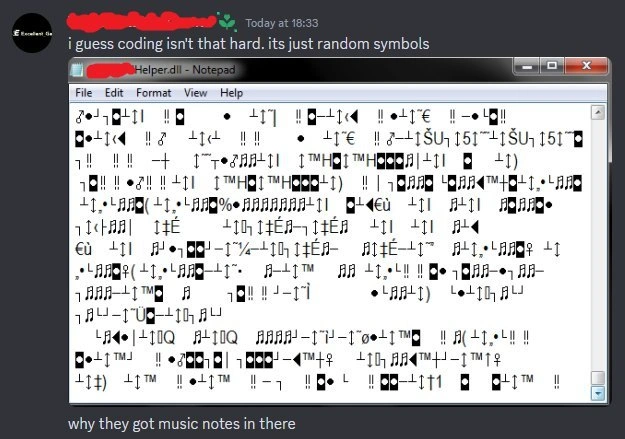
In the meme, a person did something similar with a computer file. They took a file that’s basically the computer’s secret recipe (meant only for the computer to run, not for a person to read) and opened it in a simple writing program. Unsurprisingly, it looked like a jumbled mess of symbols – there were even little musical note icons among the gibberish! The person seeing this thought that’s what programming code must be: just a bunch of random symbols, as if someone smashed a keyboard to produce it.
The funny part is, they were looking at it all wrong. It’s like they picked up an alien message or a secret code and, without any decoder, concluded it was just meaningless symbols. Real programming isn’t done by randomly hitting keys. It’s done in special languages (like Python, Java, or C++) that have words and rules – more like writing an essay or a recipe, not like those crazy symbols. What happened here is the person opened the equivalent of a finished cake and tried to read it as a recipe. Of course it’s going to look weird!
So, the meme makes us laugh because the person totally misunderstood what they saw. It’s a mix-up: they peeked into a file the computer uses internally, saw a bunch of nonsense characters, and thought, “Aha, so this is coding.” In reality, it’s as silly as trying to read a foreign newspaper upside down and saying you’ve learned journalism. Everyone who actually writes code knows that if you see pure gobbledygook like that, you’re probably just reading something the wrong way (or looking at the wrong file). The humor comes from seeing that innocent mistake and realizing how wildly off the mark it is.
Level 2: Mystery of the Music Notes
In this meme, a person took a file named Helper.dll and opened it with Notepad, a basic text-editing program. On their screen they saw all sorts of strange characters: black squares, odd symbols, even musical notes like ♪ and ♫ popping up in the text. They jokingly concluded that coding must just be a bunch of random symbols. It’s a funny misunderstanding, so let’s unravel why that happened.
Notepad is designed to display plain text – things like letters, numbers, and punctuation that humans write. Examples of plain text files are .txt files or a source code file like .py (Python) or .java (Java). These files are saved in a way that each byte of data corresponds to a specific character according to a character encoding (for example, in the ASCII encoding, the number 65 stands for the letter 'A'). When you open a plain text file, Notepad reads those bytes and shows you the intended letters and words.
A file with the extension .dll, which stands for Dynamic Link Library, is very different from a text file. It’s a kind of file used by Windows to store compiled code — basically the machine-language instructions that the computer executes. Humans normally don’t read .dll files; instead, software programs or the operating system use them behind the scenes. This is an example of a binary file format (meaning it’s meant for machines, not for human eyes). It contains a lot of bytes that correspond to CPU instructions and data, not neatly written words or numbers.
When our curious user opened Helper.dll in Notepad, the program did its best to interpret the bytes of the .dll as if they were text. But since the .dll wasn’t actually text, the result was gibberish. Imagine expecting letters and spaces, but the bytes correspond to things that have no letters assigned – Notepad has to show something for those, so you get those placeholder and oddball characters. For instance, some bytes when interpreted in the default Windows text encoding might display as the ™ symbol, or as musical note symbols, or just as empty squares for values that have no symbol. Those music notes appearing on the screen were Notepad’s literal interpretation of certain byte values in the file – it doesn’t mean the DLL had actual music or notes in it; it’s just an accidental result of the wrong reading method.
The term for this kind of garbled text is often mojibake – a word used in tech to describe what you see when text is decoded with the wrong encoding, resulting in nonsense characters. In simpler terms, Notepad was reading the file in the wrong language, so to speak. That’s why the text looked so bizarre. It’s as if you took an essay written in Spanish and read it using English pronunciation rules – you’d get nonsense, even though the original essay is perfectly valid in Spanish.
For someone learning Programming or just how computers work, the lesson here is: not all files are meant to be opened as text. There are low-level programming files like .dlls or .exe’s which contain machine code. If you want to peek inside them in a meaningful way, you usually need special tools (like a hex editor or a decompiler) that know how to handle binary data. Simply opening them in a text editor will just give you a screen full of alien-looking text. The meme is poking fun at the naïveté of thinking that this gibberish is what “coding” is. In reality, coding is done in source files that look much more structured (you’d see actual words like if, class, function, etc. in real code). The mystery of the music notes isn’t a secret feature or anything – it’s just the computer equivalent of a translation error, showing how important the correct format and tools are when trying to read data.
Level 3: Just Random Symbols
Seasoned developers immediately recognize what’s happening in this meme and why it’s hilarious. It’s riffing on a classic newbie mistake: treating a binary file (in this case a Windows DLL) as if it were a text file full of readable code. The Discord message proudly declares:
“i guess coding isn’t that hard. its just random symbols.”
This is the clueless proclamation of someone who clearly opened a compiled library in Notepad and saw a mess of bizarre characters. For an experienced dev, this scenario screams “No, that’s not how any of this works!” — and that contrast is exactly where the humor lies.
The meme plays on the gap between source code and compiled code. We write source code in languages like C++ or Python, which is relatively readable and structured text. But once compiled, that code turns into machine code (stored in files like Helper.dll), which is just bytes – effectively unintelligible if you open it in a normal text editor. Every veteran developer has either experienced this themselves early on or watched a newbie learn this lesson. It’s practically an inside joke in programming circles: at some point, many of us have clicked on or dragged a .exe/.dll into Notepad out of curiosity, only to be greeted by a parade of nonsense characters. The caption “why they got music notes in there” perfectly captures the bafflement of that moment. Of course, we know the software doesn’t actually have little musical compositions hidden in its code; those symbols are just the result of viewing the file in the wrong way.
What makes this doubly funny is the newbie’s confidence. They see inscrutable text and conclude, “coding isn’t that hard, it’s just random symbols.” It’s a delightfully wrong conclusion. In reality, if programming were just mashing the keyboard to produce random glyphs, we’d all be out of a job (or rock stars at the keyboard 🎹!). The joke underscores a basic learning milestone: understanding file types and encodings. A DLL (Dynamic Link Library) is meant to be run by the system, not read by humans. Notepad doesn’t know how to execute or decompile a DLL, it just shows you whatever characters correspond to the file’s bytes (garbled text and all). This touches on character encoding issues as well: Notepad likely interpreted the raw bytes in some default encoding (say, ASCII or Windows-1252), which is why you get recognizable tokens like ™ amidst the chaos — the byte for ™ in that encoding just happened to be present somewhere in the binary.
For experienced devs, the meme triggers a knowing smile (and perhaps memories of our own first encounters with data formats like this). It’s funny because it highlights how completely off-base a beginner’s assumption can be. Coding isn’t an unintelligible mystic art of random symbols — but if you peek at the wrong layer of abstraction (like machine code interpreted as text), it sure looks that way! The humor comes with a side of sympathy: we’ve all had moments of wild misunderstanding when we were learning. And now we get to chuckle at how far we’ve come. After all, we know that real code has logic and structure... and that opening a DLL in Notepad is about as useful as examining matrix code without knowing you’re in the Matrix. 😉
Level 4: Babel of Bytes
In computing, a .dll (Dynamic Link Library) file is compiled machine code — a sequence of raw bytes that represent instructions and data for the CPU. This binary data isn’t encoded in a character set meant for human reading, so opening it in a plain text editor creates a classic case of mojibake. Mojibake is the term for text that appears as nonsense because it’s being interpreted with the wrong character encoding or, as in this scenario, because the data isn’t text at all.
Under the hood, those "random symbols" are actually bytes being forced through the lens of a text encoding. Each byte (or set of bytes) in the file is being mapped to a Unicode code point by Notepad. For instance, a particular sequence of bits that make up a machine instruction might coincidentally correspond to code points that render as a '♫' or '™' character when interpreted in Notepad’s default font. These are meaningless in terms of the program’s logic; they’re just what happens when binary data meets an ASCII/Unicode interpreter by accident. The chaotic mix of glyphs like black squares, accented letters, and musical notes is essentially a byproduct of interpreting structured binary in a completely inappropriate format. It’s like reading raw memory as if it were text: you’ll see whatever random printable characters correspond to those bytes, hence the apparent gibberish.
This phenomenon is a collision of two worlds: the structured binary format of an executable module (the Windows Portable Executable (PE) format for a .dll) versus the assumptions of a simple text editor. A PE file begins with the bytes 0x4D 0x5A (the letters "MZ" in ASCII – a signature left over from DOS-era executables). After that header, the file contains sections of machine code and data intended for the OS loader and linker, not for a text reader. Notepad, unaware of this, tries to map every byte to a character. Many bytes fall outside the normal printable ASCII range (0x20–0x7E). Depending on the default encoding used (often Windows-1252 for legacy text on an English system), those byte values can align with extended symbols or control-picture glyphs, resulting in visible oddities. In other words, we’re seeing byte values misinterpreted as text symbols.
From an information-theoretic perspective, a compiled program’s bytes are high-entropy and lack the patterns of human language, so any naïve textual rendering will look essentially random. There’s no secret message or actual music embedded; the music notes and other icons are just artifacts — byproducts of certain byte values coincidentally mapping to those Unicode characters. In essence, the meme humorously exposes how computers can treat the same data in multiple ways. If you take data meant for one context (machine-readable instructions) and force it into another (human-readable text), you get a breakdown in communication akin to a Tower of Babel: meaningful signals turning into a babble of symbols.
Description
A screenshot of a chat, likely Discord, where one user makes a naive comment about programming. The user says, 'i guess coding isn’t that hard. its just random symbols'. Below this comment is an image of a Windows Notepad window titled 'Helper.dll - Notepad'. The content of the file is not source code but the garbled, mojibake-like result of opening a compiled binary file (.dll) in a text editor, displaying a chaotic mix of symbols, including box characters, accented letters, and Wingdings-like glyphs. A second user, equally confused, replies below the image with, 'why they got music notes in there'. The humor stems from the profound technical misunderstanding of the users, who are mistaking the raw, misinterpreted binary data of a compiled library for human-readable source code. For experienced developers, this is a relatable and funny example of the Dunning-Kruger effect, highlighting the gap in knowledge between tech professionals and those outside the field

Comments
25Comment deleted
This is a junior dev's first attempt at reverse engineering. They're about to file a bug report that the compiler is adding musical notes, which is causing dissonance in the application's architecture
Of course the DLL shows music notes - every misplaced objdump call deserves background music for the impending production incident
Ah yes, the classic 'Helper.dll' - where every function signature is written in ancient Sumerian, the comments are in musical notation, and the only documentation is a cryptic note saying 'it worked on my machine' written in wingdings. This is what happens when you let the intern refactor the legacy codebase after discovering vim macros
Ah yes, the classic 'UTF-8 vs. Windows-1252 vs. raw binary' symphony. When you open a DLL in Notepad thinking you'll find some hardcoded strings, but instead discover that your text editor has composed an avant-garde piece using the entire Unicode musical notation block. It's like the compiler is trying to tell you something in sheet music - probably 'Stop trying to read compiled binaries as plaintext, you absolute madlad.' This is what happens when someone takes 'code is poetry' a bit too literally and ends up with a concerto in the key of segmentation fault
Opening a PE DLL in Notepad and calling it 'coding' is how you end up doing code reviews on code pages - the 'music notes' are cp1252 hallucinating the section table, not our service shipping a soundtrack
The rare codebase where box-drawing meets sheet music - optimally dense, zero legibility, pure senior dev poetry
That’s not code; it’s a PE file sung in Windows-1252 - if your review tool is Notepad, your stack is mojibake-driven development
it's just an sfx file Comment deleted
*PseudoRandom Comment deleted
I know that song Comment deleted
это музыка сфер Comment deleted
english please Comment deleted
Это музыка Portable Executable Comment deleted
Please use English in this chat tr: "This is the music of Portable Executable" Comment deleted
apl be like Comment deleted
it's boss music Comment deleted
You now, it’s a music in C# key Comment deleted
I was wondering why I didn’t see the MZ and PE headers Comment deleted
And the “This program cannot be run in MS-DOS” Comment deleted
its the bottom Comment deleted
Because it's the end of DLL file — note the scroll bar position. Comment deleted
I know I know I only saw that later Comment deleted
music notes is signals to activate speaker on motherboard Comment deleted
decoding is hard though Comment deleted
(No spoilers) Started reading the file and it was nonsense. The more I read, the more confused I was, but you know, I am not the kind of guy that easily gives up, so I finished it. Read it again an it got better as I remembered some parts. 4.5/5 can recommend. Comment deleted