Microsoft Forced by EU Law to Allow Uninstalling Edge and Bing
Why is this Microsoft meme funny?
Level 1: Choose Your Pencil
Imagine you’re in a classroom where the teacher insists everyone use the special blue pencil she hands out. You’re not allowed to use any other pencil or color – even if you have a favorite red pencil in your bag, the teacher says “No, only my pencil for all your work.” It’s a bit annoying, right? You don’t get a choice, and you’re stuck with this blue pencil every day. Now picture that the school principal makes a new rule: the teacher must let students choose what writing tool they want to use. If you don’t like that blue pencil, you can give it back or throw it away and use your own pencil or pen. Finally, you have the freedom to write with what you’re comfortable with! All the kids in class are happy and relieved – they wonder why they couldn’t do this before. It’s a little funny that it took a strict rule from the principal for the teacher to allow something so simple. But in the end, everyone’s just glad they can use what they want and not have one choice forced on them.
Level 2: Breaking Bundling
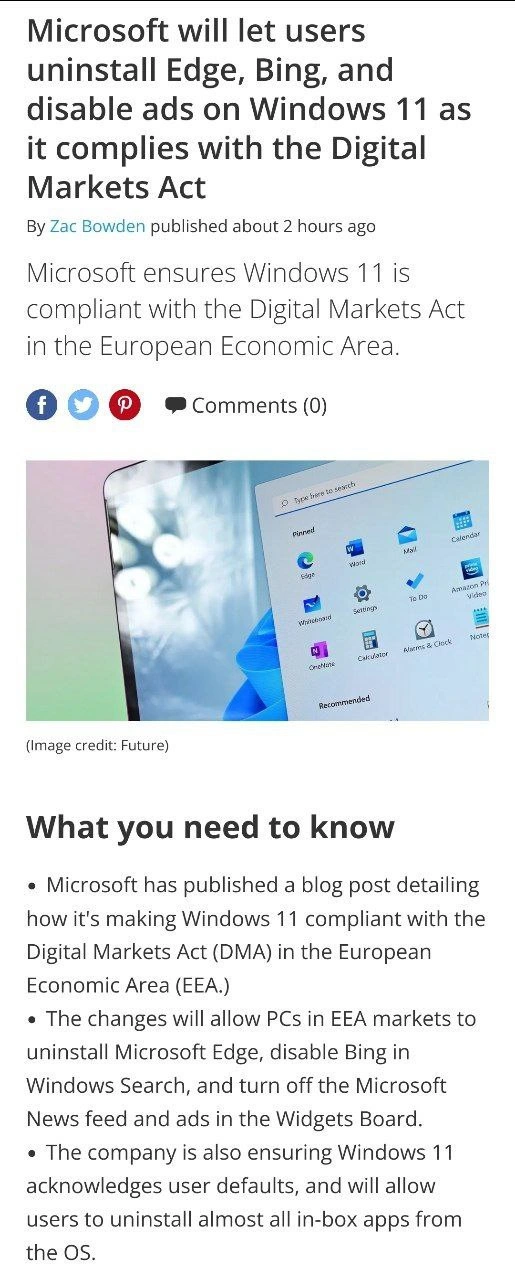
In plain terms, this news means Windows 11 (the latest version of Microsoft’s operating system) is becoming more user-friendly in Europe because of a new law. Let’s break that down. Windows 11 is an Operating System (OS) – the core software that runs your computer. An OS like Windows usually comes with built-in default programs. Microsoft Edge is one such program – it’s the web browser that comes preinstalled on Windows 11 (similar to how Safari comes with iPhones, or Chrome with some Android devices). Bing is Microsoft’s own internet search engine (like Google), and Windows ties it into the system search bar. Microsoft also includes things like a news feed and ads in a feature called the Widgets board (where you see news, weather, etc. on your screen). All these – Edge, Bing, news feed – are MicrosoftProducts integrated into Windows 11 by default.
Before these changes, Microsoft made it difficult to remove or avoid these built-in services. This practice of tightly including their own apps and discouraging alternatives is often called bundling. When such bundling makes it hard for you to switch to a competitor’s product, we also call it vendor lock-in (because you’re “locked in” to the vendor’s ecosystem). For example, before now you could not uninstall Edge through normal means – it was deemed a system component. Even if you installed another browser (say Chrome or Firefox) and set it as default, Windows would still push Edge in certain cases. A good example was clicking a web link from the Widgets panel or performing a search from the Start menu: Windows would often ignore your default browser choice and open Edge, usually showing Bing search results. There was no easy setting to change that. Likewise, the Windows search box always combined local results with Bing web results (to some users, that felt intrusive or unnecessary). The Widgets board by default shows Microsoft’s curated news articles and sometimes ads or promotions (essentially Microsoft’s content, whether you asked for it or not). Many users consider those preloaded, unremovable extras as preinstalled bloatware – “bloatware” meaning software that is pre-installed and not crucial, often just taking up space or pushing a company’s services.
Now, enter the Digital Markets Act (DMA). This is a new law in the European Union aimed at big tech companies to promote fair competition and give users more choice. In simple terms, the law says companies like Microsoft aren’t allowed to force their own apps and services on users or block alternatives, especially if that company is so big that everyone has to use their platform (Windows, in this case). The DMA defines such big players as “gatekeepers” and sets rules for them. It’s part of EU regulatory compliance that Microsoft has to follow if they want to do business in Europe without penalties.
Because of this law, Microsoft is making changes to Windows 11 (specifically for EU countries at first) to give users more control. According to the news:
- Uninstalling Edge: Windows 11 will now let users in the EU completely uninstall Microsoft Edge if they don’t want it. This is a big deal because previously Edge was treated as an integral part of the system. Now it becomes like a normal app that you can remove.
- Disabling Bing in Search: There will be a setting to turn off the Bing integration in the Windows search bar. That means if you just want the search to look for files and apps on your PC (and not show web search or Bing suggestions), you can have that. No more unwanted web results when you’re just trying to find your documents.
- Turning off News/Ads in Widgets: Users will be able to turn off the Microsoft News feed and ads in the Widgets panel. In practice, that means the little pop-up that shows news snippets and sometimes advertisements or sponsored content can be made quiet and not show those extras. You could still use widgets for things like weather or calendar without Microsoft pushing their news.
- Respecting Defaults: Windows 11 will acknowledge user defaults properly. If you set, say, Google Chrome as your default browser, Windows will respect that setting everywhere. Prior to this, there were parts of Windows that ignored your choice (for example, clicking a link in a news widget would open Edge regardless of your default). After the change, if you click a link in any part of Windows, it should open in your chosen default browser. This is basically the system not favoring Edge behind your back.
- Removable In-box Apps: Microsoft also mentioned that users will be allowed to uninstall almost all the built-in apps that come with Windows 11. “In-box apps” just means the apps that are in the box (included with the OS). Historically, some preinstalled apps (like certain Xbox apps, 3D Viewer, etc.) could be uninstalled, but others like Cortana or Edge or the Store couldn’t be. Now, in EU regions, most of those will be removable if you don’t need them.
In short, Microsoft is peeling back a lot of the things that felt like preinstalled bloatware and giving people an easy way to choose what they want. It’s a direct response to that EU law – they’re not doing it purely out of kindness, but because they have to comply with regulations (otherwise they’d face fines or other penalties for anti-competitive behavior). It’s a bit like an antitrust remediation – a fix to address concerns that they were acting like a monopoly by pushing their own browser/search too much. And indeed, the goal is to foster competition (so other browsers or search engines have a fair shot on Windows, and users aren’t stuck with Microsoft’s choices if they prefer something else). This is effectively the EU enforcing forced_browser_choice – forcing Microsoft to give you, the user, a choice of browser and services.
It’s important to note these changes are initially for the EEA (European Economic Area) markets. If you’re in Europe and update Windows 11, you’ll get these new options. If you’re elsewhere (like the US), you might not see them immediately. Often, though, once a company builds a feature for one region, they might later roll it out more widely (since maintaining two different versions can be complicated). We’ll have to see if Microsoft decides to give everyone these uninstall options or keeps them region-specific. But at least for now, Europeans get a version of Windows 11 that’s less locked down by Microsoft’s own services.
Here’s a summary of how Windows 11’s behavior changes under the DMA compliance, compared to before:
| Feature | Before (Windows 11 Default) | After DMA Changes (EU) |
|---|---|---|
| Web Browser | Microsoft Edge is preinstalled and couldn’t be removed. Some system links would open in Edge even if you set another default browser. |
Edge can be uninstalled like any other app if you don’t want it. Your chosen default browser is respected for all links and actions. |
| Start Menu Search | The Start menu search automatically shows web results from Bing alongside local results. No easy toggle to disable this Bing integration. |
Option to turn off Bing in Windows Search, so it only searches your PC (no web results) if you prefer. |
| News & Interests | The Widgets/News panel shows Microsoft’s news feed and ads by default. You had to just ignore them; no built-in way to turn them off (aside from disabling Widgets entirely). |
Option to disable the Microsoft News feed and ads in the Widgets board, so you won’t see news or sponsored content there if you don’t want to. |
| Built-in Apps | Many apps and components come preloaded (Mail, Cortana, etc.). Some could not be uninstalled even if unused. | Users can uninstall almost all in-box (built-in) apps via Settings, giving you the ability to remove apps you don’t need. |
| Default App Choices | User defaults were sometimes bypassed (e.g. Windows would still use Edge for certain tasks). | User default settings are honored consistently. If you set a different browser or app as default, Windows will use it for all relevant tasks (no hidden overrides). |
(Table: What changes in Windows 11 due to EU’s Digital Markets Act compliance.)
For a junior developer or an everyday Windows user, the key takeaway is that user choice is being restored in areas where Microsoft used to impose its own stuff. This is a win for users who prefer different software (like wanting to stick purely with Chrome and Google search, or just not have ads/news on their desktop). It’s also a notable example of how laws and regulations can directly affect tech products. Normally, companies love to keep you within their ecosystem (that’s a classic part of corporate culture in tech – it’s good for business). Microsoft bundling Edge and Bing into Windows was a strategy to increase usage of their services. Now, due to an external rule, they have to back off and let competition in. In practical terms, setting up a Windows 11 PC in Europe will involve less annoyance: you’ll have official settings to clean out the stuff you don’t want, instead of relying on hacks or just living with it.
So, if you’re newer to this topic: yes, Windows is still Windows, but it’s becoming a bit more open. Imagine that after all these years of the “blue E” browser icon being a permanent fixture, you’ll actually be able to remove it if you’d rather not see it. And that Start menu won’t secretly use Bing to web-search your every query unless you say it can. This change is fundamentally about freedom of choice on your computer. It happened because regulators were concerned Microsoft had too much power to push their own services on users (a classic monopoly concern). By forcing the company to loosen its grip, the DigitalMarketsAct hopes to create a fairer playing field for other browsers and apps, and a better experience for users. In summary: Windows 11 (in the EU) is getting less bossy about using Microsoft’s own browser/search, and more respectful of what you want to use. It’s a pretty significant shift for an OperatingSystem that, historically, was known for tightly coupling its own tools. Progress!
Level 3: IE6 Déjà Vu
It’s happening again: a quarter century after Microsoft got in trouble for bundling Internet Explorer 6 with Windows, Europe is once more forcing Redmond to unwind its desktop OS bundling habits. The meme’s headline about Windows 11 finally allowing Microsoft Edge removal and Bing opt-out triggers a wave of déjà vu for those of us who remember the old browser wars. The catalyst here is the EU’s Digital Markets Act (DMA) – essentially an antitrust crowbar prying apart products that Microsoft had glued together. To comply, Microsoft announced that in the European Economic Area (EEA), Windows 11 will let you uninstall Edge, disable Bing in the Start menu search, and turn off those baked-in Microsoft News feeds and ads in the widgets panel. For veteran engineers, this is darkly comedic: we’ve seen nearly the exact scenario decades before. Back then, Windows integrated Internet Explorer so deeply that removing it was “impossible” (official line: “IE is part of the OS!”). That gave Microsoft a stranglehold on web browsing and helped extinguish Netscape, but it also sparked massive legal battles. Fast forward to 2023: Edge — IE’s modern progeny — came preinstalled and privileged in Windows 10/11 in much the same way.
Windows 11 has been aggressive about promoting Edge and Bing at the OS level. Even if a user set Chrome or Firefox as their default browser, parts of the system (like the Search bar or Widgets) would ignore that and still launch Edge via special links. Microsoft effectively hard-coded their browser into key UI features, a classic vendor lock-in tactic. For instance, Windows would use a custom microsoft-edge:// URI scheme to ensure certain searches and widget news clicks always opened in Edge, bypassing user choice. Unsurprisingly, power users cried foul on this forced browser choice behavior. Some fought back with tools like EdgeDeflector – a small utility that caught those calls and redirected them to your preferred browser. Microsoft’s response? They blocked such workarounds in a 2021 update, doubling down on Edge’s invincibility inside the OS. It was the preinstalled_bloatware saga all over again: the system came with an unremovable default, and if you tried to escape, the OS said “No, my browser only.”
This meme lands as humorous precisely because Microsoft had to be dragged by regulators into doing what users have wanted all along. It highlights a pattern in big tech CorporateCulture: companies often push the limits of vendor lock-in and only dial back when a legal hammer strikes. Microsoft’s engineers and PMs surely knew that binding Bing and Edge into Windows 11 would irk users (and maybe EU officials), but the corporate strategy banked on ecosystem control. More usage of Edge and Bing means more ad revenue and more chances to hook users on Microsoft services. It’s akin to the 90s “embrace, extend, extinguish” playbook — embrace the web, extend the OS with the Microsoft browser, extinguish competition — updated for the 2020s. They embraced Chromium (Edge today is built on Google’s Chromium engine), extended it by weaving it into Windows 11’s fabric, and hoped to edge out (pun intended) other browsers. The antitrust_remediation now being imposed is basically the EU saying “Enough. Cut it out.”
Historically, this isn’t Microsoft’s first compliance rodeo. In the late 2000s, after an EU antitrust case, they had to introduce a “browser ballot” screen in Windows, listing alternatives like Firefox and Opera to give users a fair choice instead of silently defaulting to IE. They even shipped special Windows versions like Windows N (no Windows Media Player bundled) to appease regulators on a related issue. Those of us who survived the IE6 era remember how one monopolized browser stagnated the web for years. The scars are real: we joke about building sites that only worked in IE or the horror of maintaining two sets of code (one for IE6, one for real browsers). So seeing Microsoft forced into a more open stance with Edge is both satisfying and grimly funny. It’s antitrust déjà vu with a modern twist: now it’s Edge and Bing getting the pry bar treatment, not just IE. And it’s not just Microsoft; the DigitalMarketsAct is also pressuring Apple, Google, and others to open up ecosystems (think iPhones allowing outside app stores, Android letting go of Google-default everything). The EU is essentially doing what techies jokingly pray for: shipping a giant “Remove Bloatware” update, at policy scale.
From a senior developer perspective, there’s also amusement in the technical backpedaling Microsoft must do. Integrating Edge deeply into Windows 11 was a deliberate architectural choice. Now engineers had to disentangle that — effectively adding an off switch and uninstall option for something that was never meant to be optional. We can imagine the Windows dev team scrambling to ensure that ripping out Edge won’t break other features. (There’s precedent: back in the day, Microsoft claimed removing IE would destabilize Windows because parts of Windows Explorer and Help used the IE engine. That was desktop_os_bundling at a code level.) With Edge, similar dependencies exist: the built-in WebView2 engine (which many Windows apps use to render web content) is powered by Edge under the hood. Allowing Edge to be removed in the EEA means they likely have to let another default or modularize that component. No doubt some poor programmers had the “fun” task of auditing which parts of Windows 11 assume Edge’s presence and how to gracefully handle its absence. It’s a bit of a Frankenstein situation: “Hey team, remember that component we hard-wired? We need to un-hard-wire it, regionally.”
There’s irony layered in here for the cynical veteran crowd: Microsoft spent years nudging, nagging, even somewhat nag-ware prompting users to try Edge (“It’s time to ditch Chrome!” pop-ups, anyone?). They inserted ads for Edge in the Start menu suggestions, integrated Bing AI into the taskbar – anything to make their ecosystem sticky. And now, with the DMA, they must provide an official method to completely eject those very things. It’s like watching a big ship painstakingly reverse course. A seasoned dev might quip that this is the ultimate Edge case – where “Edge” (the browser) became such an edge case of non-removability that only law could resolve it.
On a practical note, this compliance is initially region-specific. So yes, Microsoft is effectively maintaining two Windows builds: one for the EU with the freedom to remove their stuff, and one elsewhere that likely still nudges you toward Edge and Bing. It wouldn’t be surprising if under the hood the code now does something like:
// Pseudo-code for Windows 11 compliance mode
if (User.Region == Regions.EEA) {
OS.AllowUninstall("Microsoft Edge");
WindowsSearch.IntegratedWebResults = false; // disable Bing in search
Widgets.NewsFeedAds = false; // turn off MSN news & ads
Defaults.RespectUserChoice = true; // enforce user default browser everywhere
}
This “if EU, then behave” logic is both funny and telling. It’s reminiscent of how earlier Windows versions had those special-case code paths (remember the BrowserChoice.exe popup in EU editions?). It’s a bit of a tech trope: software bending not to technical necessity, but to legal necessity. The fact that outside the EU, Microsoft might not immediately offer the same user freedom is also telling — it implies the change isn’t purely from a newfound user-first philosophy, but from fear of hefty DMA fines. In other words, “We’ll let you uninstall Edge… because we have to.”
In developer circles, this turn of events has an almost celebratory feel. It validates years of complaints about preinstalled_bloatware and disrespect for user preferences. Many of us have a routine when setting up a new Windows PC or dev environment: uninstall the junk (trial games, unsolicited apps), set our preferred browser as default, disable the endless MicrosoftProducts promos, and apply registry tweaks to silence Cortana or Bing. We used to joke that the first hour with a fresh Windows install is basically performing an exorcism of bloat. Now, at least for EEA users, Windows 11 is doing some of that cleaning for you out-of-the-box. That’s progress… ironically achieved via bureaucrats instead of engineers. It’s humorous in a satisfying way: the mighty Microsoft, who once welded their browser into Windows so tightly, is now forced_browser_choice-friendly — providing a DELETE button for Edge and an OFF switch for Bing. For the old guard who fought IE6’s dominance and the new devs annoyed by modern Windows nags alike, there’s a shared sentiment of “Finally, they’re letting us decide.” The meme nails this sentiment: it’s the sweet, slightly smug laughter that comes when a long-standing tech gripe gets resolved by external pressure. History repeats, the monopoly play gets the rug pulled out from under it, and users get the last laugh (for now).
Description
A screenshot of a tech news article with the headline: "Microsoft will let users uninstall Edge, Bing, and disable ads on Windows 11 as it complies with the Digital Markets Act". The article, written by Zac Bowden, explains that Microsoft is making Windows 11 compliant with the European Economic Area's (EEA) Digital Markets Act (DMA). A section titled "What you need to know" lists the key changes in bullet points: users in the EEA can uninstall Microsoft Edge, disable Bing from Windows Search, turn off ads, and remove most pre-installed 'in-box' apps. The image includes a generic stock photo of the Windows 11 Start Menu. The content is significant for developers as it marks a major shift in Microsoft's strategy, moving away from bundling its services and towards greater user choice, albeit under regulatory pressure. This reflects the growing global trend of governments intervening to curb the power of 'gatekeeper' tech companies

Comments
7Comment deleted
Thanks to the EU's Digital Markets Act, you can finally uninstall Edge. Now it will only exist on your system as a dependency for some obscure feature that will break catastrophically in six months if you touch it, as is tradition
Amazing how it took an entire EU directive to implement what every sysadmin already scripted in 1998: ‘remove-ie.ps1’ - now if only Brussels could mandate a “sudo apt-get purge Teams” flag
Microsoft finally implementing the uninstall feature we've been trying to code ourselves with PowerShell scripts and registry hacks for the past decade, but only for Europeans because apparently user choice is a geographically limited concept
After decades of Internet Explorer jokes and Edge memes, Microsoft finally admits defeat - not to Chrome, but to EU regulators. Turns out the only force powerful enough to make Edge uninstallable wasn't user demand or market competition, but the threat of billion-euro fines. Senior engineers everywhere are now wondering: should we add 'regulatory compliance' as a feature request priority above 'actual user needs' in our backlogs?
Amazing how “respect user defaults” became a region-scoped feature flag - regulatory-driven refactors pay down lock‑in debt faster than any OKR
EU DMA finally exposes Edge as the optional dependency it always was - winget uninstallers rejoice
Microsoft discovered a new pattern: FeatureToggleByRegulator - dma_compliance_enabled decouples Edge, disables Bing, and suddenly respects defaults; amazing what a boolean can do when fines are non-null