Future You Won't Appreciate This 'Clever' Code
Why is this Debugging Troubleshooting meme funny?
Level 1: Tangled Noodles
Imagine you have a big bowl of spaghetti noodles that you cooked in a rush. You didn’t organize them at all – they’re all jumbled and knotted together. The next day, you’re trying to pull out one specific noodle from the bowl, but it’s so tangled that you can’t follow where it starts or ends. It’s frustrating, right? You might even think, “Wow, I made this mess, and now even I can’t figure it out!” That’s exactly what’s happening in this picture, but with computer code. The programmer wrote a bunch of instructions (like a recipe for a computer), but they were written messily, like tangled noodles. Now it’s seven hours into the day, and the poor programmer is staring at the screen, totally confused by the messy instructions they themselves wrote just the day before. They feel exhausted and a bit annoyed, kind of like how you’d feel trying to untangle that giant clump of spaghetti. The joke is that even though it’s their own code, it’s become a tricky puzzle. It’s a funny way to say “keep things neat as you go, or you might end up confusing yourself later!” Just like it’s best to neatly wind up your yarn or put toys away so you can find them later, programmers need to write code clearly so they (and others) can understand it afterwards. This meme shows what happens when they don’t: a lot of time gets wasted and the person ends up with the same look as the tired office guy in the picture – totally done and bewildered by the mess they made.
Level 2: Untangling Spaghetti Code
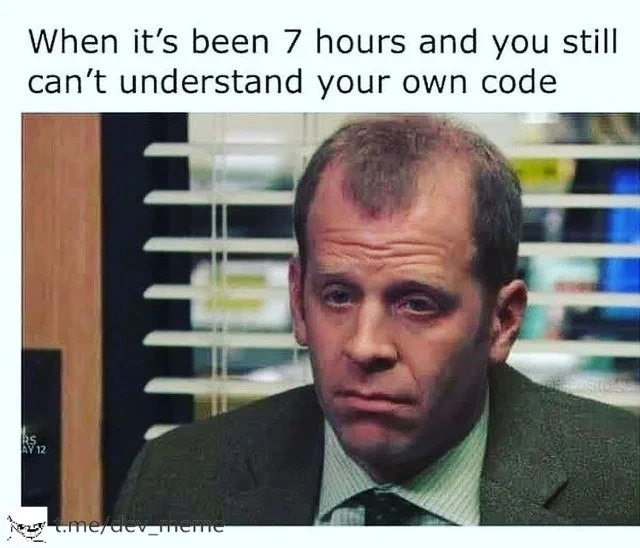
For newer developers, let’s break down what’s happening in this meme. The phrase “spaghetti code” is key here: it describes source code that is tangled and twisted, much like a bowl of spaghetti. In practice, spaghetti code means code with a very messy structure: things jump around, there’s no clear organization, and it’s hard to follow the flow of the program. If you’ve ever tried to read a confusing Choose Your Own Adventure book out of order, that’s how spaghetti code feels in a debugging session. You might enter a function, which calls another, which modifies some global variable, which triggers something else – it’s a wild web of interactions. Even the person who originally wrote it can’t easily trace what is happening, which is exactly the scenario shown in the meme caption: “When it’s been 7 hours and you still can’t understand your own code.”
Why would your own code be hard to understand? Several reasons: poor naming, lack of documentation, and complex logic are big ones. Imagine you wrote a function calc() with a bunch of cryptic steps but didn’t explain anywhere what it calculates or why. Coming back to it later, you have to re-figure out the puzzle from scratch. This is why code readability is so important: code isn’t just for computers to execute, it’s for humans (like you and your teammates) to read. Good code readability means using descriptive names (e.g., total_user_count instead of cnt), formatting your code neatly, and adding comments or docstrings that clarify non-obvious parts. In the meme’s scenario, the developer likely didn’t do these things — no helpful comments, maybe variables like i, j, k all over, and functions doing many things at once. The result? Code comprehension becomes extremely difficult. The developer has essentially created a puzzle for themselves and is now stuck trying to solve it.
Let’s talk about maintainability. Code maintainability is how easy it is for someone (often, you in the future) to fix, update, or extend the code. Highly maintainable code is clean and modular: each piece does a clear job and can be understood in isolation. Spaghetti code has low maintainability – any change can break something because everything is intertwined. In the meme, the developer has spent seven hours (almost a full workday!) trying just to understand the code before they can even begin fixing or changing it. That’s a huge hit to DeveloperProductivity. In a well-maintained codebase, you might grasp what a function does in minutes and move on to writing new code. In a messy codebase, you can sink an entire day reading and still be clueless. The blank, exhausted look on the person’s face in the image perfectly captures that feeling of “I’ve been staring at this forever and I’m nowhere closer to figuring it out.”
Technical debt is a term that describes what’s happening here. It’s a metaphor: when you write quick and dirty code (often to meet a deadline or just get something working fast), you “borrow” time, just like taking on debt. But debts must be paid back with interest. Here, the “interest” is the extra time and effort needed later to fix or understand that code. In other words, the short cut you took yesterday means long hours of debugging today. The meme humorously highlights this by saying “7 hours and still can’t understand” – the cost of that earlier quick-and-dirty approach is being paid in frustration and lost time. All developers incur some technical debt over time, but the key is managing it. If you never go back to refactor or document that hastily written code, the debt grows and debugging frustration like this becomes more frequent.
Let’s break down some common elements that cause this “spaghetti” situation:
- No Comments or Documentation: If you don’t leave any notes in the code (like
// this function implements X algorithm because...), you and others have zero clues about the original intent. The meme scenario suggests the code was poorly documented, leaving even the author in the dark. - Too Many Responsibilities: Perhaps the code in question does a lot of things in one place (e.g., a single function reads input, processes data, updates the database, sends a notification, all tangled together). This makes it hard to reason about, compared to breaking it into smaller, named functions (like
readInput(),processData(),saveToDatabase(), etc.). When everything is jammed in one big block, it’s like a novel with no chapters or punctuation – very hard to follow. - Global State and Side Effects: These are big causes of spaghetti-like complexity. A side effect means a piece of code is changing something outside its own scope. For example, a function that updates a global variable or modifies an object it wasn’t supposed to. If many parts of the code do this, then to understand one part, you have to know what others did before or after – it’s all interdependent. That’s why the meme mentions “spaghetti you wrote” – spaghetti code often involves these twisty dependencies, where one piece pulls on a string that tangles up something elsewhere.
- Poor Naming & Over-clever Tricks: If variables and functions have generic or misleading names (
data,temp,doStuff()), then reading the code is like reading a sentence where every word is vague – you constantly ask “what is this really?” Also, if you did something clever (say, a one-liner that uses three nested ternary operators, or a bitwise trick) without explaining it, you’ve created a brain-teaser. It might work, but it’s not obvious at a glance.
Now, why is all this funny to developers? Because it’s a shared experience – a kind of inside joke. If you’ve been coding even for a little while, chances are you’ve written something you thought was fine, and later you struggled to understand your own logic. It’s a moment of self-written code regret. You might chuckle when it happens to you, thinking “I’ve become that meme.” The humor also serves as a gentle lesson: write code your future self will thank you for. When you see this meme, you’re reminded that writing clear code and leaving hints (like comments) isn’t just for others – it’s for you, too! It’s highlighting the importance of CodeQuality in a lighthearted way. After all, nobody wants to be the developer sitting at their desk for hours muttering “what does this do?” at code they themselves penned the day before.
In the image, the office worker’s slumped, defeated posture and blank stare say a lot. It looks like he’s been at it all day with no progress – which is exactly what the caption describes. The setting (blinds, cubicle walls) is a typical office, reinforcing that this is an everyday work struggle for a programmer, not some extraordinary event. It’s so common that we have memes about it! The takeaway for a junior developer is: this happens to everyone, but you can strive to make it happen less. Write code with clarity in mind. Future you (and your teammates) will be grateful, and you’ll save yourself those seven-hour code reading marathons. And if you do find yourself in this situation, don’t panic or feel too bad – grab a coffee, maybe a rubber duck (a classic debugging trick is to explain your code to a rubber duck to find where you’re confused), and step through the code slowly. We’ve all been there, and we all learn from it. In time, you’ll start recognizing spaghetti code while writing it and think, “No, let me untangle this now so I don’t suffer later.” That little bit of foresight is the difference between a quick fix and clean, maintainable code. The meme is a funny reminder of the consequences when we skip that step.
Level 3: Legacy in a Day
This meme nails a scenario that even seasoned developers find too real: coming back to code you wrote just yesterday and feeling utterly lost. The humor hits hard because we all expect to understand our own code, yet here we are 7 hours in, staring like a befuddled office drone (the image is Toby from The Office, sporting the classic thousand-yard stare of debugging despair). Why is it funny? Because it’s painfully relatable — the caption’s exasperation, “still can’t understand your own code,” is a rite of passage in software development. You’ve effectively become the maintainer of your own legacy code, less than 24 hours old. It’s the fastest tech time-travel: yesterday’s fresh code becomes today’s mysterious technical debt.
On a technical level, this situation usually arises from spaghetti code – a tangled mess of logic and state, much like a bowl of noodles with no clear start or end. Perhaps you were in a late-night sprint, churning out a fix or feature under pressure. In the moment, cutting corners felt fine (“I’ll clean this up later,” you thought). But “later” is now, and you’re paying the price with interest. In software terms, this is TechDebt coming due: shortcuts and kludges from the past (even the recent past) slow you down and burn developer productivity during debugging. The meme’s exhausted expression says it all: this is the face of someone diffusing a logic bomb they planted themselves.
Let’s dissect the code quality issues being satirized: Variable names that made sense only in your head, sprawling functions that do ten different things, and zero comments to remind you why. You’re likely dealing with commentless functions full of side effects. A side effect means a function isn’t just computing a result – it’s also changing some state elsewhere (updating a global variable, modifying an object parameter, writing to a file, etc.) – which makes the code’s behavior hard to follow. When there are too many side effects, understanding code is like tracking a handful of cooked spaghetti strands in mid-air. Miss one, and the program’s state changes in ways that surprise you later.
Another culprit is over-engineered logic – maybe you tried to be clever, using an abstraction or a design pattern that was overkill. Now the intent of the code is obscured behind layers of indirection. Or perhaps it’s the opposite: purely hacked-together code with inconsistent conventions and no structure. The result is the same: high cognitive load just to figure out what the code is doing, let alone why. Seasoned devs know the horror of debugging hell like this: you spend hours stepping through your own creation, muttering “What was I thinking?” while digging through git blame only to find your name on every line. 😅 It’s a humbling and somewhat comical experience: you have no one else to blame. In fact, one running joke is that git blame on confusing code often just points right back at you, the author, triggering equal parts shame and dark laughter.
Consider an example of self-inflicted spaghetti:
let globalConn; // a global connection (side effect central)
function getData(userId) {
// Midnight hack: reuse or create a global DB connection
if (!globalConn) {
globalConn = connectToDB(); // modifies global state
}
let data = globalConn.query("SELECT * FROM users WHERE id=" + userId);
if (!data) {
return {}; // returns empty object for missing data (why? who knows!)
}
if (userId === currentUser.id) {
performSensitiveOperation(); // side effect: modifies currentUser or system state
}
process(data); // another side effect: maybe logs or alters data internally
return data; // by now, data may have been mutated by process()
}
Reading this the next day, you might have no clue what’s going on. Why are we using a global database connection? What on earth does performSensitiveOperation() do to the currentUser? And did process(data) secretly change data before returning it? The function is doing multiple things: querying a DB, conditionally performing some extra operation, processing data (with side effects), and returning results. It’s violating the single-responsibility principle left and right. With no comments or docs to explain the intent, you’re left dredging your memory for why you wrote it this way. Every line is a potential rabbit hole: maybe performSensitiveOperation was a quick fix to handle a special case, but it’s completely opaque now. This is what CodeMaintainability nightmares are made of. No wonder our poor developer in the meme looks defeated – untangling such a mess is mentally exhausting.
From an industry perspective, this meme underscores why code quality matters so much. High-quality code isn’t about vanity or strictness; it’s about communication – with others and your future self. When code is clear, with meaningful names (userProfile vs. data), small focused functions (updateUserStatus() vs. one monolithic doAllTheThings()), and proper documentation (“// if user is admin, perform extra checks”), you minimize these “7-hour what-does-this-do” sessions. Conversely, rushing and ignoring best practices creates a maintenance trap. The humor here is that developers universally recognize this trap; many have that war story of chasing a bug in circles for an entire day, only to realize the flaw was in logic they hastily wrote. It’s an experience that can induce both developer frustration and a dose of existential comedy (“I outsmarted myself!”).
Crucially, this scenario is a self-inflicted wound, which makes it funny in a dark way. In startups and crunch-time projects, developers often become their own worst enemy: writing convoluted code at 2 AM that future-them (8 AM next day) will curse. It’s like setting a booby trap for yourself. Why do teams allow this? Often, schedule pressure or the allure of “quick fixes” drives it. There’s also the perpetual optimism (“I won’t forget how this works, it’s my code!”) that betrays us later. The meme prompts a knowing laugh because the only person who could create such confusion for you… was you. It’s a sharp reminder that in coding, yesterday’s shortcut can become today’s seven-hour detour. As the saying goes, “Always code as if the guy who ends up maintaining your code will be a violent psychopath who knows where you live.” In other words, treat your future self kindly by writing cleaner code now! This meme playfully shames that lapse, and every experienced dev chuckles — perhaps a bit nervously — remembering the last time they lived this relatable nightmare.
Description
A meme featuring a close-up screenshot of the character Toby Flenderson from the TV show 'The Office.' Toby, a middle-aged man with receding brown hair, is wearing a suit and tie and has a deeply melancholic and defeated expression on his face. The background appears to be a typical office setting with blinds on the window. Above the image, white text on a plain background reads, 'When it's been 7 hours and you still can't understand your own code.' At the bottom left, there's a small watermark for 't.me/dev_meme'. The humor stems from the universal developer experience of writing code that is so complex or poorly documented that even the original author cannot comprehend it after a short period. This situation highlights the conflict between writing 'clever' code and writing maintainable, readable code, a lesson often learned the hard way over a long career. It speaks to the cognitive load required to dive back into a complex context and the subtle accumulation of technical debt
Comments
7Comment deleted
The most important team member to write clean code for is Future You. Unfortunately, they're not around during code reviews to complain about the mess Present You is making
Seven hours in and I’ve discovered my past self invented a new pattern: Schrödinger’s side-effect - simultaneously pure and mutating until prod observes it
The moment you realize the clever abstraction you wrote at 2am was just a convoluted way to avoid writing a simple for loop, but now it's in production and three teams depend on it
After seven hours of debugging, you realize the real technical debt wasn't the code you wrote six months ago - it was the optimistic assumption that Future You would inherently understand Past You's 'clever' abstractions without documentation. Turns out, context switching has a half-life shorter than your commit messages, and now you're effectively doing code archaeology on your own repository, wondering if Past You was either a genius or had a vendetta against Future You's sanity
Legacy code: any codebase you authored more than 6 hours ago, now requiring JIRA tickets for comprehension
Seven hours in and I’ve identified the architecture: temporal coupling, implicit globals, and a TODO from 2016 - confirmed by git blame
The real postmortem: past-you shipped a write-only DSL with temporal coupling and a knowledge-cache TTL of two weeks