Skip to content
DevMeme
1341 of 7435
Elon Musk's Son: The Ultimate Name Validation Edge Case
WebDev Post #1506, on May 7, 2020 in TG

Elon Musk's Son: The Ultimate Name Validation Edge Case

Why is this WebDev meme funny?

Level 1: When a Name Breaks the Rules

Imagine you have a rule that says, “You can only name your pet using basic letters, nothing fancy.” You think that covers every normal name, right? You make a nice little checklist in your head of acceptable names like Sam, Max, or Lily. Now picture someone comes along and says, “I want to name my pet X Æ A-12.” 😮 That name has a funky symbol (Æ) and even a number in it! Your rule book would probably get confused and say, “Hey, that’s not a valid name!” This situation is funny because it’s so unexpected – it’s like you set up a game with simple rules, and a player shows up with a move that doesn’t fit any of them. In the meme, Buzz Lightyear (the astronaut toy from Toy Story) represents the shocked rule-maker. He’s basically saying, “All the things I learned and all the preparations I made didn’t prepare me for this!”. The humor comes from realizing that no matter how much we plan or learn the “rules,” real life (or in this case, a real baby’s name) can surprise us. It’s a gentle poke at anyone who’s ever been absolutely sure about something, only to discover something totally new and weird that changes the game. In simple terms: sometimes our rules need to bend, because the world is full of surprises!

Level 2: Beyond ASCII

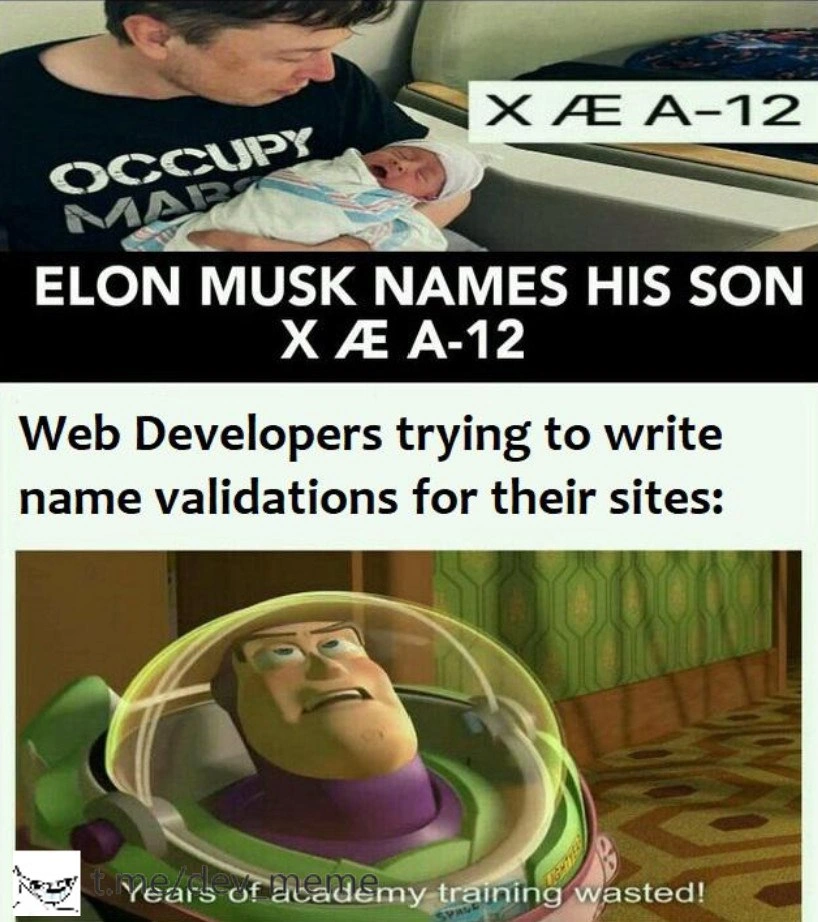
This meme shows how a web developer’s simple name-checking rules can be broken by an unusual input. The top image features Elon Musk cradling his newborn son. On that image, there’s text showing the baby’s name: “X Æ A-12” in bold. That’s not a typo – it’s the actual name the parents chose. The banner loudly proclaims, “ELON MUSK NAMES HIS SON X Æ A-12.” Already, we sense something odd: most people’s names don’t include characters like Æ or a dash followed by numbers.

The bottom image has a caption that says, “Web Developers trying to write name validations for their sites:” and then shows Buzz Lightyear from Toy Story with a shell-shocked expression. There’s a subtitle at the bottom of that frame: “Years of academy training wasted!” This is a famous quote from the movie, used here to dramatize the developer’s dismay. Essentially, the developer is Buzz Lightyear in this scenario – stunned and thinking “All that learning and preparation, and my code still failed!”. It’s a humorous exaggeration that many Frontend coders find relatable.

Let’s break down the technical joke in simpler terms. When building web forms (like a sign-up or profile page), developers often add form validation logic to make sure users input sensible data. For example, you might have rules for a name field saying “only letters and maybe a hyphen or apostrophe are allowed.” This can be done in HTML (using something like the pattern attribute) or in JavaScript with a regex (short for Regular Expression, a pattern-matching technique). A typical name regex might look like ^[A-Za-z]+$ which means “start to end, only letters A–Z.” Some might expand it to ^[A-Za-z '-]+$ to allow spaces, apostrophes ('), and hyphens (-) because we know some real names have those (think Mary-Jane O'Connell). These are our DataValidationRules – basically a checklist of what’s okay for the input.

Now, along comes this baby named X Æ A-12. For a web developer, each part of that name raises questions:

  • “X” – okay, that’s a letter. No problem.
  • “Æ” – uh oh, that’s not a standard English letter. It’s a special character (specifically a Latin Unicode character often used in some languages or stylized names). This would break a regex that only expects A-Z.
  • “A-12” – the “A” is fine, but “-12” includes a hyphen and numbers. Most name validations don’t expect digits in a person’s name. Those numbers 12 would be rejected by a rule that allows only letters.

So if a website had a name field with the rule only letters allowed, someone named "X Æ A-12" wouldn’t be able to sign up – the form would say “invalid name” or refuse to submit. That’s the core of the humor: the developers didn’t expect such characters (non-ASCII letters and digits) in a name, and now their code is effectively broken for a real person’s name.

This is a classic edge case, meaning a rare or unexpected scenario that wasn’t initially planned for. It highlights the importance of thinking broadly when writing validation logic. Unicode characters in names are more common than one might think: consider names like “José” (with an accented é) or “Søren” (with the Danish ø), or even names from entirely different scripts like “李雷” (Chinese characters). If a regex or form rule only allows English A-Z, it’ll fail for those valid names too. In our meme’s case, Elon’s baby name is an extreme example that really drives the point home.

Buzz Lightyear saying “Years of academy training wasted!” is a tongue-in-cheek way of showing the developer’s frustration. It’s like, “I studied computer science, I learned how to code these validations, I maybe even over-engineered a fancy check... and yet one unusual input made it all useless.” Of course, this is exaggerated for comedic effect – in reality, a developer can fix the code by adjusting the regex or rules. But in that moment, seeing a name that completely violates your assumptions is a huge surprise! It’s as if Buzz (the developer) is realizing that all the textbook knowledge didn’t cover this scenario.

In practical terms, the solution would be to improve those validation rules. For instance, the developer might update the regex to accept a wider range of characters. Modern regex engines support Unicode, so instead of [A-Za-z] (which is ASCII-letter only), they could use \p{L} to match any letter in any language. They might also allow certain symbols or even numbers if they decide names like "X Æ A-12" should be considered valid input on their site. Alternatively, some developers choose not to be too strict with name fields at all – maybe just checking that it’s not empty and doesn’t contain obviously dangerous characters (like SQL injection strings). After all, there are even real people with last names like "O’Neill" (apostrophe) or "Anne-Marie" (hyphen), and others with suffixes like "John Smith III" (Roman numeral that looks like III).

The tags like javascript_regex_failure and html_form_constraints hint at where this problem occurs: either in JavaScript code doing a regex test on the input (which would return false for "X Æ A-12"), or in an HTML form <input> that has a pattern which the name doesn’t match (preventing form submission). Database_schema_constraints could be an issue too – if the database was set to only accept certain characters (say it was using a column with a restrictive collation or a CHECK constraint), then saving "X Æ A-12" might error out. All these layers mean developers have to be mindful both on the Frontend and backend that names (and other data) can be more diverse than initially thought.

In summary, this meme uses a pop culture reference (Elon Musk’s uniquely named baby and a Toy Story quote) to deliver a tech lesson: Don’t assume your user input will always be simple. It’s a funny reminder in the WebDev world that edge cases – like an oddball name – can make our simple code feel inadequate. The good news is, once we stop facepalming, we can adjust our code. But we’ll certainly remember this example the next time we write a regex for user input!

Level 3: Regex vs Reality

Regular Expressions are the trusty sometimes crusty tools developers use to enforce InputValidation rules on names, emails, and other user data. We write these patterns expecting "normal" inputs, but every so often reality throws a curveball that our code isn't ready for. Enter Elon Musk’s son, named X Æ A-12 – a string of characters so unconventional that it turned countless WebDevelopment best practices on their head. The meme sets up this punchline perfectly: the top panel announces the now-infamous baby name, and the bottom panel shows a stunned Buzz Lightyear captioned “Years of academy training wasted!” – the collective gasp of developers whose carefully crafted name validators just went up in smoke.

Why is this funny to a senior developer? Because it riffs on a classic blunder in CodeQuality: making overly strict assumptions about real-world data. Web devs often write RegularExpressions for a name field like it’s an easy task – e.g. allowing only English letters and maybe a hyphen or apostrophe. It works fine for "Alice" or "O’Malley," but then along comes a true edge case: X Æ A-12 (yes, that’s the child’s actual name). This string includes a non-ASCII character Æ (an Ash ligature from the Unicode character set), a hyphen, and even digits. It’s basically a stress test for any naive validation logic. In one swoop, it breaks multiple assumptions:

  • Letters only? Nope, there’s a number "12" in there.
  • ASCII only? Nope, "Æ" is a special Unicode character (Latin ligature) outside the standard A–Z range.
  • No symbols? There’s a hyphen tying the name together.

For a seasoned developer, this situation screams “classic edge case!”. It’s a real-life example of the notorious list of Falsehoods Programmers Believe About Names, such as “people’s names only contain alphabetic letters”. We’ve all been guilty of writing a quick validation regex like ^[A-Za-z]+$ to allow only letters, or maybe ^[A-Za-z '-]+$ to allow spaces, hyphens, and apostrophes. Those might handle "Jane Doe" or "Anne-Marie", but they miserably fail on "X Æ A-12". The Buzz Lightyear quote – “Years of academy training wasted!” – perfectly captures that facepalm moment. It’s like Buzz (the developer) realizing all the fancy regex wizardry learned in courses didn’t prepare him for unexpected characters from sci-fi-sounding baby names. 🚀🤖

To illustrate the fallout, consider a simple name-checking regex in JavaScript:

const name = "X Æ A-12";
const simplePattern = /^[A-Za-z\s'-]+$/;  // letters, spaces, apostrophes, hyphens
console.log(simplePattern.test(name));    // false – pattern fails for "Æ" and "12"

This simplePattern assumes names use only the English alphabet plus a few common separators. It returns false for Elon’s baby name, meaning the form would reject a real person’s name as “invalid.” From a developer standpoint, that’s embarrassing – imagine telling Elon Musk “Sorry, our site says your name isn’t allowed.” 🙈 The humor hits close to home because many devs have built forms with exactly these assumptions, only to be surprised by users with Unicode characters in names (like café-owner “Zoë” or novelist “José”), or even an occasional numeral (some folks do have numerals or suffixes like "III" in their names).

The meme’s punchline also hints at how developers scramble to fix such a bug. The Buzz Lightyear shock is followed (in real life) by a frantic refactoring of validation logic: we either loosen the rules or switch to a more inclusive approach. A robust solution might use Unicode-aware patterns – for example, allowing any letter from any language, plus those pesky extras:

const broadPattern = /^[\p{L}\p{M}\d\s'_-]+$/u;  // Unicode letters, marks, digits, spaces, ' and -
console.log(broadPattern.test(name));            // true – now "X Æ A-12" passes ✅

Here, \p{L} matches letters from all languages, \p{M} covers combining marks (for accents like in “Élodie”), \d allows digits, and we still permit spaces, apostrophes, and hyphens. The u flag ensures the regex treats the string as Unicode (so it knows "Æ" is a single letter). With this broader regex, X Æ A-12 sails through validation. Hooray! 🎉 But the real lesson for senior devs isn’t just “use a better regex” – it’s question your assumptions. Why were we forbidding certain characters in the first place? Often, there’s no strong reason to restrict names to an ASCII-only subset. People have incredibly diverse names, and our systems need to respect that.

This meme also points to how even official systems struggle with edge cases. Fun fact: when Elon Musk tried to register this name, California’s state records form_validation_logic wouldn’t allow numbers, forcing him to change “A-12” to “A-XII” (Roman numerals) in the official name. Even government databases had a database_schema_constraint on what a valid name looks like! So if you’ve ever slapped together a name rule without thinking of edge cases, don’t feel too bad – you’re in the same boat as the California DMV 😅. The difference is that in web development, we can iterate quickly: one day we’re deploying a hotfix to let baby X Æ A-12 through, the next day we’re laughing (and maybe crying) about how this name_field_edge_case humbled our “years of academy training.”

In short, the meme resonates on multiple levels: it’s a FrontendHumor moment (web devs vs. weird input), a cautionary tale for CodeQuality (don’t over-restrict user input without good reason), and a nod to the unpredictable human factor in tech. Seasoned devs chuckle because they’ve learned this lesson the hard way: data validation is easy until reality throws you a curveball – or in this case, an “Æ”. The next time someone asks “What’s the worst that could happen with a name field?”, we have a pretty epic answer. Buzz’s aghast face says it all: even Space Ranger training can’t anticipate SpaceX baby names! 🚀

Description

A two-part meme format reacting to the news of Elon Musk naming his son X Æ A-12. The top panel features a photo of Elon Musk, wearing a black t-shirt that says 'OCCUPY MARS', holding his newborn baby. A text box overlay displays the name 'X Æ A-12'. Below this, a bold caption reads 'ELON MUSK NAMES HIS SON X Æ A-12'. The bottom panel sets up the punchline with the text 'Web Developers trying to write name validations for their sites:'. Below this is a screenshot of the character Buzz Lightyear from 'Toy Story', looking utterly defeated and stressed, with the subtitle 'Years of academy training wasted!'. A watermark for 't.me/dev_meme' is visible at the bottom. The meme humorously captures the nightmare scenario for developers who write input validation, particularly for names. Most validation logic is built on simple assumptions (letters, maybe a hyphen) that are completely shattered by a name containing special characters, numbers, and spaces, illustrating a classic 'Falsehoods Programmers Believe About Names' problem
Comments

7
Anonymous ★ Top Pick My name validation regex was `^[a-zA-Z'-]+$`. Then Elon Musk had a kid, and now my validation function just checks if the input is a valid UTF-8 string and isn't a SQL injection attack
  1. Anonymous ★ Top Pick

    My name validation regex was `^[a-zA-Z'-]+$`. Then Elon Musk had a kid, and now my validation function just checks if the input is a valid UTF-8 string and isn't a SQL injection attack

  2. Anonymous

    Incident report: one newborn named X Æ A-12 took the signup flow offline - turns out our “strict” name regex implicitly depended on babies staying backward-compatible with ASCII and varchar(30)

  3. Anonymous

    The same regex that's been rejecting O'Brien and José for 20 years just met its final boss, and now we're explaining to the PM why our "battle-tested" validation needs a complete rewrite to support Unicode, while secretly knowing we'll just add another special case to the growing list of exceptions that's slowly becoming longer than the original validation logic

  4. Anonymous

    After years of carefully crafting regex patterns for name validation - accounting for hyphens, apostrophes, and even the occasional 'van' or 'de' - you realize your bulletproof /^[a-zA-Z\s'-]+$/ pattern is about as future-proof as assuming IPv4 addresses would be enough. The moment someone tries to register as 'X Æ A-12', your entire validation philosophy collapses like a poorly designed microservice under load. Turns out the real edge case was assuming names follow any pattern at all - welcome to the Falsehoods Programmers Believe About Names, where your CS degree meets the chaotic reality of human nomenclature and Unicode's 149,186 characters

  5. Anonymous

    Your battle-tested /^[a-zA-Z\s]+$/ regex vs. X Æ A-12: the edge case that humbles even Space Ranger validators

  6. Anonymous

    Elon naming his kid “X Æ A-12” is the memo that “name” isn’t two VARCHAR(30)s behind a regex; it’s a Unicode field with ICU/NFKC - and your legacy CRM will still 500

  7. Anonymous

    Nothing stress-tests a signup flow like 'X Æ A-12' - your ^[A-Za-z]{2,}$ isn’t validation, it’s ASCII gatekeeping; store Unicode (NVARCHAR) and move on

Use J and K for navigation