The Frontend Developer's Prayer: An Empty Event Listener
Why is this Frontend meme funny?
Level 1: The Pretend Fix
Imagine you have an automatic door that normally opens whenever someone knocks twice really quickly. It’s a neat feature, except sometimes you don’t want that door to open on a double knock (maybe your little brother keeps double-knocking to annoy you and open your door!). The company that made the door gave two suggestions: put a special sign on the door that says “do not open” or change a setting with a switch so that double knocks won’t trigger the door. You try both, but guess what? The door still opens every time someone knocks twice. 😠
So you come up with a sneaky trick. Instead of relying on the door’s settings, you stand next to the door and pretend you’re about to open it yourself. You don’t actually touch the door or stop it physically – you’re just there, hand on the doorknob, doing nothing in particular. Surprisingly, this confuses the door’s automatic sensor. The door thinks, “Oh, there’s a person here who might handle the knocking,” and it decides not to open automatically. The double knock happens, but the door stays closed because your presence made it think you’ve got it covered. You effectively stopped the door from opening by pretending to do something, even though you did nothing at all!
In the meme, Safari (the web browser on an iPhone) is like that stubborn automatic door. Double-tapping the screen was causing a page to scroll or zoom when it shouldn’t. The developers tried the official “settings” to tell it not to do that (like the sign or the switch for the door), but those didn’t work – Safari kept doing it. So, they used a silly trick: they added a tiny piece of code that basically says “I’m watching for a double tap!” but then the code doesn’t actually do anything when a double tap happens. Just having that code in place is like you standing by the door – Safari sees the code and thinks, “The page might handle this double tap, I’ll back off.” Thus, Safari doesn’t do its usual jump (scroll/zoom), and everything is fine. 🎉
It’s funny because normally, to fix a problem, you expect to do something active – like actually stopping the event or changing a real setting. But here the fix was to do nothing in a strategic way. It’s as if the developers solved the issue with an invisible wink. They basically said to Safari, “Hey, I’m doing something about the double tap (not really 😜),” and Safari was fooled into not misbehaving. The emotional core of this meme is a mix of frustration (ugh, had to use a dumb trick because the normal way failed) and triumph (haha, this dumb trick actually works!). Even if you’re not technical, you can appreciate the absurdity: sometimes, in tech, the solution to a pesky problem is as simple as standing there and pretending – and that’s both hilarious and satisfying when it works.
Level 2: Double Tap Drama
Okay, let’s break down what’s going on in this meme for a junior developer or someone new to WebDev. The code snippet shows a JavaScript event listener being added to the whole page (document). The event in question is 'dblclick', which stands for a double-click event – essentially what happens when a user clicks or taps twice in rapid succession. On desktop, a double-click is when you click your mouse button quickly two times. On mobile (like an iPhone), a double tap is the equivalent: tapping the screen quickly twice.
What’s the issue? On iPhones (Safari is the default browser on iOS), double tapping the screen has a special default behavior: historically it might zoom into the content or cause some scrolling adjustment. This “double-tap to scroll/zoom” feature might be useful for normal websites, but for a web-based app (for example, an ebook reader or a game that uses double taps as a control) it’s not desirable. The developers of such an app don’t want Safari suddenly zooming in or shifting the view just because a user double tapped – they want to handle the double tap their way (maybe turn the page in the ebook, etc.). So they need to turn off Safari’s default double-tap action.
Weren’t there official ways to do that? Yes! Safari’s engine (WebKit) provided two methods:
A special HTML meta tag in the page’s
<head>:<meta name="viewport" content="user-scalable=no">This tag tells the browser “Hey, don’t let the user scale/zoom this page.” In older iPhones, setting
user-scalable=nowould disable the double-tap-to-zoom behavior (and also pinch-zoom). It’s like saying “no zooming, please.”A CSS property
touch-action: by settinghtml, body { touch-action: pan-x pan-y; }you declare how touch gestures should be handled.
pan-x pan-ymeans the page can scroll (pan) horizontally and vertically with finger swipes, but other gestures (like double-tap zoom or pinch zoom) should be turned off. This was another way to signal the browser not to perform its default zoom on double tap.
Back in 2015, WebKit’s team said these two solutions would opt you out of the double-tap behavior. But flash forward to 2025, and the meme says Safari is ignoring both settings. It could be due to a regression (a bug that brought back an old issue) or an intentional change (perhaps for accessibility reasons, Safari might be ignoring user-scalable=no to ensure users can always zoom). Either way, the “proper” methods weren’t stopping the unwanted zoom/scroll.
Enter the JavaScript workaround. The code uses document.addEventListener('dblclick', () => { ... }); to add an event listener for double-click/tap events on the entire document. Importantly, the function it provides (the arrow function () => { }) is empty – it doesn’t do anything at all. This is what we call a no-op (no operation) function. It’s like saying “I’m handling this event” but then your handler actually does nothing.
Why would you add a do-nothing handler? Because of a peculiar Safari quirk: just having a listener for the double-click event tells Safari, “the page might want to handle double taps.” Safari, upon seeing that, decides to stop its own default action (the zoom or scroll that normally happens on double tap). Essentially, Safari defers to the website: “Alright, you’ve got a dblclick handler, I won’t do my thing.” It’s a bit unintuitive because we usually expect to call event.preventDefault() inside an event handler to stop a default behavior. Here, they didn’t even need to call preventDefault – Safari just automatically doesn’t perform the default when a dblclick listener is present on the page. 🤷♂️ This is specific behavior of Safari (not something that all browsers necessarily do for every event). It’s a kind of browser-specific quirk.
To clarify some terms:
- Event listener: A piece of code that waits for an event (like a click, keypress, etc.) and runs some function when that event happens. Here the event is
'dblclick'and the function is() => {}(an arrow function with no content). - No-op: Short for "no operation." A no-op in code is something that, when executed, does nothing observable. In this case, the event handler is a no-op because it runs but doesn’t change anything or execute any logic.
event.preventDefault(): This is a method you can call inside an event handler function to tell the browser “Don’t do the default action for this event.” For example, the default action of clicking a link is to navigate to a new page; if youpreventDefault()on a click event of a link, it won’t navigate. Many might assume you’d need this to stop double-tap’s default scroll/zoom, but surprisingly, here it wasn’t needed. The presence of the handler itself already did the job.
So, the workaround is basically a trick: we add a dummy listener to fool Safari into thinking, “The page is handling double taps, so I won’t.” The developers write in the comment that they’re doing it “like a chump,” which is them poking fun at themselves – it feels silly to resort to this trick. But sometimes, in WebDevelopment, you have to do these little hacks to solve BrowserCompatibility issues. It’s part of what we call FrontendPainPoints: different browsers (Chrome, Safari, Firefox, etc.) behave slightly differently or have unique bugs, and developers often implement small code tweaks or hacks to make things work consistently for all users.
Why is this meme funny (and frustrating)? Because it highlights that in 2025, we’re still fixing browser bugs with seemingly ridiculous solutions. The code editor screenshot, dark-themed with highlighted syntax, almost looks proud of this one-liner Apple Safari fix. It’s a bit of “tech humor” – only in programming do you occasionally fix a bug by adding code that literally does nothing except exist. Newer developers might be surprised that this is even a thing! But ask any experienced frontend dev, and they’ll have war stories of similar Workarounds: little CSS tricks or JS snippets that address odd bugs in specific browsers.
In short, at this level we understand the scenario: Safari on iOS had an unwanted double-tap behavior. The recommended ways to disable it failed, so the devs found a hacky solution – add an empty double-click event listener. It’s like telling Safari “don’t worry, I got this” without actually doing anything, and Safari obligingly doesn’t do the thing. The meme’s tone and the big green comment text underscore how absurd and comical this feels to the developers. They solved a problem by literally adding code that performs no action, and they have mixed feelings about it – part triumphant, part face-palm. 🤦
Level 3: Pan-X, Pan-Y, & Plan Z
In the saga of Frontend hacks, this meme hits that nerve where official recommendations fail and a last-resort JavaScript workaround swoops in. The screenshot shows a one-liner fix for an iOS Safari quirk – a fix so absurdly simple it's epic. We're dealing with Safari’s stubborn double-tap scroll bug on iPhones, a classic BrowserQuirks scenario that makes veteran devs shake their heads.
Back in 2015, the WebKit team (Safari’s engine) promised developers we could opt out of the “double-tap to zoom/scroll” behavior by using either of two methods:
- Adding a
<meta name="viewport" content="user-scalable=no">tag to disable zooming. - Setting the CSS property
touch-action: pan-x pan-y;on the page to explicitly allow panning but no fancy gestures.
These were the blessed BrowserCompatibility incantations of the time, documented on a WebKit blog as the proper fix. Fast-forward to 2025 and reality laughs at those old instructions. iOS Safari merrily ignores both the meta tag and the CSS. 😤 The very switches meant to turn off double-tap zoom have become no-ops ineffective. So what’s a dev to do when Safari reneges on its own guidance? That’s where Plan Z comes in: a hacky noop_event_listener in JavaScript.
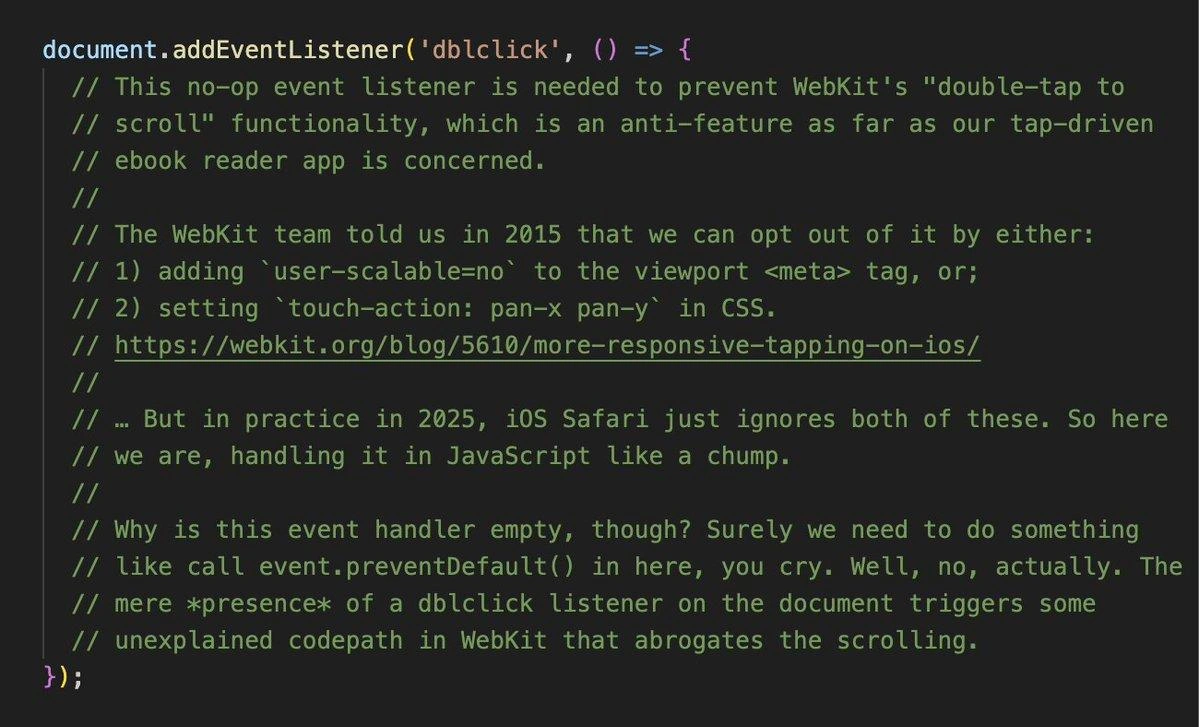
And it truly is a no-op. The code boils down to attaching an empty event handler for 'dblclick':
document.addEventListener('dblclick', () => {
// deliberately doing nothing here
});
This no-op event listener exists for one reason: to exploit a hidden Safari/WebKit behavior. Although the handler does absolutely nothing, its mere presence disables Safari’s default double-tap scroll/zoom. In other words, Safari sees that the page is “listening” for double taps and decides, “Okay, the page will handle this, I won't.” We don’t even call preventDefault() inside the handler! We don’t need to. The act of saying “Hey browser, I got this event (wink wink)” triggers some mysterious internal logic in WebKit that aborts the usual scroll-before-you-can-blink.
“…But in practice in 2025, iOS Safari just ignores both of these. So here we are, handling it in JavaScript like a chump.”
That comment from the meme perfectly encapsulates the DeveloperFrustration. The team tried to do things the right way (tags, CSS flags) but ended up feeling foolish applying a hacky_js_fix. It’s a mix of bitter annoyance and dark humor familiar to any senior dev who’s battled a vendor bug. We’ve all been that “chump” writing code that shouldn’t be necessary, solely to placate a particular browser (looking at you, Safari 🧐). This is all too common in WebDevelopment: one browser (often Apple’s) ignores standards or lags on support, and we implement an absurd workaround at 3 AM to keep our app polished.
The humor works on multiple levels. First, there’s irony in defeating a Safari bug with “nothing” – an empty function. It’s like disarming a bomb by pressing a dummy button. Seasoned developers recognize this pattern: sometimes the simplest, silliest tweak can sidestep a complex problem buried in a browser’s internals. Second, the comment’s tone exudes senior-dev sarcasm. Phrases like “anti-feature” and “like a chump” show the jaded, battle-scarred mindset: of course the fancy solution didn’t work, of course we resorted to a cheap trick. It’s a coping mechanism, laughing so we don’t cry about FrontendPainPoints. And finally, there’s the shared pain: anyone who’s wrestled with mobile Safari’s eccentricities (from weird viewport behaviors to rigid App Store policies) will chuckle and groan in unison. This one meme rolls up years of cumulative "Safari strikes again" fatigue into a single green block-comment of glory.
In summary, at the senior level we see the full tragicomedy: Apple’s browser promised a feature toggle, didn’t deliver, and a developer did literally nothing (on purpose) to fix it. It’s a triumphant and embarrassing moment – triumphant because the BrowserCompatibility issue is resolved, embarrassing because of how it had to be resolved. The Frontend world moves fast, but apparently not fast enough to outrun a 10-year-old safari_vendor_bug. This epic no-op listener is now immortalized as both a clever hack and a cautionary tale: in web dev, even doing nothing can be a stroke of genius when you do it in just the right way. 🏆
Description
A screenshot of a JavaScript code snippet within a dark-themed code editor. The code itself is a simple, empty event listener: `document.addEventListener('dblclick', () => {});`. The value of the image lies in the extensive, multi-line comments that precede and explain this seemingly useless line of code. The comments narrate a classic developer struggle: trying to disable WebKit's 'double-tap to scroll' feature for an ebook reader app. The author explains that the official solutions suggested by the WebKit team in 2015 - using a meta tag (`user-scalable=no`) or CSS (`touch-action`) - are now ignored by iOS Safari in 2025. The final, desperate solution is the empty event listener. The most revealing comment explains that the mere *presence* of this listener, without any code inside it, triggers an 'unexplained codepath in WebKit' that disables the unwanted scrolling. This is a perfect encapsulation of the esoteric, often frustrating, world of frontend development, where engineers must rely on bizarre workarounds and undocumented behavior to fix browser-specific quirks

Comments
21Comment deleted
This isn't code; it's a carefully placed load-bearing comment that prevents the entire rendering engine from collapsing. Remove it, and the browser's architect will personally visit you in a dream to ask why
Nothing like shipping an entire production build just to register an empty listener - because apparently WebKit still responds better to cargo-cult JavaScript than its own 2015 blog post
After 20 years in this industry, I've learned that the half-life of a WebKit workaround is approximately infinity - which coincidentally matches the time it takes for Safari to implement a web standard that Chrome shipped five years ago
Ah yes, the classic 'empty event listener as a browser exorcism ritual' pattern. When the WebKit team's 2015 guidance ages like milk and Safari decides meta tags are merely suggestions, you're left conjuring phantom event handlers to appease the rendering engine gods. It's the software equivalent of leaving out cookies for Santa - technically doing nothing, but somehow the mere gesture prevents chaos. Ten years of 'standards-based development' distilled into a no-op function and a comment that screams 'I've seen things you people wouldn't believe.' This is what peak cross-browser compatibility looks like: not elegant solutions, but archaeological layers of workarounds, each one a monument to a browser vendor's creative interpretation of 'deprecated.'
We’ve reached the part of web standards where the fix is code that doesn’t run - because on iOS, an empty lambda outranks a decade-old spec
Mobile web in 2025: you disable double-tap scroll by registering an empty dblclick handler that flips a secret boolean in WebKit - feature flags by folklore, not by spec
WebKit fixes? Ignored. Official APIs? Shrugged off. Welcome to iOS web dev: no-op listeners as the new gold standard
Apple is very dev friendly ❤️ Comment deleted
shit like this is why all types of safari are very much unsupported for the websites I make Comment deleted
Recently I was working with svg stroke-dashoffset and on review we discovered that Safari doesn't support negative values there while all other browsers do since 10 yrs ago. Fortunately I was able to move it 2x forward to then move back within the positive range... Comment deleted
oh, don't get me started on SVG parsers and renderers Comment deleted
Don't even fucking get me started on height: intrinsic or the fact that Safari still doesn't support canvas context filters Comment deleted
What? It doesn't?? Oh hell no Comment deleted
Safari ignores all stylings for certain elements like <button> and <input> and ALSO there’s a whitelist on fonts for some fucking reason Comment deleted
hell no 😭 Comment deleted
the hell is height: intrinsic Comment deleted
exactly! Comment deleted
The new IE Comment deleted
WebKit is such a pain in the ass, but the comments are correct. Having it defined overrides the default functionality. Comment deleted
LITERALLY WHAT SAFARI DEVELOPMENT IS ABOUT 80% OF THE TIMES Comment deleted
Safari is the new IE6 Comment deleted