A Multi-Layered CSS Pun on 'Weird Flex But Ok'
Why is this Frontend meme funny?
Level 1: Weird Flex but Ok
Imagine you have a row of toy blocks labeled 1, 2, 3, and you ask your friend to arrange them in the opposite order (so it should read 3, 2, 1). Instead of moving each block one by one, your friend picks up the entire row of blocks and flips it around in one go. Now the order is reversed, even though they used a funny method! You might laugh and say, "Ha, that's a weird way to do it, but hey, it worked."
This meme is silly in the same way. The developers had a task: put a list in reverse order. One developer did it with a very unexpected trick. He didn’t rewrite the list or do the usual step-by-step solution – he used a styling trick (like a visual flip) on the webpage to make the list appear backwards. It’s as if he found a goofy shortcut to solve the puzzle. Everyone found it both clever and funny that he was kind of “showing off” such an odd solution. In everyday terms, it was a weird thing to brag about, but it solved the problem, so everyone said, "weird flex, but ok."
Level 2: Flexbox Flip
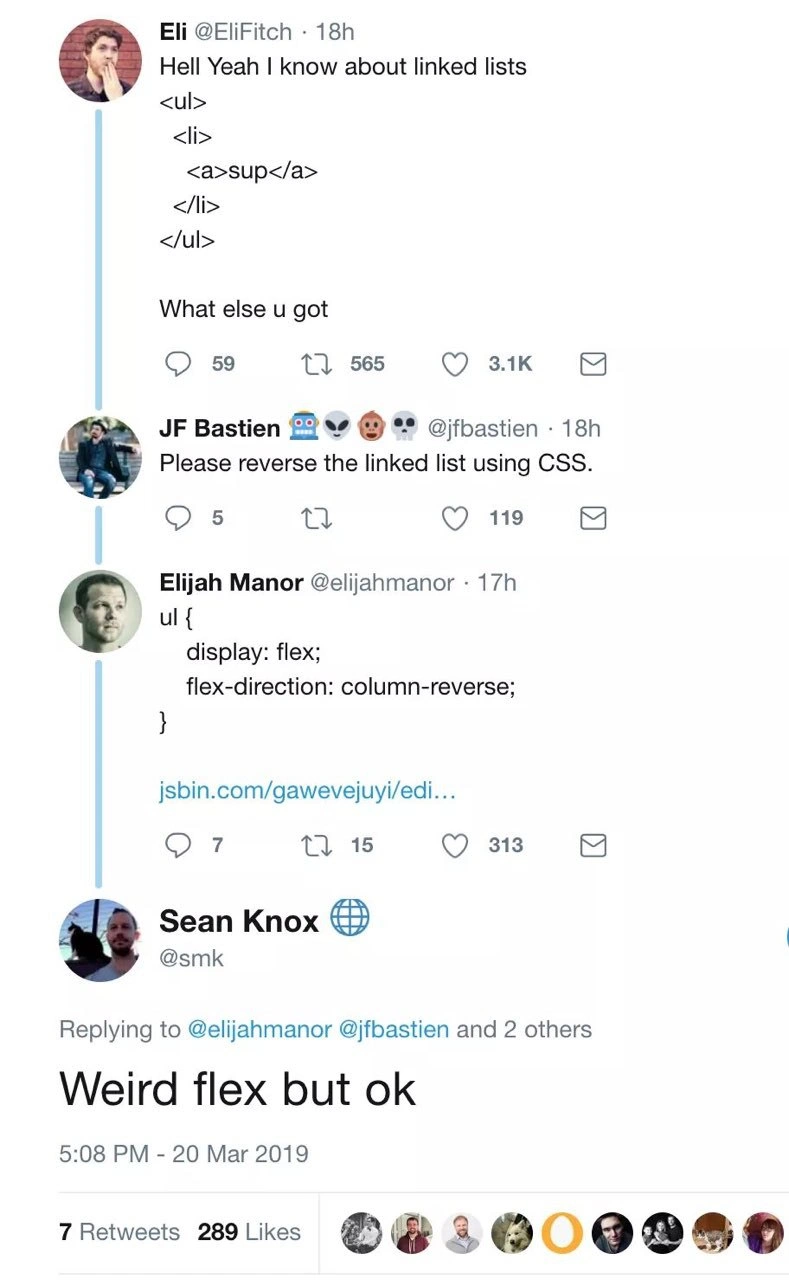
Let’s break down the joke in simpler terms. The meme is a screenshot of a funny Twitter thread between developers. The first person says, essentially, “I totally know what a linked list is,” but instead of proving it with actual computer science, he shows some HTML code:
<ul>
<li><a>sup</a></li>
</ul>
In HTML, <ul> creates an unordered list (a bullet-point list on a webpage) and <li> is a list item. He’s basically writing a little list that says “sup” as an item. By doing this, he’s jokingly equating the term “linked list” with an HTML list. It’s a pun because a linked list in programming is something completely different – a data structure where each item links to the next one in memory (like a chain of nodes). But he pretends that just knowing <ul><li> tags (basic web dev stuff) means he’s mastered linked lists. It’s silly on purpose.
Then comes the response: “Please reverse the linked list using CSS.” Now, normally if someone says “reverse a linked list,” they’re talking about that programming challenge where you take a chain of nodes and reverse their order. It’s a task you’d do with code, often asked in technical interviews to see if you understand pointers or data structures. But here, because we’re in HTML/CSS land, reversing “the linked list” is interpreted as reversing that HTML list on the webpage. And the request says to do it with CSS (Cascading Style Sheets), which is the language used to style HTML elements (like changing colors, layout, etc.). This is a quirky ask because CSS isn’t a programming language for logic – it can’t loop through items or swap them like an algorithm would. However, CSS does have layout tricks, and this is where CSS Flexbox comes in.
Flexbox is a modern CSS layout module that makes it easy to arrange elements in rows or columns and even change their order. One handy feature is that you can display a list of elements in reverse order without editing the HTML, just by using a CSS rule. The third person in the thread provides a solution in code form:
ul {
display: flex;
flex-direction: column-reverse; /* flips the visual order of list items */
}
What does this do? The display: flex; turns the <ul> into a flex container, and its list items become flex items. By default, flex containers arrange items in a row, but here we explicitly set flex-direction: column-reverse;. “Column-reverse” means stack the items as a column (vertical list) but start from the bottom. So if the HTML was:
<ul>
<li>First item</li>
<li>Second item</li>
<li>Third item</li>
</ul>
Normally, it would show up exactly in that order (First item at top, Third item last). With the CSS above applied, the browser will render it so that "Third item" appears at the top and "First item" at the bottom – effectively reversing the list visually. No JavaScript, no manual rearranging – just a CSS style flips it. It’s a nifty front-end trick to reverse the display order of an HTML list. So, in the context of the joke, the challenge “reverse the linked list using CSS” got answered literally and correctly in terms of webpage appearance. The list on screen is now reversed, which is a hilarious way to “solve” what would normally be an algorithm problem.
Finally, the fourth person replies with the line “Weird flex but ok.” This is a popular internet meme phrase that translates to, “Strange boast, but alright.” It’s what you’d say when someone shows off or does something unusual and you’re playfully acknowledging it. Here, it’s the perfect witty response because the person did show off a weird trick using Flexbox (notice the word flex here). They basically bragged “I can reverse a list with just CSS!” which is not something you’re usually asked to do. So “weird flex but ok” is commenting on that odd boast and simultaneously making a pun on the word “flex.” In tech terms: Yes, you weirdly used CSS Flexbox to brag-solve a coding problem, but hey, it worked.
In summary, this meme thread is mixing a classic coding interview question (reversing a data structure) with web development know-how (HTML lists and CSS layout). It’s funny because the solution is so literal and out-of-the-box. A linked list reversal in a coding interview would normally involve writing actual code to rearrange pointers, but these folks jokingly “solved” it at the webpage level with styles. For a junior developer or a student, the takeaway humor is in understanding both sides: what a linked list usually means in programming, and how an HTML/CSS trick was used in place of an algorithm. It’s a great example of developer humor where knowing a bit about both worlds (computer science and front-end web dev) makes the joke click.
Level 3: Flexing Linked Lists
This multi-layered joke merges CS fundamentals with frontend cleverness. It starts with a developer bragging, “Hell yeah I know about linked lists,” but instead of a real data structure, he literally writes out an HTML list using <ul><li> tags. In web development, <ul> creates an unordered list on a page, and <li> defines each list item. By dropping this snippet in a tweet, the dev is cheekily conflating a linked list (the computer science data structure) with an HTML list – he’s flexing his HTML skills as if that proves he knows linked lists. It’s a playful bait: any seasoned programmer knows an HTML list isn’t what interviewers mean by a linked list, so right off the bat we have an ironic twist.
Another developer in the thread ups the ante: “Please reverse the linked list using CSS.” This is a absurd challenge if you think in terms of real algorithms – reversing a linked list is a classic coding interview task that usually involves pointer manipulation in a language like C or Java. It’s definitely not something you’d normally do with CSS, which is meant for styling websites. But here, the term “linked list” has been reframed to mean the HTML <ul> list. So a clever front-end dev responds with a one-liner CSS Flexbox solution: he sets the list to display: flex and uses flex-direction: column-reverse. In a webpage, Flexbox is a layout system that can reorder elements without changing the HTML. Setting flex-direction: column-reverse on the <ul> will reverse the visual order of its <li> items. In effect, he did “reverse the linked list” as asked – not by rewriting any algorithm or touching the data, but by flipping how the list is displayed in the browser. It’s a brilliant literal take on the request, using pure CSS wizardry to achieve what sounds like a coding task. Seasoned devs appreciate this because it’s both a practical CSS trick and a tongue-in-cheek way to subvert the expected solution.
The punchline tying it all together is the final reply: “Weird flex but ok.” This was a popular meme phrase at the time, used to humorously acknowledge when someone brags or shows off in an odd way (“weird brag, but alright”). In our context, it’s the perfect pun. Flex is not only slang for a show-off, but also references CSS Flexbox. By saying “weird flex but ok,” the responder acknowledges the bizarre, crafty use of Flexbox to solve the problem. It’s like saying, “Alright, strange way to flaunt your skills, but it works!” This double meaning makes developers grin: the whole Twitter thread managed to turn an algorithmic challenge into a front-end inside joke. It pokes fun at coding interview culture (where reversing a linked list is a common gotcha question) and shows off real web dev skills at the same time. In the end, the meme is celebrating a creative tech pun: using an unexpected tool for the task and nailing the solution both technically and comically. It’s the kind of witty, nerdy humor that both web developers and computer science folks can chuckle at together.
Description
This image is a screenshot of a humorous Twitter thread between several developers. The first tweet, by Eli, confidently claims to know about 'linked lists' and provides a simple HTML `<ul><li><a>sup</a></li></ul>` snippet as proof. A second user, JF Bastien, sarcastically challenges him to 'Please reverse the linked list using CSS.' In a clever response, Elijah Manor provides the CSS code `ul { display: flex; flex-direction: column-reverse; }`, which visually reverses the order of the list items. The final tweet, from Sean Knox, delivers the punchline: 'Weird flex but ok'. The humor is multi-layered: it starts with the incorrect conflation of an HTML list with a computer science linked list, moves to an absurd technical challenge, is met with a surprisingly effective and witty CSS solution, and culminates in a perfect pun. The phrase 'weird flex' refers both to the strange boast and the use of the CSS `display: flex` property, making it a sophisticated joke that requires knowledge of CS fundamentals, frontend development, and internet slang
Comments
7Comment deleted
Backend interviews: 'Reverse a linked list in place.' Frontend interviews: 'Can you reverse the visual order of these divs without touching the DOM?' Both get solved, but only one of them ends with a perfect pun
One line of CSS: flex-direction: column-reverse; - suddenly the linked-list reversal is O(1) for the dev, O(n) reflow for the browser, and infinite cache invalidation for every CS purist in the room
The best part about using flexbox to reverse a linked list is that it has the same time complexity as the whiteboard interview solution, but with infinitely more browser compatibility issues
When your interviewer asks you to reverse a linked list in O(n) time and O(1) space, but you're a frontend engineer who knows that CSS flexbox can reverse visual order without touching the DOM - technically correct, the best kind of correct. Bonus points: it's declarative, works in IE11 (with prefixes), and the 'Weird flex but ok' response is both a cultural reference and an accurate technical description of the solution
Only in frontend can you reverse a “linked list” in O(1) with flex-direction: column-reverse - looks perfect until keyboard navigation proves you only reversed the rendering, not the DOM
Reversing a linked list with flex-direction: column-reverse - constant-time code change, linear-time confusion when tab order, a11y, and event handlers still walk head→tail
Forget O(n) traversal and recursion - flexbox reversal is pure O(1) declarative dominance