The Sweet, Painful Relief of an Expected Error
Why is this Debugging Troubleshooting meme funny?
Level 1: The Right Kind of Wrong
Have you ever been trying to solve a puzzle or fix something, and even though it’s still broken, you suddenly get a sign that you guessed the problem correctly? It’s a funny feeling, right? That’s what’s happening in this meme. It’s like if your toy car isn’t working and you think, “Maybe the batteries are dead.” You keep trying and trying, and finally a little light on the toy shows a low battery warning. The car still isn’t running, but you smile because now you know why – you were right about the batteries! In the same way, the programmer in the picture is happy because his computer program is giving an error message that he expected to see. It’s still an error (so the program isn’t fixed yet), but it’s the right error – the one that tells him he was on the correct track. It’s a bit like being lost and then recognizing a landmark: you’re not at your destination yet, but you’re relieved because now you know you’re going the right way. That little smile with the coffee cup is the developer feeling “Okay, it’s not working, but at least I’m not confused anymore!” It shows how even something wrong can feel right when it finally makes sense.
Level 2: Debugging Milestone
When programmers talk about debugging, they mean the process of finding and fixing mistakes (bugs) in code. In this meme’s scenario, a developer has been troubleshooting a stubborn problem for a long time (think of a bug that just wouldn’t reveal itself). The app kept showing an error or misbehaving, but initially the error made no sense or wasn’t helpful. Maybe it was just a generic RuntimeError or a crash without a clear message. This is incredibly frustrating (we often call it “Debugging Hell” when you’re stuck like that).
Now, after lots of effort, the developer finally sees a specific error message pop up – and it’s one they expected to see. This means the developer had a theory about what the problem was. For example, suppose the app was crashing and the developer suspected, “I bet it’s because the user’s name is blank causing a failure.” They then make changes or add tests to check that. Finally the app gives an error message like “Username cannot be empty.” Eureka! The app is still broken, but the error message confirms the developer’s guess. This moment is a huge relief and oddly satisfying because it’s proof they were on the right track. It’s a debugging milestone: the bug is now understood well enough that the software is telling us exactly what’s wrong in plain terms.
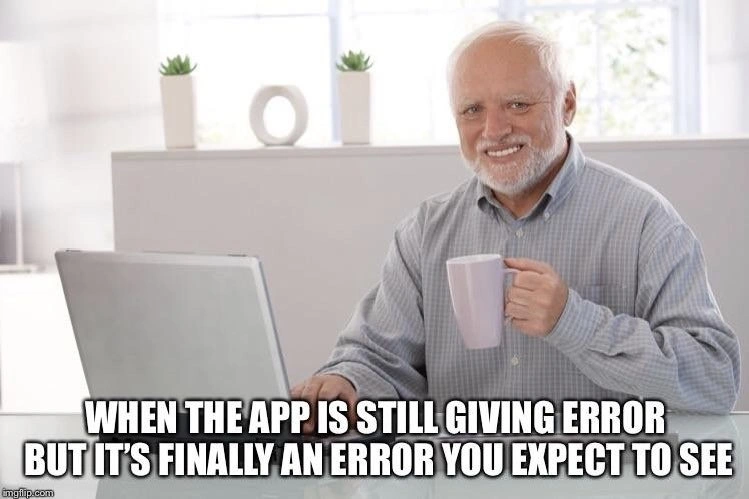
Let’s break down the meme image and text. The picture shows an older man smiling at his laptop, holding a coffee mug. This man is actually a famous meme character nicknamed “Hide the Pain Harold.” He often appears in memes where someone is enduring something uncomfortable with a smile. In this context, he represents a developer who has been suffering through a tough bug but is smiling because at least things are making sense now. The caption text on the meme says: “WHEN THE APP IS STILL GIVING ERROR BUT IT’S FINALLY AN ERROR YOU EXPECT TO SEE.” In normal words: “my program is still showing an error, but finally it’s an error that I predicted would happen.” That text is in big bold Impact font – the classic style for meme captions – to emphasize the feeling of emphasis and relief. The combination of Harold’s relieved smile and the caption tells a mini-story all developers recognize. It’s essentially saying: Even though my program hasn’t started working yet, I’m happy because now it’s failing in a way I understand.
Why is this a big deal? In programming, an unexpected error is scary because you have no idea what went wrong. It’s like your code is ill and you don’t know why. An expected error, however, is like a diagnosed illness – you know what’s causing the symptoms. When the app throws an expected error, it usually means the developer inserted some code or check that specifically looks out for the problem. Error handling is the practice of anticipating possible things that can go wrong (like missing data, invalid input, or network issues) and coding how the program should respond. A good error handling system might throw a clear error message like “File not found: config.yaml” instead of just crashing silently or giving a useless message. If a developer suspects a certain bug, they might temporarily add extra logging or conditions to force the program to report that situation clearly. So when they finally see their expected message, it’s proof they caught the right culprit.
For a junior developer (or anyone new), think of it this way: Have you ever had a program crash and show a pop-up or red text that you didn’t understand? That’s an unexpected error. You then search online or investigate why it might be happening. After some time, you find the likely cause. Then you run the program again under those conditions and boom – it errors out exactly with the message or at the line you thought it would. You’d actually feel a bit happy at that moment. Yes, the program is still not doing what it should, but now you know exactly what to fix. This progress can greatly improve Developer Productivity because instead of guessing, you can focus on the confirmed issue. Every developer lives for those “Aha!” moments, and weirdly, seeing a familiar error message can be one of them. It’s a sign that you’ve successfully reproduced the bug. In bug-fixing, being able to reproduce (or consistently cause) the error is half the battle, because now you can experiment with solutions and be confident you’re actually targeting the right problem.
In the background of the image, the setting is very calm and clean – a neat white desk, some small green plants, a simple decoration. This clean setting contrasts with the intense mental mess that debugging can be. It’s kind of ironic: the environment looks peaceful, and finally the developer’s mind is a bit more peaceful too because the error message brings clarity. The coffee mug in his hand suggests he’s probably been at this awhile (likely needing caffeine!) and now can finally enjoy a sip in satisfaction. It’s common developer humor to exaggerate how even an error (which normally is bad) can feel like a win. We laugh at this because it’s so true: only in programming do we rejoice when we see red error text on our screen – if it’s the right red error text. This means things are making sense, and we’re close to a solution. It’s a moment of expected error relief.
Level 3: Failing as Intended
WHEN THE APP IS STILL GIVING ERROR BUT IT’S FINALLY AN ERROR YOU EXPECT TO SEE.
This meme nails a bittersweet rite of passage in debugging. The developer (represented by the smiling older gentleman, a.k.a. “Hide the Pain Harold” in meme lore) has been wrestling the code for hours. The application is still broken – it’s throwing an error – but there’s a twist: the error message is finally one that makes sense. In other words, the failure now aligns with the developer’s mental model of the bug. For seasoned engineers, this moment is a weird triumph. Only in programming do we cheer for a crash that confirms our hypothesis! It’s a sign that we’ve corralled the chaos into something we understand.
On a technical level, what’s likely happened is the dev has gone from a vague, uninformative failure to a specific, known error. Perhaps initially the app was misbehaving with no logs or a cryptic code (ERROR 0x80004005, anyone?). After painstaking troubleshooting, adding some logging and sanity checks, the app now reports, say, ValueError: Username cannot be empty. This is progress: the bug is no longer a mysterious ghost floating around; it’s a concrete problem that the code acknowledges. In debugging terms, we’ve turned a Heisenbug (a bug that seems to vanish or change when you probe it) into a Bohrbug (a solid, repeatable bug) that we can study. The program’s state has become finally consistent with our expectations – analogous to a distributed system reaching eventual consistency. The error is expected and reproducible. We’ve effectively cornered the bug in a known spot.
The humor here comes from that debugging frustration flip: you’re relieved to see a failure. It’s like celebrating that your car won’t start because you correctly suspected the battery was dead. In coding, an “expected error” means your code’s error handling or your understanding of the code’s behavior has caught up to the actual problem. The bottom caption text captures this perfectly – the app is still broken, but now it’s broken the way you anticipated. Every experienced developer has felt this: after slogging through DebuggingHell, even a scary stack trace can bring a smile if it tells you exactly what you hoped to see. It validates that your last fix or test was on the right track. In terms of DeveloperExperience (DX), a clear, anticipated error message is gold – it’s telling you “You found the spot! Here’s the issue.” No more chasing phantom issues that only occur on the production server at midnight. Instead, you’ve got a successfully reproduced bug sitting right in your development environment throwing the same error every time. Glorious!
This scenario also hints at best practices and their absence. Ideally, our code should fail loudly and predictably with good ErrorMessages when something’s wrong. But real life often gives us unhelpful errors or no errors at all (just weird app behavior) due to missing logs, swallowed exceptions, or poor ErrorHandling. So developers add print statements, breakpoints, or extra checks to narrow things down. That expected error relief in the meme is the direct result of adding those efforts – like turning on a light in a dark room. It’s oddly satisfying because it means the bugs in software are finally under your spotlight. You’re no longer in the dark.
From an organizational perspective, there’s an unwritten shared knowledge here. Teams know that feeling when someone announces, “I can finally reproduce the bug consistently and it's throwing the error we thought it would.” High fives ensue – not because the bug is fixed yet, but because now we understand it. It’s a milestone in Debugging_Troubleshooting: the problem went from “non-deterministic nightmare” to “deterministic and diagnosable.” In complex systems, especially in production, you might spend hours (or an entire on-call night) just trying to make the error happen in a controlled way. When you at last see that expected error message in the logs, it’s like a green light (or rather a red error text) that you’re headed in the right direction. The developer in the meme holding his coffee with a satisfied grin? That’s the triumphant late-night coder sipping victory coffee because the code finally failed usefully.
And let’s not ignore the meta-joke: the image is the famous “Harold” stock photo who usually hides pain behind a smile. Here, Harold’s cheerful yet slightly strained grin embodies a developer’s mixed feelings – still stressed that the app is erroring, but so happy that it’s the right error. It’s the face of “I’m in pain, but this particular pain means I’ve made progress”. That’s pure DeveloperHumor – finding joy in what outsiders would see as defeat. In short, the meme humorously celebrates a debugging milestone: things are broken, but no longer mysteriously broken. Now you can actually fix the darn thing. 🎉
// Before: the app fails mysteriously with no useful info
try {
launchApp(); // Something within crashes
} catch (e) {
console.error("Unknown error occurred:", e.code);
// e.code was some baffling hex like 0x80004005
}
// ... many frustrating hours later ...
// After: dev adds a specific check to throw an expected error
if (!user.username) {
throw new Error("Username cannot be empty"); // The expected error
}
// Now, when launchApp() runs, it throws "Username cannot be empty"
// which is exactly what the developer predicted would go wrong.
Description
The image utilizes the popular 'Hide the Pain Harold' meme format. It features an elderly man with a white beard and hair, sitting in front of a laptop while holding a mug. He is smiling for the camera, but his eyes betray a sense of deep pain, stress, and weariness - a forced, unnatural smile. White text with a black outline is superimposed over the bottom of the image, reading: 'WHEN THE APP IS STILL GIVING ERROR BUT IT'S FINALLY AN ERROR YOU EXPECT TO SEE'. This meme perfectly encapsulates a specific, crucial milestone in the software debugging process. It highlights the grim satisfaction a developer feels when they move past bizarre, cryptic, or cascading failures and finally encounter a predictable error. This 'expected' error, while still a problem, signifies that the underlying chaos has been resolved and they are now on the right track. For senior engineers, Harold's pained smile is a deeply relatable expression of relief mixed with the exhaustion of a long troubleshooting session
Comments
14Comment deleted
Debugging is the five stages of grief, but the 'acceptance' stage is just finally getting the error message the README file warned you about
Introducing MTTE: Mean Time to Expected Exception - because in microservice purgatory, the first milestone is getting the failures to at least RSVP
After 20 years in the industry, you realize the most dangerous error isn't the one screaming in your logs - it's the silent corruption that's been shipping to production for six months while your monitoring dashboard shows all green checkmarks
Ah yes, the sweet relief when your application finally throws a NullPointerException instead of that mysterious 'Error: undefined is not a function at <anonymous>' that's been haunting your dreams. It's like debugging archaeology - you dig through layers of abstraction until you hit bedrock: a good old-fashioned error you can actually Google. At this point in your career, you've learned that the real victory isn't fixing the bug immediately; it's getting the system to fail in a way that makes sense. Because nothing says 'progress' quite like replacing 'something went wrong' with a proper stack trace pointing to line 247 where you forgot to check if that API response was null. Again
The app still fails, but it’s the one in the runbook - finally a failure mode you can put an SLO around
Finally, an error whose Stack Overflow answer you upvoted years ago - progress in prod
Progress is when ECONNRESET graduates to InvalidDomainStateError - you’ve moved from physics to software and can finally write the failing test
but you have no idea how to fix it Comment deleted
🥲 Comment deleted
And the last person who had seen this bug is a guy on a forum whose last seen online is 10 years ago Comment deleted
And it's person who were working on same project in same company during it's early days🤪 Comment deleted
And this person finished the post with the line: "UPD: nvm fixed it" without explaining how it was actually fixed. Comment deleted
And he lied Comment deleted
Just comment the code bro 😉 Comment deleted