Web Devs Meet the Harsh Reality of Low-Level Graphics APIs
Why is this Graphics meme funny?
Level 1: Sledgehammer for a Fly
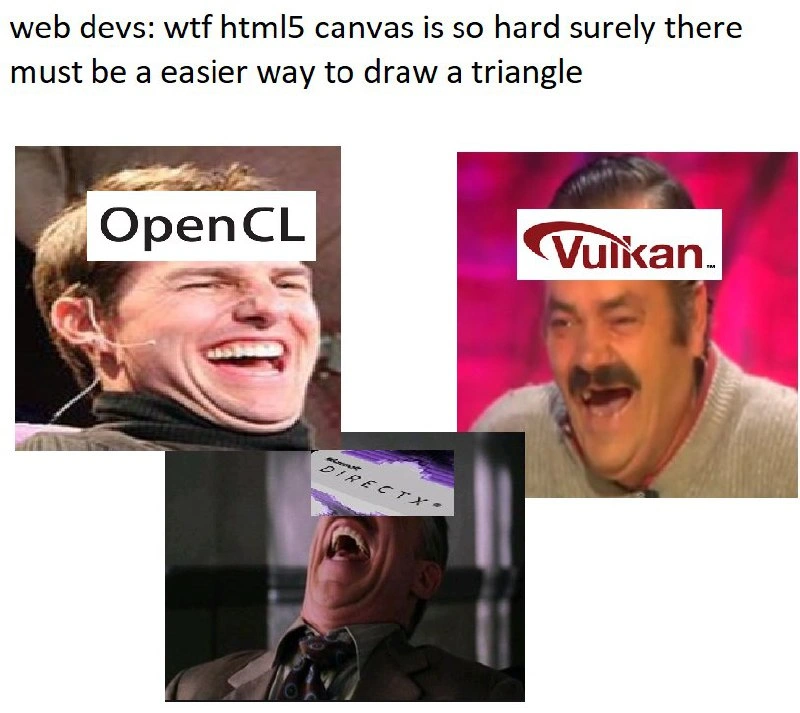
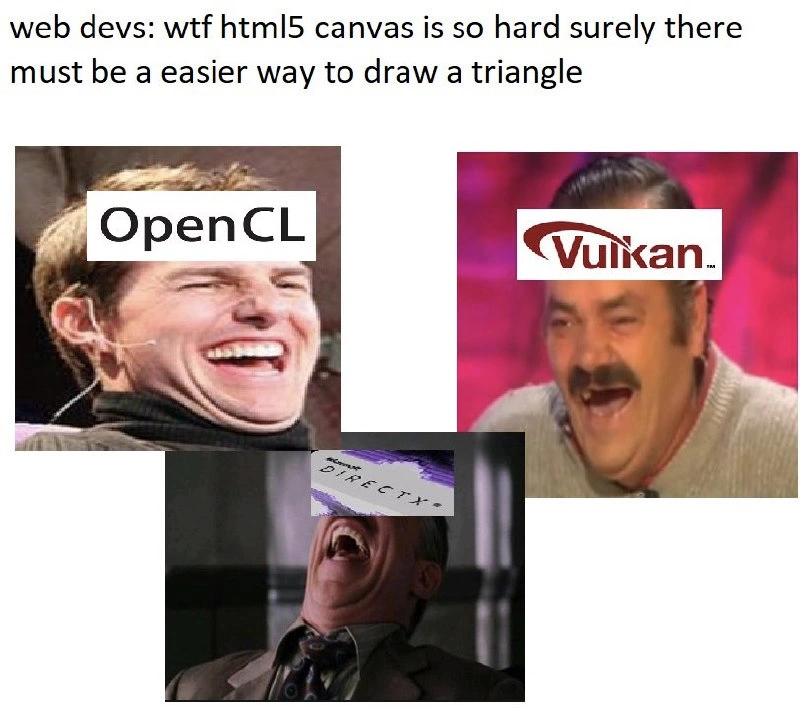
Imagine you’re learning to draw a little triangle with a crayon, and you say, “Ugh, this crayon is so hard to use, isn’t there an easier way to make this triangle?” Now, instead of giving you a marker or a triangle stamp, your friend jokingly suggests, “Hey, why not use a giant industrial painting machine, or better yet, a rocket-powered laser system to draw it?” You’d probably look at them like, “That’s crazy, those are way more complicated!” and that’s exactly why it’s funny. In this meme, the web developer finds a simple drawing tool (the crayon, which is the HTML5 Canvas) a bit hard, and someone jokingly points them to tools that are like massive machines (OpenGL, Vulkan, DirectX) – which would make the task even harder. It’s like complaining that catching a small bug is hard, so someone hands you a full NASA space suit and says, “Try this instead!” The over-the-top suggestion makes us laugh because it’s so overkill. The big laughing faces labeled with those fancy tool names are basically those tools going, “Hehehe, you think that was hard? Wait till you try us!” In simple terms: the meme is funny because it teases the idea of using a ridiculously complex solution for a very basic problem, which is a silly thing to do. It reminds us of using a huge sledgehammer to swat a tiny fly – sure, you could try, but it’s clearly not the “easier” way!
Level 2: Canvas and Beyond
Let’s break down the components of this joke and the technologies involved. HTML5 Canvas is a feature in web development that provides a rectangular area on a web page where you can draw shapes, text, images, and more with JavaScript. Think of it as a digital art canvas: you get a 2D drawing context (CanvasRenderingContext2D) and you can issue drawing commands – like move the pen to these coordinates, draw a line, fill a triangle shape with color, etc. Many beginners in WebDevelopment try Canvas for making simple graphics or games in the browser. Now, the meme starts with web developers saying essentially: “WTF, HTML5 Canvas is so hard. Surely there must be an easier way to draw a triangle.” This captures a common feeling when first learning Canvas – you have to manage coordinates, understand a bit of math for positioning, and handle the canvas state (like pen color, fill style) all through code. It can indeed feel a bit low-level for someone used to, say, dragging and dropping elements or using HTML/CSS for layout. So these web devs are hoping for a more straightforward solution to draw a triangle on the screen.
Enter the punchline: suggestions of OpenGL, Vulkan, and DirectX. Here’s what those are in simpler terms:
- OpenGL: Stands for Open Graphics Library. It’s essentially a GraphicsProgramming interface used mostly in applications like video games or simulations. OpenGL lets programmers talk to the computer’s graphics card using code, to draw complex 2D and 3D scenes. It’s much older and more complex than Canvas – typically used with languages like C or C++ outside of the browser. (On the web, a related technology called WebGL exists, which is like a cousin of OpenGL adapted for JavaScript.) To draw a triangle with OpenGL, a developer has to write quite a bit of setup code: define the triangle’s vertices (points in 2D/3D space), send them to the GPU, and then define how to fill it in (using shaders). So it’s powerful but definitely not simpler if you’re just trying to draw a basic shape.
- Vulkan: This is a newer graphics API (released around 2016) that is even more low-level than modern OpenGL. If OpenGL is like driving a manual sports car, Vulkan is like assembling the car engine before you drive – it gives you tremendous control over the GPU and can be more efficient, but it expects you (the programmer) to handle everything carefully. Vulkan was designed for expert developers who need to squeeze out maximum performance (for example, in high-end games or 3D engines). A running joke among developers is how complicated “Hello Triangle” (the simplest program to draw a triangle) is in Vulkan. It’s notoriously verbose and detail-oriented, involving setting up a lot of objects and connections. In short: Vulkan is not beginner-friendly – it’s actually considered quite hard to learn. So suggesting Vulkan as an “easier way” to draw something is intentionally absurd.
- DirectX: This is actually a collection of multimedia APIs from Microsoft. In the context of graphics, people usually mean Direct3D, the part of DirectX used for rendering 3D graphics (and 2D, if you want) on Windows systems. It’s Microsoft’s proprietary alternative to OpenGL. Many PC games use DirectX (Direct3D) to talk to the GPU. DirectX has gone through many versions; the latest versions, like DirectX 12, have a lot in common with Vulkan in terms of requiring the programmer to handle more details, whereas older DirectX (9, 10, 11) were a bit more automated (but still a lot more involved than drawing on a Canvas!). If you were to draw a triangle with DirectX, you’d similarly have to create a device interface, define vertex data, set up a render target, and so on. It’s a hefty task compared to the simplicity of a few Canvas drawing calls.
Now, the meme uses a common reaction image format: three images of people laughing uproariously, each labeled with one of these technologies (“OpenGL,” “Vulkan,” “DirectX”). This visual gag implies that these technologies find the idea of them being easier extremely funny. Essentially, the meme is anthropomorphizing the graphics APIs – picturing them as if they were people who heard the web dev’s complaint and are now laughing out loud at the suggestion that they would be the simpler choice. It’s like the APIs themselves are saying, “Haha, oh you sweet summer child, you have no idea what hard is until you’ve tried us!”
Why is this funny to folks in Frontend or graphics development? Because anyone who has dabbled in these “beyond Canvas” technologies knows they are leaps and bounds more complex. FrontendHumor often highlights these kinds of contrasts. On the web, drawing a triangle might involve at most a few lines of high-level code or perhaps using an <svg> element. But if someone naïvely thinks Canvas is too much work and asks for an easier path, giving them the names of heavy-duty graphics APIs is a tongue-in-cheek way of saying, “The thing you’re complaining about is actually the easy part, you just don’t know it.” It’s a bit of an inside joke among developers: the tools built for hardcore game development are absolutely overkill for a simple web graphic.
It also touches on the idea of overengineering or using a sledgehammer to crack a nut. Instead of finding a modest solution (like maybe using an SVG or a small library to simplify Canvas drawing), the suggestions jump to industrial-grade solutions. If this were a real discussion, a helpful suggestion might be “use a simpler canvas drawing library” or “use SVG for a triangle.” But by instead naming OpenGL, Vulkan, and DirectX, the meme exaggerates to make the point: those are far from easier.
So in summary, for a junior developer or someone new to these terms:
- The meme compares HTML5 Canvas (a web tool that’s already fairly low-level for drawing on a page) with OpenGL/Vulkan/DirectX (much more complex graphics systems usually used in professional game development or graphics-heavy applications).
- The web dev in the meme wants an easier way to draw a triangle, but the joke is that the “alternative” suggestions are ridiculously more complicated.
- The images of laughing people labeled as these technologies emphasize how laughable it is to think those would be simpler.
It’s a bit like a student complaining that elementary algebra is hard and someone responding, “Maybe you should try quantum physics instead?” – a playful way to put things in perspective.
Level 3: From Frying Pan to Fire
At a senior developer level, this meme gets a big knowing laugh because it captures a classic scenario: over-engineering as a punchline. The top caption sets the stage: a frustrated web developer complains that using HTML5 Canvas to draw a simple triangle is hard and wonders if there’s an easier method. The “punchline” is delivered by the images below, where OpenGL, Vulkan, and DirectX are personified as guys laughing hysterically. Why are they laughing? Because suggesting these technologies as an “easier way” to draw a triangle is hilariously ironic. Experienced developers recognize that Canvas – while it might have its awkward parts (manual coordinate handling, stateful drawing context, maybe not the sugar of CSS or SVG) – is already a high-level convenience. When a web dev grumbles “surely there must be an easier way,” the seasoned folks among us smirk, knowing that the obvious alternatives for drawing graphics are far more complex. It’s a case of “careful what you wish for.” The meme highlights a common rookie mindset: assuming that if one tool is giving you trouble, another fancier-sounding tool will magically solve the problem with less effort. The veterans know that often the opposite is true – more “powerful” tools usually demand more expertise. Here, OpenGL and its newer cousin Vulkan, along with Microsoft’s DirectX, are exactly those powerful but demanding tools. The humor is sharpened by the fact that these three technologies represent the de facto heavyweights of graphics programming. They are what game engines and 3D applications use under the hood. They are notorious for their steep learning curves: for instance, entire books and university courses are dedicated to teaching OpenGL from scratch. There are countless posts on developer forums titled “How do I draw a triangle in Vulkan?” with answers that run many pages long. Seasoned devs recall their own first time setting up an OpenGL context or debugging a blank screen in DirectX when a single subtle step was missed. In contrast, HTML5 Canvas is something a web developer can start drawing on in a few lines of JavaScript (ctx.moveTo(...); ctx.lineTo(...); ctx.fill();). We smile (or wince) at the memory of how much boilerplate code and graphics theory it took to achieve that same filled triangle with a low-level API. The meme’s three reaction images labeled “OpenGL,” “Vulkan,” and “DirectX” emphasize mockery through personification: it’s as if those APIs themselves are cracking up at the web dev’s innocent hope for an easier solution. Each image shows uproarious laughter, which mirrors how an experienced developer might playfully respond to the suggestion. It’s a shared joke in the dev community: “Oh, Canvas feels hard? Try doing it the hardcore way and you’ll come running back.” This speaks to a broader engineering truth: sometimes our tools feel clunky, but they’re often shielding us from the true complexity underneath. The meme also nods to the theme of over-engineering – the idea of bringing in an unnecessarily complex solution for a simple task. It pokes fun at that common advice one might see in online communities when someone struggles with a high-level tool: there’s always that one sarcastic responder who says, “Have you tried rewriting it in C++ with OpenGL? That’ll be easier.” Everyone in the room chuckles because they know that’s trading a flyswatter for a flamethrower. In summary, the senior-level insight is that the meme humorously contrasts the perceived difficulty of a high-level web API with the actual difficulty of low-level graphics APIs, using laughter to underscore just how much more daunting the “solution” is than the original problem. It resonates with any developer who has learned (the hard way) that sometimes the tools we find frustrating are paradise compared to the alternatives we think might be simpler.
Level 4: Triangles at the Metal
Deep down at the graphics hardware level, drawing even a simple shape like a triangle is a complex symphony of math and low-level operations. HTML5 Canvas abstracts most of this away, but OpenGL, Vulkan, and DirectX expose the raw reality of rendering pipelines. To draw a triangle with these low-level APIs, you must engage directly with the GPU pipeline: set up vertex buffers to hold the triangle’s corner points, compile shader programs to tell the GPU how to color in those pixels, and manage render state (like enabling a depth buffer, configuring the viewport, etc.). A seasoned graphics programmer knows the ritual of the “Hello Triangle” in these systems – an initiation involving hundreds of lines of code and careful coordination of dozens of API calls just to get one primitive shape on screen. For instance, a minimal Vulkan triangle program needs you to create a VkInstance, pick physical devices, create logical devices, allocate command buffers, and handle synchronization primitives. It’s a massive endeavor for something that, conceptually, is just three connected points filling in a color. The humor in the meme stems from this sheer disproportion: suggesting Vulkan or DirectX as an “easier” way to draw a triangle is like saying “If Canvas’s simple immediate drawing is too much, why not wrestle with vector math, GPU memory, and parallel pipelines instead?” Each of these systems (OpenGL, Vulkan, DirectX) operates at a far lower abstraction level than a web canvas. They were designed for expert-level control and performance – powering video games, CAD software, and VR – not for casual “just draw a shape” tasks. OpenGL (especially modern core-profile OpenGL) and Direct3D (the rendering part of DirectX) both require understanding the graphics pipeline stages (vertex processing, assembly, rasterization, fragment shading, etc.). Vulkan goes even deeper: it’s a more recent API designed to maximize performance by making the developer explicitly manage resources and concurrency that older APIs handle behind the scenes. This eliminates a lot of driver-handholding – and in exchange, the programmer must handle the complexity. The core joke is rooted in this high technical barrier: it highlights the almost absurd suggestion of using a much more complex, low-level graphics API to accomplish a trivial drawing task. It’s as if the very laws of graphics are laughing: there’s a well-known axiom in rendering – ultimately all drawn shapes are made of triangles at the GPU level. But just because triangles are fundamental doesn’t mean interfacing with them directly (via Vulkan or OpenGL) is simple. The meme’s deeper technical chuckle comes from the knowledge that graphics programming involves heavy linear algebra (matrix transformations for that triangle’s position and orientation), an understanding of coordinate systems (normalized device coordinates vs. pixel coordinates), and careful memory management – none of which a web developer expects when they drag a <canvas> onto a page. In short, the meme points out a truth of computer graphics: high-level abstractions like Canvas trade fine-grained control for ease of use, whereas the “easier way” sarcastically suggested – dropping down to OpenGL/Vulkan/DirectX – is actually abandoning the safety railing and parachuting straight into the nitty-gritty of GPU operations. It’s an exponential increase in complexity, akin to switching from riding a bicycle to piloting a fighter jet just to go to the corner store.
Description
The image is a multi-panel meme that contrasts the perceived difficulty of web development with the complexity of low-level graphics programming. At the top, a line of text reads, 'web devs: wtf html5 canvas is so hard surely there must be an easier way to draw a triangle'. Below this text are three separate, popular 'laughing hysterically' meme images, each with a technology logo superimposed on the person's face. On the left is Tom Cruise laughing, labeled 'OpenCL'. On the right is the 'Spanish Laughing Guy' (El Risitas), labeled 'Vulkan'. At the bottom is J. Jonah Jameson from Spider-Man, labeled 'DirectX'. The joke is aimed at experienced engineers who understand the vast difference in complexity. While HTML5 Canvas has its learning curve, drawing a triangle is a relatively straightforward task. In stark contrast, low-level APIs like Vulkan, DirectX, and OpenCL require hundreds, if not thousands, of lines of boilerplate code just to set up the rendering pipeline before a single triangle can be drawn. The meme hilariously frames these powerful but notoriously difficult APIs as laughing at the web developer's comparatively minor struggles
Comments
39Comment deleted
A web dev needs a library to draw a triangle. A graphics programmer needs a therapist after writing 1000 lines of Vulkan boilerplate to clear the screen to black
Canvas feels verbose? Just fire up Vulkan, allocate a swapchain and a few descriptor sets - because nothing says “simple triangle” like 500 lines of boilerplate and a SPIR-V toolchain wedged into your webpack build
Nothing says 'I just wanted to draw a triangle' quite like writing 500 lines of boilerplate to initialize a Vulkan instance, configure the swap chain, set up render passes, compile SPIR-V shaders, and manage synchronization primitives - all while your PM wonders why the landing page animation is taking three sprints
Ah yes, the classic developer support pattern: complaining about Canvas's verbose path API for drawing a simple triangle, only to be 'helpfully' directed toward OpenCL compute kernels, Vulkan descriptor sets and pipeline state objects, or DirectX's HLSL shaders and swap chains. Because nothing says 'easier' like manually managing GPU memory, writing vertex shaders, and debugging synchronization primitives just to render three vertices. It's the graphics programming equivalent of asking how to hammer a nail and being handed a particle accelerator - technically capable of the task, but with a learning curve measured in years and a setup complexity that makes webpack configs look like haiku
Canvas too hard? The “easier” path is just a swapchain, a render pass, a pipeline state, descriptor sets, command buffers, and a few pipeline barriers away - then you can finally draw that one triangle
Canvas too hard? Swap it for Vulkan's render passes and descriptor sets - because who needs ctx.beginPath when you can validate SPIR-V for a single triangle?
An “easy triangle” is five lines on canvas - or 500 lines of Vulkan boilerplate that still renders a black screen until you remember the image-layout transition
Windows GDI: exists Comment deleted
…OpenCL is for doing shit on a graphics card that doesn't involve drawing, but ok. You mean OpenGL most likely. Comment deleted
ya can raytrace with ray queues on opencl Comment deleted
can and should are two different things Comment deleted
that is much easier than opengl 3 and opengl FFP (fixed function), yes? Comment deleted
the whole point of the joke is that its harder though, so whats your point Comment deleted
let's just all draw with the CPU. Who needs a graphics card? Comment deleted
lets draw on paper. who needs a computer? Comment deleted
Yeap Comment deleted
opencl??????????????????????????? Comment deleted
*flashbacks to fucking java swing paintComponent nightmares* Comment deleted
pen + paper: am i joke to you? Comment deleted
Pain Comment deleted
<img src="triangle.png"></img> Comment deleted
</img> norm Comment deleted
<path data="M 0.5,0 0,1 1,1 z"/> Comment deleted
Sorry if this is incorrect I can't remember exactly Comment deleted
<path d="M0.5 0 1 1 0 1z"/> if that's supposed to be SVG Comment deleted
Yeah thanks Comment deleted
np, I've spent way too much time manually writing those Comment deleted
In UWP its a little different but the same principle Comment deleted
Don't use UWP Comment deleted
I use it because others can't Comment deleted
You will never be as good as mister Fela, deal with it Comment deleted
It seems like you can't remember my Store and The ide I am working on. Also I use pure UWP he has stuff like the image viewer that is Win32 (or .NET idk) and that wont run on xbox either Comment deleted
Unigram has no Win32 parts Comment deleted
Then .NET Comment deleted
You are right https://docs.microsoft.com/en-us/uwp/api/windows.ui.xaml.controls.primitives.popup.shouldconstraintorootbounds Comment deleted
DirectX 😭😭😭😭 Comment deleted
even Carmack rejected it... Comment deleted
You use a dead thing and you will never be the best 🤪 Comment deleted
I use what I want unless MS prevents me Comment deleted