The existential dread of supporting Internet Explorer
Why is this Frontend meme funny?
Level 1: The Homework Lie
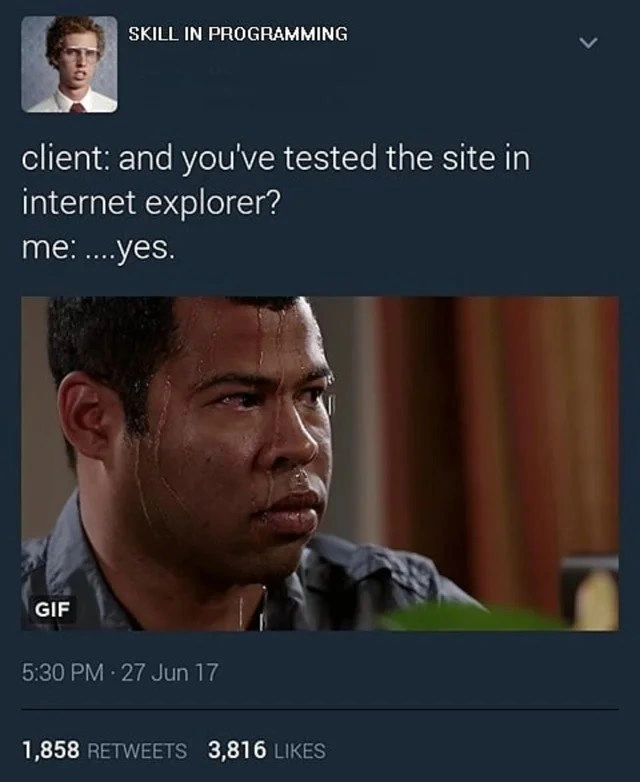
Imagine your teacher asks if you finished your homework, and even though you actually didn’t, you nervously say “...yes.” You start sweating because you’re scared the truth will come out if the teacher checks your work. This meme is just like that, but with a website and a client instead of homework and a teacher. The client is basically asking, “Did you do that important thing I asked for?” – in this case, making sure the website works on an old web browser called Internet Explorer. The developer says yes to avoid getting in trouble, but his face (all covered in sweat and looking guilty) gives away how worried he is. It’s funny because most of us have told a little lie to skip a difficult task or avoid blame, and we know that uh-oh feeling when someone asks about it. Just like a kid who didn’t do their chores and hopes their parents won’t check, this developer is hoping the client won’t actually pull up the site in Internet Explorer. The humor comes from that very human moment of panic when you fear getting caught, and everyone can understand that feeling — no technical knowledge needed!
Level 2: Cross-Browser Confessions
Let’s break down why this scenario is such a big deal in front-end development. The meme shows a conversation between a client and a developer about testing a website in Internet Explorer. Internet Explorer (often just called IE) is an old web browser made by Microsoft. It used to be very popular in the early 2000s, but over time it fell out of favor as browsers like Chrome and Firefox took over with better support for new web standards. By 2021, almost everyone (including Microsoft themselves) had moved on from IE to newer browsers like Microsoft Edge. However, some businesses and users still used IE out of habit or because their internal software required it. So, “Did you test this site in Internet Explorer?” is the kind of question that can make a developer pretty nervous if they haven’t specifically done it.
Cross-browser testing means checking that your website works correctly on all the major web browsers and operating systems your users might have. This includes modern browsers like Chrome, Firefox, Safari, Edge, and yes, sometimes Internet Explorer if it’s still on the support list. Each browser has its own engine under the hood (for example, Chrome uses the Blink engine, Firefox has Gecko, and IE has the older Trident engine). These engines don’t always display things in exactly the same way. They might interpret certain HTML/CSS rules differently or support different features. For instance, a fancy new CSS layout technique or a modern JavaScript feature might work perfectly in Chrome but not work at all in Internet Explorer, which hasn’t been updated to handle that feature. When a site isn’t compatible with a particular browser, parts of the page might look wrong or not function. That’s why developers usually test on multiple browsers as part of good QA (Quality Assurance) practices – to catch any browser compatibility issues.
Now, Internet Explorer support is kind of a running joke in web development because IE (especially older versions like IE10, IE9, or the dreaded IE6 from long ago) is notoriously difficult to work with. It often requires extra code or special tweaks just for that browser. Supporting it is called legacy browser support – “legacy” meaning it’s old and mostly outdated. Developers might have to use polyfills (which are like patches that add missing functionality to older browsers) or include alternate styles so the page doesn’t break. A simple example: modern JavaScript lets you write () => {} (arrow functions) and use features like Promises or Array.includes(). These won’t run in IE11 unless you use a tool to convert your code to older JavaScript syntax (this process is known as transpiling) or include a polyfill to simulate the feature. Likewise, modern CSS like Flexbox and Grid makes layout easier, but while IE11 has some support, it’s incomplete and buggy – a layout that looks perfect in Chrome might turn into a messy jumble in IE if you’re not careful. Developers often have to add special CSS fixes or fallbacks for IE, which is extra work.
In the meme, the client (basically the person or company for whom the site is being built) is double-checking that the site has been tested on Internet Explorer. The developer replies “...yes,” but the pause and the sweating face in the GIF tell us he might be lying or at least extremely unsure. This is funny to people in tech because it’s a common situation: sometimes there’s pressure to bluff and say everything is fine, even if you haven’t fully verified it. Maybe the developer meant to test in IE but procrastinated because it’s so frustrating, or they assumed “probably no one uses IE anymore” and skipped it. Now they’re caught off guard by that question. The nervous look is a mix of guilt (for not doing the tests) and fear (that something will go wrong when the client actually tries IE).
For a junior developer or someone new to this: imagine you finished a website and it works great on your computer or phone. You show it to your client, and then they ask if it works on their computer which, surprise, is running this old browser you didn’t check. It’s like a student turning in homework and the teacher asks, “Did you also answer the bonus question on the back page?” – and the student suddenly realizes they overlooked it. The developer in the meme is experiencing that oh-no moment. Typically, the right move is to actually test everything on the browsers you claim to support. When clients or managers talk about “supporting Internet Explorer,” they mean the site should be fully usable and not broken when someone opens it with IE. Ensuring that might involve a lot of extra testing time, which is why developers joke about it. If you ever build a site and someone asks “Does it work in IE?”, now you know why that question might come with a pained groan or a nervous laugh in the room. It’s a reminder that in web development, you have to pay attention to older environments, not just the shiny new stuff. Otherwise, you might end up in a sticky situation, just like the meme’s developer, where you’re crossing your fingers and saying “Yes, it works” without complete confidence. The humor here comes from that mix of anxiety and relatability – we laugh because we’ve all been that person saying a quick “yes” to please a stakeholder, while internally praying we’re not about to be proven wrong.
Level 3: Quirks Mode Panic
client: and you've tested the site in Internet Explorer?
me: ... yes
This meme drops us into a classic web development nightmare: the stakeholder (the client) innocently asks if the new site was tested in you know what – Internet Explorer. In that instant, every seasoned front-end developer feels a chill. The developer’s response, a hesitant “...yes,” accompanied by Jordan Peele’s famous sweat-drenched nervous reaction GIF, tells the real story: they absolutely did not test it in IE, and now panic is setting in. This setup is darkly funny because it captures browser compatibility trauma that’s almost a rite of passage in Web Development.
Why the dread? Internet Explorer (IE) is the ultimate legacy browser. By 2017 (when the tweet was posted) and even into 2021, IE was already an outdated relic most developers wished would just disappear. Modern browsers like Chrome, Firefox, and Safari adhere (more or less) to web standards, but IE has a history of doing things its own way – a way full of odd browser quirks and half-implemented standards. Seasoned devs remember battling IE’s peculiarities for years: the infamous IE6 box model bug that miscalculated CSS widths, unpredictable <div> spacing, weird font rendering, and “Quirks Mode” (when IE would essentially act like it’s 1999 if your doctype or markup wasn’t perfect). In short, building a site that works on modern browsers is hard enough; making it work on IE (especially older versions) can feel like coding in hard mode with one hand tied behind your back.
So when the client expects full Internet Explorer support, a senior developer hears alarm bells. They might have tested in every modern browser and performed rigorous QA – but IE testing often gets skipped or left until the end, partly because it’s a painful, time-consuming process. It’s a running joke in front-end circles that each new feature you build will somehow break on IE in a way you never anticipated. For example, perhaps you used a shiny CSS Grid layout or some ES6 JavaScript features; it all works flawlessly in Chrome/Firefox, but IE11 (the last version of IE, and still used by some stubborn corporate environments) will just throw up its hands and refuse to run the code or render the layout correctly.
Cross-browser testing is supposed to catch these issues, but here the developer likely bluffed – claiming “yes, of course it’s been tested in IE” while knowing full well they haven’t even fired up that browser. Why bluff? Because admitting “no, we didn’t bother to test IE” can be awkward or risky when dealing with client expectations. The client might not grasp why supporting IE is such a chore – they just know some of their users (or their boss who still clicks the blue ‘e’ icon) use it, and they expect the site to work there too. It’s a classic client request anxiety moment: the developer is caught between technical reality and what the client wants to hear. The sweaty GIF perfectly conveys that “oh no, I might get caught” feeling. Every experienced developer has tasted that panic when cornered about something they overlooked or weren’t eager to do.
From an industry perspective, this meme pokes at a larger truth: browser compatibility testing often requires supporting deprecated or obsolete technology well past its prime. IE is the poster child of legacy support nightmares. For years, Microsoft’s browser dominated the web (we all remember the browser wars of the late 90s and early 2000s where IE6 had ~90% market share), which led many companies to build internal apps that only worked on IE. Even after better browsers emerged, these legacy dependencies kept IE on life support in many offices. Developers jokingly call it “Internet Exploder” because it tends to explode modern web code. By the time of this meme, even Microsoft had replaced IE with Edge and was begging everyone to move on, but here we are – clients still ask, “Does it work on IE?” and developers still cringe. It’s a bit of Tech History repeating as farce: the ghost of IE haunting modern projects.
What makes the humor hit home is that the developer’s lie is so relatable. There’s an unwritten agreement among developers that supporting IE is thankless drudgery. Teams often try to drop IE support if possible (frequently showing a banner like “Your browser is outdated, please upgrade” to nudge users off IE). If a contract or client absolutely requires it, developers will comply – but not happily. In many cases, devs might quietly hope nobody actually uses IE so they can get away with minimal effort on it. The meme exposes that wishful thinking. We can practically hear the dev’s inner monologue: “Oh no... testing on IE? Who actually uses that?! Please please don’t let them open it during the demo.” It’s funny because it’s true – plenty of us have taken that gamble and then sweated bullets hoping not to be found out.
To mitigate IE issues, developers historically employed all kinds of hacks and special code paths. There were even IE-only conditional comments in HTML that let you target IE with alternate styles or scripts. For example, you might see code like this in older sites:
<!-- A special hack: serve IE-specific CSS to fix what it breaks -->
<!--[if IE]>
<link rel="stylesheet" href="ie-fixes.css" />
<![endif]-->
IE would load that extra CSS file with fixes (while other browsers politely ignore the strange comment). Similarly, polyfills and transpilers (like Babel) are used in modern builds to convert new syntax to something IE’s aging JS engine can understand. All these are extra hoops to jump through just for one browser. That’s why no developer is thrilled to hear the question, “Did you test in IE?” especially if they haven’t – it’s like being asked if you finished a tedious chore you were secretly hoping to avoid. The developer humor here is equal parts laughing at the scenario and shuddering from personal experience. In the end, the meme gets a knowing chuckle from anyone who’s ever had to say “Yes, it works in IE” while crossing their fingers and preparing the bug tracker for a flood of IE bug reports.
Description
A meme presented in a tweet format from an account named 'SKILL IN PROGRAMMING' with a profile picture of Napoleon Dynamite. The tweet displays a conversation: 'client: and you've tested the site in internet explorer? me: ....yes.' Below the text is a well-known GIF of actor Jordan Peele sweating profusely, looking anxious and guilty. The humor stems from the shared trauma among web developers who have had to ensure website compatibility with Internet Explorer, a browser notorious for its non-standard rendering engine, CSS quirks, and JavaScript inconsistencies. The developer's lie is betrayed by their obvious panic, a feeling instantly recognizable to any seasoned developer who has been in a similar situation when asked about supporting legacy systems
Comments
7Comment deleted
I told the client 'Yes, it works in IE,' which technically is true if you count a 404 page with a 'Browser Not Supported' message as 'working'
Yes, we tested in IE - the user-agent triggers a 302 to a PDF titled “Legacy Support Surcharge.” All green on the dashboard
The real test isn't whether your site works in IE - it's whether you can maintain eye contact while claiming you've tested every combination of IE's 47 different document modes, ActiveX quirks, and that one VP's IE8 with compatibility view permanently enabled
The real skill in programming isn't writing cross-browser compatible code - it's maintaining a poker face when a client asks if you've tested in IE, knowing full well your CSS Grid layout and ES6 arrow functions are about to make their corporate intranet look like a Picasso painting rendered in Windows 95
That 'yes' hides three hours of conditional comments, box-model resets, and questioning your life choices in Quirks Mode
Our IE “support” is verifying the unsupported‑browser page is WCAG‑compliant and loads faster than the polyfills ever did
Tested in IE? Sure - ES5-only build, a museum of polyfills, no-flexbox CSS, and a prayer the corporate GPO doesn’t force Compatibility View; it finally passed once we shipped a second app