Skip to content
DevMeme
1625 of 7435
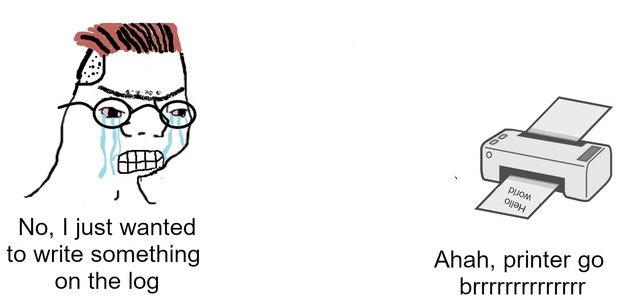
When 'Print' Debugging Goes Too Literal
Debugging Troubleshooting Post #1816, on Jul 30, 2020 in TG

When 'Print' Debugging Goes Too Literal

Why is this Debugging Troubleshooting meme funny?

Level 1: When Printer Goes Brrr

Imagine you wanted to write a secret note in your diary, but instead you accidentally sent it to the school’s loudspeaker system. Suddenly, your simple "Hello world" message is being blared out for everyone to hear. You’d feel surprised and a bit embarrassed, right? That’s basically what happened here, but with a computer. The programmer wanted to quietly write “Hello World” in the program’s diary (the log book), but because of a mix-up, the office printer started chugging out paper with “HELLO WORLD” instead. The phrase “printer goes brrr” is just a funny way to say the printer is making a lot of noise, printing nonstop. It’s like the machine is excitedly buzzing along, even though the poor developer didn’t mean to make it do that. The whole situation is silly: a tiny mistake turned a private little note into a big public print-out. It’s funny and embarrassing at the same time — a real-life “oops!” that anyone can understand.

Level 2: Log to Print

Dropping down a notch in complexity, let’s explain the joke in practical terms. Logging is when an application writes out messages describing what it’s doing (like errors, warnings, or simple debug info) to help developers with Debugging_Troubleshooting. Typically, these log messages go into a log file on disk or to a console window. In this meme, the developer intended to write "Hello World" to a log, meaning they wanted that text to appear in some log file or logging system for the program. "Hello World" is the famous first message everyone prints when learning to code, so the dev is likely doing a harmless test or demo.

However, something was configured wrong: instead of going into a log file, that message went to the office printer! This is a classic case of a MisconfigurationError – basically setting a system option incorrectly. Software often lets you choose where logs should be written (the log target or log destination). For example, you might specify a filename or a device. If that configuration is pointed to a printer device (accidentally or due to a typo), any log entry will be sent as a print job. Imagine editing a config file or calling a logging API with the wrong parameter:

import logging
# Developer wants to log to a file named "log.txt"
# But suppose a typo or wrong device name occurs:
handler = logging.FileHandler("LPT1")  # Oops! "LPT1" is often the printer port on Windows
logging.getLogger().addHandler(handler)
logging.warning("HELLO WORLD")

In the snippet above, using "LPT1" as the file name would direct output to the parallel port printer on a Windows system. Similarly, on a Unix-like system if one did something like:

echo "HELLO WORLD" > /dev/lp0

it would send the text to the first printer device (/dev/lp0). So, under the hood, the code or config mistakenly treated the printer as the log file. The result? The printer starts printing "HELLO WORLD" on paper. The meme shows the printer in action with the text coming out. The caption "printer go brrrr..." is a humorous way to describe the printer making a continuous whirring sound (like “brrr”) as it prints rapidly.

Now, why is this funny to developers? First, it’s DeveloperHumor rooted in surprise and embarrassment. The developer on the left is crying out of frustration because something trivial went very wrong. They say, “No, I just wanted to write something to the log,” meaning they only meant to record a message quietly inside the system. But thanks to the mix-up, the system treated that log message as a print command. It’s like hitting the Print button by mistake when you only meant to save a note. The phrase “Ahah, printer go brrrr” mimics internet meme slang, implying the printer just keeps running. There’s also irony: logs are part of Observability (helping you observe the software’s behavior), yet this misconfiguration made the software behavior observable in a very literal, physical way! Instead of the message being quietly stored in a log file for later analysis, it got loudly printed out for everyone nearby to literally observe. It’s a harmless bug (no data breach, nothing caught fire), but it’s definitely a DebuggingFrustration moment: the poor developer might have been checking the log file and scratching their head wondering “Where did my message go?”, only to hear the printer churning out paper across the room. This teaches a simple lesson about configuration: always double-check where your output is going. Setting the wrong log path or output stream can lead to funny (and sometimes costly) mishaps. At least in this case, the cost is just some paper and an embarrassed coder, making it a perfect little story to share in the office Slack for a laugh.

Level 3: Accidental Paper Trail

At the highest technical level, this meme highlights a logging misconfiguration that turned a simple log message into a physical printout. In complex software systems, logs are typically written to files, consoles, or centralized collectors as part of observability and monitoring. Here, due to a tiny mistake (like a wrong path or device name), the log output was directed to an office printer. The left panel’s distressed developer (classic Wojak-style with a censored face) represents the engineer who just wanted to append a message to the log file. Instead, they accidentally triggered a hardware device. The right panel shows a printer spitting out HELLO WORLD on paper, with the caption "printer go brrrrr," referencing the meme-worthy phrase for any machine running uncontrollably.

From a seasoned developer’s perspective, the humor comes from recognizing how a small configuration bug can cause an absurd outcome. It’s a BugsInSoftware tale as old as time: perhaps a typo in a log path, like using a reserved device name. For instance, in Windows, opening a file named PRN or LPT1 actually addresses the printer port. In Unix-like systems, printers are often exposed as device files (e.g., /dev/lp0). This means if your logging framework is pointed at /dev/lp0 by mistake, every log entry becomes a print job. The senior engineers reading this will recall war stories of misrouted logs – maybe an app that wrote debug data to the email server, or a misplaced printf that sent output to stdout which was piped to a printer. The meme’s scenario is funny because it’s plausible: under the hood, everything is a file or stream in OS design. A logging configuration that accidentally targets a printer device would indeed make the printer go brrr (churning out pages non-stop).

This scenario also satirizes observability gone wrong. Logs are meant to create a digital “paper trail” for debugging, but here we got an actual paper trail. It’s an Observability_Monitoring failure: the message left the application, but not in the intended way. Instead of improving insight into the system, it created a real-world annoyance (and probably confused office folks finding “HELLO WORLD” pages). Seasoned devs find this hilarious because it exposes the insane edge cases of configuration. It’s the kind of glitch you laugh about after the panic subsides. The developer’s quote, “No, I just wanted to write something on the log.”, is painfully relatable – we’ve all made innocent changes that had unintended side effects. And the printer’s deadpan response, “Ahah, printer go brrrrrrrrrrrrrr.”, perfectly captures the indifferent attitude of hardware doing exactly what it was told (however misguided the command). In short, this level of analysis recognizes the meme as a tongue-in-cheek cautionary tale: one stray character in a config, one unreviewed default, and your logging pipeline can literally turn into a print spooler. It’s both a joke and a reminder that in programming, misconfiguration errors can manifest in the wildest ways – sometimes with the sound of a printer whirring at 3am.

Description

A two-panel meme format illustrating a developer's frustration. On the left, a crying and angry Wojak character with glasses exclaims, 'No, I just wanted to write something on the log'. This represents a developer trying to use a print statement for debugging purposes. On the right, an illustration of a desktop printer is shown actively printing a page that reads 'Hello world'. Below the printer, the caption reads, 'Ahah, printer go brrrrrrrrrrr'. The meme is a variation of the 'Money printer go brrr' format. The humor comes from the literal interpretation of a 'print' command, where the developer's intention to output to a software log is misinterpreted as a command to a physical hardware printer, highlighting the ambiguity and potential for error when commands are not specific

Comments

7
Anonymous ★ Top Pick This is the bug report you get when the senior dev says, 'Just print the value to see what it is,' and the intern is working on an embedded system for the office printer
  1. Anonymous ★ Top Pick

    This is the bug report you get when the senior dev says, 'Just print the value to see what it is,' and the intern is working on an embedded system for the office printer

  2. Anonymous

    Accidentally pointed the INFO log level at lpd - congrats, team, we now run a write-only datastore with sub-second latency, infinite cold-archive fees, and an environmental SLA measured in trees per hour

  3. Anonymous

    After 20 years in the industry, you'd think we'd have learned to check the log level before deploying, but here we are, watching our ELK stack cry as someone's debug statement with full object serialization made it to production because 'it was just a quick fix' on Friday afternoon

  4. Anonymous

    When you're debugging at 2 AM and accidentally send your stack traces to the office printer instead of stdout, creating a paper trail that's both literal and incriminating. The real bug isn't in your code - it's in your muscle memory typing 'print()' when you meant 'logger.info()'. At least now you have physical evidence of your descent into madness, complete with timestamps

  5. Anonymous

    Wanted to tail -f /var/log/app.log; got a brrr-fest and a fresh timber backlog instead

  6. Anonymous

    When your rsyslog target accidentally points at CUPS, every debug() call becomes CAPEX and a shameful walk to the printer tray

  7. Anonymous

    Added “just one log” and discovered stdout is wired to the office printer - congrats, we finally implemented a high‑cardinality paper trail; printer go brrr

Use J and K for navigation