Skip to content
DevMeme
1594 of 7435
The Stack Overflow Déjà Vu of jQuery
Frontend Post #1782, on Jul 16, 2020 in TG

The Stack Overflow Déjà Vu of jQuery

Why is this Frontend meme funny?

Level 1: Not What I Asked For

Imagine you just got a new video game, and you’re super excited to learn how to play it. You ask an older friend for some tips. They start telling you all these tricks and cheat codes – but then you realize they’re talking about last year’s game, not the new one you have. At first, you’re excited because it sounds like they have the answers, but then you feel let down and frustrated because their advice doesn’t work for your game at all. That’s exactly what’s happening in this meme. The developer was looking for help with one thing (modern JavaScript), but all the help they found was for an older thing (jQuery) that they weren’t using. It’s like being shown how to use a cassette tape when you really needed help with your new MP3 player – confusing, disappointing, and not what you asked for! In the picture, Lisa’s big hopeful grin turning into a sad frown is just how it feels: you go from excited to disappointed in a snap because the answers you found weren’t the right kind of help.

Level 2: Just JavaScript, Please

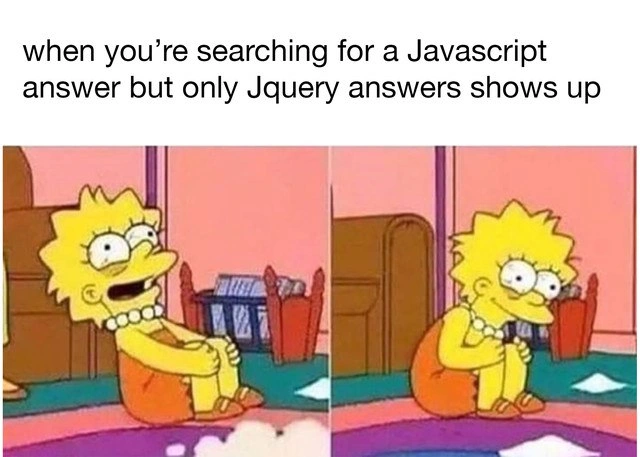
Let’s break down why Lisa (the developer) goes from excited to sad in this meme. The top text says: “when you’re searching for a JavaScript answer but only jQuery answers show up.” JavaScript is the main programming language of the web – it runs in your browser to make web pages interactive. jQuery, on the other hand, is a famous library built with JavaScript. A library like jQuery is basically a collection of ready-made functions that make certain tasks (like selecting page elements or making AJAX network calls) easier. jQuery was extremely popular in the 2000s-2010s because it smoothed over differences between web browsers and let developers write less code to do common things. For example, jQuery introduced the convenient $() function so you could grab things from the page with a CSS-like selector and then do something with them in one go. This was a big improvement at the time!

Vanilla JavaScript just means using plain, regular JavaScript without any extra libraries or frameworks. (“Vanilla” is a synonym for “plain” in this context – like vanilla ice cream with no toppings.) These days, many developers try to use the built-in capabilities of modern JavaScript or use larger frameworks (like React, Angular, or Vue) instead of jQuery. So if you’re working on a project and not already including jQuery, you probably want solutions that use plain JS. When you search on Google or Stack Overflow for how to do something “in JavaScript,” you’re hoping to see code that you can drop right into your project without adding anything extra.

Stack Overflow is the go-to Q&A site where developers post questions and answers. It has been around for a while (since 2008), so it has accumulated a ton of information. The meme’s joke is that when you search those archives for an answer, you often get older answers written using jQuery. For a newcomer or a developer trying to avoid jQuery, this is frustrating. You’ll recognize a jQuery answer immediately because it uses the dollar sign $ and functions that don’t exist in plain JavaScript (like $.ajax() or $(selector).hide() etc.). For instance, say you search “How do I change text in a div with JavaScript?” A top result might show something like:

// jQuery solution (older style, requires jQuery library)
$("#myButton").on("click", function() {
  $("#myDiv").text("Clicked!");
});

// Vanilla JS solution (modern style, no library needed)
document.getElementById("myButton").addEventListener("click", () => {
  document.getElementById("myDiv").textContent = "Clicked!";
});

In the jQuery version above, $("#myButton") looks for an element with the ID “myButton” and .on("click", ...) attaches a click event using jQuery’s syntax. $("#myDiv").text("Clicked!") finds another element and changes its text. Those $() and .text() methods come from the jQuery library. In the vanilla JavaScript version, we use standard DOM APIs: document.getElementById("myButton") to get the button, and addEventListener("click", ...) to handle the click, then textContent to set the text. This code will work in any modern browser without needing any extra library. The jQuery code only works if you’ve included the jQuery script on your page; otherwise, $ is undefined and you’ll get errors.

Now you can see why it’s a letdown to only find jQuery answers when you specifically wanted a pure JavaScript solution. It’s like you have to translate from one “dialect” of coding to another. If you’re not already using jQuery, an answer that relies on it means extra hassle: either include the jQuery library (which you weren’t planning on doing, just for this one thing) or figure out how to do the same thing with vanilla JS. A lot of newbies might not even know how to “translate” jQuery to plain JS at first, so it can be really confusing. For example, a junior dev could see $(".item").fadeOut() in an answer and wonder “Is .fadeOut() a built-in JavaScript command?” (It’s not – that’s a jQuery-specific method for fading out an element visually.) This mix-up between what’s standard JavaScript and what’s coming from jQuery can trip up learners. It’s a common frontend search friction point: the tools and best practices changed, but the search results haven’t caught up yet.

The two panels of Lisa Simpson illustrate this perfectly. First panel: you (as a dev) are excited because you found a search result that looks promising. You think, “Yes! Someone solved this exact issue.” Second panel: you open it and see jQuery everywhere, and your face falls just like Lisa’s. That bright hope goes dim. The colorful room in the meme (pink walls, teal carpet) exaggerates a childlike optimism turning into disappointment – a bit like a kid finding out their toy needs batteries they don’t have. In developer terms, jQuery is the “batteries not included” when you weren’t expecting to need any! The meme is poking fun at how the vast knowledge base online can sometimes feel stuck in the past. It resonates with front-end devs who have struggled to sift through that JavaScript vs jQuery confusion. In summary: you wanted just JavaScript, please, but all the answers handed to you are in a different flavor. No wonder you end up pouting like Lisa – you have the answer, but it’s wrapped in jQuery you didn’t want.

Level 3: Dollar-Sign Dilemma

This meme nails a classic frontend frustration: searching for a modern JavaScript solution and finding only jQuery-laden answers. It’s like the entire internet is stuck in 2010, throwing $( ... ) at you when you explicitly wanted vanilla JS. In the left panel, Lisa’s eyes are bulging with hope – a developer eagerly expecting a clean JavaScript snippet. But the right panel shows her deflated despair when every search result is a jQuery snippet requiring that omnipresent $ syntax. The humor comes from a very real WebDev pain: the gap between contemporary best practices and the web’s archive of outdated solutions. We’ve all been there – you ask Google or Stack Overflow for help with some DOM manipulation or API call without any frameworks, and all the top answers start with $("#someElement") or $(document).ready(). In that moment, your excitement crashes just like Lisa’s grin turns into a frown.

Why does this happen? A few reasons are lurking in the code archives:

  • Legacy Answers Float to the Top: Many high-upvote answers on Stack Overflow were written during jQuery’s heyday. Those legacy jQuery snippets from 2008-2014 still dominate search rankings. Search engines interpret them as authoritative, so they bubble up even if you weren’t explicitly looking for jQuery.
  • “JavaScript” vs “jQuery” Tag Blur: Historically, developers often lumped jQuery in with JavaScript answers. A question might be tagged javascript on Stack Overflow, and an answer would use jQuery (since jQuery is written in JavaScript). Thus, searching “JavaScript solution for X” often dredges up jQuery-based answers, because the content all lives under the JavaScript umbrella.
  • Shifting Best Practices: Ten years ago, using jQuery was almost a default best practice for front-end work – it patched browser inconsistencies and made DOM scripting easier. Many solutions were posted in jQuery because it was the quickest way to solve problems then. Today, the best practice is to use vanilla JavaScript or modern frameworks, but those older answers haven’t vanished. It’s a time capsule effect: the world moved on, but the Q&A pages haven’t all been updated.
  • Developer Frustration Factor: If you’re avoiding extra libraries in your project (maybe you’re using React, or you just want a lightweight page), a jQuery answer isn’t directly usable. You’d have to either include the entire jQuery library just for that one snippet or spend time translating the jQuery code into plain JS. No wonder you feel like you’re drowning in jQuery answers when all you wanted was a quick fix — it’s extra work you didn’t ask for.

For a senior developer, this scenario is a mix of nostalgia and annoyance. On one hand, they remember when jQuery was the shiny tool that solved everything – it was the framework that made cross-browser scripting tolerable. On the other hand, they’ve also experienced the modern shift: native JavaScript got better (with querySelector, fetch(), etc.), and new libraries and frameworks (like React or Vue) took the spotlight. So, encountering jQuery answers today feels like stumbling into a time warp. It’s funny because it’s true: the internet’s collective knowledge sometimes lags behind current practice. The meme’s two panels perfectly capture this frontend pain point. In panel one, you’re optimistic — “Surely someone has a neat ES6 solution for this!” — and in panel two, you’re crestfallen — “Oh great, another $.ajax() example…” 😩. It’s equal parts developer humor and shared trauma. We laugh knowingly because we’ve all worn Lisa’s orange dress in this story: initially thrilled by a promising search result, only to mutter “ugh, jQuery again” as our enthusiasm evaporates. This is a universal DeveloperFrustration in the modern JavaScript world, and the meme brilliantly transforms that experience into a visual punchline.

Description

A two-panel meme featuring the character Lisa Simpson from 'The Simpsons' reacting to a common developer frustration. The top of the image has the caption: 'when you're searching for a Javascript answer but only Jquery answers shows up'. The first panel shows Lisa sitting on the floor, looking up with a hopeful and eager expression. The second panel shows her in the same position, but her smile has vanished, replaced by a deflated, disappointed frown as she looks down. This meme perfectly captures the pain of frontend developers who are looking for solutions in modern, vanilla JavaScript but find search results dominated by answers using the jQuery library. While historically important, jQuery is often considered a legacy dependency in many modern technology stacks, and finding only jQuery-based solutions feels like digging through outdated historical artifacts instead of relevant, modern-day code

Comments

7
Anonymous ★ Top Pick Searching for a vanilla JS solution and finding only jQuery is the modern equivalent of asking for a map and being handed a stone tablet
  1. Anonymous ★ Top Pick

    Searching for a vanilla JS solution and finding only jQuery is the modern equivalent of asking for a map and being handed a stone tablet

  2. Anonymous

    Googling “modern JS fetch retry logic” and Stack Overflow hands back a $.ajax success/error callback - like asking for a Kafka topology and getting a shell script that rsyncs log files; sure, it worked in 2010, but my dignity has an SLO now

  3. Anonymous

    It's 2024 and somehow every DOM manipulation answer still starts with '$(document).ready()' - at this point jQuery is less a library and more of a persistent haunting from the Web 2.0 era that refuses to leave our search results alone

  4. Anonymous

    The real tragedy isn't finding jQuery answers - it's realizing those Stack Overflow posts from 2012 have more upvotes than any modern solution, and now you're genuinely considering whether `$('.element').hide()` is actually cleaner than `document.querySelector('.element').style.display = 'none'` just to avoid the existential crisis of questioning a decade of collective developer wisdom

  5. Anonymous

    Googling a vanilla JS bug and only finding jQuery answers is the internet suggesting you fix a 10-line DOM problem by shipping 30KB of nostalgia to production

  6. Anonymous

    The SERP is eventually consistent with 2012: I asked for addEventListener and got a 90KB dependency plus $.ready

  7. Anonymous

    jQuery: the half-life of Stack Overflow answers outlasting your last monorepo migration

Use J and K for navigation