The Short-Lived Brilliance of a 'Smart' Algorithm
Why is this Debugging Troubleshooting meme funny?
Level 1: When You Outsmart Yourself
Imagine you invented a really tricky secret code to write a message to yourself. You feel super proud because it’s so clever that nobody else can read it – you’re grinning, thinking about how smart you are. But a month later, you find that message and… you can’t understand your own secret code at all. You’ve completely forgotten how it works! Now you’re staring at the message, scratching your head, feeling shocked that you managed to confuse yourself. The first time, you were happy because you made something brilliant that only you knew how to use. Later on, you’re upset and frustrated because you outsmarted yourself and now it’s like the secret is locked away. That’s exactly what’s happening in this meme: the programmer wrote code in a super complicated way (like a secret puzzle), and when he looks at it later, he has no idea what it means. It’s funny because he tricked himself — being too clever turned into a problem. The lesson is a bit like a fairy tale moral: if you make something overly complicated just to be fancy, you might be the one who gets stuck in the end, just like the poor guy making that distressed face in the picture.
Level 2: Clever Now, Confused Later
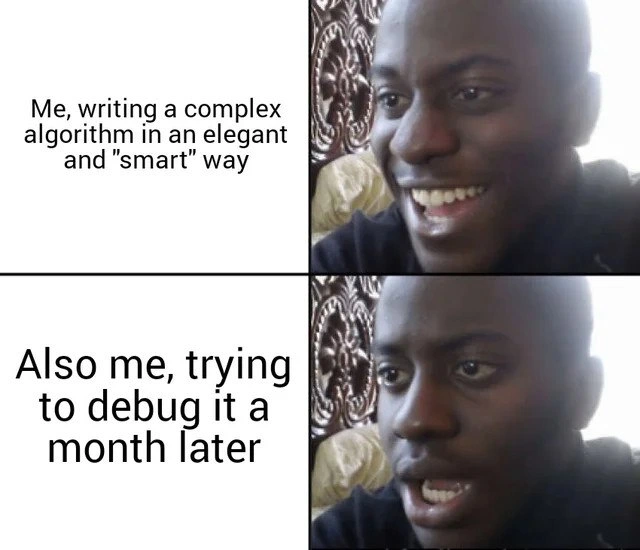
In this meme, the same developer shows up in two different moments. In the first panel, he’s writing a complex algorithm and feeling proud of how “smart” and elegant his solution is. A complex algorithm here means he wrote code that’s pretty complicated or uses advanced tricks to solve a problem. Elegant code usually refers to code that’s written in a very clever or efficient way – maybe it accomplishes a lot in just a few lines, or uses some neat programming shortcuts. At that moment, he thinks he’s done something brilliant.
Now look at the second panel (one month later): the same person is trying to debug that code, and he looks completely shocked and stressed out. Debugging is the process of finding and fixing errors or unexpected behavior in a program. It often means retracing your code, using print statements or a debugger tool to see what’s happening step by step. The joke here is that his own code was so tricky and over-engineered that even he can’t understand it after some time has passed! He’s basically put himself in a tough spot. The expression on his face says, “I have no idea what this code is doing,” which is a hilarious kind of irony because he’s the one who wrote it.
This situation is a classic lesson in CodeQuality and maintainability. Maintainability means how easy it is for someone (often your future self) to understand, fix, or update the code later on. Code that’s easy to maintain is usually written in a clear, straightforward way. There’s a common saying: “Code is more often read than written.” This means that once you write code, you (or others) will probably read through it many times to make changes or track down bugs. If that code is written in a super complex or non-obvious way, every one of those future readings becomes a headache. In the meme’s first panel, the developer wrote code that works and might even look very nifty, but it sacrifices clarity. By the second panel, he’s experiencing DebuggingFrustration — the frustration of debugging something that’s hard to even read. It’s like writing yourself a note with a secret alphabet and later realizing you can’t decode your own writing.
OverEngineering is a term used when someone designs a solution that’s far more complicated or fancy than it needs to be. In coding, over-engineering might mean using an ultra-complex algorithm, or lots of extra layers of code, to solve a simple problem. Developers sometimes over-engineer things when they try to be clever, or when they anticipate problems that haven’t happened yet (and maybe never will). In the meme, writing the algorithm in an “elegant and smart” way hints that he might have over-thought the problem. Sure, the solution might be slick, but it’s also fragile and hard to grasp. A simple, straightforward approach might have been a bit longer or felt less impressive to write, but it would be easier to debug later. The meme is poking fun at this tendency: we want to feel smart when we write code, but if we go too far, we end up outsmarting ourselves.
This ties into something called technical debt (TechDebt for short). Technical debt is a metaphor programmers use to describe the consequences of taking shortcuts or doing things in an unfriendly way for future maintenance. Just like financial debt, you “borrow” time by writing quick or overly clever code now, but you’ll “pay interest” on that debt later when you (or someone else) have to clean it up or spend extra hours understanding it. In the meme, the interest payment comes due when our poor developer is stuck debugging that inscrutable code. He saved time (or got a kick of pride) initially by not writing lots of explanatory code or comments, but now he’s paying back that time with frustration.
For many new developers (and honestly, even experienced ones on a forgetful day), writing an ingenious solution feels great. You might compress a task into a few lines, use a fancy algorithm from a textbook, or get really creative with language features to make the code short and “cool”. That’s the first-panel feeling: “I nailed it, I’m so clever!” But then comes the second-panel reality: when you revisit that code later, it’s like huh?. It’s as if someone else wrote it, because our brains tend to dump a lot of the context and details over time. If the code isn’t clear, you have to re-learn your own thought process from scratch. That can be really tough, and it’s when you realize that maybe being straightforward would have saved you time overall. This is a common journey in a programmer’s growth: at first, you value cleverness and brevity; later, you value simplicity and clarity.
There’s also the concept of CodeSmells that fits here. A “code smell” doesn’t mean your code literally stinks! It’s a funny term for any hint that something might be wrong with the code’s design. Code that is very hard to read or only the original author can understand is considered a bad smell. It suggests that if anyone else (or you in the future) works on that code, there could be problems. In our meme, the fact that the author himself is confused is a giant red flag — a strong code smell. The likely solution now is something we call refactoring. Refactoring means restructuring or rewriting parts of the code to improve its readability and structure without changing what it actually does. It’s like rewriting a complicated sentence in simpler words so that it’s easier to understand, while keeping the original meaning. If the developer refactors his “smart” algorithm, he might split that one clever passage into a few more straightforward steps, add a comment or two explaining the tricky parts, and generally clean it up. This is what the tag RefactoringNeeded implies — that the code could use some cleaning up after the fact. Refactoring is essentially how you pay off technical debt: you invest time now to fix the code so future you (or others) won’t struggle with it.
In summary, this meme humorously shows a write_once_read_never situation: code that was written once with glee, and then never meant (or easy) to be read again. The developer’s proud face in the first panel and tormented face in the second panel tell a common story in programming. It reminds us that writing code isn’t just about getting the computer to understand it (which is what an elegant complex algorithm does); it’s also about making sure humans can understand it later. If you don’t, you might end up like the guy in the meme: essentially debugging a mystery that you yourself created. The phrase “Clever now, confused later” perfectly captures this experience. It’s a lesson every coder learns eventually: keep it simple, because your future self will thank you.
Level 3: Write Once, Read Never
Write Once, Read Never is a tongue-in-cheek expression that perfectly sums up the situation in this meme. This scenario is so universal that it's practically a staple of DeveloperHumor: a developer writes some code that's extremely clever and elegant, only to find themselves utterly baffled by it when they return to it later.
In the top panel, we witness a developer reveling in the glory of a freshly written complex algorithm that they believe is elegant and “smart”. The quotes around “smart” hint at the irony: it's OverEngineering masquerading as brilliance. This is a classic scenario where CodeQuality gets compromised for a moment of cleverness. The code might leverage some advanced algorithmic trick or condense a big task into a few tricky lines that felt incredibly satisfying to craft. At that moment, the developer is proud – they've applied their CS-fundamentals and clever hacks to create a piece of code that makes them feel like a genius.
Fast forward a month to the bottom panel: that elegant solution has mutated into a personal TechDebt monster. The same developer, now in bug-hunt mode, looks absolutely distressed. Why? Because deciphering their own overly clever code is like solving a riddle they themselves wrote but no longer understand. This is the painful future_self_debugging scenario playing out. What was crystal clear during the high of coding is now obscure and tangled. The humor here stems from the all-too-relatable reversal: the developer is suffering self_inflicted_pain. The code meant to be a testament to their skill has become a trap set for their future self.
Seasoned developers have a saying: “Debugging is twice as hard as writing the code in the first place. So if you write code as cleverly as possible, you are by definition not smart enough to debug it.” (Brian Kernighan famously said this). This meme is a perfect illustration of that principle. The smart_solution_backfire is a common pattern: an over-clever implementation might run efficiently, or look theoretically neat, but it’s a nightmare to understand or modify. Overly elegant code can hide CodeSmells – subtle signs that something in the code’s design is off. When something inevitably goes wrong with such code, you're left doing wild Debugging_Troubleshooting acrobatics just to rediscover how it works. In the second panel, that horrified look isn’t just “Ugh, a bug!” – it’s “What on earth did I even write here?!”
In real projects, this kind of situation often happens when a developer prioritizes clever algorithms or micro-optimizations over clarity. Perhaps they compressed a data-processing routine into a single convoluted one-liner using fancy language features, or they implemented a novel algorithm from a research paper with minimal comments. It looks clean on the surface (fewer lines, very “advanced”), but try stepping through that code with a debugger a few weeks later – it’s borderline impossible to follow. Many of us have seen production code where a genius bitwise hack or a complex regex saved a few milliseconds at runtime, but cost days of debugging when a weird edge case popped up. The initial commit probably felt like a victory lap, but every subsequent bug fix felt like deciphering hieroglyphs under pressure. This is the DebuggingFrustration the meme portrays so well.
The meme highlights a key trade-off in software development: maintainability vs. initial cleverness. Code is read far more often than it’s written. A month later, even the original author reads their code almost like a stranger would. Without clear logic and good comments, that once-elegant algorithm now resembles an opaque maze. The developer in the meme is effectively suffering a complexity hangover – the unpleasant aftermath of over-indulging in clever design. And the only cure at that point is often to refactor the code – in other words, rewrite that “smart” solution in a simpler, cleaner way – effectively paying back the debt you inadvertently created.
It’s also a snapshot of how TechDebt accumulates. That fancy implementation seemed fine at the time, but it was like taking out a loan you eventually have to repay with interest. Here, the interest is those extended debugging sessions and the stress of not understanding your own code. The humor has an edge of truth: as developers, we can be our own worst enemies. We chase an ingenious solution (maybe to optimize performance or just to show off a bit), but we forget that clear > clever when it comes to long-term CodeQuality. When Future-You is staring at the screen muttering “What does this even do?!”, you’ve learned the hard way that cleverness without clarity is a liability. At that point, the only relief is a big sigh and a vow to add more comments or unit tests next time – perhaps right after you finish untangling this mess.
So, the top image’s grin – that’s the pride of crafting an O(n log n) masterpiece or a slick functional one-liner that made you feel like a coding wizard. The bottom image’s horror – that’s the face of digging through that same code with print statements and breakpoints everywhere, coming to terms with the smart_solution_backfire. It’s funny because it’s true: many of us have been that “brilliant” developer who inadvertently set a trap for our future self. The meme gets a knowing laugh (and maybe a wince) because that elegant code turned into a write_once_read_never artifact – literally written once, and apparently not meant to be read, even by its author a short time later.
Description
A two-panel meme using the 'Disappointed Black Guy' format to contrast the immediate satisfaction of writing clever code with the future pain of maintaining it. The top panel shows a man smiling confidently and is captioned, 'Me, writing a complex algorithm in an elegant and "smart" way'. The bottom panel shows the same man with a look of shocked, horrified realization, captioned, 'Also me, trying to debug it a month later'. This meme perfectly captures a universal developer experience: the trade-off between cleverness and maintainability. For senior engineers, it's a humorous reminder of the hard-learned lesson that clear, simple, and readable code is almost always superior to a complex one-liner or an overly 'elegant' solution that becomes incomprehensible the moment you step away from it

Comments
8Comment deleted
The compiler and I were the only two who understood that code. A month later, it's just the compiler
Optimizing to O(log n) is great - until you realize the complexity you reduced was just the runtime; the cognitive load is still O(archaeology) when you git-blame yourself next sprint
The code review praised my "elegant use of bit manipulation and recursive generators" but the incident report just says "senior engineer spent 3 days debugging what turned out to be a missing else statement."
Per Kernighan's law, debugging is twice as hard as writing the code - so that 'elegant' bit-twiddling one-liner was you taking out a loan at 200% APR, payable to whoever runs git blame
This perfectly encapsulates why 'Programs must be written for people to read, and only incidentally for machines to execute' isn't just a Abelson and Sussman quote - it's a survival strategy. That 'elegant' monad transformer stack with custom type-level computations you wrote at 2 AM? Future-you will curse past-you with the fury of a thousand merge conflicts. The real measure of senior engineering isn't how clever you can make code, but how boring and obvious you can make complexity look. Remember: code is read 10x more than it's written, and the person debugging your clever algorithm will know where you live - because it's you, and you've forgotten why you thought Reader-Writer-State-Except was the 'obvious' choice
That 'elegant' algorithm? A Rube Goldberg machine where each clever shortcut adds an hour to future debug time
Optimized it to O(n log n); a month later the 3am pager reminded me the real complexity class is O(readable)
The asymptotic I should’ve optimized was O(hours) for Future Me, not O(n log n) for data that fits in L2 cache