The fine line between being an idiot and not being stupid in programming
Why is this Debugging Troubleshooting meme funny?
Level 1: I’m Not Stupid
Imagine you’re learning to ride a bicycle. You’ve practiced and you know the basics – how to pedal, steer, and balance. But today, for some reason, you keep falling off the bike. Maybe the road is a bit bumpy or you’re just having an off day. You fall once and feel embarrassed. You try again and wobble into a bush. It’s frustrating, and you might start thinking, “Ugh, I’m so bad at this.” But then you remind yourself: “Hey, I do know how to ride a bike. I’ve done it before! I’m just missing something small here.” Maybe you realize your shoelace was untied and caught the pedal, or the bike’s seat was too low – a little detail throwing you off. You fix that, and suddenly you’re riding smoothly again. You weren’t actually bad at biking; you just had to find and fix that one problem.
This meme is saying the same thing, but about writing code (making computer programs). The person’s code is crashing and nothing is working – that’s like falling off the bike repeatedly. It feels awful and they joke that they might be an “idiot.” But then they declare, “I’m not stupid,” meaning they know they have the skill, they just made a mistake somewhere. It’s a funny way to comfort yourself. It’s like saying, “I might have done something silly, but I’m not hopeless. I can figure this out.” In simple terms: sometimes even when you know how to do something, it can go wrong. You get upset, but you shouldn’t lose confidence. Just like with the bike, a quick tweak or a bit more practice will get you going again. The meme makes us smile because we’ve all felt clumsy (whether on a bike or with a computer), and it reminds us that one setback doesn’t mean we’re not good. You can be smart and still stumble – and that’s okay! Keep trying, fix the wobble, and you’ll succeed. After all, making mistakes is how we learn.
Level 2: Debugging 101
Let’s break down what’s happening in this meme in simpler terms. The situation “none of your code works” means you’ve written a program, or multiple programs, and when you try to run them, you keep getting errors or wrong results. Essentially, the code is failing – it might be crashing, refusing to start, or producing nonsense output. Every programmer, especially when learning, goes through this. You might see red error messages in your console or a program window closing unexpectedly. It’s like the computer saying, “Uh oh, something’s wrong here.” Now, the second part “but you know how to program” is the twist. It means you’ve learned coding – you understand the programming language, you know how to write syntax (the rules and structure of the code), and you’ve probably solved similar problems before. So you’re thinking, “I should be able to do this. I have done this. Why is everything breaking now?” This is a frustrating spot to be in: you feel confident in your knowledge, yet the results aren’t there. It’s a very relatable pain for developers, because it happens even to people with a lot of experience.
Bugs – the term we use for mistakes or flaws in code – are the usual suspects when code isn’t working. A bug can be as simple as a typo or as tricky as a math error in an algorithm. The process of finding and fixing these problems is called debugging. This meme humorously captures a moment in the debugging process where the developer is exasperated. They’re essentially saying, “Everything I wrote is failing, but trust me, I haven’t forgotten how to code!” It’s half a joke and half an encouragement to oneself. Developers often use a bit of self-deprecating humor to cope with bug-hunting stress. It’s like saying, “Alright, I did something silly in my code, but I’m still a competent person. I can figure this out.” That’s much healthier (and funnier) than just giving up and thinking “I’ll never get this.” In fact, maintaining that little bit of confidence (“I know I can program, this is just a weird bug”) is super important when troubleshooting. If you believe you can solve it, you’re more likely to keep digging and eventually fix the issue.
So why might “none of your code” work? Here are some common reasons your program can fail even if you basically know what you’re doing:
- Syntax errors – This is when there’s a typo or formatting mistake in your code that breaks the rules of the programming language. For example, in Python forgetting a colon
:after anifstatement, or in JavaScript missing a{curly brace, will cause the program to error out immediately. The computer can’t even start running the code until you fix the syntax. It’s like writing a sentence with a grammatical error so severe that it becomes gibberish. The frustrating part is these are often tiny mistakes – a missing semicolon;or an extra parenthesis – but they can prevent the entire program from running. Good news: the compiler or interpreter usually points these out, though sometimes the messages can be a bit cryptic for newcomers. - Logic errors – Here, the code runs without stopping, but it doesn’t do what you intended. The program’s syntax is fine (no red errors), but the output is wrong. Maybe you wrote a formula incorrectly or put conditions in the wrong order. For example, you meant to multiply but accidentally added numbers, so your calculation is off. The computer will happily run this code, but the result will be incorrect. This kind of bug can make you doubt your programming knowledge because you see a wrong result and think “I know how this should work… why is it giving 42 instead of 24?” The trick is to trace through your code’s logic step by step (often by printing out values or using a debugger tool) to find where it diverges from your expectation.
- Runtime errors – These are issues that occur while the program is running, often due to unforeseen situations. For example, your code might try to divide by zero, or maybe it’s trying to read from a file that doesn’t exist. The program knows how to run, but at some point it hits an impossible operation and crashes. It’s like you’re following a cooking recipe and halfway through it says “now add 2 cups of flour” but you have none – you can’t proceed. Runtime errors can be tricky because the code might work fine on one set of data and then blow up on another (say, it works for positive numbers but crashes if a negative number appears, due to a math issue). You have to add checks or handle those cases to fix the bug.
Those are just a few examples of bugs. The key takeaway is that bugs are normal in development. Even the best programmers create code with bugs on their first try. That’s why debugging is such a fundamental skill in a developer’s toolkit. In fact, the term “bug” itself has a fun origin story: back in 1947, engineers found a real moth stuck in a computer’s hardware, causing an error – they taped it into a logbook with the note “First actual case of bug being found.” 🦋 Ever since, we call glitches in code “bugs”! And “debugging” came to mean removing these glitches (whether insect or programming mistake). So when your code isn’t working, you’re literally debugging – trying to find the little “bug” that’s messing things up.
Now, the meme’s humor is that the developer is almost proudly saying, “I may have written bad code, but I still know what I’m doing.” It’s a bit contradictory at first glance, but it reflects a healthy mindset. Knowing how to program means you understand that fixing mistakes is part of the job. Think about a time you assembled furniture or LEGO and got a step wrong. All the pieces might be falling apart, but you remember the instructions – you know you’ve done similar builds correctly before – so you methodically look for what you missed. Maybe one piece was backwards. Correct that, and it all comes together. You wouldn’t say you have no idea how to build things; you’d just laugh and say “oops, I’m a goof, I missed a step, let’s fix it.” That’s exactly what developers do during debugging. They rely on their training and past experience to systematically find the mistake. They use tools: printing out values (console.log in JavaScript or printf in C, for instance) to see what’s going on, or using an interactive debugger that lets them pause and inspect the program’s state. Sometimes they explain the problem to a colleague or even a rubber duck (yes, rubber duck debugging is real – talking through your code to a duck on your desk can magically reveal bugs, because it forces you to slow down and think clearly).
For a newer developer, it’s important to realize that struggling with bugs doesn’t mean you’re bad at coding. The meme is practically saying “hang in there.” Everyone’s code breaks. The difference between a novice and a pro is not that the pro writes perfect code – it’s that the pro knows how to troubleshoot and refuse to give up. They don’t internalize the failure as “I’m stupid”; instead, they think “This is a tough bug, but I can solve it.” And if one approach doesn’t work, they try another. Maybe the code isn’t working because the approach is off – a pro might recognize a design flaw and refactor the code (rewrite it in a better way). Or, if truly stumped, even senior devs will go search the error message on Google or Stack Overflow. (Many a bug has been solved by discovering a stranger’s post about the same issue and the fix for it. Using the internet to solve coding problems is a skill on its own – knowing how to describe your problem and find relevant answers is huge. As a joke, some say a good programmer’s real skill is “Google-fu,” the art of googling your bugs effectively. 🤓) In short, knowing how to program isn’t just writing code; it’s also knowing how to read errors and research solutions. So when the meme says “you know how to program,” it implies the confidence that you can eventually debug the issue, even if right now everything’s broken.
The developer experience of this scenario can be summarized as: Frustration -> Determination -> Elation (when the bug is fixed). First, you feel frustrated and maybe a bit embarrassed (“Did I just break everything? How?! I must have messed up something obvious.”). Next, you give yourself a little pep talk (“Alright, I can do this. Let’s check the code from the top.”). You might say something exactly like “I’m not stupid – I’ll find the problem.” That mindset pushes you to methodically check your work rather than throw your hands up. And finally, you find the bug and fix it – victory! You often learn something in the process, too, which makes you a better coder for next time. This cycle happens over and over in a programming career. That’s why this meme is so relatable and popular among developer humor circles. It shines light on the not-so-glamorous, but very real, part of coding: feeling clueless one moment, then clever the next. If you’re a new programmer, remember that even on days when you feel like an “idiot,” you’re gaining experience. As long as you persist and keep debugging, you’re absolutely not stupid. You’re just on the learning curve that all developers climb, one bug at a time!
Level 3: Brain vs. Bugs
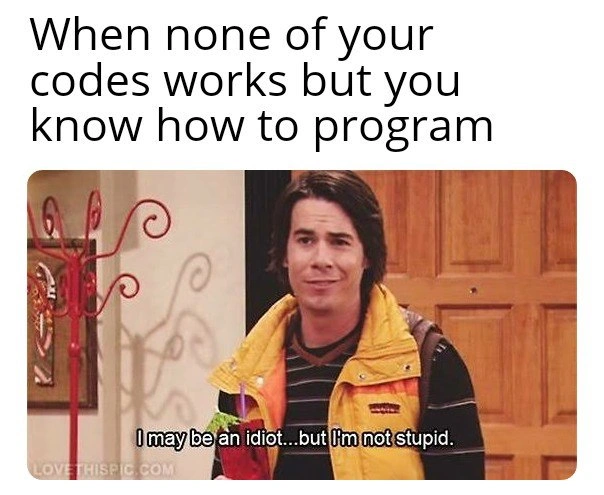
In the developer’s world, there’s a constant battle of Brain vs. Bugs: you have the knowledge and logic (the “brain”), yet your program is littered with mysterious errors (the “bugs”). This meme nails that paradox. The top text “When none of your code works but you know how to program” describes a scenario every experienced programmer recognizes. It’s that twilight zone where theoretically you do know what you’re doing – you understand algorithms, you’ve mastered your language’s syntax – and yet every piece of code you run is blowing up in your face. The punchline comes from the sitcom screenshot caption: “I may be an idiot...but I’m not stupid.” For a programmer, this translates to: “I may have made some dumb mistakes in my code, but I’m not a hopeless coder.” It’s a tongue-in-cheek way developers laugh at the self-deprecating reality that making mistakes is part of the game, while still clinging to their confidence in their skills. The humor works because “idiot” and “stupid” are synonyms, so the character is splitting hairs – much like a coder saying: “Okay, I messed up that if-statement, but I do know how a loop works, I swear!” It’s a hyperbolic, comedic take on impostor syndrome, that jittery feeling that maybe you’re clueless – undercut by a stubborn refusal to believe it. Experienced devs chuckle at this because we’ve all pep-talked ourselves through a rough debugging session with something like, “I can’t believe I missed that, I feel so dumb… but I have solved things like this before!”
On a technical level, this situation happens all the time. Code failures are the norm, not the exception. In fact, there’s an old joke among senior engineers: “If debugging is the process of removing bugs, then programming must be the process of putting them in.” 🐛 Every new feature or fix comes with a side of unforeseen issues. A veteran developer knows that writing code and debugging code are inseparable. You might run your freshly written program, expecting glory, and instantly get a face-full of errors – the dreaded red text of a stack trace or a cryptic exception message. At that moment, it’s easy to question your competence. But knowing how to program isn’t a guarantee that your program runs right on the first try; rather, it’s what lets you eventually fix the problem. Seasoned devs understand that a failing program doesn’t mean “you suck at coding” – it usually means there’s a hidden flaw to root out. It could be a tiny typo or a logic bomb lurking in the code. Maybe you used = instead of == in a comparison, or forgot to initialize a variable. Perhaps you assumed a function would return what you needed, but it returns something else entirely. Until you find that bug, things feel bleak. But once you do, there’s that “Aha!” moment: your knowledge kicks in, you apply a fix, and everything starts working. Suddenly you feel vindicated – I knew I wasn’t totally incompetent! – which is exactly the rollercoaster this meme humorously captures.
To make it even more concrete, consider a trivial mistake that can break a whole program. For example, in C or Java, omitting one curly brace or semicolon can prevent all your code from running. You might write a simple program like this:
#include <stdio.h>
int main() {
printf("Hello, world!");
// Forgot to close the main function with a curly brace
This won’t compile at all – not because you don’t know how to program, but because of one tiny oversight. Even senior developers have spent embarrassingly long periods hunting for a missing } or ) that’s wrecking their build. It’s a classic facepalm moment: the code looks mostly right, but one small error causes a cascade of failures. The meme’s scenario “none of your code works” is often exactly that feeling: some minor but critical bug is making everything blow up. In practice, the code might throw exceptions or refuse to run until that little gremlin is found. The developer’s saving grace is knowing why it failed once they discover the cause. That’s the “I’m not stupid” part – the moment you realize “Oh, it was just a missing parenthesis! I understand the problem now.” You were doing something “idiotic” (like forgetting a simple syntax rule), but you’re not fundamentally clueless; you can correct it.
Beyond simple typos, there are gnarlier bugs that torment even the best programmers. Race conditions in a multi-threaded app, an off-by-one error in an array loop, a misconfigured server environment – these can make any of us briefly feel like we have no idea what we’re doing. Imagine deploying code on Friday (risky move, by the way) and nothing works in production because of one environment variable that wasn’t set. The whole team is scrambling, and you’re thinking, “I swear I followed the deployment steps… I’m not an idiot, am I?” 😅 In reality, complex systems fail for complex reasons, and even a top-notch developer can miss a detail. The confidence in “I know how to program” comes from having been through these fires before. Senior engineers recognize the pattern: bug happens, frustration ensues, but systematic debugging will solve it. They’ve learned to stay calm(ish) and methodical: read the error logs, trace the code flow, maybe do some rubber duck debugging (explaining the problem out loud to a rubber duck or an inanimate object) to spot the flaw. They also know the value of stepping away after hours of hitting a wall – only to find the bug in 2 minutes the next morning. Experience teaches that feeling stupid is temporary; the knowledge is still in there, ready to pounce on the bug once it’s localized.
The meme is funny to developers because it’s painfully relatable. There’s a shared catharsis in admitting “Yep, been there, done that!” We’ve all written code that should work in principle and been baffled when it doesn't. It highlights a core truth of the developer experience (DX): Debugging can be an emotional rollercoaster. One minute you’re confident in your plan, next minute the program crashes and you’re questioning your life choices. The subtitle’s quote, from a goofy TV character in a yellow vest, perfectly voices that internal monologue: it’s comedic exaggeration, but with a kernel of truth. Developers often use humor as a coping mechanism. Jokingly calling yourself an “idiot” for missing a silly mistake is a way to vent frustration without truly doubting your intelligence. In team environments, you’ll even hear senior devs say “Wow, I’m an idiot” after spotting their own mistake – it signals humility and breaks the tension, while reassuring everyone that mistakes happen to the best of us. Culturally, software folks bond over these “bug wars” stories: late-night debugging sessions, weird bugs that made us pull our hair out, and the eventual triumph when we squashed them. This meme taps into that collective experience. It’s basically a developer motto in joke form: I broke it, but I know what I’m doing… sort of! And ironically, acknowledging mistakes is actually a trait of competent developers – it means you’re aware and ready to learn. So the meme resonates on multiple levels: it’s a funny TV-reference, a statement about developer frustration, and a lighthearted affirmation that struggling with broken code doesn’t make you a lousy programmer. In fact, it makes you a real programmer.
Description
A two-part meme. The top section has black text on a white background that reads, 'When none of your codes works but you know how to program'. The bottom section is a screenshot of the character Spencer Shay from the TV show 'iCarly'. He is looking slightly to the side with a smirk, and the subtitle below him says, 'I may be an idiot...but I'm not stupid.' The meme perfectly captures the cognitive dissonance developers experience during difficult debugging sessions. It highlights the feeling of being defeated by a seemingly simple bug (feeling like an 'idiot') while still having confidence in one's overall technical knowledge and problem-solving abilities (not being 'stupid'). This is a universally relatable experience in software development, where a single misplaced character can derail a complex system, making the most experienced engineer question their own competence momentarily

Comments
7Comment deleted
That feeling when you spend three hours debugging only to find a typo in an environment variable. You're not stupid, you just lost a fight with a string
None of my services are coming up, but after two decades I know it’s just one env var misspelled across twelve Kubernetes manifests - idiocy is inevitable, expertise is knowing where to grep
After 20 years in the industry, you realize the difference between 'knowing how to program' and 'knowing why the program doesn't know how to program' is about three dependency updates and a race condition you'll discover next Tuesday
The eternal developer paradox: you've architected distributed systems, optimized database queries, and debugged race conditions at 3 AM - yet somehow a simple feature refuses to work, and you're left wondering if you've forgotten how to write an if-statement. But deep down, you know the difference between not knowing how to code and having code that simply refuses to cooperate with reality. It's not stupidity; it's just another Tuesday in production
I know how to program - just not how to make reality respect my off-by-one expertise
None of my code works, but I know how to program - I just don’t know which feature flag, transitive dependency, or 300ms clock skew made the system nondeterministic today
None of my code works because the CAP theorem is negotiating between my IDE, a poisoned build cache, and three package managers