Skip to content
DevMeme
1318 of 7435
The eternal holy war: Tabs vs. Spaces
CodeQuality Post #1474, on May 2, 2020 in TG

The eternal holy war: Tabs vs. Spaces

Why is this CodeQuality meme funny?

Level 1: Sneaking into the Club

Imagine there’s a super exclusive kids-only club where everyone inside follows a very specific rule – say, everyone must be wearing a blue hat to be allowed in. There’s a big guard at the door checking everyone. Now picture a group of five friends who really want to join the fun inside, but uh-oh, they don’t have any blue hats. Instead, they come up with a silly plan: they stack on top of each other, one-by-one, and cover themselves with a huge long coat and a fake blue hat on top, trying to look like one tall person who does have a blue hat. It’s like a goofy cartoon scene! They wobble up to the club entrance disguised as this one big tall guest.

What do you think happens next? The guard takes one look and immediately knows something’s off. Maybe the “person” looks lumpy or there are extra pairs of shoes peeking out at the bottom of the coat. 📣 An alarm goes off, and a big red light flashes “Rule Violation Detected!” The guard pulls off the coat, revealing the stack of friends standing on each other’s shoulders. Busted! “Nice try, but you’re not following the one-blue-hat rule,” the guard says, and points them to the exit: “Get out.”

It’s funny because the friends thought they could fool the system by combining themselves and hiding under a coat, just like someone might think they can sneak something not allowed into a strict place. But the rule was there for a reason, and the guard was very attentive. The whole scene is playful and absurd – of course five kids in a trench-coat won’t get past a real bouncer, just like you can’t really trick a strict system by sneaking the wrong thing in. The humor comes from seeing the rule-breakers try something clever but ultimately obvious, and the quick, no-nonsense response from the rule enforcer. It’s a simple reminder that when there’s a clear rule, trying to cheat it (especially in such a clumsy way) will just end in a funny failure.

Level 2: No Mixing Allowed

When programmers talk about tabs vs spaces, they’re talking about two different ways to make indentations (the empty space at the beginning of a code line that shows it’s inside a block of code). A tab is a special single character (\t) that jumps the text to the next column stop (often visualized as a big horizontal skip). A space is the regular space character ( ) — the same one you press between words — and you might use several in a row to create the indentation width you want. For example, instead of one tab character, you might press the spacebar 4 times to indent a line by four spaces. Visually, both can look similar (4 spaces and 1 tab might both create an indent of about the same width in many editors), but under the hood they are different bytes.

In many programming languages, it actually doesn’t matter if you use tabs or spaces for indenting your code, as long as you’re consistent. The computer typically treats any sequence of whitespace the same when it’s just used to separate tokens. So a lot of the TabsVsSpacesDebate is about style and consistency — kind of like whether you prefer one big indentation step or multiple small ones, as long as everyone on the team does it the same way to keep the code neat. This is why teams have CodeStyleGuides. They decide “we indent with 2 spaces” or “we indent with 1 tab” and then everyone follows that. It’s about readability and avoiding messy diffs, making the codebase feel uniform. It also improves the DeveloperExperience: you spend less time fighting formatting and more time coding features when everyone agrees on the format. Modern text editors and IDEs_Editors (like VSCode, PyCharm, etc.) can even be configured to automatically use the project’s preferred indentation style. For instance, you press Tab and the editor might insert 4 spaces — sneaky, but it helps you not worry about it.

Now, Python is a special case where indentation isn’t just for show – it’s part of the language’s syntax. Instead of curly braces { } or keywords like begin/end to define blocks of code (like loops or if-statements), Python uses the indentation level. So if one line is indented further than the line above it, Python knows you’ve started a new block. Because of this, Python is very strict about indentation. You can’t mix tabs and spaces randomly, because how would Python know how far a tab indents compared to a space? For consistency, Python says: choose one method of indentation and stick to it within a file. If you mix them in a way that confuses the structure, Python will throw an error. A common error message is something like IndentationError: unexpected indent or IndentationError: unindent does not match any outer indentation level. This is basically Python’s way of saying “the indenting on this line doesn’t match what I was expecting – something’s off.” In Python 3, if you have tabs and spaces inconsistently, you might even get a TabError: inconsistent use of tabs and spaces in indentation.

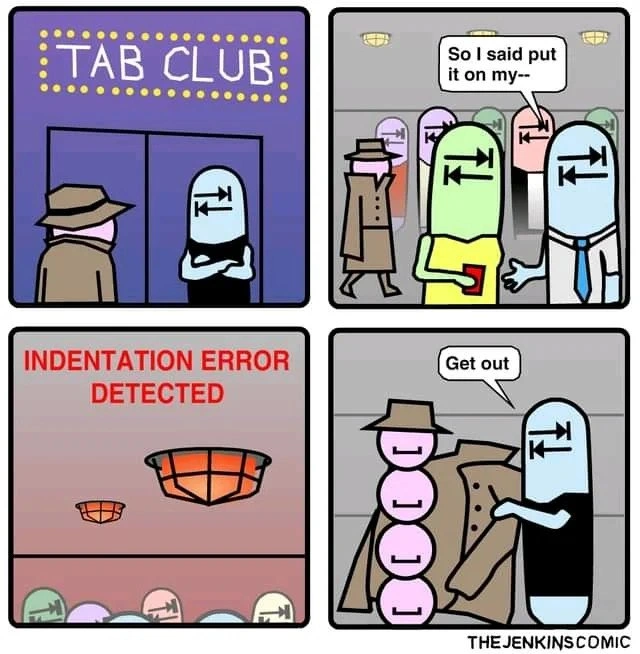
Let’s connect this to the comic: The “TAB CLUB” is a fun metaphor for a code environment or project that has a rule: use tabs for indentation (and no spaces allowed). The blue bouncer with the tab symbol is like the gatekeeper enforcing that rule. Inside the club, all the happy club-goers are tabs (following the rule). Now, the beige character trying to get in is suspiciously lumpy because, in truth, “he” is actually five space characters in a trench-coat! 🤖 In code terms, that’s like someone took 5 separate spaces and tried to pretend it’s equivalent to one big tab. In many editors, a tab might visually equal 4 or 8 spaces in width; here the comic exaggerates with five little spaces stacking up to approximate one tab’s height. The moment those spaces enter, the club’s alarm blares “INDENTATION ERROR DETECTED!” This mirrors how a code editor or build system might immediately flag a mixed indentation. The final panel where the bouncer says “Get out” to the spaces is exactly what happens in a strict project: if you submit code with the wrong indent style, the review or the CI (continuous integration) will reject it. You’d be asked to fix your formatting before it gets accepted.

For a newcomer or junior developer, the lesson here is: don’t mix tabs and spaces when indenting code. Pick one method as dictated by the project or language. In Python, the universal convention (per PEP 8) is to use 4 spaces per indent level, no tabs at all (except maybe in Makefiles or other contexts where tabs are specifically required). In other languages that aren’t whitespace-sensitive, mixing won’t break the code, but it can still cause confusion. For instance, your code might look aligned in your editor but look misaligned in another person’s editor if tabs are interpreted differently. That’s why teams often configure an .editorconfig or use auto-formatting tools to enforce consistency.

The DeveloperHumor of this meme comes from how it personifies those invisible characters. It’s a lighthearted reminder that even tiny details in code, like a single space, can have outsize consequences (like a program crash or a failed build). Thankfully, our tools are pretty good at catching these issues now – often highlighting mixed indentation or even auto-correcting it. But as every programmer learns, you still have to be mindful of the basics: when the sign on the door says “Tab club only,” don’t try to sneak your spaces in 😉.

Level 3: Whitespace War Stories

This comic nails an issue that senior developers know all too well: the Tabs vs Spaces saga – one of the classic CodingHumor battles. In the meme’s nightclub metaphor, tabs have formed an exclusive club, and a bunch of spaces stacked in a trench-coat try to sneak in. Why is this so humorous (and painfully relatable)? Because in real coding life, mixing tabs and spaces is a well-known recipe for headaches. It’s essentially a code_style_conflict that many of us have encountered.

Take Python for example. Python is infamous (in a lovable way) for using indentation to mark code blocks. If you use a tab in one place and spaces in another, you’ll trigger Python’s dreaded IndentationError faster than a loud alarm in a quiet club. The meme’s third panel with the blaring “INDENTATION ERROR DETECTED” is a dramatization of that exact moment a Python program refuses to run due to misaligned whitespace. Every experienced Pythonista has felt their stomach drop seeing that error, only to discover it was caused by something as trivial as a single space character hiding where a tab should be. It’s the programmer’s equivalent of tripping a security alarm with a paperclip.

We’ve all got our whitespace war stories. DeveloperExperience (DX) can really suffer when a team isn’t consistent about indentation. Imagine a codebase that is supposed to use tabs, but one new developer’s editor is set to insert spaces. They commit code with those sneaky spaces. Suddenly, the continuous integration build fails or a code review gets flagged. It’s like the CI system is a bouncer script growling, “No entry – inconsistent indentation!” In one project, for instance, a colleague spent hours debugging a cryptic error, only to eventually realize that one file had a mix of tabs and spaces. The fix (:retab in Vim or a global search-replace) took seconds once found, but finding it was the hard part. Talk about a facepalm moment!

CodeFormatting matters for CodeQuality – not because tabs or spaces fundamentally change logic (they don’t, except in languages like Python or YAML), but because consistency prevents these kinds of errors and makes code readable. A block of code indented with one tab should visually align with one indented with, say, 4 spaces, if and only if everyone’s environment is set the same. If not, you might see wonky alignment or, worse, in Python the code just won’t run. That’s why teams adopt CodeStyleGuides. For example, Python’s PEP 8 style guide clearly states: “Use 4 spaces per indentation level. Never mix tabs and spaces.” Many organizations have similar rules – some mandate spaces, others prefer tabs – but the golden rule is no mixing allowed. Just like an exclusive club’s dress code, you pick one style and stick to it.

The “TabsVsSpacesDebate” has been a source of tongue-in-cheek conflict for ages (even portrayed in HBO’s Silicon Valley where it nearly caused a breakup between developers!). Seasoned devs joke about it precisely because it’s so trivial and yet has caused so much friction. It’s common to hear a senior engineer sarcastically quip, “Oh, that bug? Probably a tab versus space issue,” when someone can’t spot a subtle error. There’s also a practical side to the humor: mixing whitespace can break things in unexpected places. Old-school Makefiles, for instance, require actual tab characters for recipe lines. If you used spaces instead, the build would fail – a classic gotcha that taught many of us to pay attention to invisible characters. And let’s not forget diff noise: if one person changes all your tabs to spaces or vice versa, version control will show a massive diff with virtually no real code change. That’s the developer equivalent of a nightclub fight breaking out – it causes chaos and nobody’s happy.

So the meme’s scenario of a whitespace_wars “club bouncer” catching five spaces in a trench-coat hits home. It’s exaggerating a real development scenario: a linter or vigilant team lead enforcing the indent rules. The blue bouncer with a tab symbol on his face represents the strict enforcement (perhaps an IDE showing invisibles, or a code review that spots misaligned indent). The stack of five pink space-characters under the coat is hilarious because that’s exactly what using multiple spaces is — a bunch of little characters trying to act like a single bigger character (a tab). In the last panel, the bouncer says “Get out,” just like a senior dev might reject a commit: “Fix your indentation and resubmit.” It’s a comedic way to frame what is otherwise a pretty mundane part of coding life. We laugh because we’ve been there, chasing an indentation_error or tweaking editor settings to appease the “Tab Club.” Who knew invisible characters could cause such visible drama?

Level 4: Whitespace as Syntax

In many programming languages, whitespace is insignificant — it's mostly ignored or just a separator. But Python (along with a few other languages) follows what’s known as the off-side rule, where indentation is the syntax for defining code blocks. This means those blank spaces or tab characters at the start of a line aren’t just cosmetic; they tell the interpreter how to group code. Under the hood, the Python interpreter’s lexer generates INDENT and DEDENT tokens based on indentation changes. Essentially, each increase in indent (be it a tab or multiple spaces) is like an “open block” and each decrease is a “close block.” If these blocks don’t line up perfectly, Python raises an error since it literally can’t parse the code structure.

This design has academic roots: the off-side rule was first described in the 1960s (by Peter J. Landin) and later popularized in languages like Haskell and Occam. Python adopted it to make code visually clean and consistent — no need for braces or end keywords, just whitespace alignment. The trade-off is that whitespace becomes a type of grammar. A single rogue space where a tab was expected is like a sneaky syntax error that’s invisible to the eye. Python 3 is especially strict here: it will throw a TabError (a subtype of IndentationError) if it detects you mixed tabs and spaces for indentation. This is because the interpreter must decide how many spaces a tab equals when aligning blocks (historically a tab counted as 8 spaces in Python’s calculation). If a mixture doesn’t resolve to a consistent structure, the parser essentially says “I give up”. In our meme’s terms, the language has a bouncer at the door scanning for any mismatched indentation and kicking it out on sight.

Languages that don’t use significant whitespace (like C, Java, etc.) avoid this by using explicit {} or other keywords for blocks. But then they rely on style conventions for readability rather than the compiler enforcing it. Python’s approach makes the style part of the CodeQuality: you literally cannot run code with bad indentation. The upside is cleaner looking code and one less category of argument (“where to put braces”) – but the downside is you get these almost comedic failures when someone’s editor uses spaces instead of tabs or vice versa. It’s a fundamentally different philosophy: formatting as part of the syntax. That’s why a tiny space character (U+0020) can cause a big runtime error, and why our blue Tab bouncer is dead-serious about not letting those pink space impostors slip in.

Description

A four-panel comic by 'THE JENKINS COMIC' personifying the 'tabs vs. spaces' debate. In the first panel, a character in a trench coat stands before a nightclub named 'TAB CLUB', guarded by a bouncer who is a literal Tab key character. The second panel shows the character inside, mingling with other Tab key patrons, starting to say, 'So I said put it on my--'. The third panel shows the club's lights flashing red with a warning: 'INDENTATION ERROR DETECTED'. In the final panel, the Tab key bouncer throws the character out, revealing him to be four 'space' key characters stacked on top of each other. The bouncer says, 'Get out.' This comic humorously visualizes the conflict between using tab characters versus space characters for code indentation. In languages like Python, mixing tabs and spaces can lead to an `IndentationError`, a syntax error that stops the program from running. The meme is highly relatable to developers, as this debate is a long-standing 'holy war' in the programming community
Comments

7
Anonymous ★ Top Pick That's what you get for not using an editor with 'convert tabs to spaces' enabled. It's the software equivalent of a fake ID
  1. Anonymous ★ Top Pick

    That's what you get for not using an editor with 'convert tabs to spaces' enabled. It's the software equivalent of a fake ID

  2. Anonymous

    Spaces trying to pass as a tab is the nightclub version of a 3 AM commit titled “quick whitespace fix” - looks fine until the CI bouncer flashes INDENTATION ERROR and the on-call pager lights up

  3. Anonymous

    After 20 years in tech, I've seen teams split over microservices vs monoliths, but nothing creates lasting organizational trauma quite like discovering your principal engineer committed a .editorconfig file with 'indent_style = tab' during the company's IPO roadshow

  4. Anonymous

    The real tragedy here isn't the indentation error - it's that after 20 years of heated debates, we've collectively spent more engineering hours arguing about tabs vs spaces than it would have taken to rewrite the entire Linux kernel in Brainfuck. At least the Tab Club has standards; they'll throw you out for mixing whitespace, unlike that one legacy Python 2.7 codebase we all pretend doesn't exist where someone used tabs, spaces, AND non-breaking spaces because they copy-pasted from a Word document

  5. Anonymous

    Python's parser as Tab Club bouncer: mixes tabs and spaces? Straight to IndentationError - no cover charge refunds

  6. Anonymous

    Nothing exposes four spaces in a trench coat faster than Python’s parser - it’s the only bouncer stricter than our pre-commit

  7. Anonymous

    Tabs Club runs zero‑trust: the moment a space sneaks in, Python lights “IndentationError,” CI calls security, and you’re paged before finishing “put it on my - ”

Use J and K for navigation