Skip to content
DevMeme
1317 of 7435
The existential dread of a self-fixing bug
Debugging Troubleshooting Post #1473, on May 2, 2020 in TG

The existential dread of a self-fixing bug

Why is this Debugging Troubleshooting meme funny?

Level 1: All That Work for Nothing

Imagine you have a toy that was working just fine – let’s say a remote control car. You think, “Maybe I can make it even better!” So you open it up and start changing things inside (like tweaking the wires or gears). Suddenly, the car stops working at all. Uh-oh. You spend the whole afternoon fiddling with it in different ways to fix it, but nothing works. Finally, feeling defeated, you put all the original parts back exactly where they were, just like when you started. You close it up and turn the car on... and it magically works again, just like before. Instead of feeling happy, you feel like crying. You realize all those hours you spent “improving” the toy only broke it, and in the end you fixed it by simply undoing everything you did. It’s like you went in a big circle for nothing. That mix of relief (because your car works) and frustration (because you wasted so much time and effort) is exactly why the programmer in the meme wants to lie down and cry. It’s funny in a sad way – sometimes the best way to fix a problem is to just not change anything and go back to the start, but that means admitting all your hard work didn’t pay off.

Level 2: When Fixes Break

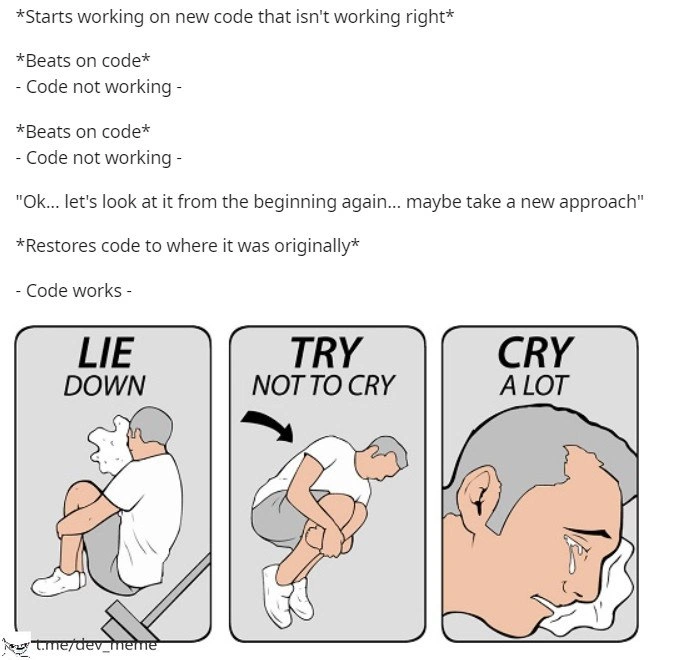
This meme shows a programmer’s worst-case debugging scenario in a humorous way. In the top text, the developer is trying to fix a problem in their code. They start with new changes (“new code that isn’t working right”), and when it doesn’t work, they beat on the code – meaning they keep tweaking and poking the code, hoping to make it work. Code not working... code not working... after multiple tries. This is the DebuggingPain many of us feel when nothing fixes the bug. Finally, the developer says, “let’s look at it from the beginning again... maybe take a new approach.” That sounds like they plan to rethink the solution, but what they actually do is restore the code to where it was originally. In plain terms, they undo all their changes and go back to the last known good version of the code. Amazingly, the original code works perfectly now – the bug or error is gone. The top half is basically a timeline of BugFixing attempts that fail, followed by a big undo_changes that succeeds. It’s like banging on a machine that isn’t working, then resetting it to factory settings and suddenly it runs fine. The meme is poking fun at how often the “fix” for a software bug is to roll back whatever change you just made. The developer wasted a lot of time, only to end up right back where they started, which is both funny and frustrating.

Now, let’s break down why this happens in developer terms. The situation here is known as introducing a regression. A regression bug means something that used to work has now broken after a change. In the meme, the program was presumably working at first (the original code was fine). The developer tried to improve it or fix a minor issue (this could be called a small refactor – changing code structure or logic without intending to change its behavior, or just an attempted fix). But their new code inadvertently caused a new bug or didn't solve the problem. No matter how much they tweak, the program remains broken, which is incredibly frustrating. So what’s the solution? Go back to a time when things worked! This is where version control comes in. Version control (like the popular system Git) is a tool that keeps track of code changes over time. It’s essentially an undo/redo history for your code. You can commit snapshots of your code at various points. If a new change causes trouble, you can use version control to revert (roll back) to an earlier snapshot before the trouble started. That’s exactly what our despairing developer does: they restore the code to its original, working version (probably using a command like git revert or git checkout to get the old code back). Immediately, everything works again, confirming that their changes were the source of the bug. It feels almost like magic – hence the meme says “restoring original code magically fixes everything” – but really it’s just because the original code didn’t have the bug that the new code introduced.

Let’s talk emotionally: The bottom half of the meme uses the “Lie Down/Try Not to Cry/Cry a Lot” cartoon to show how the developer feels. This three-panel comic is a well-known meme format for expressing defeat or heartbreak. In each panel, a character progressively breaks down: first curling up on the ground (“LIE DOWN”), then trembling and trying to hold back tears (“TRY NOT TO CRY”), and finally sobbing uncontrollably (“CRY A LOT”). In the context of programming, it humorously represents the developer’s emotional journey:

  • Lie Down – After reverting their code, the dev probably slumps back in their chair or literally lies on the floor, exhausted. All that work was for nothing.
  • Try Not to Cry – They realize the only fix was to undo everything. They attempt to stay strong, maybe thinking “okay, at least it works now… no need to cry...”
  • Cry A Lot – Finally, the reality sinks in: they spent hours (maybe days) on this, and the end result is just the original code working as it did before. That can be crushing. So, metaphorically (or literally), the programmer is crying out of frustration and disappointment. It’s an exaggeration for comedic effect, but it captures that real sting of lost effort.

In simpler terms, this meme is about DeveloperFrustration and the dark humor of coding. Every programmer (even juniors just starting out) eventually hits a scenario where you try to fix one thing and break something else in the process. You might debug for hours with no success. Having the ability to revert your code via Git is a lifesaver because it can bring your project back to a working state. But it’s also humbling: it means your grand fix was actually the problem. The meme’s humor comes from that relatability – anyone who’s struggled with code and then had to say “forget it, let’s just go back to how it was” will both laugh and cringe. The tags like DebuggingFrustration, CodeRefactoring, and RegressionBugs all point to this scenario. CodeRefactoring is supposed to make code better without altering what it does, but here an attempted refactor or change clearly altered behavior for the worse (a regression). Debugging is the act of finding and fixing bugs; here debugging turned into a cycle of trial-and-error pain. And VersionControlHumor is about jokes that only programmers get because they use tools like Git – for example, joking that the best fix is a git revert (undoing the commit). In fact, developers often make tongue-in-cheek remarks like, “Welp, time to revert and pretend this never happened!” which is exactly the scenario shown. In summary, the meme teaches (in a funny way) an important early lesson in development: sometimes your changes aren’t as brilliant as you thought, and knowing when to roll back is just as important as knowing how to write new code. It’s okay – it happens to everyone, and all you can do is have a little laugh (and maybe a little cry) and move on.

Level 3: Refactor Regrets

For seasoned developers, this meme triggers painful déjà vu. It portrays the classic nightmare of a failed refactor or bug fix that ends in total surrender. The top half reads like a debugging diary: you eagerly dive into new code to fix an issue, hammer away with changes (“Beats on code” repeatedly), yet the code stubbornly “isn't working right.” After numerous attempts (and mounting DebuggingFrustration), you concede defeat: “Ok... let's look at it from the beginning again... maybe take a new approach.” In a twist of dark irony, the “new approach” is literally restoring the code to its original state. You hit the undo_changes button (figuratively speaking) and suddenly – bam – the code works again, as if nothing ever happened. The bug vanishes. This absurd moment of relief is immediately followed by soul-crushing despair, perfectly captured by the bottom crying_meme_format panels: Lie Down (in bitter resignation), Try Not to Cry (holding it in), Cry a Lot (utter defeat). It’s the DeveloperFrustration crescendo we all recognize: the moment you realize hours of “fixing” accomplished less than doing nothing at all.

Technically, what happened here is a textbook regression bug. The developer’s changes introduced a new problem that wasn’t present in the original code. By reverting to the known-good version, they removed the faulty code and thus removed the bug. In other words, the fix turned out to be the cause of the failure. This is why we have VersionControlHumor: tools like Git let us time-travel in our code. The meme specifically hints at using version control (perhaps a git revert or git reset) as the magical spell to make everything work again. A senior engineer will chuckle (and wince) because we’ve all run git checkout HEAD~1 as a last resort when things go horribly wrong. The VersionControl saves us, but it also delivers the harsh verdict: all that new code was the problem. This situation often arises when doing CodeRefactoring or “improving” a working system without fully understanding its subtle behavior. You clean up or optimize some logic, only to knock something essential out of place – a classic case of BugFixing backfiring. The code was stable before, and every change you made just dug the hole deeper. No wonder the final fix is to climb out and fill the hole back in.

Experienced devs know the unspoken industry mantra: “If it ain’t broke, don’t fix it.” This meme is that saying incarnate. There’s a dose of DebuggingPain here that veterans know too well. You start second-guessing your skills. Was the original code actually fine all along? Did I waste half a day chasing a phantom? Often, yes. Maybe the initial error was elsewhere (a misconfigured environment, a one-time glitch) and your code tweaks were a wild goose chase. Or perhaps the code really did need changes, but in trying to fix one thing, you unintentionally broke five others – a development_cycle of one step forward, two steps back. The more you “beat on” the code without a clear plan, the worse it gets – a crude form of shotgun debugging. Seasoned developers have learned (the hard way) that randomly thrashing at code is usually counterproductive. As the meme shows, sometimes the smartest move is to admit defeat, revert everything, and return to square one. It’s both logical and humiliating: logical because eliminating your changes confirms whether they were the culprit; humiliating because it proves all your efforts only made things worse.

This leads to the emotional sucker-punch depicted in the Lie Down/Try Not to Cry/Cry a Lot comic. The meme’s bottom panels are a famous depiction of utter despair, and here they symbolize the emotional toll of failed refactors. After painstakingly refactoring and debugging for ages, discovering that restoring the original code fixes everything can break a developer’s spirit. You feel DebuggingFrustration at maximum amplitude. The code is working now (hooray!), but only because you undid all your work (ouch). It’s a net zero outcome with a heavy side of self-doubt. In the privacy of our minds (or a late-night office), many of us have indeed wanted to lie down and cry after such an ordeal. The humor is bittersweet: it’s funny because it’s true. As a battle-weary coder, you laugh to keep from crying – exactly like the cartoon character in the final panel.

On a broader level, this meme highlights why practices like unit testing and incremental changes are vital. Without tests, you might not notice a regression until hours into tinkering, when you finally run the app and see it explode. Good version control hygiene (frequent commits, meaningful commit messages, maybe a separate branch for that “new approach”) at least makes the recovery easier – you can pinpoint which commit broke things, revert or cherry-pick as needed. But even with those best practices, RegressionBugs and refactor guilt still happen, especially under pressure or when dealing with complex, fragile legacy code. The Cynical Veteran in us all has learned to approach any “simple” change with caution, commenting “what could possibly go wrong?” only in jest. Because as this meme painfully illustrates, even the most well-intentioned code change can send you on a demoralizing round trip right back to the original code. In the end, you gain a bit of wisdom (and maybe write a post-mortem in the commit log along the lines of “Reverted foo optimization – caused system to crash, sticking to original implementation”). But mostly you gain humility. The next time you think about a risky refactor, you’ll remember the sting of Refactor Regrets and think twice. And if you do forge ahead, well… keep that git revert command handy and a box of tissues nearby.

# After many failed attempts to fix the issue:
$ git revert HEAD    # undo the last commit (the "new approach")
# Code is now back to its original state and working again.
# Developer's terminal is calm, but developer is crying inside.

Famous last words: "Let's refactor this, it'll be better." – Every developer before a long night of debugging and a tearful revert.

Description

A two-part meme about a frustrating coding experience. The top part consists of text describing a developer's process: starting with non-working code, attempting to fix it multiple times ('Beats on code'), failing, deciding to revert to the original state, and then discovering that the original code now works perfectly. The bottom part is a three-panel comic, stylized as a safety instruction manual, that shows a man's reaction to this situation. The panels are labeled: 1. 'LIE DOWN', showing him curled up on the floor. 2. 'TRY NOT TO CRY', showing him curled tighter. 3. 'CRY A LOT', a close-up of his face as he weeps. The watermark 't.me/dev_meme' is in the bottom left. This meme captures the maddening, illogical nature of certain bugs (often called 'Heisenbugs') that seem to disappear when you try to fix them. It's a shared trauma for experienced developers, where the cause isn't a logical code error but likely a caching issue, a build process glitch, or some other hidden state problem that resolves itself after a reset, leaving the developer confused and emotionally drained
Comments

7
Anonymous ★ Top Pick The code wasn't broken, your 'fixes' were. `git restore` is just a polite way of telling you to step away from the keyboard
  1. Anonymous ★ Top Pick

    The code wasn't broken, your 'fixes' were. `git restore` is just a polite way of telling you to step away from the keyboard

  2. Anonymous

    Six hours rewriting the service with shiny patterns, one `git reset --hard` later it works; apparently the only stateful singleton was my ego

  3. Anonymous

    After 20 years in this industry, I've learned that sometimes the most sophisticated debugging technique is admitting defeat to git and accepting that the universe operates on quantum mechanics where observation changes the outcome - your code was both broken and working until you tried to fix it

  4. Anonymous

    The most humbling moment in a senior engineer's career: spending 6 hours refactoring perfectly working code into an elegant, well-architected solution that mysteriously breaks everything, then doing a `git revert HEAD` and watching the tests go green again. Sometimes the real technical debt is the hubris we accumulated along the way - and the only winning move is `git checkout -- .` and pretending that architectural vision never happened

  5. Anonymous

    Revert-Driven Development: after six hours of “fixes”, git reset --hard and it works - the Heisenbug lived in the build cache; the repo is just documentation

  6. Anonymous

    'New approach' always means git revert --hard HEAD~N, where N is hours of debugging-induced tech debt

  7. Anonymous

    Senior debugging tip: git reset --hard; RCA - an undocumented invariant guarded only by the build cache and a rogue feature flag

Use J and K for navigation