A World Where Every Store Accepts Your Cookies
Why is this DataPrivacy meme funny?
Level 1: When Stores Spy on You
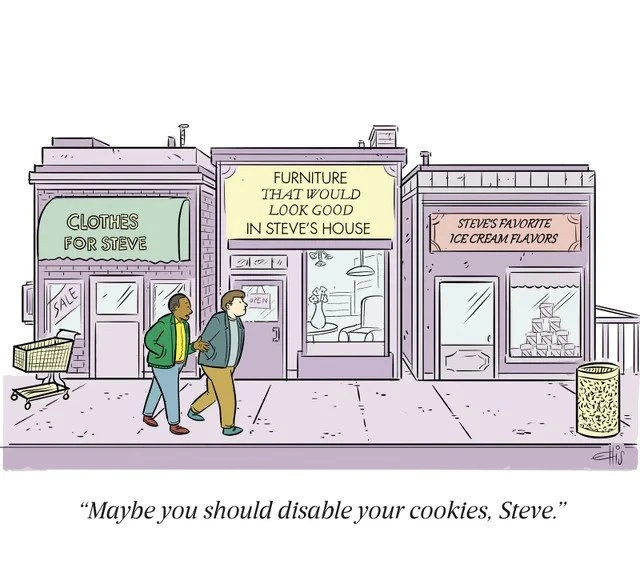
Think of it like this: imagine you’re walking down the street with a friend, and suddenly every shop you pass seems to know exactly who you are and what you like. There’s a clothing store with a big sign that says “Clothes for Steve” (with your name if it were you), a furniture store shouting “Furniture that would look good in Steve’s house,” and an ice cream shop advertising “Steve’s favorite ice cream flavors.” It would feel pretty freaky, right? It’s as if all these stores have been secretly watching everything you do at home or what you search for on your computer. In real life, a store owner doesn’t know your favorite ice cream flavor the moment you walk in – you’d have to tell them. But in this cartoon, poor Steve doesn’t need to say a word; the shops already know. It’s funny in a spooky way: Steve’s looking concerned, and his friend jokes that maybe Steve should stop sharing his cookies (not the kind you eat, but the little bits of information websites use). In simple terms, the joke is showing how online ads track what we like and then push those exact things at us wherever we go on the internet. By imagining that happening with real shops on a street, it’s easy to see why that can be a bit much! It’s like if every billboard in town was personalized just for you – at first it might feel flattering, but pretty soon you’d probably feel like you’re being watched all the time. The friend telling Steve to disable his cookies is basically saying, “Hey, maybe stop letting websites follow you around – then these stores won’t know so much about you.” The meme is funny because it takes something hidden and techy (websites tracking your data) and makes it super obvious by showing it in the real world. Even without knowing anything about computers, you can laugh and think, “Wow, if that happened to me in real life, I’d definitely be weirded out!”
Level 2: Not the Chocolate Chip Kind
Let’s break down what’s happening here in simpler terms. First off, when we say cookies on the web, we don’t mean the chocolate chip kind you eat. A browser cookie is a small piece of data that websites store in your browser to remember things about you. For example, if Steve logs into Steve’sAccount on a site, that site might set a cookie so it knows “this is Steve” each time he clicks a new page. Cookies are super common in WebDev because HTTP (the protocol of the web) is stateless – meaning by default it doesn’t remember who you are between page loads. So cookies act like an ID card or a note from the website that your browser keeps and shows back to the site when you return. They were invented to make the web more convenient. If you’ve ever had a site “remember you” after you closed the tab and came back later, that’s thanks to a cookie storing your login info or preferences.
However, not all cookies are used in friendly ways. There are first-party cookies and third-party cookies. A first-party cookie is set by the site you’re actually visiting – like that login cookie from Steve’s favorite clothing site steves-clothes.com so it keeps him logged in or knows his language preference. No problem there. The mischief begins with third_party_cookies: those are set by domains other than the one you’re visiting, usually through things like ads or embedded content. So if steves-clothes.com had an ad on it from, say, ads.example.com, that ad might set a cookie from ads.example.com in Steve’s browser. Now, why would an unrelated domain want to leave a cookie? Because if lots of sites use that same ad network, ads.example.com can recognize Steve across all those sites. It’s as if an advertiser gave Steve a unique tracker tag and whenever Steve walks into any store partnered with that advertiser, they quietly note “Steve was here looking at X.” Over time, these third-party cookies enable a practice called behavioral tracking – observing what Steve browses, clicks, or buys to build a profile of his interests and habits. This data is gold for advertisers. They use it for targeted_ads, which are ads specially selected based on Steve’s profile (so he’s more likely to click or buy). If Steve spent an evening googling living room decor, don’t be surprised if he sees furniture ads the next day on a news site – that’s targeted advertising in action.
One specific strategy that the meme highlights is retargeting. Retargeting means showing ads to you for something you almost bought or showed interest in, hoping you come back and finish the purchase. Ever noticed how after you browse a cool pair of shoes and leave the site, those exact shoes start appearing in ads all over your Facebook feed and other sites? That’s retargeting. Marketers joke that those shoes are “following” you around the internet. In Steve’s case, maybe he looked at a nice lamp for his living room but didn’t buy it. With retargeting, the furniture store can pay an ad network to show Steve that same lamp in ads wherever he goes online: “Still thinking about this lamp?” They’re essentially nudging, “Hey Steve, you liked this, come back!” The meme takes that concept and visualizes it as an entire store shouting “Furniture That Would Look Good In Steve’s House.” It’s funny because it’s a bit too on-the-nose. In real life, an online ad might be subtly showing the same lamp with a discount, whereas the meme just flat-out puts Steve’s name on the storefront, which is over-the-top personalization.
Now, why does Steve’s friend suggest disabling cookies? Because cookies, especially third-party ones, are the main way Steve’s getting tracked across sites. PrivacyConcerns come up when companies you’ve never heard of collect lots of information about what you do online. If Steve disables or clears his cookies, it’s like wiping away those “notes” that trackers and websites have left in his browser. It won’t stop all forms of tracking (there are other methods like fingerprinting, which is more advanced), but it severely limits the easiest method advertisers use to follow Steve’s behavior. Most modern browsers have privacy settings where you can block third-party cookies or even all cookies. For instance, Steve could set his browser to reject cookies from any domain that isn’t the site he’s visiting. Doing that would prevent something like ads.example.com from tagging along when he’s on other sites. The friend’s quip “Maybe you should disable your cookies” is basically saying, “turn off that feature that’s letting these stores know so much about you.” It’s common advice from IT folks to friends and family who feel spied on by ads. By March 2021 (when this meme was posted), many people were already using browser extensions or settings to curb tracking, and browsers like Safari were auto-blocking a lot of third-party cookies. There was (and still is) a growing awareness about OnlinePrivacy. People are fed up with feeling that Big Brother is watching them shop, hence all those cookie consent banners everywhere asking if it’s okay to track you. (Given how many such pop-ups we click through, a lot of us have cookie_banner_fatigue – we’re just tired of being asked, even though it’s for our own awareness.)
For a junior developer or someone new to this, imagine building your first website and discovering you can add a few lines of code to embed a YouTube video or a social media “Like” button. Neat! But then you learn that each of those widgets might also pull in cookies and trackers. Suddenly your simple site is part of the vast ad ecosystem. This meme is essentially joking about the end result of that ecosystem. Each store in the cartoon is like a website Steve visited that now knows him by name. “Clothes For Steve” might relate to a clothing retail site he frequents; “Steve’s Favorite Ice Cream Flavors” could be from a food delivery app that noticed he orders mint chocolate chip every Friday. All these bits of data are fragments of Steve’s online identity being shared and monetized. As a developer, it’s eye-opening (and a bit alarming) to realize how data from different sources gets combined to target one person. When you’re new, you might wonder, “Is this really how it works?” and the answer is yes, pretty much. Companies do share data and use tracking cookies to make ads feel personal. The meme just shows it in a ridiculously direct way.
Let’s define a few key terms clearly:
- Cookie: A small file stored in your web browser by a website. It’s used to remember information about you, like your login status or preferences. Think of it as the site leaving a note in your browser, so next time you visit, the browser shows the note back to the site (“See, I have Steve’s ID, he’s already logged in”).
- Third-party cookie: A cookie set by a website other than the one you’re currently visiting. This usually happens via third-party content (like ads, embedded widgets, or scripts). Third-party cookies are the main mechanism for broad tracking – they let ad companies recognize you across multiple websites.
- Targeted ads: Advertisements that are shown to you based on your personal data or behavior. Instead of a random ad, you see something tailored to your interests (or what the algorithms think are your interests). If Steve is into hiking, targeted ads might show him boots or backpack deals, rather than, say, random car insurance ads.
- Retargeting: A special kind of targeted ad that specifically targets you with products or pages you’ve shown interest in before. It’s the “hey, come back!” strategy. If Steve put a guitar in his shopping cart but didn’t buy it, a retargeting ad might later show him “Still thinking about that guitar? Here’s 10% off!” on a different site.
- Privacy settings: Options in browsers or apps that let users control what data is collected or shared. For instance, setting your browser to block third-party cookies, sending a “Do Not Track” signal, or clearing your cookies/history regularly. These help protect your DataPrivacy, though they might also log you out of sites or make some features less convenient.
- “Disable your cookies”: Colloquially, this means adjusting your settings to block or remove cookies (especially the tracking kind). It’s advice given to reduce how much you’re tracked. In practice, completely disabling all cookies can break a lot of web functionality (like logging into sites), so usually it refers to blocking third-party cookies or using private/incognito mode which doesn’t save cookies after use.
Now, with these basics, the meme’s scenario becomes easier to understand. The friend’s suggestion to Steve isn’t about literal baked cookies; it’s about going into his browser and turning off those tracking cookies so the “creepy shops” stop knowing everything about him. For a non-technical person, the idea that your browser cookies lead to seeing such precise ads may not be obvious. We’ve all heard someone say, “It’s weird, I was just talking about vacations and now I see vacation ads – is my phone listening?” Often it’s not the microphone, it’s the cookies and browsing data doing this behavioral_tracking magic. The meme scales that up to a funny extreme: instead of just an ad on a webpage, imagine whole stores around you morph to target you. It’s a way of saying, this is how obvious and absurd it can feel when ads get too personal. And if that weirds you out, well, maybe follow the advice and lock down your browser a bit.
Level 3: Hyper-Personalization Overdose
In this cartoon, Steve is walking down a street where every store has been creepily tailored to his tastes: “CLOTHES FOR STEVE,” “FURNITURE THAT WOULD LOOK GOOD IN STEVE’S HOUSE,” and “STEVE’S FAVORITE ICE CREAM FLAVORS.” It’s a hilarious exaggeration of what the web’s targeted ads and behavioral tracking do with our data every day. As developers, we immediately recognize the joke: those store signs are like hyper-specific banner ads generated from Steve’s browsing history. It’s as if all the AdTech algorithms and tracking cookies decided to jump out of the browser and set up shop on Main Street. Steve’s friend pointing and saying, “Maybe you should disable your cookies, Steve,” is the punchline that ties it all together – a tongue-in-cheek nod to the classic techie advice for dealing with invasive retargeting.
Behind the humor is a pretty sophisticated web mechanism. When you visit sites online, they often leave cookies (small text files in your browser) that remember who you are and what you looked at. Originally, cookies were meant for convenience – like keeping you logged in or remembering what’s in your shopping cart – but third-party cookies turned into the sneaky backchannels of the advertising world. Here’s how it works: say Steve browses an online clothing store; that site might include a hidden image or script from an ad network (a third-party) which plants a unique tracker cookie in Steve’s browser. Later, when Steve visits a furniture blog or an ice cream recipe site that uses the same ad network, that network checks Steve’s cookie and goes, “Aha, it’s Steve again! Last week he was looking at mid-century modern sofas and rocky road ice cream.” All those tidbits—Steve’s taste in clothes, furniture style, favorite flavors—get linked to Steve’s profile ID and are used to decide what ads to show him. The result? Steve sees eerily specific ads for furniture that would look good in his house or ice cream flavors he loves on every site he visits. The meme imagines this behavioral_tracking leaking into physical reality, so instead of pop-up ads, poor Steve gets pop-up storefronts announcing they know his exact preferences. It’s both comical and a little dystopian, essentially the surveillance side of personalized marketing taken to absurdity.
From a developer’s perspective, this scenario hits close to home. We know those oddly personal ads are not magic – they’re the product of code we might have written or integrated. Many web devs have added scripts like Google Analytics or a Facebook Pixel, which drop tracking cookies and enable this kind of retargeting. For example, including a snippet of JavaScript from an ad network:
<!-- An ad network script that might set tracking cookies for Steve -->
<script src="https://ads.example.com/tracker.js" async></script>
That little script can silently set a cookie identifying Steve across sites. In fact, if we peek at the HTTP headers during such a third-party request, we’d see something like:
HTTP/1.1 200 OK
Set-Cookie: trackerID=abc123; Domain=.ads.example.com; Path=/; Expires=Tue, 01 Jan 2030 00:00:00 GMT; Secure; SameSite=None
// The tracker cookie “abc123” ties Steve’s browser to a profile on ads.example.com (and notice it’s set to live practically forever!).
Every time Steve’s browser contacts that ad domain (on any site that uses it), it will send trackerID=abc123, and the ad network recognizes Steve’s previous interests. It’s a bit like giving Steve a unique customer ID that all shops in a mall somehow share to track his window-shopping. The developer in us chuckles because we’ve debugged these cookies and seen first-hand how a furniture ad “follows” a user around after one innocent search for a couch. The meme takes this to the next level: imagine implementing a literal “follow the user” feature in an IoT-powered smart city where storefront signs update as Steve walks by. It’s absurd, but technically not far-fetched – think of digital billboards that change ads based on the demographics of people nearby (that tech actually exists, though maybe not per-name specificity yet). The joke lands because it exposes the privacy concerns of digital tracking by translating them into plain sight: Steve can’t ignore it when online privacy invasions manifest as neon signs on the street.
There’s also an insider jab here at the marketing industry’s obsession with personalization. Marketers often praise “one-to-one marketing” or hyper-personalization as the holy grail – delivering the perfect product to the perfect customer (Steve, in this case) at the perfect time. From their view, a store sign that says “Steve’s Favorite Ice Cream” is a dream come true (they’ve nailed their target segment of one!). But for everyone else – and certainly for Steve – it crosses a line from helpful into creepy. It’s the classic privacy vs. convenience trade-off: sure, it’s nice when a site remembers your preferences, but no one asked for every site (or storefront) to know everything about you. Developers are acutely aware of this balance. We build features to personalize experiences, but we also worry about DataPrivacy and user trust. When personalization goes too far, users feel spied on rather than served. The meme humorously illustrates that “too far” threshold. Steve’s disturbed expression says it all: this level of personalization feels less like VIP treatment and more like being stalked by an overzealous sales bot.
Why do we keep enabling this level of tracking if it’s so intrusive? The meme subtly points to the answer: it’s everywhere because it works (and because the internet’s economy runs on ads). Sites want that sweet ad revenue, advertisers want results, and cookies grease the wheels. It’s a systemic issue: even if developers know better or feel icky about it, we get requirements like “integrate this third-party SDK for analytics/ads” as part of the job. We joke about it in memes, but in sprint planning the business priority often wins. Over time, this led to a sort of arms race of tracking versus blocking. Users got fed up and started installing ad-blockers and tracker blockers. Browsers like Safari and Firefox responded with stricter privacy_settings (e.g., blocking third-party cookies by default). By 2021, even Chrome (Google) announced plans to phase out third-party cookies because the writing’s on the wall – invasive tracking has sparked user backlash and regulatory action. Remember all those “This site uses cookies, please accept” pop-ups? That’s because of regulations like GDPR, which tried to reign in sneaky tracking by forcing transparency. The result: everyone clicking “Accept” just to see the content, leading to cookie_banner_fatigue (we’re all so tired of those consent banners that we joke the real privacy improvement would be to stop showing them!). It’s a bit ironic: the friend’s advice “disable your cookies” is basically saying “opt out of this chaos, man.” As developers, we know that’s easier said than done – turning off cookies can break website functionality or login sessions, and most non-technical people won’t go tweaking their browser settings on a daily basis. Yet, we’ve probably told a family member or two to do exactly that when they complained about creepy ads. It’s a go-to disable_cookies_advice that might not solve everything but feels cathartic to say. The meme nails that shared experience among tech folks: we recognize Steve’s plight and we’ve all quipped, “Have you tried clearing your cookies?” at some point with a knowing grin.
In short, this level 3 deep dive unveils why the comic is so spot-on for developers. It exaggerates online tracking to a ridiculous real-world scenario that makes us laugh, then cringe a little. We laugh because we spend our days either implementing these mechanisms or defending against them, and the absurdity of storefronts vying for Steve based on his browser data is both a TechHumor punchline and a cautionary tale. It reminds us that the line between clever marketing and privacy invasion can be wafer-thin (as thin as a cookie). And, as Steve’s friend hints, sometimes the simplest guard for your privacy is to hit that “Clear cookies” button and take a break from being every advertiser’s open book.
Description
This is a single-panel cartoon depicting two men walking down a city street. The man in the foreground, Steve, looks concerned as he and his friend walk past a row of hyper-personalized storefronts: 'CLOTHES FOR STEVE', 'FURNITURE THAT WOULD LOOK GOOD IN STEVE'S HOUSE', and 'STEVE'S FAVORITE ICE CREAM FLAVORS'. The friend, looking at Steve, says, 'Maybe you should disable your cookies, Steve.' The cartoon humorously visualizes the real-world equivalent of online ad-tracking. It satirizes how websites use browser cookies to collect user data, track browsing history, and serve eerily specific targeted advertising. For experienced developers, this is a relatable commentary on the pervasive nature of digital surveillance and the ad-tech ecosystem they often have to work with or around, and the ongoing discussions about data privacy and the death of the third-party cookie
Comments
10Comment deleted
The real horror story is when you're debugging a production issue and the ads start targeting you with solutions for the specific error message you're Googling
“Steve cleared his cookies, but the mall had already migrated to server-side tagging - now even the trash can triggers a Lambda that updates his customer-360 profile when he walks by.”
Steve's about to discover that clearing cookies is easier than explaining to his spouse why the entire shopping district knows about his midnight ice cream purchases and that ergonomic chair he's been browsing for three months
This is what happens when your product manager takes 'personalized user experience' too literally - Steve's entire neighborhood has become a real-world implementation of third-party cookie tracking. At least the GDPR compliance banner is probably just the 'OPEN' sign on each door. The architecture here is clearly microservices: each storefront is independently scaled based on Steve's behavioral data, with eventual consistency problems evident when the ice cream shop still thinks he likes mint chip but he switched to rocky road three sprints ago
Disable cookies, Steve? Cute - the CDP already stitched your login and server-side tags; this whole street is a single-tenant deployment named “you.”
Looks like Steve hit “accept all” on the CMP - time to set SameSite=Strict, clear the third‑party jar, and send a GPC before the barber starts A/B testing his haircut
Steve's cookie jar overflowed into urban planning - proof that persistent storage scales beyond the browser
A really nice one ! Comment deleted
Just hoid ya biscuits Comment deleted
TRUE Comment deleted