Skip to content
DevMeme
2535 of 7435
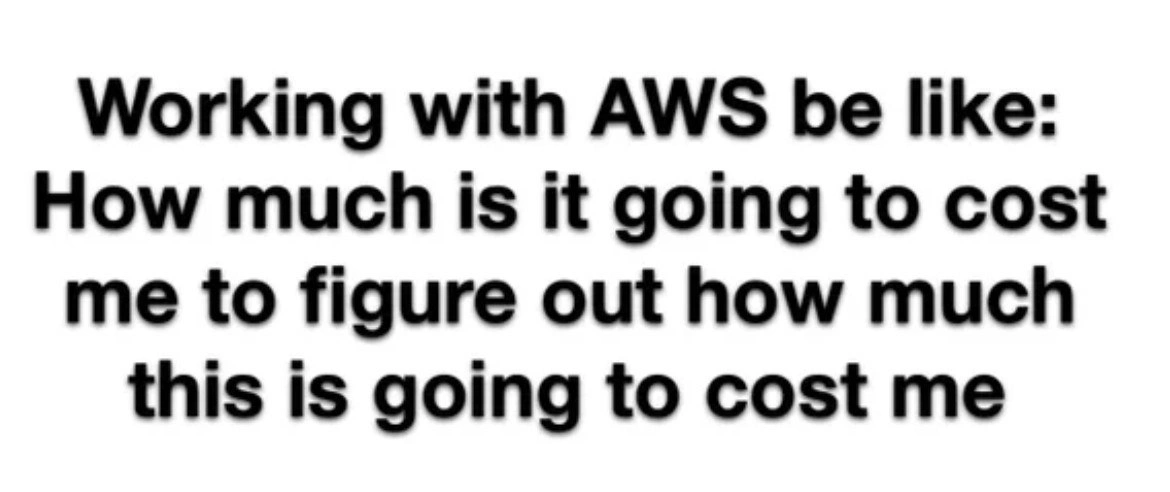
The AWS Pricing Paradox: How Much to Know How Much?
AWS Post #2810, on Mar 1, 2021 in TG

The AWS Pricing Paradox: How Much to Know How Much?

Why is this AWS meme funny?

Level 1: Paying to Ask the Price

Imagine you go to an ice cream shop, and before you even buy any ice cream, they say you have to give them a dollar just to tell you how much a scoop of ice cream costs. Sounds silly, right? You’re paying money just to find out if you want to pay more money for the ice cream. This meme is joking that using Amazon’s cloud services (AWS) can feel a bit like that. The pricing is so confusing that people end up spending a lot of time (and a little money) just figuring out what the final cost will be. It’s funny in a frustrating way: it’s pointing out how absurd it feels to pay in order to know how much you’ll have to pay later. In simple terms, the joke is: “I have to spend resources now to estimate how many resources I’ll spend later — how crazy is that?” Even if you’re not a cloud expert, you can understand that nobody likes the idea of paying just to see a price tag. That’s the feeling this meme is capturing, and why it makes tech folks chuckle and shake their heads.

Level 2: Counting Cloud Coins

Let’s break this down in simpler terms. AWS (Amazon Web Services) is a giant collection of cloud services that let you rent computing resources over the internet. Think of AWS like a utility company for tech: instead of buying your own servers, you pay AWS a fee to use theirs. It’s a pay-as-you-go system, meaning you’re charged based on how much you use (similar to how you pay for electricity or water by the amount you consume). This is super flexible — if you need a server for an hour, you pay just for that hour. But the flip side is cost_estimation becomes tricky: you have to predict how much you will use in order to know how much you’ll pay.

Now, AWS’s pricing has a lot of pieces. For a single service, say an EC2 virtual machine (a cloud computer), the charges might include: the hourly rate for the machine type, the storage cost (per gigabyte of the attached disk per month), data transfer costs (per GB of data leaving the AWS network), and maybe charges per API call or other usage. Other services have their own units — for example, AWS Lambda (serverless functions) charges per millisecond of execution time and amount of memory used, and S3 (storage service) charges per GB-month of stored data plus small fees per 1,000 requests to your files. It’s not as simple as a single price tag; it’s more like a menu of rates that you have to add up. AWS provides tools like the AWS Pricing Calculator (a web tool where you input your planned usage and get an estimated monthly cost) and the AWS Cost Explorer (which lets you analyze your actual spending and forecast it). These tools are helpful, but you often need to know a lot of details about your planned architecture to use them effectively. For example, to estimate the cost of a web application, you need to guess things like “How many users per day? How many data requests? How much data will each user download?” Each of those answers affects the cost. It’s easy to see how this can feel overwhelming, especially to someone new.

The meme’s text — “How much is it going to cost me to figure out how much this is going to cost me” — is a tongue-in-cheek way of saying “even calculating the price has a cost.” This cost could be literal or figurative. Figuratively, it costs an engineer’s time to do all this math and research (and engineers’ time is salary, which is money). In some cases, it can also cost a bit of actual money: for instance, you might run a small test on AWS to measure usage (that test isn’t free), or you might enable detailed monitoring (some advanced logging or metrics in AWS incur minor fees). There are even companies and tools whose whole job is to help you optimize and reduce your cloud bill — but those tools/services themselves usually aren’t free either! This is where the tag FinOps (Financial Operations) comes in: it’s a relatively new field where tech and finance intersect, focusing on managing and optimizing cloud spending. The existence of FinOps highlights that managing cloud costs has its own learning curve and overhead.

For a junior developer or a newcomer, a simple example can illustrate the challenge. Imagine you build a small web app and deploy it on AWS. You use a t3.small EC2 instance (a modest virtual server) for a month. You also use an S3 bucket to store user uploads, and maybe a bit of a database service. At the end of the month, you see charges for EC2 instance hours, EBS storage for the instance’s disk, S3 storage (per GB per month), S3 API requests (per thousand requests), data transfer out (for user downloads), and the database hours and storage. The bill isn’t just one number; it’s a breakdown of many line items. If you didn’t anticipate one of those (like maybe you didn’t realize that transferring data from your server out to the internet costs ~$0.09 per GB), your bill ends up higher than you predicted. That surprise is often called bill shock. To avoid bill shock, developers try to estimate everything beforehand — but doing that means understanding all those line items in advance. It can feel like homework, and thus the joke: you might spend so much effort and maybe a few dollars testing, just to answer the question “What will this app cost me per month on AWS?” The meme exaggerates it to be funny, but it resonates because many developers have indeed spent long hours (sometimes anxiously) crunching those numbers.

Level 3: Infinite Billing Loop

Working with AWS pricing can feel like an infinite loop where you’re billed to figure out your bill. This meme is highlighting a very real aws_pricing paradox: cloud engineers often sink time (and money) into cost_estimation exercises just to avoid a nasty surprise on their invoice. It’s poking fun at the pay_as_you_go_confusion we face with Amazon’s pay-as-you-go model. In theory, you only pay for what you use, which sounds great — until you try to predict what you’ll use. Suddenly, an architect is poring over pricing tables, running small test deployments, and querying cost APIs, essentially spending resources now to estimate spending later. The humor has a bit of pain behind it: anyone responsible for a cloud budget has felt that FinOps headache of “How much will this thing cost me to run… and how much am I burning just to find out?”

Why is this so funny (or horrifying) to seasoned developers? Because cloud cost calculations can become absurdly complex. AWS offers hundreds of services (EC2, S3, Lambda, DynamoDB, you name it) each with its own pricing model. You don’t just get a single price tag — you get a formula with a dozen variables. For example, an EC2 virtual machine might charge by the hour, but the storage (EBS) is per GB-month, data transfer is per GB out, and API requests might be per 10k calls. Then you have tiered pricing, regional differences, and discount options like Reserved Instances or Savings Plans that require upfront commitments. Senior engineers know that accurately forecasting a monthly bill can start to feel like solving a mini NP-hard optimization problem. It’s no wonder we joke about needing to pay an AWS fee just to use the cloud_cost_calculator. AWS Cost Explorer is a tool to analyze spending, but enabling detailed monitoring or logs for accuracy can itself incur small charges. It’s a classic case of you have to spend money to save money, taken to a comical extreme. The meme nails this irony: you’re effectively investing (time, effort, and a bit of cash) to avoid bill_shock later.

In real-world scenarios, this “cost to find the cost” shows up in a few ways. Teams might spin up a small test environment for a day to measure how a new service will scale cost-wise — surprise, that test run adds a line item to the bill. Or consider a company that hires a consultant or buys a SaaS tool purely for CloudCostOptimization; they’re literally paying money for advice on how to spend less money on AWS. It’s a prudent investment, but still kind of funny if you think about it. Even internally, an engineer might spend a full week (that's a salary cost!) tweaking spreadsheets and running aws pricing APIs to model different scenarios: on-demand vs reserved, region A vs region B, etc. All that labor is the cost of figuring out the cost. And heaven forbid you miss something — forget to include data egress fees or the cost of a NAT gateway, and your carefully calculated estimate is trash, plus you’ve wasted all that effort. As the old-timers might chuckle darkly, it’s always the data transfer (a nod to the “it’s always DNS” joke) — meaning there’s always some overlooked detail that comes back to bite you on the bill. The humor has an edge because we’ve all had that meeting where the projected budget was off by a factor of 2× due to some arcane pricing gotcha.

Systemically, this meme calls out how cloud pricing, especially AWS’s, got so labyrinthine. In the early days of cloud, you had a few simple metrics (compute hours, storage GBs). But as AWS grew, it added more granular pricing to be “fair” and flexible. The unintended result? A labyrinthine pricing page for each service that feels like reading tax code. The industry now even has a term FinOps (Financial Operations) and dedicated roles to tame this complexity. The fact we need cost optimization specialists is itself part of the joke! Essentially, the meme resonates because it’s too real: the flexibility of cloud comes hand-in-hand with unpredictability, and engineers cope by obsessively calculating costs upfront. But doing so is its own mini-project, often requiring cross-disciplinary algebra between engineering and finance. In short, AWS pricing is a riddle, and solving that riddle isn’t free. This dark humor gets a knowing laugh from senior devs and architects because it captures a truth we live with: in cloud computing, even figuring out the price has a price.

Description

This is a text-only meme on a plain white background. The black, bold, sans-serif text reads: 'Working with AWS be like: How much is it going to cost me to figure out how much this is going to cost me'. The humor stems from the notoriously complex and often opaque pricing structure of Amazon Web Services. For experienced engineers and architects, this isn't an exaggeration. Accurately forecasting AWS costs requires a significant investment of time and effort, using tools like the AWS Pricing Calculator or Cost Explorer, and sometimes even building out proof-of-concept infrastructure, all of which have associated costs (in terms of engineer hours and service usage). The joke perfectly captures the meta-level expense and frustration involved in simply trying to budget for cloud services, a pain point every senior tech professional who manages a cloud budget has felt

Comments

7
Anonymous ★ Top Pick AWS pricing is the only system where the bill has more dimensions than the multi-region, serverless architecture it's charging you for
  1. Anonymous ★ Top Pick

    AWS pricing is the only system where the bill has more dimensions than the multi-region, serverless architecture it's charging you for

  2. Anonymous

    Our CFO wanted a deterministic AWS budget, so we pointed Cost Explorer at a SageMaker Monte Carlo job - now we’re paying per prediction that we’re over budget

  3. Anonymous

    The only AWS service with predictable pricing is the one that tells you how unpredictable your pricing will be - and even that requires a PhD in cloud economics and three support tickets to understand

  4. Anonymous

    The real AWS pricing model is O(n²) where n is the number of services you need to understand to calculate costs. You'll burn through a Lambda invocation budget just running the cost calculator, and by the time you've factored in cross-region data transfer, NAT gateway hours, and the CloudWatch metrics needed to monitor your spending, you've already exceeded the budget you were trying to estimate. It's the only platform where 'cost optimization' is itself a billable service category

  5. Anonymous

    Only in AWS does a TCO estimate require Cost Explorer, three IAM roles, VPC flow logs, and a NAT Gateway - after which the line item reads: “cost of estimating the cost.”

  6. Anonymous

    AWS: Where optimizing costs requires more architectural diagrams than the app itself

  7. Anonymous

    On AWS, we spun up Athena to analyze the Cost & Usage Report and the top line item was “Athena analyzing the Cost & Usage Report.”

Use J and K for navigation