The Absurd Limits of Cross-Browser Compatibility
Why is this Frontend meme funny?
Level 1: Works Everywhere... Almost
Imagine you designed a special toy key that can open every door in your house: it works on the front door, the bedroom door, and even the garage. You’re really proud because it seems to work everywhere! But then, one day, a friend tries this key on a completely different thing – say, the door of a treehouse on Mars (a totally unusual and far-off place). Of course, your key doesn’t unlock that door, and your friend says, “Hey, it doesn’t work here!” It’s such a silly, unexpected situation that you can’t help but laugh. In the same way, a programmer made some code that worked on all the normal web browsers (like the ones on computers and phones). They were happy it worked everywhere. But then someone tried that code on a Nintendo 3DS (a little game machine with a web browser) – a place almost nobody uses for websites – and, surprise, it didn’t work there. The programmer and their friends find it funny because, just like the toy key, who would even think to try it there? It’s a reminder that sometimes there’s always one more surprise where things don’t go as planned, and that surprise can be so strange it makes everyone chuckle.
Level 2: Browser Quirks 101
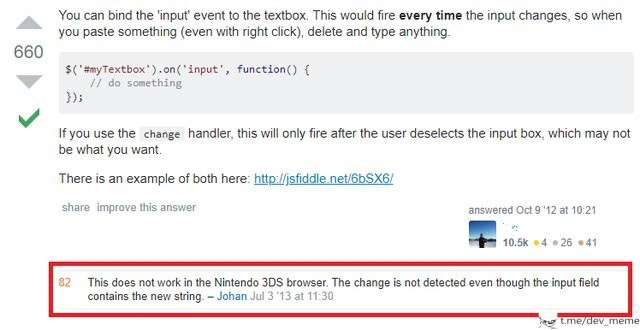
Let’s break down what’s going on in this meme for a newer developer. The image is a screenshot from Stack Overflow, a popular Q&A site where developers help each other solve coding problems. The question being answered was about handling text input in JavaScript using jQuery (a very common JS library that makes web development easier). The answer suggests binding to the input event on a text box. In code, it looks like this:
// jQuery code to run something whenever the text changes
$('#myTextbox').on('input', function() {
// do something each time the user types or pastes text
console.log("Text is now: " + $(this).val());
});
This is explaining that if you use $('#myTextbox').on('input', ...);, your function will run every time the text in #myTextbox changes – for example, on each keystroke, or when someone pastes text, or even uses the browser’s right-click “Delete” context menu. It’s more dynamic than using the older change event, which only fires when the user leaves the field or explicitly commits the change (meaning if you type and then click elsewhere). The answer even mentions: if you use the change handler, it will only fire after the user deselects (unfocuses) the input box, which might not be what you want for real-time feedback. They provided a link to a live demo (on a site like JSFiddle) showing both events in action.
So far, so good – this is standard Frontend knowledge. Most modern browsers support the input event, and it’s what you’d use if you want instant updates (like validating as the user types, or enabling a “Save” button only when something is typed, etc.). This Stack Overflow answer was clearly helpful – it got 660 upvotes, meaning lots of developers found it useful.
Now, here’s the twist: a highly-upvoted comment (highlighted in red in the meme) says: “This does not work in the Nintendo 3DS browser. The change is not detected even though the input field contains the new string.” In plainer terms, a user named Johan tried that code on the Nintendo 3DS’s web browser, and found that when he typed into the textbox, the input event didn’t fire at all. The text would appear in the box, but our // do something code never ran. That’s pretty unexpected!
Why is that comment funny or noteworthy? For a few reasons:
Nintendo 3DS browser – The 3DS is a handheld gaming console (from around 2011) primarily used to play games like Mario or Pokémon in 3D. It also has a tiny web browser built-in (so you could, say, check a FAQ online or browse the web on your device). It’s not a common platform for web apps. Yet here we have a developer who actually tested a web feature on it! That’s an example of extreme cross-browser testing – going beyond the usual suspects (Chrome, Firefox, Safari, IE, mobile phones) all the way to a gaming device’s browser. The comment implies this person either needed their site to work on a 3DS, or they were just very thorough/curious. Either way, it’s a very obscure browser edge case.
“The change is not detected” – This confirms a bug or missing feature in that browser. Most browsers would trigger the
inputevent properly. The 3DS browser apparently did not implement that part of the web standard (or had a glitch). Essentially, it behaves as if nothing happened when you type, at least from the script’s point of view. The text box visibly updates (so the character appears), but behind the scenes the script listening forinputnever hears anything. This would make a web app feel broken on that device – for instance, imagine a live search suggestion dropdown that never appears because the event isn’t firing.82 upvotes on the comment – That means many others found this comment useful or funny. On Stack Overflow, usually, only the main answers get upvotes. A comment getting that many points means it really resonated with people. Some might have upvoted because they encountered the same bug (maybe a few devs out there also had to support a 3DS user base, or they were debugging why their code didn’t work on their Nintendo). Others probably upvoted just because of how oddly specific and humorous it is – it’s a form of inside DeveloperHumor. Essentially: “Wow, someone actually tried this on a 3DS, and it broke. Good to know (and kinda funny)!”
Now, what does this teach a junior developer?
First, it highlights the importance and pain of cross-browser compatibility. Web developers can’t assume that every browser is the same. Different browsers (and devices) might implement features differently or not at all. In the worst cases, something that works perfectly everywhere else might fail on one particular platform. Here, jQuery’s on('input') works in all major browsers, but the Nintendo 3DS browser is the odd one out. This is a textbook edge case – a scenario that is real but extremely uncommon. Edge cases can bite you unexpectedly. The meme basically says, “some people take cross browser compatibility so seriously, they even worried about the 3DS!” It’s half praise (for thorough testing) and half gentle ribbing (because it’s such an unusual platform).
Second, it’s a mini-lesson in web events. The input event vs the change event is a common point of confusion for newcomers. This Stack Overflow Q&A provided clarity: use input for real-time updates, use change for after-the-user-is-done updates. However, with that comment, we also learn that not all browsers were up to speed on input event support back then. (In fact, historically, old versions of Internet Explorer didn’t support input either – developers had to use alternatives.) jQuery tried to abstract these differences away; it has long supported older IE via fallbacks. But here, the 3DS might not have been on jQuery’s radar, so there was no built-in fix. A developer targeting that device might have to write a special workaround, like listening to key events (keydown/keyup) or periodically checking the field’s value as a last resort.
Let’s imagine you were developing around 2012-2013 (when that comment was written). You might have tested your fancy new live-update form on your laptop (Chrome/Firefox) and your phone’s browser – and it worked great. If a user then reported, “hey, on my Nintendo 3DS, the live update isn’t working,” you’d probably be stunned. You might not even have a 3DS on hand to test! Tracking down the issue would involve realizing that the browser isn’t firing the event and perhaps googling that (which might lead you to this very Stack Overflow comment). It’s a reminder that WebDev can involve a lot of detective work and adaptation. The web is accessed by a bewildering array of devices: PCs, phones, tablets, TVs, game consoles, smart fridges, etc. As a junior developer, you won’t immediately test on all those (and realistically, it’s often not worth the effort for extremely fringe cases). But it’s good to know such cases exist. It encourages writing code that fails gracefully. For example, if a feature doesn’t work on a weird browser, maybe ensure the basic functionality still does using a more broadly supported event like change. Or at least, handle the absence of the input event without the whole page crashing.
Finally, this meme is a slice of coding humor in that it takes a mundane Q&A about jQuery and punches it up with an absurd real-world example. It’s funny to developers because we often deal with these kinds of unexpected issues. It’s like a badge of honor to say, “I even handled the Nintendo 3DS quirk.” When someone says “I’m glad some people still take cross browser compatibility seriously,” they are acknowledging the dedication (or maybe the over-the-top thoroughness) of developers who chase down every bug, even the ones on a tiny gaming device browser. It’s both an appreciation and a gentle tease. The lesson: in web development, never assume your code works everywhere – but also, you have to draw the line somewhere on how much you can support. And if you ever do fix a bug on something as funky as a 3DS, you’ve earned a story to tell at meetups for years!
Level 3: A New Challenger Approaches
Ah, cross-browser compatibility – the eternal boss fight of front-end development. Just when you think you’ve vanquished all the usual suspects (looking at you, IE and older Android WebKit), a wild Nintendo 3DS browser appears to crash the party. In this Stack Overflow saga, a developer proudly shares a jQuery trick: using the input event to catch every keystroke in a text box. It’s a solid solution, widely accepted with 660+ upvotes. But then, in the comment section, reality glitches:
“This does not work in the Nintendo 3DS browser. The change is not detected even though the input field contains the new string.” – Johan, Jul 3 ’13
Yes, you read that right. Not Chrome, not Safari, not even some obscure version of Opera Mini – the Nintendo 3DS, a handheld gaming console, has its own browser quirks that break this code. The humor here is a mix of “What are the odds?!” and “Of course that would happen.” Front-end devs collectively smirk because we’ve all been ambushed by an edge case like this: the one environment nobody thought to test, which inevitably finds a way to fail. It’s a classic WebDev horror story and CodingHumor gold: the ultra-specific bug lurking in an obscure browser.
From a senior developer’s perspective, this is both hilarious and painfully relatable. We’ve spent years battling browser bugs and platform inconsistencies. We write code that works on the big four (Chrome, Firefox, Safari, Edge), sprinkle in polyfills for Internet Explorer, toss in some vendor prefixes for CSS, and think we’re safe. We even remember to test on mobile devices and older smartphones. But who in their right mind would include a handheld gaming console’s web browser in the QA matrix? Well, apparently someone did – and thank goodness, because they uncovered a glitch in the Matrix that most of us never saw coming. It’s like a veteran adventurer discovering a secret boss in a decades-old video game: surprising, a bit absurd, but very real.
The technical irony is rich. jQuery, the beloved JavaScript library of the 2010s, is supposed to smooth out differences between browsers. Its .on('input', ...) handler is a modern solution for live updates in text fields. Under the hood, jQuery often has fallbacks for older browsers (like using onpropertychange for ancient IE that lacked the input event). But even jQuery’s abstraction can’t save you if a browser simply doesn’t fire the event at all. The Nintendo 3DS’s browser (likely a stripped-down WebKit or custom engine) seemingly ignored the input event. So the code in the Stack Overflow answer – which works flawlessly on desktop and mobile browsers – silently fails on the 3DS. The user can type to their heart’s content, the text appears in the field, but the jQuery input listener never knows about it. It’s the perfect storm of an edgeCase: a combination of niche device + specific event handling that nobody anticipated.
Why is this so funny to developers? Because it’s absurdly specific and yet completely plausible. It highlights the shared PTSD of front-end engineers: no matter how thoroughly you test, there’s always “one more browser” waiting to break things. Today it’s a Nintendo console; tomorrow it might be a smart fridge or an in-car dashboard browser. We laugh because if we didn’t, we’d cry – the Bugs and oddities in web development are endless. In this case, the StackOverflow comment became a mini-meme: 82 upvotes from fellow devs effectively saying, “Ah, the good old unexpected platform bug. Been there, pal.” It’s a nod of solidarity across the community.
Historically, this situation also underscores how far we’ve come and how much we still endure. In the early web days, we worried about desktop screen resolutions and table-based layouts. Then came the browser wars with IE vs. Netscape – every JavaScript feature was a coin toss of support. Fast forward, we thought standards won, but then mobile and embedded browsers emerged. The Nintendo 3DS browser is a descendant of that era – a lesser-known browser that didn’t get the memo about certain web standards. The comment from 2013 reminds us that even as HTML5 and modern JS were taking over, some devices were stuck a generation behind.
From an architectural standpoint, fixing such an issue is non-trivial. How do you patch code for a browser you didn’t even know you needed to support? The Stack Overflow user’s comment is likely not just a joke – it was a heads-up to others: “Hey, if your web app targets literally everything (including game consoles), on('input') might let you down here.” The practical fix might involve adding a fallback: maybe listen for key events (keyup/keydown) or resort to the old .on('change') for that device. But detecting the 3DS browser in code is itself an exercise in absurdity. It’s a trade-off: do you add one more conditional in your code for a minuscule fraction of users? Many teams would pragmatically say “no” and document it as a known limitation. But the mere fact someone encountered it in the wild means at least one project had to care. The comment is equal parts bug report and punchline.
In summary, the meme captures a quintessential Frontend nightmare with a smile: even a tiny edge case can break your elegant solution, and the more outlandish the scenario, the funnier (and more frustrating) it is. It’s DeveloperHumor that rings true: as JavaScript developers, we must be ready for anything – even a gamer browsing on a 3DS. We chuckle, we shake our heads, and we add another line to our mental changelog: “Beware the Nintendo 3DS browser.” After all, in the grand game of web development, there’s always a new challenger approaching.
Description
This image is a screenshot of a Stack Overflow page, a popular Q&A website for programmers. The main part of the image displays a highly-rated answer (660 upvotes) to a programming question, including a snippet of jQuery code: `$('#myTextbox').on('input', function() { // do something });`. The humor and focus of the meme are found in a comment below this answer, which has been highlighted with a red box for emphasis and has 82 upvotes. The comment reads, 'This does not work in the Nintendo 3DS browser. The change is not detected even though the input field contains the new string.' A small watermark for 't.me/dev_meme' is visible in the bottom-right corner. The technical joke revolves around the concept of cross-browser compatibility. Web developers constantly struggle to make their websites work correctly on different browsers like Chrome, Firefox, and Safari. However, receiving a bug report for a browser on a niche gaming console like the Nintendo 3DS is an extreme and absurd edge case. It humorously exaggerates the pain of supporting countless user environments and resonates with senior developers who have often faced bizarre and unexpected bug reports from obscure platforms
Comments
7Comment deleted
The five stages of developer grief: Denial that anyone uses that browser, Anger at the user for reporting it, Bargaining with the PM to mark it 'wontfix', Depression when they refuse, and Acceptance that you're now installing a Nintendo 3DS emulator
Our PM saw an 82-upvote comment about a jQuery bug on the Nintendo 3DS browser and quietly added “3DS compatibility” to the release checklist - because nothing says enterprise scalability like shipping a polyfill for Mario Kart
"Somewhere a senior engineer is writing a 47-page RFC on why we need to support the Nintendo 3DS browser, while simultaneously maintaining IE11 compatibility for that one enterprise client who pays 40% of our revenue."
Ah yes, the Nintendo 3DS browser - because nothing says 'production-ready web application' like ensuring your jQuery event handlers work on a discontinued handheld gaming console from 2011. This is the kind of edge case that makes you question whether your QA team is secretly running a retro gaming museum or if someone's product manager has a very specific definition of 'cross-browser compatibility.' It's the web development equivalent of optimizing your microservices architecture to run on a TI-83 calculator
“Fires every time the input changes” - unless your browser matrix includes the Nintendo 3DS. We swapped oninput for onblur + polling and rebranded the UI as “eventually consistent.”
Product said “support all major browsers,” so QA filed a P0 because input doesn’t fire on the Nintendo 3DS - now my listener is input|change|keyup|paste|propertychange wrapped in feature-detects and a small prayer
Frontend nirvana: an 'input' event that fires everywhere except the Nintendo 3DS browser still lurking in prod