Six comedic developer bug-fixing strategies: logs, breakpoints, ducks, StackOverflow, demons, rebranding
Why is this Debugging Troubleshooting meme funny?
Level 1: Feature, Not a Bug
Imagine you have a toy or gadget that suddenly isn’t working right, and you’re trying to fix it. You might try a bunch of different things, some sensible and some a bit silly, just like a programmer does with a broken program:
First, you’d probably look at the instruction book or the toy’s diary to see what happened – that’s like reading the log files of a program. It’s as if the toy wrote down everything it did, and you’re searching those notes for the moment things went wrong. If the notes are very long, it can be overwhelming (picture a stack of paper taller than you!). But you hope somewhere in there is the clue to the problem.
Next, if that doesn’t help, you might take the toy apart step by step to see which part isn’t working. In programming, this is like using breakpoints: you pause the program at certain points to check if everything is okay up to that step. It’s as though you stop a moving toy at every inch to see “Is it fine now? How about now?” This can be slow, but it helps you pinpoint where things start to go wrong.
Now, suppose you’re still stumped. What do you do? Maybe you talk it through out loud to your teddy bear or an action figure: “So I turned the switch on, then this gear should move…” etc. In coding, there’s a funny method where you explain your code to a rubber duck (yes, like a bath duck!). It sounds silly, but just explaining the problem in simple words can make you realize what’s wrong. It’s like when you solve a math problem only after trying to tell someone else what the problem is – suddenly the answer pops out. In the comic, the developer talks to a duck who says “This code is quacked up,” which is a punny way of the duck agreeing the code is messed up. It’s a goofy way to show that sometimes a fresh perspective (even from a pretend helper) can crack the case.
If talking it out doesn’t fix the toy, you might ask a friend or search online for answers. Maybe someone else had the same toy issue. For programmers, that friend is often the website Stack Overflow, where lots of people share advice and fixes. We often find a snippet of solution code there and copy-paste it into our program (just like taking a part from someone else’s toy to fix yours). This usually gives a quick result – your toy might start moving again with the new piece – but it can make your toy a bit odd because the piece came from a different set. In other words, the program might work, but the code could become a little patchwork and fragile. It’s like fixing a broken toy robot by using a part from a different robot that almost fits – it might do the job for now, just handle it gently!
Now we’re near the end of our rope. Imagine none of that has solved the problem. The toy still acts up. In a fit of desperation, you might jokingly say, “I’d do anything if this just started working!” Maybe you cross your fingers, wish really hard, or even pretend to make a magic deal: “Dear toy gremlins, I promise to do all my homework if you fix this.” In programming culture, we exaggerate this feeling as making a pact with the devil. Of course, nobody is really summoning demons! It’s a humorous way to admit we might resort to ridiculous hacks. For example, a programmer might write an ugly piece of code that isn’t proper but stops the bug, kind of like jamming a piece of gum to hold a toy’s part in place – it’s not how you’re supposed to fix it, and you know it might cause trouble later, but you’re so desperate you’ll do it anyway. The “devil” part is just acknowledging “I’m doing something bad for an immediate gain.” It’s the last-resort fix when you’re willing to break the rules.
Finally, there’s a point where you might just stop trying to fix it and decide the toy is fine the way it is. Maybe the toy car always turns left and never right. If you can’t fix that, you might shrug and say, “You know what? It’s not broken… it’s a special feature! This car only turns left on purpose. It’s a left-turning car, ta-da!” In the software world, when a bug truly can’t be resolved easily, people joke that you can call it a feature. “It’s not a bug, it’s a feature” basically means “We’re going to treat this annoying behavior as if we meant to do it.” It’s like telling everyone that the toy was meant to be like that, and they should enjoy it. Of course, deep down everyone knows it was a bug, but framing it as a feature is a way to laugh it off or avoid admitting defeat. In the comic, the developer literally puts the bug in a cart and labels it “FEATURE,” whistling as if proud of it. It’s a funny image that says, “Oh this little green bug here? That’s not a problem, that’s our new feature!”
So, in everyday terms, this comic shows a person trying six ways to solve a problem:
- Read all the clues (logs) – like reading a giant diary of what happened.
- Check every step carefully (breakpoints) – like stopping a process at each stage to see where it breaks.
- Explain the problem to someone (or something) (rubber duck) – because teaching often reveals the answer.
- Find an answer from others and plug it in (Stack Overflow copy-paste) – using community knowledge, even if the fix is a bit duct-taped on.
- Do something a bit crazy just to fix it (deal with the devil) – using a hack or trick that’s not ideal, with a wink to “magical” help.
- Decide it’s actually okay (rebranding as feature) – reinterpreting the problem as if it were meant to be.
It’s funny because we recognize truth in it: whether it’s fixing toys or programs, people really do go through these stages. Sometimes the best fix is methodical, other times you get creative, and sometimes you just give up and make peace with the quirk. The phrase “feature, not a bug” has even become a lighthearted proverb in tech circles, meaning you’re just going to live with the imperfection.
At the end of the day, this meme uses humor to show that problem-solving isn’t always straightforward. It can be messy, comical, and frustrating. But no matter how zany the strategy, the goal is the same: get things working again – or at least make everyone think it’s supposed to work that way!
Level 2: Bug Squashing Basics
Let’s break down the comic’s content in simpler terms and explain the core debugging techniques and jokes for someone who’s maybe a newer developer or not familiar with all the lingo. The title of the comic is “BUG FIXING WAYS,” and it presents six different methods developers use to fix software bugs (errors or unintended behaviors in code). The categories range from very standard practices (like checking log files) to humorous exaggerations (like making a deal with the devil). Here’s what each panel is showing, and some background on each concept:
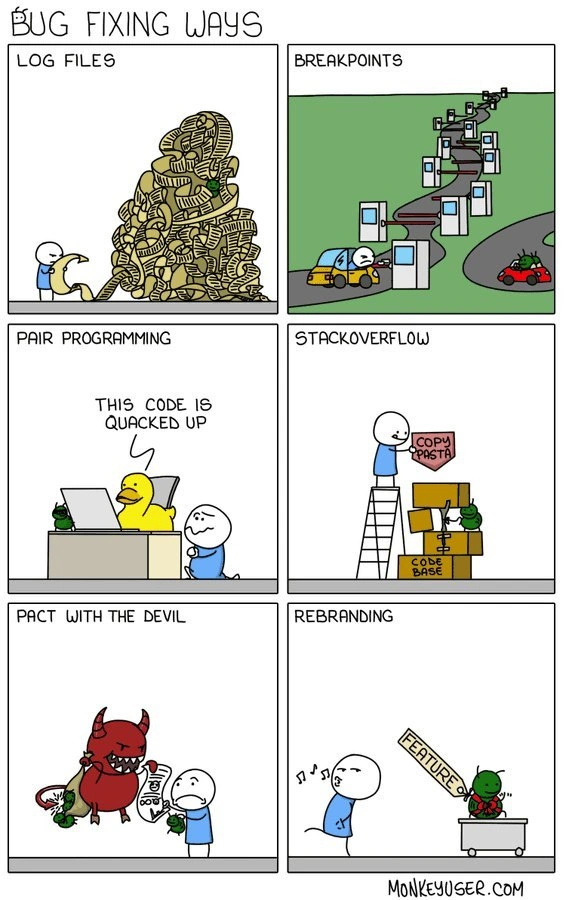
Log Files: The first panel shows a developer next to a colossal stack of paper scrolls or printouts, labeled “LOG FILES.” In real life, a log file is a file where a program writes down records of its actions, events, errors, or informational messages. For example, a web server might log every request it gets, or a game might log an error if something unexpected happens. When developers encounter a bug, a very common first step is to “check the logs,” meaning read through these log files to see what was going on in the system around the time of the error. The humor here is that logs can become enormous – imagine a diary so thick you can barely lift it. Sometimes programs produce thousands of lines of log messages per second. So the cartoon portrays that literally: the poor developer is dwarfed by a mountain of log pages, which is what it feels like when you’re combing through log output relentlessly. For a newcomer: think of it as reading a black box’s flight recorder after an incident – you have to scan a ton of data for the one clue. The tag Logging refers to this practice of adding logging statements to code (like
console.log("Value x=", x)in JavaScript, or using a logging library such aslog4jin Java) to output internal information. In the context of Debugging_Troubleshooting, reading logs is fundamental. But logs are only helpful if the information you need was actually recorded and if you can find it. That’s why here it turns into a comical avalanche – often, especially in large systems, you have to search (grepthrough the files, or use log analysis tools) for error codes or timestamps. Beginners quickly learn how to filter logs for keywords because you rarely want to read everything. The meme is exaggerating a situation we’ve all faced: squinting at logs on our screen or terminal, maybe at 3 AM, with endless scrolling. It sets the stage that debugging can start simple but quickly become overwhelming without good strategies.Breakpoints: In the second panel titled “BREAKPOINTS,” the cartoon uses a road-and-car analogy. There are multiple placards on the roadside labeled as breakpoints, and the car (driven by our developer character) has to stop wherever a breakpoint sign appears. So what’s a breakpoint? A breakpoint is a debugging tool that lets you pause a running program at a specific line of code. When you run a program in a debugger (say, pressing F5 in an IDE), it will run normally until it hits one of these breakpoints, then freeze right there, allowing you to inspect variables’ values, the call stack, and so forth. It’s an incredibly useful way to see what’s happening inside your program step by step. For someone new: imagine you could pause a cooking process at will to check if the batter has risen or if the sauce has thickened – that’s what breakpoints let you do with code execution. Now, the reason the comic shows many breakpoint signs and a weaving road is to illustrate the overuse (or heavy use) of breakpoints. Especially when you’re new to debugging, you might not know where the bug is, so you scatter breakpoints in many places (like setting many traps, hoping the bug will get caught in one of them). The car stopping at each one means the program is halting constantly – it’s like trying to find a problem by inching forward little by little. While this can work, it’s often very slow. The bug in the drawing (the little green bug) is on the side of the road, which could mean the bug might not even be on the path the developer is stopping on – maybe it’s hiding in a part of the code they didn’t think to break at! For a junior dev, it’s important to know: typically you set breakpoints in suspicious areas (for example, right before a variable that often goes wrong is calculated). DebuggingTools like breakpoints are powerful, but the meme humorously warns that if you put a breakpoint every other line, you’ll spend all day pressing “continue” and not necessarily find the issue faster. It’s about being strategic. The tagline could also be hinting at the phrase “breaking one’s flow” – stopping too often can make you lose track of what you were doing. In any case, panel 2’s message is: one common way to find bugs is to step through the code with breakpoints, but it can become tedious if overdone.
Pair Programming / Rubber Duck Debugging: Panel 3 is labeled “PAIR PROGRAMMING,” but what it actually depicts is a developer using rubber duck debugging. Traditionally, pair programming means two programmers working together at one workstation, continuously reviewing each other’s code. However, in this cartoon, the “pair” is a person and a rubber duck sitting next to the keyboard. The duck has a speech bubble saying “THIS CODE IS QUACKED UP.” This is a play on words. “Quacked up” sounds like “cracked up” or “whacked up,” slang for “messed up.” Ducks of course go “quack,” so the duck critiquing the code is both literal (a duck quacking) and punny (saying the code is messed up). RubberDuckDebugging is a beloved concept in programming circles. The idea is simple: when you’re stuck on a bug, try explaining the problem, line by line, to a rubber duck (or any inanimate object). The act of explaining often makes the solution apparent to yourself. It forces you to slow down and consider what you’re actually doing. For example, you might say to the “duck,” “First, I initialize
countto 0, then I enter the loop, then inside the loop I forget to incrementcount… oh!” – and there you find your bug (you never incremented the counter). Many newbie programmers laugh at this idea until they try it and see it actually works. Why a duck? It’s kind of a tradition/joke – possibly originating from a story in the book The Pragmatic Programmer where a programmer would carry a rubber duck and explain code to it. The duck is a stand-in for a patient, non-judgmental listener. In the meme, calling it “pair programming” is a cheeky twist because normally pair programming involves two human developers; here one “developer” happens to be a rubber duck who gives sassy feedback. The little green bug is shown listening next to the duck’s computer, which is a funny detail – it’s like the bug is thinking “uh oh, they brought in the duck, now I’m in trouble.” For a junior dev: this panel is highlighting a very practical technique. If you’re stuck, try articulating your problem to something or someone else. Sometimes even explaining it to a rubber duck (or a stuffed toy, or just out loud to yourself) helps. The phrase “This code is quacked up” is just the comic adding personality to the duck, implying the duck can immediately see the code is wrong. It’s poking fun at our tendency to overlook the obvious until we say it aloud. Also, pair programming in real life (with a person) does often catch issues early because the second person might say, “Hold on, that looks off.” The duck is a comedic substitute for that second set of eyes. This panel teaches that debugging isn’t just about tools; it’s also about how we think and communicate about the code.StackOverflow (Copy-Pasta Coding): The fourth panel is labeled “STACKOVERFLOW.” Stack Overflow is extremely well-known among developers: it’s an online Q&A forum where you can find answers to programming questions. If you’ve ever Googled an error message, chances are you ended up on a StackOverflow page with someone providing an explanation or code snippet as the solution. The meme shows the developer standing on a ladder feeding a box that says “COPY PASTA” into a tall, wobbly tower labeled “CODE BASE.” The green bug is at the bottom, holding the base steady (perhaps reluctantly). “Copy pasta” is internet slang derived from “copypasta,” meaning a block of text that gets copied and pasted around (often without much change). In coding, “copy-paste coding” means taking code from somewhere (like StackOverflow) and dropping it into your project directly. The cartoon highlights a few things: one, the code base tower is shaky, implying that too many pasted solutions can make your overall software unstable or inconsistent. Two, the bug is still involved – meaning the bug might be part of what’s propping up this whole workaround. And three, the developer is using a ladder, suggesting maybe this fix is a stretch or being inserted at a high, maybe risky, point. For someone learning: The joke is that instead of writing a fix yourself, you might find someone on StackOverflow who had a similar problem and just use their answer. This is incredibly common in real development! There’s even a kidding phrase, “StackOverflow-driven development,” which implies a programmer is basically assembling code by copy-pasting from the web. While using resources is smart, the caution (and the humor) is that if you blindly copy code without fully understanding it, you might introduce new bugs or just pile on complexity. The image is a bit like playing Jenga – if the blocks (code snippets) don’t fit well together, the whole thing can topple. The CodeQuality tag is relevant here: consistently copy-pasting can lead to poor code quality (like duplicates, mismatched styles, or even security vulnerabilities). Another layer of the joke: the box is labeled as if it’s a package (“COPY PASTA”) being delivered into the stack – which is literally what we do when we import code from an answer directly. This panel might also be referencing the common StackOverflow meme of copy-pasting without reading, which can be dangerous. For a new developer: it’s absolutely fine to use examples from StackOverflow to learn or fix things, but always integrate carefully. The cartoon just humorously dramatizes what could happen if your code base becomes a patchwork of random pieces grabbed off the internet because you were patching bug after bug hurriedly. It resonates because many of us have done this under pressure and then later had to clean up a franken-code that results from it.
Pact with the Devil: Panel five is called “PACT WITH THE DEVIL” and shows a red, horned devil character offering a contract to the developer. The bug is lying on the ground, seemingly defeated or tied up. The phrase “pact with the devil” is a figure of speech meaning you agree to do something morally or ethically questionable in exchange for a desired outcome. In debugging, this translates to implementing a fix that might be considered a horrible practice or a temporary kludge just to solve the problem. It’s like saying, “I don’t care if this breaks all the rules or if I have to sacrifice something important – I just want this bug gone.” In less metaphorical terms, this could mean: hardcoding values (instead of doing it properly), disabling a safety check or an entire feature because it’s easier than fixing it, or using a very dirty hack (like manipulating memory directly, etc.). The comic makes it literal by bringing in the devil, as if the developer is signing away their principles or the cleanliness of the codebase to exterminate the bug. The humor is dark but clear: this is when you’re really desperate. For a newer dev, you might not have felt this yet, but imagine you’ve tried everything “right” – checked logs, stepped through with breakpoints, asked colleagues or StackOverflow, etc. – and the bug STILL isn’t solved, but the boss needs the system up by morning. That’s when people say, “Alright, screw it, do whatever it takes. Comment out that whole verification step if you must.” It’s not good long-term, and everyone knows it. In fact, in the cartoon the devil likely represents the later consequences (like technical debt or potential crashes or maintenance nightmares) that you’re going to pay for. But in the heat of the moment, you accept that risk. The bug on the ground indicates success – the bug is effectively “dealt with” – but at what cost? This references the very real concept of technical debt (not mentioned explicitly in the panel, but important): it’s like taking a shortcut in code that you’ll have to pay back later by doing more work to clean it up or fix side effects. One common newbie example: let’s say a bug is causing a crash whenever a user enters a blank name. A quick-and-dirty fix (deal with devil) might be: “just default blank names to 'Anonymous' behind the scenes and move on,” even if that’s not properly communicated or handled elsewhere (possibly causing weird behavior down the line). It solves the immediate error – your app won’t crash – but it’s hiding the real issue and might confuse things later. The meme exaggerates this by making it a literal deal with a devilish figure, which is funny because that’s kind of how it feels to senior devs when we resort to those measures: we’ve violated the sanctity of good code and know we might pay for it later, but hey, the system is up and running now. The DebuggingHell tag is quite appropriate here – sometimes debugging feels like hell, and we jokingly say we’d sell our soul just to fix that critical bug.
Rebranding (Feature): The sixth panel, titled “REBRANDING,” shows the developer casually whistling while pulling the formerly troublesome bug in a wagon. The bug has a sign around its neck that says “FEATURE.” This is referencing the old joke: “It’s not a bug, it’s a feature.” Rebranding in this context means taking something that was considered a flaw or mistake (a bug) and changing the narrative so that it appears intentional (a feature). For newcomers, this is usually said humorously. It’s what you might quip when someone points out a minor bug – “Oh that? That’s not a bug, that’s an undocumented feature!” implying the program is supposed to do that, and they just didn’t know. Of course, it usually isn’t supposed to do that – it’s just a playful way to deflect embarrassment. In the context of actual software development, sometimes product or marketing teams really do spin certain limitations or odd behaviors as features, especially if they can’t be changed easily. For example, maybe a game has a glitch that players found fun, so the devs officially call it a feature in the patch notes. Or a software’s UI quirk is explained away as a security feature (“We log you out every 5 minutes for your safety!” when really it was a session bug they couldn’t solve quickly). In the cartoon, the developer’s body language (whistling, looking carefree) suggests, “Nothing to see here, all is well!” The bug sitting in the cart with a feature label suggests the bug is now being proudly presented as part of the product. This is often the final stage of bug handling despair: when you’ve tried everything and either time’s up or the bug turned out to be not entirely fixable, so you just accept it and make it part of the “character” of the software. The humor also lies in the implication that the developer is fooling themselves or others – clearly a bug doesn’t magically become a good thing just because you rename it, but sometimes in corporate or team settings, that’s exactly the narrative that goes out. The tag feature_not_bug (from the context tags) highlights this panel’s joke: turning “bug” into “feature” by rhetoric. For a new developer, it’s worth knowing this phrase because you’ll hear it often in jest. It’s basically a meme on its own in programming culture. If you ship software and someone finds a funny flaw, you might grin and say “feature, not a bug” as a lighthearted way to acknowledge it’s an oops. In professional use, you’d obviously then log it to actually fix later (unless you really do decide it’s beneficial). This panel essentially says: when all conventional debugging fails, you could always just pretend the bug is intentional. It’s the ultimate form of giving up, wrapped in humor. And yes, it has happened that teams joke about doing this when under pressure — e.g., “The app crashes if you type too fast? Maybe we call it a productivity limitation feature, haha.” Everyone knows it’s a joke, but it eases the tension of a tough bug hunt.
Bringing it all together, these six strategies represent the toolkit (and thought process) of debugging from simple to outrageous:
- Inspect and analyze (read logs),
- Use tools to step through code (debugger breakpoints),
- Talk it out (with a duck if needed, to simulate pair programming),
- Seek outside help (StackOverflow, copying known solutions),
- Apply a quick hack (even if it’s a bit devilish),
- Redefine the problem (accept and label the bug as a “feature”).
For someone in the early stages of a developer career, this comic is both funny and educational. It tells you that debugging can require multiple approaches. Some issues you’ll catch by just reading logs or using a debugger. Others might need a fresh perspective or a helpful community answer. And then there are times where the fix isn’t pretty. It also hints at the emotional journey: frustration can lead to increasingly creative fixes. The tags like BugsInSoftware and DebuggingFrustration point to the everyday struggle developers face with bugs. “Debugging Hell” is jokingly referenced by the devil and the sheer stress implied. RubberDuckDebugging is a real term, and so is reliance on StackOverflow. CopyPasteCoding is generally frowned upon if overused, but let’s be honest – everyone copies code sometimes, you just have to be careful. And finally, calling something a feature is kind of a cultural joke – it reflects a shared understanding that not everything in software is perfect, and sometimes we cope with humor.
One more bit of context: the comic is by MonkeyUser (as noted by the “MONKEYUSER.COM” in the footer). MonkeyUser is known for its satirical and relatable comics about developer life. This particular one, “Bug Fixing Ways,” is one of their well-loved strips because it encapsulates so many aspects of the developer experience (DeveloperExperience_DX). It’s not depicting a literal step-by-step process to debug (please don’t actually sell your soul or start renaming bugs to features in your day job!), but rather using comedy to highlight extremes. For a junior dev, the takeaway is: debugging is a skill that involves everything from reading output, using tools, getting help, to sometimes thinking outside the box. And importantly, you’re not alone in feeling frustrated – even veteran engineers go through these stages. It’s a bit comforting to know that if you ever resorted to adding 200 print statements or asking a rubber duck for advice, you’re actually participating in a long-standing programmer tradition (with a wink and a grin). And hopefully, you won’t truly need the devil or rebranding part – those are hyperbolic – but they serve to remind us that in the real world, not every bug gets a clean resolution. Sometimes the resolution is to live with it. This comic is basically a humorous checklist of debugging wisdom passed down in developer culture.
Level 3: Logs, Ducks & Desperation
This meme hits home for every experienced developer because it humorously catalogs the escalating tactics we use when chasing down pesky software bugs. Titled “BUG FIXING WAYS,” it presents six panels, each illustrating a different approach to debugging – from the straightforward to the utterly desperate. The reason it’s funny is that it’s painfully relatable: most of us have lived each of these scenarios at one time or another (often all in the same long night!). The joke is that debugging often starts with proper engineering discipline but, as the bug refuses to budge, devolves into increasingly creative (or absurd) measures. The combination of these six particular strategies is comedic because it’s basically a progression from “Okay, let’s methodically find this bug” to “I’ll do literally anything to make this bug go away.” Seasoned developers recognize the pattern and can swap war stories for each panel. Let’s break down the humor and truth in each part:
Log Files: In the first panel, a tiny dev stands next to a mountain of logs, literally buried in output. How many times have we cranked up the logging level to DEBUG and then been swamped by a deluge of log messages? The absurd pile of curled paper logs in the cartoon is an exaggeration of what debugging by logs feels like: sifting through endless lines of text hoping to find that one clue. It satirizes the common practice of adding console.log or System.out.println statements everywhere to trace a problem (“logging everything including the kitchen sink”). Enterprise applications even generate megabytes of log files within minutes, and combing through them can feel as futile as searching for a needle in a haystack. Yet, reading log files is often Step 1 of troubleshooting – it’s the sensible, disciplined approach. The humor is that the sensible approach can quickly become overwhelming. Every senior dev has memories of tailing log files at 2 AM, eyes glazed over, scrolling past hundreds of irrelevant entries looking for that one error stack trace or suspicious event. The Debugging_Troubleshooting process frequently starts here because logs are the record of what the software was doing. But as this panel jokes, relying on logs can turn into its own special hell: log files can be incomplete, misleading (if the right things weren’t logged), or just voluminous. The image literally shows logs piling up to the ceiling – a feeling any dev recognises when log volume explodes. There’s a shared understanding being poked at: we’ve all thought “I’ll just check the logs” and then spent hours wading through gibberish, occasionally muttering “Why is nothing in this log making sense?!” That’s DebuggingFrustration 101.
Breakpoints: The second panel is labeled “BREAKPOINTS” and depicts a winding road littered with breakpoint road signs, while a developer driving a little car has to stop at each one. This is a brilliant visual metaphor for using a debugger with too many breakpoints. A breakpoint is a marker you set in code (often in an IDE like Visual Studio, IntelliJ, or via a debugger tool like gdb) that tells the program to pause execution at that line so you can inspect the program’s state (variables, memory, etc.). It’s one of the primary DebuggingTools developers use for interactive troubleshooting. The normal process is to set a breakpoint at a suspect spot, run the program, and examine what’s happening when it stops there. However, this comic exaggerates a scenario every dev can relate to: setting breakpoint after breakpoint – essentially instrumenting every few lines – because you’re not sure where the bug is. In the cartoon, the road (representing program execution flow) is so full of stops that the car (the running program) can barely move without hitting the next one. The red bug is sitting on the side of the road, likely waiting to see if the developer will actually catch it. The humor here is twofold. First, it’s the tedium: stepping through code line-by-line with a debugger when you have no clue where the issue lies can be excruciatingly slow, almost like moving inch by inch on a highway and hitting a traffic light every meter. Second, there’s an irony: sometimes adding too many breakpoints or stepping into every single function call can confuse you more than enlighten you (you lose the bigger picture). Many of us have gone on breakpoint sprees in a panicked debugging session, essentially scattering printouts and breaks everywhere out of paranoia. It’s a rite of passage to learn that more breakpoints ≠ faster fix. Senior developers smile at this because we eventually refine our approach to use breakpoints surgically – but we only learned that after early experiences of effectively debugging in circles (or crashing the program by pausing it in a sensitive area). The road sign analogy captures the feeling that our progress is “stop-and-go” at best. It also hints at the fact that some bugs (especially time-sensitive ones like concurrency issues) can’t be caught easily with breakpoints – try to break at the wrong time and you may never see the bug occur. So the developer’s car zigzagging through all those stops resonates as the comedic embodiment of DebuggingHell when a bug is elusive.
Pair Programming (Rubber Duck Debugging): The third panel is headlined “PAIR PROGRAMMING” and shows a developer at a desk sharing a code session with a giant yellow rubber duck, while a small green bug eavesdrops nearby. The duck declares, “THIS CODE IS QUACKED UP.” This is a playful take on rubber duck debugging, a well-known technique where a programmer explains their code line-by-line to an inanimate object (often a rubber duck sitting on their desk). The idea is that by articulating the problem out loud in simple terms, the solution or the bug’s location will become obvious to the coder. The term “pair programming” is usually used for two developers working together on one problem, but here the “pair” is one dev + one duck, which is hilarious because it personifies the duck as an equal problem-solver. The duck’s line “quacked up” is a pun: it sounds like “cracked up” or colloquially “jacked up,” meaning messed up. So the duck is effectively telling the developer “this code is really messed up!” in a very duck-ish way. Now, why is this funny and relatable? Because talking to a rubber duck is absurd on the face of it – yet so many programmers actually do it (at least figuratively). You’ll hear the term RubberDuckDebugging in offices referring to this exact scenario. It’s an open secret that one of the best ways to solve a stubborn bug is to pretend you’re teaching someone else or something else about the problem. Often, just formulating the explanation causes you to catch the error in your logic. The comic adds humor by making the duck anthropomorphic (giving snarky feedback), which is basically what’s happening in a dev’s head when they do this: one part of your brain becomes the “rubber duck” that asks questions and makes witty remarks (“hmm, that loop is off by one – that’s quacked up, fix it!”). The little green bug listening in the corner is a cute detail too – it’s like the bug is hanging around enjoying the show, or perhaps getting nervous that the duck will expose it. Senior devs laugh at this because many have an actual duck on their desk or have caught themselves explaining a bug to the wall or a teddy bear. It’s a wholesome kind of DebuggingExperience – silly but surprisingly effective. This panel also nods at the importance of a fresh perspective: if a human pair programmer isn’t available, a fake one (the duck) can trigger the same reflective thinking. In essence, the meme is saying “sometimes you fix a bug by literally talking it out, even if it’s with a toy.”
StackOverflow (Copy Pasta): The fourth panel, labeled “STACKOVERFLOW,” depicts a developer on a ladder, precariously adding a new block labeled “COPY PASTA” onto an already shaky tower labeled “CODE BASE.” The tower is being supported at the bottom by our ever-present green bug, as if the bug is part of the foundation keeping everything from toppling. This is a funny and slightly scathing commentary on a very widespread debugging/fixing practice: going to Stack Overflow, finding a code snippet that purports to solve your problem, and copy-pasting it into your project (often without full understanding). “Copy pasta” is a playful term – it’s a meme-y way of saying “copied text,” and of course it riffs on “pasta” which hints at “spaghetti code.” The humor here arises from how true this scenario is. Under pressure to fix something quickly, developers (especially less experienced or just time-crunched ones) will grab code from the internet that looks like it addresses the issue. Stack Overflow is famous for having answers to almost every programming question imaginable. However, the meme illustrates the danger: each pasted solution is like another oddly-shaped block in your code Jenga tower. It might solve the immediate bug, but it could be a slightly different version of a function, use different naming conventions, require a library you weren’t using, or introduce a subtle bug of its own. Over time, a codebase built on hurried StackOverflow snippets becomes a Frankenstein monster – bits and pieces stitched together. The cartoon shows it as literally unstable. The developer on the ladder might represent someone working at great height (risk) trying to carefully place a block that might topple the whole thing. The bug at the bottom is also symbolic: maybe the initial bug is propping up the entire workaround tower – implying if you remove that original bug without careful refactoring, the structure could collapse. Experienced engineers chuckle at this because they’ve all encountered legacy codebases where you can almost see the StackOverflow DNA in it (tell-tale variable names, comment styles or even links to StackOverflow in comments!). It’s a shared guilt and shame thing – yes, we’ve all copy-pasted an answer at some point, and yes, it often leads to CodeQuality issues. The DeveloperExperience of maintaining such code is terrifying; hence the bug holding the tower could also imply that the bug is keeping the code base consistent (remove it and nothing works). This panel also nails the concept of technical debt in a comedic way: every quick fix (copy-paste block) is like borrowing stability from the future. As the tower grows, the debt (instability) mounts. The term StackOverflow-driven development is sometimes jokingly used to describe this habit of coding by searching and copying, and that’s exactly what’s lampooned here. So, the laugh comes with a wince – we know it’s funny because it’s true and slightly dangerous, like watching someone stack one more block on a wobbling Jenga tower and praying it doesn’t fall.
Pact with the Devil: The fifth panel goes full cartoon absurdity, captioned “PACT WITH THE DEVIL.” A grinning red devil is handing the developer a contract, while the little bug lies seemingly defeated on the ground. The developer looks hesitant or resigned, about to sign their soul away. This image is a metaphor for those last-resort fixes where you compromise all good practices just to solve the bug. It’s the “if StackOverflow couldn’t help, maybe dark magic will” stage. This can manifest as truly hacky solutions: editing a production database by hand at midnight to correct bad data (risky!), adding a secret cheat code in the software to bypass the error, or implementing something you barely understand with the hope that it placates the bug. It’s basically “I’ll do ANYTHING, just make it work!” The devil in tech folklore represents temptation towards the dark side of coding – quick and dirty hacks that you know are wrong. The contract likely symbolizes technical debt or a trade-off: you get the bug fix now, but you (or your team) will suffer consequences later (hard-to-maintain code, potential crashes, security holes, etc.). This is very much a senior-dev humor because with experience comes a bit of jaded knowledge: sometimes, especially under impossible deadlines, even the best of us have muttered “We might have to hack it.” Maybe you insert a delay to fix a race condition (literally sleeping the thread for a few seconds, hoping the problem won’t occur – it works… until it doesn’t). Or you catch exceptions with a giant try/except that swallows any error (“solved” because the bug is now ignored!). These are deals with the devil – you rid yourself of the immediate headache but you’ve introduced a little demon in your code that could bite later. The meme is comical in portraying this as an actual meeting with Satan. We laugh because it’s exaggeration: no, we don’t really summon a demon when the IDE fails us. But the feeling of surrendering your clean coding soul is real the moment you type something you’re not proud of just to stop an outage. The subdued bug on the ground shows that this tactic can indeed neutralize the bug, at least short-term. The senior perspective also recognizes another layer: sometimes companies or managers encourage these devil’s bargains by valuing a quick fix over a good fix. That adds a bit of dark satire – it’s not just the dev solo making this pact, sometimes the whole system pushes them into it. At 3 AM when production is down, if chanting an incantation would solve it, a lot of us would do it! This panel causes knowing groans and chuckles because it’s the unglamorous reality of software firefighting: occasionally, you patch the leak with duct tape and hope it holds. It’s obviously not ideal, and that’s why depicting it as selling your soul to a devil is so apt and funny. We’ve all been there, signing off on a fix that we’re not proud of but is necessary.
Rebranding (It’s a Feature): The sixth and final panel is titled “REBRANDING.” Here, the developer, looking quite carefree and even whistling, is pushing the once-troublesome green bug in a cart. The bug now has a placard hung around it that reads “FEATURE.” This is the ultimate tongue-in-cheek resolution to a bug: if you can’t fix it, call it a feature. The phrase “It’s not a bug, it’s a feature!” is one of the oldest jokes in the programmer’s book. The comic captures the scenario perfectly – instead of being frustrated, the dev has decided to proudly display the bug as if it was intentionally put there. The humor here resonates with any developer who has dealt with non-technical stakeholders or rushed deadlines. Sometimes, you genuinely cannot solve a bug in time or without massive refactoring. Or you discover that fixing the bug would break something else that users rely on. At that point, teams sometimes shrug and say, “Maybe we should just document this quirk as an intended behavior.” It’s a form of saving face or meeting a deadline by creative reframing. The developer whistling cheerfully implies a sense of relief or denial – as long as we say it’s a feature, it’s no longer our problem. This of course is absurd in reality, but it happens in subtle ways. For example, a video game might have a glitch that players exploit; the developers, unable to fully eliminate it, might instead give it an in-game explanation and keep it. Or a software product has an inconvenient workflow that was unintended – later the documentation spins it as a conscious security feature (“we require re-login on every page by design”). The meme makes it literal: the bug wears a “FEATURE” label like it’s on display. It tickles developers because we’ve all heard that half-joking suggestion at some point, usually accompanied by laughter: “Can we just call this a feature?” It’s funny because it’s a coping mechanism for failure – laughing so we don’t cry, essentially. In terms of Developer Experience, this is the moment of surrender (or comic genius, depending how you see it). It also pokes fun at the corporate/marketing spin that can happen around software issues. The Bugs category and CodeQuality implications here are clear: a bug has objectively lower code quality, but labeling it a feature tries to pretend it was intentional quality. Everyone sees through it, and that’s why it’s hilarious. We developers are cynically congratulating ourselves for such creativity in excuse-making.
All together, these six panels encapsulate the rollercoaster of debugging emotions – from diligent analysis to outright desperation. Each strategy is a common trope in engineering teams:
- Reading log files until your eyes bleed,
- Setting breakpoints all over and slogging through runtime step by step,
- Explaining the code to a rubber duck (or an unsuspecting coworker who now knows far too much about your problem),
- Grabbing code from the internet as a lifeline,
- Implementing a sketchy hotfix you’ll never speak of again,
- And finally, throwing up your hands and declaring the mess a “feature”.
The meme gets laughs because it’s a checklist of shared experiences – a form of collective commiseration. It’s essentially saying, “Been there, done that, got the t-shirt (with a picture of a duck and a devil on it).” It also subtly highlights the gap between ideal and reality in software development. Ideally, we’d have well-designed systems, exhaustive tests, and formal verification so we’d rarely need more than logs and the occasional breakpoint. Realistically, deadlines, complexity, and human error ensure that even the best devs sometimes descend this far down the debug rabbit hole. Seasoned devs appreciate the dark humor: the comic is funny because it’s true, and sometimes truth is stranger (or funnier) than fiction. We laugh with a mix of pride (yes, we solved it by any means necessary!) and chagrin (yes, we really did that…). In the end, the meme is a lighthearted celebration of developer resourcefulness – highlighting that in the war against bugs, nothing is off the table. Whether it’s clever (RubberDuckDebugging is actually pretty clever) or questionable (copy-paste coding, yikes), we’ll try it if it might lead to that glorious moment when the bug is finally gone… or at least successfully swept under the rug rebranded as a feature.
Level 4: Heisenbug Uncertainty Principle
At the deepest level, debugging touches on fundamental computer science limits and even a bit of quantum-like strangeness. Finding and fixing software bugs isn’t just a matter of effort – it’s constrained by theory. Computer scientists proved long ago (via the Halting Problem) that there’s no general algorithm to decide if an arbitrary program will behave correctly or ever stop. In simpler terms, you can’t write a perfect program to automatically detect and fix all bugs in another program – it’s mathematically impossible for non-trivial cases. This theoretical backdrop is why we rely on a patchwork of pragmatic techniques, like those humorously shown in the comic, to hunt bugs. Each pane in this meme lampoons a real-world tactic that exists because fully preventing bugs or reasoning about complex code is so hard. We don’t have a silver bullet, so we use logs, breakpoints, ducks, StackOverflow, and even tongue-in-cheek “magic” when necessary.
Seasoned engineers even have tongue-in-cheek scientific nicknames for the weird phenomena encountered during debugging. Notice how the first two panels (Log Files and Breakpoints) involve observing the program’s behavior. There’s a known concept called a Heisenbug (named after the Heisenberg Uncertainty Principle in physics) – it’s a bug that changes or vanishes when you try to examine it. For instance, you might have a race condition or timing bug that only shows up in production. The moment you add extra printf logging or run the code in a debugger with breakpoints, the bug mysteriously disappears or alters its behavior. By inserting log statements or pausing at breakpoints, you’re changing the program’s timing and memory layout ever so slightly. In concurrent or real-time systems, that can be enough to hide the problem – the act of observing the system disturbs it. It’s debugging’s version of the observer effect. Many a developer has joked that their bug is a Heisenbug because it’s impossible to catch when you’re watching for it. Logging too much data (like that mountain of log files in the cartoon) or stopping execution constantly can inadvertently mask the very bug you’re trying to track down. The meme’s exaggerated road filled with breakpoint signs captures this comically: scatter too many breakpoints and you’ll halt the program’s progress at every step, potentially missing the real timing of the fault. It’s a playful take on how over-instrumenting or over-interrupting a program can be as counterproductive as not observing it at all.
Conversely, there’s the notion of a Schrödinbug, riffing on Schrödinger’s cat thought experiment. A Schrödinbug is a theoretical bug that only manifests when someone reads the code and realizes it never should have worked in the first place. As long as no one knows about it, the program runs fine; but as soon as the developer becomes aware of the flaw, the program seemingly “decides” to fail. Of course, in reality the code was probably faulty all along and it’s pure coincidence (or observer bias) that it worked until that moment – but to a bemused developer it feels like the act of recognizing the bug’s existence caused the program’s behavior to change. This meme doesn’t explicitly show a Schrödinbug, but the concept underscores just how mental perception and software behavior can feel spookily intertwined when debugging complex systems. The rubber duck method in panel 3, while lighthearted, actually ties into this: by carefully reading through and explaining the code (as if to a duck), you might expose a Schrödinbug – noticing a bug that seemed dormant or invisible until the logic was scrutinized. The duck quipping “This code is quacked up” is essentially the moment of recognizing something is very wrong that went unnoticed before.
From a software engineering theory perspective, the six “bug-fixing ways” in the comic span both formal techniques and almost superstitious rituals. On the formal end, using log files and breakpoints are part of classic debugging and runtime introspection – they instrument the program to give more insight into its execution. Modern systems even use more sophisticated observability tools: structured logging, metrics, distributed tracing, core dumps analysis – all these stem from the same idea as the cartoon’s log pile, just far better organized. But these methods still wrestle with fundamental complexity; logs can be so voluminous that extracting signal from that noise is a big data problem in itself (hence the mountain of logs burying our tiny developer). Breakpoints and stepping through code are essentially performing a manual traversal of the program’s state space, which grows exponentially with each line and branch. If you’ve ever tried debugging a chain of function calls across threads or microservices, you know it can feel like traversing an endlessly branching road. In fact, there’s a combinatorial explosion of paths a program can take, which is why systematically exploring them (even with a debugger) is incredibly time-consuming. This is why advanced research fields like Symbolic Execution or model checking exist – they attempt to explore many program paths automatically using logical constraints, to find issues that manual breakpoints might miss. However, those formal techniques often struggle with scale and complexity too, which is why they aren’t a routine part of everyday debugging for most developers.
On the more human and folk wisdom end of the spectrum, we have rubber-ducking, copy-pasting from the internet, and making “pacts with the devil.” These aren’t taught in computer science theory classes, but they’ve emerged as instinctive solutions in the software development culture. The rubber duck debugging technique is surprisingly backed by cognitive science: explaining a problem aloud forces you to organize your thoughts and examine assumptions. It’s akin to the Feynman Technique, where teaching or articulating a concept reveals gaps in your understanding. By anthropomorphizing the debugging partner as a duck (an inanimate object that won’t judge you), developers externalize their thought process without fear, often leading to an “aha!” moment. This method recognizes that debugging is as much a human problem (how we think about the code) as it is a computer problem. In a theoretical sense, the duck is a stand-in for a formal proof checker: you’re effectively manually proving the correctness of each step of your code by narrating it. If there’s a logical inconsistency, you or your yellow plastic pair programmer will catch it because the story you’re telling “doesn’t hold water” (or should we say, doesn’t hold duck?). The comic’s duck saying “This code is QUACKED up” is a fun play on words (quacked sounding like a duck’s quack and implying “cracked up” or messed up code). It symbolizes that moment where your reasoning (speaking as the duck) flags the code as nonsense. In debugging theory, that’s when your mental model of the program confronts a contradiction – essentially you’ve found the bug.
The StackOverflow panel in the meme highlights a very different aspect of debugging: communal knowledge and quick fixes. Stack Overflow (the Q&A forum) can be seen as a massive, distributed memory of solutions – a global repository of bug fixes and coding advice accumulated by the developer community. In an abstract sense, one could liken it to an external oracle or a database of patches for common problems. Rather than deriving a solution from first principles, a developer might query this knowledge base (by searching error messages or symptoms) and retrieve a tried-and-true answer. The comic shows a developer copying and pasting (“COPY PASTA”) code from StackOverflow into their own code base, which is visualized as a teetering Jenga-like tower of blocks labeled “CODE BASE”. From a software architecture viewpoint, this is humorous because it’s clearly adding instability. Every foreign code snippet is a block that might not fit perfectly with the existing structure, increasing entropy in the design. It’s a reminder of a principle in software engineering: composability and consistency matter. Code pulled from an outside context might carry hidden assumptions or different coding styles, potentially introducing new bugs – a concept related to integration risk. Senior devs recognize this as the archetypal trade-off: a quick fix now can lead to technical debt later. In our theoretical framing, blindly copying code is almost the opposite of formal verification – it’s like importing a fragment of an unknown proof hoping it solves your case, which could break the larger system’s invariants. The StackOverflow approach taps into collective intelligence (which is a strength) but can undermine the integrity of the codebase if overused. The meme exaggerates it perfectly: the code base becomes a precarious tower held up by a bug (literally, the little green bug is propping it up), suggesting that the whole structure might collapse under its own inconsistency.
The last two panels, “Pact with the Devil” and “Rebranding”, verge into almost metaphysical territory – joking that when all rational methods fail, developers might turn to the dark arts or pure spin-doctoring. The “pact with the devil” is a classic metaphor (with roots in the Faust legend) for a deal where you get what you want now at a grievous cost later. In debugging terms, this equates to those dirty hacks or desperate measures you’d only use at 3 AM when nothing else is working. For example, a developer might disable an entire security check, hard-code a value, or write a one-off script to correct data, fully aware they’re introducing a potentially dangerous workaround. It’s akin to saying, “I’ll sacrifice elegance, maintainability, or even some future soul of the program if you, Dark Debugging Lord, just make this bug go away tonight.” The comic’s demon handing a contract to the programmer encapsulates that tongue-in-cheek notion of signing away your clean conscience. In theoretical terms, you might relate this to breaking the rules of the system or violating abstraction layers – doing something you know is against best practices (like reaching into a database internals, or using an undocumented API, or adding a negative time delay to fudge a race condition) to quickly appease the bug. These are unsustainable solutions, often creating new problems (the “debt” in technical debt). There’s even a famous cautionary term “daemon” in operating systems (a background process) which amusingly comes from Maxwell’s demon in physics – fittingly, here the developer literally deals with a demon to fix a bug. It’s a wink to the fact that some solutions feel almost occult. On a more concrete advanced note, hacks like these sometimes become legendary bug fixes in real projects, accompanied by eerie comments in code like // DO NOT TOUCH - fixes issue #123 by magic. Seasoned engineers reading this comic are nodding (and maybe groaning) because they’ve either written or inherited code that felt like the author must have signed a devil’s pact to make it work.
Finally, rebranding a bug as a feature touches on social engineering of software issues rather than engineering in the technical sense. It’s the classic gallows humor in tech – “It’s not a bug, it’s a feature!” – which implies that maybe the odd behavior can be presented as intentional. In a deeply technical discussion, one could point out that sometimes unexpected behavior does lead to new features. In machine learning systems, for example, an unforeseen quirk might reveal a new insight that developers then decide to keep. In product development, companies occasionally notice users relying on a glitch or workaround and then officially support it as a feature in the next release. The comic, however, portrays it as a willful act of re-labeling: the developer gives up on eliminating the bug and simply slaps a “FEATURE” tag on the little green bug and wheels it off cheerfully. This satirizes a reality in corporate tech culture: deadlines or resource constraints might force a team to declare a known bug as “won’t fix” and humorously document it as an accepted quirk. Historically, the phrase “It’s not a bug, it’s a feature” became an industry in-joke many decades ago – a wry way of saying we meant to do that, even when everyone knows that’s not true. It underscores the disconnect that can exist between engineers, QA, and management: if a problem can’t be solved in time, marketing might indeed spin it as a purposeful design element, or at least downplay its impact as if it were intentional. On an abstract level, this is about redefining requirements ex post facto – changing the spec to match the reality because the reality proved hard to change. It’s a reminder that software isn’t just code; it’s also perception. If the users accept the oddity or even like it, it effectively becomes a feature. The absurdity of this final panel wraps up the meme’s message: debugging can range from rigorous analysis (logs and breakpoints) all the way to absurd post-rationalization (calling bugs features). And underlying all of this is a truth that advanced practitioners appreciate: complex systems will always have unknown bugs, and human creativity (or humor) fills the gap where formal methods fall short.
In summary, the comic “Bug Fixing Ways” wonderfully compresses layers of software engineering reality: from the theoretical impossibility of fully eliminating bugs (hence our reliance on these methods), through the gritty realities of developer experience and code quality trade-offs, to the almost philosophical acceptance of imperfection. Each panel can be seen as a facet of the larger debugging diamond, reflecting why debugging is often considered as much an art as a science. We have formal tools and informal tricks, community knowledge and personal rituals, logical methods and sometimes nearly superstitious strategies. This rich mix exists because debugging is inherently hard. The developer experience (DX) of debugging is often one of wrestling with complexity using any and all tools at one’s disposal. And as any battle-hardened engineer (with a cynical grin) will tell you: if all else fails, you can always rename the bug and call it a day.
Description
Comic strip titled “BUG FIXING WAYS” divided into six panels. Panel 1, header “LOG FILES,” shows a tiny developer beside a gigantic mountain of curled paper logs. Panel 2, header “BREAKPOINTS,” depicts a road littered with countless roadside breakpoint signs while a developer-driven car weaves between them. Panel 3, header “PAIR PROGRAMMING,” features a yellow rubber duck at a laptop telling a developer “THIS CODE IS QUACKED UP” while a small green bug listens. Panel 4, header “STACKOVERFLOW,” shows a developer on a ladder lowering a box labeled “COPY PASTA” onto a precarious tower labeled “CODE BASE” as the bug holds the stack. Panel 5, header “PACT WITH THE DEVIL,” presents a devil handing a contract to the developer while the bug lies subdued. Panel 6, header “REBRANDING,” depicts the developer whistling as he carts the same bug now tagged with a placard reading “FEATURE.” Footer text reads “MONKEYUSER.COM.” The visuals humorously illustrate real debugging methods - log inspection, excessive breakpoints, rubber-ducking, copying answers from StackOverflow, desperate hacks, and redefining bugs as features - common experiences for seasoned engineers
Comments
6Comment deleted
My “battle-scarred” debugging pipeline: grep a terabyte of JSON logs, binary-search with breakpoints, pitch the architecture to a rubber duck, graft a 2009 StackOverflow snippet, barter one SLO with the release demon, then close the ticket as “user-discoverable feature.”
The six stages of debugging: from "let me check the logs" to "let me check the backlog to mark this resolved in the next sprint" - the only methodology where the final step is renaming the problem until your successor inherits it
The evolution of senior debugging: Junior devs add print statements everywhere creating log mountains. Mid-level devs master breakpoints but still crash. Seniors? They've learned the most efficient path - just copy-paste from StackOverflow, rubber duck the architecture decisions, and when all else fails, ship it as a 'feature' with comprehensive documentation explaining why this behavior is actually intentional. The devil's contract is just the enterprise support agreement
After 20 YOE, bug fixes still boil down to log spelunking, breakpoint gridlock, SO rituals, and rebranding 'segfault' as 'async innovation'
Defect lifecycle management, enterprise edition: logs, breakpoints, rubber duck, StackOverflow, a Faustian SLA exception, then rebrand to 'FEATURE' - the only rollback plan product will actually approve
Senior debug ladder: sift 9GB of JSON logs, set breakpoints that never hit across three microservices, paste a StackOverflow snippet, consult the duck - and then the only deterministic fix: rebrand the race condition as eventual consistency