The Ultimate Senior Developer Facepalm Moment
Why is this Debugging Troubleshooting meme funny?
Level 1: Batteries Not Included
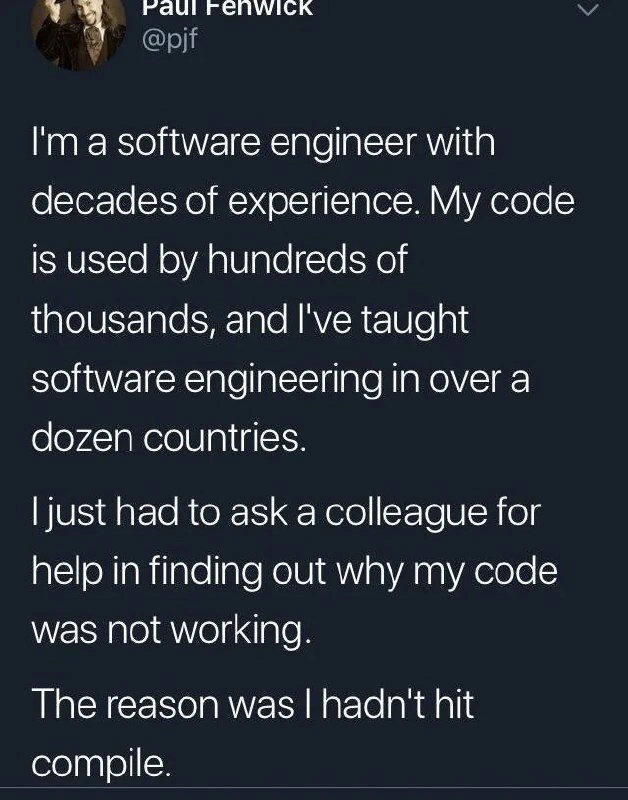
Imagine you built a fancy toy car and spent a lot of time making it perfect. You’re excited to see it zoom across the floor. You press the remote… and nothing happens. Why? Oops – you forgot to put the batteries in the car! 😅 This meme is joking about the same kind of mistake, but with computer code. A very experienced programmer wrote some code and expected it to run, but it didn’t do anything new because he forgot a super simple final step (kind of like forgetting the batteries). It’s a funny reminder that even experts can occasionally forget the obvious step. Just like anyone might forget to hit the “start” button or send a letter after writing it, programmers sometimes forget to “turn on” their creation. And that’s both funny and comforting – it shows that everyone, no matter how skilled, is human and can have a silly oops moment!
Level 2: The Compile Button Oversight
Let’s break down what happened in simpler terms. The tweet’s author is a very experienced programmer, but his program wasn’t working because he didn’t perform one crucial step: compiling the code. In programming, to compile means to take the code you wrote (the human-readable instructions) and translate it into a form the computer can execute (machine code or an intermediate bytecode). Compiling is usually a separate step before running the program. So if you forget to do it, you’re essentially running an old version of your program that doesn’t include your latest changes. This can make you scratch your head in confusion — you swear you fixed a bug or added a feature, yet the program’s behavior hasn’t changed at all.
Think of the typical edit-compile-run cycle in a compiled language like Java or C++:
- Edit/Write Code: You write or modify your source code (e.g.,
MyProgram.java). - Compile Code: You invoke a compiler (for Java, run
javac MyProgram.java) to produce an updated program (for Java, this yields a.classfile of bytecode). - Run Program: You execute the compiled program (e.g., run
java MyProgram) to see the results.
If step 2 is skipped, step 3 will just run whatever was last compiled, which might be old code. In the tweet’s story, the engineer jumped from writing code straight to running it, forgetting the compile step in between. It’s as if he edited a recipe but never actually cooked the new meal – of course the output didn’t change! This falls squarely under Debugging and Troubleshooting mishaps: the code itself was probably fine, but the process had a hiccup. The engineer thought there was a bug because his changes “didn’t work,” when in reality the new code wasn’t even running.
Let’s illustrate with a tiny example. Imagine we have a C++ program that prints a message:
#include <iostream>
int main() {
std::cout << "Bug fixed? No\n";
return 0;
}
Now suppose the developer corrects the code and expects the program to say “Yes” instead of “No”:
std::cout << "Bug fixed? Yes\n";
If they forget to recompile after making this change, and just run the program again, it will still output:
Bug fixed? No
Why? Because without compiling, the running program is still the old one where the message was “No”! The new line "Yes" lives only in the source file and hasn’t been translated into the program that executes. This is exactly what happened in the meme scenario. The senior engineer edited his code, ran it, and got the same bad result, leading him to think something mysterious was wrong. After likely spending time debugging (checking the code, printing variables, maybe googling), he finally asked a co-worker for help. The colleague probably came in fresh and asked a very basic question like, “Hey, did you hit the compile button?” That’s when our experienced friend realized his slip-up. Cue the forehead slap and a chuckle.
It’s a classic DeveloperHumor and DeveloperMistakes moment that every programmer, junior or senior, recognizes. Beginners often do this when learning compiled languages: you hit “Run” but forgot to compile, and nothing changes – very frustrating until you realize the oversight. Many integrated development environments (IDEs) try to help: for example, Eclipse or Visual Studio will often compile your code automatically when you click the run button. However, if you’re working in a more manual setup (like coding in a text editor and using command-line tools), it’s on you to remember to compile. There’s even an old joke: “It works on my machine!” – sometimes because on your machine you forgot an important step like compiling or checking in all the code.
This meme also gently highlights the human side of programming. Developer Self-Deprecation is when coders make fun of their own mistakes to stay humble and sane. Here the author lists impressive credentials to emphasize that even experts make silly mistakes. The message to less experienced devs is encouraging: “Don’t worry, everyone messes up the basics now and then!” In other words, being a senior doesn’t mean you never hit a DebuggingFrustration wall; it just means you might have seen more walls – and you’ve hopefully learned to laugh them off. The fact that he openly shared this story shows a healthy team culture too. In debugging, sometimes the hardest part is admitting you’re stuck and asking for a second pair of eyes. Often a fresh perspective will spot the simple issue you overlooked (like not compiling) because you were too deep in the weeds.
In summary, the tweet screenshot delivers a lesson in a lighthearted way. It covers both a technical concept – the importance of compiling code – and a bit of developer psychology – no one is above simple mistakes. Whether you’re a coding newbie or a seasoned architect, always remember the basics: save your files, hit compile, and don’t be afraid to ask for help. The compile button oversight captured here is a rite of passage that, evidently, repeats even after you’ve been coding for 20+ years!
Level 3: The Uncompiled Senior Moment
Even a developer with decades of experience can get tripped up by a simple compile step. In this tweet, a highly accomplished software engineer (code running for hundreds of thousands, taught worldwide) publicly admits to a classic Debugging fiasco: his code wasn’t working because he forgot to compile it. This is hilariously relatable to senior engineers. Why? We’ve all chased phantom bugs, digging into complex logic or exotic system issues, only to discover the problem was something basic outside the code. It’s a perfect cocktail of human error and technical nuance. The humor comes from the stark contrast: an expert who has written mission-critical code and educated others in software engineering still stumbles on a rookie mistake. It’s developer self-deprecation at its finest, reminding us that no amount of experience makes you immune to the occasional facepalm moment.
From a seasoned dev’s perspective, this scenario touches on the quirks of compiled languages in a development workflow. In compiled languages (think C++, Java, C#, Go), the code you write must be translated by a compiler into an executable or bytecode build artifact. Only then can you run the newest version of your program. Forgetting to compile means you’re still running an outdated binary – all your recent code changes are just sitting in source files, not in the program you execute. It’s analogous to updating the blueprint of a house but never giving it to the construction crew: the house (program) remains unchanged. Experienced engineers know this in theory, but in practice it’s easy to slip. Modern development environments and CI/CD pipelines often automate builds, so a manual compile step can become an overlooked assumption when you’re in the zone.
This meme also highlights a key aspect of Debugging_Troubleshooting culture: always check the simple things first. In complex systems it’s tempting for a veteran to suspect an esoteric bug (“Is it a race condition? A hidden dependency? Memory corruption?”) when something “impossible” is happening. Here the “impossible” symptom was “my correct code is running wrong”, and the root cause was as elementary as it gets. The senior engineer ended up asking a colleague for help, essentially a real-life rubber-duck debugging session. That humble move paid off – the colleague likely asked, “Did you rebuild/compile it?” leading to an instant facepalm realization. The experienced dev had a senior moment at the keyboard, proving that even gurus need the occasional sanity check. This kind of shared laughter over DeveloperMistakes actually strengthens team culture: juniors see that even experts screw up, and seniors are reminded not to get cocky. It’s a candid demonstration of psychological safety in engineering teams – if the teacher can admit forgetting the compile button, students won’t feel as bad about their own goofs.
On a more technical note, this scenario underscores the importance of the build process in Developer Experience (DX). A well-designed DX tries to eliminate such pitfalls. For example, some IDEs auto-compile on file save or have hot-reload features. But if those aren’t in play, the machine will do exactly what you tell it and nothing more. The compiler won’t magically run itself just because you changed some code. This is why many seniors set up habits or tooling safeguards: e.g. configuring an editor to warn if the build is outdated or using Makefile/npm run watch scripts to auto-build on changes. The tweet is humorous precisely because the cause was mundane, yet we empathize – we know how it feels to tunnel into debugging hell, only to find the exit door was open the whole time. As a battle-scarred sysadmin might joke, “at least it wasn’t DNS this time!” 😜 Here, the root cause was between keyboard and chair, not in the code at all. In the end, this DeveloperHumor gem delivers a comforting truth: no matter how advanced you are, some days you’re the expert, and some days you’re the person who forgot to hit compile.
Description
This image is a screenshot of a tweet from a software engineer named Paul Fenwick. In the tweet, he establishes his credibility by stating he has 'decades of experience,' his code is widely used, and he has taught software engineering internationally. He then humorously undercuts this impressive resume by admitting he recently had to ask a colleague for help because his code wasn't working. The punchline, delivered in the last sentence, reveals the cause of the problem: 'The reason was I hadn't hit compile.' This is a highly relatable and humbling anecdote that resonates deeply with developers of all levels. It serves as a reminder that no matter how senior or experienced one becomes, the simplest, most fundamental mistakes are always possible, and sometimes a fresh pair of eyes is all that's needed to spot the obvious

Comments
10Comment deleted
This is why the first step of debugging should always be 'git blame', just to make sure you're not about to look stupid in front of the person who wrote the build script
Twenty years of distributed-systems work, and my most reliable single point of failure is still forgetting Ctrl-Shift-B - turns out even the fanciest CI/CD pipeline can’t compensate for an uncompiled binary
After decades of experience, you realize the most complex distributed system bug is usually between the keyboard and chair - and sometimes it's just that you forgot to tell the compiler you actually want your changes to exist
After decades of architecting distributed systems and teaching software engineering globally, this engineer discovered the hardest problem in computer science isn't cache invalidation or naming things - it's remembering to press Ctrl+B. Proof that even with hundreds of thousands depending on your code, the compiler still won't run itself out of respect for your experience
Two decades in, my toughest consistency bug is local: eventual compilation - forgot to hit build, spent an hour debugging last week’s binary
Decades in, and my preferred consistency model is manual eventual consistency - source and binary converge only when the developer finally hits build
Decades scaling to millions, teaching worldwide - yet the compiler's build button remains the ultimate senior dev gatekeeper
sad story Comment deleted
Yeah, Sometimes you - change file - be interrupted by something - don't save the file - execute - fail - begin to debug - ... - profit in 10 minutes of debugging raw assembly Comment deleted
Lol I thankfully need to press an extra button to not autosave and recompile the code I write. Comment deleted