Senior Engineer's Ultimate Debugging Challenge: The Compile Button
Why is this Debugging Troubleshooting meme funny?
Level 1: Is It Plugged In?
Imagine spending hours building a fancy new toy robot, decorating it, programming it to dance – and then it doesn’t move at all, because you forgot to put in the batteries. 😅 That’s exactly the kind of moment this meme is joking about. In simple terms, the very experienced programmer wrote some code and was confused that nothing changed. It turned out he just didn’t turn on the oven before expecting the cake to bake. In other words, he didn’t do the final step needed to make the code actually run (which is pressing the “compile” button, like turning on the machine). The reason this is funny is because it shows that even an expert – someone who’s been cooking in the kitchen for years – can still forget to flip the switch sometimes. It’s a comforting joke: everyone makes silly mistakes, and often the solution to a “big problem” is something very small and obvious we overlooked. We can all laugh because we’ve all been that person staring at a perfectly fine creation that’s not working, only to realize we just needed to hit the On switch.
Level 2: Remember to Build
Let’s break down what “hadn’t hit compile” means in practical terms. Compiling is the act of turning your high-level source code (the human-readable text with all your logic) into a lower-level form that the computer can execute. In many languages – like C, C++, or Java – you can’t just run the .cpp or .java file directly. You first need to build it, which typically means running a compiler to produce an executable program or bytecode. For example, with a Java program you’d do something like:
$ javac HelloWorld.java # compile the source code to HelloWorld.class (bytecode)
$ java HelloWorld # run the compiled program
Hello, world!
If you forget the first step and just run java HelloWorld again after editing, you’ll still see the old output because the code changes were never compiled into the class file:
# (Suppose we modified HelloWorld.java to print "Hello, Mars!" but didn't recompile)
$ java HelloWorld # run without recompiling after the change
Hello, world! # still prints the old message, change not applied
In our meme, the experienced engineer ran into exactly this situation. His code “was not working” because he was likely running an outdated build of the program. All the new changes he had written were sitting idle in the source files, not yet translated into the program that runs. Debugging such an issue can be tricky if you don’t suspect the cause – you might comb through your logic wondering why nothing’s changing, when the real answer is simply that you’re not running the new code at all!
For newcomers, it’s important to know whether the language you’re using needs a separate compile step or not. Interpreted languages like Python or JavaScript execute code directly via an interpreter (or JIT compiler) at runtime – you hit “run” (or execute a script) and the code runs line by line. Compiled languages like C++ or Rust require you to compile (build) an executable first, then run that. Many modern programming environments (IDEs like Visual Studio, Eclipse, or VS Code) will do this automatically when you click the “Run” button or press a shortcut. They effectively press the compile button for you under the hood. But if you’re working in a more manual setup (say, running commands in a terminal or using an editor that doesn’t auto-build), you have to remember that extra step.
A build system (like Make, CMake, or a modern CI/CD pipeline in a team project) is responsible for orchestrating this process – compiling code, linking libraries, running tests, etc. on each build. On a large project, hitting “build” might kick off a whole sequence of steps. Skipping the build means none of those steps happen. So “hadn’t hit compile” literally means the developer forgot to start that process. It’s a very common DeveloperMistake: even though the fix is as easy as pressing a button or running a command, when you’re in the thick of troubleshooting, it’s surprisingly easy to miss. The meme is basically a friendly reminder: no matter how long you’ve been coding, always double-check the simple things – like did I compile my code? – when something inexplicable is happening. It’s part of the basics of Debugging_Troubleshooting: check power, check plugs, check you actually built the latest changes!
Level 3: Senior Developer, Junior Mistake
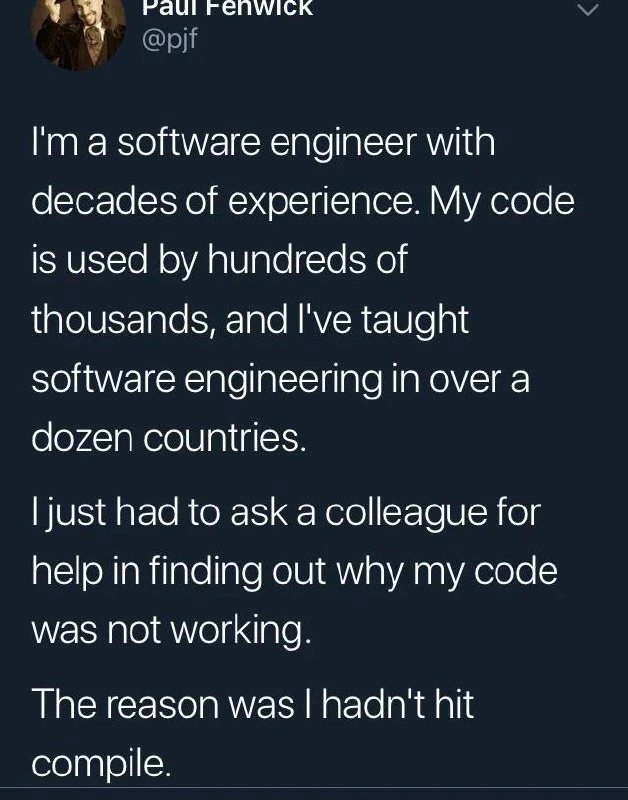
The tweet sets up a classic developer humor punchline by first spotlighting the author’s impressive credentials – “decades of experience,” “code used by hundreds of thousands,” “taught software engineering in over a dozen countries.” We’re led to expect a tale of solving some esoteric debugging mystery or a subtle compiler error that only a veteran could appreciate. Instead, the reveal is delightfully humbling: “The reason was I hadn’t hit compile.” 😂 It’s funny because it’s a senior_dev_blunder that any newbie might make. This contrast between expertise and a basic mistake creates instant comic relief and a sense of “oh, we’ve ALL been there.”
What makes this especially relatable is that forgetting to compile is an almost universal developer experience in compiled languages. It’s akin to a pilot with thousands of flight hours forgetting to disengage the parking brake. Even the best of us occasionally overlook the obvious. Here a seasoned engineer spent time puzzled over why his code changes had no effect, eventually swallowing his pride and asking a colleague for help. It’s easy to imagine that colleague suppressing a grin and gently pointing out the simplest fix: “Have you tried compiling it?” This scenario evokes the classic tech support trope “Have you tried turning it off and on again?” but applied to programming: “Did you build the latest code?” The tweet’s author essentially had a senior moment in the programming world, reminding everyone that no amount of expertise makes you immune to DeveloperMistakes.
This meme also highlights a quirk of developer productivity and DeveloperExperience_DX: our tools and habits can both empower us and trip us up. A veteran dev often uses powerful IDEs and build systems where hitting Run or a single key (F5, for example) automatically triggers a build. If something in that workflow changes – say you move to a new project without auto-build, or use a different toolchain – your IDE muscle memory might betray you. It’s painfully easy to assume your new code is running when in fact you’re still executing an old binary or no build at all. In large systems, this might happen if you update code but forget to include that file in the build configuration, or if you run tests against a cached build artifact. The tweet condenses all that “why isn’t it working?!” frustration into one laughable moment of realization.
On a broader level, the humor lands because it reassures developers of all levels: even someone who has taught in a dozen countries can get stuck on a trivial oversight. It’s a mini antidote to DebuggingFrustration and imposter syndrome. We chuckle not at the author, but with them, recalling our own “facepalm” moments: like spending an hour debugging only to find a typo in a config file, or wondering why a feature isn’t visible and discovering we were running the wrong build. These shared experiences are almost a rite of passage in software engineering. They also underscore good engineering culture: asking for help is fine, and often the quickest way out of a blind spot. The colleague likely said something like, “Let’s double-check the basics… Oh! You didn’t compile.” Cue the laughter and relief. In the end, this meme is a light-hearted nod to humility in debugging & troubleshooting – no matter how elite your background, the forgotten_compile_button can still get you!
Level 4: The Unbuilt Binary
At the core of this joke is a compilation oversight in a compiled-language workflow. In languages like C++, Java, or Go, source code must be translated into machine code via a compiler before it can run. This process involves multiple sophisticated stages: the compiler performs lexical analysis (breaking the code into tokens), parsing those tokens into an Abstract Syntax Tree (AST), possibly transforming that into an intermediate representation (IR), optimizing it, and then emitting actual machine code or bytecode. Once compiled, a linker might combine all pieces into an executable binary. Only then can the CPU execute the program as intended. Skipping any part of this build pipeline – especially the initial compile step – means your new code changes never make it into the program that runs.
In our meme scenario, the veteran engineer wrote code but didn’t invoke the compiler, resulting in what we could call a “ghost” build. The source code was updated in the editor, but no new binary was produced. Running the program was effectively launching an old version of the code (or nothing at all, if no prior build existed). It’s a subtle mistake grounded in how compiled systems work: the source and the executable are separate artifacts, unlike in interpreted languages where the source is executed on the fly by an interpreter. The humor comes from the irony that decades of high-level expertise didn’t prevent a lapse in low-level mechanics – forgetting to produce the very binary that the machine needs.
This also hints at how modern developer tools try to shield us from such errors. Many IDEs and build systems automate compilation (for example, auto-building on file save or before running). But if those automations are turned off or absent, the developer must remember to manually trigger the compile. Here, a seasoned engineer’s muscle memory likely failed him because he was either in an environment where the usual auto-compile wasn’t happening, or he’d been context-switching between languages with different workflows. It’s a classic case of human error in the finely tuned pipeline of software development. No matter how advanced our compilers and CI/CD pipelines get, a program still won’t magically work unless we feed it through that compile stage. In short, the code was written in a high-level language understood by humans, but since it was never compiled down into the language of machines, the computer treated it as if nothing changed at all – leading to a deeply non-obvious bug that wasn’t a bug at all, but an unbuilt binary.
Description
A screenshot of a tweet from user Paul Fenwick (@pjf). The tweet reads: 'I'm a software engineer with decades of experience. My code is used by hundreds of thousands, and I've taught software engineering in over a dozen countries. I just had to ask a colleague for help in finding out why my code was not working. The reason was I hadn't hit compile.' The humor in this post comes from the dramatic buildup of the engineer's extensive experience, which sharply contrasts with the incredibly basic and fundamental mistake they made. It's a humbling and highly relatable confession that resonates with all developers, especially seniors, as it highlights that no one is immune to simple, trivial errors, regardless of their expertise
Comments
7Comment deleted
Seniority doesn't mean you stop making stupid mistakes. It just means you debug them with more sophisticated-sounding excuses before realizing you forgot to save the file
When your decades of design-pattern lore meet a single unchecked keyboard shortcut, the real ‘abstraction leak’ is your dignity
The difference between a junior and senior developer isn't that seniors stop making stupid mistakes - it's that we've automated our CI/CD pipeline so thoroughly that we've forgotten how to manually compile
After decades of writing code used by hundreds of thousands and teaching internationally, this engineer discovered the most elusive bug of all: the one between the keyboard and the chair that forgot to press 'Build'. It's a humbling reminder that no amount of architectural expertise can save you from skipping `make` - proving that even the most senior among us occasionally need a colleague to ask 'did you try turning it off and on again?' but for compilers
Decades of production-scale code and global teaching tours, yet the compiler stays undefeated - true humility at scale
After 20 years debating Bazel vs CMake, the most expensive build failure remains “no build triggered” - a single-node outage in the operator’s event loop
I can debug Raft elections at 3am, but my local cluster - me and the Build button - still fails to reach quorum