Skip to content
DevMeme
1221 of 7435
Semantic Purity vs. The Pragmatic `<br>` Tag
Frontend Post #1359, on Apr 22, 2020 in TG

Semantic Purity vs. The Pragmatic `<br>` Tag

Why is this Frontend meme funny?

Level 1: Neat Freak vs Quick Fix

Imagine two kids cleaning up their room. One kid is a neat freak: he carefully puts every toy in its proper place, arranges books on the shelf by size, and makes sure everything is organized just right. The other kid is a bit lazy and decides to do a quick fix: he grabs all the toys and mess on the floor and throws them into the closet, then shuts the door. Now the room looks clean because you can’t see any toys on the floor. When their parent comes to check, the second kid smiles and says, “See? All clean!” even though he didn’t really sort anything properly. The first kid is upset and yelling, “No! You can’t just hide the mess in the closet, you’re supposed to put things where they belong!” But the carefree kid just grins because, in the end, the room visually appears tidy and that was the goal, right?

In this story, the neat kid is like a developer who wants to use the proper tools and methods (put toys in the right bins = use the right HTML tags), and the lazy kid is like the developer who takes a shortcut to get the result (hide toys quickly = just add line breaks to space things out). It’s funny because the parent (like the web browser) can’t tell the difference at a glance – the room looks clean (the webpage looks fine) either way. The humor comes from the clash between doing something the proper, organized way versus doing it the fast, lazy way and still seemingly getting away with it. The neat kid’s frustration and the lazy kid’s smug satisfaction mirror the meme’s two characters: one is following all the “rules” and the other says “ha ha, it works anyway!”

Level 2: Semantics vs Spacing

Let’s break down what’s happening in this meme in more straightforward terms. It’s highlighting a debate in web development about HTML: semantic HTML versus using simple line breaks for layout. On the left side of the image, a character is upset and saying “You can’t just add random line breaks! You have to use proper semantic elements.” Here, semantic elements refers to HTML tags that clearly describe their purpose in the page’s content. For example, <p> defines a paragraph of text, <h1> defines a top-level heading, <nav> defines a navigation section, and so on. These tags give meaning to the structure of a webpage. When code reviewers or teachers talk about writing semantic HTML, they mean you should choose HTML elements that convey the correct meaning for your content rather than just focusing on how it looks. Using a <p> tag for a paragraph is semantic (because a paragraph is a logical section of text), whereas using, say, multiple <br> tags to create space between lines is non-semantic (because you’re not marking a new logical section, you’re just forcing visual spacing).

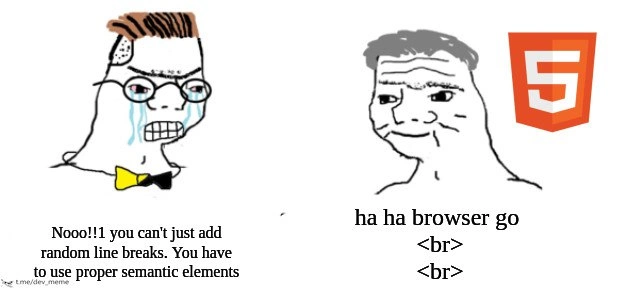
On the right side, the character (drawn with a smug, satisfied expression) is next to the orange HTML5 logo and says “ha ha browser go <br> <br>.” This is a tongue-in-cheek way of saying: “Haha, the browser just does what I tell it – I put two <br> tags and it simply adds two line breaks on the page.” The HTML5 logo indicates we’re in the era of modern web standards (HTML5 is the current version of HTML with many semantic tags added), yet the joke is that this person is ignoring those standards. The <br> tag in HTML is literally a line break – it tells the browser to start a new line at that point. It’s an empty element, meaning it doesn’t wrap any content and you don’t need a closing tag (<br> is enough, though in XHTML you might see <br />). Using one <br> moves the next content to a new line, and using two <br> in a row (as shown in the meme text) creates a blank line in between. In effect, the guy on the right is spacing out content by just inserting blank lines. That’s a very quick way to add vertical space, but it’s considered bad practice if used for presentation purposes.

Why would adding <br> all over be frowned upon by the left-side “HTML purist”? Because it’s not using HTML for its intended purpose. HTML’s main job is to structure content, while CSS (Cascading Style Sheets) is meant to handle the visual design (like spacing, layout, colors). When you see someone adding a lot of <br> tags to put space between elements, they’re essentially mixing content with presentational hacks. It can make the HTML document structure messy and less meaningful. For instance, consider two ways of spacing out two paragraphs of text:

<!-- Proper semantic markup with paragraphs -->
<p>This is the first paragraph of text. It has some content that goes here.</p>
<p>This is the second paragraph of text. It will be automatically separated 
   from the first by default margins, or can be styled with CSS for spacing.</p>

<!-- Non-semantic spacing using line breaks -->
<div>This is the first paragraph of text. It has some content that goes here.</div>
<br><br>
<div>This is the second paragraph of text. It is separated from the first by two line break tags.</div>

In the first (semantic) example, we use <p> tags for each paragraph. The browser knows these are separate paragraphs, and by default it will put a bit of space between them (browsers usually have default CSS that adds margin under paragraphs). We could also adjust spacing with CSS if we want more or less space, but importantly the HTML structure is logical: two paragraphs in a row. In the second example, we just used generic <div> containers (or we could have even just left them as plain text in one container) and then threw in <br><br> to force an empty line of space. Visually, these two approaches might look similar in a browser — you’d see one block of text, a blank line, then the next block of text. However, under the hood they’re different. The semantic version is clearer in meaning: any developer (or browser, or assistive technology) reading the HTML knows “okay, this is one paragraph, and that’s another paragraph.” In the <br> version, the browser just sees “line break here, line break here” with no indication that the texts are distinct paragraphs or ideas. It’s like the difference between a properly formatted book and one where the writer just hit the Enter key a bunch to start a new page.

Let’s also talk about why the browser is okay with both approaches. Web browsers are built to be very forgiving with HTML. They have to be, because people’s code on the internet is often imperfect. If a browser encounters unknown tags or a flurry of <br>s, it won’t crash or refuse to show the page; instead, it tries its best to interpret the intent and display something. In the case of multiple <br> tags, every browser will indeed just create that many line breaks. There’s no rule that “forbids” using <br> repeatedly, and in some cases (like formatting an address or a poem) using <br> is semantically acceptable because you actually want to end lines at specific points. The big issue is when <br> is abused purely to cheat layout. The meme exaggerates this abuse: the right-side character gleefully uses random line breaks for everything, while the left-side character cites the “proper semantic elements” that should have been used instead.

From a front-end development best practices standpoint, writing semantic HTML is encouraged for several reasons:

  • Accessibility: As mentioned, assistive devices (like screen readers for blind users) rely on proper HTML structure to convey meaning. For example, a screen reader knows to announce a <h1> tag as a “heading, level 1” which gives context to the user. If you just use a big bold text in a <div> with a bunch of <br>s before it to position it, the screen reader won’t say “heading” because it doesn’t know it’s a heading – it just sees generic containers and line breaks. Proper elements make your site usable for more people.
  • Maintainability: Code is typically read more often than it’s written. If someone (maybe Future You!) comes back to this HTML in six months to update the page, it will be much easier if the code is semantic and clean. A section of content enclosed in <section> or <article> tags with headings and paragraphs is self-explanatory and can be styled or restructured easily with CSS. Conversely, a page littered with <br> tags as spacing requires the next developer to play detective to understand the intended grouping of content. It’s very easy to break the layout further if those <br> placements get messed up.
  • SEO (Search Engine Optimization): Search engines like Google analyze your HTML structure to understand the content of your page. While modern search algorithms are pretty smart and can extract text even from messy HTML, using proper tags (like headings for important titles, paragraphs for content, lists for lists, etc.) can give the crawler clearer signals about what is what. It likely won’t make or break your SEO on its own, but it’s part of overall good site quality which search engines do favor.
  • Consistency and Styling: If you rely on <br> for spacing, you’re basically hard-coding the layout into the HTML. This is very rigid. If you suddenly want all your spacings to be a bit bigger or smaller, you’d have to edit the HTML and potentially remove/add <br> tags everywhere. Instead, if you had used proper elements with CSS, you could adjust a single CSS rule (say, the margin on <p> or on a container class) and change spacing globally. Using many <br> is a sign that maybe the person isn’t comfortable with CSS layouts or doesn’t know they should separate content from presentation. In modern web dev, HTML is for structure, CSS is for presentation.

Now, let’s decode the meme text with that understanding. When the left character says, “You can’t just add random line breaks,” he’s referring to the practice of jamming in <br> tags to create white space. When he says, “You have to use proper semantic elements,” he means you should use the correct HTML tags for the job — for example, use <ul> and <li> if you want a list of items rather than writing items separated by <br> tags, or use <p> for separate paragraphs of text rather than just breaking lines. This character is basically voicing the lessons that any good web development course or code reviewer would teach. The right character’s phrase, “ha ha browser go <br> <br>,” is a very memey way of flaunting the fact that browsers will obediently follow even bad or sloppy code. It’s inspired by an internet meme format where people say “X go brrr” to imply something just mindlessly doing its job (the origin was “money printer go brrr” in economics memes). Here, the browser “go <br> <br>” suggests the browser will simply output two line breaks without complain. The subtext is, “I (the developer) might be doing this in a dumb way, but hey, the browser still shows it, so who cares?”

The whole meme resonates with developers because this situation happens in real life. Maybe you’re doing a code review on a teammate’s front-end code and you see a chunk of HTML like:

<div class="welcome-text">Welcome to our site!</div>
<br><br><br>
<div class="intro">We are glad you’re here. Please enjoy our content.</div>

As a person who cares about clean code, you might comment: “Instead of using three <br> tags, can we put these in <p> tags or add proper CSS margin? It’ll be more robust and readable.” This is essentially exactly what the left side Wojak is saying, albeit the meme makes him say it in a very over-the-top, nerdy rage way. The teammate who wrote the code might respond, “But it looks fine in the browser and we’re short on time,” which is basically the right side’s feeling — using <br> is quick and it works. There’s even a bit of BrowserCompatibility subtext: historically, one reason people used a million <br> tags or <center> tags was to get consistent layout in an era when CSS support varied between browsers. Old-timers might recall that in the late 90s and early 2000s, using HTML tables for layout and <br> for spacing was commonplace, because CSS wasn’t as powerful or consistently supported. However, in modern web dev (post-HTML5 era), all major browsers support the standards well, and these old techniques are no longer necessary — in fact, they’re technical debt. Yet, browsers still support them for backward compatibility, which can lead new or untrained developers to think it’s acceptable.

In summary, the meme is a funny take on a common front-end development scenario: one developer insists on doing things the “right” (semantic) way, and another says, “screw it, I’ll just do the quick thing since the browser lets me.” The tags and categories attached — HTML, FrontendHumor, WebDevelopment, CodeQuality — all point to this being an inside joke about coding style and best practices on the web. Anyone learning HTML will eventually hear, “don’t use a ton of <br> for spacing, that’s what CSS/margins are for,” and anyone who’s had to clean up after someone who ignored that advice will totally sympathize with the screaming Wojak. At the same time, we’ve all been the person who just needed something to work right now and felt a tiny guilty pleasure knowing the browser will indulge our hack. The meme just dramatizes those roles: the crying stickler and the carefree hacker. It’s equal parts educational reminder (yeah, don’t do that <br><br> stuff for real) and comedic exaggeration (nobody hopefully cries literal tears over a <br> in code, but internally we might feel a pang).

Level 3: Breaking Convention

This meme captures a classic front-end codequality showdown that many seasoned web developers know all too well. On the left, we have the aggrieved semantic HTML purist (depicted as a crying, nerdy Wojak) screaming, “Nooo!!1 you can’t just add random line breaks. You have to use proper semantic elements!” His exaggerated anguish (even typing !1 by mistake in his fury) represents the developer who religiously enforces web standards and best practices. In his world, every piece of text must be wrapped in meaningful tags like <p> for paragraphs or <header> for headings. On the right, the smug Wojak (with the orange HTML5 shield floating nearby) confidently retorts, “ha ha browser go <br> <br>.” This laid-back character personifies the “if it works, it’s fine” mindset — he’s basically saying the browser doesn’t care if you stack <br> tags everywhere; it will happily render the page anyway. The humor comes from this absurd juxtaposition: the rule-following dev’s righteous rage versus the lazy anarchist approach of just throwing in HTML line breaks until things look right, knowing the browser will obediently go brrrr (make the new lines).

At a deeper level, this is poking fun at the eternal tension between web development best practices and the “ Works in My Browser™ ” shortcuts born of convenience or ignorance. The meme format itself – a distraught complainer versus an unbothered Chad – frames the semantic markup advocate as an uptight fussbudget and the <br><br> user as the carefree rebel. Every experienced UI engineer has likely encountered code where a junior dev (or a rushed senior!) used a dozen <br> tags to create vertical space on a page. It’s a quick-and-dirty solution: no new CSS, no proper containers, just brute-force line breaks. And yes, in pure visual terms, it gets the job done – the content is separated by blank lines. The browser, designed to be forgiving, renders the intended blank space without throwing errors. Meanwhile, the developer who champions maintainable, semantic markup is tearing their hair out, because they see the tech debt and future headaches hiding in those <br>s.

Why does it matter so much? Seasoned devs know that semantic HTML isn’t just academic gatekeeping – it has real benefits for accessibility, maintainability, and even SEO. Proper tags give meaning to content: <nav> tells us it’s a navigation section, <p> indicates a paragraph, <h1> denotes a top-level heading, and so on. Stacking <br> tags conveys zero meaning; it’s like saying “skip a line” over and over with no context of why the space is there. To a screen reader (used by visually impaired users), a <p> might signal a new paragraph (perhaps causing a brief pause or a change in tone), whereas multiple <br>s might just produce awkward silences or “blank” announcements with no indication of structure. To a maintenance programmer, semantic tags clearly delineate sections of the page, whereas <br> spam is just visual fluff they have to weed through when altering layout or styling. The crying Wojak’s despair, though exaggerated for comic effect, reflects the real frustration of reviewing code that “works by coincidence.” It’s the same energy as seeing someone center a div by adding &nbsp;&nbsp;&nbsp; (non-breaking spaces) repeatedly – sure, it looks centered, but oh boy is it a fragile, non-standard solution.

From an industry perspective, this meme also highlights how HTML5 standards (represented by that shiny shield icon) tried to steer everyone toward more meaningful markup, yet browsers still maintain backwards-compatibility and leniency. The presence of the HTML5 logo next to the smug Wojak is ironic – HTML5 introduced many new semantic elements and encouraged better structure, but the “anarchist” dev on the right is basically saying: “I can ignore all that fancy semantic stuff, and HTML5 browsers will still display my page just fine.” And he’s not wrong: browsers will render content inside <section> or inside a bunch of <br>s more or less similarly on the surface. This backward compatibility, while crucial for the web’s resilience, is exactly why such anti-patterns persist. Seasoned developers have seen this scenario play out in endless pull request reviews: a well-meaning reviewer writes a long comment about using proper <ul> lists or <p> tags, and the perplexed author replies, “But it looks the same, and it works on Chrome... 😕”. That disconnect – between the immediate result (“it works!”) and the long-term quality (“is it clean and correct?”) – is what the meme hilariously encapsulates. It’s essentially a code-quality morality tale told in two panels and a few words.

There’s also a shared trauma here that veterancoders will smirk at. If you’ve ever had to refactor a legacy page filled with <br>s for spacing, you know it’s like untangling a messy ball of yarn. Want to insert a new section of text? Good luck figuring out whether you need two or three extra <br>s to match the existing spacing, or if those breaks are even needed now. Or imagine trying to make that page responsive: suddenly those fixed line breaks might make huge gaps on mobile. The semantic purist isn’t just being pedantic – they’re remembering all the late nights fixing pages where content flowed out of place because someone relied on brittle <br> positioning. It’s a “once bitten, twice shy” reaction. Meanwhile, the <br> enthusiast might have their own perspective: “We had to ship the feature by EOD, and using proper CSS and markup was taking too long. So yeah, I threw in a couple of <br>s… it worked, didn’t it?” In teams with tight deadlines or without strict code standards, these hacks slide into codebases more often than anyone likes to admit. Over time, they accumulate and become what we call technical debt – shortcuts that make future changes harder. The meme’s comedic exaggeration (with tears and memespeak) adds lightness to what is actually a everyday mini-drama in web development: the passionate debate between doing things the right way versus the quick way.

In summary, the meme gets a knowing laugh from developers because it’s absurd yet relatable. It caricatures the meticulous dev as an overwrought stickler (crying “Nooo!” as if random <br>s were a mortal sin) and the lax dev as a chill iconoclast (almost proud of his wild-west <br><br> solution). Neither extreme is ideal in real life, but we’ve all had moments of being on one side or the other. The “ha ha browser go <br> <br> catchphrase parodies the popular “X go brrr” meme, implying that the browser just happily chugs along rendering line breaks, heedless of our human concerns about semantics or elegance. The punchline is that, despite all the guidelines and gravity we attach to “proper” HTML structure, at the end of the day the web browser is an anarchic beast that will do whatever the HTML tells it to – even if that HTML is an ugly mess. And for better or worse, the browser won’t pop up a message saying, “Yo, shouldn’t you be using a <p> here?” It’ll just go ahead and create empty lines on the page. The result: the semantic warrior is left feeling like their principles are mocked by a dumb client program that rewards bad behavior by displaying it perfectly. It’s a hilarious and humbling reminder that on the web, “it works” can trump “it’s right” at least in the short term – and that’s exactly why code reviewers and linters exist to save us from our <br><br> impulses.

Description

A two-panel Wojak comic meme contrasting two developer mindsets. On the left, a crying, angry Wojak character with glasses and a yellow bow tie exclaims, 'Nooo!!1 you can't just add random line breaks. You have to use proper semantic elements'. This represents a strict, by-the-book approach to web development. On the right, a calm, smugly smiling, older-looking Wojak is shown next to the orange HTML5 logo. The caption below him reads, 'ha ha browser go <br><br>', representing a pragmatic, old-school developer who uses the simple line break tag to create vertical spacing, ignoring modern best practices. The humor lies in the conflict between frontend development purism (using CSS for layout) and the quick, 'dirty', but effective legacy method of just inserting line breaks. It's a classic 'rules vs. results' scenario that resonates with experienced developers

Comments

7
Anonymous ★ Top Pick Sure, use semantic tags. But when the designer says 'nudge it down a smidge,' the browser understands `<br>` a lot faster than it understands a long-winded PR debate about design tokens
  1. Anonymous ★ Top Pick

    Sure, use semantic tags. But when the designer says 'nudge it down a smidge,' the browser understands `<br>` a lot faster than it understands a long-winded PR debate about design tokens

  2. Anonymous

    After a decade evangelizing semantic HTML, the highest-converting page in prod is still the one the sales guy built in Outlook with 42 stacked <br> tags - browser rendering: 1, my architectural dignity: 0

  3. Anonymous

    Twenty years in and I still ship <br><br> to production while my PR comments preach about semantic HTML - the only difference now is I've automated the hypocrisy with a linter I immediately disable

  4. Anonymous

    The eternal struggle: spending 3 hours architecting a perfectly semantic HTML structure with proper heading hierarchy, ARIA labels, and landmark regions, only to watch a contractor ship '<br><br><br>' for vertical spacing because 'it works in Chrome.' Meanwhile, your accessibility audit report grows longer than your sprint backlog, and the PM asks why the 'simple spacing fix' is taking so long to 'do it properly.'

  5. Anonymous

    If your spacing strategy is <br><br>, congratulations - you’ve invented whitespace-as-a-service with 0% WCAG uptime

  6. Anonymous

    Using <br> for layout is SELECT * for UI: it “works” until i18n expands the copy, screen readers narrate 17 line breaks, and every PR diff becomes a war of whitespace

  7. Anonymous

    Semantic HTML for the spec sheet, <br> for the sprint demo - browsers forgive, audits don't

Use J and K for navigation