Skip to content
DevMeme
234 of 7435
Regular Expressions: The Problem Multiplier
Debugging Troubleshooting Post #286, on Mar 31, 2019 in TG

Regular Expressions: The Problem Multiplier

Why is this Debugging Troubleshooting meme funny?

Level 1: Fix-It Fiasco

Imagine you spilled a whole box of cereal on the floor – a huge mess with cereal pieces everywhere. Let’s say 99 pieces are scattered around. You decide to clean it up quickly by using a vacuum cleaner to suck them all up in one go. It sounds like a smart idea, right? But uh-oh! The vacuum bag isn’t attached properly, and it bursts open. Now the cereal that was inside the vacuum blows all over the room. You managed to pick up those original 99 pieces, but you created a new mess in the process – even more cereal is everywhere now (one extra problem!). In the end, your quick fix made the situation a little worse.

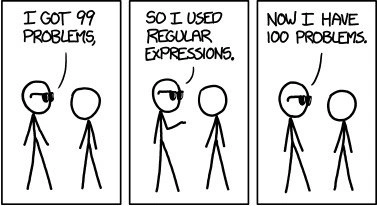
That’s exactly what happened in the meme. The programmer tried a fancy one-step solution (using a regex) to clean up a bunch of bugs, but the solution backfired and created an extra bug. The comic is funny because we all know this feeling: sometimes when you try to solve a problem too quickly or with a clever trick, you end up with an even bigger problem than you started with. It’s a lighthearted reminder not to be too clever with our fixes!

Level 2: Pattern Matching Pitfalls

Let’s break down the technical terms and scenario in simpler terms. Regular expressions (often shortened to “regex”) are patterns used to match text. Think of a regex as a tiny language for describing text strings – for example, the regex \d+ will match one or more digits in a row (since \d means “digit” and + means “one or more”). Many programming languages (like Python, JavaScript, Java, etc.) have built-in support for regex, letting developers quickly search, replace, or validate text using these patterns. They’re extremely handy for tasks like finding all email addresses in a document or checking if a form input looks like a phone number.

Now, a bug means there’s something wrong in the code – the program isn’t doing what it’s supposed to. In our comic scenario, imagine the programmer had 99 different text-processing bugs or data issues to fix (“99 problems”). They decided to solve them all at once by using a regex, since one complex pattern can often clean up a lot of messy cases in one go. That’s the idea behind the line “So I used regular expressions” in the comic. It suggests the developer wrote a fancy one-line solution to handle those problems.

However, regex is a powerful but finicky tool, and it can be painful to debug when it misbehaves. Its syntax is full of special characters (*, +, ?, . and so on) that have specific meanings. If you get even one of them wrong, your pattern might do something unexpected. For example, .* in a regex means “match anything and everything” (it’s a wildcard that can consume any length of text). If you accidentally use .* in the wrong way, you might match far more text than you intended. A classic newbie mistake is trying to use a regex to remove HTML tags by writing something like <.*> – thinking it will match one tag at a time. Instead, it ends up matching across multiple tags and deleting huge chunks of text, because .* was greedy. Oops! The fix becomes a new bug – a painful lesson about how quickly a “clever” regex can backfire.

The comic’s punchline, “Now I have 100 problems,” means the programmer’s regex solution introduced a brand new problem, bringing the bug count from 99 up to 100. It’s the programming equivalent of trying something clever and having it backfire. From a CodeQuality standpoint, this also shows why regex-heavy fixes can be risky. A very complicated regex can make your code harder to understand for others (and even for yourself later on). If someone can’t easily tell what your one-liner regex is doing, they might struggle to maintain or modify the code without causing more errors. That’s bad for overall code quality and future debugging efforts.

The comic itself is drawn in a simple stick-figure style (resembling the famous XKCD webcomic that many developers love). This minimalist art puts all the focus on the dialogue and the joke. It’s a form of developer humor that’s super relatable: even as a newer programmer, you quickly learn that “quick fixes” often aren’t so quick in the long run. The meme is basically saying, “I tried to be smart by using regex to solve my problems, and it sort of blew up in my face.” It’s funny to fellow coders because most have experienced a moment where a supposed easy fix led to an extra bug, making things a little worse instead of better.

Level 3: Regex Recoil

For seasoned developers, this comic lands as a painfully familiar joke. It’s referencing an old programming adage attributed to Jamie Zawinski: “Some people, when confronted with a problem, think ‘I know, I’ll use regular expressions.’ Now they have two problems.” In the comic’s exaggerated scenario, the developer had 99 bugs to fix and confidently unleashed a regex to solve them, only to end up with 100 bugs instead. This humorous escalation highlights a real-world pattern: using regex as a quick fix can backfire, effectively multiplying your bugs. The phrase “I got 99 problems” is a playful nod to a famous hip-hop lyric, but here it’s repurposed as programmer humor. By panel 3, the cool stick-figure in sunglasses (evoking a confident “I got this” attitude) sheepishly admits, “Now I have 100 problems.” In other words, the solution became a new problem. That’s the regex recoil – the tool’s kickback hit the developer with an extra bug.

Why is this so relatable in software development? RegularExpressions are incredibly powerful for text parsing and substitution – they’re supported in virtually all programming languages (Python, JavaScript, Perl, Java, you name it). A single regex pattern can replace dozens of lines of code by concisely expressing complex string logic. But this power is a double-edged sword. Crafting a regex pattern that truly does exactly what you intend (no more, no less) is tricky. The humor here is that the developer probably wrote a pattern to fix a bunch of text processing problems, but that pattern had an unintended side effect or didn’t account for some edge case – hence an additional bug (#100) was introduced.

Bugs often lurk in the subtle details of regex syntax: a missed escape character, the wrong quantifier, or greediness where you meant to be stingy. For instance, imagine trying to fix a log-cleansing script that had 99 known faulty cases. The developer writes a regex to globally replace a problematic substring. It solves those 99 cases… but inadvertently also catches a case it shouldn’t, corrupting something else. Suddenly a new bug is born, perhaps worse than the originals. Senior engineers chuckle (or groan) at this because we’ve all seen it – maybe we’ve even done it at 2 AM during an on-call emergency. Regex can be a bug multiplier if used without deep understanding. It’s common in CodeQuality discussions to label overly complex regexes as “write-only code” – meaning once written, even the author struggles to read and maintain it later. Such regex-heavy code can degrade maintainability, making future debugging a nightmare. The comic’s dramatic increase from 99 to 100 problems exaggerates this, but it rings true enough to be funny.

This scenario also speaks to the classic cycle of bug fixing and unintended consequences. It’s like the programmer’s version of whack-a-mole: you smash one bug and another pops up. There’s a well-known developer ditty that goes, “99 little bugs in the code, take one down, patch it around, 127 little bugs in the code.” The numbers change, but the idea is the same – sometimes fixing bugs (especially in a hurry or with a convoluted approach) introduces even more bugs. Regular expressions, in particular, have a reputation for this because they’re so terse and opaque. You might “solve” an immediate problem, but that regex can create unexpected matches. For example, consider a real mishap: you wanted to remove HTML tags from text, so you use a regex like <.*> to strip out <tag>...</tag> sections. It works on a simple line, but if the text had multiple tags, <.*> ends up wiping everything between the first < and the last > — oops, all content vanished! Now you have a bigger problem than when you started. A senior developer reading the code will facepalm at that greedy quantifier mistake; it’s an easy coding mistake to make, and it demonstrates how a naive regex can overreach.

Another aspect the comic pokes fun at is the confidence we developers sometimes have in one-liner solutions. The stick figure proudly declares using regex like it’s a magic wand – a swagger often seen when someone discovers how powerful regex can be. It’s the “I’ll just regex it!” mindset. But experienced devs know to be a bit wary of that approach. There’s often an unspoken rule: only use regex if you absolutely must, and if you do, test it like crazy. Why? Because a poorly tested regex can introduce an entire category of problems:

  • False positives or negatives: The pattern might match text it shouldn’t, or miss text it should catch. Either scenario is a new bug.
  • Performance issues: As mentioned, certain regex patterns can dramatically slow down your program for specific inputs (the dreaded catastrophic backtracking). Suddenly a quick fix is causing timeouts in production.
  • Readability and maintainability: A complex regex looks like line noise (for example: ^(?:(?!regex).)*$ – what does that even do at a glance?). Future maintainers might introduce new bugs simply by misunderstanding or incorrectly modifying the pattern. This hurts overall code quality.
  • Overfitting the input: The regex might only work for the exact scenario the developer tested against, but real-world data is messy. The 100th problem could be a slightly different input that the regex wrecks or fails on.

The comic’s structure is also a clever wink to XKCD-style humor. In fact, the minimalist stick figures and deadpan delivery are reminiscent of Randall Munroe’s comics, which frequently address programming and pattern_matching_pain. Long-time coders have likely seen an XKCD or two about regex nightmares or overly clever one-liners. By referencing the “99 problems” meme and the regex trope together, the comic doubles up on references. It’s relatable humor because nearly every developer has wrestled with a puzzling bug and thought, “Maybe I can just slap a regex on this.” And many of us have learned that while regex can be a lifesaver, it can also be a trapdoor.

In summary, at the senior developer level, this meme is funny (in a slightly painful way) because it captures a common coding mistake: using an overly complex or insufficiently vetted regex as a fix, which backfires and creates more bugs. It underscores why seasoned devs preach caution with regex. There’s a shared industry wisdom here – quick fixes in code (especially involving dense languages-within-a-language like regex) tend to cause unexpected bugs if you’re not careful. So when the comic says “Now I have 100 problems,” every coder who has been burned by a regex instantly gets the joke. We laugh, perhaps a bit ruefully, because we’ve been that sunglasses-wearing figure at some point: confident we squashed a bucket of bugs in one go, only to realize we hatched a new one that’s even trickier to handle.

import re

text = "I got 99 problems"
# A regex that finds a number and increments it by 1
fixed_text = re.sub(r"\d+", lambda m: str(int(m.group()) + 1), text)
print(fixed_text)  # Output: "I got 100 problems"

// The above code humorously demonstrates the meme: // We had "99 problems" in the text, and by applying a regex substitution // we literally end up with "100 problems". The regex fix did exactly what we told it to, // but not necessarily what we truly wanted – a tongue-in-cheek illustration of how using regex // can give you that "one more problem."

Level 3: Regex Recoil

For seasoned developers, this comic lands as a painfully familiar joke. It’s referencing an old programming adage:

Some people, when confronted with a problem, think 'I know, I’ll use regular expressions.' Now they have two problems.

In the comic’s exaggerated scenario, the developer had 99 bugs to fix and confidently unleashed a regex to solve them, only to end up with 100 bugs instead. This humorous escalation highlights a real-world pattern: using regex as a quick fix can backfire, effectively multiplying your bugs. The phrase “I got 99 problems” is a playful nod to a famous hip-hop lyric, but here it’s repurposed as programmer humor. By the final panel, the cool stick-figure in sunglasses (evoking a confident “I got this” attitude) sheepishly admits, “Now I have 100 problems.” In other words, the solution became a new problem. That’s the regex recoil – the tool’s kickback hit the developer with an extra bug.

Why is this so relatable in software development? RegularExpressions are incredibly powerful for text parsing and substitution – they’re supported in virtually all programming languages (Python, JavaScript, Java, Perl, you name it). A single regex pattern can replace dozens of lines of code by concisely expressing complex string logic. But this power is a double-edged sword. Crafting a regex that does exactly what you intend (no more, no less) is tricky. The humor here is that the developer probably wrote a pattern to fix a bunch of text processing problems, but that pattern had an unintended side effect or didn’t account for some edge case – hence an additional bug (#100) was introduced.

Bugs often lurk in the subtle details of regex syntax: a missed escape character, the wrong quantifier, or greediness where you meant to be lazy. For instance, a developer might try to remove HTML tags with a pattern like <.*> and be shocked when it deletes not just the tags but everything in between them (matching across multiple tags because .* is greedy). The result? A bigger mess than they started with. Senior engineers chuckle (or groan) at this because we’ve all seen it – maybe we’ve even done it at 2 AM during an on-call emergency. Regex can be a bug multiplier if used without deep understanding. It’s common in CodeQuality discussions to label overly complex regexes as “write-only code” – meaning once written, even the author struggles to read and maintain it later. Such regex-heavy code can degrade maintainability, making future debugging a nightmare. The comic’s dramatic jump from 99 to 100 problems exaggerates this, but it rings true enough to be funny.

This scenario speaks to the classic cycle of bug fixing and unintended consequences – the programmer’s version of whack-a-mole. You smash one bug and another pops up. There’s even a jokey refrain among coders: “99 little bugs in the code, take one down, patch it around, 127 little bugs in the code.” The numbers change, but the idea is the same – sometimes fixing bugs (especially in a hurry or with a convoluted approach) introduces even more bugs. Regular expressions, in particular, have a reputation for this because they’re so terse and opaque. You might “solve” an immediate problem with one, but that regex can create unexpected matches or performance issues.

Another aspect the comic pokes fun at is the confidence we programmers sometimes have in one-line solutions. The stick figure proudly declares using regex like it’s a magic wand – a swagger often seen when someone discovers how powerful regex can be. Experienced devs know to be wary of that approach. There’s an unspoken rule: only use regex if you absolutely must, and if you do, test it like crazy. Why? Because a poorly tested regex can create an entire category of new issues:

  • False positives or negatives: The pattern might match text it shouldn’t, or miss text it should catch. Either scenario introduces a new bug.
  • Performance problems: An overly complex regex can dramatically slow down your program for certain inputs (the dreaded catastrophic backtracking), causing timeouts or crashes in production.
  • Maintainability woes: A complex regex often looks like gibberish (^(?:(?!regex).)*$ – what does that even do?). Future maintainers might break something because they can’t easily understand or modify it.
  • Overfitting: The regex might only work for the exact cases you tested, but fail on slightly different real-world data. When those unhandled cases appear, voilà – a new bug.

The stick figure comic exaggerates by going from 99 to 100 problems, but every programmer recognizes the kernel of truth. We laugh (perhaps a bit nervously) because we’ve lived this scenario: a clever regex fix that ended up spawning a new bug or two. It’s a collective reminder that in coding, quick fixes often come back to bite, and even the coolest one-liner can hide a minefield of unintended consequences.

import re

text = "I got 99 problems"
# Use a regex to find a number and increment it by 1
fixed_text = re.sub(r"\d+", lambda m: str(int(m.group()) + 1), text)
print(fixed_text)  # Output: "I got 100 problems"

// The above code humorously demonstrates the meme: we had "99 problems" in the text, and by applying a regex substitution we literally ended up with "100 problems." The regex fix did exactly what we told it to, but not necessarily what we truly wanted – a tongue-in-cheek illustration of how using regex can give you that one extra problem.

Level 4: Automata Ambush

At the most theoretical level, this meme hints at the formal language theory behind regular expressions and why they can unexpectedly spawn new bugs. A regular expression (regex) isn’t just a fancy search string – it’s defined in theoretical computer science as a way to describe a Regular Language. In the Chomsky hierarchy of languages, regular languages are the simplest type, recognized by finite automata (think of these as very basic computational machines with a limited memory, essentially just states). Regex patterns correspond to these automata, efficiently matching text patterns that fit within that “regular” structure. For example, a regex like ^[0-9]{3}-[0-9]{4}$ is a precise finite-state rule for matching phone numbers of the form 123-4567. This theoretical neatness is powerful – regex provides a concise way to encode complex text-matching logic that would otherwise require many lines of code or elaborate state-tracking.

However, the meme’s dark punchline – ending up with 100 problems – wryly points to how regex can become a victim of its own complexity. Despite their mathematical elegance, real-world regex engines often go beyond pure regular languages, introducing features like backreferences and lookahead assertions. These enhancements make regex capable of things far beyond simple automata (some regex flavors are even Turing-complete in theory!). The trade-off: using such power carelessly can lead to unexpectedly non-regular behavior or extreme performance costs. A notorious scenario is catastrophic backtracking – a complex pattern triggers the regex engine to try so many combinations that matching takes exponential time, effectively freezing your program on certain inputs. It’s a bit like setting an elegant mathematical trap that accidentally becomes an infinite loop. One minute you’re happily solving 99 text-processing problems with a single pattern, and the next minute your application is hanging because the regex is stuck exploring countless possibilities. This is a theoretical time complexity bomb hidden in what looked like a simple one-liner solution.

Fundamentally, the meme is a nod to a theorem of experience: every quick fix with a regex adds a constant (or worse, non-linear) factor of new complexity to the system. In mathematics and computer science, we often learn that solving one instance of a problem can increase overall complexity if the solution method isn’t well-bounded. Here, solving a set of 99 input cases with a complicated pattern might push the problem into a higher complexity class where edge cases (the 100th problem) proliferate. It’s as if regex – once a precise model of pattern matching – mutates into a chaotic algorithm juggling dozens of partial matches and states. In academic terms, the humor exposes how shifting a problem into a different domain (text patterns) can violate assumptions and produce new problem states. Or in plainer terms: by using a tool (regex) that operates on its own formal rules, you sometimes invite an automata ambush, where the limitations and quirks of the regex engine ambush your code with new bugs.

Level 4: Automata Ambush

At the most theoretical level, this meme hints at the formal language theory behind regular expressions and why they can unexpectedly spawn new bugs. A regular expression (regex) isn’t just a fancy search string – it’s defined in theoretical computer science as a way to describe a Regular Language. In the Chomsky hierarchy of languages, regular languages are the simplest type, recognized by finite automata (think of these as very basic computational machines with a limited memory, essentially just states). Regex patterns correspond to these automata, efficiently matching text patterns that fit within that “regular” structure. For example, a regex like ^[0-9]{3}-[0-9]{4}$ is a precise finite-state rule for matching phone numbers of the form 123-4567. This theoretical neatness is powerful – regex provides a concise way to encode complex text-matching logic that would otherwise require many lines of code or elaborate state-tracking.

However, the meme’s dark punchline – ending up with 100 problems – wryly points to how regex can become a victim of its own complexity. Despite their mathematical elegance, real-world regex engines often go beyond pure regular languages, introducing features like backreferences and lookahead assertions. These enhancements make regex capable of things far beyond simple automata (some regex flavors are even Turing-complete in theory!). The trade-off: using such power carelessly can lead to unexpectedly non-regular behavior or extreme performance costs. A notorious scenario is catastrophic backtracking – a complex pattern triggers the regex engine to try so many combinations that matching takes exponential time, effectively freezing your program on certain inputs. It’s a bit like setting an elegant mathematical trap that accidentally becomes an infinite loop. One minute you’re happily solving 99 text-processing problems with a single pattern, and the next minute your application is hanging because the regex is stuck exploring countless possibilities. This is a theoretical time complexity bomb hidden in what looked like a simple one-liner solution.

Fundamentally, the meme is a nod to a theorem of experience: every quick fix with a regex adds a constant (or worse, non-linear) factor of new complexity to the system. In mathematics and computer science, we often learn that solving one instance of a problem can increase overall complexity if the solution method isn’t well-bounded. Here, solving a set of 99 input cases with a complicated pattern might push the problem into a higher complexity class where edge cases (the 100th problem) proliferate. It’s as if regex – once a precise model of pattern matching – mutates into a chaotic algorithm juggling dozens of partial matches and states. In academic terms, the humor exposes how shifting a problem into a different domain (text patterns) can violate assumptions and produce new problem states. Or in plainer terms: by using a tool (regex) that operates on its own formal rules, you sometimes invite an automata ambush, where the limitations and quirks of the regex engine ambush your code with new bugs.

Description

This is a classic three-panel comic from the webcomic XKCD. Two stick figures are depicted against a plain white background. In the first panel, the character on the left, who is wearing glasses, says, "I GOT 99 PROBLEMS,". In the second panel, the same character continues, "SO I USED REGULAR EXPRESSIONS.". In the final panel, he concludes with the punchline, "NOW I HAVE 100 PROBLEMS.". The comic is a famous and widely circulated piece of programmer humor. It plays on the lyric from the Jay-Z song "99 Problems" to make a sharp point about the nature of regular expressions (regex). While regex is an incredibly powerful tool for text processing and pattern matching, its syntax is notoriously dense, cryptic, and difficult to master. For developers, especially experienced ones, the joke is painfully relatable: attempting to solve one problem with a complex regex often introduces a new, even more difficult problem - namely, debugging and maintaining the regex itself


Comments

8
Anonymous ★ Top Pick The only thing more unreadable than a junior's first attempt at regex is a senior's 'optimized' version six months after they wrote it
  1. Anonymous ★ Top Pick

    The only thing more unreadable than a junior's first attempt at regex is a senior's 'optimized' version six months after they wrote it

  2. Anonymous

    Replaced the entire data-cleaning step with one “elegant” PCRE; catastrophic backtracking spun the cluster to 1000 nodes - now the only thing matching is our burn rate

  3. Anonymous

    The regex you wrote to parse HTML just gained sentience and is now filing a grievance with HR about hostile work environment

  4. Anonymous

    Regex is write-only code: the author understood it for exactly one compile cycle, and the next maintainer files problem #101

  5. Anonymous

    The real problem isn't that regex creates 100 problems - it's that 99 of them are 'works on my machine' edge cases you'll discover in production at 3 AM, and the 100th is explaining to your team lead why you didn't just use a proper parser library in the first place

  6. Anonymous

    Regex: because nothing secures job longevity like a 300-char monster that parses HTML 'just this once' in prod

  7. Anonymous

    Regex: the write-only DSL where one missing ? upgrades validation to catastrophic backtracking and opens a new Sev-2

  8. Anonymous

    Regex: the tool that upgrades a parsing bug into an SLO breach via catastrophic backtracking

Use J and K for navigation