How to Heat Your Room with Two Lines of Swift
Why is this Languages meme funny?
Level 1: Chasing Its Tail
Imagine two puppies in a yard. Puppy A is chasing Puppy B’s tail, and Puppy B is chasing Puppy A’s tail. They go round and round in circles, each trying to catch the other’s tail, but of course they never can – it’s an endless chase. What happens if they keep doing this? They’ll get tired and warm from all the running, but they won’t accomplish anything except maybe heating themselves (and the yard) up a bit. This meme’s code is just like those two pups chasing each other’s tails: the computer keeps working really hard in a circle without ever finishing the task. All that pointless running makes the computer’s “brain” (the CPU) get super hot, kind of like the puppies getting warm and panting. So the joke is saying: “Hey, if you’re cold, just let these two little classes chase each other’s tails in your computer – it’ll get nice and toasty!” It’s a silly way to point out a roundabout bug that makes the computer work very hard for nothing, turning it into a tiny heater.
Level 2: Endless Inheritance Loop
Let’s break down what’s happening in that snippet for those newer to this. We have two Swift classes defined:
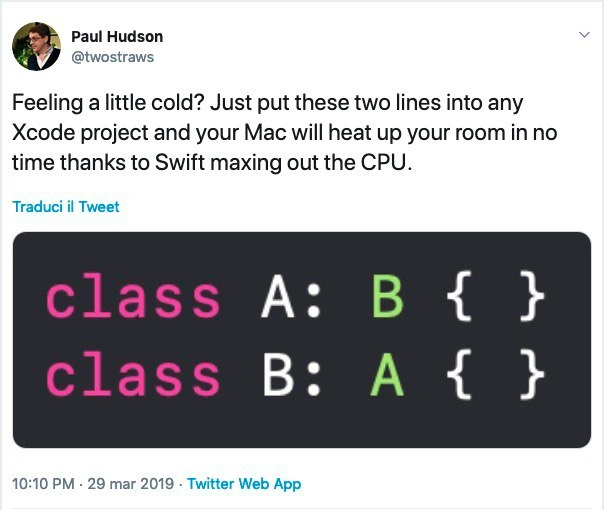
class A: B { }
class B: A { }
In Swift (and many other object-oriented languages), the keyword class defines a new class. A class can inherit from a parent class, which means it gains the properties and methods of that parent. We indicate inheritance in Swift with the colon. So class A: B { } means “make a class A that inherits from class B.” Likewise, class B: A { } means “class B inherits from class A.” Now, normally inheritance forms a one-way chain: for example, you could have class Cat: Animal (Cat is a kind of Animal). But here, A says it’s a kind of B, and B says it’s a kind of A. They’re essentially claiming each other as a parent. This is a circular inheritance or an inheritance loop, a situation that just doesn’t make sense in programming – it’s like saying “A is B’s child and B is A’s child,” which is impossible in a family tree and just as impossible in a class hierarchy.
So what should happen? Typically, the compiler (the program that converts Swift code into executable form) should catch this and stop with an error. It would usually say something like “error: inheritance cycle detected” – basically telling you “hey, class A and B are trying to inherit from each other, that can’t work.” That’s a compiler error: feedback from the compiler that the code is not valid. In fact, most languages outright forbid this kind of definition because it’s logically unsound. Under the hood, compilers build something like a list or graph of class inheritances to understand the relationships. When it sees A inherits B and B inherits A, it should realize “there’s no bottom to this, I’m looping!” and bail out.
However, the joke here is that Swift’s compiler (as of that tweet in early 2019) didn’t properly handle this scenario. Instead of swiftly (no pun intended) giving an error, the compiler tries and tries and never succeeds in figuring these classes out. It’s as if it’s stuck in an infinite loop internally. What does that feel like on your computer? The telltale sign of a program stuck in a loop is that one of your CPU cores will go to 100% usage – the process is running full blast but not actually making progress. On a Mac, when the CPU is maxed out, you’ll notice the computer getting hot to the touch and the fans kicking in hard to cool it down. The whole system might become sluggish because a lot of resources are being tied up. Essentially, Xcode (or specifically the Swift compiler process it runs) is using all of the CPU time it can, and that continuous work generates heat – a lot of heat if it runs long enough. People joke about laptops that can fry eggs or heat rooms, and here we have that joke coming to life via a simple coding trick.
So why is this funny to developers? It’s a bit of developer humor arising from a bug in the Swift compiler. The tweet by Paul Hudson says, paraphrasing: “Feeling cold? Insert these two lines into any Xcode project and your Mac will heat up your room in no time, thanks to Swift maxing out the CPU.” He’s jokingly presenting a programming mistake as a feature – as if we intentionally wrote code to turn our computer into a heater. Of course, normally you don’t want your CPU pegged at 100% doing nothing useful; that’s a performance issue. But he’s using the outcome (lots of heat) in a tongue-in-cheek way. It’s funny because it’s an absurd solution to being cold, and it highlights how even simple code can misbehave in unexpected ways. This also touches on language quirks – it’s a reminder that new programming languages like Swift can have odd bugs lurking. If you’re a newer developer, the big takeaway is: be careful of infinite loops – they can happen in your code and, as shown here, even in your tools. They’ll tie up your CPU and potentially make your computer loud and hot. And specifically, don’t try to make classes inherit from each other in a circle; the computer won’t like it!
Level 3: Compiling in Circles
For seasoned developers, this meme delivers a knowing grin because it captures a perfect storm of compiler bug meets hardware reality. The code in question creates a circular inheritance — class A inherits from class B, and class B inherits from class A. In a sane world, any compiler would promptly throw a compile-time error: “Circular class inheritance is not allowed.” But here, Swift’s compiler (at least back in March 2019) didn’t handle that properly. Instead, it got stuck compiling in circles. The tweet jokes that if you’re feeling cold, just add those two lines to an Xcode project to warm up the room. Why? Because Xcode (Apple’s IDE for macOS/iOS development) will spin its wheels so hard on this conundrum that your MacBook’s CPU goes to 100% usage, turning the machine into an impromptu space heater. Seasoned macOS developers are all too familiar with the “jet engine” sound of MacBook fans when a process maxes out the CPU – it usually happens during heavy builds, runaway processes, or infinite loops in code. But it’s a special kind of face-palm when just the act of compiling a two-line program triggers that meltdown.
The humor here plays on the absurdity: two class definitions, nothing more, manage to confuse the mighty Swift compiler so badly that it works itself into a sweat (literally). This resonates with experienced folks because we’ve seen how Apple’s tools, for all their polish, have these quirky edge cases. It’s a tongue-in-cheek jab at both Swift’s young language maturity (Swift was only about 4-5 years old in 2019 and had gone through rapid evolution) and at the sometimes heavy performance cost of using Xcode/Swift. Many iOS devs have anecdotes of Xcode being sluggish or Swift’s compile times blowing out, especially with complex generics or if you tickle a compiler bug. This meme distilled that experience into a simple, comical recipe: “1) Write absurd code. 2) Watch MacBook turn into heater.” It’s funny because it’s true – we’ve all joked about laptops doubling as hand warmers during intense tasks, but here it’s the source code itself that’s inherently useless and the heat is the most notable output it produces.
In real-world terms, no developer intentionally writes two classes inheriting from each other – it’s obviously wrong design. But the meme exposes that just trying it reveals a flaw: the Swift compiler of that era doesn’t know how to quit gracefully when it encounters a paradox. Instead of quickly erroring out, it engages in an endless loop of trying to resolve A and B’s relationship. For a senior developer, this rings a bell: it’s an example of an edge-case bug that escaped the language designers’ tests. It also subtly references the classic scenario of high CPU usage due to a bug – something any on-call engineer or seasoned dev has seen in production (though usually that’s a server spinning, not your IDE’s compiler). We chuckle because it’s a harmless scenario (just your dev machine getting warm, not production down at 3 AM), but it underscores the reality that even our development tools have deep bugs. There’s also an element of “been there, done that” in dealing with performance issues: we often talk about code that accidentally causes infinite loops or heavy computation at runtime; here it’s the compiler’s code that’s gone off the rails. It’s a clever inversion of the usual "infinite loop" joke – normally, you’d run a program that never stops and eats CPU. This time, you don’t even get to run the program; the act of compiling is what never stops. And of course, leave it to a witty developer like Paul Hudson (@twostraws) to frame it as a feature: Need heating? Compile this! Seasoned devs appreciate that kind of dark humor because we cope with frustrating bugs by laughing at them. The categories (Compilers, Apple, Performance, Bugs, Languages) all converge here neatly: it’s an Apple language (Swift) suffering a compiler bug that leads to a performance fiasco. In short, we’re laughing with a slight groan, recognizing that this is one of those “fun” moments where our expensive MacBook Pro momentarily doubles as the world’s fanciest radiator thanks to a goofy coding trick.
Level 4: Ouroboros Inheritance
At the deepest technical level, this meme highlights a Swift compiler quirk involving an inheritance cycle – essentially a snake eating its tail in code form. The snippet class A: B { } and class B: A { } creates two classes that recursively inherit from each other, forming a closed loop in the compiler’s type graph. In compiler design, class hierarchies are supposed to form a directed acyclic graph (DAG) – there’s an expectation that if class A inherits from B, eventually B inherits from some base class (like NSObject or Swift’s implicit root) and the chain ends. Here, the chain loops back on itself, violating that acyclic assumption. The Swift compiler’s type checker likely enters an unexpected state: it tries to resolve A’s parent (which is B), then B’s parent (which is A again), and so on ad infinitum. If the compiler’s algorithm for validating class inheritance doesn’t explicitly guard against cycles, it can end up in an infinite recursion or an endless fixpoint iteration. This is akin to a depth-first search that never finds a terminating condition because it’s caught in a cycle – a classic graph traversal bug.
Under the hood, the Swift compiler might be constructing an Abstract Syntax Tree (AST) and building symbol tables. When it encounters class A: B before knowing what B is, it likely creates a placeholder for B and then proceeds. Once it reads class B: A, it has to reconcile that A and B reference each other as superclasses. The resolution algorithm should ideally detect the cycle and emit a compile error (much like how compilers detect circular dependencies or import loops). However, a bug in Swift’s compiler (circa early 2019) meant that instead of a quick error, the compiler kept churning, possibly attempting to finalize the definitions in a loop. This compiler bug effectively turns the compile process into a non-terminating computation – the compiler is stuck trying to make sense of two classes that can never be fully resolved. The result? The compile process burns CPU cycles relentlessly. In computer science terms, it’s a pathological case where the compiler’s algorithm doesn’t find a stable resolution (no fixed point in the inference logic), reminiscent of unsolvable self-references. It’s not that the problem is theoretically undecidable – a simple cycle check would catch it – but the implementation likely missed this edge case, leading to exponential backtracking or outright infinite recursion in the compiler’s code.
From a performance perspective, this is a nightmare scenario: a tiny snippet triggers what amounts to a denial-of-service on your own CPU. All cores rev up as the compile process monopolizes them, possibly even maxing out a single thread in a tight loop. Modern CPUs will crank to full throttle, and if the loop is limitless, the machine will heat up until thermal management kicks in. We can think of it as the compiler inadvertently solving a trivial constraint (A is a B and B is an A) in the most expensive way possible – by brute-force iteration that never concludes. It’s a humorous illustration of how a seemingly innocent language quirk (two lines of code!) can exploit a corner case deep in the compiler’s logic. On a theoretical level, it’s a reminder that even compilers – our translators between human-readable code and machine instructions – are algorithms that can have bugs or even algorithmically hard scenarios. In this case, the “hardness” is accidental: a circular definition should be instantly recognized as invalid, but instead it behaves like a compiler Ouroboros, a serpent consuming its own tail, with the system’s fans and heat as tangible evidence of the internal struggle.
Description
This image is a screenshot of a tweet from Paul Hudson (@twostraws), a prominent figure in the Swift developer community. The tweet humorously suggests a solution for being cold: "Feeling a little cold? Just put these two lines into any Xcode project and your Mac will heat up your room in no time thanks to Swift maxing out the CPU." Below this text is a syntax-highlighted image of two lines of Swift code: `class A: B { }` and `class B: A { }`. The technical joke here is the creation of a circular dependency, also known as circular inheritance. Class A is defined to inherit from Class B, while Class B is simultaneously defined to inherit from Class A. When the Swift compiler attempts to process this, it gets caught in an infinite loop, as it cannot determine the memory layout of either class without first knowing the other. This recursive nightmare causes the compiler process to consume 100% of a CPU core, leading to the computer's processor working intensely and generating a significant amount of heat. For developers, particularly those in the Apple ecosystem, it's a clever and relatable joke about compiler-crashing code patterns presented as a funny, if impractical, life hack
Comments
8Comment deleted
Senior devs don't need a linter to find circular dependencies; they can just listen for the sound of the CI runner's fans preparing for takeoff
Tarjan said cycle detection is linear - Swift saw class A : B, class B : A and converted O(N) into BTUs, instantly provisioning the office’s new space heater
The Swift compiler's type checker running in O(∞) time is still more efficient than our sprint planning meetings trying to resolve circular dependencies between teams
Cyclic dependency: rejected in code review, embraced by facilities management as a Q4 heating cost optimization
Ah yes, the classic 'free heating solution' for developers - circular inheritance in Swift. Two lines of code that transform your MacBook Pro into a space heater by sending the type checker into an existential crisis. It's the compiler equivalent of 'which came first, the chicken or the egg?' - except instead of philosophical debate, you get thermal throttling and fan noise that sounds like a jet engine. Swift's type system is so eager to prove correctness that it'll happily burn through CPU cycles until the heat death of the universe (or your next forced reboot). At least with C++ template metaprogramming errors, you get a novel-length error message to read while you wait; Swift just silently cooks your laptop. Pro tip: This also works great for stress-testing your cooling system and validating that AppleCare purchase
Swift's type checker: achieving perfect CPU utilization by refusing to resolve what mortals call 'cycles'
Mutual inheritance is the design pattern where the compiler tries to topologically sort a cycle, your fans achieve quorum, and your Mac implements Proof-of-Heat
Circular inheritance in Swift is the only design pattern with a BTU rating - add class A: B and class B: A, and Xcode’s type checker debates lineage until your MacBook becomes a space heater