New Hires Think They'll Quickly Get Up and Running Then Build Errors Hit
Why is this Juniors meme funny?
Level 1: Five Hours Later...
Imagine you’re really excited to play with a brand new toy. The toy’s box says, “Assemble in 5 minutes!” – sounds great, you’ll be playing in no time! But when you open the box, oh no… pieces are scattered everywhere, the instructions are super confusing, and some pieces seem to be missing or don’t fit. Instead of playing, you spend the whole afternoon just trying to figure out how to put this thing together. By the time you’re done (if you even get it done), it’s been way more than 5 minutes – maybe five hours – and you’re frustrated and tired.
This meme is joking about a very similar feeling, but with setting up a computer project instead of a toy. The new person on a team thought they could get everything ready really quickly and start doing the fun part (coding, which is like playing with the toy). But as soon as they started, a bunch of angry red error messages popped up – think of these like big red warning signs or the toy pieces not fitting. Each error message is like the toy instructions saying “Error: missing part” or “Oops, something’s wrong!” It’s basically the computer saying “I can’t start because something isn’t right.” So instead of coding right away, the poor newcomer has to stop and fix all these problems first (find the missing “parts”, follow complicated “instructions”). It turns into a long, tiring ordeal.
The text in the meme is written in a funny way: it’s like the experienced people are teasing the newcomer. The new hire says, “I’ll quickly get up and running!” (meaning they think setup will be fast). The veterans respond, “No you won’t, the ____ is coming 😂.” Even without knowing the exact hidden word, you can tell they mean something bad (maybe “storm” or a more cheeky word) is about to hit. And they’re laughing not to be mean, but because they’ve been in that exact situation and know how totally wrong the “quickly” part can be. It’s that laugh of “oh boy, I remember when I thought it would be easy too… good luck, friend!”
So the meme’s joke in simple terms: starting a new coding project is never as easy as it sounds. They say it’s a “five-minute setup,” but then you end up fighting with the computer for hours because of all sorts of unexpected issues. It’s funny in the way that tripping over your shoelaces might be funny when it happens to someone who was confidently sprinting – not funny in the moment for them, but a bit humorous looking back. The experienced folks laugh with a bit of “told you so” energy, because they always expect some kind of mess.
If you’re not a developer, think of it like trying to bake a cake from a recipe that claims “prep time: 5 minutes”. Then you find out you’re missing several ingredients, your oven isn’t preheated, and the mixer breaks. Suddenly that “5 minutes” turns into a whole afternoon of improvising and troubleshooting. By the end, the kitchen is a disaster (flour and sugar everywhere – like those red errors cluttering the screen). You eventually get the cake made (hopefully), but it was not the breezy quick task you were promised. You might laugh about it later, especially if you see a funny picture online of someone else covered in flour with the caption “so much for a quick cake,” because you relate to it.
That’s exactly what’s happening here. It’s a shared joke among programmers: Setting up projects always takes longer than you think, often going hilariously (and frustratingly) wrong. The new person’s hopeful attitude meets the reality of complicated setups, and the outcome is a comedic “I told you so” moment. In the end, everyone ends up learning to be a bit more patient and prepared for things to go wrong – and they’ll definitely sympathize with the next newbie who goes through the same thing.
Level 2: Onboarding Ordeal
So, what’s actually happening in this meme? Let’s break it down in simpler terms. A new developer joins a project and is eager to start writing code. They’ve been told (or the project’s documentation claims) that setting up the project will only take a few minutes. Just download the code, run one or two commands, and you’re ready to go. This initial process is what we call the dev environment setup – basically, getting all the software pieces in place on your computer so you can build and run the project.
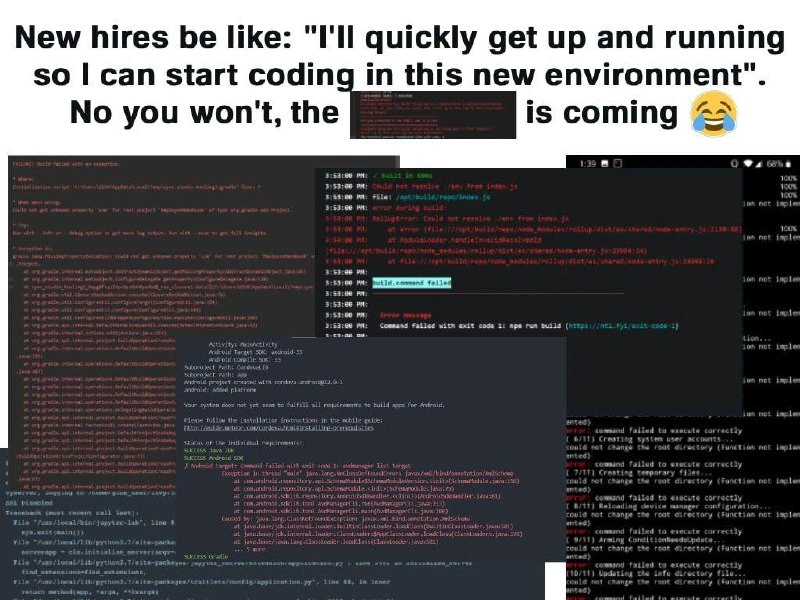
However, in the meme, as soon as the new hire tries to do this “quick” setup, they are hit with a wall of error messages (all in red text on the terminals, which is the color typically used to indicate errors or failures). The top caption says:
New hires be like: "I'll quickly get up and running so I can start coding in this new environment."
**No you won't, the █████ is coming 😂"
This is a playful way to show the dialogue between the optimistic new person and the reality that the experienced folks know. The new hire’s thinking: “Alright, let's do this, I’ll be coding in no time!” But the seasoned engineers are ominously saying: “Oh dear... you have no idea what's about to happen.” The blacked-out word █████ likely hides something tongue-in-cheek (maybe “the pain” or an expletive for a chaotic storm), meaning trouble is coming. The 😂 emoji shows they’re saying it with a laugh – teasing the newcomer a bit because everyone knows this pain is coming for them.
Now, the images beneath that caption are a collage of screenshots from various programming tools and their error outputs. Let’s identify them and explain:
- The red text on the left looks like an output from a build or package manager. We see things like npm ERR! and “build failed”. npm stands for Node Package Manager – it’s used in JavaScript projects to install libraries and run build scripts. When you see
npm ERR!in red, it means something went wrong in a script or command it ran. For example, if the project said to runnpm run buildto compile the app, and that fails, npm will print an error log. Common causes? Maybe one of the project’s dependencies (libraries) didn’t install or has a version conflict, or a build step (like bundling files) encountered an error. The new hire might not have all the prerequisites (like a required Node.js version or a compiler for native addons), so the build bombed out.ERR! build command failedbasically says "the command to build the project didn’t succeed". This is often accompanied by a lot of additional lines pointing to what went wrong. It’s intimidating if you’re new because it’s a wall of text with file paths and error codes. But it’s the computer’s way of telling you "I tried to do what you asked (build the app), but I hit errors – here’s all the details." - To the right side, there’s a dark screenshot with red text showing timestamps (like 5:33:09 PM) and lines like “build in core” and “Command failed with exit code 1 (https://yarnpkg.com/...”. This looks like it might be output from a tool like Yarn (another package manager similar to npm) or a build log from a CI system. The key part "exit code 1" is mentioned. An exit code is a number a program returns when it finishes – by convention
0means success, and any non-zero (like1) means an error. So "failed with exit code 1" just reinforces that the build did not complete successfully. To a junior dev: if you see exit code 1, think of it as "Job failed" – it’s a generic failure code. The log likely contains hints above it (which are not fully visible in the meme) about why it failed – maybe some test failed or a compile error occurred. The snippet also mentions yarn (the URL), which suggests the project uses Yarn for building. Yarn and npm are similar, and a failing build in either will throw these kinds of messages. - Another screenshot (center bottom of the collage) is about Android. We see lines like "Activity not started" and references to AndroidManifest.xml and some Android build output (APK, Gradle etc.). This means the project possibly has a mobile app component. “Activity not started” could mean the app didn’t launch, maybe because it failed to build or there was some configuration issue. Android development is done in Java/Kotlin and uses Gradle as the build system. The text “Execution failed for task” is a typical Gradle error prefix. For example, Gradle might say Execution failed for task ':app:compileDebugJavaWithJavac', which is a fancy way of saying "compiling the app’s code for the debug version didn’t work". The reasons? Could be a missing Android SDK (the tools to build Android apps) or some library not being found. We also see something about "SDK location not found". This specifically hints that the build couldn’t find the Android SDK on the new hire’s machine. Often, to build an Android app, you must install Android Studio or at least the SDK and set an environment variable or configuration file pointing to it. If you don’t, Gradle throws an error about the SDK location. In the meme, it looks like exactly that happened – a classic newbie stumbling block on mobile projects.
- There’s mention of Gradle’s error and Cordova in some text too (Cordova is a framework for building mobile apps with web tech). Words like “cordova-android” and “try updating or adding missing requirements” appear. This indicates the new dev possibly tried to run a cross-platform mobile build and it failed due to missing requirements (like the proper Android platform tools). The meme squeezes in many scenarios, but the theme is consistent: missing pieces cause big red errors.
- Another snippet shows Python Traceback text (whenever you see the word "Traceback" and lines ending in an error like ModuleNotFoundError, it’s Python’s way of showing an error stack trace). ModuleNotFoundError: No module named 'X' means the code tried to import a Python library that isn’t installed in the environment. So maybe the new hire forgot to activate a virtual environment or didn’t run
pip install -r requirements.txt. This again is a common setup step in Python projects. If you skip it, the code can’t find the libraries it needs, and boom – lots of red error text. So in our poor new hire’s case, they might be dealing with a multi-language repo (perhaps backend in Python, frontend in Node, mobile app in Java/Android). They have to set up each part, and each part is complaining about something missing or incorrect.
All these errors are overwhelming, but each one is basically saying "you haven’t set me up properly". The DeveloperOnboarding process is supposed to prevent this, by giving clear instructions or scripts to install everything needed. But reality is often messier. Perhaps the documentation is outdated (maybe it said “just run the build” but forgot to mention you need Java 11 installed). Or the project maintainers assumed certain things (like “everyone will have Python 3” or “Android devs will have the SDK already”). New hires often run into these assumptions on day one. That’s why we call it #OnboardingPain: it’s the pain of getting all the pieces to finally work together on a fresh machine.
From a junior developer’s perspective, this situation is frustrating and confusing. Each error message is full of jargon and file paths. You might wonder, "Did I break something? Is it my fault?" Rest assured, you likely didn’t break anything – you just don’t have something configured yet. The red errors are the system’s way of guiding you (albeit harshly) to what’s missing. For instance, ModuleNotFoundError: No module named 'X' is solved by installing that module (maybe pip install X). npm ERR! missing script: build could mean you’re running the wrong command or you need to install dependencies first with npm install. Gradle failed task errors might require checking that you have the right Java version or that you’ve installed the Android SDK and accepted licenses. These are standard setup steps, but if any are skipped, the build fails.
The collage in the meme basically visualizes the new hire’s screen filled with multiple terminals/IDE windows all showing problems. It’s chaotic and probably mirrors how the person feels internally: "Everything is on fire, and I have no idea where to start." The humor is that this chaos is so common that we’ve turned it into a laughable moment. The caption "No you won’t, the ____ is coming 😂" with a laughing emoji is like a friendly tease from senior devs. They’re not really happy you’re struggling, but they remember struggling too and can’t help but smile at how inevitable it is. It’s almost like an initiation.
BuildSystems_CICD: Let’s clarify this category. Build systems are tools like Gradle, Maven, npm scripts, Makefiles, etc., which automate turning source code into a final product (an application, a library, etc.). CI/CD stands for Continuous Integration/Continuous Deployment, which means automated processes on a server that build and test code whenever changes are made. Often, a project’s CI pipeline is configured so that everything works there. But replicating that on a new computer means installing all the same stuff the CI environment has. If you miss something, you get errors. The meme underscores how the CI server might have had everything set up from ages ago, but a brand-new machine doesn’t – and the hapless newcomer has to figure it all out.
Dependencies: These are external modules or packages your project needs. For example, if you’re building a website, you might depend on React or Lodash (via npm). If you’re building an Android app, you depend on libraries from Google or other sources. Python projects might depend on Flask or Django, etc. Managing these can be tricky – version numbers must match up, and you have to actually have them installed. The term #DependencyHell is used when dependencies become unmanageable – like conflicts (one library needs v1.2 of something, another needs v2.0 of the same, and they clash). The new hire’s errors might be partly due to such conflicts. For instance, if the project hasn’t been updated in a while, maybe some packages are outdated and won’t compile on a newer system without tweaks. That’s a hellish situation indeed, hence the name.
DeveloperExperience_DX: This refers to the overall experience a developer has when using tools or working on a project – basically how user-friendly it is for developers themselves. A good DX means easy setup, good documentation, helpful error messages, etc. A bad DX (like in the meme) means the setup is painful, docs might be lacking, and error messages are cryptic. This meme is almost a case study in bad DX for onboarding: the environment setup was not smooth at all.
Debugging_Troubleshooting: Once all these errors appear, the new dev has to debug/troubleshoot them one by one. That means reading the error logs, Googling messages like “npm ERR build failed exit code 1”, searching Stack Overflow for “Gradle SDK not found error”, etc. It’s a learning process, albeit an overwhelming one on your first day. Each red message is a clue. Debugging is like detective work: you see the error, then figure out the root cause (e.g., “Ah, it can’t find module X – did I install everything? Maybe I missed running pip.”). The collage shows so many errors at once that it’s comedic – in real life, usually you tackle them one at a time. But it feels like an onslaught, especially under pressure (“I just want to start coding, why is this happening?!”).
Local_env_vs_ci: This tag hints at the “It worked in one environment, but not in another” problem. CI environments are often Linux containers configured perfectly. Your local environment might be Windows, or Mac, or just missing those configs. Local environment vs CI differences can cause surprises. For example, maybe the project’s tests always pass on CI, but fail on your machine because you have a different locale or timezone set – yes, that happens! In our context, perhaps the project maintainers forgot that new machines won’t have all the environment variables that the CI has. Or maybe a script assumes a Unix-like environment and you’re on Windows. These mismatches lead to the kind of errors we see plastered in the meme images. It’s basically the “But it works on the server, why not here?” situation.
In summary, at this intermediate level: the meme shows a new programmer’s first-day nightmare – trying to build the project and getting bombarded with errors. It’s using exaggerated visuals (a messy collage of error screens) and a joking caption to communicate a real problem: setting up complex projects is hard. If you’re a newcomer seeing this, don’t be discouraged – it’s normal! Every experienced developer has gone through an ordeal like this and come out the other side wiser (and maybe with a few gray hairs 😅). The meme resonates because it’s an experience almost every coder can share and laugh about. The key takeaway is: Don’t trust the “five-minute setup” claim until you’ve actually done it – sometimes it’s five minutes, but often it’s five hours or five days if things are particularly gnarly. And when it does blow up in your face, know that you’re not alone — we’ve all cursed at those red error logs, and eventually, piece by piece, solved them. It gets better with persistence (and some help from teammates/Stack Overflow).
Level 3: The Five-Minute Mirage
At the highest level, this meme is poking fun at the eternal struggle of developer onboarding. It's a senior engineer’s I-knew-this-would-happen chuckle at the optimistic phrase "It’s a five-minute setup". Seasoned devs know that promise is often a mirage. The collage of red error text from various tools – npm, Gradle, Android, Python – represents a full-spectrum #DependencyHell explosion. In theory, a new hire should just clone the repo, run the setup, and boom: coding can begin. In reality? The build system (be it a Node project’s npm run build or an Android app’s Gradle tasks) detonates with errors.
Why is this funny? Because it’s relatable in a painfully comic way. The meme exaggerates the scene: enthusiastic newcomer meets a cascade of crimson build logs. Those logs are red because build tools often color errors red – a visual alarm bell every developer dreads. Each screenshot snippet is a different flavor of failure: an npm ERR! about a build command, a Gradle Execution failed exception, a Python Traceback, an Android launch error. It’s a greatest hits of onboarding failures, all happening at once. The humor comes from recognition: any developer who’s been around the block can practically hear the groan and see themselves in this scenario. It’s the gap between promised ease and actual pain.
Under the hood, this is highlighting real technical complexity in modern dev environments. Projects today aren’t just “open and run” – they involve sprawling dependency trees, specific version requirements, environment variables, and maybe native modules that need system-level tools. The phrase “No you won’t, the █████ is coming” (with the censored block) implies something ominous – likely a joking reference to "the s**tstorm is coming" or "the build is coming". In other words, brace yourself, because an avalanche of errors is about to hit. This echoes the famous "Winter is coming" vibe (danger is inevitable). The comedic tension is between the newcomer’s naïve confidence and the veteran’s knowing dread.
Let’s break down the typical culprits behind this onboarding apocalypse:
- Hidden Dependencies: Perhaps the project requires a certain database, a messaging queue, or a specific library installed. The new hire’s machine doesn’t have it, leading to missing module errors (like the Python
ModuleNotFoundErrorglimpsed in the collage). - Version Mismatch: The code might be pinned to an older Node.js or Python version. If you have a newer version globally, things break in weird ways. Node packages might fail to compile if your Node version is off (ever seen a cryptic
node-gyperror?). Gradle builds might complain if the Java SDK version is wrong. - Incomplete Setup Scripts: The README might say “just run setup.sh”, but if that script doesn’t handle every scenario (or fails silently), you end up only half-configured. Cue the “command failed with exit code 1” messages. An exit code
1is the computer’s blunt way of saying “Something went wrong, but I’m not telling you exactly what here”. Helpful, right? 😅 - Environmental Differences: “Works on my machine!” is the classic developer joke. Maybe the app was last developed on Linux, but the new hire is on Windows, so path differences or line endings cause havoc. Or the #CI/CD pipeline (Continuous Integration server) has environment variables and cached dependencies that a fresh laptop simply doesn’t. So the build passes in CI, but fails on the new machine with a litany of errors.
- Conflicting Tools: If multiple projects or languages are involved, their tools can collide. For example, the project uses Gradle (Java/Android) and npm (JavaScript) together (maybe a Node backend with a mobile app?). That means setting up JDKs, Android SDKs, Node, npm packages, perhaps even Python for some scripts. One misconfigured path like an Android
sdk.dirmissing, and Gradle will spit out something like “SDK location not found. Define location with sdk.dir in local.properties”. Meanwhile,npmmight die because the new dev’s Node version defaulted to 18 but the project expects 16. It’s a juggling act, and any dropped ball shows up as red text.
All these factors create a perfect storm where the poor new developer’s terminal looks like a horror movie scene – walls of red text scrolling endlessly. The meme’s collage shows that no matter what tech stack, something will go wrong: Node and npm (JavaScript) yelling in red, Gradle (Android/Java) failing tasks, Python throwing errors. It’s a universality to the pain: pick any platform, there’s a unique way your setup can implode.
To a veteran, the phrase "five-minute setup" triggers a smirk because we mentally add "...assuming you already spent a day installing prerequisites". We’ve been burned by optimistic quick-start guides before. There’s even an unofficial law among developers: Everything takes longer than you think (a twist on Hofstadter's Law). So the new hire’s cheery “I’ll quickly get up and running!” is met by the internal voice of experience: “No you won’t... not if that one crucial package is missing or that config file isn’t updated.” The 😂 emoji in the meme underscores that this is all in good humor – you have to laugh to keep from crying when facing those blaring errors. It’s a shared joke that softens the very real frustration (hence the tag #DebuggingFrustration).
This scenario also highlights a DeveloperExperience_DX issue: setting up dev environments should be easier. Companies now invest in Docker containers or one-click VM setups to avoid this nightmare. Why? Because wrestling with environment issues wastes time and morale. The meme is essentially a satirical reminder: if your “quick setup” requires more steps than a space launch, maybe update your onboarding docs. It’s a gentle jab at teams to empathize with newcomers and perhaps streamline that process. But until then, every new dev might face this trial by fire – almost a rite of passage in software teams. The humor is that we all survived it and can laugh about it (after the fact).
To sum up at this deep level: the meme humorously compresses a ton of real-world software engineering pain points into one image. It satirizes the optimism of new hires against the reality of complex build systems and fragile dependency chains. It’s the battle of expectation vs. reality in a developer’s world, where a “quick build” can hide a minefield of setup problems. And as every battle-hardened programmer knows, those error logs may be terrifying at first, but line by line, we’ve learned how to slay those beasts. The bitterness is real, but so is the camaraderie in laughing about it.
# Glimpses of the horror (red text everywhere):
npm ERR! code ELIFECYCLE
npm ERR! build: `react-scripts build` **failed**
Command failed with exit code 1
> Task :app:compileDebugJavaWithJavac FAILED
error: package com.example.something does not exist
Traceback (most recent call last):
ModuleNotFoundError: No module named 'libraryXYZ'
Above are sample fragments like those in the meme’s collage: an NPM build failure, a Gradle task crash, and a Python missing module error. Each one by itself is frustrating; together they form the comedic overkill of a truly cursed “five-minute” setup. The meme exaggerates with a whole symphony of errors, but any single one is enough to ruin your day. The seasoned perspective is: “Yep, been there, fought that.” This inside-joke bonding over red logs is what makes the meme resonate among experienced developers. They’ve seen those exact error messages at 2 AM during a deployment or on day one of a job, and while it wasn’t funny then, it’s oddly funny in retrospect when you see it turned into a meme.
Description
A meme with white top text on black background reading: 'New hires be like: "I'll quickly get up and running so I can start coding in this new environment". No you won't, the [censored] is coming' followed by a crying-laughing emoji. Below, a collage of multiple overlapping terminal windows and IDE screens showing various build failures, error messages, stack traces, and configuration problems. Visible errors include npm build failures, RollupError, Python tracebacks, Gradle build errors, Android SDK issues, and Cordova configuration problems -- representing the typical chaos of setting up a development environment for the first time
Comments
19Comment deleted
The real onboarding documentation is just a list of every StackOverflow link the last new hire bookmarked before they got it to compile. Step 1: npm install. Step 2: cry. Step 3: rm -rf node_modules && npm install. Step 4: repeat
Onboarding is the process of a new hire's optimism decaying exponentially as they discover the project's README.md was last updated during the Obama administration and the setup script is now sentient and demands a sacrifice
Nothing says “welcome aboard” like discovering the company’s ‘one-command setup’ is actually a distributed system of cascading npm, Gradle, and pip failures - proof that Conway’s Law applies to on-call rotations too
The real enterprise onboarding checklist: Day 1 - Get laptop. Day 2-5 - Install corporate VPN. Day 6-15 - Request access to 47 different systems. Day 16-30 - Debug why the 'simple' build script requires 3 deprecated Node versions, a specific JDK from 2019, and a blood sacrifice to the Jenkins gods
Every senior engineer knows the real onboarding timeline: Day 1 is reserved for Slack setup, Day 2-5 for deciphering why the 'quick start' guide hasn't worked since 2019, and Week 2 is when you finally admit defeat and ask someone to share their working .env file over a Zoom screen share
Every “5‑minute setup” is a distributed systems problem: your laptop, SDK managers, npm, Java, and CI achieve eventual consistency around day three
New hires dream of coding; reality's monorepo turns them into sudo-savvy ops engineers before lunch
nixos ftw Comment deleted
Failed to build a python app because pypi kept throwing 404s for package download requests. My first interaction with p🤢thon in a couple years and this shit hasn't changed a bit Comment deleted
im researching for ai for it don't scare me Comment deleted
It's great for AI. Python is built for people who don't want to bother with coding, like mathematicians or AI researchers. The only reason I hate python is because people keep trying to stuff it everywhere, from Ubuntu init scripts to web backends Comment deleted
exactly Comment deleted
for me that i wanna build my ai model, that's great yes. but it's very hard in c++ that I make my model Comment deleted
No matter how reproducible your OS is, you still depend on a bunch of idiots who can't even learn a programming language that's not made for toddlers Comment deleted
I'll keep old version :3 Comment deleted
I am an old hire and even I don't think so. Would get me like days to get it up and running. Comment deleted
Docker : "Am i a joke to you ?" Comment deleted
*Joker Comment deleted
I feel this Comment deleted