
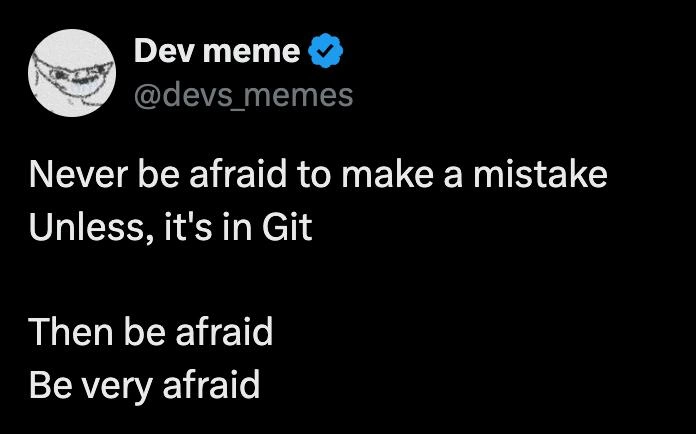
Never Be Afraid to Make a Mistake Unless It's in Git
Why is this VersionControl meme funny?
Level 1: Permanent Marker Problem
Imagine you’re drawing with a pencil in your own notebook. If you make a mistake – say you draw the wrong shape or write the wrong word – you can simply erase it and try again. No big deal, and no one else will even know it happened. Now imagine instead that you take a permanent marker and start drawing on the classroom whiteboard or on the wall of your house. Oops – you mess up the drawing or write something wrong in big, bold ink. You can’t just wipe it off easily, and everyone can see the error. You might feel a rush of uh-oh panic because that mark is going to be difficult to clean up, and until it’s cleaned, it’s sitting there for all to notice.
Making a mistake in Git is like using that permanent marker on a shared wall. The “wall” is the shared codebase (all the project’s code that everyone works on), and the marker’s ink is the commit you shared with the team. It’s not that the mistake can never be fixed – but undoing it is much harder than an easy pencil erase. You might have to scrub really hard or paint over it (which is like using special Git commands to rewrite history or undo changes), and during that time everyone sees the blunder. That’s why the meme jokes that you should be “very afraid” of mistakes in Git. It’s saying that when you’re working in a shared space, you need to be extra careful. Of course, in real life we know mistakes happen and can be fixed, even in Git; it’s just a lot nicer if you don’t have to drag out the heavy-duty cleaner for a permanent marker stain. So, just like you’d double-check you’re using a dry-erase marker on the whiteboard, developers learn to double-check what they’re committing and where they’re pushing it. It saves a lot of cleanup, and everyone can keep laughing instead of panicking when something goes wrong.
Level 2: Why Git Mistakes Hurt
Git is a popular version control system. That’s a tool developers use to track changes in code and collaborate. Think of it as a timeline of a project: every time you make some changes and want to save them, you create a commit. A commit is like a snapshot of your project at a certain point, with a short message (e.g. “Add login feature”) describing what changed. Commits are stored in order, creating a history of the project. When you work with teammates, this history isn’t just on your computer – it’s shared. Usually there’s a remote repository (for example, on GitHub or GitLab) that everyone pushes their commits to, so all copies of the project stay up to date.
Now, making a mistake in your own code is usually no big deal. You run the app, see a bug, and then change the code to fix it. No one else is affected. But if you make a mistake in a commit and push it to the shared repo, that mistake becomes part of the history that everyone has. It’s like adding a bad page to a book that all your coworkers are copying from. If the mistake is small, the easiest fix is to make another commit that corrects it or undoes it. That’s the normal way: acknowledge the slip-up and patch it with a “fix” commit. Everyone else will pull the latest changes and get both the mistake and the fix. The history will show that you made a mistake and then fixed it, which is usually fine – it’s all part of the record.
However, sometimes people try to erase the mistake from the history, as if it never happened. For instance, imagine you accidentally committed a file full of passwords, or you wrote a really embarrassing commit message and want to take it back. Git actually allows you to change history on your own machine using commands like git rebase -i (interactive rebase) or git reset to remove or edit commits. But here’s the catch: if that commit was already pushed and others have pulled it, changing it becomes tricky and potentially disruptive. The only way to push an edited history to the remote is to use a force push. Normally, if your history doesn’t line up with what’s on the server (because you rewrote some commits), Git will reject your push. It’s basically saying “Hold on, your history is missing something or has things I don’t have – did you forget to pull updates from the server?” The --force option overrides this check. It tells Git, “Yes, I know my history is different. Please replace the remote history with what I have locally.” It’s like telling everyone, “That bad page in the book? I tore it out and here’s a new page – use this one instead.”
Using git push --force (or the slightly safer git push --force-with-lease) on a shared branch is risky. Why? Imagine your teammate pulled the original commit (the one you now removed) and built new work on top of it. Now you force push and drop that commit from the remote. Your teammate’s work is suddenly built on a foundation that disappeared. When they try to sync their code with the remote, Git will throw errors or warnings because the history they have doesn’t match the server’s history anymore. They’ll get a message about their branch having “diverged” or needing to “pull or merge”, which basically means they have to manually sort out the differences. The --force-with-lease flag makes this a bit safer by refusing to force push if it detects someone else pushed new commits to that branch after the point you’re rewriting. In other words, it won’t let you accidentally delete work you didn’t know about. But even with that safety, if people already have the old commits locally, a force push means those folks must take some manual steps to reconcile things.
Another common issue for Git newcomers is merge conflicts. This happens when two people edit the same part of a file or make changes that Git can’t automatically merge together. For example, you change the title in an index.html file to say “Welcome”, and around the same time your colleague changed that exact line to say “Hello”. Now there are two different changes to the same line. If you try to merge these two sets of updates, Git won’t know which one to keep, so it will flag a conflict. The file will end up with both versions marked, like:
<<<<<< HEAD (Your version)
<title>Welcome</title>
======
<title>Hello</title>
>>>>>> Colleague's version
You (and likely your colleague) then have to decide which title to go with (or combine them somehow), edit the file to resolve the conflict, and then commit the resolved version. It’s a normal part of working in a team, but the first few times you see a conflict like this, it can be scary – your code looks “broken” until you fix it. There’s even a tongue-in-cheek term “command line terror” to describe that fright when Git suddenly shows errors or conflict markers and you worry you’ve wrecked everything. With practice, you learn that conflicts are solvable, but at first it feels like you’re in trouble. If a history rewrite happens (like someone force-pushing a change that alters past commits), you can end up with a bunch of merge conflicts too, because people’s work no longer lines up on the same timeline. Resolving many conflicts can be really confusing for a newcomer.
Now, about git blame – this is actually the name of a Git command. Despite the scary name, it’s not about shaming anyone; it’s a tool to see who last edited each line of a file and when. If you’re trying to figure out why a piece of code is the way it is, you use git blame to find out who wrote it, and then you might ask that person, “Hey, I’m seeing this line – what was the intention?” The reason it’s called “blame” (a bit of dark humor by the Git creators) is that it can indeed be used to pinpoint who introduced a bug. For example, if a certain line is causing an error and git blame shows you added that line in a commit last week, you’ve essentially identified the “culprit” (which in this case is you). In a good team culture, this isn’t about punishment – it’s about finding information. But it does mean any mistake you commit is recorded with your name on it, for anyone to see later. That can make you a bit more nervous about messing up: nobody wants to be the one who broke the build in front of everyone.
Finally, consider the CI pipeline (Continuous Integration pipeline). Many teams set up an automated system that runs tests and builds the project every time new code is pushed to the repository. If your commit has a bug and causes tests to fail, the CI pipeline will turn red and send out an alert. That’s actually helpful – it catches issues early. But if you rewrite history or remove commits that the CI system is in the middle of testing, it can get confused. For example, the CI might try to fetch a commit by its ID, only to find that commit ID no longer exists on the server because someone rewrote history. It’s like if you schedule a package pickup at an address, then move houses – the delivery service arrives and is baffled. In practice, CI issues from force pushes are usually resolved by manually triggering a new run, but it’s extra headache and downtime.
In short, a mistake in Git tends to have ripple effects. It’s not that you can’t ever fix it – you usually can, with the right commands or by coordinating with your team – but it can turn a quick oops into an hour(s)-long fix fest. For a newcomer, that can definitely be intimidating. The meme jokes “be very afraid” to make us laugh, but it’s referencing that real feeling of developer anxiety when you’re unsure how to undo a tangled Git mess. The good news is Git has tools to help recover from almost anything (like git revert to safely undo a commit without rewriting history, or git reflog to find lost commits). The better news is that with a bit of caution – like double-checking which branch you’re on, or avoiding force pushes on shared branches – you can prevent most of these nightmares. It’s a bit like being careful to use a pencil until you’re sure you want something permanent. Mistakes are part of learning, even with Git, but when everyone shares the same “book of code,” it pays to think twice before scribbling on a page. As you gain experience, you’ll become more confident, and that big scary Git monster will start to feel more like a manageable pet (albeit one you still don’t tick off).
Level 3: Force Push Fallout
“Never be afraid to make a mistake. Unless it’s in Git. Then be afraid—be very afraid.”
Seasoned developers chuckle at this meme because it rings painfully true. In day-to-day coding, mistakes are normal and usually harmless: you debug, you fix, you move on. But when a mistake is committed to Git (especially to a shared branch), it can snowball into a team-wide nightmare. The tweet-format joke nails that contrast. We tell juniors “fail fast, it’s okay to make mistakes,” yet we also warn “but for the love of Linus, don’t mess up the Git repo.” The humor comes from treating Git like a volatile monster that remembers everything. And honestly, after a few merge conflict horrors and botched rebases, every senior developer develops a healthy caution – maybe even a few battle scars – around certain Git scenarios.
The underlying issue is that version control, unlike a local code scratchpad, is a shared history. A stray commit isn’t just your personal oops; it’s an event that propagates to everyone’s clone and the Continuous Integration (CI) system. That’s why a small goof – like committing debug code or a wrong file – can have outsized consequences. You might break the build for everyone or stall the pipeline. And once that bad commit is upstream, it’s immortalized in the repository’s history. Sure, you can make a new commit to fix the bug (that’s the usual approach, leaving a trail of “oops, fix” in the log), or you can try to scrub it out with a history rewrite. But if you choose the latter after it’s public, you’ve opened Pandora’s box.
Nothing strikes fear in a dev’s heart like the words “force-pushed to main.” A git push --force to a shared branch is essentially the nuclear option in Git – sometimes necessary, often dangerous. It means you replaced the remote history with your local one, tossing aside any commits that were there. If a teammate had based work on the old history, their next git pull becomes a bizarre mystery: Git will politely tell them “your branch and origin/main have diverged,” which really means “welcome to merge conflict hell.” The team might have to scramble to recover lost commits or cherry-pick changes from the reflog of someone’s local repo. CI pipelines that triggered on the now-deleted commits may fail or, worse, deploy the wrong code. It’s not uncommon to see a flurry of messages on Slack or Teams after such an event: “Stop everything! Who force-pushed?!” followed by a collective groan and white-knuckled efforts to untangle the mess.
Let’s break down some real version control nightmares that this meme alludes to:
- The Accidental Merge Commit: You merge a feature branch in a hurry and accidentally include half-done work. Now that mistaken merge is in the
mainhistory. Reverting it means adding another “undo” commit, while rewriting history to remove it risks angering everyone who already pulled it. Either way, the git blame on those lines tags you, and a colleague will likely ping you, “Hey, what’s this change about?” Ouch. - The Unforgiving
--force: A junior dev tries to tidy up commit messages on the main branch with an interactive rebase, then usesgit push --forceto update the remote. Suddenly, coworkers’ local branches break, and somebody’s un-pushed work gets lost in the chaos. People start digging throughgit refloglike detectives searching for clues to resurrect the missing commits. Lessons are learned amidst much face-palming. - Merge Conflict Cascade: Two developers edit the same file in different branches. When their work converges, Git can’t automatically figure out whose change to take – a conflict erupts. Now imagine this multiplied across dozens of files because someone rebased a long-lived branch on top of another. Resolving one or two conflicts is fine; resolving dozens is diff-driven surgery. Everyone involved comes out of that session a bit shaken up, vowing never again (until next time).
- The Permanent Record: A developer commits a secret API key or a huge unnecessary file by mistake. Panic ensues – you can’t leave sensitive info in history. The team attempts a
git filter-branch(an extreme history rewrite) or uses the BFG tool to purge it. This changes every commit from that point onward, invalidating months of commit IDs. The operation itself is scary, and any collaborator who misses the memo will keep pushing the old, now-conflicting history. Even with careful coordination, it feels like performing open-heart surgery on your repository. And the kicker: that sensitive data might still live in someone’s clone or on the server’s reflog, haunting you like a ghost of commits past.
# The infamous command that turns calm engineers into anxious wrecks:
git push --force origin main
# (Here be dragons: rewriting shared history ahead)
In each of these scenarios, a “normal” coding mistake graduates into a full-blown incident because of how Git propagates changes. The meme captures that uniquely developer anxiety: the moment you realize your casual error isn’t local and fleeting, but forever inscribed in a distributed log that all your teammates share. It’s the difference between scribbling in your own notebook versus accidentally spray-painting the office wall. One you can quietly fix; the other requires an emergency group cleanup and leaves a lasting impression (plus maybe a new rule to always use --force-with-lease).
Experienced engineers have internalized a lore of Git cautionary tales. We double-check which branch we’re on before committing. We think twice before rewriting commits that have been pushed. We’ve learned that Git does have safety nets (branches, revert, reflog) but also sharp edges. The phrase “be very afraid” is tongue-in-cheek exaggeration – but like all jokes in developer humor, it’s born from real pain. After you’ve spent a late night recovering a repository or untangling who overwrote whom in a blame-game, you start treating version control with the wary respect one might give a live wire. Git is powerful, but mistakes in Git are powerfully hard to forget. This meme gets a nod of recognition (and maybe a wince) from anyone who’s been on the wrong side of a push.
Level 4: Temporal Git Paradox
Deep beneath Git’s friendly version control facade lies a directed acyclic graph (DAG) of commits, each identified by a cryptographic hash linking it to its parent commit. This structure is essentially an append-only timeline of changes. When you attempt to rewrite history – say by an interactive rebase or git commit --amend – you’re creating an alternate timeline. Every commit’s hash depends on its contents (including parent references), so one small change spawns entirely new commit identities. It’s like trying to travel back in time to erase a mistake: you return to the present and discover you’ve forked reality into two divergent histories. In one timeline, the mistake commit exists; in the new one, it’s replaced. And now each collaborator’s repository might inhabit either timeline until convergence is forced.
In distributed systems theory, consistency issues arise when there’s no single source of truth – and Git epitomizes a distributed model. There’s no centralized database locking everyone to the same sequence of changes; instead, each clone holds a full copy of the repository’s history. Normally, all copies stay in sync via merges and pushes, maintaining a collectively agreed-upon sequence of commits. But a forced rewrite (git push --force) breaks that agreement. It’s a manual override of the remote history, effectively saying, “Discard your version of events; this is the new truth.” Other clones that had the old commits are now out of sync, leading to a state akin to a distributed consensus problem: every developer must reconcile to agree on one history. Unlike a robust consensus algorithm (e.g. Raft or Paxos), Git relies on humans to resolve these conflicts through manual merges or by outright discarding one history. The eventual consistency model here can involve panicked Slack messages and Stack Overflow searches rather than automated conflict resolution.
Because each commit is content-addressed via a hash (historically SHA-1, now often SHA-256), altering any part of a commit (like its parent link or commit message) produces an entirely new hash. This property means Git commits are effectively immutable records – you can’t change an existing commit in-place; you can only create new commits and move branch pointers to them. Rewriting history is thus a misnomer: you don’t change the past, you create a new fork of it and pretend the old one didn’t happen. But the old commits don’t vanish immediately; they linger as “dangling” objects in the data store and in any clones that have them. Git’s reflog (reference log) on each developer’s machine keeps a temporary log of where branch heads have been, which can serve as a time machine to recover commits that were "erased" from the visible history. For example, if you realize you nuked an important commit from your branch, git reflog might show the old HEAD commit ID, allowing a quick restoration with git reset or git cherry-pick. However, that reflog rescue works only if you catch it in time on that clone – and it does nothing for the confusion of teammates already operating on the old history.
There’s an inherent paradox here: Git is designed to encourage fearless experimentation (create branches, make commits, roll back if needed), yet its core is a Merkle tree of objects that resists tampering once shared. The moment a commit is pushed to a shared repository, it becomes part of everyone’s reality. Changing it after the fact is a bit like pulling the rug out from under dozens of shared timelines. Every collaborator must now deal with the fallout of that time warp – typically by manually aligning their work with the new history. In theory, a distributed system could auto-merge divergent histories, but merging code is a semantic, not purely mechanical, process – so Git leaves it to us error-prone humans armed with diff tools and coffee. The meme’s dark humor (“be very afraid” of mistakes in Git) is rooted in this reality: a trivial slip-up in command-line flags or a misguided rebase can entangle the mathematics of Git’s DAG with human workflow in ways that are fiendishly difficult to unravel. It’s a spooky consequence of combining an immutable log with the human desire to rewrite our mistakes – a true temporal paradox in the world of version control.
Description
A tweet-style meme from the account 'Dev meme @devs_memes' (with a blue verified checkmark) on a black background. The text reads: 'Never be afraid to make a mistake Unless, it's in Git Then be afraid Be very afraid'. The profile picture shows a sketched face with sunglasses. The humor plays on the permanence of Git history where mistakes are forever preserved in commit logs, force pushes to main are catastrophic, and rebasing gone wrong can ruin everyone's day
Comments
15Comment deleted
Git never forgets, and neither will your coworkers when they run git blame on that one commit from 3 years ago
There are only two certainties in a developer's life: death, and that moment of cold-sweat panic after you type 'git push --force' and before you hit Enter
Git never forgets - unless you rewrite history, and then the entire team never forgives
After 15 years in the industry, I've learned that the only thing more permanent than a production database is a mistaken force push to main that overwrote three sprints of work - at least the database has backups and a DBA who answers their phone
Git: where 'git push --force' is the technical equivalent of 'hold my beer' - except the beer is your entire commit history and everyone's watching
Reflog is a parachute - until you --force origin/main and the recovery plan becomes 'find the one teammate whose clone hasn’t pulled yet.'
Architects fear monoliths; seniors fear 'git reset --hard HEAD~1' on a shared main
Pushed .env - "Oops"😁 Comment deleted
ohshitgit.com Comment deleted
knowing how to use git cmd is important for automation, but when someone doing everyday stuff and fucking up in ways like these - most fundamental problem is that they are lacking an overview, should've used a visual git wrapper to see how each change actually affects the commit graph Comment deleted
Can confirm that I have been in most of these situations and have applied most of the listed solutions. Not sure what that means, but ohshitgit for sure. Comment deleted
13bb98a: remove hardcoded credentials in src/www/mission-control/nuke-activation.php Comment deleted
There is nothing that git reflog couldn't fix Comment deleted
Fortunately we already have Jujutsu git client, that has "jj undo" to just undo anything you made wrong in VCS Comment deleted
https://github.com/sourcegit-scm/sourcegit Comment deleted


