Skip to content
DevMeme
4375 of 7435
When the cookie banner becomes a developer’s GDPR rant instead
DataPrivacy Post #4788, on Aug 13, 2022 in TG

When the cookie banner becomes a developer’s GDPR rant instead

Why is this DataPrivacy meme funny?

Imagine you have a big jar of cookies at home. Now, your parent makes a new rule: before you take a cookie from the jar, you have to ask for permission every single time. They say it’s to make sure you know what you’re eating and that you’re okay with it. The first time, it seems polite: “Hey, is it okay if we take a cookie?” You say yes or no. But then you go to another friend’s house, and they also stop you to ask, “Are you okay with us offering you a cookie?” Then every house you visit, you get the same question about cookies. Pretty soon, you’re thinking, “I just want to eat the cookie, why do we keep doing this? I already know the answer!” It gets really annoying, right?

Now, imagine one baker gets so frustrated with this rule that he puts up a huge sign on his shop’s door. It looks like a normal “May I give you a cookie?” sign, but instead it says: “We have no cookies to give. I’m just tired of that rule about asking! Do the people who made this rule even know what a cookie is? They made every shop ask this question, just when we all finally stopped other annoying stuff. I don’t even have any cookies here — I just wanted to complain on this sign. Ha! You’re reading my complaint right now, aren’t you?!”

This is exactly what the meme is doing, but on a website. The rule is like the real-life law that websites must ask to use “cookies” (small bits of data). The baker is the web developer. He doesn’t even use cookies on his site (no treats at all), but he still put up a cookie banner just so he could vent (complain) about the cookie rule. It’s funny because it’s as if someone followed a rule in a ridiculous way to show how silly they think the rule is. And you, the visitor, ended up reading the rant that you were never expected to read. In simple terms: the grown-ups made a rule to protect people’s privacy on the internet, but it ended up creating pop-up messages everywhere. This developer thought that was dumb, so he turned one of those pop-up messages into a joke. The joke is poking at how irritating those messages are — and the fact that you found the secret rant means you were curious enough to read it, proving his point that most people usually don’t! It’s a bit like finding a hidden note from a bored chef in a menu saying, “We know you’re not actually reading these descriptions, so hello there!” It makes you smile because you realize the person who made it is just like you — a bit fed up with all the needless fuss about cookies. The meme is funny on a basic level because it’s someone yelling “UGHH!” about a rule we all find annoying, but doing it in a clever, sneaky way.

For a more junior developer or someone new to this, let’s break down what’s going on. First off, Cookies here don’t mean the chocolate-chip kind. In web development, a cookie is a small piece of data that a website stores in your browser. It might contain a user ID, a session token, or your preferences. For example, when you log into a site and it “remembers” you next time, that’s usually thanks to a cookie. Cookies are super common in WebDevelopment because HTTP (the protocol for websites) is stateless – it doesn’t remember who you are between page loads – so cookies help create a memory.

Now, why do we have these banners about cookies? A few reasons. Some cookies are used for benign things like keeping you logged in or saving your shopping cart. But other cookies (especially third-party cookies from advertising networks) can track you across different websites, building a profile of your behavior – that’s a big PrivacyConcern. People became uneasy when they learned how much data could be collected without them knowing. Enter DataPrivacyRegulations. In the European Union, laws were passed to protect users. One was nicknamed the “EU cookie law” (officially part of the ePrivacy Directive, around 2011), and later the much broader GDPR (General Data Protection Regulation, enforced in 2018). These laws require websites to be transparent and get user consent before using certain cookies, especially for tracking or personalized ads. In practice, this meant virtually every website started showing a notice like “This site uses cookies. Do you accept?” — what we call cookie banners or consent dialogs.

If you’ve browsed the web at all in the last few years, you’ve definitely seen these consent pop-ups. They often appear as a banner at the top or bottom of the page, or sometimes as a blocking modal in the center. They usually have buttons like Accept, Reject, and maybe options to customize which cookies you allow. This is all part of the user_consent_experience now. It’s well-intentioned — the idea is to inform you and give you control. But let’s be honest: seeing essentially the same message on every single site gets old fast. That feeling of being a bit tired or annoyed at constant pop-ups is sometimes called popup_fatigue. Users often just click “Accept” or “OK” immediately without reading the details, simply to get rid of the interruption. It’s like being handed a form to sign every time you open a door – at some point you stop reading the fine print and just sign so you can get on with your day.

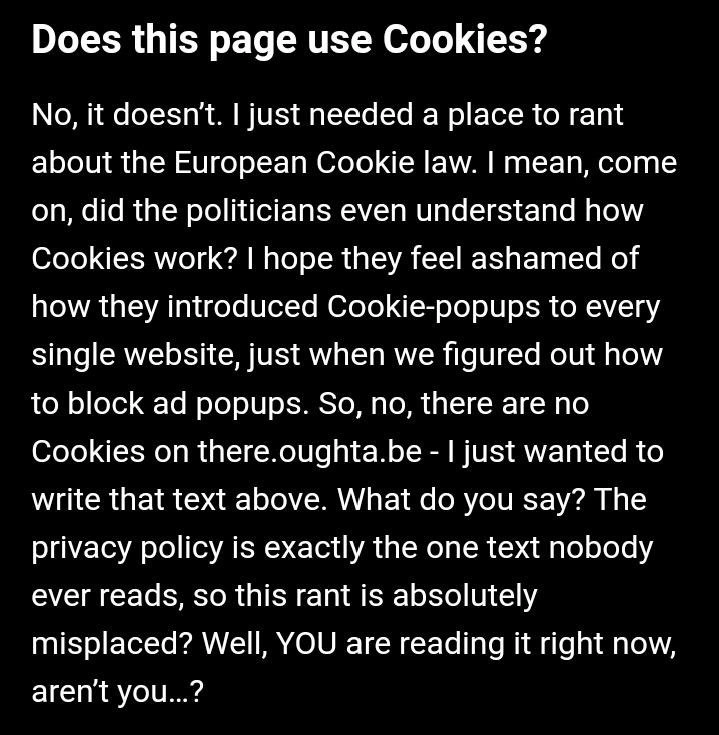
Now, the meme is playing with this situation. The image is styled to look exactly like one of those cookie consent notices: black backdrop, bold question, explanatory text. The big bold line “Does this page use Cookies?” is a direct nod to the typical wording in these banners. Usually, the site would then say something like “Yes, we use cookies to personalize content and ads, to provide social media features...” etc. But here, the answer is “No, it doesn’t.” Wait, what? The site admits it does not use cookies at all! That’s already humorous because if no cookies are present, why pop up a banner asking about them? The reason comes next: “I just needed a place to rant about the European Cookie law.” Ah, so the developer created a fake cookie notice just to complain. This is the developer_rant aspect: the programmer behind the site is using this space (normally reserved for a serious privacy message) as their personal blog soapbox.

The rant continues to question whether politicians understood how cookies work and expresses frustration about how every website now has these annoying_consent_dialog boxes. This reflects a common sentiment in the developer community: implementing these banners can be frustrating, and we’re not sure if they truly help users. The text even says “just when we figured out how to block ad popups” – referencing that in the past, pop-up ads were the big nuisance (younger devs might recall or have heard that early web browsers didn’t block pop-ups, and ads would literally open new windows everywhere). By around mid-2000s, browsers introduced built-in popup blockers, and using pop-ups for ads became less common. Web developers celebrated because pop-up ads were considered a very bad UXDesign practice. Now, from about 2011 onward, we suddenly had to implement a new kind of pop-up (the cookie consent banner) on sites due to DataPrivacy rules. It felt like a step backward for user experience – a necessary evil, one might say. The junior dev might not have experienced the pre-banner world as much, but they certainly know the banner-filled world. So the meme pointing out “we beat one kind of popup, only to get another mandated by law” is a funny observation.

Let’s clarify some terms you see in the meme and tags:

  • GDPR: This stands for General Data Protection Regulation. It’s a comprehensive data privacy law in the EU that came into effect in 2018. It does many things (like giving users rights to their data, imposing hefty fines for misuse of personal data, etc.), and one visible outcome for websites was the reinforcement of getting explicit consent for cookies and tracking. If you’ve ever seen a site ask you to agree to cookies or seen a long updated privacy policy, that’s GDPR at work. Other regions have similar laws now (like CCPA in California), but GDPR is the famous one that started the trend globally.

  • Privacy policy: This is a page or document on a site that explains how the site collects, uses, and protects your data. Every legitimate website will have one (often linked in the footer). It’s usually very long and written in legal language. The meme jokes that it’s “the one text nobody ever reads.” That’s largely true — most users don’t read privacy policies line by line (they can be quite dry).

  • Cookie consent banner/dialog: The little (or sometimes not so little) pop-up you see when first visiting a site, asking you about cookies. Sometimes it just has an “Accept” button (which some argue isn’t fully compliant anymore), and sometimes it offers “Accept All”, “Reject All”, “Settings” etc., where you can choose which types of cookies to allow (e.g., strictly necessary vs. analytics vs. marketing cookies). Implementing a full-featured consent dialog with settings is more work, so many sites outsource to specialized Consent Management platforms or libraries. As a junior dev, you might’ve come across tools or scripts your team uses to display these banners. It’s not usually a fun feature to implement — it’s more of a checklist item to satisfy legal requirements.

  • UX/UI: Stands for User Experience/User Interface. The tags and context mention UXFailures and UXDesign because these banners are often cited as a step backward for user experience. Ideally, good UX is invisible and seamless. But a giant modal asking for consent is the opposite of seamless — it’s intentionally interruptive (because legally it has to get your attention). Many designers have struggled with how to make it less annoying: maybe delaying it a bit, or using softer language, but in the end it’s an interruption you can’t avoid if you want compliance. Some users have even installed browser extensions to auto-dismiss or pre-consent to these, which tells you how much they dislike them.

  • Popup fatigue: This term basically means getting tired of seeing pop-ups all the time. When users get too many prompts (be it cookie banners, newsletter sign-ups, in-app notifications asking for ratings), they start to become annoyed or ignore them entirely. It’s like crying wolf too often; eventually people are like “yeah yeah, whatever.” That’s bad because if something truly important pops up, users might ignore that too. With cookie banners, we definitely see this effect — people are habituated to just click “Accept” to make it go away.

Now, the meme text itself becomes playful towards the end. It says: “So, no, there are no Cookies on there.oughta.be – I just wanted to write that text above.” This confirms the site literally has no cookies; the developer just really wanted to put that rant somewhere visible. Then it says: “What do you say? The privacy policy is exactly the one text nobody ever reads, so this rant is absolutely misplaced? Well, YOU are reading it right now, aren’t you…?” Here the developer breaks the fourth wall and addresses the reader (you!). They anticipate the criticism, “Hey, this rant doesn’t belong in a cookie notice; no one will see it.” And they cheekily respond, “Well, you are reading it, right?” It’s a playful jab. Essentially, the dev knew someone would eventually read it — and that someone (maybe a curious user or another developer) is now in on the joke. If you’re a junior dev reading this meme, in that moment you realize you’ve been trolled a bit by the banner. A normally boring privacy notice has turned into a hidden joke. It might even make you think, “Huh, how many other sites could be hiding silly messages in their policies that I’ve never read?”

This highlights an important thing about developer culture: humor hidden in plain sight. Whether it’s naming a server something funny, leaving a witty code comment, or writing an entertaining Terms of Service (some small companies do this), developers often cope with tedious tasks by injecting a bit of fun. Here, implementing a cookie banner was likely such a tedious task (especially if there are actually no cookies – it would feel pointless to the dev). So the dev spiced it up by turning it into a mini comedic monologue. As an up-and-coming developer, you can appreciate this as both a lesson and a laugh. The lesson: even “boring” required parts of a project (like compliance notices) matter and get seen by users (so don’t neglect them, and maybe don’t actually put jokes in real client work unless you have permission!). The laugh: everyone is fed up with these banners, even the people who code them, so much so that one just used it to sass the whole situation.

In terms of the broader categories: DataPrivacy is the central theme (the whole reason cookie banners exist is privacy regulation). WebDev is how this meme is born (only a web developer would bother constructing a fake banner on a webpage). UX/UI is the domain where this all plays out (it’s a user interface element affecting user experience). So the meme sits at the intersection of these: a web developer’s take on a data privacy user interface requirement. It’s simultaneously about law (GDPR), technology (cookies and web coding), and design (a banner modal).

For a junior or any non-expert, it’s also worth noting the current state: this frustration isn’t just a meme, it’s prompting real discussions in the tech world. People ask, “Is there a better way to handle consent?” Browsers are considering more built-in privacy features. The EU has debated if these banners are overkill. There’s something called the GDPR consent fatigue issue — exactly what the meme jokes about. So it’s a known problem that the industry is aware of. As a new developer, you might one day be part of implementing a smoother solution, or at least you’ll definitely implement a consent banner if you work on user-facing websites. And when you do, you’ll remember memes like this and realize you’re not alone in finding it a bit absurd!

In summary, at Level 2, we understand the meme as: a web developer making fun of cookie consent pop-ups. The dev turned a standard cookie banner into a comedic privacy_policy_rant. It’s funny because we all recognize those banners (and usually ignore them), but this one actually contains a candid message. It’s highlighting the annoyance those very banners cause, in a self-referential way. If you know what cookies and GDPR are, you’ll get why the developer is annoyed. If you don’t, well, now you do: those banners are there because of privacy laws, and yes, even the folks who make websites find them irritating. This meme is basically saying: “we have to put this banner up, but we don’t have to like it!” — and it does so in a very creative manner.

Level 3: Return of the Pop-ups

At the senior engineer level, this meme hilariously skewers the clash between data privacy laws and real-world web development. It’s poking fun at the regulatory_overhead introduced by Europe’s cookie consent rules (think GDPR and the earlier EU “cookie law”). The image mimics a normal cookie banner, but instead of politely asking for consent, it launches into a developer_rant. This twist is comedy gold for experienced devs: it subverts the very thing meant to be serious compliance UI into a snarky vent. The humor emerges from shared frustration — we’ve all been user_consent_experience guinea pigs clicking “Accept” on those dialogs, and many of us have had to implement them despite hating them. The meme is essentially a developer saying, “If I must put up a banner, I’ll use it to tell you how stupid I think this requirement is.” It’s a cathartic eye-roll at DataPrivacyRegulations done in the one place PrivacyConcerns are supposed to be addressed.

Experienced devs immediately recognize the cookie_banners format and the sarcastic tone. The heading “Does this page use Cookies?” is exactly what you see on countless sites; the punchline is the answer: “No, it doesn’t. I just needed a place to rant about the European Cookie law.” This is an UX/UI inside-joke. Why? Because if there truly are no cookies, there’s technically no need for a banner — yet here it is, purely as an excuse to complain. It’s a tongue-in-cheek violation of users’ expectations (and maybe of the law’s spirit) and that surprise is what makes it funny. It highlights how annoying_consent_dialog design has become a farce: even a site with zero tracking cookies might throw a popup just to gripe about popups! Talk about full meta-circle.

Seasoned perspective: We remember the bad old days of the web. Once upon a time, pop-up ads plagued every other click. We fought them with pop-up blockers and better browser defaults. Web UX improved; users could browse without constant intrusive windows. Now enter the European Cookie Law (the ePrivacy Directive around 2011, followed by the mighty GDPR in 2018). These laws mandate informed consent for tracking technologies like cookies. Noble goal, but how was it achieved? By slapping a popup or banner on virtually every site asking users to agree or manage settings. In other words, the solution to unwelcome secret tracking was… an avalanche of in-your-face prompts. Irony much? The meme explicitly calls this out:

“...just when we figured out how to block ad popups, they introduced Cookie-popups to every single website...”

That line gives a knowing chuckle to senior devs. We literally solved one UX scourge (ad pop-ups) only to have a legislated pop-up replace it. It feels like a UXFailure of colossal proportions — a Consent Conundrum where privacy protections clash with user experience. We went from fighting spammy ads to forcing an equally ubiquitous interruption in the name of privacy. The popup_fatigue is real: users are so bombarded by cookie banners that many blindly click “OK” without actually thinking about their privacy choices, arguably undermining the whole point of informed consent. As one might joke, the internet now greets you with “By continuing to breathe, you accept our cookies” at every page load.

From a systems viewpoint, this is a classic unintended consequence. Lawmakers aimed to address PrivacyConcerns (like hidden trackers), but the implementation has been clunky. The meme’s rhetorical question “did the politicians even understand how Cookies work?” reflects a common developer sentiment that tech policy often misses technical nuances. Cookies are just small text tokens (often harmless, sometimes misused), but regulations painted them with a broad brush. So devs ended up implementing blanket pop-ups everywhere to be safe. Many of us suspect the policymakers didn’t anticipate how this would play out in practice — turning the web into a sea of consent forms. As the meme says, “I hope they feel ashamed”. That’s obviously hyperbole (and a bit of dark humor), but it captures the exasperation of engineers who had to roll out annoying banners against their own UX principles. It’s the developer_rant heard ’round the world, echoed in countless chat rooms whenever a new compliance requirement drops: “Who writes these laws, and do they even use the internet?!”

Let’s talk real-world scenarios to illustrate why this hits home for seasoned devs. Imagine you’re on a team building a website in 2017-2018. GDPR’s enforcement date (May 2018) is looming and suddenly every project manager is freaking out about compliance. There are meetings with Legal about updating the privacy policy and adding a cookie consent widget. The developers get dumped with tickets like “Implement cookie banner on all pages” and “Store user consent choice”. It’s extra unplanned work — a regulatory tax on development. You scramble to integrate a third-party Cookie Consent library or write one from scratch. You have to audit where your site sets cookies (analytics, login sessions, maybe third-party embeds) and ensure none fire before the user clicks “Accept”. Perhaps you throw a quick localStorage or cookie to remember the user’s choice so the banner doesn’t show every single visit. If users click “Decline”, you must disable tracking scripts. The codebase gets new conditionals everywhere checking if consent was given. It’s messy and stressful, but non-negotiable. Every EU-based user must see that banner or you risk fines. By the deadline, the team is a little frazzled, joking that the site now spends the first 5 seconds showing a modal instead of content. WebDevelopment time that could have gone into features or bug fixes got spent appeasing the law. This is exactly the regulatory_overhead devs gripe about. The meme resonates because it’s basically a dev saying: “All that effort for what? For users to ignore it and me to hate it.”

And let’s be honest, UXDesign took a hit. No matter how gracefully you style it, a consent banner is an interruption. Some sites tried creative approaches (a subtle bar at the bottom, or delaying the prompt), but many just splash a full-page overlay with two big buttons. It’s effective at forcing a choice, yes, but it’s a curb on seamless navigation. The meme’s author explicitly notes “The privacy policy is exactly the one text nobody ever reads”. That’s a self-aware slap: we write these verbose disclosures and pop-ups because we have to, yet we all know users rarely read them. The dev in the meme uses that fact to their advantage — hiding a rant in the one place they’re sure almost no one will look. It’s an easter egg for the curious (or bored) user who actually reads the fine print. If you discovered such a rant on a site, you’d probably burst out laughing at the absurdity and honesty. It’s a form of protest by dev humor: complying with the letter of the law (there is a banner, after all) while mocking its spirit.

This also touches on the creative rebellion many senior engineers have deep down. We value user privacy, but we loathe bad UX. So the idea of a privacy_policy_rant hidden in plain sight is delightful — it’s a way to vent without actually breaking any rules. The banner technically appears and informs you there are no cookies; it’s truthful! It just also happens to scold the lawmakers. It’s the kind of thing an indie developer or small site might do as a stunt (big corporations never would — too risky/professional). So it has that indie hacker vibe: a developer taking the piss at authority through their own site. We’ve seen similar energy in error messages or source code comments left as jokes. It’s part of engineering culture to slip Easter eggs in boring required stuff, to keep ourselves sane.

To illustrate the paradox of cookie consent, consider how even a “No, don’t track me” choice must be remembered by the site. How does it remember? Likely by setting a cookie! The meme’s rant doesn’t mention it, but it’s a well-known irony in the dev community:

// User declines cookies, so we set a cookie to remember that decision (oh the irony)
document.cookie = "userConsent=none; max-age=31536000; path=/";

Yes, you read that right — a site might use a no-tracking cookie to track that you don’t want to be tracked. 🤦‍♂️ It’s a bit of technical satire in itself. Cookies are how state is preserved on the stateless web. If we can’t even use a cookie to remember your preference, we’d have to ask you every single time (which nobody wants). So even in compliance, we tie ourselves in knots. This kind of absurdity is exactly why the dev in the meme is railing at the situation.

Let’s step back and see the bigger picture in senior terms. The meme is highlighting a consent UX paradox: regulations intended to enhance transparency have resulted in consent fatigue and a degraded experience. In theory, informing users about cookies is good. In practice, the implementation has often been poor. A lot of senior folks in tech advocate for better solutions — browser-level privacy controls, global consent settings, less intrusive warnings — but those require industry coordination and regulatory acceptance, which move slowly. Meanwhile, we’re stuck with the banner status quo. The shared trauma of 2018’s GDPR rollout (remember all those “We’ve updated our privacy policy” emails and modals?) still elicits groans and memes. This particular meme just does it in a brilliant way: by masquerading as the very thing it mocks.

We should also note how it touches on the UX_UI design aspect. The banner in the image is styled like a typical FAQ or consent notice (black background, white sans-serif text, bold question). It looks legit at first glance. This is intentional—both in the meme’s design and in real life, these things are made to catch your attention. Here the dev co-opts that design pattern to deliver a rant. For a split second, a user might see it and think “Oh, another cookie notice…” and be poised to hit “OK, got it.” But if they actually read it, surprise! It’s more entertaining (or abrasive) than the usual legalese. This contrast between expected formal tone and actual sarcastic content amplifies the humor. It’s like hearing a flight attendant suddenly start roasting the airline during the safety briefing — using the official channel for unofficial attitude.

To summarize the senior engineering take: this meme is funny because it reflects our daily reality and frustrations. It’s about a dev turning a nuisance into a canvas for comedic protest. It jabs at how DataPrivacy rules, born from good intentions, can lead to perverse outcomes like popup_fatigue and awful UXDesign. And it validates the collective gripe of developers who’ve grumbled about these cookie banners for years. In tech circles, complaining about cookie consent is practically a hobby — and this meme manages to package that entire grumble into one faux-dialog on a webpage. It’s equal parts WebDev insider joke, PrivacyConcerns critique, and slapstick commentary on modern internet norms. Seasoned devs see the layers instantly: technical (cookies), regulatory (GDPR), historical (pop-ups war), and human (annoyance), and they appreciate how neatly the meme ties them together with a bow of sarcasm.

One more senior-level wink: The meme’s site is “there.oughta.be”. As in the idiom “There oughta be a law...”. Here, it’s implying “There oughta be a law against dumb cookie laws.” 😏 That’s a final flourish that seasoned jokers will nod at. We’ve come full circle — laws about cookies inspiring rants about laws on a site name referencing laws. The whole thing is delightfully self-referential. In the end, it’s a comedic reminder that in software, sometimes our biggest headaches come from outside the code — from policy, compliance, and non-technical stakeholders — and all we can do is laugh and put an ironic message in the very dialog we’re forced to add.

Intended Goal (Policy) Reality (Practice)
Give users control over their data Users click “Whatever, Accept” on every site
Increase transparency about cookies Banner blindness – people stop paying attention
Improve online privacy experience Frustrating UX: constant pop-ups on every visit

The table above sums it up: the idea versus what actually happened. The Cookie Law and GDPR wanted to empower users, but the execution often just annoyed them. This meme is a dev’s way of saying, “See how absurd this has become?” It’s that cynical veteran viewpoint packaged in a playful format. In short, at Level 3 we understand the meme as a sharp critique of the consent banner overkill, delivered by a battle-weary developer who has had enough. It’s funny because it’s true — painfully true. And every experienced engineer who’s had to plow through compliance checklists or deploy yet another cookie popup can only smirk and think, “Preach! 👏”.

Description

Black background with white sans-serif text mimicking an FAQ banner. Large bold heading reads “Does this page use Cookies?”. Body copy: “No, it doesn’t. I just needed a place to rant about the European Cookie law. I mean, come on, did the politicians even understand how Cookies work? I hope they feel ashamed of how they introduced Cookie-popups to every single website, just when we figured out how to block ad popups. So, no, there are no Cookies on there.oughta.be - I just wanted to write that text above. What do you say? The privacy policy is exactly the one text nobody ever reads, so this rant is absolutely misplaced? Well, YOU are reading it right now, aren’t you…?” Visually it looks like a typical consent notice but humorously admits it only exists to complain about EU regulations. Technically it lampoons GDPR-driven consent banners, highlighting developer frustration with regulatory overhead and poor UX that interrupts web flows

Comments

6
Anonymous ★ Top Pick Spent weeks shaving 300 ms off FCP and tree-shaking 2 MB of JS - then Legal ships a 700-word cookie banner that blocks rendering. Regulatory tech debt is the only cache that never expires
  1. Anonymous ★ Top Pick

    Spent weeks shaving 300 ms off FCP and tree-shaking 2 MB of JS - then Legal ships a 700-word cookie banner that blocks rendering. Regulatory tech debt is the only cache that never expires

  2. Anonymous

    We spent 20 years perfecting popup blockers only to legally mandate that every website implement their own popup. It's like solving SQL injection by requiring every query to start with DROP TABLE

  3. Anonymous

    This is the engineering equivalent of implementing a 'reject all cookies' button that's actually just a rant about GDPR stored in localStorage - technically compliant, philosophically defiant, and the only privacy policy developers actually read to completion. It's the perfect encapsulation of how we went from 'move fast and break things' to 'move slowly and document your cookie consent flow in triplicate,' all because legislators thought session storage was a baked good

  4. Anonymous

    Our CMP added a 70kb bundle to ask consent for 700kb of adtech, hid 'reject all' below the fold, and Legal called it privacy-by-design; conversion dropped 3%

  5. Anonymous

    EU cookie law: Frontend's revenge on adblockers, mandating a modal epidemic just as single-page apps mastered seamless UX

  6. Anonymous

    GDPR compliance theater: the only cookie on our static site is the one that remembers you consented to us not using cookies

Use J and K for navigation