Skip to content
DevMeme
4374 of 7435
Blaming the tiny gateway box for yet another 502 error
OnCall ProductionIssues Post #4786, on Aug 13, 2022 in TG

Blaming the tiny gateway box for yet another 502 error

Why is this OnCall ProductionIssues meme funny?

Level 1: Don’t Shoot the Messenger

Imagine you ask your friend Joe to get an answer from another friend. Joe goes to ask, but the other friend never answers the door. Joe comes back and says, “I couldn’t get an answer, something’s wrong.” Now you’re really upset, and you start yelling at Joe for bringing you bad news. That’s pretty unfair, right? Joe didn’t cause the problem – he tried to help!

In this meme, the little gateway box is like Joe, the messenger. It tried to get information from another server but got nothing back, so it showed an error message. The man yelling at the box is like someone blaming the messenger for the bad news. It’s funny because he’s scolding a tiny metal box as if it did something wrong, when actually the box was just passing along the message that something else failed. It’s a bit like yelling at the mailman because the letter you received had bad news – the mailman only delivered it! The lesson: don’t get mad at the messenger (or the poor gateway); it’s just telling you something went wrong behind the scenes.

Level 2: Gateway to Frustration

Let’s break down what’s happening in simpler terms. The meme refers to an HTTP error called 502 Bad Gateway. In web development, this error pops up when you have a setup with multiple servers talking to each other. For example, you might have Nginx as a front-end server (a reverse proxy) that passes your request along to a back-end application server. If the back-end server doesn’t respond correctly – maybe it’s down, or it crashed, or it sent something Nginx couldn’t understand – then Nginx returns a 502 error to the user. Essentially, “Bad Gateway” means “I, the gateway, got a bad response from the next guy in line.”

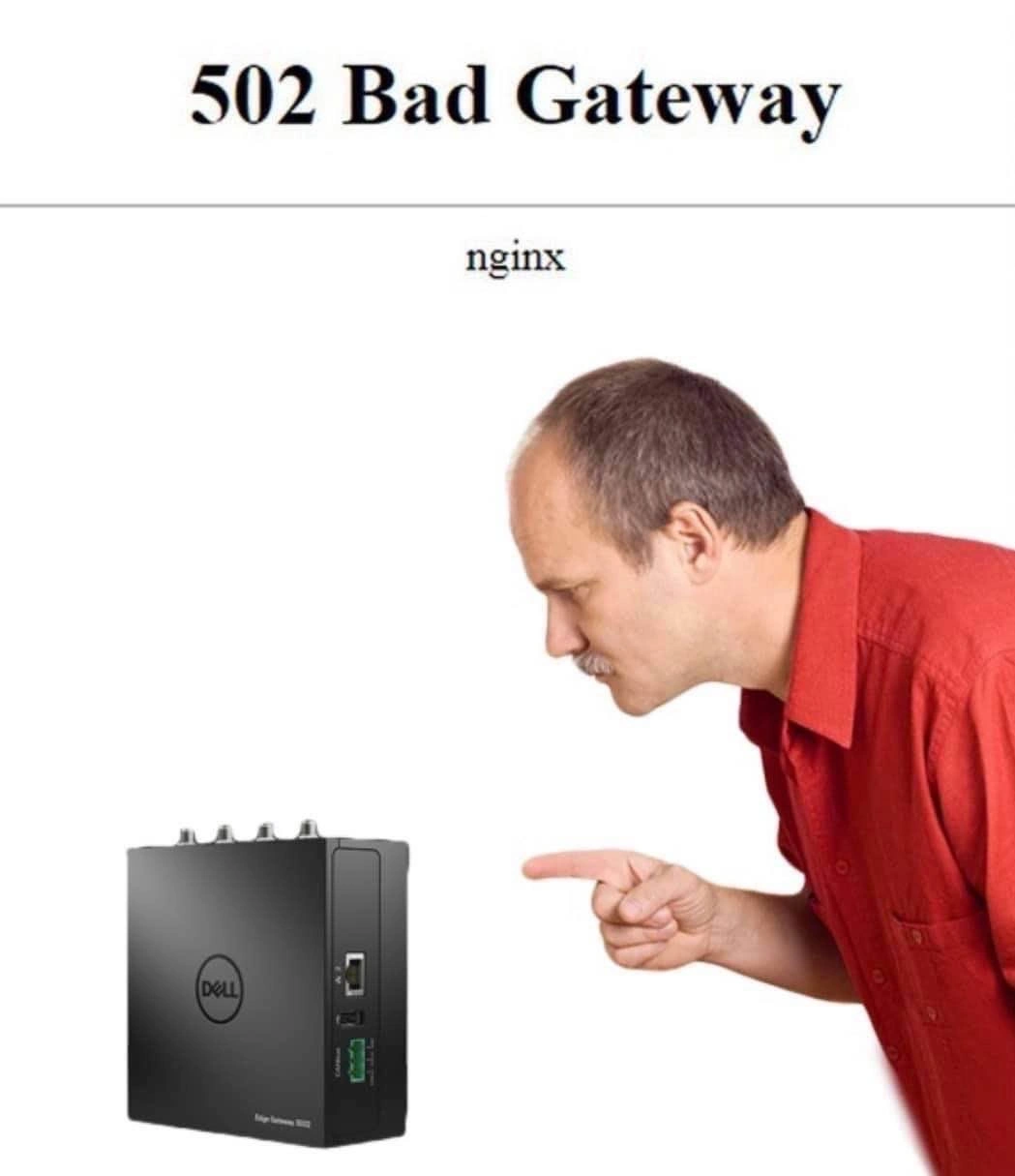
In the image, the text “502 Bad Gateway – nginx” mimics the default error page from Nginx. That little black Dell box the man is yelling at is a physical edge gateway or micro-server, likely the hardware running Nginx or acting as a network gateway device. It’s small, innocuous hardware often used at a network’s edge to route traffic (hence the term gateway). The joke is that the man is treating this device like it’s a naughty child, blaming it for the error. We know of course that a gateway box is just a tool – it forwards messages between servers. If there’s a 502 error, it’s usually because the other server (the one the gateway tried to contact) had an issue. The poor gateway is just delivering the bad news.

For a junior developer or someone new to DevOps/SRE, it helps to know that a 502 error is often not the gateway server’s fault at all. It’s a ProductionIssue that could stem from a variety of causes upstream. Common causes include:

  • The backend service is down or unresponsive: If the application the gateway forwards to has crashed or is overloaded, the gateway gets nothing useful in return. Result? 502 Bad Gateway.
  • Misconfiguration in Nginx: For instance, Nginx might be pointing to the wrong address or port for the upstream service. If it tries to connect to a service that isn’t there, you’ll get a 502 (or sometimes a similar gateway error like 502/504).
  • Network issues: perhaps a firewall or network policy is blocking the connection, or there’s a timeout. The gateway device can’t reach the upstream server due to a networking glitch, so it reports a Bad Gateway.
  • Protocol mismatch or errors: If the response is garbled (say the backend sent malformed HTTP headers), Nginx might consider it a “bad” response and throw a 502.

Now, the man in the meme is physically venting anger at the gateway box. This is funny because, in real troubleshooting, you might feel like blaming the first thing you see – “Ugh, this stupid Nginx server!” – when your website isn’t working. It’s a bit of DebuggingFrustration coming out. But part of learning to troubleshoot as a developer is realizing the error message is just a starting clue. A 502 Bad Gateway tells you “there’s a communication problem between two servers.” The Nginx server (gateway) is telling you it couldn’t get a good response from the application server. The next step would be checking that application server: Is it running? Is it healthy? Did we deploy something wrong?

The meme’s humor also plays on the literal interpretation of “Bad Gateway.” Someone inexperienced might think, “The gateway is bad – quick, reboot that hardware!” In fact, a lot of us have been tempted to restart the reverse proxy or power-cycle the device when we see 502 errors. (Have you heard the phrase “Did you turn it off and on again?” – it even applies in server land!). Sometimes that does temporarily clear an issue (like if Nginx was hung), but most of the time the real fix lies deeper. Networking and server errors can be tricky, and it’s easy to point blame at the wrong component at first. The visual of a man angrily leaning in to scold the gateway is a humorous exaggeration of that initial, impulsive blame game.

For a new dev or admin, the key takeaway is: HTTP 502 means a gateway/proxy server got a bad response from the next server in the chain. The word “bad” refers to the response, not necessarily that the gateway itself is broken. Nginx (the proxy) even puts its name on the error page, which is why you see “nginx” in small text – it’s letting you know who is reporting the error. The actual cause is often elsewhere. This meme is a lighthearted reminder not to immediately yell at your tools or infrastructure when something goes wrong. Instead, use that clue (502 Bad Gateway) to methodically check the upstream servers, the configs, and the network. And maybe give the hardware a break – it’s just the messenger!

Level 3: Reverse Proxy Rage

At 3:00 AM in a production outage, on-call engineers enter a state of reverse proxy rage. The meme captures that familiar scene: bleary-eyed DevOps folks glaring at a little edge gateway device as if it’s a misbehaving employee. We see the classic minimal browser error page with the ominous text:

502 Bad Gateway
nginx

This is the HTTP 502 status code, hauntingly rendered by Nginx. Every seasoned SRE knows this unhelpful white page by heart. It basically screams, “Something went wrong between the proxy and the backend!” In our scenario, a frustrated engineer is literally pointing a finger and yelling at a small Dell micro-server (an edge gateway box) as if that hardware personally caused the failure. The dark humor here is the hardware scapegoat: in a firefight, humans instinctively look for something physical to blame. The reverse proxy (Nginx on that tiny box) is the bearer of bad news, but it’s getting all the wrath.

Why is this funny to experienced devs? Because we’ve all been there. You get an alert for “502 Bad Gateway” and your first thought (after a stream of curses) is, “Ugh, what’s the gateway up to now?” It’s a knee-jerk blame reaction. Seasoned engineers recognize the pattern: when an outage hits, the initial suspects are always the network appliances, load balancers, or that mysterious “gateway” in the rack. If it’s not DNS, it’s the gateway, right? The meme exaggerates this by showing a guy about to lecture a silent black box — a scene so absurd yet so relatable in the heat of on-call ProductionIssues.

Technically, a 502 means Nginx, acting as a reverse proxy, received an invalid response from an upstream server. But in that sleep-deprived moment, the error’s wording “Bad Gateway” feels like the gateway itself is bad. It’s almost as if the error is tattling: “This gateway is broken!” The human in the meme falls for this literal interpretation, giving the gateway hardware a stern talking-to. The DevOps humor here lies in the mismatch between the real root cause and the target of our frustration. Usually, the true culprit is an application crash, a misconfigured server, or a database gone AWOL deep in the stack. But the poor gateway — just doing its job routing traffic — gets yelled at because it’s visible. It’s like kicking the nearest object when your code deploy fails. We laugh (a bit bitterly) because pointing fingers at the wrong thing is a well-known OncallNightmares coping mechanism.

In real incidents, the SRE team eventually traces the 502 to the real issue: maybe the upstream service is down, or the NginxConfiguration is pointing to the wrong IP, or a network firewall is blocking traffic. Blaming the gateway box is a ritual of frustration, not a solution. Still, in that frantic outage call, someone invariably mutters “maybe the load balancer is acting up” before evidence shows otherwise. The meme nails this shared experience: an engineer literally DebuggingFrustration by scolding hardware. As cynical veterans, we smirk because we know that yelling at metal won’t fix the bug — but hey, at 3 AM, logic takes a backseat to emotions. The Networking gear can’t yell back, which makes it a convenient (if unjust) target for our rage when everything is on fire.

Description

The image mimics the minimal white error page that browsers show when a reverse-proxy fails: centered at the very top, bold black text reads “502 Bad Gateway” and directly underneath, in smaller type, “nginx”. Below that, a stock-photo style man in a red short-sleeve shirt leans forward aggressively, face blurred, extending his index finger as if scolding a small black Dell edge-gateway / micro-server sitting on a blank background. The visual joke is that the human is literally yelling at the hardware ‘gateway’ as the culprit for the HTTP 502 status, a scenario familiar to DevOps engineers diagnosing upstream failures. It pokes fun at production firefighting, where frustrated on-call staff may blame network appliances or load balancers before tracing the real root cause


Comments

6
Anonymous ★ Top Pick Go ahead, yell at the gateway for that 502 - meanwhile the upstream pod is cold-starting, DNS is still propagating, and the circuit breaker is as open as our post-mortem doc
  1. Anonymous ★ Top Pick

    Go ahead, yell at the gateway for that 502 - meanwhile the upstream pod is cold-starting, DNS is still propagating, and the circuit breaker is as open as our post-mortem doc

  2. Anonymous

    After 20 years in this industry, I've learned that nginx will faithfully report every single upstream failure with surgical precision, but somehow the actual problem is always in that one microservice nobody owns anymore that Steve wrote before he left for Google

  3. Anonymous

    The irony here cuts deep: nginx dutifully reports '502 Bad Gateway' when the upstream server fails to respond, but in production at 3 AM, we all know that finger-pointing moment when you're trying to determine if it's the reverse proxy config, the application server that's actually down, network segmentation rules, or - as this meme suggests - the literal gateway appliance that decided to take an unscheduled vacation. The real gateway was the friends we blamed along the way

  4. Anonymous

    Upstream backend ghosts nginx? Blame the L2 switch - postmortems love a good layer violation

  5. Anonymous

    502: a layer‑7 failure where layer 8 yells at layer 1 - the upstream died, not the gateway box

  6. Anonymous

    “502 Bad Gateway”: nginx blaming the upstream, while someone reboots the physical gateway - peak “fix Layer 7 with Layer 3” energy

Use J and K for navigation