Skip to content
DevMeme
3202 of 7435
The Junior React Developer Starter Pack
Juniors Post #3523, on Aug 10, 2021 in TG

The Junior React Developer Starter Pack

Why is this Juniors meme funny?

Level 1: Look Ma, No Brakes!

Imagine a little kid who just learned how to ride a bike. He’s feeling super confident after a few successful pedaling attempts in front of the house. The very next day, he decides he’s ready to race down the big hill in the neighborhood. He even puts a cool new horn and shiny streamers on his bike to make it look extra awesome (he wants to show off, just like a new developer excited about fancy tools). With a grin, he kicks off downhill at full speed, pedaling as hard as he can. But in all that excitement, he forgot one important thing – to check how the brakes work. 😬 Halfway down, the bike starts going really fast and he suddenly realizes he doesn’t know how to slow down. You can guess what happens next: he loses control and crash-lands into a bush (thankfully with just a few scrapes). The first thing he does is pout and shout, “This bike is broken!” because he truly thought the bike would magically handle everything. But of course, the bike isn’t broken at all – it was just the rider going too fast without using the brakes. An older kid watching him just shakes their head and smiles, remembering when they did the exact same thing. The young boy learned a big lesson that day: it’s great to be excited and confident, but next time, he’ll make sure he understands the basics (like how the brakes work) before he zooms off. It’s a cute and a bit funny moment – we feel a little bad for him, but we also know it’s just part of learning and growing up.

Level 2: Don't Forget the Brackets

Let’s break down what each part of this starter pack means in practical terms. If you’re a junior developer (or remember being one), these probably hit close to home:

  • React's useEffect Hook: In React (a popular JavaScript library for building frontend user interfaces), useEffect is a function that lets your component run some code as a side effect of rendering. For example, you might use it to fetch data from an API after the component appears on screen. It takes two arguments: a function to run, and an optional array of dependencies. That second argument (the dependency array) tells React when to re-run the effect. If you leave the array out, React will run your effect after every single render update. This is usually not what you want. In the meme, the junior omitted that array, so their effect kept making a network request repeatedly – basically an accidental infinite request loop. The screenshot with “129238 requests” exaggerates the idea, but it gets the point across: the app called the server over a hundred thousand times because the effect never stopped re-running! This likely overwhelmed the server or the browser. The lesson here is: always include the dependency array in useEffect if you don’t want it running continuously. Even an empty array [] means “run only once on mount,” which would have prevented the flood of requests. Forgetting that second argument is a common gotcha for newcomers, and it can cause some pretty crazy bugs until you realize what’s wrong.

  • Floating-Point Surprise: The meme shows a console calculation 0.1 + 0.2 resulting in 0.30000000000000004. A junior dev might see that and think, “Huh? I expected 0.3. Is JavaScript broken?” But this isn’t actually a bug in JavaScript – it’s how computers handle decimal numbers in binary. JavaScript (like many languages) uses binary floating-point representation for numbers. Some numbers that are simple in our normal base-10 system (like 0.1 or 0.2) don’t have an exact representation in base-2 (imagine trying to write 1/3 in decimal – you get 0.333..., an endless repeating fraction; similarly, 0.1 in binary is repeating). So when the computer adds 0.1 and 0.2, the result isn’t exactly 0.3, but a tiny fraction more: 0.30000000000000004. This is a classic floating-point precision quirk. It surprises almost everyone at first! The key takeaway is: JavaScript isn’t “bad at math” – this happens in Python, Java, and others because it’s about how hardware stores numbers. For most cases, these tiny rounding errors aren’t a big deal, but if you need precise decimals (like for money calculations), developers use workarounds (like converting to whole numbers, using a special decimal library, etc.). The meme finds it funny that the junior calls out “OMG JS is broken” – it’s poking fun at that initial misunderstanding and gently saying, “so cute, they don’t realize the whole world (of computing) has these little flaws.”

  • Dunning–Kruger Effect: That graph with the “Peak of ‘Mount Stupid’” is illustrating the Dunning-Kruger effect, which is a psychology concept, not a software concept. It’s included because it perfectly describes the mindset of a brand new developer. In simple terms, the Dunning-Kruger effect is when someone with low experience overestimates their ability. So a junior dev who has just learned the basics of React might feel super confident – they haven’t yet encountered the really hard parts that would show them they’re not an expert. In the graph, that’s the left side peak: confidence is high, competence is low. The meme gives examples of this: the junior says “I think I can finish it by tomorrow” (overestimating how quick and easy the work will be) or asks “have you heard of this new awesome lib?” (trying to show they know the latest tools, thinking that’s the most important thing). But as the junior gains more experience – maybe after a few bugs or project delays – their confidence might dip. That’s the “Valley of Despair” on the graph, when they realize, “Whoa, this is harder than I thought. There’s so much I don’t know.” Eventually, with more practice, they climb out of that valley and their confidence and competence rise together more realistically. In short, the meme uses the Dunning-Kruger effect to say: early on, many developers feel on top of the world (often mistakenly), and it’s only after stumbling a few times that they calibrate their self-assessment. It’s normal, and we’ve all been through it.

  • New Library Hype: Juniors also tend to get very excited about new libraries and frameworks. The quote “have you heard of this new awesome lib?” in the meme is poking fun at this. The JavaScript world in particular has a new framework or library popping up almost every week. It’s easy for a beginner to think every new tool is a must-know and to constantly buzz about whatever they saw on Hacker News or Twitter last night. In the meme, it says “they know about all the random JS libs no one cares about” – exaggerating that our junior dev is collecting trendy library names like Pokémon. 😄 The seasoned perspective on this is a bit more cautious: while it’s great to stay informed, not every shiny new library is actually useful or mature. Experienced developers have seen many “hot” libraries turn out to be unnecessary or get abandoned. But a junior might not have that filter yet, so from their view, introducing a cool new library can seem like a magic fix or a chance to impress (“Look, I added FancyLib 3000, isn’t that awesome?”). The humor here comes from the gap between junior and senior priorities: the junior thinks using lots of new libs shows prowess, whereas the senior is thinking about stability, compatibility, and whether adding that dependency is worth the trouble. So the meme lovingly mocks the junior’s tendency to chase every new tool (and perhaps overwhelm their project with unnecessary dependencies).

  • Unrealistic Deadlines: Another item in the starter pack highlights the junior’s optimistic view of timelines: “I think I can finish it by tomorrow.” This is a prime example of unrealistic time estimates made out of sheer innocence. Most newbies genuinely believe those words when they say them. Maybe they built something similar in a tutorial in 20 minutes, or they just haven’t experienced how requirements can evolve and complications can arise. The meme jokes that their estimation skills are like those of a potato – in other words, not very refined. When a seasoned dev hears “done by tomorrow,” they often smile because they know chances are slim. It’s not that juniors are lazy or anything; it’s that software tasks often turn out to be more complex than they look at first glance. For instance, a junior might promise a feature by tomorrow, not realizing they’ll hit a snag that takes days to debug, or that the feature needs more testing and polish. Almost every developer has at some point said, “Oh, this won’t take long,” and then eaten those words later. Over time, you learn to pad your estimates or at least be more cautious, but early on you have no frame of reference for how long things should take. So this part of the meme is both funny and a gentle reality check: it’s easy to say “I’ll do it in a day” and much harder to actually pull it off. Don’t worry – learning to estimate realistically just takes practice (and a few missed deadlines 😅).

  • Git Rebase Panic: Finally, there’s the Git scenario. The junior cries, “Help, I messed up my git history trying to use rebase.” If you’re new to Git, this might sound gibberish, but it’s describing a common version control mishap. Git is the tool developers use to track changes in code. git rebase is a more advanced command that essentially rewrites the commit history of your code branch. It’s used to integrate changes and make the history look neat (like as if you had developed your feature from the latest version of the code all along). However, rebasing can be tricky. If you do it wrong – say, you rebase the wrong branch, or you get a bunch of conflicts and resolve them incorrectly – you can mess up the sequence of commits. To a newcomer, this feels like they “broke” the project history. Perhaps some changes disappeared, or now there are weird duplicate commits, and they’re not sure how to fix it. The meme’s suggestion to “just git clone again” is basically the brute-force solution: throw away your local copy of the code and clone it fresh from the remote repository (like downloading a clean version). This works because the remote (like GitHub or GitLab) presumably has the correct history, and you’re just discarding your messed-up attempt. It’s funny because it’s sort of true – a lot of juniors, when faced with a really tangled Git situation, choose the nuclear option: delete the folder and re-clone to start over, instead of untangling the Git knots. Seasoned devs might tease this approach (since it avoids learning how to actually fix the problem with Git commands), but they also remember when Git was confusing for them too. Everyone has that first time where they mess up a rebase or a merge and momentarily panic. With experience, you learn recovery tools (like git reflog to find lost commits, or when not to rebase), but early on, it’s intimidating. So this part of the starter pack is highlighting a typical “I’m new to version control” crisis. The good news is, no lasting harm done – you can always clone again! It’s a funny reminder that sometimes, starting over is the newbie solution when you don’t yet know how to properly backtrack in Git.

Putting all these pieces together, the Junior React Developer Starter Pack is both a light-hearted jab and an empathetic wink. It says: “Yes, newbies often make these mistakes or have these attitudes, and that’s okay – we’ve all been there.” Each piece — the weird math output, the useEffect bug, the overconfidence (Dunning–Kruger), the love of new libraries, the optimistic timeline, and the Git mistake — is a common storyline from a developer’s early days. The meme resonates with so many people because it captures those universal beginner experiences. If you’re a junior dev reading this, you might feel a bit called out 😅, but remember, even your seniors likely did every one of these things themselves. And if you’re a senior dev, you’re probably nodding along, remembering the junior version of you doing that exact same “clone the repo again” trick or pushing that “one-day” fix that took a month. The starter pack format makes it easy to laugh at these scenarios, but it also kind of celebrates them as a natural part of growing in the software field. Every mistake here teaches you something: numbers can be tricky, React hooks need care, hype isn’t everything, time estimations are hard, and Git requires respect. Live through all that, and congrats – you’re leveling up from junior territory! 🎉

Level 3: Peak of Mount Stupid

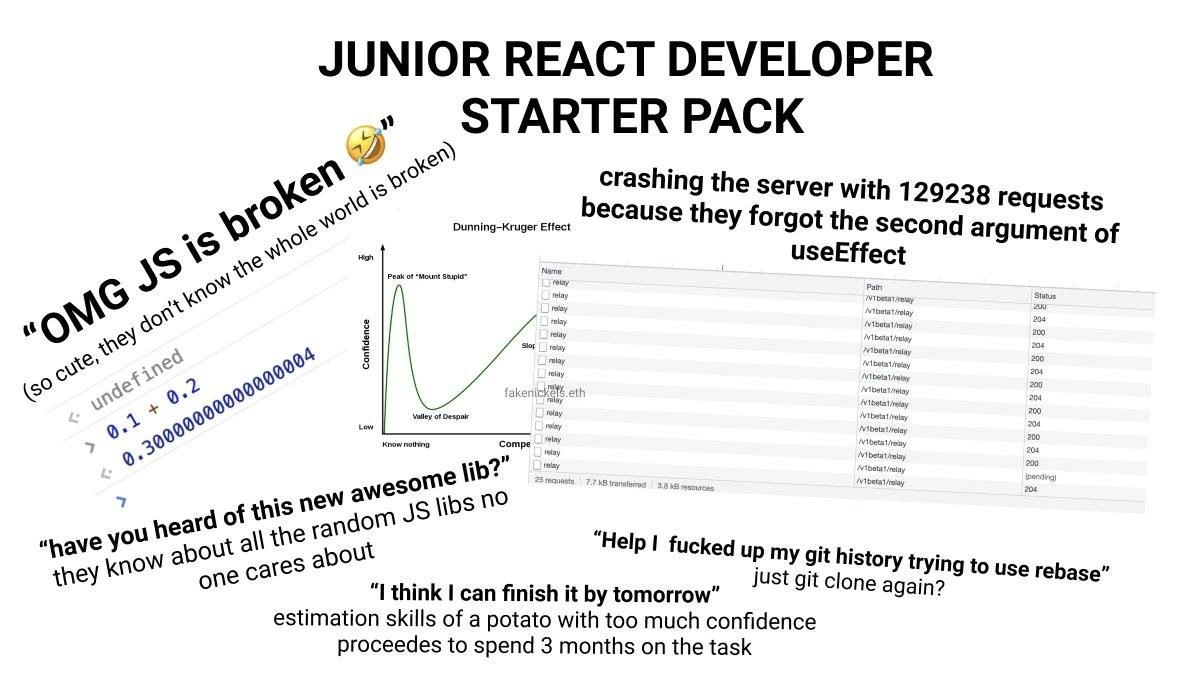
In the frontend world, there's nothing quite like the naive bravado of a brand-new developer hitting their first real gotchas. This image is a classic Starter Pack collage that perfectly captures the Junior vs Senior gap – a set of all-too-familiar blunders every seasoned dev has seen (and survived). Various screenshots and quotes are scattered on a plain background, each representing a rite-of-passage lesson for a junior React developer. The humor is equal parts technical and traumatic: it highlights the steep fall from “I know everything” to “Oh no, what have I done?” – essentially a tour of the Dunning–Kruger rollercoaster in software.

First, consider the browser console screenshot showing 0.1 + 0.2 evaluating to 0.30000000000000004. Our newbie is freaking out, exclaiming “OMG JS is broken 🤣”. To an experienced dev, this is adorable – a tiny splash of cold reality on that newbie confidence. (The meme even adds, “so cute, they don’t know the whole world is broken,” driving home how naïve it is to think this quirk is unique to JS.) In truth, this isn’t JavaScript being uniquely broken at all – it’s a well-known floating-point precision quirk. JavaScript (like many languages) uses 64-bit binary floats (IEEE 754), and certain decimals (like 0.1 or 0.2) can’t be represented exactly in binary. So you get a tiny rounding error: 0.1 + 0.2 ends up slightly more than 0.3, hence that weird 0.30000000000000004. Seasoned devs have seen this million-dollar mistake everywhere from Python to C – it’s the classic newbie misconception to think they’ve uncovered a core language bug, when really they’ve stumbled on a fundamental binary math reality. The cynical veteran response is basically, “Kid, if you think JavaScript is broken, wait till you find out how broken everything is.” In other words, welcome to software development – where BugsInSoftware often trace back to the laws of math and hardware, not just your code.

console.log(0.1 + 0.2);
// → 0.30000000000000004

Next up, front and center, we have a screenshot of a browser Network panel flooded with identical requests. The caption: “crashing the server with 129238 requests because they forgot the second argument of useEffect.” Any React old-timer immediately winces (and chuckles) at this. It’s highlighting useEffect dependency omission – a classic rookie mistake in React. The useEffect hook runs some code after a render, and you’re supposed to give it a dependency array as a second parameter to control when it runs. Omit that array, and guess what? Your effect runs after every render. If that effect changes state on each run (say, fetching data and updating state), you’ve inadvertently written an infinite request loop. The meme’s absurd “129,238 requests” is hyperbole that feels downright plausible when you see how fast a React app can thrash when it re-renders endlessly. It’s a comedic horror story: the junior deploys a seemingly innocent effect, and suddenly the server logs look like a DDoS attack because the component is re-fetching data non-stop. Every senior dev reading this has either made this mistake or stopped a code review to prevent it. It’s a rite of passage in React development: one missing [] dependency can melt your app. The humor here has a dark edge: we’re laughing because we remember that sinking feeling of “Why is the app so slow? Why is the server on fire?” before discovering oh, I forgot to include the second argument in useEffect. In production at 3 AM, that scenario is nightmare fuel; in a meme, it’s schadenfreude for the survivors.

Now notice the little graph labeled Dunning–Kruger Effect, marking the “Peak of ‘Mount Stupid’” and the “Valley of Despair.” This adds a psychological punchline to the technical gags. The junior dev in this meme is perched right atop Mount Stupid – the phase where a little knowledge has filled them with a lot of overconfidence. They’ve learned just enough React and JavaScript to feel invincible, but not enough to know what pitfalls lie ahead. That’s why we see quotes like “I think I can finish it by tomorrow” and “have you heard of this new awesome lib?” splashed around. These aren’t just random jokes; they’re symptoms of overconfidence born from ignorance. Every experienced developer recognizes this because we’ve all been there: after a few tutorials or a couple of successful bug fixes, you feel like you’ve got the whole thing figured out (Peak Confidence). You start promising ridiculously short timelines and name-dropping every trendy library, genuinely believing you’re on the cutting edge. And then… reality kicks in. Your perfect plan blows up with bugs, that “awesome lib” turns out to be unnecessary (or unstable), and your “done by tomorrow” task drags into next month. That’s the crash into the Valley of Despair – when the junior dev realizes just how much they don’t know. The meme brilliantly references this journey: it’s essentially saying “Here’s a Junior Dev Starter Pack: uncontrolled enthusiasm, unrealistic promises, and inevitable humbling lessons.” Seasoned devs find it painfully funny because it’s true. We’ve all watched a bright newcomer charge up Mount Stupid and then tumble down, and maybe we see a bit of our younger selves in that too. The JuniorVsSenior contrast is strong here: the junior says “awesome new lib!”; the senior rolls their eyes because they’ve seen 50 “awesome libs” come and go. The junior says “I’ll finish by EOD”; the senior subtly schedules a follow-up next week knowing that’s an unrealistic time estimate. The Dunning–Kruger graph is basically the meme pointing a laser pointer at this exact dynamic.

Speaking of “have you heard of this new awesome lib?”, the meme is poking fun at JavaScript’s notorious hype ecosystem. New libraries and frameworks pop up daily, and junior devs, eager to prove themselves, often latch onto them. In the collage, there’s text about how our junior “knows about all the random JS libs no one cares about.” That line drips with sarcasm. It’s exaggerating the fact that a newbie might rattle off names like a walking Twitter feed – “Have we tried X.js? What about Y.js? It’s awesome!” – often without considering if those tools actually solve any problem the team has. Meanwhile, the senior developers, battle-scarred from chasing one too many hype-trains, know that not every shiny new library will stick around. (We’ve seen Left-pad, we’ve endured countless “Redux killers”, we’ve survived the great JS framework wars of the last decade.) The humor here is that the junior is trying so hard to impress with breadth of buzzword knowledge, while the senior is internally screaming “please, not another half-baked library in our project.” It’s a gentle roast of the newbie’s tendency to prioritize novelty over pragmatism. Sure, that enthusiasm can be a good thing (staying up-to-date is important in frontend), but veterans know a new awesome lib can sometimes become tomorrow’s legacy cruft that nobody wants to maintain. The meme calls it out: the junior has effectively built a mental catalog of random JS libs that experienced devs largely ignore. We’re laughing because it’s true – at one point or another, every senior dev has had to gently deflate a junior’s “let’s rewrite everything in this cool new framework” balloon.

Now let’s examine the quote “I think I can finish it by tomorrow.” This one is practically a legends-tier cliché in software circles. The meme’s tiny caption says the junior’s estimation skills are of a potato, which is a spicy way of saying they have no clue how long things actually take. And honestly, as mean as it sounds, it’s accurate for most fresh devs (and, to be fair, even some of us veterans still get it wrong!). When you lack experience, everything looks doable in a day – after all, your toy examples or tutorial projects never showed the dozens of edge cases, integration headaches, and deployment snafus that real-world projects hide. So juniors confidently promise speed. Managers love the can-do spirit, until it turns out that “one day” task tomorrow ends up delivered next quarter. The humor here has a bit of owch to it: we’ve all been burned by our own optimistic timelines. Senior devs laugh (perhaps through a tear) because they remember saying the exact same thing to their tech lead – “yeah, I’ll wrap this up by EOD Friday” – only to be debugging that feature into the wee hours weeks later. It’s a shared acknowledgement that deadline pressure and the art of estimation are learned the hard way. When the meme lists “I think I can finish it by tomorrow” in the starter pack, it’s essentially saying: Welcome to software development, where the first lesson is humility – you will grossly underestimate tasks. And it’s okay, everyone does. The joke lands because every senior dev has a mental archive of timeline fiascos, both their own and those they’ve witnessed from juniors. It’s funny to see that optimism caricatured so bluntly, and it’s comforting (in a twisted way) to know this over-confidence is practically a universal stage in the developer growth path.

Lastly, we arrive at the Git disaster portion of our meme, which might be the crown jewel of “oh no!” moments: “Help, I fucked up my git history trying to use rebase”. If you’ve ever been a git guardian for your team, you probably have war stories starting exactly like that. The meme even suggests the nuclear option fix in smaller text: “just git clone again?” This captures a common junior reaction to git screw-ups: I have no idea what I did, maybe I should just delete everything and re-clone the repo. It’s both hilarious and painfully relatable. Here’s what’s happening: git rebase is an advanced Git command to rewrite commit history (often to integrate changes or clean up commits). When used correctly, it’s great. When used incorrectly… oh boy. You can end up with duplicated commits, dropped changes, or a hairy merge conflict in every file. Newcomers often read somewhere that rebasing is good practice (“keep that history linear!”), so they try it, not realizing it’s a bit like performing surgery on your repo’s timeline. One wrong move and you’ve created a Frankenstein history that even git log is ashamed of. The junior in this meme clearly got in over their head – their commit history is now so tangled that they’re panicking. “Help, I messed up my git history” is probably them on Slack, begging a senior for救VersionControl救 help because git push rejected their changes or their branch is in conflict limbo. The senior’s tongue-in-cheek answer? “Just clone again.” That’s basically saying “yeah, you borked it so bad, might as well throw it out and start over.” It’s a joke, but it’s rooted in truth: sometimes nuking your local copy feels like the simplest path when you’re a Git newbie. (Raise your hand if your “fix” to a messed-up repo was just deleting the folder and cloning fresh – we’ve all done it in desperation.) Experienced devs are grinning at this because we know Git’s learning curve is steep and full of WTFs. We’ve stared at git reflog entries trying to un-mess a rebase gone wrong at least once. So when the meme casually suggests re-cloning as the fix, it’s poking fun at that very real impulse. It’s the software equivalent of “did you turn it off and on again?” for version control. Sure, it avoids the real problem, but hey, it works as a last resort. The humor lands because it’s an innocent ignorance kind of mistake – juniors don’t yet have the mental model to calmly undo a bad rebase, so their instinct is just start over. Seniors laugh, not to mock, but in solidarity: Git branching and rebasing is confusing at first, and we’ve all seen a bright newcomer reduce a repository to chaos with one command. The meme’s rebase segment is basically the grand finale of the starter pack, saying “if you haven’t completely trashed a git repo yet, are you even a junior dev?”.

Taken as a whole, this “Junior React Developer Starter Pack” meme is a roast and a reality check wrapped in one. Each item – the oddball JavaScript math result, the runaway useEffect, the over-hyped library, the optimistic timeline, and the Git mishap – represents a spike on the graph of learning. For those of us who have been through it, it’s impossible not to smirk (and maybe feel a phantom pang of stress). We find it funny because it’s true: these are the exact Bugs and blunders virtually everyone encounters early in their career. The meme works on multiple levels: it satirizes the enthusiasm and ignorance of youth, while also subtly acknowledging the wisdom and scars earned by experience. A senior developer sees this and goes, “Haha, yep, been there, done that,” perhaps even feeling a bit relieved to be on the other side of those lessons. And a junior dev sees it and might think, “Wait, is it that obvious? 😅” – but hopefully also realizes that messing up is just part of the journey. In the end, the gap between “OMG JS is broken!” and “It’s not a bug, it’s a floating-point feature” is just time and experience. This meme hilariously sums up that journey – from the Mount Stupid confidence down into the humbling trenches – and it does so with the kind of affectionate sarcasm that only the tech community can pull off. It’s a reminder that we all start out thinking we’re on top of things, only to learn, crash, and eventually laugh about it later.

Description

A 'starter pack' meme collage titled 'JUNIOR REACT DEVELOPER STARTER PACK' on a white background. The image is a collection of several smaller images and text snippets that humorously stereotype a junior React developer. Key elements include: a Dunning-Kruger effect graph showing 'Peak of Mount Stupid'; a screenshot of a browser console showing the JavaScript floating-point error '0.1 + 0.2 = 0.30000000000000004' with the caption '"OMG JS is broken"'; a network tab flooded with requests, illustrating the consequence of forgetting the second argument of useEffect; text bubbles with phrases like '"I think I can finish it by tomorrow"', '"have you heard of this new awesome lib?"', and a desperate plea: '"Help I fucked up my git history trying to use rebase"'. For senior developers, this meme is a nostalgic and funny look back at the common, painful-but-necessary learning experiences of junior engineers, from misunderstanding fundamental language quirks to grappling with complex tools like Git and React hooks

Comments

24
Anonymous ★ Top Pick The 'Junior React Developer Starter Pack' is missing one crucial item: a senior dev's calendar, pre-booked with recurring 'let me see your screen' meetings
  1. Anonymous ★ Top Pick

    The 'Junior React Developer Starter Pack' is missing one crucial item: a senior dev's calendar, pre-booked with recurring 'let me see your screen' meetings

  2. Anonymous

    Senior rule of thumb: if your useEffect has no dependency array, your pager does

  3. Anonymous

    The real starter pack is the senior dev who's been debugging the same useEffect infinite loop in production for three years, but now gets paid 3x more to pretend they've never made these mistakes while secretly googling 'javascript floating point precision' for the 47th time this month

  4. Anonymous

    Ah yes, the classic junior React developer journey: confidently perched atop Mount Stupid, hammering the server with 129,238 requests because useEffect's dependency array is 'just a suggestion,' right? Meanwhile, they're three months deep into what should've been a two-day ticket, having pivoted through seventeen different state management libraries, each more obscure than the last. But hey, at least they discovered that 0.1 + 0.2 !== 0.3 and JavaScript is 'broken' - a rite of passage that somehow never makes it into the bootcamp curriculum. And when Git inevitably becomes a tangled mess of rebases gone wrong? Just nuke the repo and clone it fresh. Problem solved. Ship it

  5. Anonymous

    My favorite chaos engineering technique: onboard a React junior - between a missing useEffect dependency array and an ambitious rebase, you’ll validate rate limits, idempotency, and backups in one sprint

  6. Anonymous

    Watching a junior ship useEffect without a dependency array is a live demo of client-side thundering herd, IEEE-754 surprises, and Git's content-addressed DAG - followed shortly by an emergency lesson in rate limiting and git reflog

  7. Anonymous

    useEffect sans deps: the junior's 'hello world' that ghosts your entire backend cluster

  8. @feskow 4y

    How to remove commit How does rebase work These are the questions that are going to bother me forever

    1. @dsmagikswsa 4y

      Until the day Git is no longer exist

  9. @feskow 4y

    Commit faster so you don't have to rebase 😎

  10. @MagnusEdvardsson 4y

    this is true not only for react

  11. Deleted Account 4y

    So true

  12. @FunnyGuyU 4y

    Off, who needs Git! /projects/work/final/final06/last/Sunday/Sunday_evening/compiles/test06/final 04

    1. @dugeru42 4y

      And then your team periodically send all of your files to team member which role is compiling that by copy pasting your code into single project

      1. @viktorrozenko 4y

        You know what the worst thing is? Getting your university project teammates to use proper tools

      2. @FunnyGuyU 4y

        You figured it well. But the most intricate question in all this is to guess who is currently THE member who does this. Actually, there might be more than one 🤣

        1. @dugeru42 4y

          The on who can possibly solve conflicts or just stay sane

          1. @FunnyGuyU 4y

            Sane? I can hardly imagine a sane person who would stay in a place like that for more than several minutes.

  13. @affirvega 4y

    I wonder if using gui git would make it easier to fix most of the beginners' problems

    1. @affirvega 4y

      Like rebase? Drag your mouse, it shows which file would be affected, where are conflicts that you can edit right there.

      1. @affirvega 4y

        Change commit data? Click it to edit. Move it to another branch? Drag it away and all of that is done

  14. @azizhakberdiev 4y

    "Who needs js? React is much better, bruh"

    1. @viktorrozenko 4y

      I will not React to this pun

  15. Anon 4y

    So true

Use J and K for navigation