When every layer of the stack somehow ends up being JavaScript
Why is this Languages meme funny?
Level 1: One Tool for Every Job
Imagine you have a super handy tool, like a magical duct tape that can fix anything. Got a torn book? Use the duct tape. Leaky plumbing? Wrap duct tape around it. Broken glasses, loose chair leg, phone case coming apart? Duct tape, duct tape, duct tape! It sounds funny, right? In real life you’d normally use glue for the book, a wrench for the plumbing, screws for the chair… different tools for different problems. Using only duct tape for everything is a bit silly – it might work sometimes, but it’s also kind of crazy.
In this meme, JavaScript is like that one super tool being used for every job in the shop. Need to build the back of a website (the part users don’t see)? JavaScript can do it. The part you do see and click on? Also JavaScript. Making it look pretty with styles? Yep, JavaScript there too. Even the scripts that help launch the website and the plans for what computers it runs on – all JavaScript! It’s as if a team decided, “We love this one tool so much, we’re going to use it everywhere.” That’s why it’s funny: it’s a little ridiculous to use the same thing in every single place, yet it’s impressive that JavaScript is flexible enough to actually do it. The meme makes us laugh because the man in the picture confidently answers every question with “JavaScript,” just like someone who only has duct tape saying “Don’t worry, I have just the thing for that!” for every problem. It’s poking fun at how one single language somehow ended up being the solution for almost everything in coding, which is both amazing and a little absurd – and that’s exactly why it makes people smile.
Level 2: One Language Everywhere
If you’re newer to development, let’s break down what this meme is listing — and how JavaScript manages to sneak into each part:
Backend (Server): The backend is the part of a website or app that runs on a server (the brains behind the scenes, like handling logins or database queries). Traditionally, you might use languages like Python, Ruby, Java, or C# for backend logic. But thanks to Node.js, you can use JavaScript on the server too. Node.js is essentially a program that lets JavaScript run outside the browser. So instead of Python or others, many teams now write server code in JavaScript. When the meme says “Backend? JavaScript.” it’s talking about using Node.js to build things like web APIs or microservices using JavaScript. This means a web developer who knows JS can also write backend code without switching to a different language.
Frontend (Client): The frontend is what you see and interact with in your browser – all the buttons, text, and pretty layouts on a web page. Web frontends have always used JavaScript, because that’s the native language of web browsers (along with HTML and CSS). When you click a button and something changes on the page without reloading, that’s JavaScript in action. In modern development, we use powerful frontend frameworks like React, Angular, or Vue which are all JavaScript-based. So the meme’s “Frontend? JavaScript.” is kind of obvious (the browser requires JavaScript), but it’s emphasizing that today it’s JavaScript-heavy: whole applications are written in JS and loaded into the browser. Frontend developers might write hundreds of components in JS (or TypeScript, which is just a stricter form of JS) to create a single-page application. In short, the visible part of the stack is definitely JavaScript territory.
Styles (CSS): Styles determine how things look on a webpage – colors, layouts, fonts, all the pretty stuff – and they are usually written in CSS (Cascading Style Sheets). CSS is a different language just for styling. Normally, you’d have
.cssfiles separate from your JavaScript. But lately, a trend called CSS-in-JS has emerged, especially in the React world. With CSS-in-JS, you write your styles inside JavaScript code. For example, you might use a library like styled-components or Emotion to create a styled button right in your JS file instead of writing a separate CSS file. Under the hood it still ends up as CSS for the browser, but you author it using JavaScript syntax (often for benefits like scoping styles to a component or using JavaScript variables and logic to adjust styles). So when the meme shouts “Styles? JavaScript!”, it’s referencing this idea that even styling — which used to be the realm of plain CSS — is now being handled with JavaScript techniques. To a newcomer, that sounds wild (why use JS for styles?), but it’s a real approach developers use to keep all component code in one place or to leverage dynamic styling via code. It’s convenient in some cases, though definitely debated in the web community.CI (Continuous Integration): CI/CD stands for Continuous Integration/Continuous Deployment. This is about automation – for example, every time you push code to GitHub, a CI system can automatically run tests, build your application, and even deploy it. Traditionally, setting up a CI pipeline might involve writing configuration files (like a YAML file for GitHub Actions or Jenkins) and using shell scripts (commands a Linux terminal would run, often written in Bash). How does JavaScript come into play here? Many build and test tools are written in Node.js, which means you’ll be writing commands like
npm run testor using Node-based utilities in your pipeline. Some CI systems (like using Node in a Jenkins script or writing a custom script in a package.json) effectively have you writing JavaScript to define what the pipeline does. For instance, you might use a JavaScript task runner (like Gulp or an npm script) to lint your code, run tests, bundle assets, etc., as part of the CI process. The meme saying “CI? JavaScript.” highlights that even the automation scripts might be running on Node or written in JS. Imagine a file that’s supposed to just configure things, but it’s actually executing JavaScript to do the work – that’s what’s happening in many modern build pipelines. So, a junior dev might be surprised that learning JavaScript means you can even understand parts of the build/deploy pipeline, not just the app code itself. JavaScript has crept into the DevOps tooling!Infrastructure: Infrastructure refers to the servers, networks, and cloud resources that your application runs on. In the past, a developer might not touch this much, and ops engineers would set up servers manually or with specialized scripts. Then came Infrastructure as Code – tools that let you define infrastructure setup in code files so it’s automated and version-controlled (no more clicking around in cloud dashboards by hand). Common infrastructure-as-code tools include Terraform (which uses its own HCL language) or AWS CloudFormation (which uses YAML/JSON templates). These are basically configuration languages, not general purpose programming. The crazy twist: now we have infrastructure-as-code frameworks that use general programming languages like JavaScript! For example, AWS CDK (Cloud Development Kit) allows you to write TypeScript/JavaScript to create cloud resources (like defining a server, database, or load balancer as objects and function calls in a JS file). Another is Pulumi, which supports JavaScript, letting you script your infrastructure in your favorite language. So when the meme says “Infrastructure? …also JavaScript.” it’s pointing out that you can manage even the low-level cloud setup with JavaScript code. This is pretty mind-blowing if you’re new: it means the same language you use for a web page can also, say, create an AWS S3 bucket or spin up servers in code. For a team that already writes everything in JS, using AWS CDK means they don’t have to learn a new config syntax – they just reuse their JavaScript skills to manage AWS infrastructure. It’s convenient, but also kind of funny if you think about it: JavaScript has left the browser, left the server, and is now arranging our entire cloud environment.
What’s the big deal with one language everywhere? For a newcomer, it might actually sound great – you can become a full-stack developer without learning a ton of different syntaxes. In fact, many coding bootcamps teach JavaScript for both frontend and backend (often with Node/Express and React) precisely so graduates can do a bit of everything. It simplifies your life when starting out: you get to use one set of tools (like the VS Code editor with JS highlighting, one package manager npm/yarn, one main language syntax) for both client and server work. The meme is funny though because it’s exaggerating this to every single layer ([javascript_everywhere](#) indeed!). Even styles! Even CI scripts! Even infra! It’s like saying “we refuse to use anything that isn’t JavaScript.” It makes us smile because there’s a grain of truth (plenty of stacks are very JS-heavy) taken to an extreme. As a junior dev, you might sooner or later encounter a project where basically everything is written in JavaScript or its superset TypeScript. Don’t be too shocked – it’s actually a pretty common approach now. Just remember, even if it’s the same language everywhere, each environment (browser, server, etc.) has its own quirks. But hey, you’ll be speaking one tongue across the whole project, and that’s kind of cool (until you step on that one weird quirk of JavaScript, but that’s another meme 😉).
Level 3: JavaScript All the Things
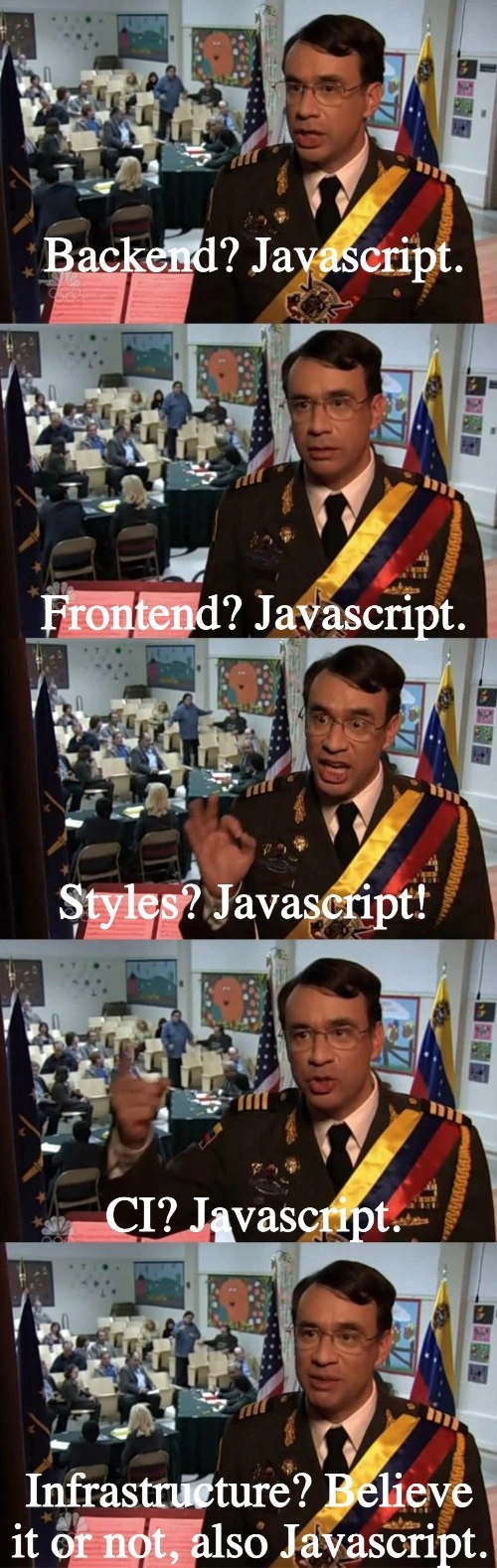
At first glance, the humor is blatant: no matter which layer of the tech stack you ask about, the answer is “JavaScript.” In the meme’s five frames, a decorated official emphatically declares: “Backend? JavaScript. Frontend? JavaScript. Styles? JavaScript! CI? JavaScript. Infrastructure? Believe it or not, also JavaScript.” It’s absurd and yet oddly familiar to many developers. This cartoonish one-note answer is poking fun at a very real trend in modern software engineering: using JavaScript everywhere – from the browser all the way down to your servers and tools.
Why is this funny (and a bit painful)? Because traditionally, each layer of a web application was a polyglot affair – different problems called for different languages or technologies. For example, a decade ago your backend might be in Python or Java, the frontend was inevitably JavaScript (since browsers only speak JS), your styles were pure CSS, your CI/CD scripts were Bash or specialized config, and infrastructure was managed with domain-specific languages (like writing Terraform .tf files or CloudFormation templates). But fast-forward to today’s full-stack development culture, and it’s not uncommon that everything has converged on JavaScript (often via Node.js). The meme exaggerates it as an overzealous decree: “Yes, we’ll build absolutely every part of our product with one language!” – a scenario many engineers recognize from real life teams adopting a JS monoculture.
This one-language-to-rule-them-all approach is sometimes called a JavaScript monoculture or JavaScript everywhere. It became possible thanks to a series of industry shifts: the rise of Node.js made JavaScript viable on the server (Backend? JavaScript. ✅), powerful front-end frameworks like React and Angular turned the browser into a near-operating-system (Frontend? JavaScript. obviously), and new techniques allowed managing styles and even infrastructure code with JavaScript abstractions (Styles? JavaScript! Infrastructure as code? Believe it or not… JavaScript. 🙈). Even Continuous Integration pipelines – the automated build/test/deploy scripts – are often written in JavaScript nowadays (think of writing build steps in a Node-based tool or using JavaScript-driven task runners). It’s as if the entire software stack accidentally became one giant Node.js application running everywhere.
To seasoned developers, the meme is a wry nod to how far this trend has gone. There’s even an old tongue-in-cheek adage, Atwood’s Law, which states: “Any application that can be written in JavaScript, will eventually be written in JavaScript.” The meme basically shows Atwood’s Law in action across the whole stack, turned up to 11. Each panel’s escalating “X? JavaScript!” is funny because we’ve all met that situation where JavaScript was shoehorned into places it historically didn’t belong. It’s a shared industry joke that JavaScript has become the default answer – whether you’re building a web UI, a server, a desktop app (hello Electron!), or scripting your deployment.
Yet, this trend didn’t arise out of sheer silliness; there are real reasons behind the one-language stack. With JavaScript everywhere, teams can unify their technology, share code between server and browser (e.g., using the same validation logic on frontend and backend), and onboard developers faster (since everyone only needs to know JS/TypeScript). The FullStackDevelopment movement, popularized by stacks like MEAN (Mongo-Express-Angular-Node), promised that a single developer could work on any part of the system without switching languages. In practice, this can reduce context-switching and simplify the toolchain — there’s one set of libraries and one gigantic npm ecosystem to rule them all. The official in the meme, with his confident posture, humorously embodies that one-track mindset: whatever the problem, just throw JavaScript at it.
Of course, the experienced folks also chuckle because they know this monoculture comes with trade-offs. JavaScript was originally a simple scripting language for web pages, and here we are bending it to handle server concurrency, build automation, and even infrastructure provisioning. It works — thanks to Node’s event loop, countless frameworks, and expansions like TypeScript — but it isn’t always elegant. There’s an ironic truth behind “Styles? JavaScript!”: web devs were so frustrated with managing separate CSS files (and issues like CSS global scope or coordination with JS animations) that they invented CSS-in-JS libraries (like styled-components or Emotion) to generate and manage CSS via JavaScript code. Now styling a page might involve writing JavaScript objects or template literals instead of traditional CSS syntax. It’s a bit crazy: we’re using a full-blown programming language to handle what was once just declarative style rules, but it gives more dynamic control. The meme’s punchline “Infrastructure? …also JavaScript.” alludes to tools like AWS CDK and Pulumi, which let you write cloud infrastructure setup in TypeScript/JavaScript. Instead of writing separate config files (YAML/JSON) or using a different DSL, you write actual code (loops, conditionals, classes!) to define cloud resources. That’s powerful – you get the flexibility of a real language – but also amusing, since we’re literally standing up servers and networks with the same language we use to pop up alert boxes in a browser.
Let’s put this in perspective with a comparison of each layer’s traditional tech vs its JavaScript-based counterpart today:
| Stack Layer | Traditional Approach | JavaScript Approach |
|---|---|---|
| Backend (server-side) | Python, Java, Ruby, etc. | Node.js (runs JS on the server) |
| Frontend (client-side) | (Always used JavaScript in browsers) | Modern JS frameworks (React, Angular, etc.) |
| Styles (presentation) | CSS stylesheets (and preprocessors like Sass) | CSS-in-JS libraries (styles defined in JS code) |
| CI/CD (build & deploy) | Bash scripts, YAML pipelines, Makefiles | Node.js scripts and JS-based tools (e.g. npm run build) |
| Infrastructure (ops) | Config DSLs like Terraform (HCL), Cloud templates (YAML/JSON) | AWS CDK / Pulumi (TypeScript/JS code describing infra) |
In each case, you can see how JavaScript has encroached into territory once ruled by other languages or specialized formats. The meme gets its comedic oomph by having this uniform answer of “JavaScript” shouted from the rooftops for every layer, as if a highly decorated general is proudly announcing our glorious one-language victory over complexity. The final frame’s phrasing, “Believe it or not, also JavaScript,” resonates because even developers themselves sometimes “can’t believe” everything ends up in JavaScript, especially infrastructure or build pipelines which historically felt very removed from web scripting. It’s a mixture of pride (“hey, I can do it all with JS!”) and face-palming (“ugh, it’s literally JavaScript everywhere, we’ve created a monster”).
From an experienced engineer’s perspective, this meme might also carry a subtle critique: a one-language monoculture can be a double-edged sword. Sure, it’s convenient and hip with Node.js everywhere, but it can lead to issues if that one technology has a bad day. (For instance, a bug in the Node runtime or an npm left-pad fiasco can ripple through your entire stack because everything relies on it.) Seasoned devs have seen “the right tool for the job” sometimes replaced by “the one tool we happen to know” and can attest to both the productivity and the pitfalls that result. The meme playfully satirizes that scenario. We laugh, perhaps a bit nervously, because we recall meetings where someone asked “Why not do this part in $OTHER_LANG?” and the answer was essentially, “We already have JavaScript folks, let’s stick to JavaScript for everything.” It’s the path of least resistance – and hey, it often works – but it’s undeniably funny to see it summed up in such a blunt, meme-able way. This is the inside joke of many a full-stack team: no matter the question, JavaScript is the answer.
Description
Five vertically-stacked frames from a TV interview show a decorated official standing in front of a busy community-meeting room. His face is blurred, but his uniform features gold epaulettes and a multi-color sash; he gestures more emphatically in each successive panel. White overlay text changes per frame: “Backend? Javascript.”, “Frontend? Javascript.”, “Styles? Javascript!”, “CI? Javascript.”, and finally “Infrastructure? Believe it or not, also Javascript.”. The meme humorously points out the language’s ubiquity - Node .js on the server, React on the client, CSS-in-JS for styling, JavaScript-based CI pipelines, and even infrastructure-as-code tools like the AWS CDK - illustrating how modern engineering teams can unintentionally create a single-language monoculture

Comments
30Comment deleted
If every layer speaks JavaScript, congratulations - you’ve traded polyglot complexity for the existential thrill that a single compromised npm package can now deploy straight to prod, style the error page, and break the build in one push
We've successfully abstracted away all the complexity of polyglot architectures into a single point of failure: npm install
When your entire tech stack is JavaScript, you don't have polyglot problems - you have a monoglot monopoly. From Express handling your API routes to React rendering your UI, styled-components managing your CSS, GitHub Actions running your CI pipeline, and Pulumi provisioning your cloud infrastructure, it's JavaScript all the way down. The real question isn't 'Can we use JavaScript for this?' - it's 'What's left that we haven't JavaScripted yet?' Spoiler: your coffee machine is next, and yes, there's already an npm package for that
JavaScript: full-stack isomorphism achieved, from DOM to deployments - bundle sizes and type errors as the price of empire
When “npm run” becomes your control plane - from CSS‑in‑JS to CDK deploys - you’ve basically built an entire company on a package‑lock
JavaScript everywhere: consolidating every failure domain into a single package-lock.json
JPEG only! No thinking required! Comment deleted
JavaPEG Comment deleted
I never use jpg by choice. Either I am forced to or there is nothing better Comment deleted
What is your preference for photos when file size does matter? Comment deleted
Not taking photos then Comment deleted
Idc if a photo is 500MB if its a PNG Comment deleted
There are also people who download flacs and they are like 200MB Comment deleted
I try to use webm or even avif where possible Comment deleted
JPEG sucks Comment deleted
jpeg is pretty ok at what it does, people just keep misusing it Comment deleted
telegram be like Comment deleted
It's pronounced "PNJ" Comment deleted
What is the name for that feeling, when your eyes feel pain while reading text on jpeg? That's jpegging! Comment deleted
Jeff Atwood be like Comment deleted
I don’t understand the last one….infra in JS? JS container ? Comment deleted
yup js container. Comment deleted
it does take a good while to encode, aye… Comment deleted
You see? PNGs are not treated as "native" images by Telegram, but merely as "files with view capability" (sounds similar to "people with disabilities"). Comment deleted
Looooool no its a visual sign that its a lossless file Comment deleted
I see it as a pro Comment deleted
Telegram has a similar system to vk, send as file or send as photo Comment deleted
That I'm saying is that Telegram considers that only photographical images are eligible for embedding, and thus uses JPEG compression unconditionally. PNGs are only allowed as generic attachments. Comment deleted
girlfriend? JavaScript Comment deleted
pulumi really is a great tool tho its TS not JS Comment deleted