Skip to content
DevMeme
4118 of 7435
Frontend boredom: using DevTools to summon Cthulhu on Google’s homepage
Frontend Post #4494, on Jun 20, 2022 in TG

Frontend boredom: using DevTools to summon Cthulhu on Google’s homepage

Why is this Frontend meme funny?

Level 1: Drawing Mustaches

Imagine you have a big poster or a famous painting and you’re feeling a little bored. You take a marker and draw a silly monster or a funny mustache on it just for fun. You’re not really damaging the original poster (let’s say it’s behind glass, and you’re drawing on a clear sheet that you can remove). It’s just a goofy, temporary joke for your own amusement.

What’s happening here is just like that, but on a computer screen. The Google webpage is like the poster, and the developer used a special tool (kind of like a magic marker for websites) to add a pretend “summon a monster” label to it. The page itself is usually very plain, like a clean drawing – and this person doodled a giant imaginary monster summoning spell onto it! It doesn’t actually do anything scary; it just looks funny to someone who knows it’s there. The reason it’s humorous is because Google’s page is usually so simple and serious, and now our mischievous developer has jokingly decorated it with a make-believe monster summoning tag. It’s the tech equivalent of drawing a goofy monster in the corner of a textbook when the teacher isn’t looking. In the end, it’s a harmless bit of fun that makes a normally boring page feel a little magical and mischievous, even if only the person who did it can see it.

Level 2: DevTools Playground

Let’s break down what’s happening in simpler terms. The image shows Google’s homepage, but the developer has opened the Chrome DevTools panel at the bottom. DevTools is like a toolkit built into the browser that lets you see and edit the website’s code in real time. One part of DevTools is the Elements tab, which displays the page’s HTML structure (the DOM, or Document Object Model). Think of the DOM as a tree of all the elements (like <div>, <button>, etc.) that make up the page.

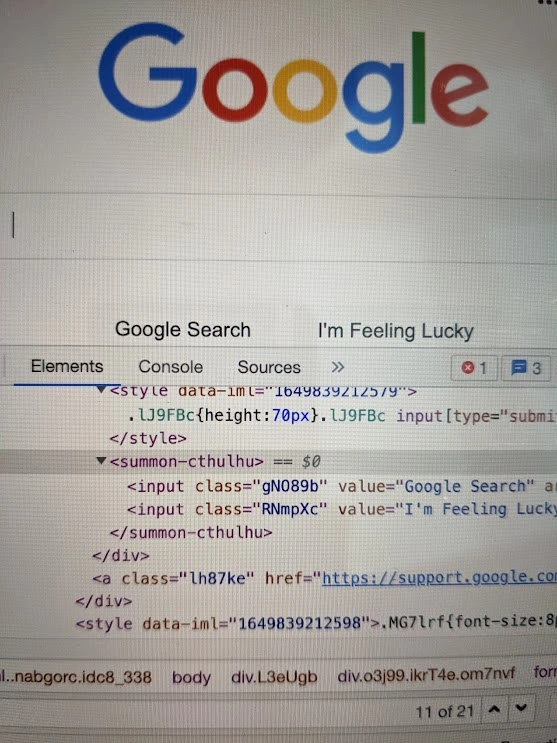
In the normal Google homepage DOM, there’s usually a <form> or some container around those two big buttons (“Google Search” and “I’m Feeling Lucky”). But the developer here has used DevTools to edit the HTML on the fly. They changed that container into a custom tag named <summon-cthulhu>. This tag is not something that Google put there – it’s a made-up element name the person manually inserted as a prank. Browsers actually allow this: if an HTML tag is not recognized, the browser doesn’t crash or anything; it just treats it as a plain container. In modern web development, we even have a concept of custom elements (via Web Components) where developers can define new HTML tags with specific behavior. But in this case, the <summon-cthulhu> tag isn’t actually defined by any code – it’s just a random name, so it doesn’t do anything special except exist as a wrapper.

Why choose the name “summon-cthulhu”? Well, Cthulhu is a fictional giant sea monster/god from H.P. Lovecraft’s horror stories, often used jokingly by nerds and programmers to represent something ominous, chaotic, or monstrous. By naming the HTML tag after a monster-summoning ritual, the developer is being playfully dramatic. It’s as if they’re saying, “I’m performing a dark magic ritual on the Google page!” – entirely for humor. The content inside that tag – the two <input> elements for the buttons – are unchanged (apart from now being children of this fun new tag). You can see each input has a weird class name like "gNO89b" or "RNmpXc". Those are the actual classes from Google’s site (Google’s front-end code often uses auto-generated class names that look like gibberish). The developer didn’t change those; they only changed the surrounding tag.

This kind of live DOM editing is something many developers do either for serious reasons or just for fun. On the serious side, you might use DevTools to test how a color or layout change looks instantly, or to debug issues by editing elements and seeing what happens. On the fun side, people sometimes use “Inspect Element” (the action of opening DevTools and editing a page) to, say, change a headline on a news site as a joke, or to modify text before taking a screenshot (for example, making a fake tweet or altering a website to prank a friend). It’s important to note these changes are purely local – only you see them, and they disappear on refresh. You’re not actually hacking the real website; you’re just changing your copy of it in the browser.

In this meme, the frontend developer was likely a bit bored and decided to inject some humor into an otherwise plain page. Because the Google homepage is so minimal, it’s a prime target for this kind of silliness – any little change stands out. By inserting a “forbidden” or unexpected element (<summon-cthulhu> sounds like a spell), they turned the ordinary search page into a private joke. It’s a harmless Developer Humor moment: no users are affected, nothing is permanently altered, but the dev gets a laugh. And it also showcases how powerful our developer tools are nowadays as part of modern developer experience. With just a few clicks, you can play around with the building blocks of a page right in the browser.

So, in summary: Chrome DevTools allowed the developer to open up the page’s internals and write a funny, made-up HTML tag (summon-cthulhu) around Google’s search buttons. This didn’t break the site – browsers are fine with unknown tags. It’s all done in good fun, mixing a bit of nerdy horror-fiction reference with everyday web tinkering. If you’re a newer developer, don’t worry – this isn’t some advanced coding technique, it’s more like a creative detour. In fact, you might have already done something similar (like changing the text on a site just to see the effect). It’s essentially playing in the sandbox of your browser, a testament to how interactive and malleable the web platform can be when you have the right tools. Just remember, summoning actual monsters through code? Not supported… yet! 😉

Level 3: Eldritch DevTools Ritual

The Google homepage is famously simple, but here a bored developer has turned it into an arcane playground. In the screenshot, Chrome DevTools is open, showing the page’s DOM (Document Object Model) structure. The usual search form container has been cheekily replaced with an HTML element that definitely isn’t standard: <summon-cthulhu>. Yes, the dev literally edited the live page to include a custom tag invoking Cthulhu, the mythical Lovecraftian monster. This is senior-level irreverence at its finest – taking a mundane page and adding a dash of cosmic horror, just because you can.

From a technical perspective, this works because modern browsers are surprisingly flexible. HTML5 parsers will accept unknown tags without flinching. In fact, behind the scenes the browser treats <summon-cthulhu> as an HTMLUnknownElement – basically a generic element with no special behavior. It’s part of the design of HTML and web development that introducing a new tag won’t explode the page. This tolerance was intentional: it allows forward compatibility (so older browsers don’t choke on newer tags) and enables Web Components (developers can define custom elements with their own behavior). In our case, no custom behavior is defined – the tag is just an empty shell, a fun wrapper around the normal buttons. The page didn’t sprout tentacles because, thankfully, nothing in Google’s code knows what to do with a summon-cthulhu element (and no actual ancient gods were listening in the event loop).

If you look closely at the DevTools panel, you’ll see the two familiar buttons inside this spooky tag: the "Google Search" and "I'm Feeling Lucky" inputs. Their classes (gNO89b and RNmpXc) are those obfuscated class names Google uses in production – likely auto-generated by Google’s frontend build for minimal download size or just to discourage tinkering. That gives the whole thing a professional absurdity: real production code (with cryptic classes and inline styles) now enclosed in a tongue-in-cheek custom HTML element. It’s like seeing a serious news article suddenly framed in a meme font. The elements tab even shows the custom tag highlighted as the selected node (== $0 in Chrome DevTools means the current selected element), emphasizing that the dev is literally poking at the live site’s structure.

Why is this so relatable to seasoned developers? Because many of us have done something similar! Using Browser DevTools to live-edit a webpage is a rite of passage and a guilty pleasure. Maybe you tweak CSS to see a different layout, or change some text on a site just to joke with a coworker (“Look, the headline now says we tragically ran out of coffee!”). In serious work, DevTools let you debug and test UI changes instantly, which is a huge boost to Developer Experience (DX). But in unserious moments, that same power becomes a sandbox for silliness. Here, instead of the usual trivial edits, the developer went for an over-the-top joke – summoning an elder god via HTML. It’s hilariously overkill: the Google homepage is practically the holy ground of minimal design, and our bored dev introduced a forbidden ritual in its code. It doesn’t break anything (the site remains visually the same unless you open the inspector), but it injects a bit of dark humor into the mundane. In a way, it’s poking fun at how frontend devs sometimes feel like wizards chanting incantations (frameworks, build tools, weird CSS hacks) to make things work – here the “incantation” is just more literal (and Lovecraftian!).

And let’s not ignore the cheeky meta-commentary: “summoning Cthulhu” on Google’s homepage might also imply “I’m so bored I’m willing to unleash unspeakable horrors just to spice things up.” 😄 It’s a playful exaggeration of how a quiet day in web development might lead to ridiculous experiments. No production servers were harmed in the making of this meme – it’s all client-side, visible only to the prankster. Refresh the page, and Google’s pristine DOM returns, Cthulhu banished back to the depths. But for that brief moment, one developer’s DevTools fiddling turned a boring afternoon into a cosmic chuckle.

<!-- A glimpse at the modified DOM: the developer's prank in code -->
<summon-cthulhu>
  <input class="gNO89b" value="Google Search" type="submit">
  <input class="RNmpXc" value="I'm Feeling Lucky" type="submit">
</summon-cthulhu>

(Above: Normally these inputs sit in a <form> or a <div>. Here, our mischievous dev gave them an unholy parent element for fun.)

In summary, this meme strikes a chord with developers because it combines technical savvy with whimsical rebellion. It’s the frontend humor of bending the rules (harmlessly) and adding your own creative twist to a page everyone knows. Seasoned devs chuckle because they’ve been there – maybe not summoning ancient gods, but definitely using DevTools as a personal playground when the coding gets slow. After all, why just "Inspect Element" when you can Inspect Eldritch Element? 🔮

Description

The photo shows the Google home page in a browser, with the colorful "Google" logo at the top and the familiar search bar beneath it. Chrome DevTools is open in the lower half of the screen on the "Elements" tab, revealing the live DOM tree. Inside the markup, the usual form wrapper has been cheekily replaced by a custom tag that reads <summon-cthulhu> … </summon-cthulhu>, enclosing the two input buttons whose values are "Google Search" and "I'm Feeling Lucky". All other code - classes like gNO89b and RNmpXc, style blocks specifying .LJ9FBc{height:70px}, and the “Elements / Console / Sources” tab headers - is rendered in the standard monospace font and syntax-highlighted colors of DevTools. The image captures that universal developer pastime of poking at production sites with live DOM edits, highlighting the intersection of web-component freedom and senior-level irreverence

Comments

6
Anonymous ★ Top Pick Proof that when a senior dev says they’re just adding a custom element, you should probably check the eldritch API surface - Custom Elements v666 ships with unspeakable side effects
  1. Anonymous ★ Top Pick

    Proof that when a senior dev says they’re just adding a custom element, you should probably check the eldritch API surface - Custom Elements v666 ships with unspeakable side effects

  2. Anonymous

    Opening DevTools on Google's homepage to discover they use the same unreadable class names as the rest of us, except theirs actually make it to production and handle 8 billion searches a day

  3. Anonymous

    Ah yes, the legendary <summon-cthulhu> element - Google's most powerful custom web component. While mere mortals struggle with semantic HTML like <button> or <input>, Google engineers have transcended to eldritch naming conventions. The button's class names 'gNO89b' and 'RNmpXc' aren't just minified - they're the result of a build process that sacrifices readability to the Old Ones in exchange for 0.3ms faster page loads. And honestly, after debugging production issues at 3 AM, summoning Cthulhu feels like a reasonable escalation path

  4. Anonymous

    When analytics beacons, cookie banners, and feature flags race the render thread, the only deterministic orchestration primitive left is a custom element called <summon-cthulhu>

  5. Anonymous

    Scraping Google? You're 'feeling lucky' only if your CSS selector survives the next deploy

  6. Anonymous

    Nothing says Web Components at scale like wrapping Google’s buttons in <summon-cthulhu> - meets the hyphen rule, passes the demo, and keeps SLOs safe right up until refresh

Use J and K for navigation