The Phantom Error: A Debugging Horror Story
Why is this Debugging Troubleshooting meme funny?
Level 1: Missing Page Panic
Imagine you have a little storybook that’s only 43 pages long. Now picture your teacher or friend says, “There’s a mistake on page 57 – go check it.” You flip through the book, but wait… it ends at page 43. Page 57 doesn’t even exist! You’d probably be really confused, right? You might double-check the book, count the pages again, or see if you have the right book. You’d feel a bit panicked, like “What are they talking about? Did pages get lost or magically disappear?”
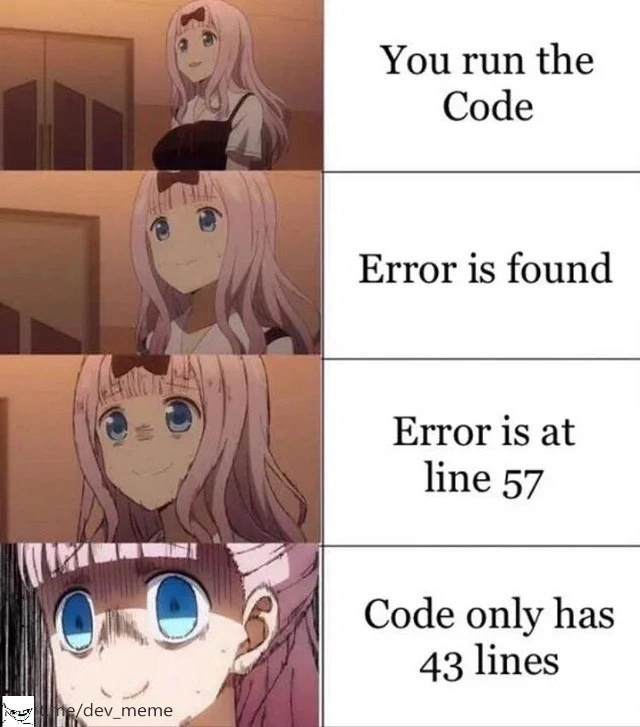
That’s exactly the feeling this meme is showing for a programmer. The computer is telling them there’s an error on a line of code that isn’t there at all – like a ghost line. The pink-haired anime character starts off calm when everything is normal (running the code), then looks concerned when there’s an error, then more worried when told the error is on “line 57,” and finally utterly shocked when they realize their code file has only 43 lines. It’s the same as our book example: the poor programmer is thinking “Line 57?? But my code only goes up to line 43!” Their face in the last panel is pure panic and confusion because they don’t know where to find this mysterious mistake.
It’s funny in a silly way: computers are usually very exact and logical, so seeing an error point to something that can’t be is like the computer is doing a practical joke. It’s as if you were told to go to a classroom on the 57th floor of a building that only has 43 floors – you’d think either you heard wrong or the building plans are wrong. In real life, what’s happening is the programmer needs to figure out why the computer said “line 57.” But in the moment, it just feels impossible and a bit scary. We laugh at the meme because we understand that confused feeling and we know it’s a mix-up — kind of like a treasure map leading to a treasure that isn’t there. The humor comes from that over-the-top, “This can’t be happening!” reaction. Even if you’re not a coder, you can relate to being told something that seems completely nonsensical, and the meme exaggerates it in a fun, dramatic way.
Level 2: Missing Line Mystery
For a newer developer or someone not as familiar with debugging, let’s break down why “line 57” vs “43 lines of code” is such a spooky situation. When a program runs into a problem (a bug!), it often crashes or throws an error message. Along with that message, the system will output a stack trace. A stack trace is basically a report that tells you the sequence of function calls (the program’s call stack) leading to the error and, importantly, it usually includes the filename and line number where things went wrong. It’s like the computer saying: “I had an issue right here on this line of your code.” As a developer, you rely on that hint. Normally, you double-click the error, your editor takes you straight to say, line 57 in my_script.py, and you see the problematic code and fix it.
Now, imagine doing exactly that and… discovering your file doesn’t even GO to line 57! 😱 This is the “missing line” mystery the meme is dramatizing. The text “Code only has 43 lines” means when the developer opens the file my_script.py, it ends at line 43. There is no line 57 at all. Instantly, the question arises: “Did I open the right file? Is my editor broken? Is the error referencing the wrong thing?” It’s a moment of total confusion. The meme’s character goes from confident to anxious to full-on panic, which is relatable developer experience when you have no idea what the computer is talking about.
So how can this happen in real life? There are a few simpler explanations:
Hidden or Generated Code: Sometimes the code you write isn’t exactly the code that runs. For example, developers often use build tools or compilers that take their code and generate a slightly different (often bigger or optimized) version for the computer to actually execute. If an error happens in that generated code, the line number might refer to a generated file or combined file which has more lines than your original source file. It’s as if you wrote a 43-line recipe, but the kitchen combined it with other recipes into a 57-line mega-recipe – and the chef’s error report says “mistake on line 57.” Without realizing that combination happened, you’d be baffled looking at your 43-line original.
Minified Code Confusion: You might have heard of minified code. This is when we take code (especially in web development for JavaScript or CSS) and remove all the line breaks, extra spaces, and comments to make the file size smaller. The result is usually one very long line of code (or just a few lines). Developers do this to make websites load faster. However, minification can confuse error reporting. Suppose your original, nicely formatted code had an error on line 57, but after minification, the code is only 5 lines long in a single compressed file. If something crashes and there’s no helpful mapping, the error might still say “line 57” referring to the original format, but you open the minified file and it’s tiny — nowhere near 57 lines. Without context, you’d feel lost. This is why developers use source maps – a kind of translator file that helps map the minified code’s lines back to the original code’s lines. If the source map is missing or broken, the error messages become gibberish in terms of where to look. In our meme, the developer likely encountered this kind of scenario: the runtime gave an error line that doesn’t align with the source code file they’re checking. That’s prime DebuggingFrustration.
Simple Syntax Mistake: Sometimes the issue is more straightforward (and ironic). If your code has a syntax error like a missing parenthesis
)or a missing curly brace}, the parser (the part of the language that reads code) might reach the end-of-file expecting something that never comes. For example, in JavaScript if you forget a}to close a block, the interpreter goes all the way to the end of the file looking for it. It might then throw an error and often will report the error at the next line after the last one it read, effectively saying something like “Unexpected end of input at line 57” even though your file ended at line 43. The number 57 in this case is somewhat arbitrary or derived from internal counting – the key point is the program is basically telling you “I ran out of code while still expecting another closing brace, so I’m complaining just after your last line.” A newer programmer might be really mystified by that message (it’s not immediately clear that the real issue is a missing brace somewhere above, not anything at an actual line 57). The meme captures that WTF moment perfectly.Wrong File or Version: It’s also possible the error is legitimate but you’re simply looking at the wrong file version. Maybe the code ran a file that indeed had 57 lines, but you opened a similarly named file that has 43 lines. Or you updated your code but are running an older build by accident. This mix-up can happen especially in big projects. For a junior dev, the idea that the code you run might not match the code you see is a new (and scary) lesson. It teaches the importance of keeping builds and source in sync. In the meme, the shock suggests the developer did not expect any discrepancy – highlighting how unsettling it is to feel like “the computer must be wrong.”
In simpler terms, this meme is about debugging a very puzzling bug. The humor comes from the utter impossibility of the error location at first glance. It’s making fun of those times when a programmer is trying to fix a bug, and the tools that are supposed to help (like error messages with line numbers) instead make you even more confused. The tags like DebuggingFrustration and ErrorMessages really hit the nail on the head: the frustration is real when the error message itself seems buggy! It usually takes a bit of experience (or a helpful mentor) to realize “Ah, there’s nothing wrong with the editor or your eyesight – the issue lies in how the code was processed or an environment quirk.” Once you know that, you start checking for things like mismatched versions, build steps, or missing braces. But in that initial moment exemplified by the meme, a junior developer’s mind is blown: “How can line 57 exist when my code ends at 43?!” It’s equal parts terrifying and, in retrospect, comedic. After all, part of a programmer’s growth is learning that sometimes you’re not crazy – computers, or the complex setups around them, can indeed give seemingly nonsensical info. And then you learn to decipher those mysteries.
Level 3: Phantom Stacktrace Lines
At first glance, this meme is darkly hilarious to any seasoned developer. It captures a specific nightmare scenario: you run your code, get an error, check the stack trace for the file and line number... and discover the error points to line 57 even though your file only has 43 lines. The four-panel anime meme brilliantly escalates this horror: the character’s calm expression at “You run the code” turns to mild concern at “Error is found,” then growing alarm at “Error is at line 57,” and finally absolute panic at “Code only has 43 lines.” This progression mirrors a developer’s rising anxiety when a bug report doesn’t make logical sense. It’s a relatable blend of confusion and dread that prompts a knowing, if nervous, laugh.
Why would an error ever reference a non-existent line? Seasoned devs know this scenario usually means reality isn’t breaking down — rather, something in the build or debug process is off. There are several common causes for these phantom line numbers in error messages:
Compiled/Transpiled Code Mismatch: Modern build tools often transform your source code. For example, a JavaScript app might be bundled or transpiled (via tools like Babel or Webpack) into a single file that’s much larger than any one source file. If an error occurs in that bundled file at, say, line 57, but you’re looking at your original module that’s only 43 lines, you’ve got a mapping problem. Without the proper source maps (files that map the positions in the bundled/minified code back to the original code), the runtime errors and stack traces will point to the compiled code’s line numbers, leaving you scratching your head since your source file is shorter. In short, your program is actually running a slightly different version of the code than the one you’re eyeballing in the editor. Seasoned developers have learned to suspect the build pipeline or compiled artifacts when their error messages don’t line up with the source.
Minified Code Troubles: In web development, it’s common to minify JavaScript or CSS for production – meaning all the pretty formatting and line breaks are removed, often collapsing code into one giant line (to save bytes). Imagine your original
app.jsis nicely formatted with 100 lines, but the minifiedapp.min.jsis just 5 lines of dense code (or even one super-long line). If an exception occurs in the minified file, the line number in the error might refer to the minified file’s lines. It could say “error at line 57” ofapp.min.js, even thoughapp.min.jsmight have, say, only 10 physical lines after minification. Conversely, sometimes a tool might report the line number from the original source while you’re looking at minified output, or vice versa. Without the mapping context, it’s utterly confusing. This meme’s scenario screams DebuggingFrustration: you’ve hit a bug, but the clue (the line number) is practically useless or misleading without additional insight.Generated Code & Macros: In some languages (C/C++ for instance), you might use preprocessor macros or code generation techniques. These can insert or remove lines during compilation. A trivial example is including another file’s content or using a macro that expands into multiple lines of code. The compiler error messages typically try to point back to the original source, but in tricky cases (or with less helpful tooling) you might see an error reference that doesn’t cleanly map to your edited source file. For instance, an error might point to a line number that only exists in the expanded code after macro substitution. If your toolchain isn’t clear about it, you’re left bewildered, thinking “Line 57? But this file ends at line 43!” This stack_trace_confusion is the developer equivalent of seeing footprints that lead into a wall with no door – it seems impossible, prompting a double-take.
Off-by-One (or Fourteen) and Parser Quirks: The tag off_by_one_suspicion hints at another cute inside joke here. An off-by-one error is a classic bug where a boundary is mis-calculated by one (like iterating one too many or too few times). A panicked dev might momentarily wonder, “Is my text editor numbering lines from 0 instead of 1, or did I miscount?” But 57 vs 43 is way beyond a simple off-by-one; it’s a big discrepancy that screams a deeper issue. One common cause in scripting languages: missing closing syntax. For example, if you forget a closing bracket
}or a quote in languages like JavaScript, Python, or C, the interpreter/compiler might reach the end of the file and throw an error past the last line, essentially saying “I was expecting something (like a}) and hit the end of file unexpectedly.” The error might be reported at a line number beyond your file’s length because internally it’s as if the code “continued” in a phantom line looking for the closure. A Python example: leave an open triple-quote string and the interpreter might report an error at a line beyond the file as it never found the closing""". So the line number mismatch could be the compiler’s way of indicating “end-of-file” rather than an actual line in your source. It’s like the tool is guesstimating where the error context ends. If you don’t know this quirk, seeingSyntaxError at line 57when your file is 43 lines long is pure nightmare fuel.Stale or Mismatched Artifacts: Picture this: you run your program and it crashes, referencing a line that isn’t in your open file. A savvy old-timer will ask, “Are we sure the code running is the code we’re looking at?” Maybe you forgot to recompile after changes, so the program is actually running an older 57-line version of the code that still lingers in build output. Or perhaps you deployed the wrong build artifact. These BugsInSoftware aren’t in the code’s logic per se, but in the development process – a mix-up of versions. It’s an embarrassing but common scenario: you’re frantically examining the wrong code! The meme’s horror-face in the last panel could also represent the moment you realize you’ve been debugging the wrong file or an outdated copy. In large systems, one file might get duplicated or split, and an error might reference the unified line count while you’re staring at just one fragment.
All of this boils down to a shared developer experience: relatable confusion and debugging troubleshooting hell. The humor works because it’s so absurd on the surface — an error pointing to a non-existent line, as if the program is trolling you — yet it happens more often than we’d like. Every experienced developer has a war story of chasing a bug that turned out to be in a completely different place than where the system pointed them. The meme resonates especially with that “oh no…” feeling: first you’re concerned about a bug, then you see the line number and go through denial (“That can’t be right...”), then a dawning horror (“What on earth is going on?!”). It’s a mix of RuntimeErrors and reality glitches.
The last panel’s wide-eyed panic is something seniors know well: it usually precedes a deep dive into build configs, searching forums for cryptic compiler messages, or instrumenting the code with console.log/print statements in a desperate hunt. It’s funny after the fact – after you’ve solved it – but in the moment, having an error with an impossible reference is the stuff of debugging nightmares. As one might jokingly say, “Great, my code has spawned ghost lines now. Time to call an exorcist… or maybe check the minifier settings.” This meme encapsulates that exasperated laughter you have once you realize the bug was something like a missing source map or an outdated file. To sum up, the industry pattern being satirized here is that gap between what the tools tell us and what’s actually true – a gap often created by abstraction layers, build processes, and frankly, by us developers trying to be too clever (or too careless). And as every veteran knows, when the tools lie, your night just got a lot longer.
Description
A four-panel meme using the 'Chika Fujiwara's Subjective Feelings' anime format. Each panel on the left shows the pink-haired anime character Chika with a progressively more distressed expression, while the corresponding panel on the right contains a line of text. First panel: Chika is smiling calmly, text: 'You run the Code'. Second panel: Chika looks slightly concerned, text: 'Error is found'. Third panel: Chika appears worried and is sweating, text: 'Error is at line 57'. Fourth panel: Chika has a look of pure terror with wide, shocked blue eyes, text: 'Code only has 43 lines'. The meme humorously captures the sheer panic a developer feels when a stack trace points to a line number that does not exist in the source file they are looking at. This absurd situation immediately signals a much deeper, more complex problem than a simple runtime error, often involving broken source maps, issues with transpiled or bundled code, errors in a hidden dependency, or a complete environment mismatch. It's a relatable moment of dread when a quick fix turns into a deep investigation
Comments
7Comment deleted
When the error is on line 57 of a 43-line file, you're no longer debugging your application code. You're now debugging the entire JavaScript ecosystem, starting with your webpack config's sourcemap settings
When the stack trace swears the NPE is on line 57 of a 43-line file, you realize you’re no longer debugging code - you’re debugging the build graph, the sourcemap generator, and every life choice that led you to ship transpiled code before coffee
The webpack bundle is 47MB, the source map is corrupted, and somewhere between your TypeScript decorators and Babel plugins, line 57 exists in a quantum superposition that only the JavaScript engine can observe
Ah yes, the classic Schrödinger's line number - simultaneously existing and not existing until you check the source map. This usually means your transpiler is having an existential crisis, your bundler forgot to include proper source maps, or you're debugging minified production code at 2 AM. Senior engineers know this feeling well: it's the moment you realize you're not debugging your code anymore, you're debugging the entire build pipeline. The real error is always in the webpack config
Stack trace says line 57 in a 43‑line file - classic sign you’re debugging the toolchain: stale artifacts, broken source maps, or an unsaved buffer - the enterprise edition of off‑by‑one
When the stack trace points to line 57 in a 43‑line file, you’re not debugging your code - you’re debugging the Babel/Webpack/coverage pipeline; source maps on, weekend off
Preprocessor's cruel joke: your tidy 43 lines balloon to 57 after includes, but only the error knows the full novel