Skip to content
DevMeme
1248 of 7435
When the IDE's Auto-Format Feature Betrays You
IDEs Editors Post #1393, on Apr 26, 2020 in TG

When the IDE's Auto-Format Feature Betrays You

Why is this IDEs Editors meme funny?

Level 1: When Helping Hurts

Imagine you’re building a tall tower out of LEGO blocks, and you notice one block is a bit out of place near the bottom. You ask a helpful friend (or a robot helper) to fix that one block for you. They push or twist that block to straighten it – but uh-oh – in the process they shake the tower and 50 other blocks fall off the structure! Now the tower is in worse shape than before. You’d look at your friend and say, “Hold on, fixing that was your idea… what happened?!” You trusted them to help, but their help accidentally made a bigger mess. That’s exactly the feeling of this meme. The “IDE auto-format” is like that well-intentioned friend or gadget meant to help clean up one little mistake in your code (your tower). Instead, it accidentally caused a lot more things to go wrong (lots of pieces fell off, or in code terms, many new errors appeared). It’s funny in the way spilling a tiny drop of paint and then watching it turn into a huge stain is funny – only after you’ve cleaned it up, of course. The meme makes us laugh because we’ve all had moments where trying to fix a small problem ended up making things much more complicated. It’s a playful reminder: sometimes a quick fix isn’t so quick, and even our trusty tools can backfire and leave us feeling betrayed, just like poor Anakin in that picture.

Level 2: Format Feature Fumble

Stepping back to basics: an IDE (Integrated Development Environment) is the software developers use to write code (think Visual Studio, IntelliJ, VS Code, etc.). These IDEs often have an auto-format or auto-correct feature. Code formatting means automatically adjusting the layout of your code – things like indentation, line breaks, brace positioning, or even adding missing punctuation like commas or semicolons – to make the code neat or conform to style guidelines. For example, if you’ve ever used Microsoft Word’s auto-correct, it fixes typos as you type; similarly, an IDE can fix simple code issues or styling as you write. Now, the meme text says:

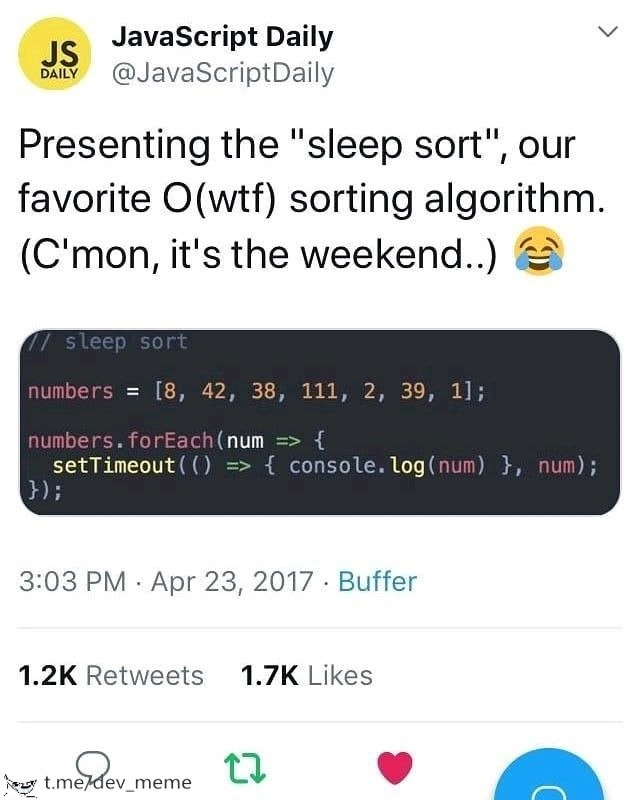
Me: uses IDE auto-format feature to fix error in code
code: gets 50 more errors
Me: [shocked Pikachu face, essentially]

What’s happening here is the developer (Me) had one error in the code. Maybe it was a minor syntax mistake like a missing curly brace { in Java or an extra indent in Python. They clicked the IDE’s auto-format hoping it would tidy things up and resolve that error. But instead, the code suddenly shows 50 new errors. This often happens because the initial error was hiding or causing confusion about the code’s structure. When the auto-format tried to fix it, it possibly moved code around or inserted something that then caused many parts of the code to break the rules.

For instance, imagine you have an HTML file and you forgot a </div> closing tag somewhere. An editor’s auto-format might try to help by adding a closing tag where it guesses the block should end. If it guesses wrong, now many subsequent elements might be incorrectly nested, leading to a ton of new “unclosed tag” errors. Or in a JavaScript file, suppose you had a trailing comma in an object literal that wasn’t allowed – the formatter removes it, but in doing so maybe it also reflows the object in a single line or changes quote styles, and suddenly your linter throws errors on every line of that object for not matching the project style. Those “50 errors” could be compiler errors or linter warnings (the meme says “compiler or linter explode” – a linter is a tool that checks code for stylistic or certain logical issues).

To a newer developer, this is a heart-stopper: “I pressed the fix button, and now EVERYTHING is red and broken!” It feels like you triggered a trap. In reality, the auto-format is usually doing exactly what it’s programmed to do – it’s just that your code had some fragile spots. In a learning moment, you find out that one small error (like a missing brace) can confuse the IDE about where things begin and end, so its fix ended up misaligning large sections of code. Debugging then becomes untangling not just the original error, but all the consequences of the “fix.” No wonder the developer in the meme looks at the code (personified by Anakin) in disbelief. The categories like IDEs/Editors, Bugs, Debugging_Troubleshooting, CodeQuality all hint that this is about the tools we use in coding and how they can sometimes create hilarious bugs or at least big headaches when trying to maintain code quality. It’s a lesson many of us learn early: use auto-formatters with care, and always double-check what they change!

Level 3: Quick Fix Quagmire

On a more practical level, this meme captures a scenario every seasoned developer finds painfully relatable: you hit that shiny “auto-format” or “quick fix” shortcut in your IDE, hoping to resolve a trivial issue, and suddenly your codebase lights up like a Christmas tree with error markers. The humor comes from this exaggerated backfire. It’s riffing on the idea of a “simple fix” spiraling out of control – a known anti-pattern in debugging and code maintenance. Experienced engineers have learned (often the hard way) that blindly trusting automated fixes can lead to a quagmire of new issues. Why does this happen? Real-world code isn’t always neat and pristine; there might be legacy quirks or half-written sections. The IDE’s formatter operates with a generic idea of how code should be structured. If your code was in a delicate state (say, an unclosed tag, an unmatched brace, or some half-typed expression), the formatter’s “fix” might re-indent or rearrange code in a way that exposes all those latent problems that were previously lurking unnoticed. It’s like shining a floodlight on your code – every little mistake or inconsistency stands out glaringly.

This is often seen with strict linters and code style rules: for example, you apply an auto-format in JavaScript using Prettier to fix one missing comma, and it also re-orders your imports, splits long lines, and adds semicolons everywhere. Next thing you know, your ESLint config or CI pipeline complains about 50 new violations (“unused variable here, line too long there, import/order rule broken everywhere…”). Or consider a C++ codebase where a quick auto-format after fixing one brace causes your #include lines to be rearranged, now the code can’t find certain symbols or has macro redefinition errors – boom, dozens of compiler errors. Senior developers joke about this because we’ve all been in that “it was supposed to be one little fix!” situation. The meme’s Star Wars image nails the feeling: Obi-Wan (the developer) gave the go-ahead for this “operation” (the auto-format), and Anakin (the code) turns around accusingly with “Hold on. This whole operation was your idea.” It’s a playful way to say the developer feels betrayed by their own tool or decision. In reality, it’s less the tool being malicious and more the developer underestimating the complexity of the change. This ties into a broader engineering truth: seemingly simple fixes can unravel hidden complexities. The auto-format feature, meant to improve code quality, ironically becomes the instigator of a debugging marathon. It’s a classic case of developer frustration where the helper that was supposed to save time ends up costing more time – something that often gets a knowing, rueful laugh in programming circles.

Level 4: The AST Strikes Back

In the deepest technical trenches of this meme lies the IDE auto-format feature’s battle with code structure. Modern IDEs parse your source code into an Abstract Syntax Tree (AST) – a hierarchical representation of your program’s structure – to intelligently reformat it. Why is this relevant? Because when your code has a minor syntax error (say a missing brace or semicolon), the AST is essentially broken. The auto-formatter then tries to auto-correct or pretty-print the code by guessing the intended structure. This is like a mini-compiler attempting error recovery: the formatter might implicitly insert a bracket where it thinks one belongs or re-indent code based on an assumed block structure. But if its guess is off by even a little, the resulting code can violate language grammar in dozens of places. What began as a single error cascades into a chain reaction of new parse errors.

Under the hood, most formatters strive for idempotence (formatting twice shouldn’t change anything the second time). However, idempotence assumes the code was syntactically valid to start with. With a broken AST, an auto-format is operating in a partially undefined state. The formatter’s output might introduce misplacements: an extra curly brace closing too early, a code block shifted outside its if statement, or variables now outside their scope. Each of these is a fresh compiler error. It’s analogous to a compiler’s error recovery mechanism – a single missing semicolon in C can make the parser think the rest of the file is one giant malformed statement, yielding a flood of errors. The meme humorously amplifies this effect: the IDE “fixes” one error and unleashes 50 new ones, as if the AST itself struck back out of spite. In essence, the deep technical joke is about the unforgiving nature of formal grammars and tooling: one tiny syntax mistake or misguided automated fix can destabilize the entire parse tree, leading to an explosion of compiler complaints. The core betrayal is rooted in these fundamental principles of compilers and language design – your tool betrayed you not out of malice, but because formal syntax rules are a harsh master.

Description

A two-part meme. The top section contains text describing a scenario: 'Me: *uses IDE auto-format feature to fix error in code*'. This is followed by 'code: *gets 50 more errors*', and finally 'Me:'. The bottom section is a screenshot from the movie Star Wars: Episode III - Revenge of the Sith, featuring Anakin Skywalker looking accusingly at Obi-Wan Kenobi. The subtitle reads, 'Hold on. This whole operation was your idea.' The meme humorously captures a common developer frustration: trusting an automated tool, like an IDE's code formatter, to solve a problem, only to have it create a much bigger one. The tool's attempt to 'fix' the code results in a cascade of new errors, and the developer, like Anakin, blames the tool that presented the 'solution' in the first place. It’s a relatable jab at the sometimes-unhelpful nature of aggressive linters and formatters
Comments

7
Anonymous ★ Top Pick That's the face you make when Prettier and ESLint get into a fight and your codebase is the collateral damage. You hit save, and suddenly your valid code becomes a Jackson Pollock painting of red squiggly lines
  1. Anonymous ★ Top Pick

    That's the face you make when Prettier and ESLint get into a fight and your codebase is the collateral damage. You hit save, and suddenly your valid code becomes a Jackson Pollock painting of red squiggly lines

  2. Anonymous

    Asked clang-format to fix one wayward brace; it rewrote half the monorepo, invalidated git blame, and lit up every CI stage - hold on, tool, this outage was your idea

  3. Anonymous

    The auto-formatter is just enforcing the linter config someone committed six months ago without reading, which enforces the style guide written by that architect who left three years ago, which was based on a Medium article about Google's best practices from 2015

  4. Anonymous

    Ah yes, the classic IDE auto-format paradox: you run Prettier to fix one missing semicolon, and suddenly your entire codebase is screaming about line length violations, trailing commas, and import order conflicts. It's like asking your linter to organize your desk and coming back to find it's rearranged your entire office according to the Airbnb style guide - technically correct, but now nothing compiles and your CI pipeline is redder than a Sith lightsaber. The real kicker? The original error was just a typo in a comment

  5. Anonymous

    Format on Save: where one missing brace becomes a distributed incident - Prettier vs ESLint vs EditorConfig, 50 warnings-as-errors, and a red CI

  6. Anonymous

    Auto-format on broken syntax: the only tool that assumes your code is valid, then proves exponential growth theorems on error counts

  7. Anonymous

    Auto‑format didn’t break your code; CI finally enforced twelve conflicting style rules (Prettier+ESLint+tsc --strict) you approved in last quarter’s DX initiative

Use J and K for navigation