The Inevitable Funeral for 4GB of RAM
Why is this Hardware meme funny?
Level 1: Too Many Friends, Too Small Car
Imagine you have a really small toy car that can only carry one little action figure. Now, what if four big action figures – let’s call them Andy (Android Studio), Phoebe (Photoshop), Google (Chrome), and Vicky (Visual Studio) – all try to ride in that tiny car at the same time? The car would break or stop moving because it’s carrying way too much weight, right? In this story, the tiny car is like a computer’s memory (4 GB is like a small amount of space for working), and the four big action figures are like heavy programs that need a lot of that space to run. When all four jump onto the little car, the car can’t handle it – it’s as if the car “dies.”
Now picture something funny: those four big action figures wanted to go for a ride, but after overloading the car, they end up having to carry the broken car away. And they aren’t sad about it – they’re actually dancing and smiling as they carry it off, as if they’re saying “Hooray, we broke the car!” That’s essentially what the meme shows: the four programs happily carrying a coffin with the computer’s small memory inside, like they’re at a silly party instead of a sad funeral.
Why is this funny (in a goofy way)? Normally, if a car breaks because it’s overloaded, it’s a bad thing and people would be upset. But here we imagine the big riders actually celebrating that they overdid it. It’s a playful way to show how using too many big programs on a weak computer will “kill” its ability to work – and the joke is that the programs themselves are partying about it. It’s like if you packed your backpack way too full and it ripped apart, and then your books threw a party because the backpack ripped. It’s absurd and backwards – usually people get mad when a computer or backpack fails, not the stuff that caused it.
So in very simple terms: The meme is saying a small computer memory can’t handle too many big applications at once. Instead of explaining that in a serious way, it uses a funny dancing-at-a-funeral scene. The big applications are the dancers, and the thing that “died” is the computer’s 4 GB memory (which was just too small for them). It makes us laugh because it’s showing a frustrating situation (a slow, overwhelmed computer) in a silly, over-the-top way. Even if you’re not a computer expert, you know that if you try to do too much on an old or weak computer, it might crash or stop working well. This meme just personifies that idea: the poor computer’s memory worked so hard it collapsed, and the very apps that caused the trouble are cheerfully taking it to its grave. It’s a bit like a cartoon – exaggerated and ironic – which is why it’s amusing, especially to people who have experienced their computer freezing up on them.
Level 2: Meet the Memory Hogs
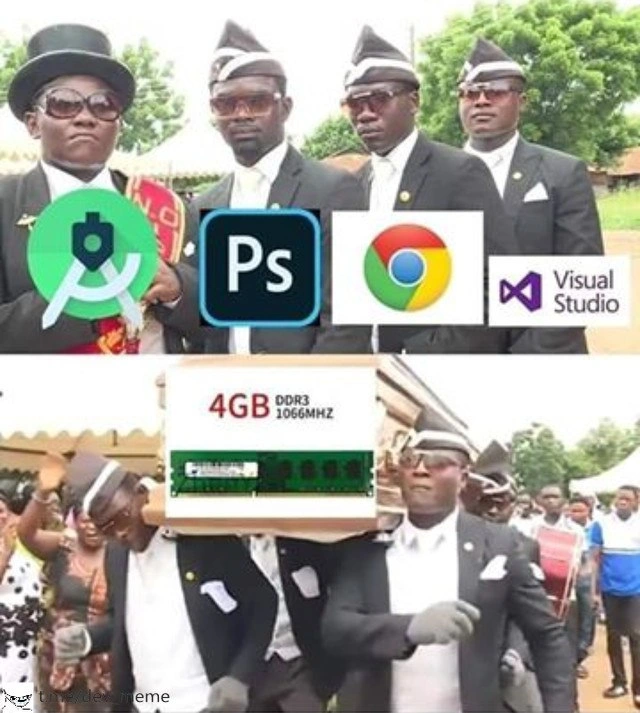
Let’s break down what’s happening in this meme in simple terms. The image shows a scene from a popular meme known as the “coffin dance.” In that original viral video, a group of pallbearers in Ghana dance jubilantly while carrying a coffin, implying a celebratory send-off at a funeral. In this meme, the coffin has “4 GB DDR3 1066MHz” written on it – that’s specifying a 4 gigabyte DDR3 RAM stick (DDR3 is an older type of computer memory, and 1066 MHz is its speed). The joke is that this 4 GB of RAM is “dead” or has “given up.” Carrying the coffin are four men whose suits have big icons pasted on them, representing four software programs: Android Studio, Adobe Photoshop (Ps), Google Chrome, and Microsoft Visual Studio. In the top part, they are standing serious (like a normal funeral), and in the bottom part they are dancing with the coffin (a humorous twist, as if celebrating the memory’s demise). Essentially, the meme artist is saying these four programs teamed up to kill the poor 4GB of memory, and now they’re dancing at its funeral.
Who are these “friends” on the pallbearer team, and why are they so notorious?
Google Chrome – Chrome is a web browser made by Google. It’s what you use to surf the web. Chrome is fast and popular, but it’s famously greedy with memory. Each open tab in Chrome uses a chunk of RAM. So if you open many tabs (or run web apps in it), the memory usage adds up quickly. People joke that Chrome can slow down your whole computer by consuming too much RAM, which is why it’s called a “RAM hog.”
Android Studio – This is an IDE (Integrated Development Environment) for making Android apps. Think of an IDE as a super advanced text editor for coding that also compiles your code, debugs, etc. Android Studio has a lot of features: code suggestions, a phone emulator, layout designers, and so on. All those features mean it runs a lot of processes in the background. It’s built on Java, which by itself can use a lot of memory, and if you run an Android emulator (a virtual phone on your computer for testing apps), that can use even more memory. So Android Studio is known to be quite heavy on systems with low RAM. Many junior developers are surprised at how slow their laptop gets when they first fire up Android Studio on a machine with limited specs.
Adobe Photoshop – Photoshop is a professional image editing program. If you’ve ever edited photos or images with many layers or high resolution, you might have used Photoshop. It’s powerful, but it uses a lot of memory, especially when working on big images (think of multiple layers, effects, history undo steps – all of that is stored in RAM while you edit). Photoshop even has its own setting for how much memory it can use because it expects to use hundreds or thousands of megabytes. On a machine with only 4 GB, a large Photoshop project can eat up most of that by itself.
Microsoft Visual Studio – Not to be confused with Visual Studio Code (a lighter editor), this is Microsoft’s full-fledged IDE primarily for developing Windows applications (.NET, C++, etc.). It’s been around for a long time and is packed with features: designers for building GUIs, code analyzers, debuggers, you name it. Over the years, Visual Studio has gotten pretty large. When you open a sizable solution (a collection of projects), Visual Studio loads a lot into memory: all the symbols, the code index for IntelliSense (auto-complete suggestions), possibly runtime tools. It’s not uncommon for Visual Studio to use over a gigabyte of RAM when working on a big project. On a low-end machine, just opening Visual Studio can already consume a big chunk of available memory.
So all four of these programs are what we’d call resource-hungry or memory-intensive. A common term developers use is “memory hog” – like a hog (pig) that eats a lot, a memory hog is a program that gobbles up a lot of RAM. Running even one of them on a 4GB RAM machine can be sluggish. Running all of them together? That’s asking for trouble. Your system will likely start chugging. Here’s what typically happens on a 4 GB system: as you open these apps, they start filling up the RAM. 4 GB (gigabytes) of RAM means 4096 MB (megabytes) roughly. Chrome with a few tabs might use, say, 800 MB to 1 GB by itself. Android Studio could take 1.5 GB or more (especially with an emulator running). Photoshop might grab another few hundred MB to a GB if you load a big file. Visual Studio could take several hundred MB to 1 GB depending on what you’ve loaded. If you add those rough numbers, you’re way beyond 4096 MB – the poor computer simply doesn’t have enough physical memory for all that.
When RAM runs out, the computer doesn’t just give up immediately; it performs a juggling act called virtual memory management. It will start moving some information from RAM to the hard drive or SSD, using a special space often called the swap file or page file. This frees up some RAM for the active tasks but uses your disk as an overflow. The problem is, the disk (especially if it’s an older hard disk drive) is much slower than RAM. Imagine having to use a slow notepad when you run out of quick sticky-notes – it takes longer to read/write. So as soon as the system starts heavy swapping, things slow down drastically. The cursor might lag, windows might freeze for seconds, and everything feels sluggish. This is a classic performance issue when you have limited hardware and resource-hungry tools: the computer is technically still working, but it’s now extremely slow, almost unusable. In some cases, programs might even crash or get forcibly closed by the system if memory runs critically low. For example, Windows might pop up a “Your system is low on memory” alert suggesting you close apps, or Linux might invoke the OOM killer to terminate a process. For the user (especially a developer trying to get work done), this is super frustrating – you might lose unsaved work or just waste a lot of time waiting. This frustration of the computer grinding to a halt is a well-known developer pain point.
Now, the meme makes light of this painful scenario. It imagines these four applications as if they are happily carrying the “body” of the 4GB RAM to a grave. In other words, they killed the RAM by exhausting it, and now they’re dancing because they succeeded (the irony!). The text caption, “When your 4 GB RAM laptop meets Chrome, Android Studio and friends,” is basically saying: when a laptop with only 4GB of memory tries to handle Chrome and Android Studio and others simultaneously, the RAM dies. The “friends” part is tongue-in-cheek – these software are not very friendly to low memory at all, but developers often joke about how our most-used tools betray our machines. It’s a form of hardware humor among tech folks. We personify the programs and the RAM: the programs are like gluttonous friends who ate all the food (memory), and the poor RAM is the victim suffering a “death by overwork.”
For a newer developer or someone not familiar with these specific tools, it’s useful to know this is a shared joke in the dev community. Modern IDEs/editors like Android Studio and Visual Studio, as well as browsers and creative software, are amazing in what they can do, but they demand a lot from your computer. 4 GB of RAM is considered a low amount for such tasks nowadays. Most developers would recommend at least 8 GB, often 16 GB, for a smooth experience with these tools. The mention of DDR3 1066MHz highlights that this is older, slower memory (DDR3 was common around 2010; by 2020, new PCs use DDR4 or DDR5 memory which is faster and usually people have more of it). It’s emphasizing that the laptop in question is not just low on capacity, but also using an older generation of RAM – a double whammy for performance. So, in simpler terms: the laptop is outmatched by the software. Chrome, Android Studio, Photoshop, and Visual Studio are heavyweight champs, and a 4GB DDR3 laptop is like a lightweight fighter – it doesn’t stand a chance in this bout.
The meme uses the coffin dance to add that extra flair of dark humor. In internet culture, when something “dies” (like a video game character, a joke, or in this case a computer’s capability), people sometimes jokingly overlay the coffin dance music or imagery to say “farewell” in a playful way. Here, it’s your RAM that’s died, and the culprits (the apps) are literally carrying it away. Even the onlookers in the background of the bottom image are celebrating – that’s directly from the coffin dance video, where the mood is oddly joyful. It’s a funny contrast: in reality, when your computer starts swapping and lagging, you’re not joyful – you’re groaning in frustration. But the meme flips it to a celebration of the inevitable, which is what makes it so humorous. It’s basically a fun way of saying “RIP 4GB RAM, you tried your best, but these apps overwhelmed you.”
So, to sum up at this level: this meme is highlighting a developer struggle in a humorous way. Limited memory (4 GB) vs memory-hungry programs is a mismatch that leads to the computer slowing to a crawl or “dying.” It’s depicted as a funeral (coffin and pallbearers) because the RAM effectively “died” due to the overload. The pallbearers are the very programs that caused the problem, depicted as if they’re gleefully dancing with the evidence of their crime. For anyone who has dealt with a slow computer, it’s a relatable scenario – you might not know whether to laugh or cry when your machine freezes, and this meme chooses laughter (at the RAM’s expense).
Level 3: Bloatware Funeral March
If you’ve ever tried to do serious development or design work on a machine with just 4 GB of RAM, this meme probably hits home hard. It combines the infamous Ghanaian coffin dance meme (where pallbearers dance with a coffin, celebrating a not-so-sad demise) with the reality of modern software bloat. In the top frame, we see four solemn pallbearers, each labeled with a heavyweight application logo: Android Studio, Adobe Photoshop (Ps), Google Chrome, and Microsoft Visual Studio. In the bottom frame, the same quartet is joyfully dancing with a coffin that has “4 GB DDR3 1066MHz” emblazoned on the side along with a picture of a RAM stick. The humor is immediately clear to any seasoned developer: these four applications are notorious memory hogs, and together they’ve effectively killed the 4GB RAM – sending it off to the afterlife with a triumphant shuffle. It’s a hilarious (if painful) exaggeration of a common developer experience (DX) problem: your hardware simply can’t keep up with the bloated performance requirements of modern tooling, leading to a metaphorical funeral for your system’s responsiveness.
Why is this so funny and resonant in dev circles? Because it’s true. Google Chrome has a well-earned reputation for devouring RAM. Open a handful of tabs and you’ll see your memory usage shoot up; open twenty tabs and your machine might start lagging as Chrome sprawls out, each tab a separate process feasting on memory. There’s a running joke that “Chrome is essentially an operating system disguised as a browser” because it’ll use as much memory as you let it, caching aggressively to stay snappy. Then there’s Android Studio, which every Android developer knows is a beast. It’s built on a Java IDE platform and tends to gobble up a couple of gigabytes easily, especially when indexing a project or running an emulator. You might start it up and watch your RAM usage bar climb steadily. Adobe Photoshop is the go-to image editing tool for designers, and it’s similarly heavy – dealing with large images, multiple layers, and history states means it keeps tons of data in memory for quick access. If you’ve ever loaded a big PSD file, you’ve probably seen Photoshop’s memory usage balloon. And Visual Studio (the full IDE for C#/C++ and more) is an old-school giant of an IDE. It’s feature-rich to the brim – which also means it’s heavy. It opens slowly, it loads entire frameworks into memory, and with larger solutions it isn’t shy about consuming resources for things like IntelliSense (code auto-completion and analysis), designers, runtime libraries, etc. In fact, back in the day, running Visual Studio and something like SQL Server together on a low-RAM machine was a recipe for constant disk thrash and frustration. Each of these programs alone can push a low-memory system to its knees; together, they’re the Four Horsemen of the RAM-pocalypse for a 4GB laptop.
This meme pokes fun at that exact developer pain point. The “friends” in the title – Chrome, Android Studio & co. – are ironically the very apps that will betray your modest laptop. It’s the kind of dark humor you develop after experiencing one too many tooling frustration moments, like when your laptop freezes during a critical demo because you had an IDE open alongside a browser and maybe Slack or Photoshop. Seeing those app icons as dancing pallbearers is basically saying, “Yup, here lies your RAM, dead and buried, and these apps are cheerfully responsible.” The onlookers in the meme’s bottom half, clapping and celebrating, mirror how other developers might react – not that they’re happy your machine died, but they relate and find it comically relatable. We’ve all been there, watching our system crawl and thinking, “There goes my memory... RIP,” sometimes even joking that our computer is staging its own funeral when the fan starts howling and the hard drive light won’t stop blinking.
There’s also an implicit commentary on software bloat and modern expectations. A decade or two ago, 4 GB of RAM was a luxury – plenty for most tasks. DDR3 1066MHz was a decent spec around, say, 2009. But by 2020 (when this meme was posted), 4 GB had become the bare minimum for running even an operating system smoothly, let alone heavyweight apps. Developers frequently upgrade to 8, 16, or even 32 GB of RAM to keep up with tools like these. The meme captures that generational shift: what used to be sufficient memory is now laughably inadequate for current software. It’s both a joke and a little bit of a complaint – “Why do our tools need to be so memory-hungry?” But it’s a tongue-in-cheek complaint, because we also love the functionality and power these tools give us. It’s just ironic that to use them all at once, you need a machine with the memory of a small server. Performance tuning and memory management often fall by the wayside when average hardware spec increases, which is why Chrome, IDEs, and creative suites have been allowed to balloon in RAM usage. After all, if most developers have 16 GB, who is optimizing for 4 GB? Thus, those stuck on older or low-end machines feel the burn – literally sometimes, as the laptop’s CPU and disk heat up from all that swapping.
In summary, the meme is a perfect storm of DeveloperHumor and reality: it anthropomorphizes our applications as gleeful pallbearers dancing away with the coffin of our tiny 4GB RAM. It highlights a real performance bottleneck (limited memory) with a scene of dark celebration. Seasoned devs laugh (perhaps a bit ruefully) because they remember the times they tried to run a bulky IDE or keep Chrome open with dozens of tabs on insufficient RAM – the system grind, the inevitable crash or freeze, and maybe seeing the OS’s “low memory” warning acting as the eulogy. Hardware humor at its finest: you either upgrade your RAM or join the dance to mourn its demise. The meme’s brilliance is how it uses that viral coffin dance clip to encapsulate a shared tech frustration – it’s a farewell party for your struggling memory, thrown by the very apps you need to use. Grim, true, and damn funny.
Level 4: Page Fault Procession
Deep inside the system, this meme’s scenario is a textbook case of memory thrashing. When you launch all these heavy applications on a machine with only 4 GB DDR3 1066MHz of RAM, the operating system’s virtual memory manager goes into overdrive. Each program allocates chunks of memory, and pretty soon the sum of their working sets far exceeds the 4 GB physical RAM. The OS begins furiously swapping memory pages to disk (the pagefile or swap partition) to compensate. Every time one of those apps tries to use a piece of memory that isn’t in physical RAM (because it got paged out), a page fault occurs – the OS must pause the app, fetch the data from the slow disk, and swap something else out to make room. It’s like a morbid procession of memory pages marching back and forth to the disk (the coffin) instead of staying in speedy RAM. The term for this worst-case scenario is thrashing: the CPU is idling most of the time, waiting on disk I/O because the system is overwhelmed by continuous page faults. In essence, the computer spends more time shuffling data between RAM and disk than doing actual work. No wonder the performance dies – the latency of disk (even a fast SSD is on the order of microseconds to milliseconds) is orders of magnitude slower than DRAM (nanoseconds). Each context switch and memory access turns into a funeral march of reads/writes to disk. The coffin labeled “4GB DDR3 1066 MHz” in the meme symbolizes that the memory subsystem has given up the ghost under this load.
From an operating system perspective, those four heavyweight processes are contending for a very limited resource (physical memory), causing constant eviction of each other’s data. Chrome, for instance, uses a multi-process architecture (each tab, plugin, and extension often runs in its own process for stability and security). This design avoids one tab’s crash taking down the whole browser, but it incurs higher memory overhead – each process has its own duplicate runtime, isolates, and memory allocations. Android Studio (built on JetBrains’ IntelliJ IDEA) runs on the Java Virtual Machine, which means a large Java heap and lots of background tasks (indexing, code analysis, Gradle builds) consuming memory. If you run an Android emulator as well, that’s effectively like booting a mini-Android OS in RAM – another huge bite into available memory. Adobe Photoshop loves RAM for high-resolution layers and undo history; it will happily consume gigabytes, storing image data and using caches for performance. Visual Studio (the full-fledged IDE, not to be confused with VS Code) is known for loading entire development ecosystems – compilers, debuggers, designers – into memory. It maintains numerous in-memory structures for your solution (IntelliSense indexes, symbol tables, design surfaces, etc.). Each of these programs alone can easily use several hundred megabytes to a few gigabytes of RAM if given the chance. Now imagine all of them together on a 4 GB system: the combined demand might be 2× or 3× the physical memory. The result is inevitable RAM starvation – the system has to invoke its emergency policies to handle memory exhaustion. On a modern OS, that could mean aggressive swapping or even an OOM killer (Out-Of-Memory killer) stepping in to terminate processes. It’s a bit like the OS saying, “Alright, something’s gotta go,” and metaphorically shoving one of those memory-hogging processes off the coffin to save the rest. In the absence of adding more RAM, the fundamental physics and resource limits come into play: you simply cannot magically cram 8 GB of working data into 4 GB of physical memory without severe consequences. The coffin dance we see is a darkly comic visual for these consequences – the death of performance and the burial of the overburdened RAM module, escorted by the very processes that killed it. In short, at a low level this meme is illustrating how resource-hungry tools trigger a cascade of page faults and context switches that lay an underpowered system to rest.
Description
A two-panel meme using the popular 'Coffin Dance' (or 'Dancing Pallbearers') format. In the top panel, four Ghanaian pallbearers stand still and look seriously at the camera. Overlaid on their chests are the logos of four notoriously resource-intensive applications: Android Studio, Adobe Photoshop, Google Chrome, and Visual Studio. In the bottom panel, the pallbearers are energetically dancing while carrying a coffin. The coffin has been replaced with an image of a single 4GB DDR3 1066MHz RAM stick. The humor lies in the universally understood experience among developers and power users that modern software, especially IDEs and web browsers, consumes vast amounts of memory. The meme implies that trying to run these demanding applications simultaneously on a system with only 4GB of older, slow DDR3 RAM will inevitably lead to the system's 'death' from being overwhelmed, hence the 'funeral' for the inadequate RAM stick

Comments
7Comment deleted
The year is 2024. Your 4GB of RAM is not just the bottleneck; it's the tombstone. Chrome is the eulogy, the IDE is the dirge, and the OS is just there to pay its last respects before swapping itself into oblivion
Boot Chrome, Android Studio, Photoshop and VS on a 4 GB DDR3-1066 laptop and you get a live demo of the OOM-killer’s choreography - four memory hogs hoisting your last DIMM to /dev/null before the JVM even finishes “warming up.”
The same laptop that was "good enough" when we hired junior devs in 2012 is now expected to run our entire microservices architecture locally via Docker, plus the Electron apps we swore we'd never build
The pallbearers represent every senior engineer who's watched a junior developer try to run Android Studio, Visual Studio, Photoshop, and 47 Chrome tabs simultaneously on 4GB of RAM - we're not just carrying the memory to its grave, we're mourning the death of productivity, the countless OOM crashes, and the optimistic belief that 'recommended specs' are merely suggestions. The real tragedy? This was someone's production machine until last Tuesday
Android Studio, Photoshop, Chrome, and Visual Studio on 4GB DDR3 - commit charge outruns RAM, the kernel schedules a page‑fault procession, and the OOM killer delivers the eulogy
Opening Chrome, Photoshop, Android Studio, and Visual Studio on a 4GB DDR3 box is basically running a benchmark called Swap Throughput - the OOM killer doesn’t crash, it officiates the funeral
4GB DDR3 with VS, AS, Chrome, PS: Where 'context switching' means thrashing to disk like a poorly sharded cluster