When Your HTML and CSS Outgrow the Tiny JavaScript Glue
Why is this Frontend meme funny?
Level 1: Big Cake, Tiny Cherry
Imagine you bake a huge cake and cover it with tons of frosting, decorations, and sprinkles. It’s grand and colorful, taking up the whole table. Then, on top of this giant cake, you stick one tiny cherry. The cherry is so small compared to the cake that it’s a bit funny to look at!
In this story, the big decorated cake is like the HTML and CSS – it’s the main structure and all the pretty stuff. The little cherry on top is like the JavaScript – a small finishing touch that adds a bit of flavor. Usually, we expect the part that makes things happen (like the engine of a toy or the action part) to be big or important. But here it’s actually very small, sitting on a huge pile of visual stuff.
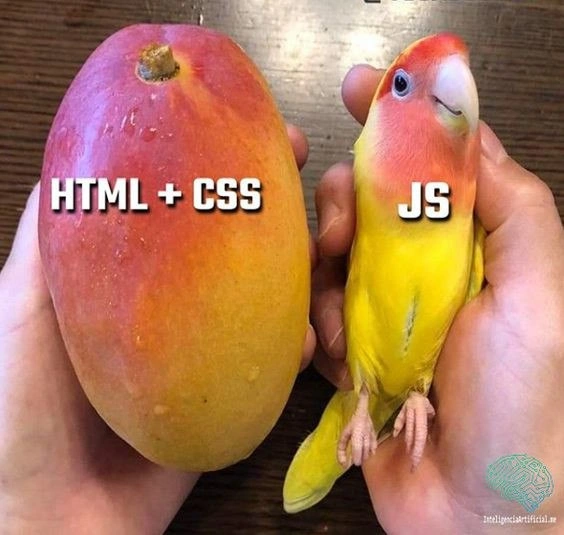
That’s why the picture is amusing. It shows a tiny little bird next to a gigantic mango, kind of like a tiny cherry on a huge cake. It’s a silly way of saying sometimes the extra fancy decorating and layout can end up being a lot bigger than the little bit of actual doing. In everyday terms: a whole lot of dressing up, and just a teeny bit of moving parts – an unexpected mismatch that makes people laugh.
Level 2: Featherweight JavaScript
Let’s break down what’s happening in simpler terms. In frontend development, a web page is built with three core ingredients:
- HTML (HyperText Markup Language) – this is the content and structure of the page. Think of HTML as the skeleton or building blocks: it defines paragraphs, headings, buttons, images, and the layout of different sections.
- CSS (Cascading Style Sheets) – this is the styling and design. CSS is like the paint and decorations on those HTML blocks: it controls colors, fonts, sizes, spacing, and the overall visual look of the page.
- JavaScript (JS) – this is the programming logic that runs in the browser. JavaScript is like the brain or behavior: it can respond to clicks, change content dynamically, handle form submissions, and add interactivity beyond the static layout.
In the meme’s picture, the HTML + CSS part is represented by the huge mango, and the JS part is the tiny lovebird. This shows a project where the HTML/CSS files have become massive (big and heavy, like a mango) but the JavaScript code is just a small bit (light and little, like the bird). It’s a funny comparison because often people assume JavaScript, being a full programming language, would take up the most code. But here, the markup and style sheets – which aren’t writing logic, just describing structure and style – ended up being a much larger chunk.
Why would HTML and CSS outgrow JS? Imagine you’re making a website with a lot of content and a detailed design:
- You might write hundreds of lines of HTML to structure all the information (for example, dozens of
<div>,<section>, and<p>tags to organize text, images, and links). - You could add a huge CSS file with thousands of lines to fine-tune the layout and look, making the site responsive on mobile, styling every element perfectly (colors, spacing, animations, you name it).
- But the interactive part might be really simple – say just a few JavaScript functions to handle a menu toggle or a pop-up. That might end up only 20 lines of JS code.
In this case, the HTML and CSS parts of the project feel “bigger” and heavier than the JS part. We sometimes call the JavaScript here glue code: it’s just gluing together the UI, not doing a ton of heavy computation. The meme exaggerates that feeling by showing an enormous fruit for the HTML/CSS (implying “wow, this got huge”) and a tiny bird for the JS (implying “this part stayed small”).
This is relatable humor for many developers. Maybe you started a project thinking, “I’ll need to write tons of JS to make this work,” but then realized most of your time was spent writing HTML markup and tweaking CSS styles, while the JS was minimal. It’s a common FrontendDevelopment surprise: the visual and structural code (HTML/CSS) can balloon in size, even though it doesn’t feel like “real programming” compared to writing JavaScript logic.
For example, consider a photo gallery webpage:
<!-- HTML: lots of images and structure (snippet) -->
<div class="gallery">
<img src="photo1.jpg" alt="Photo 1">
<img src="photo2.jpg" alt="Photo 2">
<img src="photo3.jpg" alt="Photo 3">
<!-- ... imagine many more image elements ... -->
</div>
/* CSS: styling the gallery layout (snippet) */
.gallery {
display: grid;
grid-template-columns: repeat(auto-fit, minmax(100px, 1fr));
gap: 5px;
}
/* ... imagine many more lines of CSS for responsiveness, hover effects, etc. ... */
// JavaScript: a tiny bit of interactivity (snippet)
document.querySelector('.gallery').addEventListener('click', event => {
if (event.target.tagName === 'IMG') {
event.target.classList.toggle('enlarged');
}
});
Here, the HTML might include dozens of <img> tags (one for each picture), and the CSS might have a lot of rules to make the gallery look nice and responsive. The JS, however, is just a few lines to let you click an image and toggle a class (perhaps to enlarge or highlight it). The HTML + CSS part (loading all the content and styling it) ends up doing the bulk of the work in terms of code size, whereas the JavaScript is just a little add-on for interactivity. This is exactly the situation the meme is joking about.
So when front-end developers see this image, they chuckle and think, “Yep, I’ve seen that!” Sometimes the “simple stuff” like laying out content and styling it can grow into a huge job, and the “hard stuff” (the JS logic we expected to write) turns out to be only a few lines. It’s a lighthearted reminder that HTML and CSS, even though they’re just for structure and style, can end up dominating a codebase. In other words, the markup and styles can become the big, heavy mango, while the JavaScript is just the tiny bird perched on top.
Level 3: Mango-Sized Markup
At a senior engineering level, this meme speaks to the ironic imbalance in front-end codebases. The gigantic "HTML + CSS" mango represents a bloated mass of markup and styling, while the petite "JS" lovebird stands for a minuscule layer of JavaScript logic. Experienced developers smirk at this because they've seen projects where the presentation layer (HTML structure and CSS design) wildly outgrows the scripted logic. It’s a reversal of the usual concern that JavaScript dominates web projects. Here, the humor is that the markup is heavier than the logic — an absurd twist for anyone who’s battled large Single Page App scripts. For veterans, it’s reminiscent of the early web days when pages were mostly static HTML (sometimes with huge <table> layouts) and just a pinch of JS (maybe a little jQuery snippet) for a dropdown. The meme shows that even in modern WebDev, we can unexpectedly end up back in that situation.
Modern front-end development is a careful balance of these layers, but sometimes the scales tip in unexpected ways:
- Content-heavy pages or dashboards – Lots of HTML elements for data and a mountain of CSS for layout, but just a sprinkle of JS for a couple of interactions.
- Massive CSS frameworks/themes – Importing a framework or design system can mean thousands of lines of CSS (a mango-sized stylesheet) while your custom JS is maybe a few tiny functions (lovebird-sized code).
- "Just enough JavaScript" architectures – Approaches like progressive enhancement or static site generators push most of the work to HTML/CSS, leaving only glue code in JS to handle small dynamic bits.
The phrase tiny JavaScript glue (from the title) hints that JS in this scenario only lightly binds things together. Perhaps the dev relied on HTML for structure and CSS for interactive effects (using CSS animations, transitions, or even checkbox hacks to toggle UI states), so the JS file ended up doing very little. One or two addEventListener calls can control a lot of elements, meaning the JS doesn’t need to grow as the page adds more content. Meanwhile, each new feature or section likely adds dozens of new HTML tags and style rules. As a result, the HTML/CSS bundle swells like a ripe mango, while the JS remains a tiny bird perched on top.
Seasoned devs know this trade-off well: keeping JS minimal can be great for performance and simplicity, but it might come at the cost of an overgrown CSS file and ultra-dense HTML. Enormous CSS brings its own headaches — cascading conflicts, specificity wars, selector soup — meaning shifting complexity out of JS isn’t a free lunch. The meme exaggerates this to make us laugh: imagine a project with a 45kB stylesheet next to a 5kB script. It’s a funny role reversal for those used to blaming slow pages on heavy JavaScript.
Tiny JS Bird: "Hey, don’t blame me for the page weight – check out that giant CSS mango I’m stuck with!"
In short, the humor comes from recognizing that front-end code isn't always dominated by the fancy script. Sometimes the humble HTML templates and style sheets quietly grow into a behemoth, while the interactive logic remains a cute little sidekick. The meme nails that feeling with a perfect visual metaphor, capturing a scenario that is both painful and comical to experienced developers.
Description
The meme shows two hands holding very different-sized objects against a wooden table background. In the left hand is a large ripe mango; white bold text over the fruit reads “HTML + CSS”. In the right hand is a much smaller yellow-and-pink lovebird with the caption “JS” printed across its body in the same font. The visual joke contrasts the physical bulk of the mango with the petite bird to imply that markup and styling can become huge while the JavaScript layer remains comparatively small. Front-end engineers will recognize the commentary on how page structure and stylesheets often dominate codebases despite the perception that JavaScript is the heavyweight of modern web stacks
Comments
69Comment deleted
We spent two sprints tree-shaking JS down to 28 kB; then Tailwind’s purge missed and the critical-path CSS shipped as a 1.3 MB mango - Lighthouse called, it wants its irony back
The junior dev's PR: 2000 lines of CSS. The senior's PR: document.querySelector('*').style = 'display: none'. Both technically solve the ticket
This perfectly captures the eternal truth of frontend development: HTML and CSS give you a beautiful, perfectly structured mango - but it just sits there. JavaScript is the hyperactive parrot that makes it squawk, fly around the DOM tree, and occasionally peck at your carefully crafted layouts at 2 AM when you realize your event listeners are leaking memory
Frontend reality: the mango-sized “HTML + CSS” hides three design systems and a specificity war; the tiny JS bird flaps once, triggers hydration/reflow thrash, and your Core Web Vitals migrate south
HTML+CSS: Bloated stylesheets inflating your bundle. JS: Tiny bird that asyncs your sanity into oblivion
Remember when progressive enhancement meant HTML and CSS shipped the UI and JS was a chirp, not a 3MB hydration nest of transitive deps
cool parrot, but where is the funny? Comment deleted
JavaScript “can” do what HTML and CSS can. Comment deleted
Magyar vagy? Comment deleted
Nem kínai Comment deleted
Lame joke though Comment deleted
The color is similar….but I don’t get the joke too… Comment deleted
Probably 1 yr of FE experience isn't enough to understand the joke Comment deleted
I think, that mango is a kinda static object with some styles, but carrot is a thing with interactive features that might be implemented only with JS ) idk Comment deleted
CSS is many things, but static isn't it Comment deleted
there are animations in css Comment deleted
don't be suck bro Comment deleted
birdgo Comment deleted
Here u go Comment deleted
appird Comment deleted
melird Comment deleted
Guys who tell that css is turing complete and make carousels and other shit and constanting that js is useless are more funny Comment deleted
wait, is css turing complete‽ Comment deleted
https://stackoverflow.com/questions/2497146/is-css-turing-complete Comment deleted
190.204.17.126 Comment deleted
Umm, what Comment deleted
joke about me having your IP-Adress. hackerman threats and stuff Comment deleted
wait you know where I pee ? Comment deleted
Yes, we know where you do pee Comment deleted
thats wierd I paid her not to tell anything to anybody 'bout what we did Comment deleted
well I paid her more. in fact, I was her ALL ALONG Comment deleted
you are going through things that you don't know what it can result in Comment deleted
maybe I am chaotic Comment deleted
Well, nearly everyone has a 15cm long tracking device in pocket, why are you surprised? Comment deleted
well mine is just for peeing purpose Comment deleted
lol, I didn't mean... Comment deleted
ah that didn't work Comment deleted
wait you mean cellphones ? Comment deleted
Yes Comment deleted
no, he meant the rod between your legs, which is a tracking antennae by bill gates Comment deleted
rod by Microsoft™️ Comment deleted
not micro, nor soft. Rod! Buy now! Comment deleted
that was genious Comment deleted
It's not a rod — it's a stick! Joy stick! (BTW, Microsoft never made joy sticks, AFAIR, just game pads.) Comment deleted
Xbox from Microsoft Comment deleted
That's just a game pad. Comment deleted
what you call the little thingies on it Comment deleted
Joystick Comment deleted
tata Comment deleted
"Knüppel" in German and "Кнюппель" in Russian. IDK about English, though — "hat switch" perhaps. Comment deleted
translator says these words are "sticks" Comment deleted
analog stick Comment deleted
I mean, XBox controllers have Joysticks Comment deleted
Real joy sticks are real thing! Comment deleted
Because they work like these things: joysticks Comment deleted
Afair they did Comment deleted
I see nobody got UDP joke, again. I'm resending it Comment deleted
maybe because somepeople like the ones who are clapping at this https://t.me/devs_chat/62336 are using IE Comment deleted
Not just that. We know the precise location and position in which you shit. Comment deleted
because I'm that CSS guy Comment deleted
not supported in my region I guess Comment deleted
127.0.0.1 Comment deleted
I was just trying to get a better wifi signal Comment deleted
Everybody lives in 127.0.0.1, where else to go? Pee outside? Comment deleted
I personally like 192.168.0.1 Comment deleted
But social toilets are not free Comment deleted
Another question, why these rods or sticks scripted to automatically get activated every morning? Comment deleted
It's just a wake timer to get updates while you don't use the thing. Comment deleted
this definition was the best to describe it Comment deleted