Frontend vs. Backend: The Disney Tarzan Analogy
Why is this Frontend meme funny?
Level 1: Looks Can Be Deceiving
Sometimes, things that look confusing on the outside turn out to be quite simple on the inside once you know what’s going on. It’s like watching a magic trick: from the audience view, you see a magician’s trick that makes you go “Huh?! How is that possible?” Maybe the magician appears to saw someone in half or makes them float in mid-air, and it looks totally wild and puzzling. But then you peek backstage and find out there was a hidden support or some wires – suddenly it all becomes clear and logical. You realize the trick wasn’t magic at all, just a clever setup. That’s exactly the idea here. The meme shows that from the front view, two jungle characters swinging on vines looked like a jumbled mess (legs and arms everywhere, which is pretty funny and confusing!). But from the back view, you can see plainly how they are actually positioned and it’s perfectly organized. In the same way, a computer program or website can seem bizarre or messy when you only see the outside result, but once you look behind the scenes at the actual code or structure, you go “Oh, now I get it!” The joke reminds us not to be fooled by how things appear at first glance – there’s often a clear explanation hiding just out of sight.
Level 2: Under the UI Hood
Let’s break down what’s meant by Front End and Back End in this context. In software (especially web development), the front-end is the part of the application that users directly see and interact with – essentially the user interface. This includes everything visual and interactive in your browser or app: for a website, it’s the HTML structure, the CSS styling that makes it colorful and arranged, and the JavaScript that adds interactivity. When we talk about front-end code, we’re talking about the code running in the browser (or on your device) that renders buttons, forms, images, layouts, etc. Developers working on this side focus on UX/UI (User Experience/User Interface) details – making sure the app is easy to use and looks right. However, building a polished UI isn’t always straightforward – browsers might interpret things differently, and small CSS tweaks can lead to big visual changes. This is why front-end work can sometimes feel confusing or finicky: you might have elements overlapping or layouts breaking unexpectedly, leading to those “???” moments shown in the meme’s FRONT END panel. For example, if two characters in an animation (or two <div> elements on a page) are not aligned correctly, from the outside it might look like a jumbled mess. Many FrontendHumor jokes come from these frustrations – like a button that refuses to center or a modal that mysteriously disappears off-screen due to a CSS bug.
Now, the back-end is like the behind-the-scenes powerhouse that users don’t directly see. If the front-end is what happens in the browser, the back-end is what happens on the server (or the cloud, or any remote service). It handles things like business logic, database operations, and server-side calculations. For instance, when you log into a website, the front-end might collect your username/password and show you a loading spinner (the visual part), but the back-end is the one checking those credentials against a database and sending back a response saying “login successful” or “wrong password.” Back-end code is often written in languages like Python, Java, Node.js (JavaScript on the server), Ruby, etc., and it doesn’t concern itself with how things look, only that the data and rules are correct. It’s usually organized in a logical way: data is fetched or updated, processed with algorithms, and then results are sent to the front-end. In the meme, the BACK END panel – a clear line-art sketch with a check mark – represents this idea of clarity and correctness. It’s as if each limb corresponds to a piece of data or a function in the back-end, and from that angle, we can see exactly which piece goes where (no confusion about who’s arm is who’s, so to speak!).
Think of building a web page like a two-layer process: the back-end provides the raw materials and instructions (for example, “Tarzan should hold Jane at these coordinates”), and the front-end takes those instructions to paint the picture on screen (“draw Tarzan and Jane like so”). If something looks off in the final picture (the front-end), a newbie developer might be puzzled – why is Jane’s arm floating weirdly? But if they peek “under the hood” using their dev tools, they might find, for example, that the HTML structure has Jane’s arm nested in the wrong container, or a CSS rule rotated Tarzan oddly. These tools let you see the DOM (Document Object Model) – basically the back-end of the UI where every element’s placement is defined – much like that bottom sketch reveals the true positions of the characters. Once you see that, you realize, “Oh! Each limb (element) is actually properly attached; I just misunderstood the view.” This is a classic RelatableDeveloperExperience: the initial “It’s broken!” feeling, followed by “Aha, got it now.” when you find the logical cause.
In simpler terms, front-end vs back-end in development mirrors the meme’s front vs back perspective: the front-end is concerned with how things look from the user’s point of view, and it sometimes uses clever tricks to make everything appear just right. The back-end is concerned with how things actually work under the covers, making sure all the data and processes line up correctly. When both do their job well, the user gets a seamless experience. But when you catch a glitch or freeze the action at the wrong time – like pausing that Tarzan swing at an awkward frame – you might momentarily think “This looks all wrong!” until you understand the perspective. New developers quickly learn that what you see (in the browser) isn’t always an accurate reflection of how tidy or untidy the code might be – sometimes beautiful UIs are held together by hacks, and sometimes messy-looking outputs come from well-structured code. This meme humorously reminds us that seeing the whole picture (both the client side and server side, or both the design view and the implementation view) is key to understanding why something behaves the way it does. And it gives a nod to the friendly rivalry and mutual mystery between front-end and back-end folks: each side might glance at the other’s work and go “How does that even…?” when, in fact, from the right angle, it all makes sense.
Level 3: Illusion vs Implementation
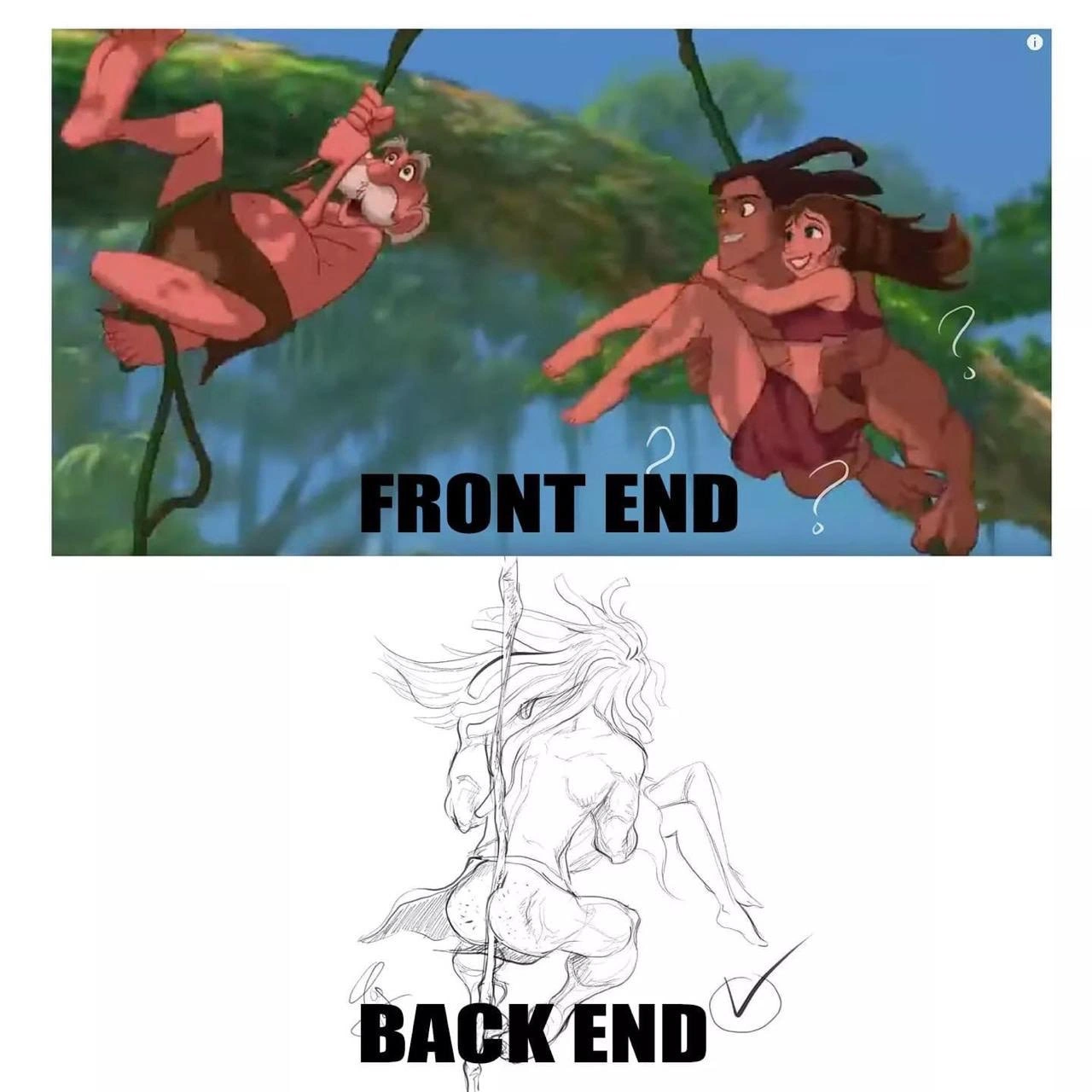
From a seasoned developer’s viewpoint, this meme brilliantly highlights the illusionary complexity of the front-end versus the logical clarity of the back-end. The top panel (labeled FRONT END) shows a chaotic tangle of limbs as Tarzan swings with Jane through the jungle, leaving us wondering “What is even happening here?” – much like a perplexing UI bug where elements overlap in weird ways. Those little question marks in the image mirror the confusion many of us feel when the user interface behaves unexpectedly (think of CSS layouts that suddenly break or that one pixel that never aligns!). In contrast, the bottom panel (labeled BACK END) is a clean sketch from behind, revealing a perfectly sensible alignment – akin to looking at well-structured server logic or a clean database schema that makes everything tick. There’s even a reassuring check-mark, as if to say “Yep, this checks out.”
This juxtaposition is poking fun at a classic Frontend vs Backend scenario. In front-end development (the realm of UX/UI, browsers, and client-side code), things often involve visual tricks and hacks to make an interface look right. It can feel like you’re creating a perspective illusion with HTML/CSS: the final result is flashy and colorful (just like that vibrant Tarzan scene), but if you freeze it at the wrong moment or view it from the wrong angle (perhaps inspecting the DOM without styles), it might look downright absurd. We’ve all experienced a FrontendPainPoints moment where a page looks fine in one browser and utterly broken in another – overlapping elements, weird spacing, or z-index nightmares that make you go “?!?”. That’s the FRONT END chaos the meme humorously captures.
On the other hand, back-end development deals with the behind-the-scenes logic: databases, servers, APIs, and algorithms. It’s typically more monochrome and schematic (just like the sketch). When you inspect a well-designed back-end system, everything tends to line up logically – data relationships, function calls, and modules connect in an organized manner. A back-end developer might joke that their code has no fancy visuals, just solid logic (a bit like that black-and-white outline showing Tarzan’s pose makes sense). The meme implies that while the user-facing side can look convoluted, the underlying implementation actually has a clear structure. In practice, this is often true: a UI may involve tricky CSS to achieve a design (e.g., negative margins, absolute positioning, transforms – all the crazy stuff that makes the page look right but is hard to reason about from the outside). Meanwhile, the server code or data model that feeds that UI might be using straightforward algorithms or well-known design patterns that any back-end dev can reason through.
There’s an ironic role reversal here that senior devs appreciate: usually, we joke that the back-end is the complex part hidden behind a simple UI. But this meme flips it – the front-end (at least visually) appears wild and tangled, whereas the back-end perspective is simple and clear. It reflects the reality that appearance can be deceiving. The front-end often manipulates perspective (through code, not vines!) to create illusions of simplicity for users, while the back-end ensures consistency and correctness. An experienced engineer knows that a seemingly convoluted interface glitch might just be a matter of a missing CSS rule or a slight DOM reordering – once you “look from the right angle” (i.e., check the actual code structure or use debugging tools to see the box model outlines), the issue becomes obvious and solvable. The humor hits home because we’ve all been in those situations where we exclaim, “Why on earth does it look like that?!” only to realize the back-end logic or code structure was fine – the problem was just our viewpoint or a front-end quirk. In other words: from the right perspective, even a wild Tarzan tangle can be a perfectly executed swing.
This meme resonates as DeveloperHumor because it underscores a shared experience: the divide between how things appear on the surface and how they actually function underneath. It’s relatable whether you identify as a front-end specialist who’s had to assure others “trust me, the code behind is solid, it just looks weird now,” or as a back-end guru who occasionally peeks at UI code and feels as puzzled as looking at that front view of swinging Tarzan legs. It’s the jungle of web development – colorful and confusing on the outside, structured and methodical in the trees behind.
Description
A two-panel meme contrasting frontend and backend development using imagery from Disney's 'Tarzan'. The top panel, labeled 'FRONT END' in bold black text, features a colorful, chaotic scene from the animated movie. Tarzan and Jane swing gracefully on a vine, while another character, Professor Porter, hangs on awkwardly and clumsily behind them. Hand-drawn white question marks are scattered around the main couple, suggesting confusion or unpredictability. The bottom panel, labeled 'BACK END' with a checkmark next to it, shows a starkly different style. It's a clean, detailed, black-and-white anatomical sketch of a muscular figure, presumably Tarzan, swinging powerfully on a vine, viewed from behind. The meme humorously illustrates the common perception of frontend development as a somewhat messy, user-facing layer that has to deal with many moving parts and unpredictable user interactions, whereas the backend is seen as the underlying, well-structured, and powerful system that is elegant and robust in its design

Comments
8Comment deleted
The frontend is a tangled mess of vines held together by hope and !important tags, while the backend is a single, perfectly tensioned liana compiled directly from the laws of physics
The UI looks like Tarzan after a bad merge, but spin the camera 180° and it’s just a perfectly normalized schema swinging through 500 TPS with ACID grace - perspective is mostly CSS
Frontend gets the design system and component library; backend gets "just make it work with the 47 different auth providers, 3 legacy databases, and that SOAP API from 2003 that nobody remembers why we still need."
Accurate: the backend is unshaded pencil with a single reviewer checkmark, and that checkmark is the entire test suite
Frontend is like that perfectly rendered hero animation - smooth, delightful, and what the user sees. Backend is the centaur holding it all together: architecturally questionable, anatomically complex, and requiring you to explain in design reviews why you're running a distributed system that's half REST API, half GraphQL monolith, connected by what can only be described as 'creative middleware.' Both work, but only one gets to be in the marketing screenshots
Frontend: Tarzan-swinging through CSS jungle hacks and browser mutinies. Backend: Jane's got the pole-vault straight to the DB - no drama
Frontend looks like a smooth swing; backend is distributed sagas, idempotency hacks, and a 2001 cron job named vine.sh keeping the jungle from collapsing
Everyone loves the FRONT END swing demo; meanwhile the BACK END is the only vine with SLAs - idempotency, retries, migrations, and rate limits - but sure, let’s spend the sprint debating 2px vs 4px border-radius