The Programmer's Compulsive Save Reflex
Why is this DeveloperProductivity meme funny?
Level 1: Better Save than Sorry
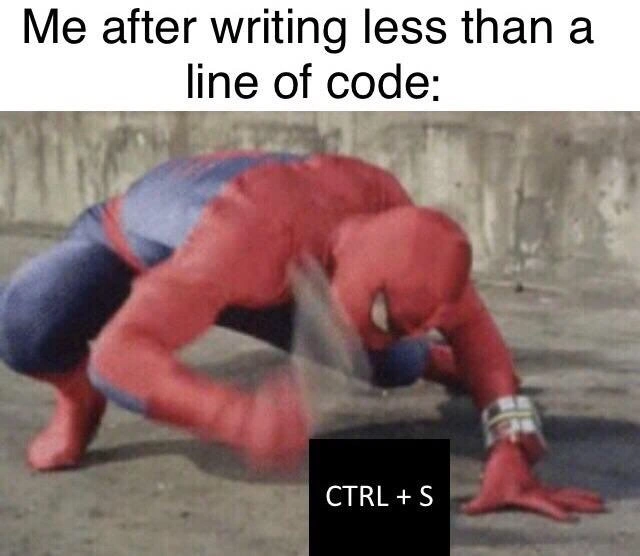
Imagine you’re drawing a big picture, and every time you add a tiny detail – even just one line or a single color – you immediately stop and take a quick photograph of your drawing. Why would you do that? Because you’re afraid someone might accidentally smudge it or the paper could blow away, and you’d lose your progress. That’s exactly how a programmer feels about their code! The meme shows a superhero (Spider-Man) smashing a save button really, really fast. This is a funny way of saying the programmer is super eager to save their work. They’ve typed only a few words of their program, and already they’re rushing to keep it safe. It might look extreme, but it comes from feeling protective: just like you wouldn’t want to lose your drawing, a developer doesn’t want to lose their code. So they hit “save” almost every time they make a change. In simple terms, this meme is joking that programmers save their work obsessively because it makes them feel safe – it’s always better to save than be sorry later.
Level 2: Save Early, Save Often
If you’re a newer developer or just learning to code, you might notice people constantly pressing Ctrl+S (or Cmd+S on a Mac). That’s the universal keyboard shortcut for "Save" in almost every program, especially in code editors and IDEs (Interactive Development Environments, like Visual Studio Code, IntelliJ, or even older tools like Notepad++). This meme jokes that as soon as a programmer writes even a few characters of code, they will immediately hit the save keys – just like Spider-Man quickly slamming his hand down in the image. Why would someone save so often, even when only half a line of code is written? The answer has to do with habit and muscle memory built over time to protect their work.
When we talk about muscle memory here, we mean that developers have done an action (pressing Ctrl+S) so many times that their fingers do it automatically without thinking. It becomes part of their DeveloperWorkflow. This habit often forms after a frightening experience: imagine you wrote a lot of code or an important school essay, and then your computer or program crashed before you saved the file. All your changes would be lost! Most people only go through that pain once before they learn the lesson: save your work frequently. So in the world of programming, hitting the save shortcut constantly is considered good practice – “Save early, save often”, as the saying goes. It’s about being better safe than sorry. Every time you press Ctrl+S, you’re storing your code to the computer’s permanent storage (like the hard drive or SSD) so it won’t disappear if something bad happens (like the code editor unexpectedly closing or the power going out).
Modern code editors and IDEs try to improve the DeveloperExperience by providing features like auto-save or backup files. For example, some editors will automatically save a file every few seconds or keep a backup copy of unsaved changes. This means even if you forget to hit save, your work might still be there when you reopen the program. Despite these features, many programmers still manually save out of habit. It’s almost a reflex – as soon as they make a tiny edit, their hand hits the shortcut. This meme is making fun of how fast and how often developers do this. The Spider-Man character is shown frantically slapping the ground with "CTRL + S" written on it, exaggerating the speed of the action. The joke is that developers act with superhero-level urgency just to perform a very ordinary task: clicking save.
For newcomers, it might seem funny or odd to save after typing just a word or two. But to a seasoned coder, it feels natural. They’ve been taught (and maybe scolded by experience) that you can’t save too frequently. Just like in video games where you might hit the save button at every checkpoint to avoid replaying a level, programmers hit Ctrl+S every time they write a bit of code to avoid re-writing it later. It’s a little quirk of the DeveloperHumor world that also serves a practical purpose: keeping your work safe. So, the meme is both joking about our almost silly over-alertness, and at the same time reminding everyone why it exists. In short: programmers press save all the time because once you’ve almost lost your code, you never want to feel that panic again!
Level 3: Spidey Save Sense
Experienced developers will chuckle at the blurry Spider-Man slamming the ground because it perfectly captures the muscle memory of hitting Ctrl+S at lightning speed. The meme’s caption "Me after writing less than a line of code:" sets the scene: you’ve barely started typing, and already your spidey-sense is tingling to save the file. It’s an instinct born from countless close calls with lost work. In coding, nothing feels truly “real” until it’s saved to disk. We’ve all developed a near pavlovian response — type a few characters, then smash the save shortcut. This rapid-fire saving is part of the seasoned developer’s workflow, ingrained through hard experience with fragile IDEs and the occasional system crash.
Under the hood, pressing Ctrl+S in an editor triggers the IDE to write your in-memory changes to permanent storage. In technical terms, it flushes the editor’s buffer to disk. Why does this matter? Because until you save, your code lives only in volatile memory (RAM). If your IDE or laptop crashes before that code is written to a file, poof! it’s gone. Older generations of developers learned this the hard way — one blue screen of death or an editor freeze and half a day’s code could vanish. The trauma of losing unsaved work just once is enough to hard-wire the save reflex into your fingers. The result? Even if you’ve written only int x = , your left pinky is already hovering over Ctrl and your index finger over S, ready to pounce. It’s both hilarious and entirely rational: hitting save every few seconds is far easier than redoing hours of lost work. No one has ever complained, “Darn, I saved my code too often,” but plenty have cried out, “I can’t believe I didn’t save and lost it all!”
This meme also plays on how saving obsessively is overkill in modern tools, yet we all still do it. Many modern code editors and IDEs (Integrated Development Environments) have auto-save features or emergency save recovery. For example, VS Code and IntelliJ can auto-save files or restore your session after a crash, improving Developer Experience (DX) by reducing data loss. But old habits die hard: even with auto-save turned on, a veteran dev might still manually press Ctrl+S out of habit. It’s like a reflex you can’t shut off – an actual ctrl_s_reflex. In fact, this reflex is so ingrained that developers sometimes catch themselves hitting Ctrl+S in applications where it isn’t needed (or where it does something else entirely). Ever accidentally hit Ctrl+S while in a chat app or web form and wondered why nothing happened? That’s muscle memory overriding context. (Fun fact: in a plain terminal, Ctrl+S might even freeze the screen output via XOFF flow control, catching a reflexive saver off guard.) These little quirks are common in DeveloperWorkflow humor because they highlight how Developer Productivity tricks become second nature. We’re essentially performing a quick ritual to ward off the evil of lost code. The blurry Spider-Man in the image exaggerates the speed and determination of this action – as if life and death hinged on saving that half-written line. And emotionally, for a programmer guarding their work, it feels exactly like that!
Ultimately, this meme pokes fun at our save_shortcut_addiction. Hammering Ctrl+S after every tiny edit is both a DeveloperHumor cliché and a wise practice. It’s the “save early, save often” mantra taken to the extreme. The combination of an iconic superhero (with famously fast reflexes) and a humble keyboard shortcut captures the absurdity: we developers might not have superpowers, but when it comes to protecting our code, we’ve trained ourselves to react faster than Spider-Man dodging a punch. With great power (to write code) comes great responsibility (to save it before something crashes).
| Habit | Rationale | Result |
|---|---|---|
| Constant Ctrl+S | Paranoia from past data loss | |
| Infrequent saving | Trust in auto-save or oblivious | Occasional “Why me?!” |
The table above humorously contrasts obsessive savers with more carefree folks. Seasoned devs appear almost paranoid (slamming Ctrl+S non-stop), but really they’re just prepared. Less experienced devs or those trusting auto-save might not save as often, but when something does go wrong, they’re the ones muttering "it’s gone..." in despair. The meme resonates strongly because it’s an exaggeration based on a true aspect of developer life. CodingHumor often takes these everyday developer habits and blows them up into superhero proportions – literally, in this case – to get a laugh out of shared “Yep, I do that!” experiences. It’s silly, it’s nerdy, and it’s a tiny badge of honor among coders: you know you’re a real programmer when hitting Ctrl+S becomes an automatic muscle-memory twitch, even if you’ve only typed a semicolon.
Description
A popular meme format featuring the superhero Spider-Man in his iconic red and blue suit, crouched low to the ground and forcefully slamming his hand down. The image is captioned at the top with 'Me after writing less than a line of code:'. Superimposed over Spider-Man's impacting hand is a black box with the white text 'CTRL + S'. The meme humorously exaggerates the deeply ingrained muscle memory of programmers to save their work constantly, often after making the most trivial of changes. This habit, born from the historical trauma of losing hours of work to crashing editors or systems, persists even with modern autosave features and is a universally relatable experience for developers of all levels
Comments
8Comment deleted
Autosave is for people who trust the system. I trust my twitchy little finger hitting Ctrl+S with a frequency that could DDoS the file system
I’ve built five-nines distributed storage, yet I still hammer Ctrl+S after every semicolon - apparently my trust in autosave never reaches quorum
Twenty years in, I still hit Ctrl+S after every semicolon because that one time in 2003 when Visual Studio crashed and took my afternoon with it apparently caused permanent psychological damage
Ctrl+S three times in a row isn't redundancy - it's at-least-once delivery semantics for people who've been burned by exactly-once promises
After 15 years in the industry, you realize that writing one line of code isn't exhausting because it's difficult - it's exhausting because you've mentally compiled every edge case, considered three refactoring approaches, questioned whether this violates SOLID principles, wondered if it'll scale to 10M users, debated if you should write a test first, and calculated the technical debt interest rate. Then you hit CTRL+S seventeen times just to be sure, because that one time in 2009 when you lost four hours of work still haunts your dreams
After 20 years, Ctrl+S isn't a habit - it's my autonomic response to IDEs that ghosted more commits than bad dates
Ctrl+S is my manual two-phase commit: prepare on keystroke, commit on muscle memory, then Prettier rewrites the diff anyway
Half a line in and I slam Ctrl+S - my manual fsync; autosave is just eventual consistency, and Eclipse 2008 taught me never to trust RAM