Frontend First, Functionality... Eventually
Why is this Frontend meme funny?
Level 1: All Show, No Go
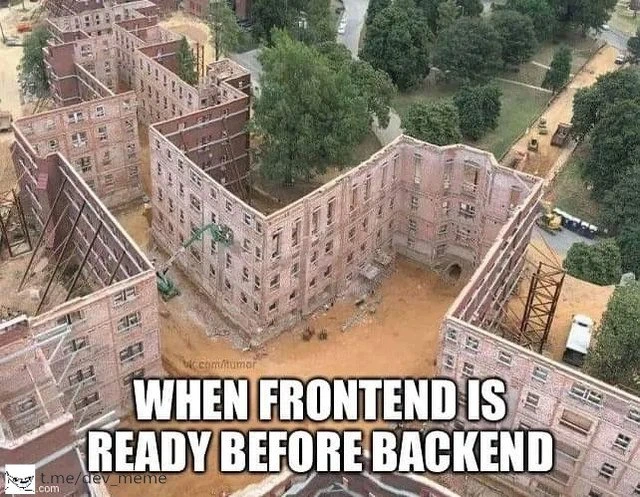
Imagine you see a beautiful house from the outside – walls painted nicely, windows in place, it even has a fancy front door. It looks like a perfect house. 😄 But then you open the door and… there’s nothing inside. No floors to stand on, no rooms, not even a roof above – just an empty space of dirt and air. That would be pretty silly, right? The house was just a front with nothing real behind it. This meme is funny for the same reason: it’s like someone built the outside of an app (the part you see and click on, like buttons and menus) but never built the inside (the part that’s supposed to do things like saving data or loading information). It’s all show on the surface, with no “go” under the hood. In other words, it looks finished, but it doesn’t actually work yet. 😂 The picture of the hollow building makes us laugh because we know a house isn’t truly done until it has its insides built – and just like that, a program isn’t really done until the behind-the-scenes parts are working too. So the meme is comparing a finished-looking outside with an unfinished inside in a way that’s easy to see and chuckle about.
Level 2: All Front, No Backend
Let’s break down what’s going on here in simpler terms. In web development, an application is usually divided into two main parts: the frontend and the backend. The frontend is everything you see and interact with as a user – the buttons, text, images, and forms in a website or app. It’s built with technologies like HTML (for structure), CSS (for styling), and JavaScript (for interactivity). Think of the frontend as the user interface (UI), kind of like the outer appearance of a building: the walls, windows, and paint that people can see.
The backend is the behind-the-scenes part of the application that users typically don’t see. It’s like the building’s internal structure – the support beams, electrical wiring, plumbing, and all the rooms inside. In software terms, the backend is the server, database, and application logic that make features actually work. It handles things like storing data, authenticating users, and enforcing business rules. When you click “Save” or “Login” on the frontend, the frontend sends a request to the backend (often through something called an API, which stands for Application Programming Interface). The backend then processes that request (for example, checks your username and password, or saves your form data to a database) and sends back a response. If the frontend and backend are like two teammates, the API is their agreed language for talking to each other — for instance, a specific URL or endpoint the frontend can call, and a defined format for data (often JSON or XML) that comes back.
Now, the meme caption “When frontend is ready before backend” describes a situation where the frontend part is finished and looks great, but the backend part isn’t finished yet. In real life, that’s like having the outside of a house completely done – you’ve got the walls up and they’re nicely painted – but inside there are no floors, no furniture, not even a roof. It might look like a complete house from the street, but you definitely can’t live in it. In a software project, this means you might have a fully designed website or app interface (you can navigate pages, see the layout, maybe even some sample data is visible), but none of the buttons or forms actually do anything meaningful because the server-side code isn’t hooked up. For example, maybe you have a sign-up form on the frontend where a new user can enter their details. The form is there and you can type into it, but when you hit “Submit”, nothing really happens (or you get an error), because the backend code to register a user and save their info in the database hasn’t been implemented yet. The frontend was built and deployed while the backend is still “under construction.”
This leads to some awkward and funny scenarios that many developers encounter. For instance, a frontend developer might use placeholder or fake data to simulate the backend while building the UI. It’s common to hard-code some example responses or use a temporary stub server that returns fixed results. That way, the UI can at least display something. But until the real backend is ready, it’s all smoke and mirrors. Imagine clicking on a “Get Inventory” button in a shopping app and the app just always shows the same five sample products because it’s not actually fetching from a real database. Or think of a backend service as a chef in a kitchen: the frontend waiter has given the customer a menu and taken their order, but if the chef isn’t there to cook (backend missing), the waiter comes back with nothing or just a plastic display meal. 🍽️
Let’s illustrate with a tiny code example of what the frontend might do and why it fails when the backend isn’t there:
// Frontend code trying to fetch data from a backend API
fetch('https://api.example.com/products')
.then(response => response.json())
.then(data => {
console.log("Got products:", data);
displayProductsOnPage(data); // hypothetical function to show data
})
.catch(error => {
console.error("Failed to load products:", error);
showErrorMessage("Unable to load products, please try again later.");
});
In the code above, the frontend is making a request to https://api.example.com/products to get a list of products. The idea is that the backend would have an endpoint (an API URL) at /products that returns a list of products in JSON format. The frontend then tries to display those products on the page. But if the backend isn’t ready, that URL might not exist yet – what we call a 404 Not Found – or it might return an error or empty response. The .catch block will run, logging an error like “Failed to load products” and maybe showing a user-friendly error message. In plain terms, the frontend knocked on the door asking for data, but nobody was home to answer (the backend didn’t respond with the data needed).
For a new developer (or anyone new to the frontend/backend concept), this situation teaches an important lesson: the frontend and backend have to work together for the application to actually do something useful. Just having a pretty interface (FrontendDevelopment) is not enough; it needs to be wired up to real functionality on the back end (BackendDevelopment). When those get out of sync – say, you finish all the UI pages first – you end up with what’s shown in the meme: an UI shell that’s essentially empty inside. It might be temporarily okay if you’re just showing a demo of the design or testing the layout, but you can’t deliver that to users expecting it to work. Users will click and get frustrated, much like a person trying to walk into those half-built buildings would be very confused or hurt.
The construction analogy is one we use often in software because it’s so relatable. If you only build the facade of a building (just the front walls) without building the structure behind it, you’ve got a fake building – something that might look like a building but isn’t usable. In software, if you build the UI without the supporting backend, you’ve essentially made a fake app interface. It looks like an app, but it doesn’t do the real job. This is considered a planning or coordination problem in project development. Ideally, frontend and backend development should be coordinated: either the backend is built first (so the data and services are ready for the UI to use), or both are built in small steps together. In many real-world projects, teams mitigate this by defining the API contracts first. That means they agree on what the backend will send and receive (for example, designing the JSON format for /products and what queries or data it supports) before they actually implement it fully. The frontend team can then use that agreed contract to build the UI and even use a mock service that pretends to be the backend. When the real backend is finally developed and plugged in, if all goes well, the frontend just starts working with real data instead of fake data. But if there were misunderstandings or delays... well, you get the hollow building scenario.
All this makes the meme very relatable because many developers have experienced that moment where someone says “the app is ready!” when only the interface is done. It’s a bit of a tongue-in-cheek caution: don’t count your apps before the backend hatches! If you showed this meme to a room of developers, the frontend folks might nervously giggle (“not my fault the UI was done first!”) and the backend folks will roll their eyes (“we’ll be up all night finishing the guts behind that pretty UI”). It highlights a common pain point in tech projects: integration. Integration is when you connect the frontend and backend and make sure everything works together properly. If integration is left to the very end, it can be tricky – just like adding a missing foundation to a standing building is a nightmare. Better to build things in sync from the start.
Level 3: Facade-Driven Development
At first glance, the building in the photo looks complete – solid brick walls forming a U-shaped apartment complex. But step through the front door and you’ll face dirt and air. There are no floors, no interior, no structure supporting those walls. This is a perfect architectural metaphor for a software anti-pattern seasoned devs know too well: the frontend UI is “finished” while the backend is nowhere to be found. It’s a hollow triumph, much like a flashy app interface that can’t actually do anything real. In the meme’s bold caption, “WHEN FRONTEND IS READY BEFORE BACKEND,” every experienced web engineer chuckles (and maybe cringes). We’ve all seen a project that’s all facade, no foundation.
So why does this happen in Web Development? Often, separate teams or developers handle the Frontend and Backend. The frontend team might race ahead, building a gorgeous interface with modern frameworks (React, Angular, Vue, take your pick) complete with sleek buttons and shiny forms. Meanwhile, the backend team is knee-deep in complex business logic, database schema design, or wrestling with an unstable legacy system. Deadlines loom, and management yells “We need something to show the client!” The result? The frontend gets deployed as an empty shell – an application apparition that looks like a functioning product but is secretly held up by scaffolding and mocked data. It’s like deploying an apartment building’s exterior to appease investors, even though no one can actually live in it yet. FrontendHumor and BackendHumor collide here: the frontend devs proudly say, “Hey, our part is done!” while the backend devs groan, “Wait, you built the whole UI without our APIs ready?!” This is the classic BackendVsFrontend scheduling mismatch that becomes a RelatableDeveloperExperience for anyone who’s been on a dev team with siloed workflows.
From a senior engineer’s perspective, the humor has a dark edge because we know the integration pain that’s coming. That beautiful UI façade is brittle. Click a button and instead of real data, maybe you get a spinner that never stops, or a hard-coded placeholder. In the best case, the frontend devs have wired the interface to call dummy endpoints or return fake JSON. In the worst case, you see a console full of 404 errors and red TypeError: undefined is not a function because the code expected a response that isn’t there. We laugh because it’s so true – many of us have stayed late to turn an interactive prototype into a real app, scrambling to connect those orphaned UI elements to freshly written backend endpoints. It’s integration hell: hooking up the missing backend services under intense pressure. Often, the UI was built with assumptions that don’t match the eventual API, so everything breaks. The form expected a field user_name but the backend returns username – now there’s a last-minute bug hunt. That slick front-end chart showing analytics? Turns out the back-end team wasn’t told about it, and now someone is quickly spinning up an endpoint returning dummy numbers just so the demo doesn’t crash. It’s duct-tape development at its finest.
Let’s be clear: building frontend without API support is generally a smell – a sign of trouble. Sure, sometimes you stub out data or use a construction analogy in planning (“we’ll build the UI like scaffolding and fill in behind it”). But if you actually press ahead with UI-first development without a solid contract or plan for the backend, you’re inviting chaos. The meme’s construction site image nails this: the empty_facade_construction is visually striking. It’s literally a UI-first smell in brick-and-mortar form. The walls stand tall (equivalent to a complete UI/UX), yet the project is dangerously incomplete (no backend = no structural integrity). Every senior dev knows that feeling of walking through an application that’s basically a movie set: a convincing front, propped up by 2x4s and hope. It might work for a quick demo to stakeholders – just don’t let any real users inside, or the whole thing could collapse. We chuckle because we’ve survived these scenarios. Been there, done that, have the on-call pager scars. In meetings, we’ll dryly joke, “The app is technically done… as long as you don’t click the login button,” echoing the meme’s sentiment. It’s a coping humor for the absurd but common reality of software projects with misaligned timelines.
In the industry, there are well-known best practices to avoid this hollow app syndrome: API-first design (agree on the backend contracts early), incremental vertical slices (deliver one fully working feature at a time, front-to-back), and close collaboration between front-end and back-end teams. But those require discipline and communication. Ironically, the pressure to show progress often trumps doing things in the right order. As a result, we get these RealWorldAnalogies turned into jokes – building the roof before the foundation, painting the house before the plumbing is in. This meme strikes a nerve because it’s funny and painfully accurate. It reminds the grizzled engineers of all the times we’ve had to retrofit functionality into a UI that was prematurely declared “ready”. In the end, the hollow building stands as a warning: don’t celebrate the façade until you’ve built the solid structure behind it. Otherwise, you’re just inviting the inevitable scramble, or worse, a spectacular collapse when users actually move in. And trust me, cleaning up that kind of FrontendDevelopment/BackendDevelopment mess in production is about as fun as installing an elevator after the building’s already built – technically possible, but harrowingly difficult and certainly avoidable with better planning.
Description
An aerial photograph of a construction site shows several multi-story building facades, complete with brickwork and window openings, standing upright. However, there is nothing behind these facades; they are just empty shells propped up on a dirt lot, resembling a movie set. The meme text, in large white capital letters, is overlaid at the bottom: "WHEN FRONTEND IS READY BEFORE BACKEND". This image serves as a powerful and widely understood metaphor in software development. The visually complete but hollow building fronts represent the user interface (frontend), which can be built to look finished using mock data. The missing structure behind them represents the server, database, and business logic (backend) which is not yet complete, rendering the beautiful UI non-functional. It humorously captures the project management challenge of teams working at different paces and the awkward state of a project where the outside looks done but the inside is nonexistent. Two watermarks are visible: 'vk.com/humor' and 't.me/dev_meme'

Comments
7Comment deleted
Our frontend is feature-complete. Now if you'll excuse me, I need to go see if the backend team has finished inventing the database yet
Demo day: the React façade renders at 60 fps - then the user hits “Save” and free-falls into a 500 because the backend is still a Confluence page marked “TODO”
Just like these buildings, our frontend looks production-ready until someone tries to actually live in it - then they discover it's all useState with hardcoded demo data, axios calls returning Promise.resolve({todo: 'implement later'}), and a backend team still debating whether to use REST, GraphQL, or just rewrite everything in Rust
The classic scenario: your React components are pixel-perfect, TypeScript interfaces are immaculate, and the design system is chef's kiss - but the backend team is still debating whether to use REST or GraphQL while the database schema exists only in a Slack thread. Sure, you've got a beautiful facade with mock data, but try deploying that to production when your 'foundation' is still a TODO in the sprint backlog. At least the stakeholders think you're 80% done because they can click buttons that don't actually do anything yet
Definition of done: 100% Lighthouse, 0% endpoints - congrats, we shipped the Facade pattern literally
Frontend ships the facade; backend's still debating if we need elevators or just a service mesh
Pixel-perfect React on MSW mocks, OpenAPI still TODO - don’t worry, we’re calling it the Façade pattern