The Ultimate Frontend Developer Resume
Why is this Frontend meme funny?
Level 1: Right in the Middle
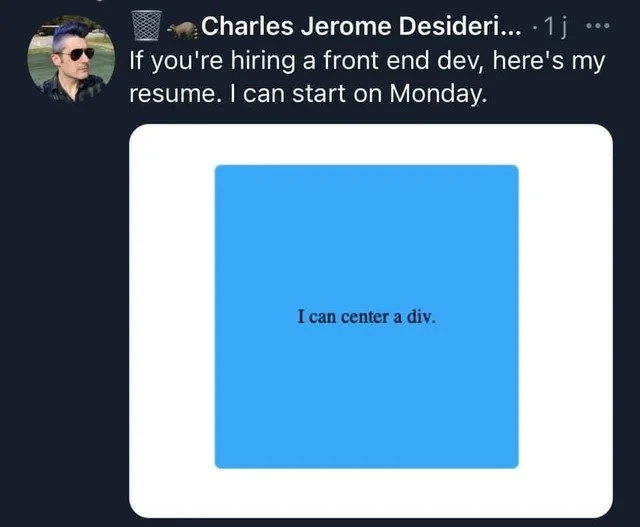
Imagine you have a big piece of paper and you want to stick a small blue square exactly in the middle of it. You don’t want it too high, too low, or off to the side – it should be perfectly centered, like a bullseye. 📍 Sounds simple, but if you’ve ever tried without measuring, you know it can be surprisingly hard to get something exactly in the middle on the first try. Now think of a person who finally does it – they place that blue square right in the center of the paper, with equal space on all sides – and they’re so proud that they say, “This is my whole resume, I can start on Monday!” It’s a funny exaggeration.
Why is it funny? Because in the world of making websites, putting a box right in the middle of the page was a little like trying to perfectly center that blue square on the paper. It should be easy, but it often caused people trouble. So when someone shows just a centered blue box as their resume, they’re joking that this one perfect placement is proof they’re super qualified. It’s like saying, “Look, I mastered this tricky thing everyone struggles with – hire me!” Even if you’re not a coder, you can appreciate the silliness: it’s boasting about something very simple, in a cheeky way. The heart of the joke is feeling proud about getting something “just right” that others find frustrating. Everyone can relate to that little victory of finally getting something exactly centered and wanting to celebrate it.
Level 2: Flexbox to the Rescue
Let’s break down why “I can center a div” is a beloved joke in Frontend development. First, some basics: in web design, a div is just a box or container in HTML (the code that structures web pages). CSS (Cascading Style Sheets) is the code that styles those HTML elements — it controls colors, sizes, and importantly here, layout and positioning. Front-end devs are the folks who build the visible part of websites, so they work a lot with HTML and CSS to make things look right on the page. One of the most common things you might want in a layout is to put something (like a dialog box, an image, or a button) exactly in the center of the page or a section. Sounds easy, right? Just throw it in the middle! Well, it turned out to be a bit tricky historically, especially vertical centering (up-and-down centering) before newer CSS features existed.
This meme’s image is essentially a mini web page: a white rectangle (imagine that as the page or a container) with a blue square perfectly centered inside it. The text “I can center a div.” in the middle of the blue box is the punchline. It’s saying: this is my skill demonstration. Why would centering be considered a special skill? Because without the right technique, things often wouldn’t line up perfectly center, and it used to frustrate a lot of beginners.
Thankfully, today we have CSS tools that make centering easy. The tweet joke likely references CSS Flexbox, which is a modern layout module introduced to simplify tasks exactly like this. With Flexbox, you can turn a container into a flexible box by writing display: flex;. Then you can center whatever is inside it by adding two rules: justify-content: center; (this centers items horizontally, left-to-right) and align-items: center; (this centers items vertically, top-to-bottom). Voila – anything inside that container will gravitate to the exact center. 🎉 Problem solved! There’s also CSS Grid, another layout system, where you can do something similar (for example, display: grid; place-items: center; centers content both ways in one go). The meme specifically says “flexes CSS chops,” which is a play on showing off skills and hinting at using CSS Flexbox to do it.
To appreciate the joke, you should know that before Flexbox, centering an element required more finicky solutions. One common method was setting an element’s left and top position to 50% of its container, then nudging it back by half its own width and height (using a CSS transform). It worked, but it wasn’t obvious to come up with that. Another was using an HTML <table> or the CSS display: table-cell trick to mimic table behavior for vertical centering. These felt like weird workarounds for a newbie learning CSS. So if you were new to web development a decade ago, you might spend a lot of time searching “How do I center a div?” and wading through blogs or Stack Overflow answers. It became kind of an ongoing joke in the community that such a basic thing was surprisingly hard to get right.
Now, when a developer says “Here’s my resume, I can center a div,” they’re making a tongue-in-cheek statement. On one hand, they’re showing they know their foundational CSS (because an actually centered element proves they understand CSS layout). On the other hand, they’re joking that this one skill is so significant it alone qualifies them for the job. It also pokes fun at how sometimes job interviews or resumes can feel over-the-top — like you have to prove you know every little detail. In this case, the developer is humorously implying, “Don’t worry about all those fancy frameworks on my resume. I’ve got the essential skill down pat!” It’s relatable humor to other developers because many remember the time when centering that darn div was an achievement.
To illustrate how centering works now, here’s a quick example with CSSFlexbox. We have an outer container and an inner box (the div we want to center):
<div class="container">
<div class="inner">I can center a div.</div>
</div>
In our CSS, we’ll use flexbox on the container to center the inner div:
.container {
display: flex;
justify-content: center; /* centers child horizontally */
align-items: center; /* centers child vertically */
height: 300px; /* give the container some height to work with */
background: white; /* white background like the meme's rectangle */
}
.inner {
width: 150px;
height: 150px;
background: cyan; /* the blue square */
text-align: center; /* center text inside the blue box (horizontally) */
line-height: 150px; /* center text vertically inside the box by matching its height */
}
This CSS will indeed place the .inner blue box smack dab in the middle of the .container every time. The text inside the blue box (“I can center a div.”) is also centered within it. In a real webpage, you might use 100vh (100% of the viewport height) on the container to center something on the full screen. The code above is a simplified example, but it demonstrates the concept. You can see with just a few lines of CSS, we’ve achieved perfect centering. Flexbox to the rescue! 🚀
So, the meme is funny to us because centering a div has become a kind of milestone for learning CSS. It’s like the “Hello World” of web layout challenges. DeveloperHumor often exaggerates like this: take a tiny skill and blow it up as if it’s your entire qualification. In reality, a front-end developer’s resume would list frameworks (React, Vue), languages (JavaScript, HTML, CSS), and projects — but joking that none of that matters except this one CSS trick is an ironic way to bond over a common hurdle. It’s RelatableHumor because almost everyone who has touched CSS has googled “how to center something” at some point. Now that we have the hang of it (thanks to modern CSS), we laugh at how overblown that struggle felt. This meme just encapsulates that feeling in one neat, centered package.
Level 3: The Holy Grail of CSS
In front-end circles, centering a <div> has long been joked about as the Holy Grail of CSS. It sounds trivial: just put a blue square dead-center in a white container. But for years, this seemingly simple task was a notorious pain. Every experienced WebDev remembers the convoluted tricks we used before modern CSS layout tools existed. We’d try setting an element’s margin: auto for horizontal centering and then scratch our heads about vertical alignment. We’d resort to CSS hacks like:
- Using a parent container with
display: table-cell; vertical-align: middle;(treating a<div>like it’s a table cell, yikes). - Absolutely positioning the element 50% from the top/left and then using
transform: translate(-50%, -50%)to pull it into the true center (a clever math-y hack, but not obvious to newcomers). - Even the ancient
<center>HTML tag (deprecated, but desperate times called for desperate measures).
It was such a common headache that centering_div questions on forums got thousands of upvotes. This meme plays on that shared frustration. The tweet humorously offers just a centered div as the author’s entire resume, implying, “Look, I’ve conquered css_centering – I can start on Monday!” 😄
For seasoned developers, the humor cuts deep. Centering an element was infamously difficult in the past, and a perfectly centered div feels like a small victory that only fellow front-end devs truly appreciate. It’s poking fun at hiring and interview culture too. Job postings often demand a litany of frameworks and fancy skills, but at the end of the day, one of the most visible results on a website might come down to getting a layout just right. There’s a wink-wink here: being able to wrangle CSS until that div is centered both horizontally and vertically might actually be more practical in daily work than knowing the trendiest new JavaScript library. The meme’s author is “flexing” their CSSFlexbox chops (pun intended) by literally using flexbox or a similar CSS trick to center the blue square. It’s the ultimate inside joke for front-end developers – FrontendHumor distilled: we’ve all been there, spending an absurd amount of time centering something on the page, and now that we’ve mastered it, we wear it like a badge of honor.
The image itself looks simple – a cyan square perfectly in the middle of a white rectangle with the text “I can center a div.” It’s ridiculously minimalist for a resume, which is why it’s funny. In developer meme culture (especially on Tech Twitter), bragging “I can center a div” is tongue-in-cheek. It’s like a veteran chef saying “I can boil water” with a proud grin. The DevCommunities that see this on Twitter immediately get the reference: centering was a tiny task that caused outsized grief. By presenting it as the entire resume, the meme also satirizes tech hiring – as if this one skill alone qualifies you for a front-end job. (Given how tricky pure CSS layouts can be, some of us half-jokingly agree!)
In short, this frontend_resume_meme hits home because it distills years of shared developer pain into one elegantly centered box. It’s absurd and satisfying at the same time. Centering that div is both a trivial CSS exercise and a rite of passage. The meme says, “I’ve mastered this fundamental (and once infuriating) skill, so I’m ready for the job.” And every front-end dev from the old days is chuckling, because they remember a time when getting that result was not so straightforward. Now, thanks to modern CSS (hello CSS Flexbox and Grid), we can achieve in two lines what used to require creative sorcery. This tweet playfully “flexes” that mastery while reminding us of the collective struggle. It’s a little victory lap for anyone who’s ever fought with CSS to make a UI perfectly balanced, as all things should be. 🎯
Description
A screenshot of a tweet from a user named Charles Jerome Desideri. The tweet says, 'If you're hiring a front end dev, here's my resume. I can start on Monday.' Below this text is an image that serves as the 'resume': a solid blue square is perfectly centered inside a larger white container. Inside the blue square, the text 'I can center a div.' is also perfectly centered. The joke is a classic piece of web development humor. For years, vertically and horizontally centering a div element using CSS was notoriously difficult and a common source of frustration for developers, especially before modern tools like Flexbox and Grid became standard. By presenting this single, hard-won skill as the entirety of a resume, the meme satirizes the outsized historical difficulty of a seemingly simple layout task, a pain point universally understood by any seasoned frontend engineer

Comments
19Comment deleted
My only interview question would be: 'Great, you're hired. Now can you do it in an HTML email for Outlook 2007?'
I finally centered a div without translate(-50%) or absolute positioning - now HR thinks I’m ready to untangle the 600-service mesh because I’ve proven I can achieve distributed consensus in two dimensions
After 15 years in the industry, I've seen engineers build distributed systems spanning continents, but still Google 'css center div vertically and horizontally' every single time. The real senior move is having that Stack Overflow link bookmarked in a folder called 'Architectural Patterns'
In an industry where we've gone from table layouts to floats, from floats to inline-block hacks, from inline-block to flexbox, and now to grid - yet somehow 'centering a div' remains the universal litmus test of frontend competency. This resume brilliantly captures the absurdity: we can build reactive SPAs with sub-millisecond state updates, implement complex WebGL shaders, and optimize bundle sizes to the byte, but the ability to vertically and horizontally center a box is still considered a legitimate flex. The real senior move? Knowing when to use `display: flex; justify-content: center; align-items: center;` versus `display: grid; place-items: center;` versus the ancient `position: absolute; top: 50%; left: 50%; transform: translate(-50%, -50%);` incantation - and being able to explain why each approach exists in your codebase's archaeological layers
Anyone can helm install; find the engineer who can center a div inside nested flex-in-grid within a transformed container across Safari and in-app WebViews - offer letter sent
Find me someone who can center a div across breakpoints, RTL, nested transforms, and IE11 kiosk mode, and I’ll show you someone who already understands distributed consensus
Centers divs without tables or IE6 hacks - clearly architect material, not just a frontend pleb
display: flex; align-items: center; justify-content: center; Comment deleted
display: grid; place-items: center; Comment deleted
We just use Center() in Flutter. Comment deleted
so unfair Comment deleted
margin-left:52px; margin-top:113px; Comment deleted
Nice photoshop skills. Comment deleted
<img src="ololo.png"></img> Comment deleted
calc(50% - 52px) Comment deleted
margin-left: 50%; margin-top: 50%; transform: translate(-50%, -50%); Comment deleted
margin: 0 auto; Comment deleted
Width:100%; Height:100vh; Comment deleted
Doesn't work for <a> afaik Comment deleted