Microsoft's 'Reply All' Poll Gets a Chaotically Evil Response
Why is this CorporateCulture meme funny?
Level 1: It Was an Echo
Imagine you’re in a big school assembly with a microphone in your hand. You meant to whisper a joke to your friend next to you, but by accident, you left the microphone on and your joke blares out to the entire school. Uh-oh! Everyone in the auditorium heard it. You feel your face turn red with embarrassment. Now, a teacher on stage asks, “So, you just accidentally broadcasted that to everyone… what are you going to do next?” A silly friend of yours suggests, “Hey, say the sound system glitched! Repeat the joke ten more times over the loudspeaker, then claim the microphone is broken and kept replaying your voice by itself.”
Can you imagine that? You’d be deliberately shouting the same awkward joke ten times to all your classmates and teachers, trying to pretend it wasn’t you doing it – it was just a technical problem with the PA system. It’s such a goofy plan that just thinking about it makes you laugh (and maybe cringe a little). Everyone knows that if they hear something ten times in a row, it’s probably not an echo or a hiccup – it’s someone desperately trying to cover up a mistake. The humor here is like a kid spilling juice in front of the whole class, then pouring out the jug nine more times on purpose and saying, “Oops, the pitcher must be leaking!” It’s a ridiculous way to avoid saying “I messed up.”
Why is this funny? Because we all know how it feels to make an embarrassing mistake in front of others. It’s a yucky, butterflies-in-stomach feeling, right? In that moment, part of you might wish you could snap your fingers and pretend it never happened – maybe by blaming something else, like a glitch or an echo. This meme joke takes that wish to the extreme to make us giggle. It’s showing that doubling down on a mistake (doing it more and more) and saying “Not me! It was a glitch!” is a pretty silly response – so silly that it’s laughable. It’s much better just to say, “Sorry, that was an accident,” but that wouldn’t be as funny. So instead, we get this over-the-top, naughty idea: pretend the mistake was just a crazy echoing microphone. Even a kid can see that doing something wrong ten times on purpose to hide one goof-up is absurd. And that’s the heart of the joke – it exaggerates a common feeling (not wanting to get in trouble for an error) into a playful, far-fetched scenario that makes us laugh and feel a little better about the fact that, hey, everybody goofs up sometimes.
Level 2: Reply-All 101
Let’s break down what’s happening here in plain terms. Email is a primary mode of communication in offices, and it has this notorious button: “Reply All.” Normally, when you hit “Reply,” your response goes just to the one person who sent you the email. But if you click “Reply All,” your response goes to everyone who was included in the email thread. Now, a department-wide email means a message that was sent to an entire department’s mailing list – potentially hundreds of people in one go. Accidentally hitting reply-all in that context is a classic office blunder: you intended your comment or response for one pair of eyes, but instead you broadcasted it to every coworker in the department. Oops!
Why is that such a big deal? Well, imagine you got an email addressed to lots of people (say, “All Employees”), and you just wanted to reply to the sender like “Got it, thanks.” If you accidentally choose reply-all, you just sent that “Got it, thanks” to the whole department. Now everyone’s getting a trivial notification from you that they didn’t need. It clutters inboxes and can be a bit annoying – multiply that annoyance by the number of people, and it’s a communication breakdown in the making. Sometimes, it’s more than just “Got it.” People have mistakenly sent sensitive remarks or jokes to entire groups by not paying attention to which reply button they hit. That’s miscommunication on a grand scale, and often pretty embarrassing.
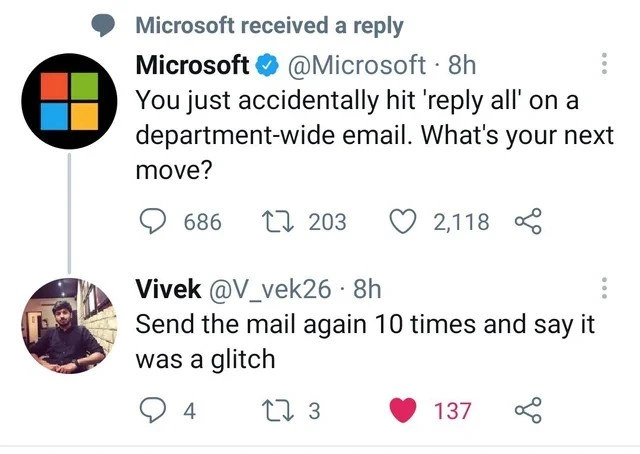
Now, the meme joke goes further. Microsoft’s official Twitter playfully asked, essentially, “If you commit this email sin, what do you do next?” One user quipped: “Send the mail again 10 times and say it was a glitch.” They’re basically suggesting, as a joke, to spam everyone ten more times with the same email and then claim a glitch (a technical malfunction) was responsible. Let’s unpack that. A glitch is a minor fault or bug in a system – like when your computer freezes for a second or your phone sends a duplicate text. In our scenario, “saying it was a glitch” is a tongue-in-cheek way of not taking blame. It’s as if you’d tell your whole department, “Hey folks, sorry about the ten duplicate emails – our email system went crazy!” instead of admitting that you goofed up. Obviously, sending it ten more times on purpose is not something anyone would really do – that would make the situation ten times worse (literally!). The humor is in the exaggeration. It’s poking fun at the idea that someone might try to cover an honest mistake by creating evidence of a fake technical problem. It’s like pressing the fire alarm again and then saying “These alarms are so faulty!”
For someone newer to the office or early in their career, here’s why this resonates: almost everyone gets warned about the “Reply All” button at some point. Maybe on your first day, a colleague whispers, “Careful with reply-all on big emails – it can be chaos.” You might even witness an incident: one mistaken reply-all, followed by a flood of “please remove me from this thread” messages (each of those, unfortunately, also hitting reply-all!). It turns into what we call a reply-all storm – an email thread that keeps getting new replies from people who either don’t realize they’re messaging everyone or are begging others to stop. It’s the digital version of an awkward chain reaction. In some famous cases, so many emails get generated that it can actually slow down the mail server. This is why companies have guidelines (a part of corporate culture): for example, they might restrict who can send to huge mailing lists, or have an “email etiquette” training that basically says “think twice before you reply-all.”
The second part of the meme, using a “glitch” as an excuse, is something a junior developer or office newbie might not have experienced yet, but it’s a known trope. It’s like when a student tells the teacher “the computer bugged out and deleted my assignment” – sometimes it’s true, but often it’s an attempt to excuse a human mistake. In a professional setting, blaming a glitch might save face momentarily (“Oh, it wasn’t me, it was a system error!”), but if used too often, people won’t buy it. Technical folks especially can usually tell apart a real system error from an user error. And sending the same email ten times in a row is almost never a real system error – it’s either a prank or a huge mistake. In reality, if you ever do hit reply-all by accident, the recommended move is to own up and apologize in one follow-up (or just let it go if it was innocuous), certainly not send ten more emails! This meme is WorkplaceHumor that exaggerates the situation to get a laugh. It highlights a very human aspect of tech: messing up an email and then fibbing about it to avoid embarrassment. If you’re new in tech, don’t worry – it happens to the best, and now you know why everyone chuckles nervously when the “Reply All” topic comes up. It’s practically a rite of passage in office life to see (or create) one of these email storms… just hopefully not ten emails worth of one!
Level 3: The Glitch Gambit
For seasoned folks in Corporate IT, this meme hits home because it combines two all-too-familiar workplace fiascos: the reply-all storm and the classic “blame it on a glitch” cover story. The situation: you’ve just accidentally emailed an entire department – a cringe-inducing moment of pure dread. Every office veteran has either witnessed or inadvertently caused one of these chain-reaction nightmares. The initial mistake is usually innocent (misclicking Reply vs. Reply All in Outlook, especially easy on that tiny mobile screen), but the fallout is instant and exponential. Co-workers start replying-all to scold “Please stop replying all,” which only adds fuel to the fire. Suddenly a thread that should’ve been one email deep is 50 messages long, and everyone from the intern to the VP is caught in the crossfire. It’s communication breakdown in its purest form, and an instant productivity killer. Now enter the second act: damage control. What do you do after such a blunder? According to this meme’s humor, you double down on the chaos – resend the email ten more times – and then claim some mysterious technical glitch caused the spew of duplicate messages. This is the glitch gambit: pretending the system had a hiccup, not you. It’s funny because it lampoons a common corporate instinct to avoid personal blame by invoking a technical gremlin. Seasoned developers and IT folks have seen this play out in real life. It’s the office equivalent of “the dog ate my homework,” except now it’s “the mail server acted up.” PEBCAK (Problem Exists Between Chair and Keyboard) is what tech support might jokingly label this – a user error – but admitting that in a big corporate setting can be career-suicide for the overly anxious. So instead, some opt for the glitch alibi.
Why is this so relatable (and funny) to those in the industry? First, the corporate culture around email is often paradoxical. You’re expected to be flawless in mass communications, yet everyone knows the system UI isn’t foolproof. (Ever noticed how the “Reply All” button in email clients sits precariously close to “Reply” – a UI design that practically beckons disaster under a jittery cursor or fat finger?) With hundreds or thousands on a list, a single slip unleashes office humor legend. People still swap war stories about the time “Bob in Accounting accidentally CC’d the entire company,” followed by the inevitable reply-all apocalypse of out-of-office auto-replies and snarky comments. There’s even historical lore: the infamous Bedlam DL3 incident at Microsoft where an errant reply-all on an enormous distribution list generated so much traffic that it earned a code name and forced internal changes. Put simply, large organizations have lived through these awkward moments in tech and implemented new policies (“disable reply-all for lists over X recipients!”) and tools (like Microsoft’s aforementioned Reply-All Storm Protection) to prevent human folly from melting down email servers.
Now, about blaming a glitch – the meme is poking fun at how often “technical glitch” is used as a scapegoat. It’s almost a running gag in corporate communications: “Due to a technical glitch, we regret any inconvenience…” when everyone privately knows someone messed up. But as a strategy, it’s a double-edged sword. On one hand, non-technical higher-ups or HR might actually buy it – after all, computers do act up sometimes, right? On the other hand, your IT department (and any savvy colleagues) will roll their eyes so hard they might sprain something. Miscommunication is at the heart of this joke: instead of directly communicating “I made a mistake” (which would be honest), the person concocts a false miscommunication story blaming the system. It satirizes that aspect of corporate culture where saving face often trumps transparency. We laugh because we’ve seen people try absurd things to dodge embarrassment. (Pro tip from a cynical veteran: if you ever actually attempt the glitch excuse, you’d better pray the real IT logs aren’t revealing that those 10 emails came from your device intentionally. It’s hard to keep a straight face in the post-mortem when the logs tell the true story.)
Finally, consider the social dynamics: The meme’s absurd solution – “send it again 10 times” – is so obviously making things worse that it highlights the folly of any cover-up. It’s a hyperbole that seasoned developers recognize as a truth-in-jest: sometimes our “fixes” for an error can be hilariously worse than the original mistake. It’s like deploying a quick patch to hide a bug that ends up causing ten bigger bugs. In real life, the correct move after accidentally reply-all-ing would be to send a single apology (to the same list, unfortunately) or, better, do nothing and let it blow over. But owning up frankly is not as funny – or as true to corporate life – as the caricature of concocting a far-fetched glitch story. The collective experience (and trauma) around reply-all disasters and the ensuing scramble for damage control is exactly why this joke lands so well among tech workers. It’s both a cathartic laugh at our occasional incompetence and a sigh at the lengths people go to avoid admitting it. In a world where every developer has at some point whispered “please, not reply-all…”, this meme manages to turn that nightmare into a shared chuckle.
Level 4: Broadcast Storm in the Inbox
At a deep technical level, this scenario is eerily similar to a network broadcast storm – but instead of Ethernet frames flooding a switch, it’s emails flooding inboxes. Hitting “Reply All” on a massive distribution list essentially broadcasts your message to every recipient. In a huge organization, that could be thousands of mailboxes. If even a fraction of those recipients also hit reply-all (often to shout “Please stop replying all!” – the ultimate irony), the email traffic can grow exponentially. We’re talking on the order of $O(n^2)$ messages in the worst case, where n is the number of unlucky colleagues on that list. This kind of uncontrolled feedback loop is analogous to positive feedback in a system – like a microphone next to a loudspeaker causing a squealing loop. It’s the email equivalent of a denial-of-service attack, albeit self-inflicted by human error. In fact, Microsoft Exchange server teams have had to implement safeguards (often dubbed “Reply-All Storm Protection”) precisely because of legendary incidents where a single accidental reply-all nearly Bedlam DL3’d the entire email system. The term “Bedlam DL3” itself comes from a notorious 90s Microsoft email debacle where a rogue reply-all on a company-wide list unleashed email chaos, hammering servers and teaching everyone a scaling lesson the hard way. In theoretical terms, the email system lacks a consensus mechanism to prevent or roll back this global mistake – once you send, those emails propagate to every mailbox with eventual consistency (and eventual annoyance). There’s no central transactional rollback for “oops, didn’t mean to send to everyone.” Instead, admins have to scramble with mitigation scripts or throttling rules, much like engineers rushing to contain a cascading failure in a distributed system. The meme’s punchline – “send it again 10 times and say it was a glitch” – hints at exploiting a Byzantine approach to cover one’s tracks: create a pattern of repeated messages to simulate a system glitch. It’s a cheeky nod to how complex (and absurd) it would be to intentionally mimic a malfunction. For a grizzled engineer, the humor here taps into the fundamental communication breakdown that occurs when human error meets system design: a simple UI slip (reply vs. reply-all) triggers an emergent phenomenon that even robust corporate networks struggle to curb. It’s the perfect storm where social dynamics (panic, confusion, everyone for themselves) interact with technical systems (email protocols, distribution lists) in unpredictable ways. In summary, this “reply-all avalanche” illustrates how even mundane tools like email can exhibit complex, chaotic behavior when scaled – a reminder that awkward moments in tech often have serious technical underpinnings (and maybe a whitepaper or two written after the fact).
Description
This image is a screenshot of a Twitter exchange. The main tweet is from the official verified Microsoft account (@Microsoft), which asks, 'You just accidentally hit 'reply all' on a department-wide email. What's your next move?'. Below this is a reply from a user named Vivek (@V_vek26), who responds, 'Send the mail again 10 times and say it was a glitch'. The screenshot captures the likes and retweets for both posts, with Microsoft's having over 2,118 likes and Vivek's reply having 137. The humor stems from the terrible yet hilarious advice, which suggests escalating a minor corporate blunder into a major spam event and then blaming a technical issue. This resonates with experienced developers who understand the absurdity of corporate email chains and appreciate the chaotic energy of solving a social problem by creating a technical one

Comments
11Comment deleted
The junior dev recalls the email. The mid-level dev sends an apology. The senior dev writes a script to send it 10 more times from a new hire's account and then opens a P1 ticket for a suspected mail server loop
Spin up an incident channel, tag it SEV-1, and blame a missing circuit breaker in Outlook’s reply-all pipeline - then quietly ship the fix we deferred in 2014 during the blameless post-mortem
The real enterprise solution would be to immediately push a hotfix that retroactively implements a 'recall message' feature, then gaslight everyone into believing it always existed - but we all know the Exchange server would crash before the recall completes anyway
The real senior engineer move? Immediately write a post-mortem titled 'RCA: Reply-All Incident' with sections on blast radius analysis, rollback strategy (unsend feature limitations), and proposed architectural improvements (mandatory email approval workflows with 2FA). Then schedule a 'lessons learned' meeting and invite the entire department. When questioned, simply state: 'We're treating this as a production incident because it affected multiple stakeholders across organizational boundaries.' Bonus points if you create a Jira epic for implementing a company-wide email gateway with ML-based reply-all detection
Call it a transient Exchange partition - leadership hears CAP theorem, ops hears thundering herd, and 1,200 inboxes become your shards
Enterprise scaling done right: horizontally replicate one reply-all into a 10x outage, blame the glitch for 'high availability'
Reply-all is the original enterprise DDoS - O(n^2) fan-out on Exchange - then the RCA calls it a “glitch,” which is incident-comms for catch(Exception) {}
Wait what? Comment deleted
Legit Comment deleted
smart Comment deleted
outlook glitch* Comment deleted