The Web Developer's Answer to Adblock Walls
Why is this Frontend meme funny?
Level 1: The Curtain in Front of the TV
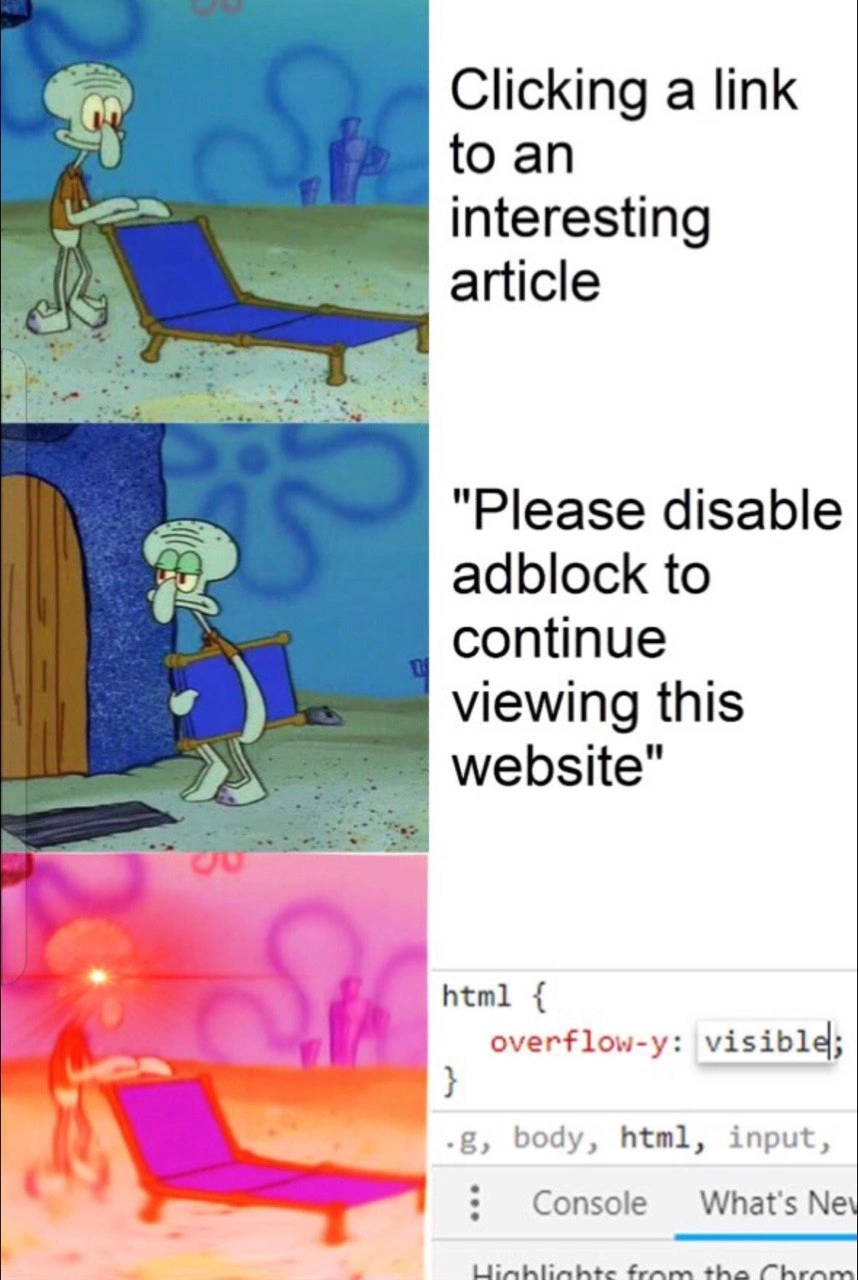
Imagine someone hands you a comic book, then taping a piece of paper over every page that says "you can't read this until you eat your vegetables." But the comic is already in your hands — the paper is just sitting on top. The grumpy squid character gets annoyed, then comes back with laser eyes and simply... lifts the paper off. That's the whole trick: the website pretends the article is locked away, but it already gave it to you, and anyone who knows where to peel gets to keep reading from their comfy beach chair.
Level 2: What DevTools Actually Lets You Do
The key terms behind the glow-up:
- DevTools (open with
F12or right-click → Inspect): A panel built into every browser that shows the live structure (DOM) and styling (CSS) of the page you're viewing. Crucially, you can edit both, live, on your copy of the page. overflow-y: visible: A CSS property controlling vertical scrolling. Anti-adblock overlays usually setoverflow: hiddenon the page so you can't scroll past the popup; changing it back, as in the screenshot, unlocks the page.- Modal overlay: The dark full-screen box demanding you disable your blocker. It's just an HTML element layered on top — delete it in the Elements panel and the article beneath is untouched.
- Client-side vs server-side: Code running in your browser (client) versus on their machines (server). You can change anything client-side; you can't touch the server. The joke exists because these popups are usually 100% client-side.
This is genuinely one of the best ways to learn web development: open DevTools on real sites, poke the styles, break things (only your local copy breaks — refresh resets it). The day you first dismiss an annoying overlay with the Elements panel is a small rite of passage; the day you realize your own site's "protection" can be dismissed the same way is a bigger one.
Level 3: Client-Side Walls, Client-Side Hammers
The three Squidward panels narrate a complete threat model. Panel one: contentedly unfolding the lounge chair — "Clicking a link to an interesting article." Panel two: chair packed up, leaving in disgust — "Please disable adblock to continue viewing this website." Panel three: the glowing-eyed, red-tinted ascended Squidward returns, and his power-up is rendered as a literal Chrome DevTools screenshot showing the Styles panel with:
html {
overflow-y: visible;
}
That single edited property is the whole exposé. The seniors in the audience know what it means: the publisher's "adblock wall" isn't a wall at all. It's two lines of client-side CSS — a full-screen modal <div> with a stratospheric z-index, plus overflow: hidden slapped on html/body to lock scrolling. The article is already downloaded. It's sitting in the DOM, fully rendered, behind a curtain. Flip the overflow back to visible, delete one node in the Elements panel, and the content was there all along — because it had to be, for the page to load at all.
This is the eternal lesson the meme weaponizes: the client is enemy territory, and anything enforced purely client-side is a polite request, not a control. The same fallacy powers hidden form fields as "security," JavaScript-disabled right-click "protection," and front-end-only input validation. The user's browser executes your code at the user's pleasure; DevTools is root access to your presentation layer. Publishers know this — which is why the arms race escalated into genuinely server-side measures (truncating article HTML, randomized class names, bait scripts that detect blocked requests), each round breaking screen readers and reader modes for paying customers while inconveniencing the F12-literate for roughly eleven seconds.
The economics underneath are the sad part the meme doesn't caption. Publishers aren't villains; programmatic ad revenue collapsed per-reader, adblock adoption gutted what remained, and the anti-adblock modal was the cheapest intervention a sprint could ship. But it filters users by technical skill rather than willingness to pay: the developer bypasses it instantly, the non-technical reader bounces, and the metric that improves is "walls deployed." It's a beach chair standing on someone else's beach, defended by a sign — and Squidward brought his own sand.
Description
A three-panel meme using the 'Squidward Lounge Chair' format from SpongeBob SquarePants. In the first panel, a content Squidward sets up a blue lounge chair, with adjacent text reading, 'Clicking a link to an interesting article.' The second panel shows an annoyed Squidward folding the chair and walking away, with the text, '"Please disable adblock to continue viewing this website"'. The final, climactic panel shows Squidward returning with glowing red eyes, defiantly setting up a now-glowing purple lounge chair. Next to this is a screenshot of a browser's developer tools, specifically the CSS inspector, where the style for the 'html' element is being edited to 'overflow-y: visible;'. The meme illustrates the common frustration of encountering adblock walls and the empowered response of a web developer. Instead of complying, the developer uses their technical skills to directly manipulate the website's CSS, bypassing the restriction that prevents scrolling and demonstrating a common, satisfying hack for tech-savvy users
Comments
8Comment deleted
Websites that try to stop a developer with `overflow: hidden` are like toddlers trying to hide by covering their own eyes. It's cute, but we can still see everything
Marketing burned six sprints on an “AI-powered anti-adblock overlay”; a senior dev counters with six keystrokes: `html{overflow-y:visible!important}` - the original zero-day we mastered in Firebug in ’08
Twenty years of web development experience, and I'm still using the same three-line CSS fix to bypass paywalls that I learned as a junior - except now I call it "client-side content accessibility optimization" in my architecture reviews
Their 'sophisticated adblock detection' is a div with z-index 9999 and overflow: hidden - security through CSS, defeated by F12
Every senior dev knows the sacred ritual: encounter paywall, F12, hunt for `overflow: hidden` on body/html, toggle to `visible`, close DevTools, continue reading. It's not piracy - it's aggressive CSS refactoring in production. The real question is whether you're more annoyed by the paywall or by the fact they're using `overflow-y` instead of properly managing z-index and position on their modal overlay
Anti‑adblock implemented as 'overflow:hidden' on html? That’s not a paywall, it’s a CSS specificity bug; Ctrl+Shift+I is the new subscription tier
Anti-adblock CSS: hiding <html> entirely then !important-ing selectors - elegant as a regex golf contest gone wrong
I don’t disable AdBlock; I disable your CSS - html { overflow-y: visible } is my premium plan