Skip to content
DevMeme
5899 of 7435
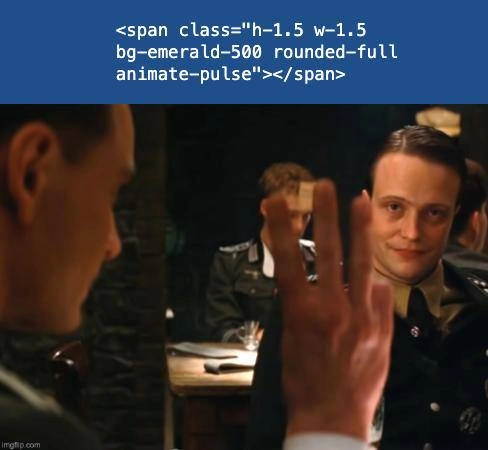
When Tailwind utility classes demand IMAX-level screen real estate for one div
Frontend Post #6459, on Dec 17, 2024 in TG

When Tailwind utility classes demand IMAX-level screen real estate for one div

Why is this Frontend meme funny?

Level 1: Massive Instructions, Tiny Task

Imagine you wanted to give your friend directions to press a button on your phone, but instead of saying “press the blue button,” you describe every tiny detail: “Move your hand forward, open your thumb and index finger 5cm apart, rotate 10 degrees, now touch the upper-left blue circle with medium force…” By the time you finish describing it, your instructions are huge – you’d need a giant poster to write them all down – for a really small action. That’s the joke here! In this meme, we have a tiny job (styling one little box on a webpage) but an enormous list of directions (lots and lots of style rules) to do it. They pretend to put that list on a movie theater screen because it’s so long. It’s funny because it’s an overkill comparison: normally, you’d never need a whole cinema screen just to show the code for one little thing. It’s like using a billboard to explain how to tie your shoelaces – ridiculously excessive and therefore comedic. Everyone in the theater is looking up at this wall of text with the same seriousness as watching a film, which is silly because it’s just code for styling a web page. The humor comes from that exaggerated contrast: a small, ordinary task blown up to absurd proportions. Even if you don’t know the tech details, you can laugh at the idea of something simple needing something as dramatic as an IMAX theater to be seen.

Level 2: One Div, Many Classes

If you’re a newer dev or just learning about this meme, let’s break down what’s going on. Tailwind CSS is a popular tool called a CSS framework. It provides a huge set of utility classes – these are short class names that each apply a specific style. For example, bg-blue-500 might set a background color to a medium blue, text-center will center-align text, p-4 adds padding, and rounded-3xl gives very rounded corners. Instead of writing CSS rules in a separate file, developers using Tailwind attach all these small classes directly to their HTML elements to style them. So an <img> or <div> might end up with a chain of classes describing its padding, margin, font size, color, shadow, etc., all in one line. This approach is often called utility-first or atomic CSS because you’re working with tiny “atomic” style units.

Now, the meme shows a pretend scenario where a single <div> element’s Tailwind classes are so numerous that they’re being displayed on an IMAX movie screen (the huge curved screen used for blockbuster films, especially shot on 70mm IMAX format). The tweet text says “1 div styled with tailwind on IMAX 70mm,” and the image literally has people in a theater looking up at a giant screen filled with lines of code. Those lines are actually what a typical Tailwind class list might look like in code, but blown up to cinema proportions. It includes class names like flex-col (which sets flex container direction to column), space-x-2 (adds horizontal spacing between child elements), hover:scale-110 (on hover, slightly zooms the element to 110% size), cursor-help (changes mouse cursor to a help icon), and many more. Each of these is a real Tailwind utility class doing one small job. But when you use Tailwind heavily, you might stack dozens of them on one element to get the exact look you want.

For a junior developer encountering this, it might look overwhelming. Why would someone do this? Well, the design idea behind Tailwind is that by using predefined classes, you maintain consistency (the same text-sm class means the same small text size everywhere, for example) and speed up styling by copying combos of classes rather than writing new CSS each time. It’s also great for rapid prototyping – you can tweak spacing or colors right in the markup by changing a class name, and see the effect immediately. DeveloperExperience can actually feel great when adding styles is as easy as Lego bricks.

The trade-off is readability. A newcomer opening a file filled with div class="flex px-4 py-2 bg-gray-800 text-white rounded-lg shadow-md hover:bg-gray-700 focus:outline-none ..." might initially think “Whoa, what is all this gibberish attached to the div?” But each token is meaningful:

  • flex px-4 py-2 → make a flex container, add padding x=4 (horizontal padding), y=2 (vertical padding).
  • bg-gray-800 text-white → background color dark gray, text color white for contrast.
  • rounded-lg shadow-md → give the box rounded corners (large radius) and a medium shadow.
  • hover:bg-gray-700 focus:outline-none → on hover, slightly lighter gray background; if focused (e.g., clicked or tabbed to, for accessibility), remove the default outline.

All those classes might replace writing a CSS like:

.myButton {
  display: flex;
  padding: 1rem 0.5rem;
  background-color: #2d3748; /* tailwind gray-800 */
  color: white;
  border-radius: 0.5rem;
  box-shadow: 0 0 6px rgba(0,0,0,0.1);
}
.myButton:hover { background-color: #4a5568; /* gray-700 */ }
.myButton:focus { outline: none; }

…and then the HTML <button class="myButton">. With Tailwind, you skip defining .myButton and directly put all those styles as classes on the element.

The meme exaggerates this idea to be funny. In reality, even if a Tailwind class list is long, you obviously don’t need a movie screen to read it – a normal code editor with line wrapping or proper formatting is enough. But it feels huge sometimes. The IMAX joke is saying: “Look how absurd it can feel to have so many classes for one little <div>. It’s like we need an IMAX theater just to display it all!” It’s a playful take on the one_div_many_classes phenomenon.

For frontend developers, especially those who have used plain CSS or other CSS frameworks (like Bootstrap or Foundation), this points out a key cultural shift. Old-school CSS might have one class name per element (maybe with some nested selectors) and the styles elsewhere. Modern utility CSS means your HTML is loaded with styling information right there. This can be ironic because when CSS was first introduced, the goal was to separate style from HTML content. Now frameworks like Tailwind mix them back together, but in a structured way. That’s why some people find it funny or ironic (frontend_irony): we went full circle! The meme is basically light-hearted ribbing of that fact – we solved our CSS maintenance problems by dumping everything back into the HTML, and now the HTML is huge.

It’s also poking at framework fatigue: developers often feel there’s always a new tool or method to adopt. Tailwind is very popular in 2024, but it’s not without skeptics. If you’re new, don’t worry – the meme isn’t really hating on Tailwind; many who laugh at this still use Tailwind daily. It’s more about laughing at ourselves for the sometimes comical side-effects of the tools we choose. After all, if you print out one of your React components using Tailwind classes in 14pt font, it might actually cover a wall! 😅 (Alright, maybe not literally, but you get the idea.)

In summary, the meme shows an IMAX code screen filled with Tailwind classes to humorously illustrate how using lots of utility classes can make a single element’s code blow up in size visually. It’s highlighting the contrast: one small piece of UI requiring an insanely large space to list its styling instructions. For newer devs, it’s a reminder that every approach (even convenient ones like Tailwind) has its quirk – here the quirk is super long class lists. And yes, that’s normal when using Tailwind! Over time, you learn to read those long strings almost like a sentence describing the element’s design. But seeing it out of context (like on a giant screen) really makes you chuckle at how over-the-top it appears.

Level 3: Cinematic Class Overload

For seasoned frontend developers, this meme hits on a familiar “too real” scenario: opening an HTML/JSX file and seeing a single <div> or <button> with what feels like an entire stylesheet’s worth of classes stuffed into the class attribute. The image literally shows an IMAX theater screen filled with one ridiculously long Tailwind class list, line after line of flex-col rounded-3xl border-2 shadow-2xl translate-x-3 skew-y-6 opacity-75 and so on. It’s funny because many devs have scrolled through a code file where a lone element’s class list overflows the editor or requires endless horizontal scrolling. In the meme, instead of a blockbuster movie, the audience is gazing at TailwindCSSUtilities in their full glory, as if the code itself were the feature film 😂. The tweet’s joke caption “1 div styled with tailwind on IMAX 70mm” lands because we recognize that feeling: this single UI component’s markup is so verbose, you practically need an IMAX projector to comfortably read it!

The humor also touches on DeveloperExperience_DX and the ongoing debates in CSS methodology. Tailwind’s utility classes can rapidly speed up development — you don’t have to come up with unique class names or context-switch to a CSS file; you just stack pre-defined classes like p-4 (padding) or text-lg (large text) right in your HTML/JSX. It’s very LEGO-like: you snap together small blocks to build the final design. But the downside is what we see lampooned here: an avalanche of class tokens, which can be daunting to read and maintain. This is the utility_css_sprawl in action. Over time, these mile-long class strings can become a new form of technical debt or tooling frustration – especially when another developer (or “future you”) revisits the code and has to decipher a wall of cryptic class abbreviations. It’s all perfectly valid and works, but it’s not exactly the clean, semantic HTML we were taught to strive for. In a code review, a senior dev might jokingly say, “Are we coding or writing out a dictionary of every style property?”

This meme also taps into FrameworkFatigue and irony in frontend development. Not so long ago, many teams complained about managing large CSS files, naming conflicts, and specificity hell. The industry swung towards solutions like BEM (Block-Element-Modifier naming) and CSS-in-JS, and now utility-first frameworks like Tailwind. Each step promises to make styling easier or more maintainable, yet each comes with its own trade-offs. Here the trade-off is crystal clear (or should we say, IMAX crystal clear): you eliminate separate CSS files and custom class names, but in exchange you get markup that looks like an explosion at the class name factory. It’s a bit of “out of the frying pan, into the fire” — we escaped tangled stylesheets by moving styles inline as classes, and now the HTML is humongous. The meme exaggerates that to humorous effect.

Anyone who’s worked on a large Tailwind project knows there are ways to manage the madness, like grouping classes by function (spacing, layout, colors) or using editor plugins that sort and even collapse the class lists for readability. But the core of the joke is that at face value, a Tailwind-heavy codebase can look overwhelming. The IMAX metaphor playfully implies that you need specialized, larger-than-life equipment just to comprehend your UI code. It resonates with developers who have squinted at a tailwind class string thinking, “This feels longer than the CSS it replaces!” It also pokes at how modern frameworks sometimes lead us to solutions that are technically efficient but optically absurd. The audience in the theater, staring up at rows of orange monospace text, mirrors us developers staring wide-eyed at our editor, trying to take it all in. It’s a shared laugh at our own expense: we asked for component encapsulation and consistency, and we got them – along with code that literally goes off the screen.

To put it in perspective, here’s a tongue-in-cheek “snippet” of what one tailwind_class_overflow might look like in a code file:

<!-- A wild Tailwind class list appears! -->
<div class="
    flex flex-col justify-between items-center 
    p-6 m-4 
    bg-blue-300 text-white text-xl font-bold 
    rounded-3xl border-2 border-red-200 shadow-2xl 
    transform hover:scale-110 translate-x-3 translate-y-2 skew-y-6 
    opacity-75 cursor-pointer select-none
">
  <!-- ... content ... -->
</div>

Yes, that’s all for one <div> (and there are even more classes in the meme’s IMAX version!). In plain CSS, we might have achieved the same styling with a single class like .card or a couple of nested rules. But with Tailwind’s CSSFrameworks approach, we compose these utility classes directly. The benefit is we know exactly what styles are applied just by reading the HTML. The humor is that reading the HTML now feels like reading the entire style sheet anyway. It’s the CodeReadability dilemma: is it easier to understand a short HTML with an abstract class name plus separate CSS, or a very long HTML with every style explicitly listed? The meme clearly teases the latter scenario.

Experienced developers also catch another layer of wink-and-nod here: the absurd image of a packed cinema for “one div’s styles” subtly mocks how overboard we sometimes go with tooling and trends. It suggests that maybe we’ve made something as simple as styling a box on a webpage into an epic event. This touches on a bit of impostor syndrome or collective industry self-deprecation: we invent fancy new tools (like a highly specialized CSS framework), then joke about the monsters we’ve created (massive class lists). Frameworks often promise to simplify our lives, but come with complexity in other forms. Tailwind simplifies writing styles but can complicate reading them. The IMAX joke is a lighthearted reminder not to take our shiny new tools too seriously – after all, if you need a theater-sized monitor to display your code, maybe the pendulum has swung a tad too far.

Level 4: Atomic CSS Cinemascope

At the deepest level, this meme riffs on the utility-first CSS paradigm taken to a ludicrous extreme. Tailwind CSS exemplifies an Atomic CSS approach: styling is composed by stacking dozens of tiny single-purpose classes (like p-4 or text-center) rather than writing one semantic class with a dedicated CSS rule. In theory, this follows a form of the Single Responsibility Principle in UI design – each class has one job (set a margin, apply a color, etc.), and developers compose these atomic classes to build up complex styles. It’s akin to writing assembly language for your UI: extremely granular instructions rather than a single high-level command. The result is highly explicit markup where every visual detail is spelled out inline, instead of being abstracted into separate CSS definitions.

From a software architecture standpoint, this approach challenges the old ideal of separation of concerns. Traditional CSS encourages keeping style definitions in .css files (separate from HTML structure), mapping meaningful class names (e.g. .navbar or .button-primary) to style rules. Utility-first frameworks like Tailwind invert this by co-locating style with structure: the HTML is peppered with classes that directly correspond to design decisions. This can actually improve maintainability in large systems by avoiding the cascade and specificity wars of vanilla CSS – styles are local and predictable, and you never suffer from naming things (one of the classic hard problems in computer science 😄). Tailwind essentially generates a giant stylesheet of classes (thousands of them) covering a comprehensive design system. During build, unused classes are purged (to manage file size), meaning that each HTML page selects just the styles it needs by including those class names in the markup. It’s a bit like a just-in-time compilation of CSS: only the “instructions” you actually use end up in the final CSS bundle.

However, the meme humorously highlights the visual overhead of this atomic approach. Listing every atomic style decision inline leads to utility_css_sprawl – the HTML becomes dense with class names. While each class is small, together they form an IMAX-scale string of code. The phrase “1 div styled with tailwind on IMAX 70mm” wittily conflates front-end code with epic cinema. 70mm IMAX film is known for its huge resolution and detail, used for monumental scenes – here it’s absurdly used to display a single snippet of HTML/CSS. The subtext pokes fun at the idea that to fully appreciate (or simply read) all the utility classes needed for styling one element, you’d need a screen of cinematic proportions. This echoes a common critique: code readability can suffer when a simple component’s styling isn’t abstracted but exploded into a long list of tokens. The meme exaggerates this to a hyperbolic, physical scale, underscoring the irony of a “small” thing (one <div>) having such a massive footprint in code. It’s a playful jab at how modern CSS frameworks sometimes trade elegant abstraction for explicit verbosity — a frontend irony where developer convenience produces comically verbose markup, large enough for the silver screen.

Description

The meme is a screenshot of a tweet: a user’s avatar and handle are shown (face blurred), with the tweet text reading “1 div styled with tailwind on IMAX 70mm.” Below, an IMAX cinema auditorium is packed with seated viewers staring at the giant curved screen, but instead of a movie it displays an endlessly long string of Tailwind CSS utility classes rendered in a code editor theme (orange monospace text on a dark background). Lines include snippets like “flex-col”, “rounded-3xl”, “border-2”, “shadow-2xl”, “translate-x-3”, “skew-y-6”, and various “opacity-75” modifiers, exaggerating how verbose a single Tailwind-styled <div> can become. The visual gag plays on the sheer length of utility class chains by scaling them up to towering cinema proportions, poking fun at frontend styling practices and readability trade-offs in modern component frameworks
Comments

32
Anonymous ★ Top Pick At last - a display where the Tailwind className fits on one line; sadly the linter still flags a ‘max-line-length exceeded’ warning in the projection booth
  1. Anonymous ★ Top Pick

    At last - a display where the Tailwind className fits on one line; sadly the linter still flags a ‘max-line-length exceeded’ warning in the projection booth

  2. Anonymous

    Finally, a screen large enough to display a single Tailwind component's class list without horizontal scrolling - though you'll still need IMAX 3D glasses to debug the specificity conflicts in production

  3. Anonymous

    When your PM asks for 'just one small styling change' and you realize you're now maintaining a div with more utility classes than lines of actual business logic in your entire microservices architecture. At least with Tailwind, the bundle size is optimized - unlike this IMAX projection, which is definitely not tree-shaken

  4. Anonymous

    Tailwind: escaping CSS specificity turns your className into a feature-length IMAX screenplay; at least PurgeCSS is the editor

  5. Anonymous

    DevTools truncates your Tailwind classList; IMAX gives every utility the 70mm spotlight it craves

  6. Anonymous

    Tailwind solved CSS specificity; the new bottleneck is code‑review bandwidth - one div, 200 tokens, and you still need IMAX to fit the diff

  7. @jaaaaded 1y

    Still the best way to write CSS

    1. Deleted Account 1y

      SCSS

      1. @Boguslavv 1y

        Have you seen Imba inline styles, you can even do things like animate mount/unmount in-fucking-line.

      2. @SamsonovAnton 1y

        "S" for "simplified", right? :Padme:

    2. @Algoinde 1y

      ...If you don't know CSS

      1. @kandiesky 1y

        How? Lmao You HAVE to know CSS to use Tailwind It's just so freaking good to use

    3. @Agent1378 1y

      Vanillllllllaaaaaaa!

  8. @Mikle_Bond 1y

    ye, but is this div centered?

  9. @Araalith 1y

    React...

  10. @evankh 1y

    ...so each class has 1 CSS rule associated with it? Brilliant

    1. dev_meme 1y

      I'd be more concerned about every nth class name overriding every n-1 class name's effect

    2. @kandiesky 1y

      Not really; but mostly, yeah

      1. Deleted Account 1y

        Almost all

        1. @kandiesky 1y

          Yep. Almost all

          1. Deleted Account 1y

            Where u from Just for curiosity by seeing ur name

            1. @kandiesky 1y

              I'm from Brazil. My name on this Telegram is just an nickname my friends gave me

  11. @user638294 1y

    man that thing is massive

  12. @user638294 1y

    you know what else is massive?

    1. @sylfn 1y

      int arr = { 1, 2, 3, 4 };

      1. @user638294 1y

        low taper fade...

      2. @azizhakberdiev 1y

        how, wtf

        1. @sylfn 1y

          what what

          1. @azizhakberdiev 1y

            idk why Russians mean array when they say massive

            1. @sylfn 1y

              because it looks like a transliteration of "массив" [array] (https://en.wiktionary.org/wiki/%D0%BC%D0%B0%D1%81%D1%81%D0%B8%D0%B2)

              1. @azizhakberdiev 1y

                out of all the words to use

                1. @sylfn 1y

                  lmao

Use J and K for navigation