Skip to content
DevMeme
4620 of 7435
Rubber duck debugging with ChatGPT stalled by Sequelize Pascal vs snake bug
Debugging Troubleshooting Post #5068, on Dec 7, 2022 in TG

Rubber duck debugging with ChatGPT stalled by Sequelize Pascal vs snake bug

Why is this Debugging Troubleshooting meme funny?

Level 1: Talking to a Wall

Imagine you’re trying to solve a tricky puzzle, and you decide to explain the puzzle to a teddy bear sitting on your shelf. You tell the teddy bear, “Okay, don’t say anything, just listen.” Then you start describing all the things that are going wrong with the puzzle. You’re hoping that by talking about it out loud, you might see the answer. But when you finish explaining, the silent teddy bear just stares back (as teddy bears do, since they can’t actually talk). You even kind of wish it would say something to help, but you did ask it to stay quiet! This meme is exactly that situation, but with a programmer and a computer chat assistant. The programmer had a problem where they accidentally gave something two different names (a bit like calling the same friend two different nicknames and getting confused). This naming mix-up was causing trouble in their code. They tried to work through the problem by talking to ChatGPT like it was a rubber duck – basically treating the computer program like a silent friend who just listens. But because they literally told the chat to be silent, it responded with nothing. It’s like talking to a wall or an echo: you get no answer. That’s the funny part – the developer ended up alone with their confusion, and the high-tech “helper” just sat quietly because that’s what it was told to do. In simple terms, the meme shows how silly it can get when you over-complicate getting help: sometimes, even a rubber duck (or a quiet chat buddy) can’t solve your problem if you don’t let them speak! The emotional takeaway? Frustration, yes – but also a chuckle, because we’ve all felt like we were talking to an unresponsive wall at some point while trying to figure something out.

Level 2: Naming Convention Clash

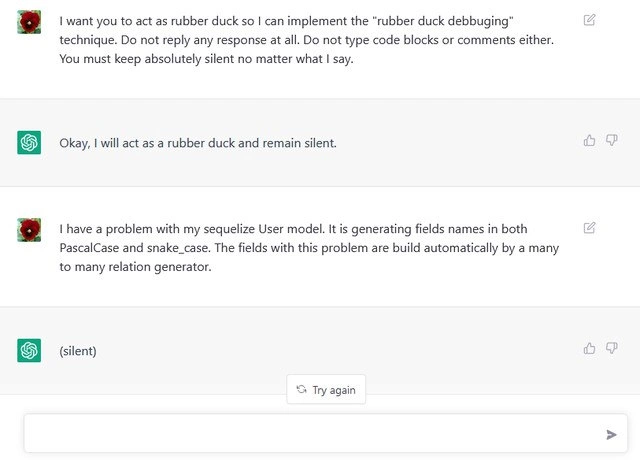
Let’s break down what’s happening here in simpler terms. First, rubber duck debugging is a well-known technique in programming. The idea is that you explain your code problem out loud, in detail, as if you’re talking to a friendly rubber duck (or any inanimate object). The duck doesn’t talk or give solutions – it just listens. Often, the act of explaining step-by-step helps you find the mistake yourself. In practice, many developers have a figurine or even just an empty chair as their “listener.” It might sound silly, but it’s surprisingly effective for troubleshooting. In this meme, the developer tries to use ChatGPT as the silent rubber duck. They explicitly tell the AI: “Do not reply at all… You must keep absolutely silent no matter what I say.” Essentially, “just listen, don’t talk.” Usually, you wouldn’t ask an AI to be silent (after all, we go to an AI for answers!), but here the user is attempting the rubber duck method via a chat interface.

Now enter the actual coding problem they’re monologuing about: Sequelize. Sequelize is an ORM (Object-Relational Mapper) for Node.js and JavaScript. It helps developers interact with a SQL database using JS objects instead of writing raw SQL queries. When you define a Sequelize model (like a User model for users in your system), you often specify field names. Sequelize can also auto-generate certain fields, especially for relationships between models. For example, if a User has a many-to-many relationship with a Role (like a user can have many roles, and a role can belong to many users), Sequelize will create a join table behind the scenes (maybe called UserRoles). In that table, it will by default create foreign key columns, perhaps named something like UserId and RoleId, to link to the primary keys of User and Role.

Here’s where naming_conventions come in. PascalCase vs snake_case refers to two different styles of naming. PascalCase means each word is capitalized and joined: e.g. UserId or CreatedAt. It’s similar to camelCase, except camelCase usually starts with a lowercase letter (like userId), whereas PascalCase often starts with an uppercase (like UserId). On the other hand, snake_case means all letters are lowercase and spaces between words are replaced with underscores: e.g. user_id or created_at. Different programming communities and tools have different preferences. In JavaScript, object properties are often camelCase/PascalCase, but in SQL databases, it’s common to use snake_case for column names. ORMs like Sequelize bridge these worlds, and they have settings to handle naming.

The developer’s complaint is that their Sequelize User model is generating field names in both PascalCase and snake_case — that’s inconsistent and definitely confusing! They specifically mention it happens for fields built automatically by a many-to-many relationship generator. This likely means the join table or foreign keys are not following one single naming style. For example, perhaps the code is ending up with both UserId and user_id referring to the same thing in different contexts. Why would that happen? Possibly misconfiguration. Sequelize allows a setting (either globally or per model) called underscored. If underscored: true is set, Sequelize will use snake_case for automatically added fields (so it would use user_id). If it’s false (default), it might use UserId. If the developer turned this on for the models but not for the relationships (or vice versa), they might get a mix. It could also be an older Sequelize quirk or a logic bug where the association mixin method generated one style while the base model used another. In any case, an experienced dev might fix this by explicitly specifying the column names in the relationship definition or ensuring a consistent naming convention across the board. For instance, one could do:

// Ensuring Sequelize uses snake_case for everything
const User = sequelize.define('User', { /* fields */ }, { underscored: true });
const Role = sequelize.define('Role', { /* fields */ }, { underscored: true });

// Define a through table with snake_case as well
User.belongsToMany(Role, { 
  through: 'user_roles',  // join table name in snake_case
  foreignKey: 'user_id',  // foreign keys in snake_case 
  otherKey: 'role_id' 
});

With a setup like that, you’d consistently get user_id and role_id everywhere. Alternatively, if you prefer CamelCase/PascalCase, you’d do the opposite and ensure no underscored option so it sticks to UserId/RoleId. The key is consistency. When fields appear in both forms, the ORM might be creating alias properties or just duplicating data, which can definitely bewilder a developer reading the output or debugging an issue. No wonder this person was frustrated enough to start talking to an AI duck!

Now, the funny part: the ChatGPT assistant actually obeys the order to stay silent. Normally, if you present a problem like “I have an issue with Sequelize mixing PascalCase and snake_case”, the assistant would try to help by explaining potential causes or solutions (like I just did above). But because the user said “Do not reply any response at all,” the AI was effectively gagged. In the screenshot, the assistant’s reply is just "(silent)" – literally indicating silence. The interface then shows a “Try again” prompt because from the app’s perspective, the assistant didn’t provide a useful answer. It’s a bit like having an expert in the room but you’ve instructed them to keep their mouth shut while you rant. Of course, you get no solution from them since you tied their hands (or vocal cords, in this case). The humor is twofold: (1) The developer is essentially debugging alone despite using a fancy AI, and (2) The AI is so literal that it even outputs the word “silent” to confirm it’s not speaking – a paradoxical way to not talk! It’s a playful poke at both the developer_humor of rubber duck debugging and the sometimes overly-literal obedience of AI like ChatGPT.

So, putting it all together in simpler terms: The dev was stuck on a tricky bug where database field names didn’t match up (PascalCase vs snake_case mix – a detail that can break things). They tried to solve it by explaining the problem out loud (which is good) using ChatGPT as a pretend rubber duck. But by telling ChatGPT to be completely mute, they got a silent_ai_response – no help at all, other than the echo of their own words. It’s a relatable Debugging situation exaggerated to comic effect. The lesson for a junior dev? Be careful how you ask for help: if you tell your helper to stay silent, you might just end up debugging by yourself! And check your naming conventions in your tools – a small setting can cause a big headache until you spot it.

Level 3: The Case of the Silent Duck

At first glance, this meme hilariously mashes up old-school debugging with a bleeding-edge AI assistant. The user literally instructs ChatGPT to become a silent rubber duck – a nod to the classic rubber_duck_debugging technique where you explain your code problem out loud to a mute object (often a little toy duck) to clarify your own thinking. In true obedient fashion, the AI agrees to remain silent, effectively transforming itself into a digital rubber duck. The developer then pours out a real issue: a vexing Sequelize ORM bug where a User model’s fields are appearing in both PascalCase and snake_case. This happens specifically for fields auto-generated by a many_to_many_relationship join table, causing a confusing double naming. Any seasoned developer reading this can immediately sense the naming_conventions conflict – a classic source of frustration in ORMs and databases.

This is where the humor really lands for those of us with experience: the combination of a DebuggingFrustration and an AI twist. We’ve all been there, scratching our heads over why our code is behaving oddly, only to discover it’s a trivial naming mismatch or config setting. In Sequelize (a NodeJS ORM that maps JavaScript objects to database tables), inconsistent naming conventions can wreak havoc. For instance, if one part of the code expects UserId (PascalCase) but the database column is user_id (snake_case) due to a different setting or default, you end up with duplicate fields or undefined errors. This meme’s scenario hints at exactly that kind of DeveloperExperience_DX hiccup: perhaps the developer enabled a setting like underscored: true for snake_case on some models, but the ORM’s many-to-many relation generator still produced PascalCase join fields (or vice versa). The result? A confusing mix of UserId and user_id fields referring to the same thing, which is equal parts annoying and comical in hindsight. It’s a Tooling issue that’s technically small (just naming), yet it can stall your entire debugging session. As the saying goes, “There are only two hard things in Computer Science: cache invalidation, off-by-one errors, and naming things.” This naming_conventions snafu lives up to that joke – such a little detail, such a big headache.

So the poor developer decides to talk it out to an AI “duck”, a modern twist on an old debugging method. But here’s the senior-engineer punchline: by telling the AI to “keep absolutely silent no matter what,” they’ve essentially engaged in a one-sided conversation. The AI assistant follows the instruction to the letter – responding only with a single word “(silent)” as if emulating a mute duck, and then offering no help at all. The UI even shows a cheeky gray “Try again” button, acknowledging the non-response. It’s an absurd scenario of self-imposed silence: the developer asked for silence and ChatGPT delivered exactly that. In effect, the user engineered their own unhelpful answer. This paradox tickles experienced devs because it highlights a truth about debugging: sometimes you just need a sounding board, but if you muzzle your sounding board (or if it’s a robot that takes you literally), you’re back to talking to yourself! It’s a perfect illustration of AI doing exactly what you said, not what you meant. Seasoned engineers have a term for this kind of outcome too: a PICNIC problem – “Problem In Chair, Not In Computer.” The AI wasn’t wrong; the request was.

On a deeper level, the meme satirizes our relationship with new AI tools in programming. We often turn to Stack Overflow, DuckDuckGo, or ChatGPT for quick help. But here the developer tried to combine a human technique (talking through a problem) with an AI that’s usually expected to talk back with solutions. The collision of expectations is comedic. A cynical veteran might chuckle, “At 3 AM, even the AI won’t talk to me when my code breaks.” An enthusiastic educator, though, sees a lesson: debugging often requires clarity in communication – even to yourself. If you garble the request (like telling the helper to be mute), you won’t get a useful answer. And in this case, the real answer likely lies in the Sequelize docs or GitHub issues: set a consistent naming convention (snake_case or camelCase) for your models and relation fields, so your JavaScript objects and SQL columns stay in sync. The deeper irony is that if the user hadn’t insisted on silence, ChatGPT might have cheerfully explained exactly how to fix the Pascal vs snake case bug! This meme resonates because it captures both the timeless struggle of debugging and the modern quirk of interacting with an overly literal AI. It’s a gentle reminder: whether it’s a rubber duck or a chatbot, how you engage with your debugging tools matters. And sometimes, the silence (or the bug) is literally of your own making.

Description

Screenshot of a chat UI (white background, green assistant icons) showing four dialogue bubbles. 1) User: “I want you to act as rubber duck so I can implement the 'rubber duck debugging' technique. Do not reply any response at all… You must keep absolutely silent no matter what I say.” 2) Assistant replies: “Okay, I will act as a rubber duck and remain silent.” 3) User continues: “I have a problem with my sequelize User model. It is generating fields names in both PascalCase and snake_case. The fields with this problem are build automatically by a many to many relation generator.” 4) Assistant responds with the single word “(silent)”, and beneath it the UI shows a grey “Try again” button. The meme humorously highlights rubber-duck debugging taken literally, an ORM naming-convention conflict in Sequelize, and the paradox of asking an AI assistant to stay mute while seeking help

Comments

11
Anonymous ★ Top Pick Told ChatGPT to be a silent rubber duck while I vented about Sequelize spitting out both UserId and user_id in the pivot table - proof that every additional abstraction eventually duplicates your columns and your conversations
  1. Anonymous ★ Top Pick

    Told ChatGPT to be a silent rubber duck while I vented about Sequelize spitting out both UserId and user_id in the pivot table - proof that every additional abstraction eventually duplicates your columns and your conversations

  2. Anonymous

    We've reached the point where we need AI to pretend it doesn't understand things so we can explain our problems to it, which is exactly how I brief new contractors about our legacy codebase

  3. Anonymous

    When you ask an LLM to be your rubber duck and it actually complies by staying silent, you've successfully achieved the debugging equivalent of 'task failed successfully' - now you're stuck explaining your Sequelize naming convention nightmare to an AI that's contractually obligated to ignore you. At least a real rubber duck would have the decency to float away

  4. Anonymous

    Asked GPT to be a rubber duck and it replied “(silent)”; Sequelize’s many-to-many generator gave me both PascalCase and snake_case - classic underscored flag drift, and somehow the duck is the only component with a consistent API

  5. Anonymous

    Asked the LLM to implement IRubberDuck; it answered '(silent)', while Sequelize's M:N generator emitted both PascalCase and snake_case - introducing eventual consistency to our naming strategy

  6. Anonymous

    Sequelize many-to-many generators: uniting tables while dividing opinions on camelCase vs snake_case - until rubber duck forces you to spot the config override

  7. @M4lenov 3y

    What bot is it?

    1. @slnt_opp 3y

      Must be this https://openai.com/blog/chatgpt/

  8. Deleted Account 3y

    (silent)

  9. @lord_nani 3y

    lmao

  10. @privatecopypaste 3y

    Perfect bot

Use J and K for navigation