A Dad's Guide to Playing 'Programmer'
Why is this Debugging Troubleshooting meme funny?
Level 1: More Prep Than Play
Imagine you got a brand new toy you’re super excited to play with. But before you can have any fun, your parent makes you do all the boring stuff: read the entire instruction booklet for hours and set up the toy exactly right. You spend a bunch of time struggling with tiny parts that won’t fit and even get mad that it’s so tricky. Then, after all that work, you play with the toy for just five minutes – and that’s it. Kind of a letdown, right? This meme is joking in exactly that way. The kids want to “play programmer” because they think coding is cool and exciting. But the parent says, basically, sure, but real programming means first doing a ton of reading and getting frustrated, and only then do you get to do a tiny bit of the fun part. It’s funny because it flips the expectation: what the kids thought would be an adventure (like instantly making a game or a cool app) turns out to be mostly tedious prep work (like homework) and a little reward at the end. In other words, being a real programmer isn’t just playing on a computer – it’s a lot of studying and problem-solving before you finally get something to work. The humor comes from showing the real programmer life in a way anyone can understand: lots of “chores,” not much “playtime.” It’s a playful warning that coding, just like building anything great, takes patience and effort before you see the fun result.
Level 2: One Line to Show for It
Let’s break down the joke in simpler terms. The tweet basically outlines a mock “day of coding” for the kids, and each part corresponds to a real programming activity:
Reading documentation (4 hours) – In software development, documentation is like the instruction manual or guide for your tools and libraries. It’s the text (often web pages or PDF manuals) that explains how things work – for example, how to use a new programming framework or the details of an API. When the tweet says the kids have to sit and read documentation for four hours, it’s poking fun at the fact that developers spend a lot of time learning and researching. Imagine you’re new to a JavaScript framework like React: you might spend your morning combing through guides, tutorials, and reference docs just to understand how to get started or how a particular feature works. This can definitely feel like documentation overload when you’re eager to write code but have to wade through pages of instructions. Every new coder discovers that reading and understanding is half the battle. It’s not wasted time – it’s how you gather the knowledge to actually write your program – but it can be tedious. So, making kids do that as a “game” is a funny (and slightly cruel) way to show them what daddy’s job really entails. It highlights DocumentationWoes: sometimes docs are long, boring, or confusing, and you just have to grind through them. (Seasoned devs often joke that Googling errors and reading docs is 90% of coding.)
Cursing at a text editor (2 hours) – After the research phase, the tweet says the kids should curse at a text editor for two hours. A text editor is the program you write code in – examples are Visual Studio Code, Atom, or even Notepad. Developers often use more advanced editors or IDEs that help check code, highlight errors, and run programs. But here’s the thing: setting up and using these tools can be frustrating, especially when things go wrong. “Cursing at a text editor” is a funny way to say “struggling with coding problems or tools and getting frustrated.” Maybe the code isn’t running due to a mysterious error, or the editor is complaining about a missing plugin, or you can’t figure out why your program crashes. For a newbie, this might be like trying to run your first app and getting a cryptic error message – you’d probably feel like yelling at the screen, “Why isn’t this working?!” This is extremely common in programming! Even simple tasks can hit snags: maybe you forgot a comma, or the environment isn’t configured right. Developers sometimes literally mutter or shout at their code or editor when stuck – it’s a universal form of coding frustration. In the “game” for the kids, having them pretend to angrily debug for two hours demonstrates that writing code isn’t a smooth ride; it comes with errors, confusion, and a bit of developer frustration. (Don’t worry, real programming isn’t always that miserable – but it can feel like it when you’re learning or when a bug won’t go away.)
Writing one
console.logstatement (at the end) – Finally, after all those hours of prep and struggle, the kids get to write a single line of actual code: aconsole.logstatement. In JavaScript,console.log()is a function that simply prints a message to the developer’s console (basically, it outputs text for you to see while developing, often used for debugging or checking values). It’s one of the first things you learn in many programming tutorials. For example, you might write:console.log("Hello, world!");This would print the text “Hello, world!” to the console. It’s equivalent to a basic “print” statement in many other languages. Writing a
console.logis about as simple as coding gets – it doesn’t create a fancy app or anything; it just shows you a message. So, why is the tweet specifically mentioning a single console.log? It’s highlighting how, after all that time spent reading and debugging, the end result is just a tiny bit of code with a very simple outcome (printing something to the screen). It’s like spending all day preparing and the only thing you do is make the computer say “Hello.” That’s intentionally ridiculous and therefore funny. The kids probably expected to create a cool game or a website while “playing programmer,” but nope – Dad’s joke is that they’ll end up with one line of output. This is poking fun at developer productivity: on the surface, it looks like you did almost nothing (one line of code) in a whole day. Of course, in reality that one line might be very important, or those hours of reading set you up to do bigger things later. But humorously, we often measure a day by visible output, and sometimes there’s not much visible output. Every junior dev quickly learns that a lot of the job is invisible work (learning, fixing, understanding) and not just cranking out hundreds of lines of new code each day.
So, putting it together: The parent in the tweet is effectively saying, “Oh, you want to play coder? Alright, I’ll give you the real coder experience.” The kids_playing_programmer scenario becomes a mini bootcamp of what a developer actually does:
- Study time – just like doing homework, you read technical docs for hours. (Boring, but necessary.)
- Problem time – you grapple with errors or tools that won’t cooperate and maybe get a bit angry. (Frustrating, but very common.)
- Tiny victory – you write one simple line that finally works. (Satisfying, but hilariously small in scale.)
This contrast is what makes developers laugh knowingly. As a newcomer to coding, you might even find yourself in similar situations. For instance, think about the first time you set up a programming environment: you might spend an afternoon installing Python or Node.js, reading how to run a script, troubleshooting a PATH error (those annoying setup problems), and eventually you run print("Hello World") or console.log("Hello World") successfully. It’s just one line printing a greeting, but you feel triumphant because you overcame the setup and instructions. The tweet is basically that scenario, exaggerated: lots of prep, just a console_log_statement as the end product. It’s a form of relatable dev experience humor – anyone who has struggled through documentation and debugging to get a trivial program working can see themselves in this. And for those who haven’t experienced it yet, well, it’s setting expectations that programming is not all typing cool code like in the movies; a lot of it is careful reading and persistent problem-solving. The DeveloperHumor here comes from exposing that reality in a playful way. After such a “game,” the kids would probably understand why Daddy sometimes looks tired after work – writing code is as much about thinking and learning as it is about typing. In short, the meme is telling us: programming is 90% preparation/frustration, 10% execution, and it finds comedy in that imbalance.
Level 3: Working Hard or Hardly Coding
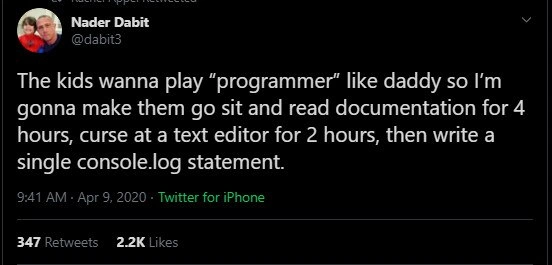
“The kids wanna play ‘programmer’ like daddy so I’m gonna make them go sit and read documentation for 4 hours, curse at a text editor for 2 hours, then write a single console.log statement.”
This tongue-in-cheek tweet lays bare a classic developer reality: hours of effort yield only a single line of code. It humorously breaks down a day in the life of a programmer into a 4:2:1 ratio – four hours slogging through documentation, two hours wrestling with the development environment (and uttering a few choice expletives at the text editor), and one lonely console.log at the end. Seasoned engineers chuckle (or maybe groan) at this because it’s alarmingly relatable. We’ve all had those days where we dive into documentation overload, emerging bleary-eyed with just a tiny snippet of code to show for it. In real projects, reading and deciphering docs – whether it’s a framework’s 20-page setup guide or an API’s arcane reference – often consumes far more time than writing the feature itself. The meme exaggerates for comedic effect (hopefully you’re not literally stuck reading docs for 4 hours straight every day), but it captures an essential truth: DeveloperExperience (DX) includes a lot of unglamorous groundwork.
Why is this funny? Because it flips the glamorous image of “programming” on its head. Non-developers (and certainly kids) might imagine coding is all about furiously typing new features into existence. The reality: much of a developer’s “coding time” is actually spent reading manuals, tutorials, and Stack Overflow posts to figure out how to do something. There’s even an old adage, RTFM (“Read The Friendly Manual”), which is veteran shorthand for “go figure it out from the docs” – a rite of passage for any programmer. The tweet nails this documentation humor: reading for hours to fix one tiny issue or learn one method. It’s a universal developer experience to navigate sparse or confusing Documentation_Woes where you’re not coding at all, just parsing instructions. And let’s not forget the text_editor_rage part – that’s a nod to the inevitable frustration when your code editor or IDE (Integrated Development Environment) becomes your nemesis. Think about those times an IDE refuses to compile because of one missing semicolon, or when your text editor’s auto-formatting fights you. Many of us have shouted “Why won’t you run?!” at a screen at 2 AM. That’s the “curse at a text editor for 2 hours” segment – a bit of DeveloperFrustration that’s almost a daily routine. It’s funny in hindsight precisely because it’s true: outbursts at inanimate code editors are part of the relatable dev experience.
Finally, after all that toil, the punchline is writing a single console.log statement. In JavaScript, console.log simply prints a message for the programmer to see – it’s about as basic as it gets, often used for quick debugging or the classic “Hello World” test. The absurdity is that after 6 intense hours of “playing programmer,” the kids (or rather, the developer in the story) have produced one measly line of output. It’s a sharp wink at how developer productivity isn’t measured by lines of code written. In fact, a day spent removing 100 lines or understanding code can be more productive than a day adding 1000 lines. Here, the tiny console.log is symbolic: all those headaches and research sessions condensed into a trivial outcome. It highlights the paradox of programming: the visible result can be disproportionately small compared to the effort. Every senior dev has tales of spending an entire day chasing a bug or configuring a tool, only to change one line (or sometimes just one character!) in the code to fix everything. The humor comes from shared catharsis – we’ve been through this grind, and while it’s painful, seeing it stated so bluntly is darkly comical. DeveloperHumor often thrives on exactly this kind of painful truth. So when the parent in the tweet says they’ll make the kids “play programmer” by enacting this scenario, experienced devs smirk knowingly. It’s an ironic way to teach the kids the real programmer life: not the Hollywood montage of quickly hacking into mainframes, but the actual slow, methodical process of learning and debugging. And maybe, just maybe, it’s a subtle jab at how un-exciting our job looks from the outside. The next time someone says programmers have it easy, we can point to this meme and say, “Sure, come play developer – bring coffee and be ready to read for hours!” At least the tweet’s schedule didn’t include another 2-hour meeting about that console.log statement – now that would truly capture corporate developer life.
Description
A screenshot of a tweet from Nader Dabit (@dabit3) on a dark mode interface. The tweet reads: 'The kids wanna play “programmer” like daddy so I’m gonna make them go sit and read documentation for 4 hours, curse at a text editor for 2 hours, then write a single console.log statement.' The humor comes from its painfully accurate portrayal of the developer experience. It satirizes the romanticized idea of programming by breaking it down into its core, often frustrating components: endless documentation, battles with tooling, and the slow, incremental progress symbolized by writing a single debugging statement ('console.log'). The joke resonates deeply with senior engineers who understand that much of their job isn't writing new code, but troubleshooting existing systems
Comments
7Comment deleted
The full simulation would also require them to attend three pointless meetings and then explain to a non-technical person why their single line of code took all day to write
Sure, the kids can play programmer: first spend four hours untangling a peer-dependency mismatch in the 7,000-package monorepo, curse at the IDE when the TypeScript server hits 8 GB, then finally ship a single console.log - instantly triggering the quarterly change-management review
Teaching kids about programming is like explaining your job at a dinner party - you start with grand visions of distributed systems architecture, but end up just showing them how you spent three days debugging a race condition that turned out to be a missing await keyword
This perfectly captures the 80/20 rule of software development: 80% of your time reading docs and fighting your editor, 20% writing code - and that 20% is just console.log statements to figure out why the other 80% didn't work. The real programming rite of passage isn't writing your first Hello World, it's spending six hours debugging only to realize you forgot a semicolon, then questioning every life choice that led you to this career. At least the kids will learn early that 'programmer' isn't a glamorous job title - it's a support group for people who enjoy being humbled by inanimate objects
Console.log-driven development: six hours of doc archaeology and editor yak‑shaving to ship one line - still faster than waiting for the CAB to approve a real release
Kids want to code like dad? Start with docs for console.log - teaches 'em faster than any LeetCode that 90% of dev is RTFM, not memes
Kids want to “play programmer”? Start with four conflicting docs, spend two hours making VSCode obey .editorconfig, then write console.log - immediately rejected by pre-commit and lost to 1% log sampling