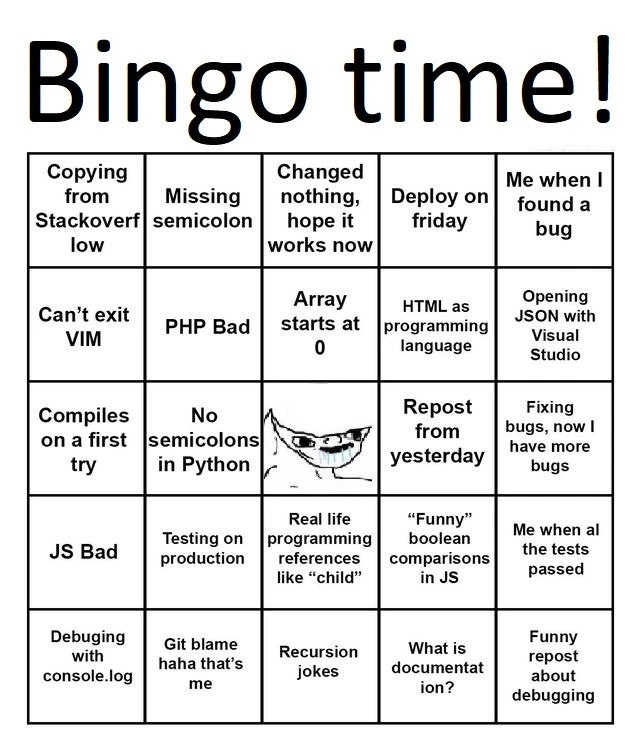
Developer bingo card covering classic coding fails, debugging woes, and language wars
Why is this Debugging Troubleshooting meme funny?
Level 1: Everyone Makes Mistakes
Imagine a bingo game where each square is a little everyday mistake or “oops” moment. For example, one square says “spilled juice on my homework”, another says “forgot to save my game”, another “stayed up too late and felt tired”. If you’ve done all those, you’d yell “Bingo!” – not because it’s great, but because it means you’re human and these goof-ups happen to everyone.
This meme is just like that, but for people who write computer programs. Each box on the card is a common mix-up or funny situation that every programmer faces sooner or later. One box jokes about copying homework answers from a friend (that’s like copying code from the internet). Another is like not following the recipe and hoping the cake still turns out okay (“changed nothing, hope it works”). There’s even one about using a super complicated tool to do a simple thing (imagine using a huge truck to deliver a single pizza – silly, right?).
Why is it funny? Because when programmers see this bingo card, they go, “Oh wow, I’ve done that… and that… oh, and that too!” It’s a way to laugh at ourselves for all the little mistakes and crazy predicaments we’ve been in. It turns feelings of frustration or embarrassment into a shared joke. The message is: everyone makes mistakes, and that’s okay. In fact, making these mistakes is practically how you know you’re really learning and doing something hard. By turning those moments into a game, the meme makes it clear that no one is alone – we’ve all checked off those bad-day boxes, and we can all still smile about it in the end.
Level 2: Coding Pitfalls 101
Let’s break down the bingo card into its individual squares and explain what each one means in simpler terms. These are basically the greatest hits of common programmer mistakes, frustrations, and inside jokes. If you’re new to coding, here’s why each of these is famous (or infamous):
Copying from Stack Overflow: Stack Overflow is a hugely popular Q&A website where programmers ask questions and get code snippets as answers. Copy-pasting code from there is practically a daily routine for many developers. It’s fast and often helpful, but the joke is that some people rely on it a bit too much. If you copy code without fully understanding it, you might introduce weird bugs or have code you can’t fix later. This square is on the bingo because almost everyone has done it – sometimes you’re in a hurry and paste a solution from the internet instead of writing it yourself.
Missing semicolon: In many languages (like C, C++, Java, JavaScript), every statement must end with a
;(semicolon). It’s like the period at the end of a sentence, but for code. Forgetting one tiny semicolon can cause the whole program to not compile (i.e., not even run). A newbie might stare at their code for ages, only to find out they just missed a;somewhere. It’s such a classic mistake that it’s almost a rite of passage in learning to code. The bingo card pokes fun at this because everyone has missed a semicolon at some point and felt silly about it.Changed nothing, hope it works now: This phrase captures a moment of pure desperation. You’re debugging (trying to fix a problem), and nothing is working. You reach a point where you basically try doing nothing different – maybe just restart the program, or run the code again – and cross your fingers that the issue magically fixes itself. It sounds absurd, but sometimes environment issues or random factors can make a bug appear and disappear unpredictably. Every developer has had that “I haven’t changed a thing, but maybe this time it’ll work…” thought. It rarely does, but hey, hope springs eternal! This square is on the bingo because it’s a tongue-in-cheek admission that we all resort to praying to the code gods at times.
Deploy on Friday: Deploying means putting new code or a new version of your software onto the server for users (essentially, launching changes to production). Doing this on a Friday is notoriously risky. Why? If the new code has a bug or causes a crash, it might not be noticed until people start using it — which could be late Friday or over the weekend. That leaves the team (or an on-call engineer) scrambling to fix things during their time off. It’s common wisdom among developers to avoid Friday releases (there’s even a meme: “Friends don’t let friends deploy on Fridays”). This bingo square is basically a warning wrapped in a joke: it’s so common that someone deploys on Friday and regrets it that it became meme-worthy.
Me when I found a bug: In meme-speak, a phrase like “me when I found a bug” is usually paired with a funny image or GIF showing some expression. It’s a way to convey how you feel in that moment. Finding a bug in your code can induce very mixed feelings: sometimes it’s “Yay! I discovered why it’s broken, I’m relieved,” or if you’re the one who wrote the bug, it’s “Oh no… that’s on me.” Without the actual image, just know this square refers to a relatable emotional moment. Every developer knows that bittersweet feeling of finally spotting the error in their code – you’re happy you found it, but also maybe facepalming that it was there in the first place.
Can’t exit VIM: Vim is an old-school text editor that runs in the terminal (a command-line interface). It’s powerful but not user-friendly to beginners. The common joke is that newbies open Vim and then have absolutely no idea how to get out of it, because usual keys don’t work as expected. In Vim, you have to hit the
Esckey to go into command mode, then type:q(or:q!to force quit without saving) and press Enter. If you don’t know that, Vim seems like a trap you can’t escape. Many people have resorted to closing the terminal or even rebooting the computer just to exit Vim! It’s such a well-known problem that “how to exit Vim” is one of the most searched questions for new programmers. This square is a nod to that universal newbie experience.PHP Bad / JS Bad: These two are about programming language reputations. PHP is a language mainly for writing server-side web code (things like WordPress and old websites use a lot of PHP). It’s often criticized for having inconsistent design and being easy to write messy code in. So some developers jokingly just say “PHP bad” as a meme, implying they dislike it. JavaScript (JS) runs in web browsers (and elsewhere) and is incredibly popular, but it has some famously wacky parts (like we mentioned with type coercion, or historical quirks because it was created in a hurry in the 90s). So “JS bad” is the similar meme of blaming JavaScript for bugs or weird behavior. In reality, both languages can be used to build great things, but devs love to playfully argue about which languages are the worst. Putting “PHP Bad” and “JS Bad” on the bingo card is like saying, “Yep, been part of a flamewar where everyone dumps on a language – classic developer banter.”
Array starts at 0: In programming, an array is a list of items (like numbers, or strings, etc.) and usually the first item is index 0, the second item is index 1, and so on. This is called zero-based indexing. It’s a bit unintuitive at first, because if you’re counting things in real life, you start at 1 (“first” means 1). But in most coding languages, the “first” element is
array[0]. Newbies often stumble by writingarray[1]thinking that’s the first element and getting the wrong result or an error. The bingo square just states this fact – “array starts at 0” – because it’s one of those fundamental things you learn early (often by making a mistake). It’s almost a gentle I-told-you-so from the programming universe, reminding us of the rule that caught us all off-guard initially.HTML as programming language: HTML (HyperText Markup Language) is the standard language for creating web page structure and content. But importantly, it’s not a programming language that can do logical decisions or computations; it’s more like a layout or formatting language. However, people who are new to computers sometimes list HTML as the first “programming language” they learned. Veteran programmers love to debate this trivial point: “Is HTML actually a programming language?” (Usually the answer is “No, but it’s still an important skill.”) So this bingo square represents that cheeky debate. It’s funny to developers because it reminds us either of ourselves back when we thought making a webpage with HTML was real programming, or of times we’ve had to gently correct someone on this.
Opening JSON with Visual Studio: JSON stands for JavaScript Object Notation, and it’s a plain text format for storing data (e.g., configuration files, data exchanged between a server and web app, etc.). You typically open a JSON file with a simple text editor or a specialized lightweight tool to just inspect or edit it. Visual Studio, on the other hand, is Microsoft’s giant IDE, intended for building entire applications, with projects, solutions, compilation, debugging – the works. If someone tries to open a
.jsonfile in Visual Studio, a couple of things might happen: Visual Studio might think you want to create a whole project, or it’ll just load it but take a long time because VS is heavy. It’s generally using an elephant to crack a peanut. The humor here is imagining a beginner who doesn’t realize this and goes through a lot of unnecessary steps, or simply the absurdity that your operating system defaults to Visual Studio for.json. Developers chuckle because we’ve seen machines set up weirdly where double-clicking a JSON triggers Visual Studio, and we’re like “No no no, just use Notepad or VS Code!”Compiles on a first try: When you write code in languages that need compiling (like C++ or Java), you have to run a compile step that checks the code and builds an executable. Usually, the first time you try to compile a new piece of code, you get errors – maybe a typo, maybe forgot to declare something, or yep, a missing semicolon. It’s normal to iterate a few times fixing compile errors before it finally succeeds. So, if your code compiles on the first try, it’s either a super simple change or you’re unbelievably careful... or just lucky. It’s so rare it’s kind of a bragging right and a joke in one. Some developers facetiously claim “it compiled on first try!” the way a fisher might say “I caught a huge fish!” – half-joking, half-proud. The bingo card having this square is a humorous little gold star: if you can mark that, you either experienced a miracle or you’re remembering that one blissful time everything just worked (versus the hundreds of times it didn’t).
No semicolons in Python: This is straightforward – in Python, you do not need to put semicolons at the end of each line. Each line break is automatically the end of a statement. It’s one of Python’s design choices to make code visually cleaner. You can put a semicolon if you really want (it will be treated as an empty statement, basically ignored, or to put two statements on one line), but typically nobody does. This is often surprising to people coming from C-like languages. They might habitually add semicolons out of habit and realize it’s not necessary. The bingo square pairs with “Missing semicolon” as a contrast. It humorously highlights that something considered an error in one language is a non-issue in another. For a newcomer, it’s a hint: different languages have different syntax rules, and you have to adapt – what’s a mistake in one might be normal in another.
Smug cartoon cat face: One of the squares in the middle is just an image: a cartoon cat with a smug expression (like a sly grin). Without seeing it, we can infer it’s used as a meme reaction. Possibly it corresponds to one of the “Me when...” captions (like “Me when I found a bug” or “Me when all the tests passed”). The cat’s face would convey the feeling – perhaps self-satisfied, cheeky, or mischievous. In developer memes, animals with human-like expressions (grinning cats, dogs at computers, etc.) are often used for humor. The presence of the smug cat in the bingo adds a dash of visual fun to break up all the text. It’s basically a meme within a meme, relying on the image to get a laugh.
Repost from yesterday: A “repost” means someone is sharing the exact same content that was already shared recently. In online communities, people sometimes complain “This is a repost!” when they see the same meme or joke again. By including “Repost from yesterday” as a square, the bingo card is self-aware. It’s like it’s saying, “Yep, these jokes aren’t new – you probably just saw them, in fact.” This is funny in itself because the card is poking fun at how repetitive developer humor can be, and how the same debugging stories and coding fails are told over and over, day after day. There’s comfort in that though: it shows that each new generation of devs experiences the same struggles, so the jokes keep cycling.
Fixing bugs, now I have more bugs: This square is basically the programmer’s version of “cut one head off, two more grow in its place.” When you fix a bug in code, especially without fully understanding the deeper impact, you might cause another bug elsewhere. For example, you patch a leak, but now water is coming out somewhere else in the pipe. In coding, this is super common in large, interconnected systems. You change something to solve problem A, but that unintentionally breaks thing B. It’s why we do a lot of testing. This being on the bingo card is a nod to that frustrating but frequent scenario. Every developer eventually says, “I thought that would fix it, but now there’s two new errors!” You often have to fix the way you fixed things, which can feel like an endless loop. It’s both exhausting and, when looking back, a bit funny how adding one line can cause so much chaos.
JS Bad: We already touched on this with “PHP Bad / JS Bad”. It appears both “PHP Bad” and “JS Bad” are each given their own square on the bingo. So the card really emphasizes the language-bashing meme. For a junior: just know that JavaScript (“JS”) is often the butt of jokes due to historical warts. For instance, JavaScript will let you do silly things like
typeof nullreturning"object"(which is a bug in the language from long ago that just never got fixed for backwards compatibility). It also has that unusual way to compare equality with loose vs strict checks. These quirks make it easy to trip up if you’re not careful, hence old-school devs sometimes groan about “bad JavaScript.” Of course, it’s said half-jokingly – we all use JS anyway because it’s everywhere.Testing on production: Ideally, when you write new code, you test it in a development or staging environment – basically a safe sandbox that’s a clone of the real system, so if the code has issues, no real users see it. Testing on production means you’re running your new code directly on the live site/app to see if it works. This is dangerous because if it doesn’t work, you’ve just broken something real users rely on. It’s like fixing a car’s engine while driving on the highway – not recommended! Sometimes it happens by accident (“whoops, I merged to the main branch and it deployed, guess we’re testing in prod now!”) or due to lack of proper test setups. It’s both horrifying and (later, when all is well) darkly humorous that anyone does this. The meme square reminds newbies: don’t test in production... unless you secretly like firefighting outages.
Real life programming references like “child”: In programming, we use everyday words to describe technical concepts, and it can sound funny outside context. Some examples: “child” (a sub-task or sub-element of something), “parent” (the container or origin of that child), “kill” (to force-stop a process), “orphan” (a process whose parent died), “deadlock” (when two processes are stuck waiting on each other). A programmer might say a sentence like, “The parent process died, leaving a bunch of zombie children.” That sounds like a horror story, but in computing it’s a normal description of an OS state! This square is about those moments where a developer says something plainly in code-speak and non-techie folks around raise an eyebrow or gasp. It’s an inside joke because once you’ve done it, you realize how absurd it sounds and you learn to clarify quickly, “Uh, I mean child process, not a real child!”
“Funny” boolean comparisons in JS: This refers to how JavaScript handles booleans (
true/false) and other types when comparing with the==operator. JS tries to convert values to a common type, which can lead to some really unexpected results. For example:0 == "0" // true, string "0" is converted to number 0 false == "0" // true, "0" becomes 0, and false becomes 0, so 0 == 0 false == [] // true, [] becomes "" (empty string) then 0, false becomes 0 [] == "" // true, an empty array becomes "" when converted to string [] == 0 // true, [] becomes 0 (as above) null == undefined // true, these are considered loosely equal in JSThese results are pretty counter-intuitive! A new programmer might scratch their head and say, “How on earth is
false == "0"true?” This happens because of type coercion rules defined in the JavaScript specification. To avoid such weirdness, there’s a stricter equality operator===that does not perform type conversion – it checks value and type, sofalse === "0"would be false (since one is Boolean false, the other is string "0"). The bingo card putting this in quotes as “Funny” boolean comparisons is ironic: it’s “funny” as in “funny-strange,” not funny-haha when you actually encounter it while debugging. It’s a gentle warning to newcomers: JavaScript can be quirky, so be careful with equality checks (and consider using===to save yourself from DebuggingFrustration).Me when all the tests passed: This is another “me when...” reaction square. Software developers often write tests (small programs that automatically check if the main code is working correctly). When you run the test suite, it’s common for some tests to fail at first – meaning you’ve got bugs to fix. Getting all tests to pass (especially on the first run) is a joyous moment. Some might describe it as feeling like winning a lottery or leveling up in a game. It’s both relief and pride: “Finally, everything is green!” If this square is marked, it implies the person has had that glorious moment where all the lights are green and no alarms are going off. The meme likely had a picture of someone celebrating or looking astonished with a caption like “me when all tests pass” to dramatize that feeling. In simple terms, it’s showing the happiness (or disbelief) a coder feels when their code is completely working as expected – a moment worth putting on a bingo because it’s oddly uncommon and very satisfying.
Debugging with console.log: When code isn’t working, debugging is the process of finding out why and fixing it. There are advanced ways to debug (such as using a debugger tool to step through code, inspecting variables, etc.), but the quickest and dirtiest method is often just to put
console.log()statements (in JavaScript) orprint()statements in your code to print out values at certain steps. For example, if you’re not sure a function is being called, you might putconsole.log("Reached here")inside it. This is a very common practice because it’s simple and doesn’t require learning a new tool – you just run the program and watch the outputs. However, it can be messy to leave those logs in code, and it’s not the most efficient way to debug complex issues. This square is on the bingo because pretty much every developer has debugged this way. It’s often the first method you learn, and even experienced devs sometimes fall back to print-debugging out of convenience. So it’s kind of a lovable bad habit that unites programmers of all levels.Git blame haha that’s me: Git is a version control system, basically a tool that tracks changes in code over time. Every change (commit) has an author and timestamp. The command
git blamecan show, line by line, who last edited each line of a file. Developers use it when they find a bug or strange code: you blame the code to see who wrote that part, often to ask them “Why is this like this?” or “Can you help fix this?” The funny scenario here is runninggit blameon a bug and discovering you yourself wrote it a while ago. It’s a bit embarrassing and humorous – you were cursing the author of the bad code, only to realize it’s you. Almost every programmer has this experience, especially on long projects: you simply forget what you wrote six months ago. When you realize you’re the culprit, you kind of laugh it off (and maybe quietly fix it and hope no one notices). The bingo card puts it as “haha that’s me” to emphasize the self-deprecating humor.Recursion jokes: Recursion is a programming concept where a function calls itself. It’s used to solve certain problems, but it’s also a concept that can tie your brain in knots at first. A classic way to explain or joke about recursion is to use a self-referential definition. For example: a famous programming joke is “Recursion (noun): See recursion.” Or you might hear, “To understand recursion, you must first understand recursion.” The humor is that the definition refers back to itself – which is exactly what recursion is (a function that calls itself). Another angle: If recursion goes wrong (for instance, if a function never stops calling itself), it can cause a stack overflow error (because the computer keeps allocating new memory for each call endlessly). The name of the website Stack Overflow is actually a nerdy nod to this concept! Recursion jokes appear on the bingo because they’re an old staple of geeky humor. If a developer chuckles at “to understand recursion, see recursion,” it means they’ve been initiated into the club of CS fundamentals. This square basically says: we programmers love our silly, self-referencing jokes about concepts we struggled to learn.
What is documentation?: Documentation means the written text and guides that explain how code or a system works. It can be comments in code, README files, user manuals, etc. Good documentation is super important for collaboration and for your future self, but writing it is not as fun as coding, so programmers often neglect it. There’s a stereotype that developers dive into writing code and either don’t write any docs, or they don’t read existing docs and then ask questions that were answered in the docs. This square, “What is documentation?”, is a sarcastic way of saying developers act as if they’ve never even heard of documentation. It’s like pretending to be clueless: “Docs? What are those? We just wing it and hope for the best!” It’s funny because it holds a little truth – many projects have poor documentation, and many coders have been guilty of skipping the documentation step. For someone learning: this is a gentle reminder that documentation exists, and you should use it… but also a wink that you’re not alone if you sometimes ignore it.
Funny repost about debugging: This is similar to the “Repost from yesterday” square. It implies that jokes or stories about debugging are constantly being recycled. Perhaps someone keeps sharing that same comic about how a bug turned out to be a missing semicolon, or the classic xkcd comic where the code only works when you add a print statement and stops when you remove it (suggesting the act of observing changes the outcome, a Schrödinger’s Cat reference). The bingo square is acknowledging that yes, we’ve heard that one before – but it still ends up on our feeds again. For a junior developer, it tells you: the struggles of debugging are so common and timeless that people have made tons of jokes about them, and you’ll keep encountering those jokes (especially if you join programmer groups or forums). And when you do, you might just laugh along, because by then you’ll relate from personal experience!
Whew! 😅 That was a lot, but each bingo square has its own little story. What’s amazing is that all of these are super common in the programmer community. If you’re just starting out in coding, don’t be overwhelmed – instead, recognize that making mistakes and encountering weird problems is totally normal. This bingo card is basically telling you, “Hey, look at all these goofy things that happen to everyone writing code.” It’s almost a mini-checklist of lessons learned:
- You will forget a semicolon or a bracket and facepalm.
- You will copy something from the internet and later think, “hmm, what does this actually do?”
- You will accidentally push code at a bad time or test something live and learn why that’s risky.
- You will run into strange behavior (especially in JavaScript) that makes you question reality.
- You will laugh at jokes that use programming terms in silly ways.
- You will eventually write a bug and later discover you were the one who wrote it.
And you’ll also have victories, like fixing tough bugs, getting all tests to pass, and writing code that compiles and runs correctly (maybe even on the first try once in a blue moon!). The bingo format just brings all these shared experiences together in a fun, game-like way. Instead of feeling bad about them, we can smile and say “Bingo! Been there, done that.” It’s both educational (for you now know about these concepts) and reassuring – everybody goes through this stuff, so you’re part of the club. Happy coding, and may you fill your bingo card with experience (just maybe not all in one day)! 🎉
Level 3: Bugs, Fails & Flamewars
At the highest level, this meme is a programmer’s bingo card filled with 25 familiar glitches, follies, and feuds in software development. It strings together a series of developer in-jokes spanning debugging nightmares, silly mistakes, and programming culture wars. The humor lands because each square is painfully recognizable to experienced devs – if you haven’t hit these squares, have you really been coding? It’s the kind of dark comedy where we laugh because it’s true. Here’s why a seasoned engineer might smirk (or cringe) at each element:
It covers everything from copying code straight off Stack Overflow (a quick fix that might come back to bite you if you don’t understand the snippet) to minor syntax slip-ups like a missing semicolon causing a build error, to desperate last-ditch moves like “changed nothing, hope it works now.” These tiles highlight those moments of Debugging Hell where logic yields to superstition. Who hasn’t restarted a failing test or redeployed an app without changes, hoping some cosmic ray or cache flush makes the bug disappear? It’s the coder’s equivalent of turning a device off and on again – we know it’s not a real fix, but when you’re mystified, you’ll try anything.
Tools and environment nightmares make an appearance too. “Can’t exit VIM” encapsulates that rite-of-passage moment when a newcomer (or an unwitting veteran in the wrong terminal) opens the Vim editor and gets stuck. Vim is a powerful modal text editor from the old school; it doesn’t have a friendly Quit button – you have to remember to press
Escthen type:q!and hit Enter. It’s so counterintuitive to first-timers that “How do I quit vim?” became a legendary StackOverflow question and an everlasting meme. Likewise, “Opening JSON with Visual Studio” lampoons using a sledgehammer to crack a nut. JSON files are simple text data, usually opened with a lightweight editor. Visual Studio, on the other hand, is a heavyweight IDE (Integrated Development Environment). Opening a tiny.jsonconfig file in full Visual Studio is hilariously overkill – it’s like using a chainsaw to cut butter. Many of us have accidentally done this (thanks to default file associations or habit), and then twiddled our thumbs as the gargantuan IDE loads, all for a 2KB file. It’s a moment of unintentional comedy in our DeveloperExperience_DX.The bingo card also satirizes dangerous practices that everyone warns against but somebody inevitably does. “Deploy on Friday” is practically a horror story among seasoned engineers. Deploying means releasing new code to production (the live environment), and doing it on a Friday is playing with fire. If something breaks, guess who’s spending their weekend on emergency bug fixes? There’s an unwritten rule on many teams: no Friday deploys (unless you enjoy 3 A.M. server alerts on a Saturday). Seeing “Deploy on Friday” on the card draws a knowing groan – it’s a classic mistake you either have made once (and learned from) or narrowly avoided. Similarly, “Testing on production” is the tongue-in-cheek way of admitting you skipped having a proper staging environment. It means you’re essentially using real users and real data as your test suite – a big no-no in theory, but it happens more than teams like to admit. Perhaps the staging setup wasn’t identical to production, or a last-minute hotfix only got tested live. It’s both terrifying and, in hindsight, darkly funny to test in prod because it’s the ultimate YOLO move in development. Both of these squares capture that gap between best practices and the frantic reality of software projects – where time or pressure tempts even smart people into risky shortcuts.
Then we have the perennial language flame-wars and quirky language gotchas. “PHP Bad” and “JS Bad” are succinct squares referencing the endless debates in tech communities maligning certain programming languages. PHP (a scripting language mainly for web backends) has a long history of being the butt of jokes – critics cite its inconsistent design and security pitfalls. Yet, irony of ironies, PHP still powers huge portions of the web (WordPress, anyone?). The bingo isn’t judging, just acknowledging that “PHP is bad” is an extremely common punchline in developer humor. Likewise, JavaScript (JS) gets its share of jabs – often for its loose type system and weird behavior. The card specifically calls out “Funny” boolean comparisons in JS, hinting at those infamous cases where JavaScript’s
==equality can produce baffling results due to type coercion. For instance, developers love to mock that in JS, the expressions[] == 0and[] == ""are bothtrue, or that'5' + 5gives"55"(string concatenation) while'5' - 5gives0(automatic conversion to numbers for subtraction). These oddities stem from JS trying to be helpful by converting types on the fly, but it often frustrates debugging and defies intuition. Seasoned JS devs stick to===(strict equality) to avoid these traps. By including this on the card, the meme nods at every programmer who’s been burned by JavaScript’s loosey-goosey comparisons and had a good facepalm about it. And on the topic of syntax, the juxtaposition of “Missing semicolon” vs “No semicolons in Python” highlights a fundamental difference in language design. In C, C++, Java, JavaScript, etc., forgetting a;at the end of a statement is a classic error that can halt compilation. Python, however, said “enough of that noise” – it uses newlines and indentation to structure code instead of semicolons, so there’s no such error to be had. This contrast is low-key humor: one square bemoans a tiny syntax gotcha, the next reminds us that some languages simply chose a different path. It’s a wink at how diverse (and occasionally frustrating) programming syntax can be across languages.Some squares poke fun at the blur between code and everyday life. “HTML as programming language” riffs on an age-old debate (or misunderstanding). HTML (HyperText Markup Language) is basically the content and layout of a webpage – it’s markup, not a full programming language, because it doesn’t do logic or calculations. Yet, you’ll occasionally hear an excited beginner say “I know how to program, I learned HTML!” To seasoned devs, that’s adorably misguided – akin to saying you’re a chef because you can arrange ingredients on a plate. So of course the meme includes it: it’s a gentle jab at newbies over-crediting HTML, and at the gatekeepers who pedantically insist “HTML isn’t real programming” in forums. Another square, “Real life programming references like ‘child’”, highlights how developers often transplant their jargon into real-world talk, with comical results. In programming, terms like child, orphan, dead, kill, zombie have very specific, non-morbid meanings. You might tell a colleague, “I killed the child process because it was unresponsive,” which in normal life sounds horrifying! Or say, “I have to feed my database some raw data,” which just sounds weird outside of work. Programmers find this funny and bond over it – those moments you catch yourself saying something utterly normal in code but totally bizarre in the grocery store line. The bingo card gives a nod to this shared experience of living in two worlds: code and reality, where things can get lost (or amusingly twisted) in translation.
A huge part of the card is devoted to debugging woes and self-inflicted pain – basically the everyday battle of developers vs. bugs. “Debugging with console.log” (or
printfdebugging in other languages) is the most bare-bones way to find a problem: you sprinkle print statements in your code to dump out values or trace execution, since you maybe don’t know how to use the debugger or it feels too slow. It’s like leaving breadcrumbs to see where the program goes. It’s simple and often effective, but also a bit of a clumsy hack — and nearly everyone resorts to it, even if we have fancy IDE debuggers available. The fact that console.log debugging is on the bingo means it’s practically universal; nobody escapes the temptation of a quickconsole.log("got here!")when chasing a bug. Then there’s “Git blame haha that’s me” – an embarrassingly relatable scenario courtesy of version control.git blameis a Git command that shows who last modified each line of code, typically used to track down who wrote a bug. The meme scenario goes: something’s broken, you run blame to find the foolish author… and discover it was you, months ago, who wrote that now-crashing line. Oops! It’s a moment of sheepish humor – confronting your own past self with a mix of blame and compassion. Another square reads “Fixing bugs, now I have more bugs”, capturing the whack-a-mole reality of software maintenance. You squish one bug, and in doing so accidentally cause a ripple effect that spawns additional bugs elsewhere in the code (also known as a regression if it breaks something that used to work). This happens because modern programs are complex and interconnected; a small change in one place can have unforeseen consequences in another. It’s both frustrating and expected – a reason developers write tests, and also a source of endless jokes (“I’ll fix this one line… what’s the worst that could happen?” Two hours later: “Bingo! More bugs.”). That feeling when a “bugfix” doubles your bug count is practically a meme genre of its own, and any battle-worn programmer has lived it.There are also a couple of meme-in-a-meme moments on the card, breaking the fourth wall of dev humor. “Repost from yesterday” and “Funny repost about debugging” acknowledge how often these jokes get recycled in online communities. Because these programming problems are eternal, the same humorous anecdotes and memes keep resurfacing on Reddit, Twitter, and forums. One day it’s “Can’t exit Vim” getting hundreds of upvotes, the next day someone posts the same joke as if it’s new. By including a “repost” square, the bingo card playfully pokes fun at itself – it’s basically saying “yeah, none of these jokes are fresh, but we still love ’em.” It’s a shared wink that in tech meme culture, originality is optional; relatability is king. We laugh not because we’ve never heard it, but because every time we have that experience, it rings true again. The bingo format itself has been used before in various communities, so it’s intentionally a repost-worthy concept.
Finally, the corners of the bingo feature those reaction-based squares like “Me when I found a bug” and “Me when all the tests passed.” These presumably came with funny images (maybe that smug grinning cat for one, or a celebratory GIF for the other). Even without seeing the exact images, any programmer can imagine the feelings. Finding a bug can trigger a weird dual reaction: if it’s someone else’s bug, maybe a smug “haha, gotcha!”; if it’s your own bug, more of a facepalm or “oh no…” Still, there’s a certain glee in pinpointing the cause of a problem after a long search, akin to solving a mystery. And when all tests pass – that is pure, rare bliss! In many projects, getting every unit test to go green (especially on the first try) is borderline miraculous. Many devs have an internal monologue of disbelief: “No failing tests? That can’t be right… run them again!” It’s often accompanied by a celebratory dance or at least a sigh of relief. The meme captures that moment of triumph/shock. By anthropomorphizing these with “Me when…” captions, the bingo makes it personal and hilarious – you see yourself in those little victories and defeats. And let’s not forget the “smug cartoon cat face” square (right in the center of the grid). That might be there as a free space or just an image-based joke. The cat’s mischievous grin could represent the dev’s inner feeling of sly satisfaction, perhaps when ticking off any of these bingo items (“heh, got away with deploying on Friday and nothing broke… yet”). It’s just another layer of meme-y goodness, using a popular reaction image style to convey emotion without words.
All together, this bingo card brilliantly encapsulates the Developer Experience – the trials and tribulations of coding – in a single, humorous snapshot. Each square is a mini-story of DebuggingPain, learning, or tech culture, and seeing them arranged as a game card is ironic because none of us wants a full line of these experiences, yet we inevitably collect them. It’s both cathartic and comedic: developers share this bingo around to commiserate. “Look, I’ve hit every square this week, BINGO!” means “wow, it’s been a rough week, but at least we’re in it together.” The meme turns frustrating realities into a badge of honor (or a punchline). Seasoned engineers chuckle because each item has been there, done that written all over it – and if you can laugh at the bugs, the late deploys, and the weird code antics, it means you’ve grown (or at least earned a coffee break). In the end, the humor works as a form of collective relief: we’ve all made these mistakes, so we might as well shout “Bingo!” and have a laugh when they happen.
Description
A bold header reading “Bingo time!” sits above a 5×5 white bingo grid bordered in black lines. Each square contains a familiar developer meme: Row-1 lists “Copying from Stackoverfl ow”, “Missing semicolon”, “Changed nothing, hope it works now”, “Deploy on friday”, “Me when I found a bug”; Row-2 has “Can’t exit VIM”, “PHP Bad”, “Array starts at 0”, “HTML as programming language”, “Opening JSON with Visual Studio”; Row-3 shows “Compiles on a first try”, “No semicolons in Python”, a smug cartoon cat face, “Repost from yesterday”, “Fixing bugs, now I have more bugs”; Row-4 presents “JS Bad”, “Testing on production”, “Real life programming references like “child””, ““Funny” boolean comparisons in JS”, “Me when al the tests passed”; Row-5 reads “Debugging with console.log”, “Git blame haha that’s me”, “Recursion jokes”, “What is documentat ion?”, “Funny repost about debugging”. The collection lampoons everyday coding blunders - copy-pasting from Stack Overflow, deploying on Friday, console-log debugging, language flame-wars, and tests that magically pass. By turning these pain points into a bingo game, the meme satirizes real-world debugging and productivity challenges that seasoned engineers confront during development and code review

Comments
6Comment deleted
Our SRE team replaced burn-down charts with this bingo card - first engineer to hit five-in-a-row before the Friday deploy automatically becomes both the post-mortem author and the root cause
This is basically a greatest hits album of r/programmerhumor from 2015 - the kind of bingo card where everyone wins because we've all seen these jokes reposted a thousand times in Slack channels we've long since muted
This bingo card is basically a O(n²) algorithm for generating empathy in a room full of senior engineers - every square triggers a cascade of war stories, and by the time someone gets five in a row, you've accidentally spawned a two-hour architectural debate about whether 'Testing on production' is a feature or a deployment strategy
We rebranded “deploy on Friday” as chaos engineering; observability is just console.log while accountability is handled by Git blame
This bingo card is our incident runbook: deploy on Friday → test in prod → console.log observability → Git blame (hi, me). We call it PagerDuty‑driven development
This bingo fills faster than tech debt in a 'quick monolith refactor' gone microservices