
Skip to content
DevMeme
925 of 7435
Computer Science vs. Reality: The Inversion of Trees
CS Fundamentals Post #1045, on Feb 24, 2020 in TG

Computer Science vs. Reality: The Inversion of Trees

Why is this CS Fundamentals meme funny?

Level 1: Upside-Down Tree

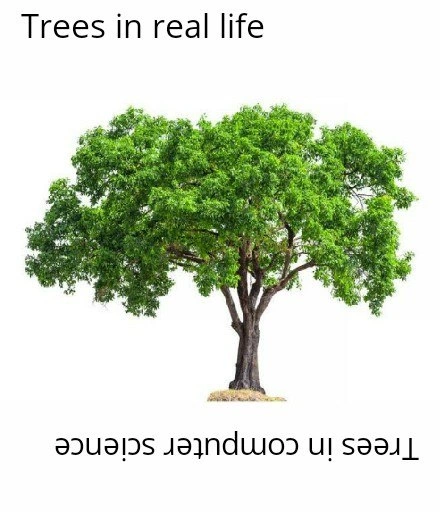
Imagine a big tree, but upside-down: its trunk is at the top and its branches hang downward. 😃 Kinda funny, right? In the computer world, people like to draw their “trees” that way! It’s as if you took a normal tree and hung it from the ceiling. The root of the tree (usually in the ground) is drawn at the very top, and the leaves that normally reach for the sky are drawn at the bottom. It looks silly compared to a real tree, like a picture flipped upside-down, and that’s exactly why it’s funny. This meme shows a normal tree (for real life) and then jokes that a computer science tree grows the opposite way. The joke is basically saying: computer science does things upside-down! Even a tree in computer science doesn’t care about gravity – it “grows” from top to bottom on paper. For someone learning about coding, it’s a goofy reminder that the computer version of things can be the reverse of the real thing. In simple terms, it makes us laugh because our brain knows trees don’t really grow that way, but in computer diagrams they do. It’s a little upside-down world, and that’s pretty amusing!

Level 2: Roots Up, Leaves Down

Let’s break down the joke for those newer to coding. In computer science, a tree is a fundamental data structure that organizes information hierarchically. Think of a family tree or an organizational chart – that’s the kind of structure we mean. A tree data structure starts from a single node at the top called the root. The root node is like the big boss or the oldest ancestor: it’s the one node that doesn’t have any parent above it. From the root, you have lines (called branches or edges) that lead to other nodes. Those other nodes are the children of the root. Each of those can have their own children, and so on, forming a branching structure. Nodes that have no children (nothing below them) are called leaf nodes (or just leaves). So the tree “grows” as you go downwards: starting at one root and splitting out into multiple leaves at the bottom.

Now, the funny bit is how we draw these trees. By convention, computer scientists draw the root node at the top of the diagram, with its children below it, then their children further down, etc. Visually, it’s an upside-down version of a real tree! In nature, roots are at the bottom and a tree fans out upward with leaves on top. But in a typical computer science diagram, we put that root at the top center of the page and let the structure expand downward. Here’s a simple example of a small binary tree (each node has at most two children) drawn the usual way:

       [8]   <- root
       / \
    [3]   [10]
    / \      \
  [1] [6]    [14]   <- leaves

In this diagram, the number 8 is the root node (notice it’s at the very top). Node 8 has two children: 3 and 10, drawn directly beneath it and connected by lines. Then node 3 has two children of its own (1 and 6), and node 10 has one child (14). The nodes 1, 6, and 14 are at the bottom with nothing below them, so they’re the leaf nodes (marked with an arrow comment “<- leaves”). This is exactly how you’d see it in an algorithms course or textbook. The structure flows from a single point at the top down to multiple points at the bottom.

Why do we draw it upside-down compared to a botanical tree? It’s mostly about readability and convention. We usually write and read diagrams from top-to-bottom. The root at the top gives us a clear starting point, and the leaves at the bottom form the endpoints. It’s like drawing a tree diagram for a tournament bracket or a family tree: start with one and end with many. In fact, the term “family tree” uses the same idea – you often put the oldest ancestor (the “root” of the family) at the top and descendants branching downward. So this drawing style is familiar in hierarchies beyond just computing. In coding terms, we often talk about “going down the tree” from parent to child nodes. And since computer data isn’t subject to physical gravity, there’s no problem with our tree diagrams “growing” downward on the whiteboard or screen.

Some newcomers find it a bit funny or confusing at first: “Why is the root drawn at the top instead of the bottom?” But once you realize the root is just the conceptual starting point (not a literal root in soil), it makes sense. The root node is where the data structure begins, and everything else extends from it. So we place it at the top so we can see the whole hierarchy spread out below. The words “Trees in computer science” being written upside-down in the meme is a visual gag to emphasize this exact point. It’s saying: in CS, even trees are upside-down! This is a common inside joke you might see on programming forums or class presentations when introducing tree data structures. It’s a playful way to remember that computer science sometimes does things a bit differently from the real world, even with something as simple as drawing a tree.

To summarize the contrast:

Tree in Real Life 🌳 Tree in Computer Science 🖥️
Roots are at the bottom, underground. Root node is at the top of the diagram.
Trunk grows upward from the ground. Branches (children nodes) grow downward from the root.
Leaves and branches spread up and out. Leaf nodes appear at the bottom, at the ends of branches.
Gravity pulls everything downward. Gravity not involved! Arrows can point down (or any direction).

As you can see, the structure is literally flipped vertically when we go from the natural world to the computer science world. The terminology — root, branch, leaf — is borrowed from nature, but the visual orientation is inverted. Once you know this, you’ll spot it everywhere: file system trees in your OS (ever notice the “C:\” root directory is at the top of the tree view in a file explorer?), organizational charts, decision trees in AI algorithms — they all put the root at the top. It’s a fundamental part of CS fundamentals to learn this, and it quickly becomes second nature. And later, when you see a meme like this, you’ll smile because you remember that little leap of imagination it took to see a tree drawn upside-down and think, “Yep, that’s a tree, computer-science style.” 🌟

Level 3: Gravity? Who Needs It

In the daily life of a developer, you eventually accept that in computer science, trees grow upside down. This meme pokes fun at that exact convention. Real trees have roots buried in the ground and leaves reaching for the sky, obeying good old gravity. But in computer science diagrams, a tree data structure is drawn with the root node at the very top of the page and the leaf nodes dangling at the bottom. It’s as if gravity doesn’t apply in our abstract world – and that absurdity is the punchline. Experienced engineers chuckle because we’ve all seen a perplexed newbie point at a diagram in an algorithms textbook and exclaim, “Wait, why is the tree upside-down?” 😄

This humorous contrast highlights a core CS convention: we visualize hierarchical data top-down. The meme’s top caption “Trees in real life” over a normal upright oak, and the bottom caption “Trees in computer science” flipped upside-down, sums it up perfectly. It’s an inside joke across DeveloperHumor circles because it recalls our first encounter with data structure diagrams. We remember grappling with binary tree diagrams where the “root” was drawn at the top. At first it feels counter-intuitive – shouldn’t roots be at the bottom? – but then it clicks: in a hierarchy, the root is the starting point, so we place it at the top for clarity. It’s a little mental flip we all had to learn. After a while, you don’t even blink; of course the root goes at the top of the whiteboard drawing! But that initial surprise is so universal that it’s become relatable humor. This meme playfully crystallizes that shared experience in one image.

Why do we do this? Partly because of how we traverse and use these structures. In a typical tree traversal (say a preorder traversal), you process the root first, then its children, and so on. Drawing the root at the top visually mirrors that process: you read from top (root) downwards through the children. It’s logical for an algorithm and for our eyes scanning a page. Plus, consider practicality: if we drew the root at the bottom, we’d have to draw all branches going upward – awkward on a whiteboard or paper (not to mention gravity would be very upset with those arrows 🡅!). By convention, computer scientists long ago decided to invert the tree for diagrams, much like organizational charts or family trees where the ancestor appears at the top. And so the “upside-down tree” became standard in every CS fundamentals class and textbook.

The humor here also stems from the literal interpretation. We borrowed the term “tree” from nature to describe a branching data structure, even naming parts of it root, branch, and leaf. Then we promptly turned the whole thing on its head! It’s a cheeky reminder that CS folks often take real-world metaphors (like trees) and twist them to fit abstract concepts. In practice, no one is actually confused – we all know it’s just a convention – but seeing the direct comparison in the meme (one caption flipped upside down) triggers that “oh yeah, that is pretty funny when you think about it” reaction. It’s a classic bit of ComputerScienceHumor: highlighting the contrast between real vs abstract in a single, easy-to-get visual. Every seasoned dev has drawn or seen countless data structure diagrams of trees “growing” downward, so we immediately get the joke. It’s a lighthearted jab at our own discipline’s quirk: when it comes to data structures, we casually defy real-world gravity every day.

Description

A two-part meme contrasting real trees with their computer science counterparts. The top half is labeled 'Trees in real life' and displays a standard, upright image of a lush green tree against a white background. The bottom half, labeled 'Trees in computer science', shows the exact same image and text but flipped vertically by 180 degrees. The tree is now upside down, with its roots pointing towards the sky and its leaves towards the ground. This meme is a classic visual pun on the way tree data structures are represented in computer science. In CS, tree data structures are drawn with the 'root' node at the top and the 'leaf' nodes branching out downwards, which is the inverse of how biological trees grow. The humor comes from this literal and simple depiction of a core, abstract concept taught in introductory computer science courses


Comments

7
Anonymous ★ Top Pick The CS tree is the only tree where the root is at the top, and yet we still wonder why developers have a skewed perception of reality
  1. Anonymous ★ Top Pick

    The CS tree is the only tree where the root is at the top, and yet we still wonder why developers have a skewed perception of reality

  2. Anonymous

    Only in CS do we draw the root on top and the leaves at the bottom - no wonder our incident bridges spend an hour pruning foliage before anyone looks up and spots the real root cause hanging overhead

  3. Anonymous

    After 20 years in tech, I've finally accepted that the only trees that grow properly are the ones in production that shouldn't be there in the first place

  4. Anonymous

    The eternal irony: we teach juniors that trees grow upward in nature, then immediately show them a whiteboard where the root is at the top and we traverse 'down' to the leaves. No wonder they're confused when we later introduce forest data structures - they're still trying to figure out why our trees defy gravity and whether leaf nodes need photosynthesis

  5. Anonymous

    CS trees put the root on top because garbage collectors start at the root set; in nature, the unreachable leaves fall on their own

  6. Anonymous

    CS draws trees upside down to match the org chart: the root cause lives at the top, branches proliferate, and the leaves are the ones getting paged at 2am

  7. Anonymous

    Real trees self-balance via physics; CS trees skew into O(n) traversals until you rotate them back

Use J and K for navigation
