The Layered Defense of Debugging
Why is this Debugging Troubleshooting meme funny?
Level 1: Better Together
Imagine you’re walking outside and it starts to pour rain. You have a raincoat on, but you also open an umbrella. And if it’s really stormy, you might even run under a shelter or porch to stay dry. It wouldn’t make sense to say, “If the umbrella works, why wear a raincoat? If the raincoat works, why go under a shelter?” You know that using all of them together keeps you driest. Each thing helps in its own way: the coat keeps your body dry, the umbrella stops rain from hitting your head, and the shelter gives extra protection when rain is heavy. This is just like debugging a program – using printouts, special debugging tools, and asking others for help (or looking up answers) all at the same time gives the best results. The meme is funny because it shows how silly it would be to choose only one when, really, everything works better in combination. When solving tough problems, more than one tool or method can be helpful, and that’s okay – in fact, that’s the smart way to do it.
Level 2: Safety in Layers
Let’s break down the three debugging helpers mentioned, and why developers use them all:
- Print debugging: This means adding simple output statements to your code (like
print("x=", x)in Python orconsole.log(x)in JavaScript) to display the values of variables or checkpoints in your program’s flow. It’s a quick-and-dirty way to inspect what’s going on inside a running program. New programmers often start with print statements because they’re straightforward and don’t require special tools. It’s essentially manual logging: you run the program and watch the console or log files to see the printed output, which can reveal where things go wrong. - Debugger tools: Most modern IDEs (Integrated Development Environments) come with a debugger, which is a more advanced way to examine your program. You can set a breakpoint (a marker) in your code that pauses execution at a specific line. When the program stops there, you can step through the code line by line, inspect the values of variables at that exact moment, and see the call stack (the chain of function calls) in real time. For example, using the debugger in Visual Studio, PyCharm, or even a command-line tool like
gdblets you watch how your code executes in slow motion. This is super helpful for complex logic, loops that iterate many times, or debugging algorithms where you need to know the state at each step. It’s like having an X-ray of your program’s internals. - Stack Overflow: This is an online Q&A community (one of the most famous DevCommunities around) where developers ask and answer programming questions. If you encounter a cryptic error or a tricky problem, chances are someone else has seen it too and posted about it on Stack Overflow. By searching the error message or issue, you often find solutions or at least hints. Relying on StackOverflow has become so common that there’s a running joke in the industry about “Stack Overflow-driven development” – meaning a lot of us copy-paste code snippets or fix bugs by consulting this communal knowledge base. It’s essentially a vast library of debugging wisdom accumulated by developers worldwide.
Now, the meme’s joke format – “If X works, why Y? If Y works, why X? If both work, why Z?” – is pointing out a logic fallacy. Just because one method works doesn’t mean the others are useless. In practice, each debugging method has its strengths and weaknesses, and they often work best together. For a junior developer, it might be puzzling: “Why would I need to use print statements if my IDE has a fancy debugger?” or vice versa “Why learn a debugger if printing variables shows me the output?” The answer is that real-world debugging and troubleshooting involve layers of tools, like layers of safety.
Think of it this way: print debugging is fast and always available – even if you’re debugging a live server, you might only have log files (which are basically a collection of print statements from the running application) to understand what happened. But printouts alone might not tell you the full story, especially if the bug is in how the logic flows or in a specific iteration of a loop. That’s where an interactive debugger is invaluable: you can pause at the exact moment things start to go astray and inspect everything (variables, memory, program counters) in that snapshot. It’s a more granular approach to find subtle issues like off-by-one errors or misunderstandings in how code executes. However, sometimes neither prints nor stepping through code will immediately reveal the issue if it’s something like a misunderstood API or an environment-specific glitch. At that point, turning to Stack Overflow or documentation is a smart move – maybe the bug isn’t in your code at all, but a known issue in a library or a quirk in a framework configuration. Searching the problem often saves time because someone else has already done the hard work and shared the solution.
So, the meme is poking fun at the idea that a developer should pick only one method. In reality, any experienced dev fighting a tough bug will use all three: you read the logs or add print statements, you fire up the debugger for a closer look, and you Google the error (landing on Stack Overflow) if you're still stumped. The combination is what makes for efficient debugging. Just like the car safety analogy in the meme (you wouldn’t say “if seatbelts work, why have airbags?” – you want both for maximum safety, plus brakes to avoid the crash altogether!), in coding we embrace multiple safety nets. It’s a humorous way to remind developers, especially newcomers, that these techniques aren’t in competition. There’s no need to be tribal about debugging tools – it’s not print vs debugger, or tools vs StackOverflow. Instead, they complement each other to improve our overall Developer Experience (DX) when chasing down bugs. The meme resonates as relatable developer humor because practically every programmer has felt that moment of debugging frustration and ended up doing exactly this: mixing old-school methods with modern tools and community help, whatever it takes to squash the bug.
Level 3: Trinity of Troubleshooting
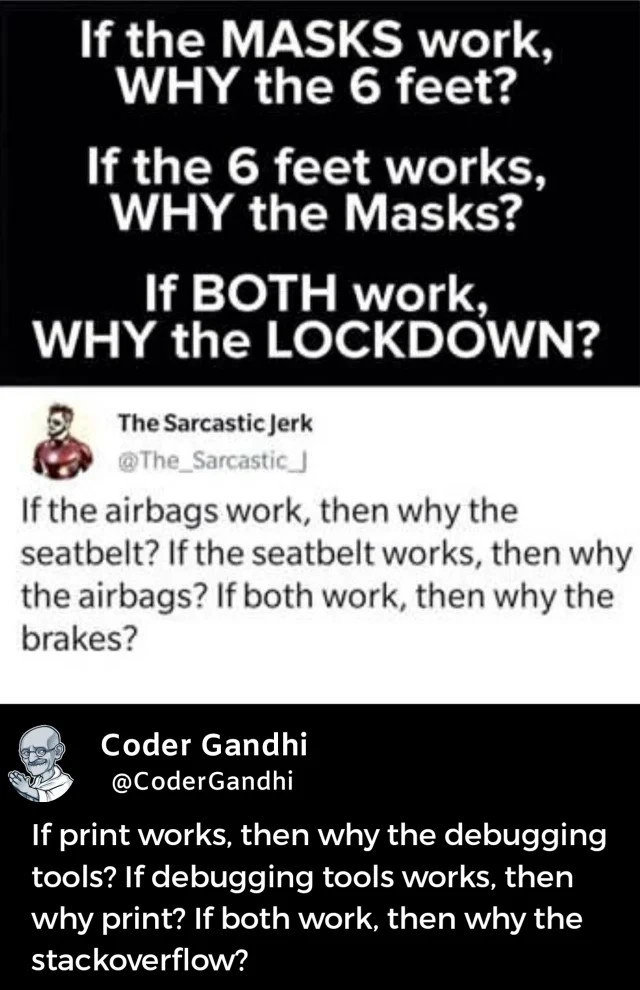
In the final panel of this meme, developer Coder Gandhi remixes a faulty logic often seen in early 2020 pandemic debates (the “if masks work, why distance? if both, why lockdown?” refrain) and applies it to programming. The humor targets a false choice fallacy in debugging: the idea that using one method (like printing logs) should negate the need for others (like an IDE’s debugger or checking Stack Overflow). Seasoned developers immediately recognize this as a tongue-in-cheek reference to how we actually debug in real life. We don’t limit ourselves to either print statements or debugger tools, just as we wouldn’t rely on either seatbelts or airbags alone. In both car safety and coding, multiple layers work together for the best outcome.
From a senior engineer’s perspective, the meme highlights the “why not all three?” approach to troubleshooting. Each tool – print logs, interactive debuggers, and community knowledge – addresses different aspects of a problem. Relying solely on one is a known anti-pattern. For example, print debugging (sprinkling printf or console.log statements in code) is simple and ubiquitous – it works in any environment, even when you can’t attach fancy tools (like when debugging a production issue through log files). Meanwhile, an IDE debugger (with breakpoints, step-through execution, and variable inspectors) provides a powerful microscope into a running program’s state, invaluable for complex logic, loops, or recursive algorithms where manually scanning printouts would be overwhelming. And then there’s Stack Overflow, the collective brain of the dev world: it’s not a direct debugging tool but a lifeline when you hit a wall, offering insights from hundreds of other engineers who likely encountered your exact error message or strange bug before.
The meme is funny to experienced devs because it pokes at a relatable truth: we often end up using all these methods in combination, sometimes in the same bug-hunting session! Imagine debugging a gnarly issue in a web app: you might start with some quick console.log("value=", variable) lines to see if anything obvious is off. If that doesn’t reveal the problem, you’ll fire up your debugger, set a breakpoint, and step through the function to watch the program’s behavior in slow motion. And if you still can’t find the root cause – maybe it’s a weird quirk in a library or an API call that always returns the same puzzling error – you’ll copy that error message into Google, inevitably landing on a Stack Overflow page where a helpful stranger has posted the answer. Experienced developers know there is no single silver bullet for debugging; instead, we use a toolchain of techniques. The tweet humorously mirrors the “defense-in-depth” principle from safety engineering (and pandemic precautions) in the context of dev work. Just as prudent public health policy uses masks and distancing and lockdowns together, prudent debugging uses prints and breakpoints and community wisdom together. The rhetorical questions in the meme deliberately sound absurd to underscore that print debugging, IDE debuggers, and Stack Overflow aren’t mutually exclusive at all – they’re complementary layers of defense against stubborn bugs. It’s a comedic reminder that in software development, as in car safety, redundancy and multiple safeguards are a good thing.
Description
A three-part meme presented as a social media thread that reframes a common logical fallacy. The top section, in white text on a black background, poses a series of flawed questions about COVID-19 safety measures: 'If the MASKS work, WHY the 6 feet? If the 6 feet works, WHY the Masks? If BOTH work, WHY the LOCKDOWN?'. The middle section is a tweet from 'The Sarcastic Jerk' that parodies this logic with a car safety analogy: 'If the airbags work, then why the seatbelt? If the seatbelt works, then why the airbags? If both work, then why the brakes?'. The final, and most relevant, part is a tweet from 'Coder Gandhi' which applies the same flawed reasoning to software development: 'If print works, then why the debugging tools? If debugging tools works, then why print? If both work, then why stackoverflow?'. The humor lies in the powerful analogy, illustrating the principle of 'defense in depth' - that complex problems require multiple, layered solutions. For senior developers, this resonates as a perfect encapsulation of pragmatic problem-solving: no single tool is a panacea, and the choice between a simple print statement, a full-featured debugger, and community knowledge is situational and a mark of experience

Comments
7Comment deleted
A junior uses the debugger for everything. A senior uses printf. A principal engineer has a finely-tuned intuition that's somehow connected to the production logs. And the architect? They just ask 'have you tried turning it off and on again?' while looking at a diagram that hasn't been updated in three years
Print gives me the alibi, the debugger shows me the crime scene, and Stack Overflow convenes the jury - because after 20 years I’ve learned the real culprit is always my 3 a.m. assumption about thread safety
If console.log works, why did we spend $2M on Datadog? If Datadog works, why are we still adding console.logs? If both work, why is the senior engineer SSH'd into prod reading raw logs at 3am?
This perfectly captures the senior engineer's debugging philosophy: you don't choose between print statements, debuggers, and Stack Overflow - you use all three simultaneously because production bugs have a way of hiding in the one layer you didn't check. It's defense in depth, but for your sanity. The real question is: if all three work, why are we still deploying on Fridays?
printf is the seatbelt, the debugger the airbag, and Stack Overflow the ambulance - because in distributed systems, failure modes are microservices too
We use all three because debugging is defense-in-depth: printf catches what a breakpoint retimes, the debugger inspects state when logs lie, and Stack Overflow explains why both broke after -O2
Printfs are seatbelts for bugs - reliable until the crash; that's when you deploy the debugger airbag and pray Stack Overflow has the brakes