Skip to content
DevMeme
4197 of 7435
Adding Debug.Log() turns code into a quantum double-slit experiment of bugs
Debugging Troubleshooting Post #4583, on Jun 25, 2022 in TG

Adding Debug.Log() turns code into a quantum double-slit experiment of bugs

Why is this Debugging Troubleshooting meme funny?

Level 1: Hide and Seek

Imagine you’re playing a game of hide-and-seek with a mischievous little puppy. When you’re not watching, the puppy runs around knocking things over and making a mess. But the moment you peek around the corner to catch him, he immediately sits down, looking all innocent like he wasn’t doing anything at all. This meme is joking that sometimes computer bugs act just like that puppy. When you’re not paying close attention, the program misbehaves and does something wrong (makes a mess). But as soon as you decide to watch it carefully – kind of like shining a flashlight on it or saying “I’m watching you!” – the program starts behaving and the problem disappears, as if the bug is hiding because it knows you’re looking. It’s funny in a cheeky way: the developer is frustrated because every time they try to catch the bug, the bug says “Who, me? I’m not doing anything!” and the program works fine. It’s like a magic trick or that peekaboo game with a baby – now the bug is there, now it’s gone! The meme uses a science picture to make the joke, but at its heart, it’s the same idea: sometimes just looking at something can change what it does. For a programmer, that’s both frustrating and comical, kind of like trying to fix a toy that only breaks when nobody is looking. The reason we laugh is because we’ve all had that experience of something acting wrong only until the very moment we decide to show someone else or investigate – then it suddenly behaves. It’s a playful reminder that even in coding, things can play hide-and-seek with you!

Level 2: Heisenbug 101

So, what’s going on for those newer to coding? Let’s break down this meme’s pieces. First, Debug.Log() is just a programming way to say “print some message to the console/log file for debugging.” It’s a common thing developers do when they want to see the value of a variable or know if a certain part of code was reached. Think of it like leaving breadcrumbs in your code to trace what’s happening. Logging (using functions like Debug.Log() or console.log in JavaScript, printf in C, etc.) is a key part of Debugging – which is the process of finding and fixing bugs (errors or weird behavior in your program).

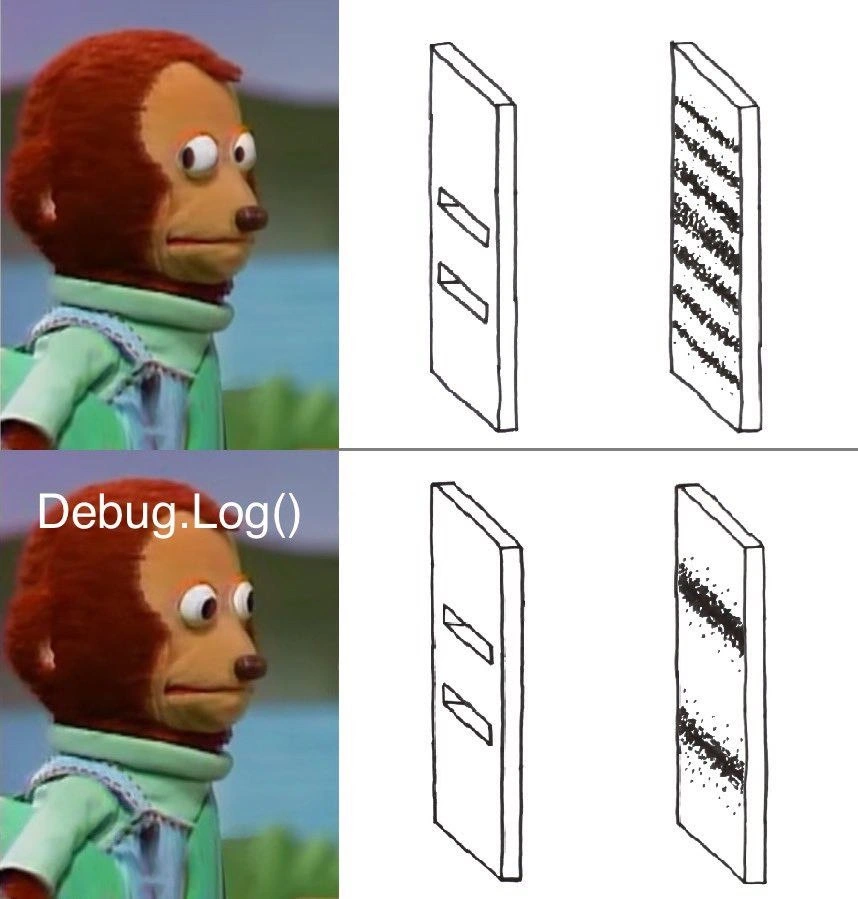
Now, what’s with the puppet and those panels on the right? The puppet is a meme image (often called the side-eye puppet meme) used to humorously show someone looking nervous or caught off-guard. In this context, the puppet represents either the developer or the code/bug itself being aware it's being observed. The top puppet image glancing sideways is like the code thinking “hmm, someone’s watching me…”, and the bottom puppet with “Debug.Log()” over its head is the moment we actually put the log in – now the code is being fully watched. The right side panels are sketches of a physics experiment (the double-slit experiment). In the top-right, before we add the debug log, we see many stripes – that’s an interference pattern, which happens when you don’t observe particles going through the slits (they act all wild and wavy, creating multiple bands). In the bottom-right, labeled with Debug.Log(), there are just two dark stripes – that’s what happens when you do observe each particle at the slits (they behave normally, just two piles behind each slit).

So why is this funny or relatable? Because it’s drawing an analogy: a bug that behaves inconsistently or bizarrely when you’re not actively looking at it, but behaves normally when you try to examine it. Developers have a nickname for this type of situation: a Heisenbug. A bug is just a problem or error in the code. The name “Heisenbug” comes from the physics principle by Werner Heisenberg (not the Breaking Bad guy, the physicist!) which, put simply, says that you can’t measure something without changing it. In software, a Heisenbug is that bug that disappears or changes whenever you attempt to investigate it. For example, maybe a program keeps crashing when you run it normally. You then run it in a debugger (a tool that lets you step through code) to see where it crashes – and surprise, it doesn’t crash anymore! Or you add some Debug.Log() statements to print out progress and variables, hoping to catch the bug in the act – and suddenly the program runs fine. It’s frustrating because the very act of trying to observe the bug means you can’t reproduce it and thus can’t fix it easily.

Let’s put this in more concrete terms. Suppose you wrote a small game or app, and occasionally it freezes or does something odd. You suspect a certain part of the code is the culprit. So, you add a Debug.Log("Reached point A") and maybe print out some variable values around that part to see what’s going on. Strangely, after adding those logs, the app no longer freezes. In fact, it runs perfectly. “Huh… did my logs accidentally fix it?” you wonder. In reality, the logs might have indirectly changed how the code runs – often by slowing things down a bit or preventing some timing issue. A common example is with race conditions in multi-threaded programs (that’s when two threads – basically parallel mini-programs – hit a timing snag). If a bug is due to one thread not waiting for another, adding a log might slow one thread enough that they no longer conflict. Another example for beginners: sometimes code behaves differently in a Debug mode versus Release mode. In debug mode, the program might run slower and do extra checks, so everything seems fine. But in the fast optimized release mode, a hidden bug appears. When you try to debug it (slowing it down again), the bug goes away – classic Heisenbug behavior.

The “observer effect in software” is a real phrase people use to describe this: by observing (through logging or debugging) you change the conditions. Observability is usually good – we add logs and monitors so we can see what software is doing (that’s what observability means: tools and practices to watch the internals of a system). But this meme is pointing out the ironic twist that observability itself can tweak what you’re observing. In simpler words, trying to watch the program can make the bug hide. It’s like the program is camera-shy! This is a rite-of-passage type of experience for new developers – the day you encounter a bug that only shows up when you don’t add prints or run the debugger. It’s confusing at first, but then someone tells you, “Ah, you’ve got a Heisenbug on your hands.” It even sounds like a quirky in-joke, right? It is – it’s a shared bit of developer lore. And the meme leverages that lore by comparing it to the famous physics experiment that many of us learned in school or via pop science. Even if you don’t know the physics deeply, you probably have heard “when they observed it, things changed.” That’s enough to get the joke: the bug changes because we observed it (with Debug.Log). And the puppet’s uneasy look? That’s just the cherry on top, representing how suspicious this whole thing feels – like the code is aware of our prying eyes.

In summary, at this level: Debug.Log() is a way to log or print debug information. Adding those logs is supposed to help you find bugs. But sometimes, adding a log makes a tricky bug go away – a phenomenon we call a Heisenbug, where the act of observing the program (via logs or debugging) changes its behavior. The meme humorously equates this to a quantum physics scenario (double-slit experiment) to exaggerate how weird and mysterious it feels. It’s a joke many coders laugh at because they’ve experienced the “it only breaks when I’m not looking” problem at least once.

Level 3: Heisenbug Uncertainty Principle

For seasoned developers, this meme hits on a very real (and often frustrating) pattern in debugging. The term Heisenbug is a nod to Heisenberg’s uncertainty principle – joking that like subatomic particles, certain bugs seem to change or disappear when you probe them. Here, adding a simple Debug.Log() (a logging statement) is the probing action. The meme humorously suggests that adding a log line to inspect what’s happening turns your code into a quantum experiment, as if the bug knows it’s being watched. The left side of the meme is the famous side-eye puppet looking nervously, which perfectly captures a developer’s suspicious gaze when things “start working” the moment you try to examine them. On the right side, the sketches of the dual slits and resulting patterns reference the same idea: initially, the bug’s effects are all over the place (the top-right interference pattern, with many bands – think of it as erratic, unexplained behavior). But once you insert that Debug.Log() (the bottom row), the chaos collapses into a simpler, more orderly outcome (the two bands – think of this as the bug either disappearing or behaving normally). The puppet’s straight-ahead stare in the bottom-left, labeled “Debug.Log()”, is like the code acting innocent once the log is in place, while the developer is left thinking, “Uhh, okay… where’d the problem go?”

This joke lands so well with developers because we’ve all been there. Imagine you have a nasty bug in production – something weird is happening, maybe data is inconsistent or a program is crashing unpredictably. You run the code normally and see the problem, but the moment you try to debug it, poof, it’s gone or it behaves differently. You might add a line like Debug.Log("Got here") or print the value of some variable to understand what’s going on. Suddenly, the bug stops happening. It’s infuriating and fascinating at the same time. Everyone who’s done serious debugging has stories of these phantom issues that only occur when you’re not looking. The meme basically says: bugs behave like quantum particles – observing them changes the outcome. It’s a humorous exaggeration, but it’s rooted in truth.

Why does this happen in reality? There are a few concrete reasons why adding a log or running a program under a debugger can alter behavior:

  • Timing Changes: Logging to console or file is a relatively slow I/O operation. Adding Debug.Log() introduces a small delay each time. If your bug is caused by a race condition (two things happening in an unexpected order), that tiny delay might be enough to change the scheduling. For example, Thread A and Thread B might collide in a bad way when running at full speed, but if you slow down Thread A slightly with a log statement, Thread B now has time to avoid the collision. The result? The race condition bug doesn’t occur when logging is on.
  • Memory and Optimization Effects: In some cases, adding a log can affect how the code is optimized or how memory is accessed. For instance, a compiler might optimize away a variable or reorder instructions differently in a release build. But once you insert a logging call (which the compiler usually can’t optimize out because it produces an externally observable effect), it might prevent certain optimizations. The program’s execution path becomes slightly different – perhaps enough to dodge the bug. A notorious scenario is when a bug only appears in the high-optimization Release build, but not in the Debug build (where there are extra checks and no aggressive optimization). Logging can act like those debug-mode checks, inadvertently smoothing over the error.
  • Memory Barriers and Caches: Especially in multi-threaded programs, a log call might include a flush to I/O or a system call, which can act as a memory barrier. This means it forces the CPU to synchronize memory (flush write buffers, update caches). If the bug was due to a stale read or a write that hadn’t propagated to another thread yet, the act of logging can force an update and make things appear consistent. By observing the state with a printout, you unintentionally change the timing or ordering of how memory is seen by threads. So the bug (which might have been due to, say, a missing synchronization) is hidden because your log introduced just enough sync to mask it.

All of these technical details boil down to the same core idea: observing the program (via logs or a debugger) interferes with its natural behavior. That’s why the meme’s comparison to the physics experiment is so spot-on – it’s framing these real-world debugging challenges as if they’re laws of nature. The DebuggingFrustration is real: you’re staring at your code like that puppet, thinking “I swear it was failing a minute ago!” It can make you question your sanity when a bug becomes unreproducible the moment you try to pinpoint it. This observer effect in software is a well-known pitfall. Developers have even adapted strategies to handle it: for instance, using less intrusive logging or specialized tools that minimize impact, and writing automated tests to catch the bug in action without “scaring it away.” But the meme playfully shrugs and says, yep, adding a log line turns debugging into a quantum experiment. It’s the perfect illustration of a Heisenbug – a term every programmer learns once they’ve chased one of these ghosts. Just like in quantum mechanics, where you can’t measure something without influencing it, in debugging you often can’t poke at a bug without inadvertently changing the outcome. The shared laughter comes from the recognition: “Haha, it’s so true – my code’s behavior seems to change simply because I looked at it, as if it’s playing quantum hide-and-seek with me!”

To visualize it in code, consider a simplified scenario: imagine you have a loop that mysteriously crashes at iteration 999 when running normally. In desperation, you add a log to see the counter progress, and magically, the crash never happens. It might look like this:

for (int i = 0; i < 1000; i++) {
    // Imagine something mysterious goes wrong when i == 999 under normal run
    DoWork(i);
    // Uncomment the next line to observe:
    // Debug.Log("Iteration: " + i);
}

When the Debug.Log is commented out (i.e. not observing), perhaps DoWork(999) throws an error or triggers a weird behavior. But when you uncomment that logging line, the act of printing each iteration’s number slows things down just enough that DoWork(999) suddenly succeeds. The bug hides when you’re watching via the log. In real life, DoWork could be involving multiple threads or some time-sensitive operation that fails only under precise conditions. The logging disturbs those conditions. This pseudocode is a bit contrived, but it represents the countless times developers have seen code fail, then added a Console.WriteLine or Debug.Log() and found the issue no longer reproduces. It’s equal parts relieving and maddening – you’re glad the program runs, but now you can’t diagnose the original problem because it went away!

The observability paradox here is that the very tools we use for debugging (logs, debuggers, print statements – essentially our Observability toolkit) can introduce an observer effect. It’s like needing to check if the light in the fridge goes off when the door closes – but opening the door (to check) turns the light on. The meme gets a hearty laugh (or maybe a groan) from developers because it captures that Oh no, it’s happening moment. It uses a clever scientific analogy that makes us feel a little better: “Hey, it’s not just me – even physics says weird stuff can vanish when observed!” And that shared understanding is comedy gold in technical circles.

Level 4: Bugs in Superposition

In the quantum world, a particle can act like a wave spread out in many states at once – a phenomenon known as superposition. The classic double-slit experiment shows this beautifully: send electrons or photons through two slits, and if you don’t observe them, they create an interference pattern of many bands on the screen (like ripples mixing together). It’s as if each particle went through both slits simultaneously and interfered with itself. But the moment you observe or measure which slit each particle goes through – by adding a detector – that dreamy superposition collapses. Suddenly each particle acts like a distinct little bullet, going through one specific slit or the other, and the interference pattern disappears, replaced by just two clean bands behind each slit. In other words, watching the particles forces them to pick a lane. This is the observer effect in physics: the act of observing a system fundamentally changes its state.

Now, our meme mischievously equates this quantum paradox with software debugging. When complex code is running unobserved, a tricky bug might exist in a kind of unstable superposition, yielding weird, unpredictable behavior (analogous to that multi-band interference pattern). But as soon as you add a Debug.Log() statement (our “detector” in the code), the bug’s wavefunction collapses. The code’s behavior changes – often, the bug magically vanishes or turns into a “normal” error that’s easier to understand (just like the neat two-band pattern). In essence, the meme suggests that software bugs can exhibit a wave-particle duality of their own: unobserved, they behave one way; observed, they behave differently. It’s a tongue-in-cheek take on the quantum behavior of bugs, poking fun at how debugging sometimes feels like quantum physics.

This isn’t just a figurative analogy; there’s a real kernel of truth here. In computing, we recognize the “observer effect” too: any act of instrumentation (like logging, breakpoints, or debugging) inevitably interacts with the program. Logging might slow down execution or change timing, and that can prevent certain bugs (especially race conditions or timing-sensitive errors) from manifesting. It’s reminiscent of how measuring a particle with light alters its path. The meme elevates this to almost a scientific principle of coding: by observing a program, we perturb it. In fact, developers have a term for these nearly magical disappearing bugs – the Heisenbug – named after Werner Heisenberg (famous for the Uncertainty Principle, which is all about observers affecting outcomes). A Heisenbug is a bug that seems to vanish or alter its behavior when you try to study it, much like our quantum particle behaving itself once we’re watching.

If we were to express the meme’s insight semi-mathematically:

$$ P(\text{bug appears} \mid \text{logging}) ;\ll; P(\text{bug appears} \mid \text{no logging}) $$

In plainer terms, the probability of the bug showing up while you have debug logs enabled is much lower than when you run the code without any logging. The act of adding Debug.Log() is analogous to putting a microscope on a quantum system – it drastically reduces the chance of seeing the original mysterious behavior. This is the quantum observer effect of software: the system’s “many possibilities” collapse into one straightforward outcome as soon as you peek. The meme brilliantly merges physics and programming humor, implying there’s almost a scientific law at play when debugging: observing a bug changes its behavior. It’s a deep, almost philosophical joke about the nature of complex bugs – and it resonates because it captures that eerie, awe-inspiring moment when reality (or your code) changes simply because you looked at it.

Description

The meme is a two-row, three-column layout. Left column shows the well-known side-eye puppet: top frame the puppet glances nervously sideways; bottom frame the puppet faces forward with the white text “Debug.Log()” over his head. The two right columns in each row are simple black-line sketches of a board with two rectangular slits (left) and the resulting hit pattern board (right). In the top row, the hit pattern is a smooth interference pattern of many vertical bands; in the bottom row, after the “Debug.Log()” observation, the hit pattern collapses into just two dark stripes directly behind the slits. Visually it references the physics double-slit experiment to joke that inserting a debugging log statement can change program behavior - the classic Heisenbug effect familiar to developers troubleshooting elusive bugs

Comments

6
Anonymous ★ Top Pick Insert one Debug.Log(), the JIT reshuffles cache lines, and the race condition politely acquires an imaginary mutex - quantum courtesy for the observer
  1. Anonymous ★ Top Pick

    Insert one Debug.Log(), the JIT reshuffles cache lines, and the race condition politely acquires an imaginary mutex - quantum courtesy for the observer

  2. Anonymous

    Twenty years in and I still ship code with console.log statements because the observability stack takes three sprints to configure and the bug needs fixing by EOD

  3. Anonymous

    Every senior engineer knows that Debug.Log() is like turning on the lights in a supposedly 'clean' codebase at 3 AM during an incident - suddenly you see all the edge cases, race conditions, and 'temporary' workarounds from 2019 that are now load-bearing. The real production system isn't the elegant architecture diagram in Confluence; it's the chaotic mess of state mutations, retry logic, and defensive null checks that only reveals itself when you actually instrument the damn thing. Bonus points if your logs show that critical business logic is happening in a catch block someone added 'just to be safe.'

  4. Anonymous

    Debug.Log(): From 'must be transient' to 'welcome to the on-call cell block of cascading failures'

  5. Anonymous

    Debug.Log() is my photon detector; observe the code and the race condition collapses into two bands - works on my machine and fails only in CI

  6. Anonymous

    Debug.Log(): the accidental synchronization primitive - races vanish in editor, resurrect in release when the logs get compiled out

Use J and K for navigation