
Skip to content
DevMeme
628 of 7435
Debugging: the board-game where you're detective, victim, and murderer simultaneously
Debugging Troubleshooting Post #716, on Sep 29, 2019 in TG

Debugging: the board-game where you're detective, victim, and murderer simultaneously

Why is this Debugging Troubleshooting meme funny?

Level 1: Solving Your Own Mystery

Imagine you’re playing a mystery game all by yourself. You’re the only one playing, so you have to be all the characters! First, pretend you made a little mess or a mistake without knowing it – like maybe you left your favorite toy somewhere and now it’s lost. Now you’re upset because you can’t find the toy (you’re the hurt party, the one with the problem). Finally, you turn into a detective, searching every room in the house to find that missing toy. After a big hunt, you discover the toy under your bed and realize you were the one who put it there when you were playing earlier. In this story, you accidentally caused the problem, you suffered because the toy was lost, and you solved the problem by finding the toy again. Kinda funny, right? You had no one else to blame or help – it was all you!

That’s exactly what happens with programmers and bugs in their code. A bug is like a little mistake or error in a program that makes things go wrong. When something breaks, the programmer feels bad because the program isn’t working (like not finding the toy). Then the programmer has to act like a detective to figure out what went wrong in the code. In the end, they often find out it was their own code from before that caused the issue – they wrote a wrong instruction or forgot something important. So the programmer sort of "tricked" themselves and then had to catch themselves!

It’s a bit like cleaning up a spill you caused: you knocked over the milk (oops!), now the floor is messy and you’re sad about it, and then you grab a towel to clean it up. You play all the roles. The meme jokes that debugging is a “classic mystery game” but with this funny twist: you’re the detective looking for clues, you’re the victim who got inconvenienced, and you’re also the one who did it by accident. It’s funny because in a normal mystery game or story, those would be different people – one person causes the trouble, another suffers, and a detective solves it. But in programming, it can literally be just you the whole time!

So the next time you have to fix something in your code, remember this silly comparison. It might make you smile instead of feel bad. Debugging is like solving a little mystery that you unknowingly wrote yourself. You learn from it, fix the problem, and then everything is okay again – until the next mystery pops up! And that’s how programmers keep improving their code, one mystery (or bug) at a time.

Level 2: Bug Sleuthing 101

Let's break this down in simpler terms. Debugging is the process of finding and fixing errors in software. A bug is just a problem in the code – maybe the program crashes, or it gives the wrong answer, or it behaves in a weird, unexpected way. When this meme jokes that you're the detective, the victim, and the murderer all at once, it’s describing a typical programmer’s predicament:

  • Detective: This is you when you're debugging. Like a detective solving a mystery, you go through your code line by line looking for clues about what went wrong. You might use tools like a debugger (which lets you run your program step-by-step to see what it’s doing) or add extra logging (console.log("got here") or print statements) to track the program’s state. You're essentially investigating the "crime scene" of the code to find the cause of the bug. Think of error messages and stack traces (the lists of function calls that led to an error) as the evidence you're examining. For example, an error might point to a specific file and line number – a big clue about where things went wrong.

  • Victim: This is also you (and your software). When a bug strikes, your program might crash or misbehave, which can be a minor annoyance or a major problem. If it's your personal project, maybe you're personally frustrated (victimized) because the app isn't working until you fix it. If it's a big application, the "victims" could be the users or the business – say the website is down and users can't do anything. But as the developer responsible, you feel the pain directly: it's your late night, or your weekend getting ruined trying to fix that outage. In short, you (and your program) suffer from the bug's consequences. The meme captures that feeling of "Oh no, I've shot myself in the foot with this code, and now I'm hobbling around because of it." You experience the problem first-hand, so you're the victim of the error you introduced.

  • Murderer: This dramatically refers to you again – specifically past you who wrote the buggy code. Of course, no programmer writes bugs on purpose (we don't wake up and say "I'm going to sabotage my own program today!"). Bugs are usually mistakes or oversights. Maybe you were in a hurry and forgot to account for an empty input, and now the program crashes (so you "killed" the program flow). The "murder weapon" could be anything: a missing null check, an off-by-one error in a loop, a typo in a variable name, a logic mistake in a function. It's self-inflicted in the sense that it's your own code causing the issue. When you finally discover the bug, there's a facepalm moment: I did this. Realizing you are the one who created the problem (the murderer) can be humbling and a bit funny in hindsight.

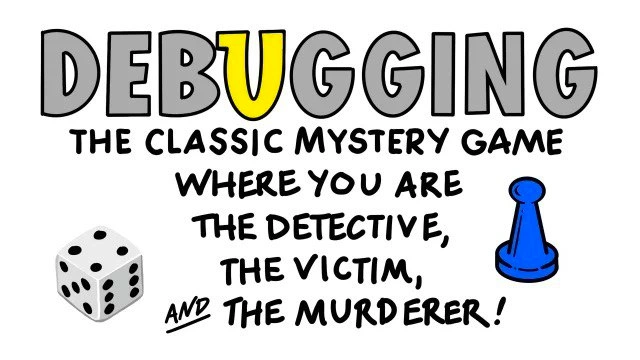
The meme cleverly frames this common scenario as a classic mystery board game. The imagery is a nod to the board game Clue (known as Cluedo in some countries). Clue is all about solving a murder by figuring out who did it, with what weapon, and in what room. For example, you might find out it was "Colonel Mustard in the Library with the Candlestick" by the end of a Clue game. Here, the meme jokes that in the game of debugging, the answer is always "The Developer in the Codebase with a Bug." The single blue pawn in the picture represents the lone player (just you, playing this "game" by yourself), and the six-sided die adds to the theme – as if you're rolling dice and moving through the board (the code) searching for the culprit. Of course, in reality, debugging isn't about luck or dice, but sometimes it does feel like you have to try a few things at random before you hit on the solution. The underlined phrase “AND THE” emphasizes that it's all three roles combined: not just detective, not just victim, not just culprit, but all of the above. In a normal murder mystery, those are different people, but in a coding bug mystery, it's pointing out the funny truth that they're one and the same person: the developer.

Notice how in the word "DEBUGGING," the letters B U G are highlighted in yellow. That's a visual pun: the word "bug" is literally inside "debugging." It reminds us that you can't have debugging without a bug. When you're debugging, you're specifically dealing with a bug in your code. The bright color draws attention to the core of the problem. It's almost like the meme is shouting, "Hey, there's a bug here!" which is exactly what you're trying to find in a debugging session. This is a nod to the obvious reality that bug-fixing is the essence of debugging.

Let's talk about why developers compare debugging to solving a mystery. When your code doesn't work as expected, you often have to play detective. For instance, suppose your program is supposed to calculate everyone’s age in a list but suddenly it crashes or gives nonsense output for some inputs. You’ll start investigating: check the error message (maybe it says "Index out of range" or "Null reference error"), then look at the code around that area. You might add some print statements or use a debugger to see the values of variables at each step. It's exactly like gathering clues. Each clue (maybe a variable has a weird value, or a condition isn't being hit) narrows down the suspects. As you eliminate possibilities (not this function, not that module), you come closer to the root cause. And when you find the cause, often you realize it's something you wrote incorrectly – aha, you found the "murderer" (the bug in your code), and it was indeed you who put it there by mistake.

Because this scenario happens so often, there's a lot of developer humor around it. The meme is one example; another common tongue-in-cheek term is "rubber duck debugging." This is a technique where programmers explain their code, line by line, to an inanimate object like a rubber duck (yes, literally a bath duck!) as if they were explaining to a fellow detective. The act of explaining often makes the solution obvious — you catch the mistake while trying to describe it. It's like talking to a sidekick while investigating, except the sidekick is a toy and the detective and murderer are still you! This technique highlights that often the answers are in front of us; we just need to look at our own code from a fresh perspective.

Another term you might hear (which even appears in the tags) is Heisenbug. This is a playful name for a very tricky kind of bug: one that changes or vanishes when you try to study it. The name comes from the Heisenberg Uncertainty Principle in physics (where observing something can change it). For example, imagine your program only crashes when running at full speed, but if you try to slow it down with a debugger or add prints to see what's happening, the bug disappears or behaves differently. It's like a suspect in a mystery who acts innocent whenever you’re watching, so you can’t pin them down. For a newbie developer, encountering a heisenbug can be really confusing – it defies the usual logic of "repeat the steps and the bug should happen again." Experienced developers know to suspect things like uninitialized memory, race conditions (bugs in concurrent programs when timing matters), or other subtle issues when a bug is this sneaky. It's both frustrating and darkly funny: you know there's a bug, but whenever you go looking, it hides! This term and others (like Bohrbug for a solid, easily repeatable bug) are part of the colorful jargon developers use when talking about bugs. They show how debugging can sometimes feel like dealing with different “personalities” of problems.

So, why is this meme popular in coding humor circles? Because it captures a truth that is almost a rite of passage in software development: sooner or later, you will spend hours troubleshooting a problem, only to realize the root cause was a simple mistake you made yourself. Instead of getting mad, most of us eventually learn to laugh it off (after maybe a facepalm or two). It's a way to cope with the frustration – by sharing jokes and memes about it. Seeing "Debugging: the board game..." with that funny tagline can make a frazzled programmer chuckle and think, "Yep, been there, done that!" It's a form of commiseration. Developer humor often revolves around these shared struggles, like merging code, dealing with legacy systems, or hunting bugs at absurd hours.

In summary, this meme uses a board game analogy (riffing on the game Clue) to describe the self-inflicted challenge of debugging software. It emphasizes that as a programmer, you're in a unique position of holding every role in the drama: you wrote the code (and the bug), your program/users suffer the outcome, and you have to investigate and fix it. It’s simultaneously humbling and humorous. Understanding this early on is actually pretty helpful for a junior developer: it sets the expectation that bugs are normal, everyone introduces them, and finding them is a skill you build over time – almost like becoming a better detective with each case. And hey, at least in this "game," you eventually know who to blame (gently) and who can fix it: it's you! No need to flip the table; just roll up your sleeves and start sleuthing through that code.

Level 3: The Code Crime Scene

In the world of software debugging, every seasoned developer has played detective at the scene of a digital crime. The twisty irony (and humor) of this meme is that the call is coming from inside the house: the coder is simultaneously the sleuth investigating a bug, the hapless victim suffering its effects, and the unwitting culprit who wrote the faulty code in the first place. It's a one-person murder mystery in your codebase. Debugging often feels like dusting for fingerprints in a dark server room at 3 AM, hunting for that elusive bug you unknowingly planted days or weeks ago. The meme nails this with its board game parody: a single blue pawn (just you, the lone player) and a die suggesting the element of chance in troubleshooting. The letters B-U-G gleam bright yellow inside the word "DEBUGGING", pointing out that, yes, there's literally a "bug" embedded in the process. How fitting that the word itself contains the problem! It's a visual pun any developer can appreciate after hours of staring at a stubborn error.

Let's unpack the humor: In a classic whodunit board game like Clue, you gather clues to deduce the murderer, who is usually someone else. But in software, nine times out of ten, you wrote the bug you're trying to solve. That database crash at midnight? Surprise, the culprit was your own code from Friday afternoon. As a senior engineer might quip, "We met the murderer, and it was us." The meme's tagline "WHERE YOU ARE THE DETECTIVE, THE VICTIM, AND THE MURDERER" rings true because debugging a gnarly issue is a cathartic but painful form of self-investigation. There's even a popular saying in programming circles:

"If debugging is the process of removing bugs, then programming must be the process of putting them in."

In other words, every feature we build carries the seeds of a future bug. The dark comedy of development is that our day job is often cleaning up our own inadvertent messes. This meme exaggerates it to murder mystery proportions, which feels apt on days when a bug takes down production and you have to interrogate your past self’s code like a detective grilling a suspect.

Why is this so relatable? Because debugging frustration is practically a universal constant in programming. We've all experienced that sinking feeling when an app breaks and everyone looks to the developer (also you) to figure out what went wrong. You sift through log files (the clues), play and replay the scenario in a debugger, and reconstruct the scene of the crime. Maybe you discover a suspicious commit in Git history – ah, the smoking gun! Perhaps it was that clever one-liner you were so proud of yesterday that's now causing a null pointer exception. Cue the dramatic reveal:

It turns out the Developer, in the codebase, with a null pointer, did it! 🔍🕵️

It's funny in hindsight because it's true. The developer (murderer) introduced a flaw, the running program (and by extension the dev’s peace of mind – the victim) got hurt by it, and now the same developer dons the deerstalker hat as a detective to track it down. This all-in-one role reversal is essentially a blameless post-mortem you conduct with yourself. After all, in modern dev culture we say "no blame," but let's be real – when you're alone at the keyboard, it's hard not to mutter "idiot, how did I miss that?" to the mirror.

Real-world scenarios? Oh, they abound. Think of a time you hurried a deployment on Friday evening (against your better judgment). Come Monday, the site is broken and guess who gets paged? Now you're diffing through your own last commits to identify the lethal line of code. It's essentially a solo round of Clue: you suspect a particular function or module ("Was it the regex parser in the login module with the off-by-one error?") and test your theory. Debugging can feel like rolling the dice – sometimes you hit the jackpot clue immediately, other times you chase false leads for hours. The included six-sided die in the meme hints at the randomness that can be involved: maybe the bug only occurs 1 in 6 times, a cruel game of chance! Indeed, one class of bugs, the infamous Heisenbug, might disappear the moment you try to inspect it (like a criminal wiping their fingerprints when the detective arrives). Seasoned devs swap horror stories of Heisenbugs – those haunting errors that only show up in production or vanish when you enable debugging logs, making you question reality. It's a shared industry joke that sometimes just looking at a bug can scare it away, which is both frustrating and comical.

Under the humor, this meme highlights some deeper truths about software development. Systemic issues like tight deadlines, insufficient testing, and complex architectures practically ensure we'll be in this self-inflicted detective role often. You might ask, "Why do smart developers keep making bugs for themselves to solve?" Because writing complex software is hard. Requirements change, our brains slip up, or we trust a function that mostly works (until it doesn't). Best practices like code reviews and automated tests catch a lot, but they can't prevent every bug. So inevitably, debugging becomes a core part of the job – a mix of art, science, and sheer perseverance. A senior engineer reading the meme might chuckle and recall the hundredth time they said "Works on my machine" only to discover in the post-mortem that they misconfigured a setting. The detective-victim-murderer trifecta is a rite of passage in coding: it teaches humility. No matter how advanced your tech stack (cloud microservices! AI-driven code! cutting-edge frameworks!), a tiny oversight can bring it all down, and you'll be left to solve the mystery you inadvertently wrote.

In fact, many developers secretly enjoy the detective aspect – it's satisfying to crack a tough case – but it's definitely more fun when it's someone else's bug. When it's your own, there's a peculiar mix of embarrassment and relief: embarrassment that you caused it, relief that at least you can fix it (since you know the code intimately, being the culprit and all). Modern teams encourage "blameless" debugging and retrospectives precisely because everyone eventually ends up in the hot seat of chasing their own mistakes. The meme resonates because it exaggerates this bizarre scenario to a board game advertisement, as if to say: Debugging isn’t just a task, it’s an adventure! Step right up and play! And honestly, after surviving a few high-stakes bug hunts, it does start to feel like a grim kind of game you play with the codebase – one where experience, intuition, and maybe a bit of luck (roll that die!) all come into play.

So the next time you find yourself poring over a stack trace at midnight, remember this meme and have a chuckle: you're not alone. Every developer has been the detective, the victim, and the murderer in their own tech mystery game. Consider it a quirky occupational hazard of coding – a puzzle of your own making that only you can solve. In the grand game of Debugging (subtitle: How I Shot Myself in the Foot and Then Investigated It), winning means finding that bug and patching it up, hopefully learning a lesson for next time. Until the next case, of course... because the game never truly ends when you're a developer. 🎲🔧

Description

The meme shows the word “DEBUGGING” in large grey block letters, with the letters B-U-G filled in bright yellow to visually emphasize the word BUG. Below, black hand-drawn text in all caps reads: “THE CLASSIC MYSTERY GAME WHERE YOU ARE THE DETECTIVE, THE VICTIM, AND THE MURDERER!” with the phrase “AND THE” underlined for extra punch. A white six-sided die with black pips sits in the lower-left corner, while a single blue plastic pawn from a board game is in the lower-right, reinforcing the tabletop-game motif. The graphic humorously compares software debugging to a murder-mystery board game, highlighting how engineers both create the bug, suffer from it, and must ultimately investigate it - capturing the self-inflicted, all-roles nature of real-world troubleshooting

Comments

6
Anonymous ★ Top Pick Senior-Dev Clue: it was 2014-You, in the monolith, with the “temporary” global mutex - congratulations, you just paged yourself
  1. Anonymous ★ Top Pick

    Senior-Dev Clue: it was 2014-You, in the monolith, with the “temporary” global mutex - congratulations, you just paged yourself

  2. Anonymous

    The best part about debugging your own code from six months ago is discovering comments like "// TODO: fix this properly later" right above the crime scene

  3. Anonymous

    The real plot twist in this mystery game is when you realize the 'legacy code' you're debugging was actually written by you six months ago, and the git blame output becomes your confession letter. At least in Clue, Colonel Mustard had the decency to use a different weapon each time - we just keep stabbing ourselves with the same null pointer

  4. Anonymous

    Debugging legacy code: yesterday's you is the murderer, today's you the victim, and tomorrow's you still hunting clues in the commit log

  5. Anonymous

    Debugging is enterprise Clue: it was past‑me, in the config loader, with the race condition - caught by git bisect and tracing, followed by a blameless postmortem where the only name is mine

  6. Anonymous

    Enterprise edition: the postmortem concludes it was you, two sprints ago, in the cache layer, with a 'temporary' feature flag - confirmed by git blame

Use J and K for navigation
