Skip to content
DevMeme
1987 of 7435
Regex Debugging: An Archaeological Expedition
Debugging Troubleshooting Post #2214, on Nov 1, 2020 in TG

Regex Debugging: An Archaeological Expedition

Why is this Debugging Troubleshooting meme funny?

Level 1: Secret Code

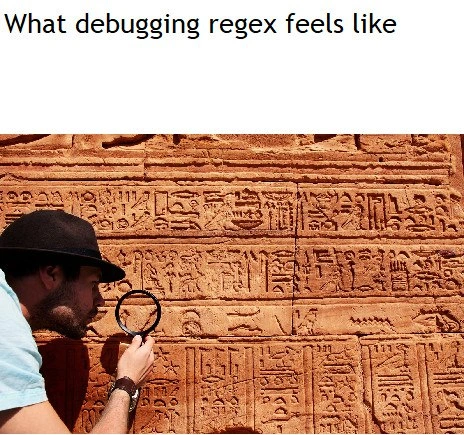
Imagine you find a message written in a secret code made up of strange squiggles and symbols instead of normal letters. You grab a magnifying glass and go symbol by symbol, trying to figure out what on earth it says. It feels like you’re a detective or an archaeologist cracking an ancient puzzle. That’s what a programmer feels like when they’re trying to read a very complicated piece of code full of weird symbols. It’s as if the code is written in an ancient language and they have to decode it to understand it. The picture in the meme is funny because it shows a programmer literally doing that – examining a wall of Egyptian hieroglyphs with a magnifying glass – to exaggerate how hard it is to read. In everyday life, we’ve all seen something so confusing that we joke “it might as well be in another language!” This meme is saying the same thing: the regex was so confusing, debugging it felt like translating a secret ancient message. It’s a silly visual that makes us laugh because it captures that ugh! feeling of being totally lost, but in a lighthearted way.

Level 2: Under the Magnifying Glass

Regular expressions (regex for short) are like little formulas for matching text patterns. Instead of writing a bunch of code to find specific text, you can write one of these patterns to do it in a compact way. For example, if you want to check if a string looks like a phone number, you might use a regex pattern rather than manual code. Regex syntax is made up of special symbols that each have a job: \d means “a digit”, \w means “a word-character (letter or number)”, . means “any character”, + means “one or more times”, and so on. Because of this symbolic shorthand, a regex can do a lot in one line – but it also means that one line can look very confusing if you don’t know the symbols by heart. Debugging a regex means trying to fix it when it isn’t working right. Maybe your regex is supposed to filter out invalid email addresses, but some bad ones are slipping through, or some good ones are being rejected. To debug it, you have to figure out which part of that pattern isn’t doing what it should.

The meme paints a clear picture of what that feels like. It shows a developer crouched in front of a wall of hieroglyphics (ancient Egyptian carvings) with a magnifying glass. The caption says “What debugging regex feels like.” In simpler terms, when you’re trying to fix a broken regex, you often have to read a bunch of strange symbols and it truly feels like deciphering an ancient language. Imagine looking at a pattern like ^\d{3}-\d{3}-\d{4}$ for the first time. At a glance, that looks like gibberish – a mix of caret, backslash, numbers, braces, hyphens, and a dollar sign. But each part has meaning: ^ means "start of the string", \d{3} means "exactly 3 digits", - is just a hyphen, and $ means "end of the string". So ^\d{3}-\d{3}-\d{4}$ is actually a pattern for a 3-digit-3-digit-4-digit phone number format. Without knowing those regex rules, though, it’s just a line of weird text. That’s why the meme compares it to hieroglyphics – to the untrained eye, both are just mysterious symbols.

When you debug such a pattern, you often end up examining it one piece at a time, much like using a magnifying glass to inspect each hieroglyph. You might test the regex on various examples to see which part fails. For instance, if phone numbers like “123-456-7890” aren’t matching, you’d check each section of the pattern to see where it doesn’t line up with the input. This can involve a lot of patience and attention to detail. Developers sometimes use special regex testing tools that highlight different parts of the pattern, or they’ll add its own comments and line breaks to the regex (in a mode that ignores whitespace) to make it clearer. It’s the programming equivalent of a Rosetta Stone – something to help translate the “secret code” of the regex. The magnifying glass in the image isn’t just for show; it symbolizes the very close inspection you perform on that tangle of symbols to find the bug.

From a developer experience (DX) standpoint, regex debugging is a notorious pain point. It’s essentially a trade-off we accept: we write something in a very compact, computer-friendly language (regex) and later struggle because it’s not very human-friendly to read. For new developers, this can be both fascinating and frustrating. On one hand, it’s cool that a few cryptic characters can do so much. On the other hand, it’s easy to mess up one of those characters and then you’re stuck trying to figure out where things went wrong. The meme uses the ancient writing analogy to convey that universal feeling: “I have no idea what I’m looking at, but I need to figure it out.” It’s a little comforting, too – even experienced programmers feel this way about regex sometimes. In short, debugging a regex is like solving a puzzle written in symbols: rewarding when you crack it, but quite perplexing until you do.

Level 3: Hieroglyphic Patterns

For many experienced developers, encountering a complex regex bug can trigger a very familiar feeling: uh-oh, time to decode this mess. The meme nails that experience with the caption “What debugging regex feels like” and the image of an intrepid developer scrutinizing a wall of hieroglyphs. It’s funny because it’s so relatable – we’ve all had that moment squinting at a gnarly regex string full of ^$.*+?()| and thinking, “Who on earth wrote this and what were they even trying to do?!”

This combination of elements is humorous precisely because regex patterns are essentially write-only code. They might work brilliantly, but reading them later (especially if someone else wrote them, or if it’s your own from months ago) is like deciphering an unknown language. Every symbol in a regex carries meaning, often a very compressed one: . means “any character” (unless escaped), \w means “word character” (letter or digit), + means “one or more of the preceding item”. When these pile up into something like ^(?:\+?\d{1,3})?[\s.-]?(\d{3})[\s.-]?(\d{4})$, the pattern becomes a dense wall of symbols. There’s no whitespace, no natural-language cues – your brain has to parse it the hard way. It’s akin to looking at a slab of hieroglyphic carvings with no translation key. At first glance it’s just a jumble of unfamiliar signs; with regex, it’s a jumble of backslashes, braces, and brackets.

The industry anti-pattern being satirized here is the “quick regex solution” that turns into a long-term maintenance headache. We’ve all been guilty of it: you have a problem to solve quickly, so you whip up a one-line regex magic spell. It works... until it doesn’t. When it breaks, an on-call engineer might find themselves at 3 AM staring at a single line of code that’s 200 characters long. The humor has an edge of shared trauma: it’s funny because it’s true. Debugging a regex often means inspecting it character by character to find where things go wrong. Developers have developed coping mechanisms that the meme hints at. The magnifying glass isn’t just literal in the image – it represents how you might tackle the bug: zoom in on a tiny portion of the pattern at a time. Seasoned devs will copy the regex into a sandbox and start testing pieces of it, effectively putting each hieroglyph under the microscope. Many will switch the regex into a “verbose” mode with comments or break it into multiple lines, turning the hieroglyphic blob into something more readable. In other words, we create our own Rosetta Stone for the regex by adding documentation and spacing that wasn’t there originally.

Why is fixing it harder than it looks? Because with regex, a small change can have big ripple effects. You tweak one part to fix the bug, and suddenly the regex starts behaving differently elsewhere. It’s like finally translating one section of an ancient text, only to realize it changes the interpretation of the sections around it. There’s a persistent fear among developers: if it ain’t broke, don’t touch it. Regexps are notorious for this – folks joke about being afraid to “disturb the ancient magic”. The meme captures that unspoken anxiety in a lighthearted way. The developer in the hat is being very careful examining the wall, as if one wrong move could trigger a trap (or in coding terms, introduce a new bug).

There’s a famous programmer adage that fits perfectly here:

“Some people, when confronted with a problem, think ‘I know, I’ll use regular expressions.’ Now they have two problems.”

This meme illustrates that second problem. The first problem was whatever you wanted to solve (parsing some data, validating input, etc.), and the second problem is now the tangled regex you wrote to solve it. The combination of the ancient writing imagery and the mention of a bug hunt highlights the almost adventurous ordeal of troubleshooting these patterns. It’s a shared joke in the developer community: we all recognize that feeling of being a hapless archaeologist, brushing dust off an old regex and praying we don’t break an ancient curse (a.k.a. production code) in the process. The humor works so well because it captures both the frustration and the absurdity – who would have thought that in the high-tech world of programming, we’d sometimes feel like Indiana Jones deciphering booby-trapped codes? Yet here we are, and this meme lets every coder who’s suffered through regex debugging have a good, knowing laugh about it.

Level 4: Automata Archaeology

At its theoretical core, that cryptic regex pattern the developer is debugging is rooted in formal language theory. Regular expressions describe what computer scientists call a regular language – a set of strings defined by mathematical rules. In formal terms, a regex corresponds to a finite automaton (a kind of abstract machine) that processes text one symbol at a time. Each tiny symbol in a regex (like *, +, or \d) is not unlike a hieroglyphic in an ancient script, carrying a precise meaning in this miniature language. The humor here taps into the idea that reading a dense regex is like deciphering an arcane language from an ancient civilization. It’s as if the developer in the meme is performing code archaeology, trying to uncover the logic buried in the symbols.

This analogy goes deeper than it first appears. For instance, the * in regex – known in theory as the Kleene star (named after mathematician Stephen Kleene) – means “repeat the preceding element zero or more times.” The hieroglyphics carved on the wall mirror the regex’s abstract syntax: both are compact encodings of information that require specialized knowledge to interpret. Modern regex engines (like PCRE in many languages) extend beyond pure theoretical regex capabilities by introducing features like lookarounds, backreferences, and non-greedy qualifiers. These additions break the simple finite automaton model and allow patterns to handle even more complex text structures – but with that power comes increased complexity. When a regex includes a forward-looking assertion like (?=...) or a backreference like \1, debugging means reasoning about hidden state and context, far beyond the straightforward left-to-right matching of a classic automaton.

The process of debugging a regex often means mentally simulating how this internal engine operates on a given input. In essence, you’re reconstructing the state machine in your mind. Each literal character, each \w (word character), each \b (word boundary), and each grouping (...) in the pattern is a transition or condition in that state machine. When a bug surfaces – say the regex unexpectedly matches too much text or fails to match a valid string – it’s often due to an unforeseen path through this labyrinth of states. Backtracking is a huge factor: most regex engines use a backtracking algorithm that will try many possible ways to match a pattern. If your pattern is slightly off, the engine might wander down a wrong path, then backtrack (like stepping back in a maze) to try a different route. Catastrophically, certain regex bugs cause the engine to explore an astronomical number of paths (the notorious catastrophic backtracking), making your program hang or slow to a crawl. To truly debug such issues, one might break out advanced techniques – like visualizing the regex as a graph of state transitions or using a tool that shows how the engine backtracks at each step. It’s like needing a digital Rosetta Stone to translate the pattern’s hieroglyphs into a step-by-step narrative of what’s happening internally.

In historical context, regex syntax itself is a decades-old invention that has barely changed – an ancient script in computing terms. The earliest implementations of regex in computer tools (e.g. in the 1960s with Ken Thompson’s QED editor and later the grep utility in Unix) already used terse symbols and special characters to represent complex matching rules. As a result, regex patterns in 2020 look a lot like they did in the past: dense and symbolic, like a text etched in stone. The meme’s visual of poring over stone carvings with a magnifier playfully exaggerates this reality. It underscores that even though regex is powerful and grounded in elegant theory, deciphering a large regex without context is basically an intellectual excavation. The developer has to dig through layers of meaning – from the high-level intent (“match an email address”) down to the low-level mechanics (“why is this . here? what does this ?: do?”) – much like an archaeologist decoding an ancient tablet character by character.

So on this deepest level, the joke resonates with the fact that underneath the everyday frustration lies some profound computer science. A regex bug hunt is not just random guesswork; it’s grappling with the fundamental building blocks of pattern recognition – just hidden behind what looks like funky line noise. In our case, those hieroglyphic patterns the developer is studying are the blueprint of a tiny program (the regex engine’s instructions), and unraveling it requires the same rigor and patience as translating a dead language. It’s a reminder that even humorous coding problems have an underlying brilliance: we’re effectively debugging a piece of theoretical computer science written in shorthand.

Description

A meme that visually equates debugging regular expressions with deciphering ancient texts. The top of the image has a white background with the black text 'What debugging regex feels like'. Below this, the image shows a man wearing a dark fedora, leaning in to closely inspect a large, sandstone-colored wall covered in Egyptian hieroglyphics. He is holding a magnifying glass up to the wall, scrutinizing the intricate, ancient symbols. The joke lies in the powerful analogy: the dense, symbolic, and often unreadable syntax of a complex regular expression is comparable to an ancient, cryptic language. For developers, especially senior ones who have encountered truly monstrous regex patterns, the process of finding a subtle error feels less like programming and more like a painstaking archaeological investigation, trying to understand the intent of a long-lost author (often their past self)


Comments

13
Anonymous ★ Top Pick Some say that if you have a problem and use regex to solve it, now you have two problems. They're wrong. You have a problem, a regex pattern that mostly works, and a future maintenance task for an archaeologist
  1. Anonymous ★ Top Pick

    Some say that if you have a problem and use regex to solve it, now you have two problems. They're wrong. You have a problem, a regex pattern that mostly works, and a future maintenance task for an archaeologist

  2. Anonymous

    Regex archaeology: you set out to strip one HTML tag and end up carbon-dating the senior who in 2011 thought a recursive negative look-ahead was “self-documenting.”

  3. Anonymous

    The only difference between regex and hieroglyphics is that archaeologists eventually figured out the Rosetta Stone, while we're still waiting for someone to explain why (?<!\w)(?:[a-z](?=[A-Z])|[A-Z](?=[A-Z][a-z])) actually works in production

  4. Anonymous

    Debugging regex is the only time you'll find yourself wishing for better documentation than 'it worked on my machine 3000 years ago.' At least with hieroglyphics, you know the Rosetta Stone exists - with regex, you're just hoping Stack Overflow hasn't been down for maintenance since the pattern was written

  5. Anonymous

    Regex debugging: one quantifier off, and your pattern collapses faster than a pyramid scheme of nested groups

  6. Anonymous

    Nothing humbles an architect like realizing the 280‑char PCRE with nested lookbehinds was slower than rewriting the parser, right before an emoji triggers catastrophic backtracking in prod

  7. Anonymous

    Debugging regex is archaeology with lookarounds - staring at (?<=foo)(?!bar), praying RE2, PCRE, and Unicode agree, and that catastrophic backtracking doesn’t melt prod

  8. @alexeeffff 5y

    True story

    1. @BadWolf33 5y

      пишете по english будто все тут англичани...

  9. @lowerkinded 5y

    regex101.com at least tries to help you by describing the regex in english

    1. @Vitalis11 5y

      Yeah, nice site

    2. Deleted Account 5y

      I always make and test my (plural regex) there, that site is awesome

    3. @jieggii 5y

      yea, I always use it while working with regular expressions

Use J and K for navigation